For Loops in R (Examples with Vectors, Lists, and Matrices)
For loop syntax and examples
A for loop runs a block of code once for each element in
a sequence.
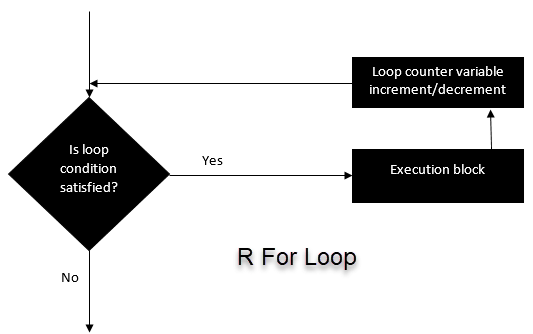
Example 1: Loop over a character vector
This example prints each element of a vector.
## [1] "Apple"
## [1] "Orange"
## [1] "Passion fruit"
## [1] "Banana"
Example 2: Build a list (pre-allocate)
Avoid using list as a variable name because it masks the
base list() function. Also, it’s good practice to
pre-allocate containers in loops.
## [[1]]
## [1] 1
##
## [[2]]
## [1] 4
##
## [[3]]
## [1] 9
##
## [[4]]
## [1] 16
Notes:
seq_along(x)is safer than1:length(x)because it behaves correctly whenxis empty.i^2is clearer thani*i.
For loop over a list
Looping over a list is similar to looping over a vector: the loop variable receives each element of the list.
basket <- list(
  Basket = c("Apple", "Orange", "Passion fruit", "Banana"),
  Money = c(10, 12, 15),
  Purchase = FALSE
)

for (item in basket) {
  print(item)
}
## [1] "Apple" "Orange" "Passion fruit" "Banana"
## [1] 10 12 15
## [1] FALSEIf you need both names and values, iterate over
names():
## Basket :
## [1] "Apple"         "Orange"        "Passion fruit" "Banana"
## Money :
## [1] 10 12 15
## Purchase :
## [1] FALSE
For loop over a matrix
A matrix has rows and columns, so nested loops are common.
mat <- matrix(seq(10, 21, by = 1), nrow = 6, ncol = 2)

for (r in seq_len(nrow(mat))) {
  for (c in seq_len(ncol(mat))) {
    cat("Row", r, "and column", c, "has value", mat[r, c], "\n")
  }
}
## Row 1 and column 1 has value 10
## Row 1 and column 2 has value 16
## Row 2 and column 1 has value 11
## Row 2 and column 2 has value 17
## Row 3 and column 1 has value 12
## Row 3 and column 2 has value 18
## Row 4 and column 1 has value 13
## Row 4 and column 2 has value 19
## Row 5 and column 1 has value 14
## Row 5 and column 2 has value 20
## Row 6 and column 1 has value 15
## Row 6 and column 2 has value 21Notes:
seq_len(n)is a safe way to generate1:n-style sequences (it works well even whenncan be 0).cat()produces cleaner console output thanprint(paste(...))for simple messages.
A work by Gianluca Sottile
gianluca.sottile@unipa.it