IF, ELSE, and ELSE IF Statements in R
The if / else statement
Conditional statements let you run different code depending on
whether a condition is TRUE or FALSE. The
basic syntax in R is:
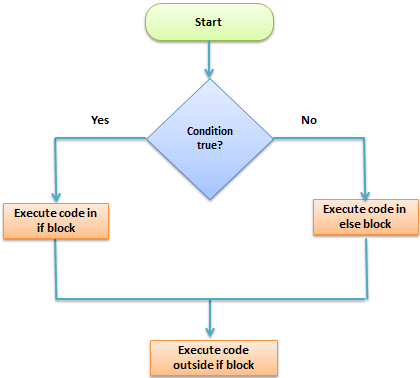
The else if statement
Use else if to check multiple conditions in
sequence.
Example 2: Multiple conditions
quantity <- 10

if (quantity < 20) {
  print("Not enough for today.")
} else if (quantity > 20 && quantity <= 30) {
  print("Average day.")
} else {
  print("What a great day!")
}
## [1] "Not enough for today."Note:
&&is the scalar “AND” operator typically used inif()statements;&is vectorized and compares element-by-element.
Example: VAT rate by product category
Imagine three product categories with different VAT rates:
| Category | Products | VAT |
|---|---|---|
| A | Books, magazines, newspapers, … | 8% |
| B | Vegetables, meat, beverages, … | 10% |
| C | T-shirts, jeans, pants, … | 20% |
We can apply the correct VAT rate with an if / else if
chain:
category <- "A"
price <- 10

if (category == "A") {
  total <- price * 1.08
  cat("VAT rate: 8%.\nTotal price:", total, "\n")
} else if (category == "B") {
  total <- price * 1.10
  cat("VAT rate: 10%.\nTotal price:", total, "\n")
} else {
  total <- price * 1.20
  cat("VAT rate: 20%.\nTotal price:", total, "\n")
}
## VAT rate: 8%.
## Total price: 10.8Extra (optional): vectorized if-else
If you need to apply conditions to an entire vector (not just a
single value), you typically use ifelse() (base R) or
dplyr::if_else() (type-stable).
A work by Gianluca Sottile
gianluca.sottile@unipa.it