Tidy data and reshaping
Wide and long tables, and how to move between them with tidyr
Recognise wide and long layouts, reshape with pivot_longer() and pivot_wider(), split and combine columns with separate_wider_delim() and unite(), and make missing combinations explicit with complete() and drop_na().
NoteLearning objectives
By the end of this lesson you will be able to:
- tell whether a table is in wide or long format, and which one an analysis needs;
- turn columns into rows with
pivot_longer(), including column names that contain several variables (names_sep,names_pattern); - turn rows into columns with
pivot_wider(), filling gaps withvalues_fill; - split and combine columns with
separate_wider_delim()andunite(); - make implicit missing combinations explicit with
complete(), and remove incomplete rows withdrop_na().
library(dplyr)
library(tidyr)
library(tibble)
library(ggplot2)
1. Why reshape?
In Data frames we said that a dataset is tidy when each variable is a column and each observation is a row. Real data are often not tidy, for good reasons: a spreadsheet designed for people to read looks different from a table designed for software to analyse.
Consider the blood pressure of three patients measured at two visits:
bp_wide <- tibble(
  patient = c("P1", "P2", "P3"),
  visit_1 = c(132, 118, 141),
  visit_2 = c(128, 121, 135)
)
bp_wide
#> # A tibble: 3 × 3
#> patient visit_1 visit_2
#> <chr> <dbl> <dbl>
#> 1 P1 132 128
#> 2 P2 118 121
#> 3 P3 141 135This is the wide format: one row per patient, one column per visit. It is easy to read, but “blood pressure” is spread over two columns and “visit” is hidden in the column names. To plot pressure against visit, or to fit a model pressure ~ visit, we need visit and pressure as columns. That is the long format:
bp_long <- bp_wide |>
  pivot_longer(
    cols      = c(visit_1, visit_2),
    names_to  = "visit",
    values_to = "pressure"
  )
bp_long
#> # A tibble: 6 × 3
#> patient visit pressure
#> <chr> <chr> <dbl>
#> 1 P1 visit_1 132
#> 2 P1 visit_2 128
#> 3 P2 visit_1 118
#> 4 P2 visit_2 121
#> 5 P3 visit_1 141
#> 6 P3 visit_2 135Neither format is “wrong”: the right one depends on the question. As a rule of thumb, ggplot2 and statistical models want long data (one row per measurement), while tables for reports are often wider.
2. pivot_longer(): columns to rows
pivot_longer() needs three pieces of information:
cols: which columns to stack (anyselect()helper works);names_to: the name of the new column that will hold the old column names;values_to: the name of the new column that will hold the values.
bp_wide |>
  pivot_longer(
    cols         = starts_with("visit_"),
    names_to     = "visit",
    names_prefix = "visit_",
    values_to    = "pressure"
  )
#> # A tibble: 6 × 3
#> patient visit pressure
#> <chr> <chr> <dbl>
#> 1 P1 1 132
#> 2 P1 2 128
#> 3 P2 1 118
#> 4 P2 2 121
#> 5 P3 1 141
#> 6 P3 2 135names_prefix removes a common prefix, so visit becomes "1" and "2".
TipHow to read this output
- The number of rows is (number of patients) × (number of stacked columns) = 3 × 2 = 6.
- The column
patient, which was not stacked, is repeated for each measurement — it identifies the unit. - Every value of the wide table appears exactly once in the long table: reshaping never loses or creates data.
A classic example: relig_income
tidyr ships relig_income, a survey table with one row per religion and one column per income bracket; the cells are counts of respondents.
relig_income#> # A tibble: 18 × 11
#> religion `<$10k` `$10-20k` `$20-30k` `$30-40k` `$40-50k` `$50-75k` `$75-100k`
#> <chr> <dbl> <dbl> <dbl> <dbl> <dbl> <dbl> <dbl>
#> 1 Agnostic 27 34 60 81 76 137 122
#> 2 Atheist 12 27 37 52 35 70 73
#> 3 Buddhist 27 21 30 34 33 58 62
#> 4 Catholic 418 617 732 670 638 1116 949
#> 5 Don’t k… 15 14 15 11 10 35 21
#> 6 Evangel… 575 869 1064 982 881 1486 949
#> 7 Hindu 1 9 7 9 11 34 47
#> 8 Histori… 228 244 236 238 197 223 131
#> 9 Jehovah… 20 27 24 24 21 30 15
#> 10 Jewish 19 19 25 25 30 95 69
#> 11 Mainlin… 289 495 619 655 651 1107 939
#> 12 Mormon 29 40 48 51 56 112 85
#> 13 Muslim 6 7 9 10 9 23 16
#> 14 Orthodox 13 17 23 32 32 47 38
#> 15 Other C… 9 7 11 13 13 14 18
#> 16 Other F… 20 33 40 46 49 63 46
#> 17 Other W… 5 2 3 4 2 7 3
#> 18 Unaffil… 217 299 374 365 341 528 407
#> # ℹ 3 more variables: `$100-150k` <dbl>, `>150k` <dbl>,
#> # `Don't know/refused` <dbl>The income brackets are values of a variable (“income”), not variables. Let us make it long:
relig_long <- relig_income |>
  pivot_longer(cols = !religion, names_to = "income", values_to = "count")
relig_long
#> # A tibble: 180 × 3
#> religion income count
#> <chr> <chr> <dbl>
#> 1 Agnostic <$10k 27
#> 2 Agnostic $10-20k 34
#> 3 Agnostic $20-30k 60
#> 4 Agnostic $30-40k 81
#> 5 Agnostic $40-50k 76
#> 6 Agnostic $50-75k 137
#> 7 Agnostic $75-100k 122
#> 8 Agnostic $100-150k 109
#> 9 Agnostic >150k 84
#> 10 Agnostic Don't know/refused 96
#> # ℹ 170 more rows!religion means “all columns except religion”. The tidy version has three variables — religion, income, count — and is ready for count(), summarise() or a plot.
Several variables in the column names: names_sep, names_pattern
Sometimes a column name packs two variables. Here systolic (sys) and diastolic (dia) pressure are measured at two visits:
bp2 <- tibble(
  patient = c("P1", "P2"),
  sys_v1 = c(132, 118), sys_v2 = c(128, 121),
  dia_v1 = c(85, 76),   dia_v2 = c(82, 79)
)

bp2 |>
  pivot_longer(
    cols      = !patient,
    names_to  = c("measure", "visit"),
    names_sep = "_",
    values_to = "value"
  )
#> # A tibble: 8 × 4
#> patient measure visit value
#> <chr> <chr> <chr> <dbl>
#> 1 P1 sys v1 132
#> 2 P1 sys v2 128
#> 3 P1 dia v1 85
#> 4 P1 dia v2 82
#> 5 P2 sys v1 118
#> 6 P2 sys v2 121
#> 7 P2 dia v1 76
#> 8 P2 dia v2 79Giving two names to names_to and a separator to names_sep splits "sys_v1" into measure = "sys" and visit = "v1". When the structure is less regular, names_pattern takes a regular expression whose parentheses mark the pieces to keep (regular expressions are introduced in Strings and dates):
bp2 |>
  pivot_longer(
    cols          = !patient,
    names_to      = c("measure", "visit"),
    names_pattern = "(.*)_v(\\d)",
    values_to     = "value"
  )
#> # A tibble: 8 × 4
#> patient measure visit value
#> <chr> <chr> <chr> <dbl>
#> 1 P1 sys 1 132
#> 2 P1 sys 2 128
#> 3 P1 dia 1 85
#> 4 P1 dia 2 82
#> 5 P2 sys 1 118
#> 6 P2 sys 2 121
#> 7 P2 dia 1 76
#> 8 P2 dia 2 79Now visit contains only the digit.
NoteGoing deeper: the
.value sentinel
In bp2, systolic and diastolic pressure are really two different variables, so the truly tidy table has one row per patient–visit and two columns sys and dia. Use the special name ".value" in names_to: that part of the column name becomes a column of its own.
bp2 |>
  pivot_longer(
    cols      = !patient,
    names_to  = c(".value", "visit"),
    names_sep = "_"
  )
#> # A tibble: 4 × 4
#> patient visit sys dia
#> <chr> <chr> <dbl> <dbl>
#> 1 P1 v1 132 85
#> 2 P1 v2 128 82
#> 3 P2 v1 118 76
#> 4 P2 v2 121 79Why ggplot wants long data
With penguins in long format, one facet_wrap() draws a histogram of every measurement:
penguins_long <- penguins |>
  pivot_longer(
    cols      = c(bill_len, bill_dep, flipper_len, body_mass),
    names_to  = "measurement",
    values_to = "value"
  )

ggplot(penguins_long, aes(value)) +
  geom_histogram(bins = 30, na.rm = TRUE) +
  facet_wrap(~ measurement, scales = "free") +
  labs(x = "Value (original units)", y = "Number of penguins")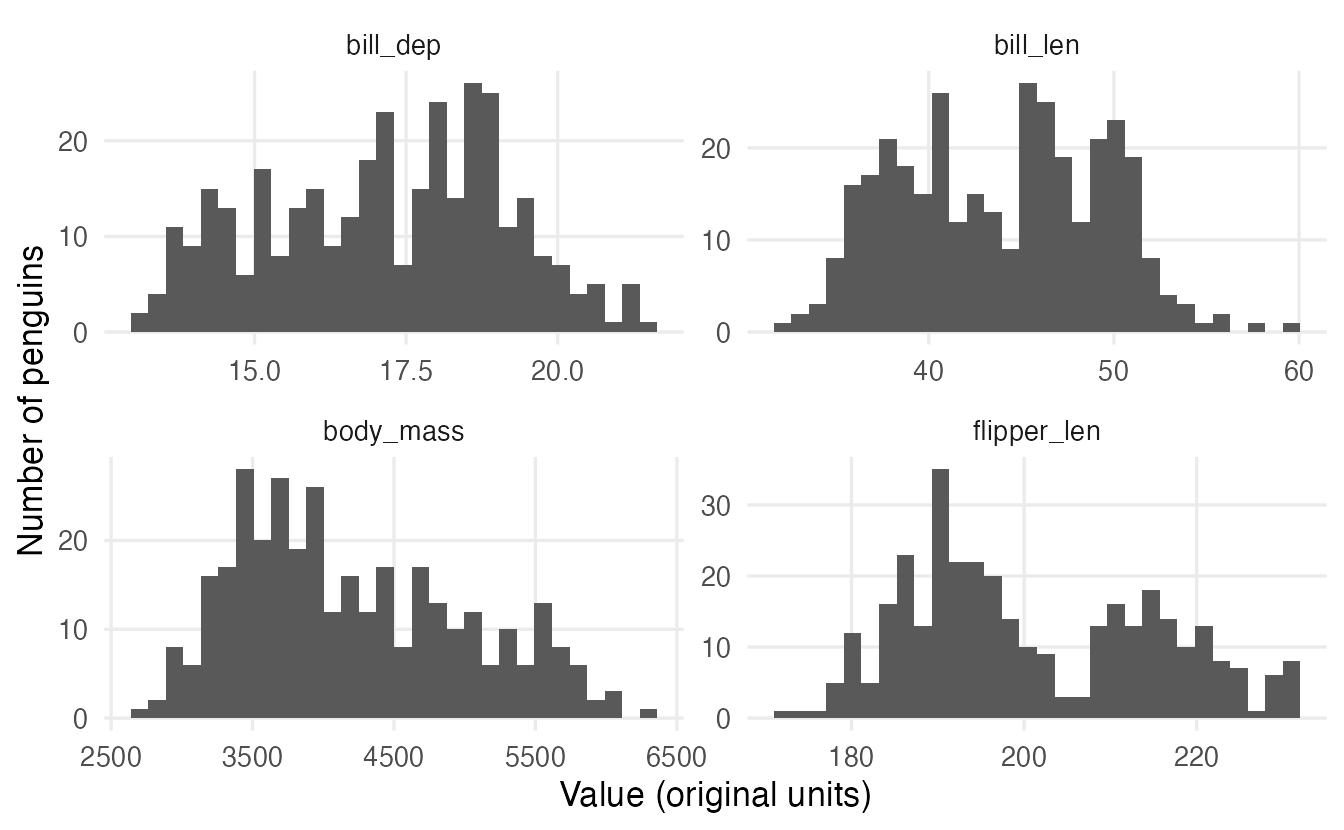
penguins_long has 1376 rows: four per penguin. In the wide table this plot would require four separate graphs.
3. pivot_wider(): rows to columns
pivot_wider() is the inverse operation. It needs:
names_from: the column whose values become the new column names;values_from: the column whose values fill the cells.
bp_long |>
  pivot_wider(names_from = visit, values_from = pressure)
#> # A tibble: 3 × 3
#> patient visit_1 visit_2
#> <chr> <dbl> <dbl>
#> 1 P1 132 128
#> 2 P2 118 121
#> 3 P3 141 135We are back to bp_wide. A frequent use is to turn a long summary into a readable table, for example counts of species by island:
penguins |>
  count(species, island) |>
  pivot_wider(names_from = island, values_from = n)
#> # A tibble: 3 × 4
#> species Biscoe Dream Torgersen
#> <fct> <int> <int> <int>
#> 1 Adelie 44 56 52
#> 2 Chinstrap NA 68 NA
#> 3 Gentoo 124 NA NACombinations that never occur (no Chinstrap on Biscoe) become NA. Here we know they mean “zero penguins”, so we say so with values_fill:
penguins |>
  count(species, island) |>
  pivot_wider(names_from = island, values_from = n, values_fill = 0)
#> # A tibble: 3 × 4
#> species Biscoe Dream Torgersen
#> <fct> <int> <int> <int>
#> 1 Adelie 44 56 52
#> 2 Chinstrap 0 68 0
#> 3 Gentoo 124 0 0
TipHow to read this output
This is a contingency table: rows are species, columns are islands, cells are counts. The zeros show that only Adelie penguins were found on more than one island. You will build such tables directly with table() in Frequency tables.
values_fill should be used only when a missing combination truly means zero (or another known value). A missing measurement is not zero.
4. Splitting and combining columns
separate_wider_delim()
A column sometimes stores several values separated by a character. Sample codes like "Biscoe-2008-017" contain island, year and an identifier:
samples <- tibble(
  code = c("Biscoe-2008-017", "Dream-2009-003", "Torgersen-2007-112"),
  mass = c(4300, 3650, 3800)
)

samples_split <- samples |>
  separate_wider_delim(code, delim = "-",
                       names = c("island", "year", "id"))
samples_split
#> # A tibble: 3 × 4
#> island year id mass
#> <chr> <chr> <chr> <dbl>
#> 1 Biscoe 2008 017 4300
#> 2 Dream 2009 003 3650
#> 3 Torgersen 2007 112 3800The new columns are character; convert where needed, e.g. mutate(year = as.integer(year)). (Older code uses separate(), which still works but has been superseded by the separate_wider_*() family.)
unite()
unite() does the reverse: it pastes columns together.
samples_split |>
  unite(col = "code", island, year, id, sep = "-")
#> # A tibble: 3 × 2
#> code mass
#> <chr> <dbl>
#> 1 Biscoe-2008-017 4300
#> 2 Dream-2009-003 3650
#> 3 Torgersen-2007-112 38005. Missing values: implicit vs explicit
A value can be missing in two ways:
- explicitly: the cell exists and contains
NA; - implicitly: the row simply does not exist.
In the species-by-island counts, “Chinstrap on Biscoe” was implicitly missing. complete() adds every combination of the variables you name, making missing rows explicit:
penguins |>
  count(species, island) |>
  complete(species, island, fill = list(n = 0))
#> # A tibble: 9 × 3
#> species island n
#> <fct> <fct> <int>
#> 1 Adelie Biscoe 44
#> 2 Adelie Dream 56
#> 3 Adelie Torgersen 52
#> 4 Chinstrap Biscoe 0
#> 5 Chinstrap Dream 68
#> 6 Chinstrap Torgersen 0
#> 7 Gentoo Biscoe 124
#> 8 Gentoo Dream 0
#> 9 Gentoo Torgersen 0This matters, for example, when you compute a mean count per group: leaving out the zeros would overestimate it.
drop_na() goes the other way: it removes rows with NA in the columns you name (or in any column, if you name none).
nrow(penguins)#> [1] 344penguins |> drop_na(sex) |> nrow()#> [1] 333penguins |> drop_na() |> nrow()#> [1] 333drop_na() is convenient, but deleting incomplete rows can bias an analysis if the missing values are not missing at random. Think before you drop — see Missing data.
WarningCommon pitfalls
- Forgetting which columns identify the unit. In
pivot_wider(), every column not used innames_from/values_fromis treated as an identifier. An extra column with unique values (e.g. a row number) prevents rows from collapsing and gives a table full ofNAs. - Duplicate identifiers in
pivot_wider(). If two rows have the same identifiers and the samenames_fromvalue, tidyr cannot put two values in one cell: it warns and creates list-columns. Summarise first, or add the missing identifier. - Filling real missing values with zero. Use
values_fillandcomplete(fill = ...)only for combinations that truly mean “none”. - Expecting numbers after splitting.
separate_wider_delim()and names taken from column headers return text; convert withas.integer()/as.numeric(). - Stacking variables with different units in one
valuecolumn and then summarising them together (e.g. averaging grams with millimetres). Always group by thenames_tocolumn.
6. Check your understanding
7. Exercises
Interactive (run in your browser)
★ Exercise 1 — longer. Stack the two bill measurements of penguins (bill_len, bill_dep) into a column dimension with values in a column mm. Keep only species, dimension and mm. How many rows do you expect?
cols = c(bill_len, bill_dep), names_to = "dimension", values_to = "mm". Expected rows: 344 × 2.
penguins |>
  select(species, bill_len, bill_dep) |>
  pivot_longer(
    cols      = c(bill_len, bill_dep),
    names_to  = "dimension",
    values_to = "mm"
  )
688 rows: two per penguin.
★★ Exercise 2 — a readable table. Count the penguins by species and sex (drop those with unknown sex), and reshape so that there is one row per species and one column per sex.
Drop missing values of sex; the new column names come from sex, the values from n.
penguins |>
  drop_na(sex) |>
  count(species, sex) |>
  pivot_wider(names_from = sex, values_from = n)
Each species has roughly equal numbers of females and males (for example 73 and 73 for Adelie).
★★ Exercise 3 — two variables in the names. The table scores (already created) has columns like math_2023. Make it long with columns student, subject, year, grade. Then compute the mean grade by subject and year.
names_to = c("subject", "year") and names_sep = "_".
scores |>
  pivot_longer(
    cols      = !student,
    names_to  = c("subject", "year"),
    names_sep = "_",
    values_to = "grade"
  ) |>
  summarise(mean_grade = mean(grade), .by = c(subject, year))
Mean grades rise from 2023 to 2024 in both subjects (math: 23 → 25; physics: 22 → 24).
Practice on your own computer
★★ Exercise 4 — billboard. The tidyr dataset billboard has one row per song and columns wk1, wk2, … with the chart rank in each week after entering the chart. Make it long with columns week (an integer) and rank, dropping the NA weeks. Then find, for each song, the best (lowest) rank reached.
TipSolution
billboard_long <- billboard |>
  pivot_longer(
    cols            = starts_with("wk"),
    names_to        = "week",
    names_prefix    = "wk",
    names_transform = list(week = as.integer),
    values_to       = "rank",
    values_drop_na  = TRUE
  )

billboard_long |>
  summarise(best_rank = min(rank), weeks = n(), .by = c(artist, track)) |>
  arrange(best_rank, desc(weeks))
values_drop_na = TRUE removes the weeks after a song left the chart, which are structural NAs rather than missing measurements.
★★★ Exercise 5 — debug a wide table. A colleague runs the code below to get one column per species with the mean flipper length per island, but obtains many NAs and one row per penguin. Explain why and fix it.
penguins |>
  mutate(row = row_number()) |>
  pivot_wider(names_from = species, values_from = flipper_len)
TipSolution
All columns not used in names_from/values_from (including row, and every measurement) are treated as identifiers, and row is unique for each penguin, so nothing collapses. Summarise first, keeping only the identifier you want:
penguins |>
  summarise(mean_flipper = mean(flipper_len, na.rm = TRUE),
            .by = c(island, species)) |>
  pivot_wider(names_from = species, values_from = mean_flipper)
The remaining NAs now have a meaning: that species was not observed on that island.
Summary
| Function | Purpose | Key arguments |
|---|---|---|
pivot_longer() |
columns → rows (wide → long) | cols, names_to, values_to, names_sep, names_pattern, names_prefix |
pivot_wider() |
rows → columns (long → wide) | names_from, values_from, values_fill |
separate_wider_delim() |
one column → several | cols, delim, names |
unite() |
several columns → one | col, ..., sep |
complete() |
add missing combinations | ..., fill |
drop_na() |
remove rows with NA |
... (columns to check) |
- Wide is for reading, long is for plotting and modelling.
- Reshaping never changes the data, only its layout: check the row count (units × stacked columns).
- Every column not being pivoted is an identifier; make sure the identifiers really identify the unit.
- Distinguish implicit from explicit missing values, and never fill real missing measurements with zeros.