Plotting distributions
Histograms, density plots, boxplots, violins and ECDFs — and how to read them
Visualise the distribution of a numeric variable and compare groups with histograms, density plots, boxplots (every element explained, including notches), violin plots, jittered points and empirical cumulative distribution functions.
NoteLearning objectives
By the end of this lesson you will be able to:
- draw histograms and density plots and explain how bin width and bandwidth change what you see;
- identify every element of a boxplot (quartiles, whiskers, outliers, notches) and interpret it correctly;
- use violin plots, jittered points and ECDFs to show distributions in more detail;
- choose a sensible plot to compare a numeric variable across groups.
library(ggplot2)
library(dplyr)
1. Why plot a distribution?
In Summary statistics we compressed a variable into a few numbers. Numbers alone can be badly misleading. The faithful data record 272 eruptions of the Old Faithful geyser; the mean eruption length is 3.49 minutes. Is that a “typical” eruption?
ggplot(faithful, aes(eruptions)) +
  geom_histogram(binwidth = 0.25, boundary = 1.5,
                 fill = "grey70", colour = "white") +
  geom_vline(xintercept = mean(faithful$eruptions), linetype = "dashed") +
  labs(x = "Eruption duration (minutes)", y = "Number of eruptions")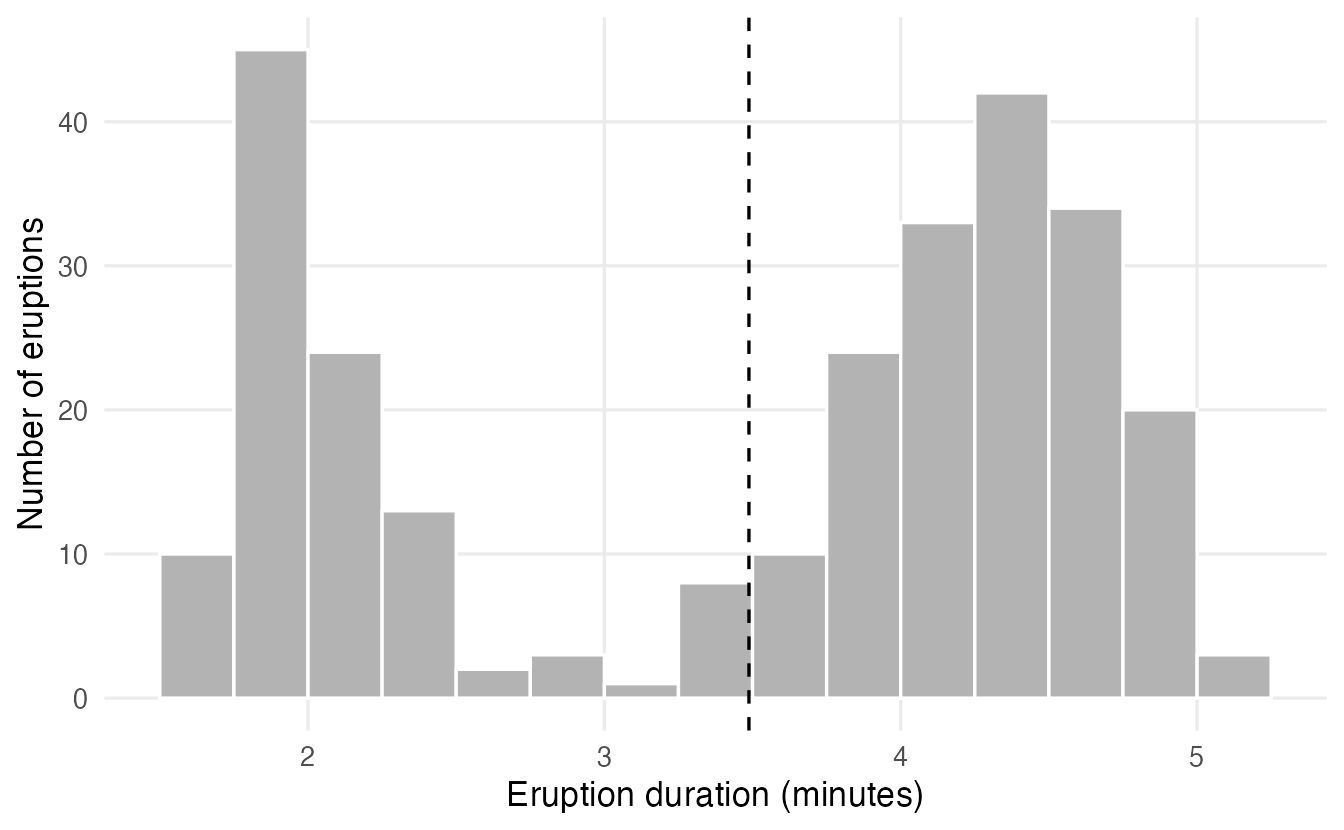
No. There are two kinds of eruptions — short ones of about 2 minutes and long ones of about 4–5 minutes — and the mean falls in the gap between them. A distribution with two peaks is called bimodal. Only a plot reveals this.
2. Histograms
A histogram is the picture of a frequency table of classes (see Frequency tables): the x axis is divided into adjacent bins and the height of each bar is the number of observations in the bin. Unlike a bar chart, the bars touch, because the x axis is a continuous number line.
Bins change the story
You control the bins with bins (how many) or, better, binwidth (how wide) and boundary (where one bin edge falls):
h <- ggplot(faithful, aes(eruptions)) +
  labs(x = "Duration (min)", y = "Count")

h + geom_histogram(binwidth = 1.5, boundary = 1.5, colour = "white")
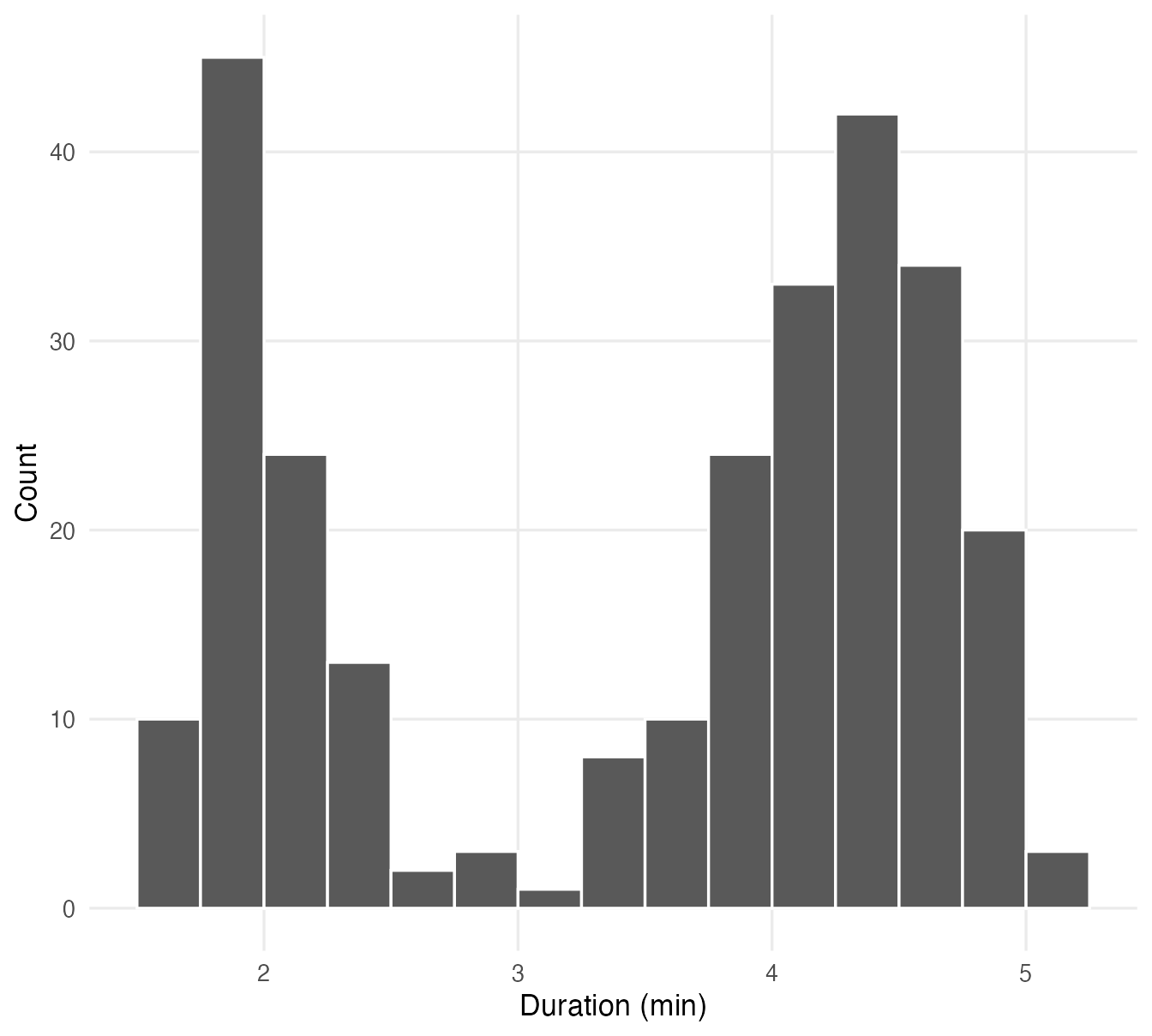
h + geom_histogram(binwidth = 0.25, boundary = 1.5, colour = "white")
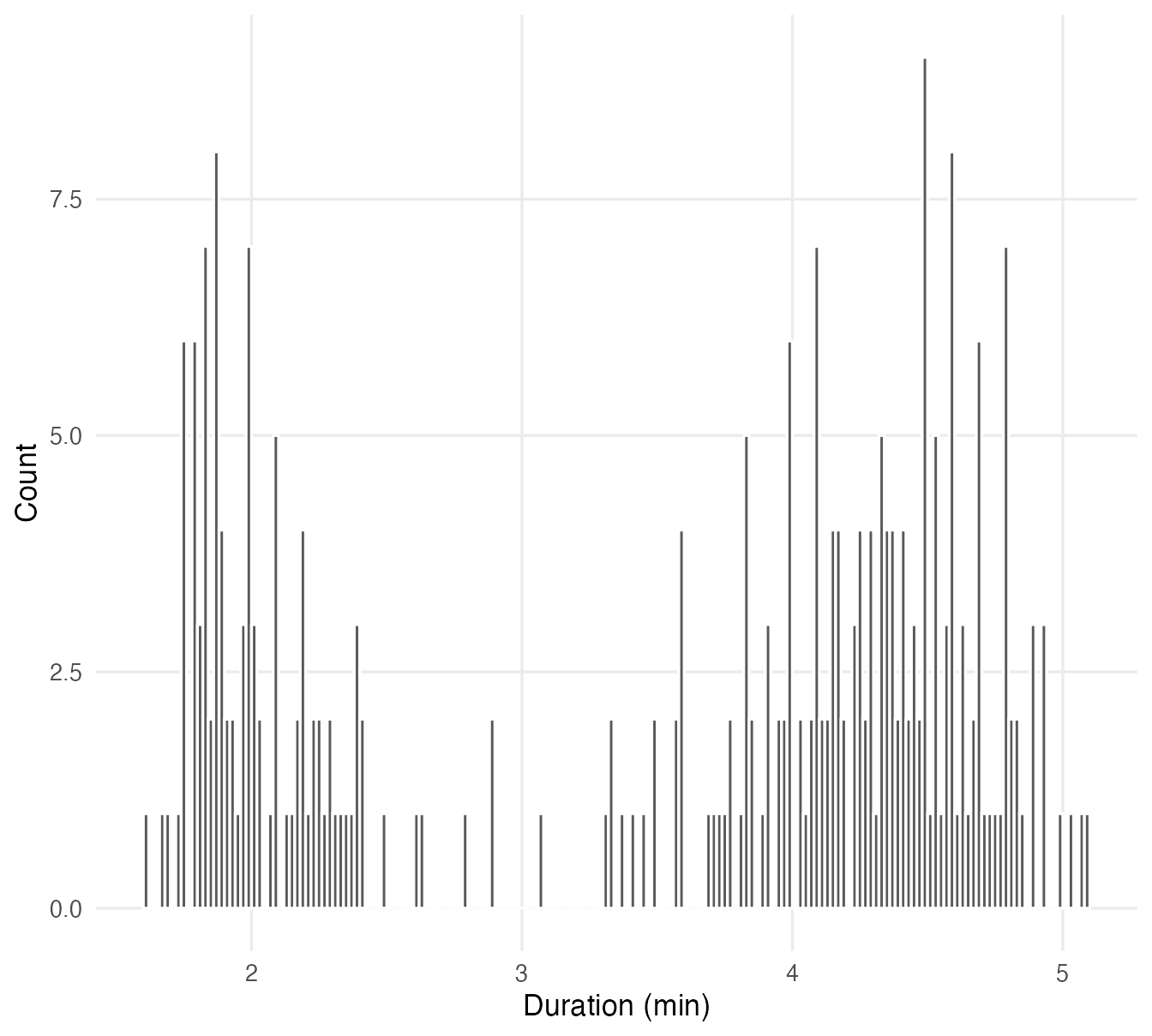
h + geom_histogram(binwidth = 0.02, boundary = 1.5, colour = "white")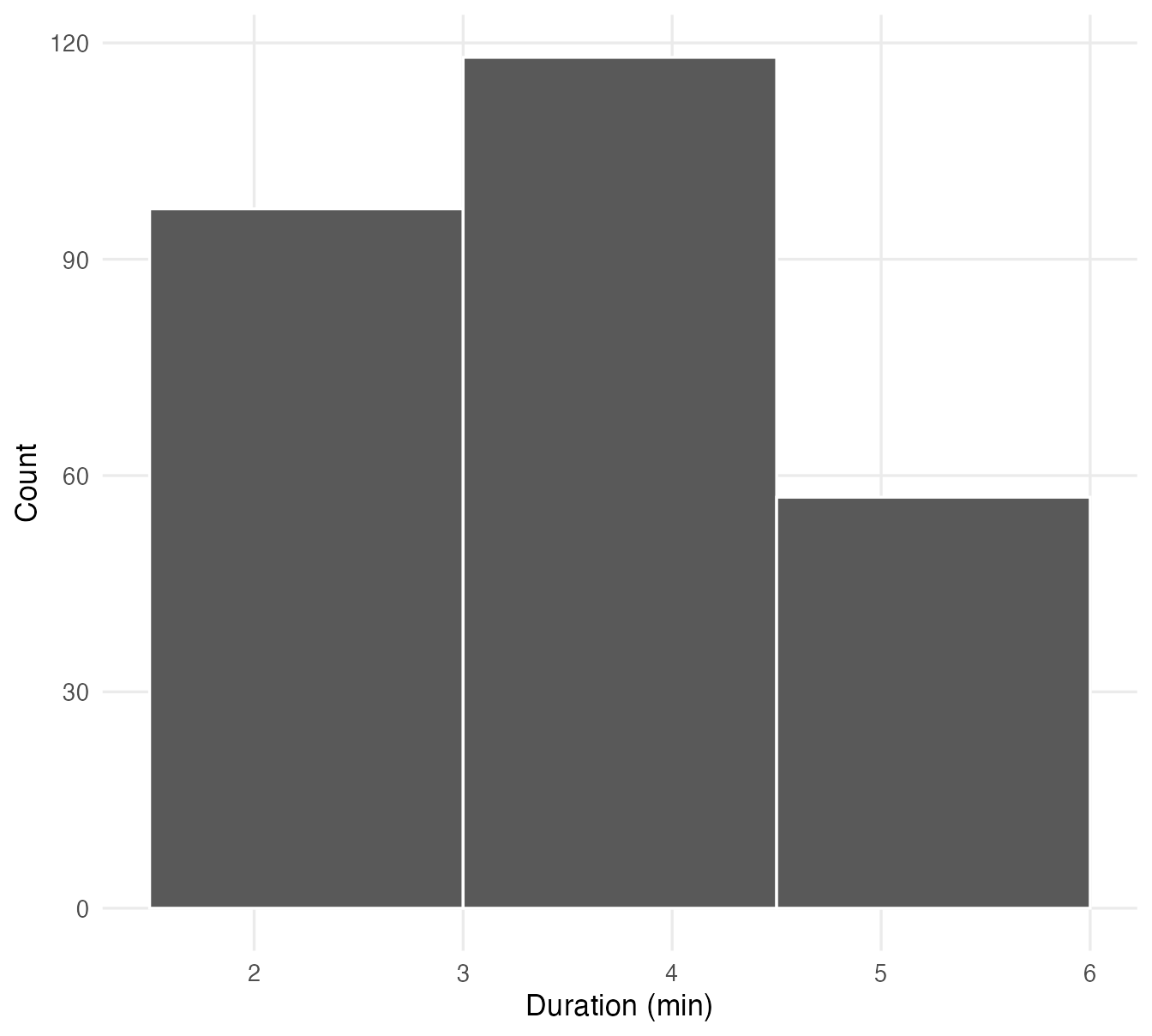
- With very wide bins the two groups merge into one hump: the bimodality disappears.
- With very narrow bins each bar holds just a few eruptions and random noise dominates.
- In between, the main features are visible. Always try several bin widths before settling; ggplot2 uses 30 bins by default and prints a message asking you to choose a better value.
Choose binwidth in round units of the variable (0.25 minutes, 5 mm, 500 g) and set boundary so that bin edges fall on round numbers: readers can then read the bins.
Counts or density?
By default the y axis shows counts. With aes(y = after_stat(density)) it shows a density: bar areas add up to 1, so histograms of groups of different sizes become comparable and a density curve can be drawn on top:
ggplot(faithful, aes(eruptions)) +
  geom_histogram(aes(y = after_stat(density)), binwidth = 0.25,
                 boundary = 1.5, fill = "grey80", colour = "white") +
  geom_density(linewidth = 1) +
  labs(x = "Eruption duration (minutes)", y = "Density")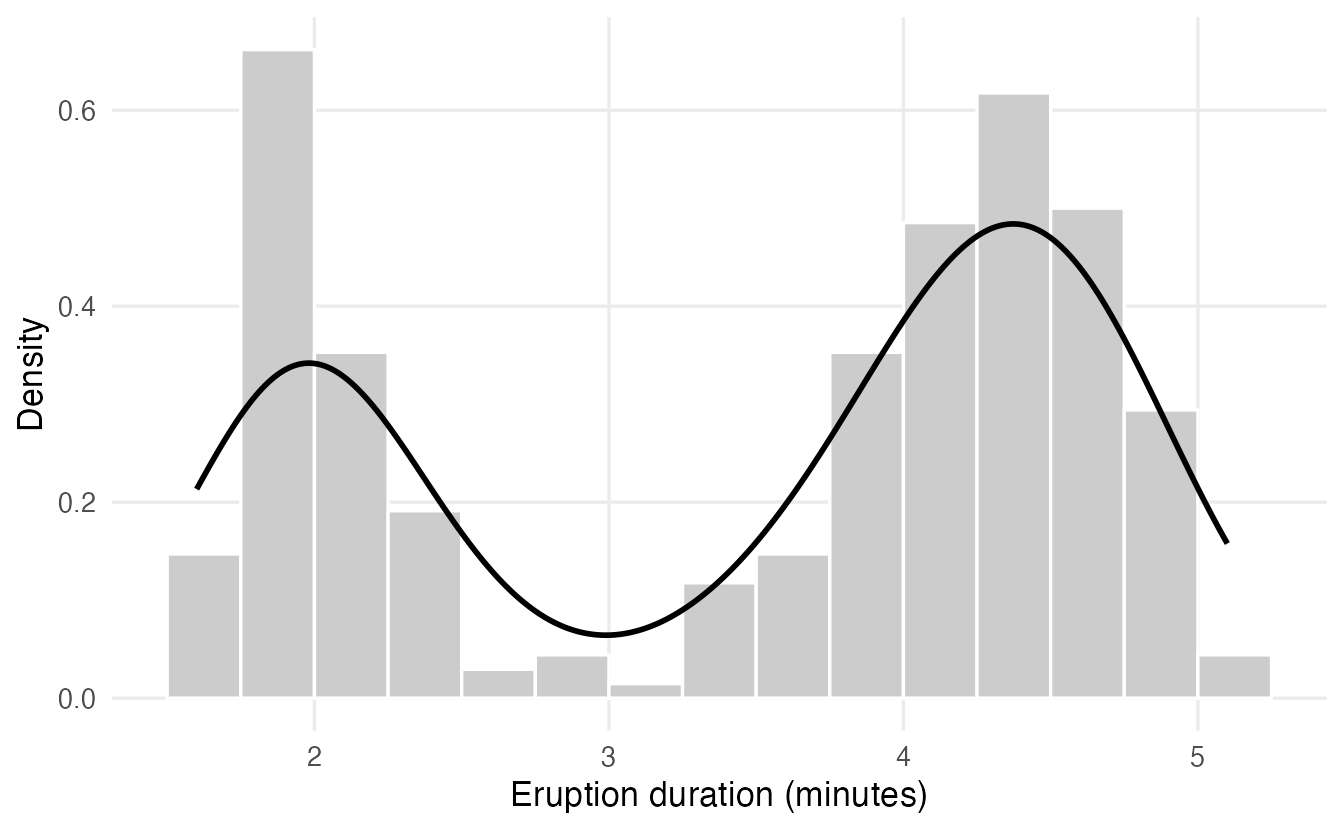
after_stat() refers to a variable computed by the geom’s statistic (here the density of each bin) rather than a column of the data.
3. Density plots
A density plot (kernel density estimate) is a smooth version of a histogram. Imagine putting a small bell-shaped “bump” on every observation and adding them up: where many observations are close together, the bumps pile up into a peak. The total area under the curve is 1, so the height is not a count but a relative concentration of observations.
The width of the bumps is the bandwidth; you scale it with adjust (default 1):
ggplot(faithful, aes(eruptions)) +
  geom_density(adjust = 0.25, linetype = "dotted") +
  geom_density(adjust = 1, linewidth = 1) +
  geom_density(adjust = 3, linetype = "dashed") +
  labs(x = "Eruption duration (minutes)", y = "Density",
       subtitle = "adjust = 0.25 (dotted), 1 (solid), 3 (dashed)")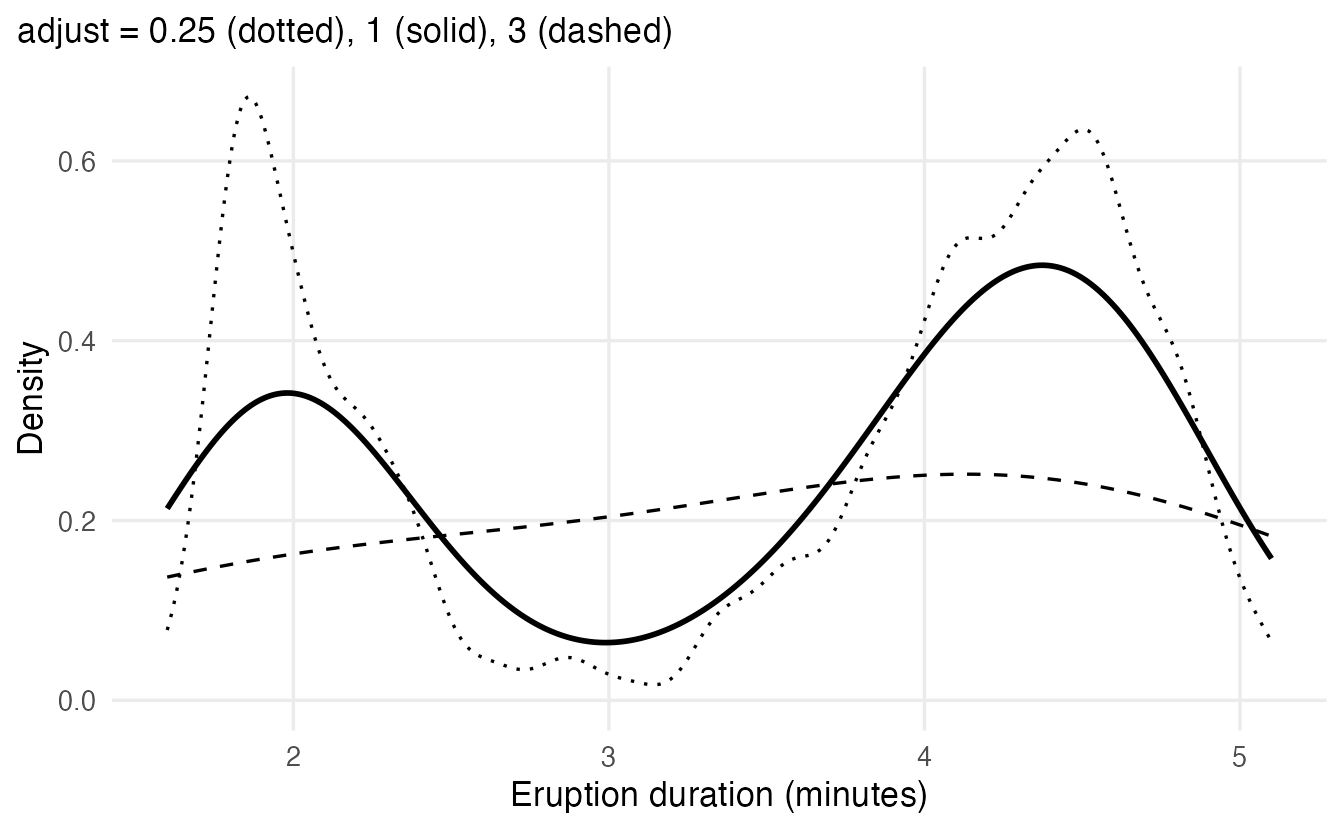
Density plots are excellent for comparing a few groups on the same axes:
ggplot(penguins, aes(body_mass, fill = species)) +
  geom_density(alpha = 0.5, na.rm = TRUE) +
  labs(x = "Body mass (g)", y = "Density", fill = "Species")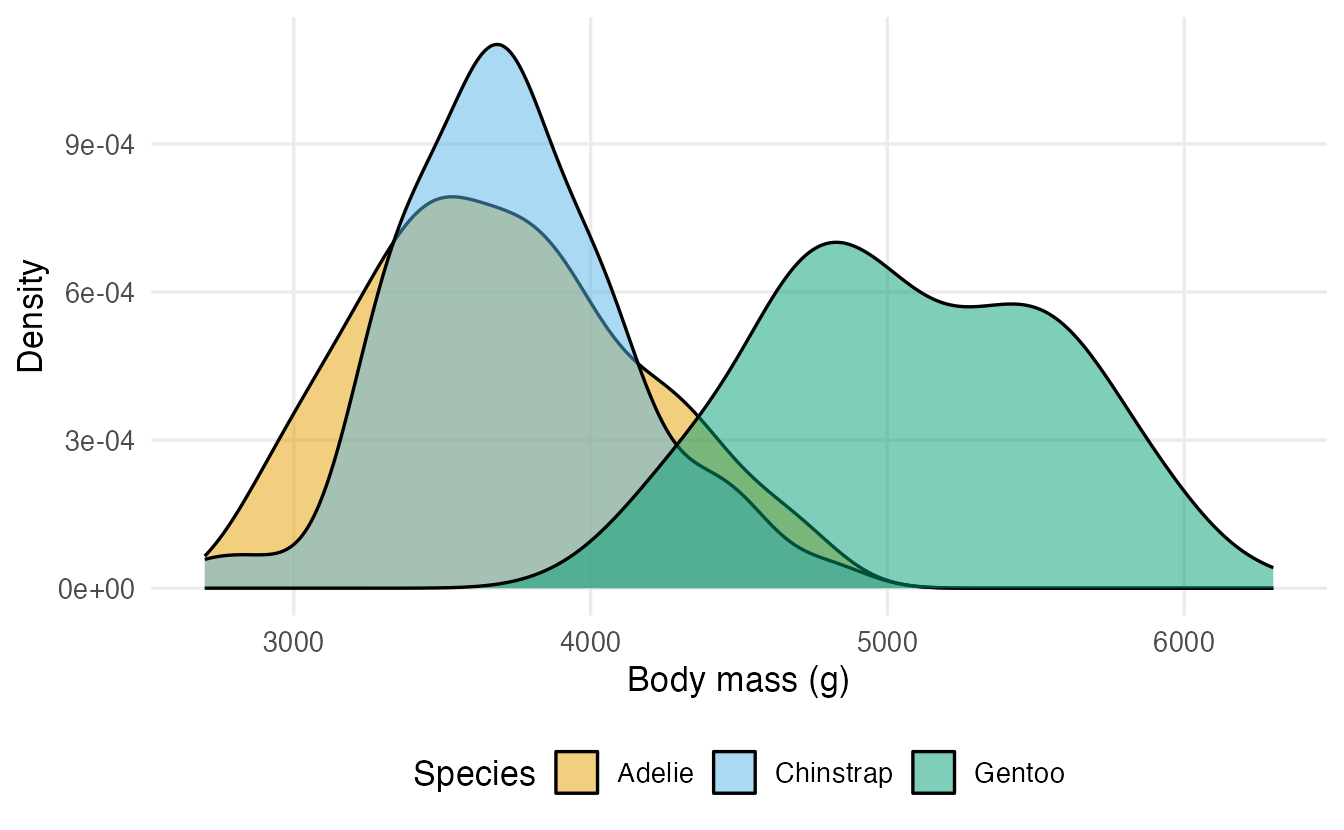
Be aware that a density curve can extend beyond the possible range of the data (for example below zero for a positive variable) and can make very small samples look smoother than the evidence justifies.
NoteGoing deeper: the kernel density estimator
For data \(x_1, \dots, x_n\), the kernel density estimate at a point \(x\) is
\[ \hat f(x) = \frac{1}{n h} \sum_{i=1}^n K\!\left(\frac{x - x_i}{h}\right), \]
where \(K\) is a kernel (a symmetric density, by default the standard normal) and \(h > 0\) is the bandwidth. ggplot2 uses bw.nrd0() (Silverman’s rule of thumb), \(h = 0.9 \min(s, \mathrm{IQR}/1.34)\, n^{-1/5}\), multiplied by adjust. For the eruptions:
bw.nrd0(faithful$eruptions)#> [1] 0.3348Base R’s density() computes the same estimate.
4. Boxplots: every element explained
A boxplot (Tukey’s box-and-whisker plot) draws the five-number summary from Summary statistics plus a rule for flagging unusual values. Let us compute each element for the ozone concentration in airquality and then see where it appears.
ozone <- airquality$Ozone[!is.na(airquality$Ozone)]

q <- quantile(ozone, c(0.25, 0.5, 0.75))
iqr <- q[[3]] - q[[1]]
fences <- c(lower = q[[1]] - 1.5 * iqr, upper = q[[3]] + 1.5 * iqr)

q
#> 25% 50% 75%
#> 18.00 31.50 63.25fences#> lower upper
#> -49.88 131.12c(lower_whisker = min(ozone[ozone >= fences[["lower"]]]),
upper_whisker = max(ozone[ozone <= fences[["upper"]]]))#> lower_whisker upper_whisker
#> 1 122ozone[ozone > fences[["upper"]] | ozone < fences[["lower"]]]#> [1] 135 168labels_df <- tibble(
x = c(q[[1]], q[[2]], q[[3]], max(ozone[ozone <= fences[["upper"]]]), 150),
label = c("Q1", "median", "Q3", "end of\nwhisker", "outliers")
)
ggplot(tibble(ozone), aes(x = ozone, y = 0)) +
geom_boxplot(aes(group = 1), width = 0.3, orientation = "y") +
geom_text(data = labels_df, aes(x = x, y = 0.25, label = label),
size = 3.5, lineheight = 0.9) +
scale_y_continuous(limits = c(-0.3, 0.35), breaks = NULL) +
labs(x = "Ozone (ppb)", y = NULL)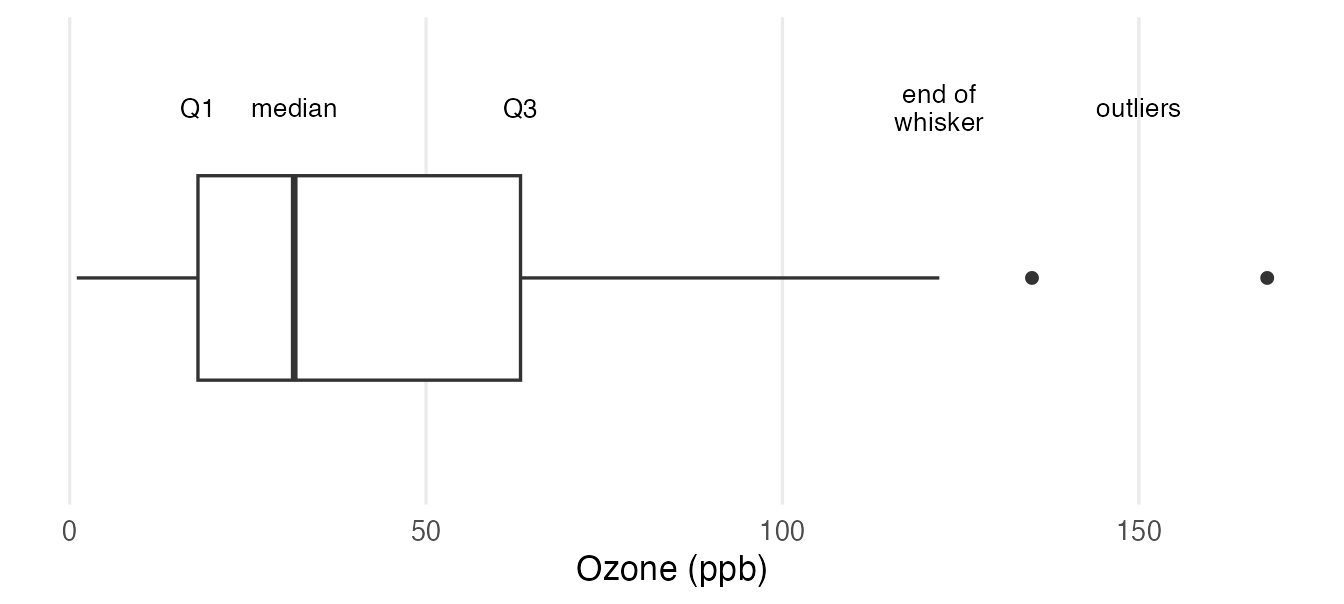
TipHow to read a boxplot
- The box goes from the first quartile (Q1 = 18) to the third quartile (Q3 = 63.25): it contains the middle 50% of the observations. Its length is the IQR (45.25).
- The line inside the box is the median (31.5). Its position inside the box hints at skewness: here it is closer to Q1, and the right part of the box is longer — a right-skewed distribution.
- The whiskers extend from the box to the most extreme observation that lies within 1.5 × IQR of the box. They do not end exactly at Q3 + 1.5 × IQR (131.125); here the upper whisker ends at the observed value 122. The lower whisker ends at the minimum (1) because no value is below the lower fence.
- Points beyond the whiskers are drawn individually as potential outliers (here 135 and 168). They are values worth checking, not automatically errors and not something to delete. In skewed data, many perfectly valid observations end up beyond the whiskers.
The quartiles of geom_boxplot() are computed with quantile() (type 7). Base R’s boxplot() uses Tukey’s hinges (fivenum()), so the two can differ very slightly.
What a boxplot hides
A boxplot shows five numbers and the outliers — nothing else. Two very different distributions can have the same boxplot. The bimodal eruptions look perfectly ordinary in a boxplot:
ggplot(faithful, aes(x = eruptions, y = "")) +
  geom_boxplot() +
  labs(x = "Eruption duration (minutes)", y = NULL)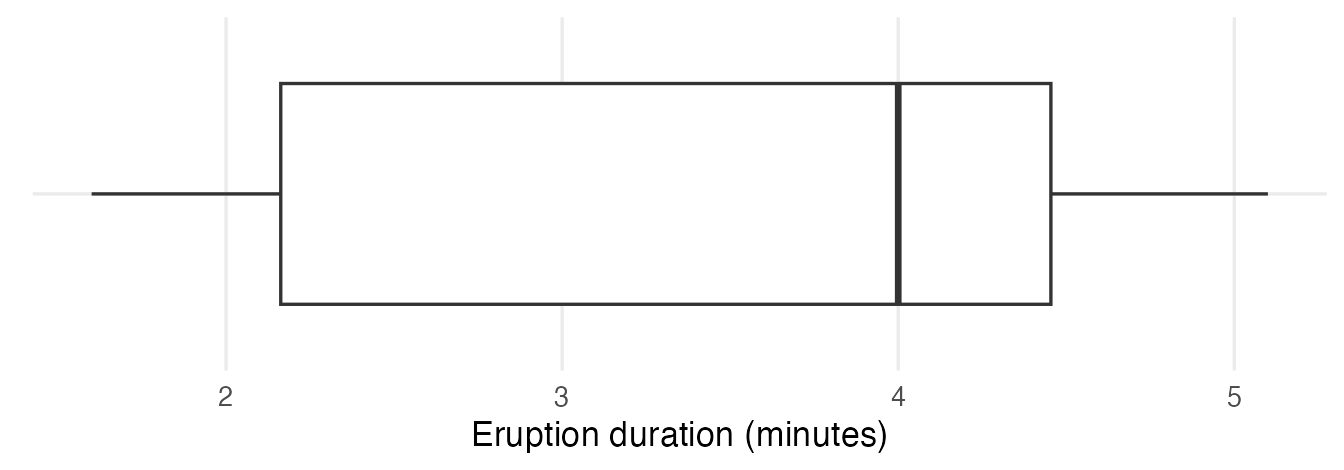
This is why boxplots are best combined with the points or used for quick comparisons of many groups whose shape you have already checked.
5. Comparing groups: ozone by month
The old version of this course explored New York ozone levels by month. We prepare the data first: Month becomes a factor with month names, and a new categorical variable splits each month into beginning, middle and end.
air <- airquality |>
  filter(!is.na(Ozone)) |>
  mutate(
    Month = factor(Month, levels = 5:9, labels = month.name[5:9]),
    day_cat = case_when(
      Day < 10 ~ "Begin",
      Day < 20 ~ "Middle",
      .default = "End"
    ) |>
      factor(levels = c("Begin", "Middle", "End"))
  ) |>
  select(Ozone, Wind, Month, Day, day_cat)

count(air, Month)
#> Month n
#> 1 May 26
#> 2 June 9
#> 3 July 26
#> 4 August 26
#> 5 September 29Note that June has only 9 days with an ozone measurement: keep this in mind when comparing.
box_air <- ggplot(air, aes(x = Month, y = Ozone)) +
  labs(x = NULL, y = "Ozone (ppb)")

box_air +
  geom_boxplot(outlier.colour = "#D55E00", outlier.shape = 17,
               outlier.size = 2.5) +
  stat_summary(fun = mean, geom = "point", size = 3, colour = "#0072B2")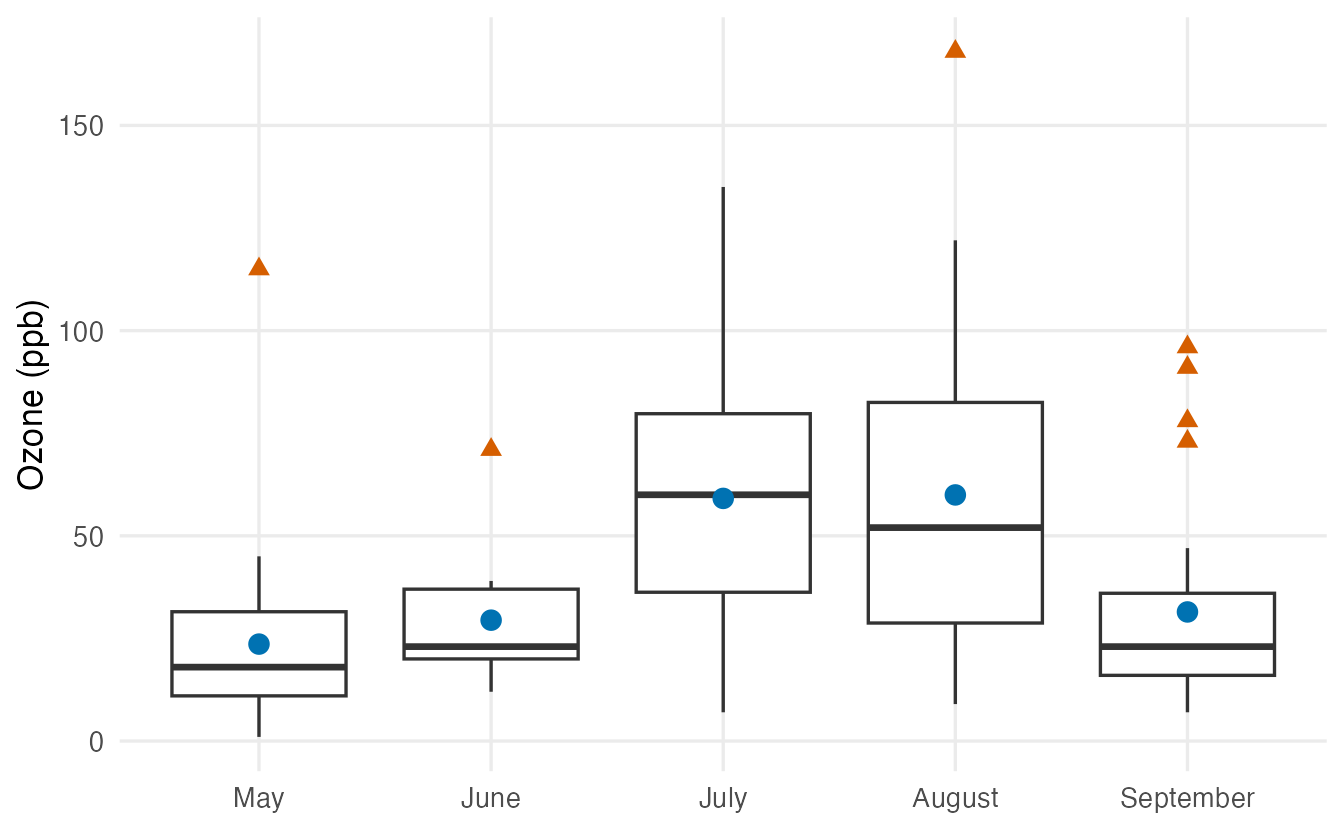
- The
outlier.*arguments change how flagged points look. stat_summary(fun = mean, ...)computes a summary for each group and draws it (the old argumentfun.yis deprecated: usefun).- July and August have the highest ozone levels. In four of the five months the mean lies clearly above the median, a sign of right skew within months (in July the two are almost equal).
Variants of the same plot:
box_air + geom_boxplot() + coord_flip()

ggplot(air, aes(Month, Ozone, colour = Month)) +
  geom_boxplot() +
  guides(colour = "none") +
  labs(x = NULL, y = "Ozone (ppb)")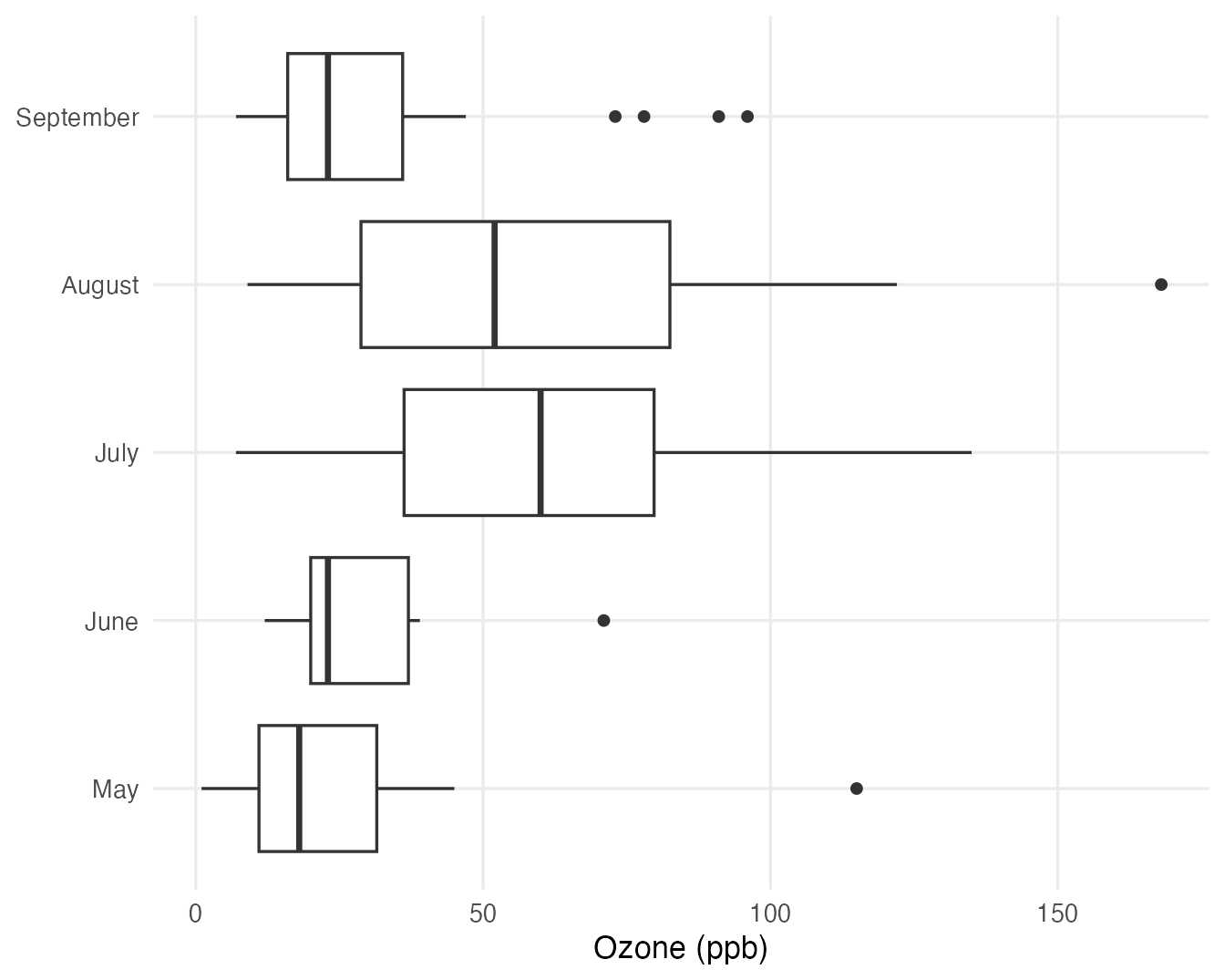
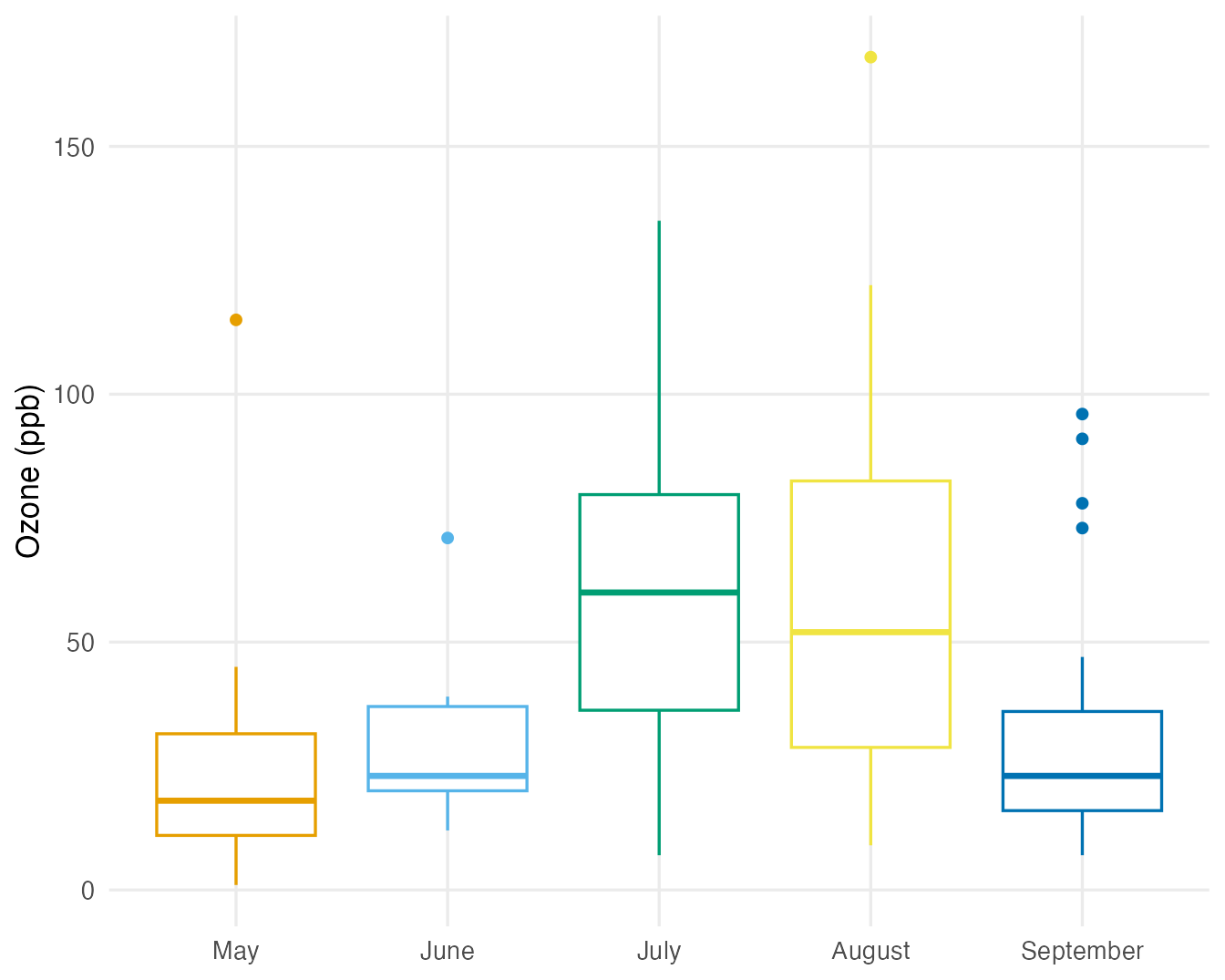
Removing the legend in the second plot is correct: month is already written on the axis, so the legend would be redundant ink. Colour adds no information here — use it only when it encodes something.
Boxplots for two grouping variables use fill (or colour) for the second one:
ggplot(air, aes(Month, Ozone, fill = day_cat)) +
  geom_boxplot() +
  labs(x = NULL, y = "Ozone (ppb)", fill = "Part of month")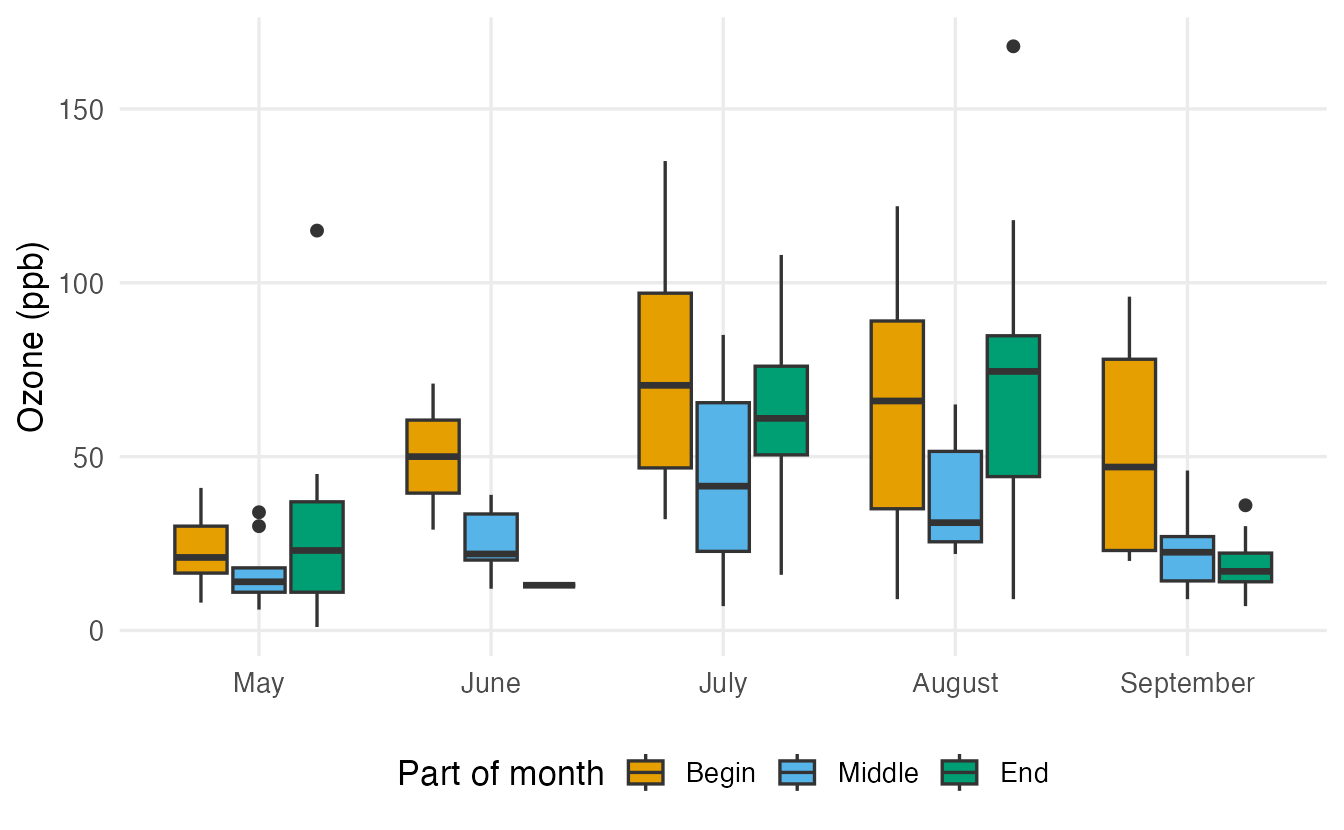
With three boxes per month, most boxes summarise fewer than 10 days — the “End” box for June only one day: an attractive plot can be built on very little data.
6. Notched boxplots
A notch narrows the box around the median. Its half-width is
\[ 1.58 \times \frac{\mathrm{IQR}}{\sqrt{n}} . \]
box_air + geom_boxplot(notch = TRUE)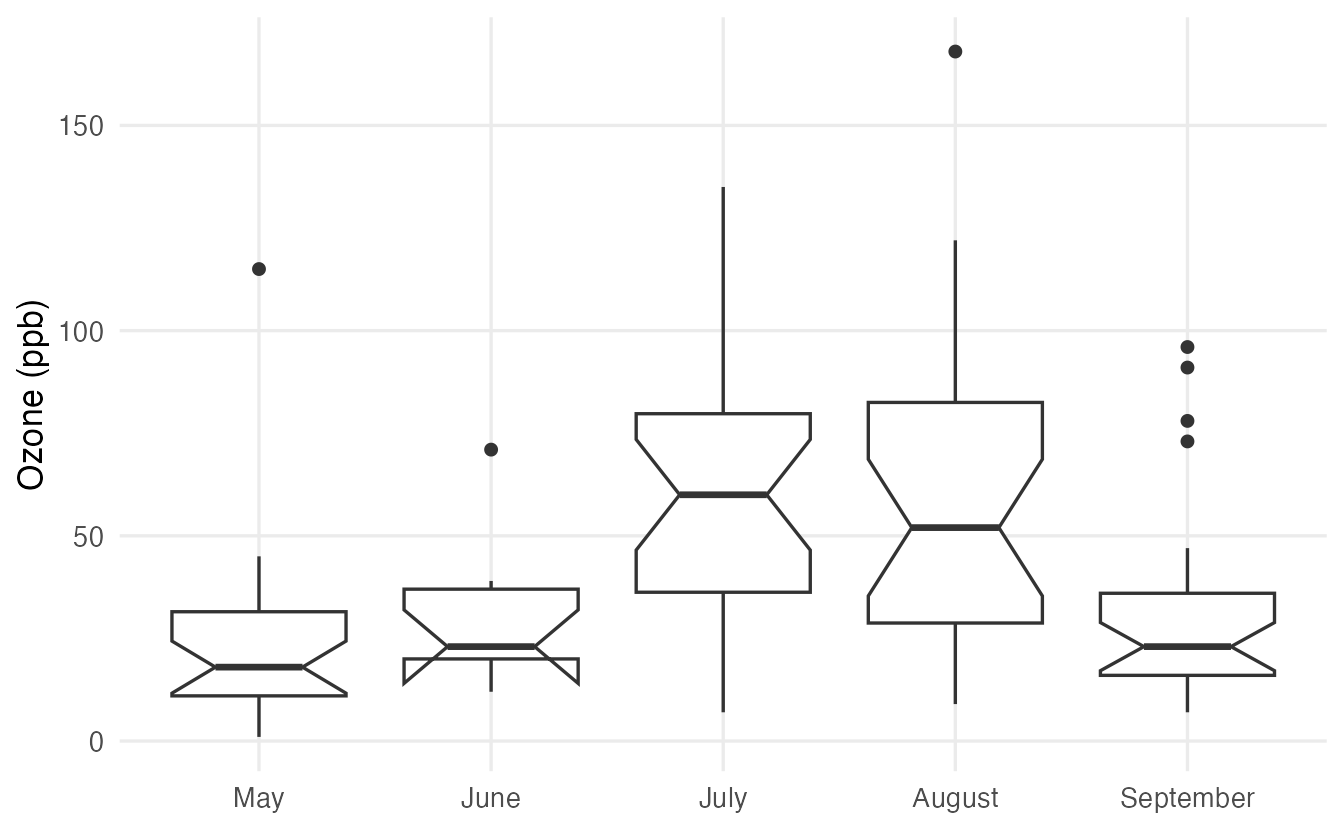
TipHow to read notches
- Notches are designed for comparing medians between boxes: if the notches of two boxes do not overlap, this is rough evidence (at about the 5% level) that the population medians differ. May and July are a clear example.
- Overlapping notches do not prove that medians are equal — just as a non-significant test does not prove “no difference”.
- A notch is not a confidence interval for one median on its own, and it says nothing about means.
- With small groups the notch can extend beyond the box (June, 9 days): the comparison is then very imprecise. ggplot2 warns about this.
- The formula assumes roughly symmetric data and independent observations; consecutive days of ozone are not really independent, so treat notches here as a visual hint. Formal comparisons are in Non-parametric tests.
7. Showing the points: jitter and dot plots
With a few dozen observations per group, show every observation. Points at the same x position overlap; jittering adds a small random horizontal shift:
box_air +
  geom_boxplot(outlier.shape = NA) +
  geom_jitter(width = 0.15, height = 0, alpha = 0.6, colour = "#0072B2")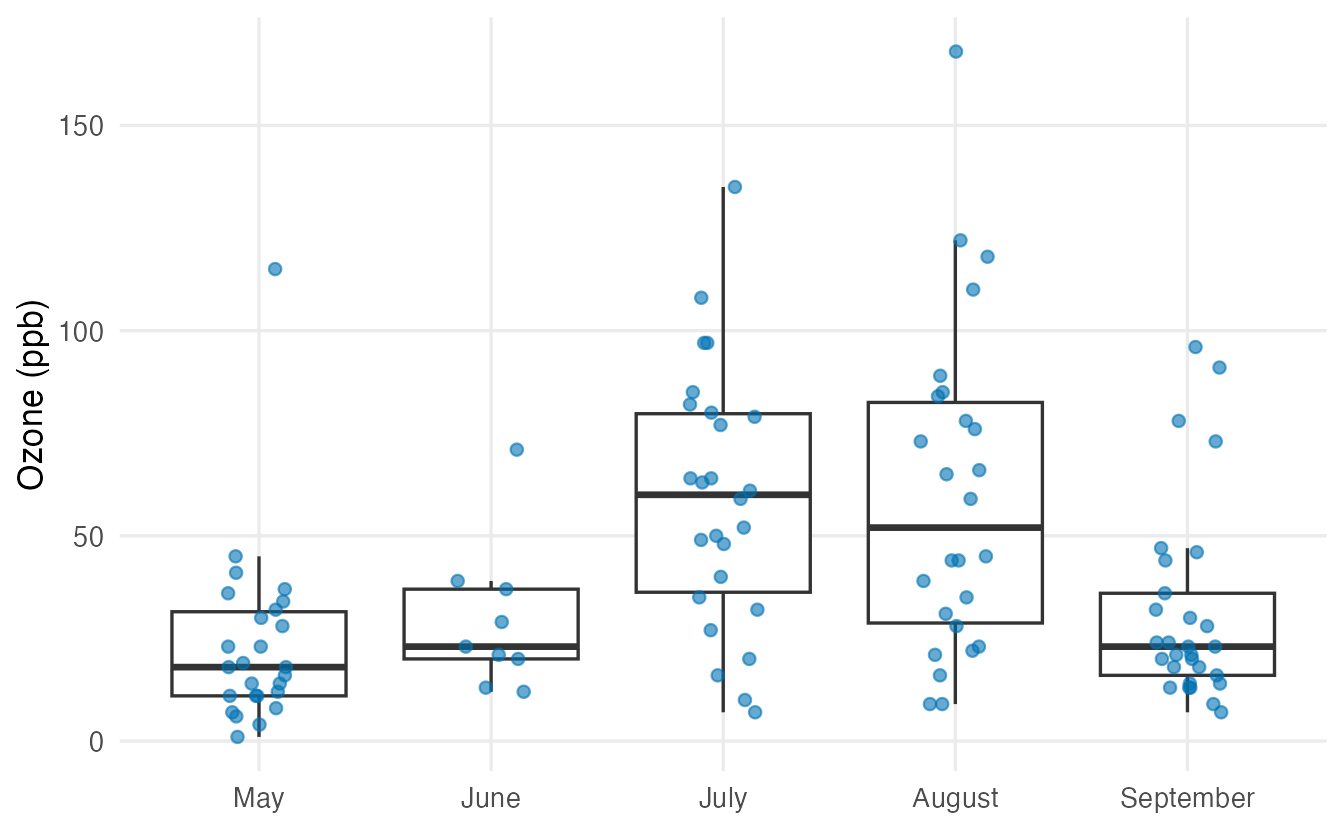
height = 0is important: never jitter the variable you are measuring.- Because the jitter layer already shows every point,
outlier.shape = NAhides the boxplot’s own outlier points (otherwise they would appear twice). - Without jitter (
geom_point()), values with the same ozone in the same month would be drawn on top of each other and hidden.
A dot plot stacks the points instead of scattering them:
box_air +
  geom_boxplot() +
  geom_dotplot(binaxis = "y", stackdir = "center", dotsize = 0.6,
               binwidth = 4)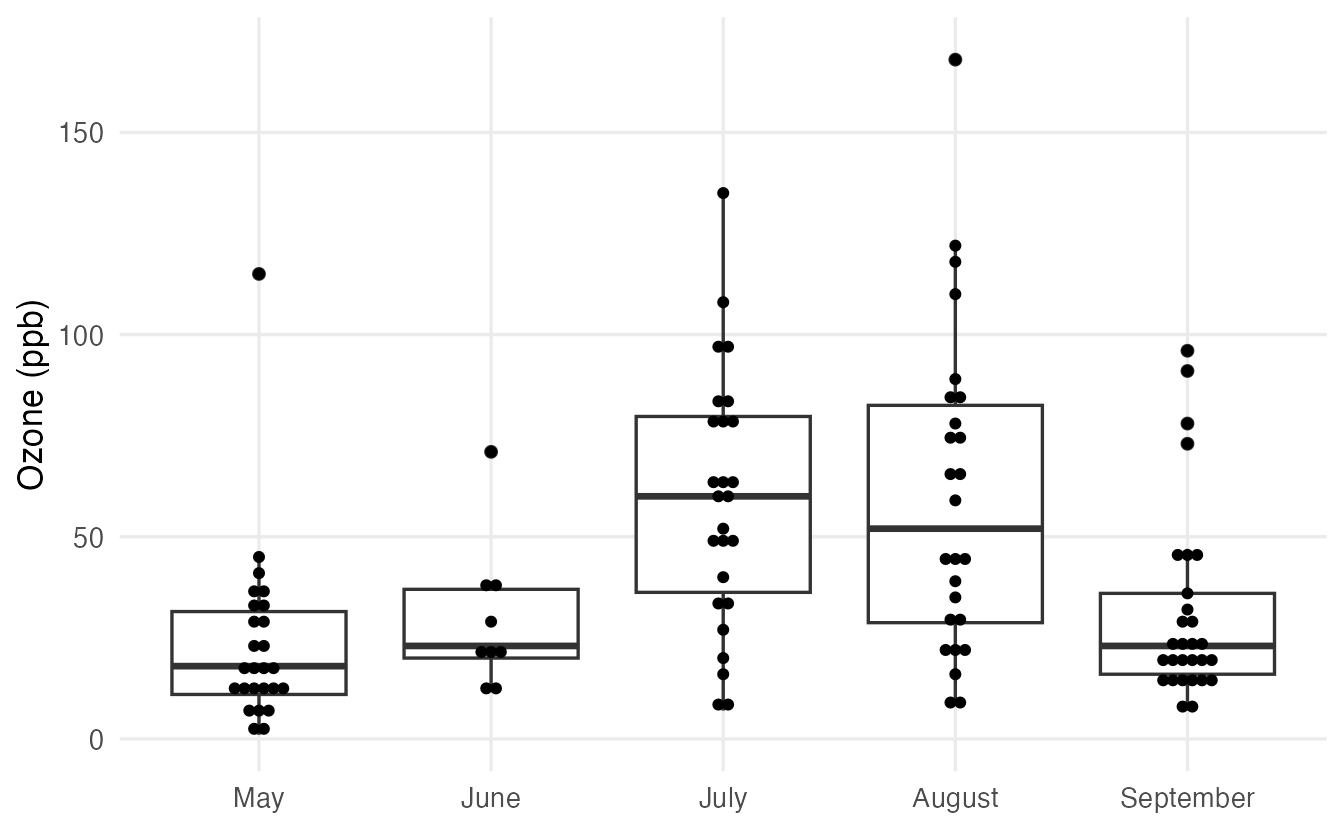
8. Violin plots
A violin plot draws a mirrored density curve for each group, so it shows the shape (including several peaks) that a boxplot hides. A narrow boxplot inside adds the quartiles:
ggplot(penguins, aes(species, body_mass, fill = species)) +
  geom_violin(alpha = 0.5, na.rm = TRUE) +
  geom_boxplot(width = 0.12, fill = "white", outlier.shape = NA,
               na.rm = TRUE) +
  guides(fill = "none") +
  labs(x = NULL, y = "Body mass (g)")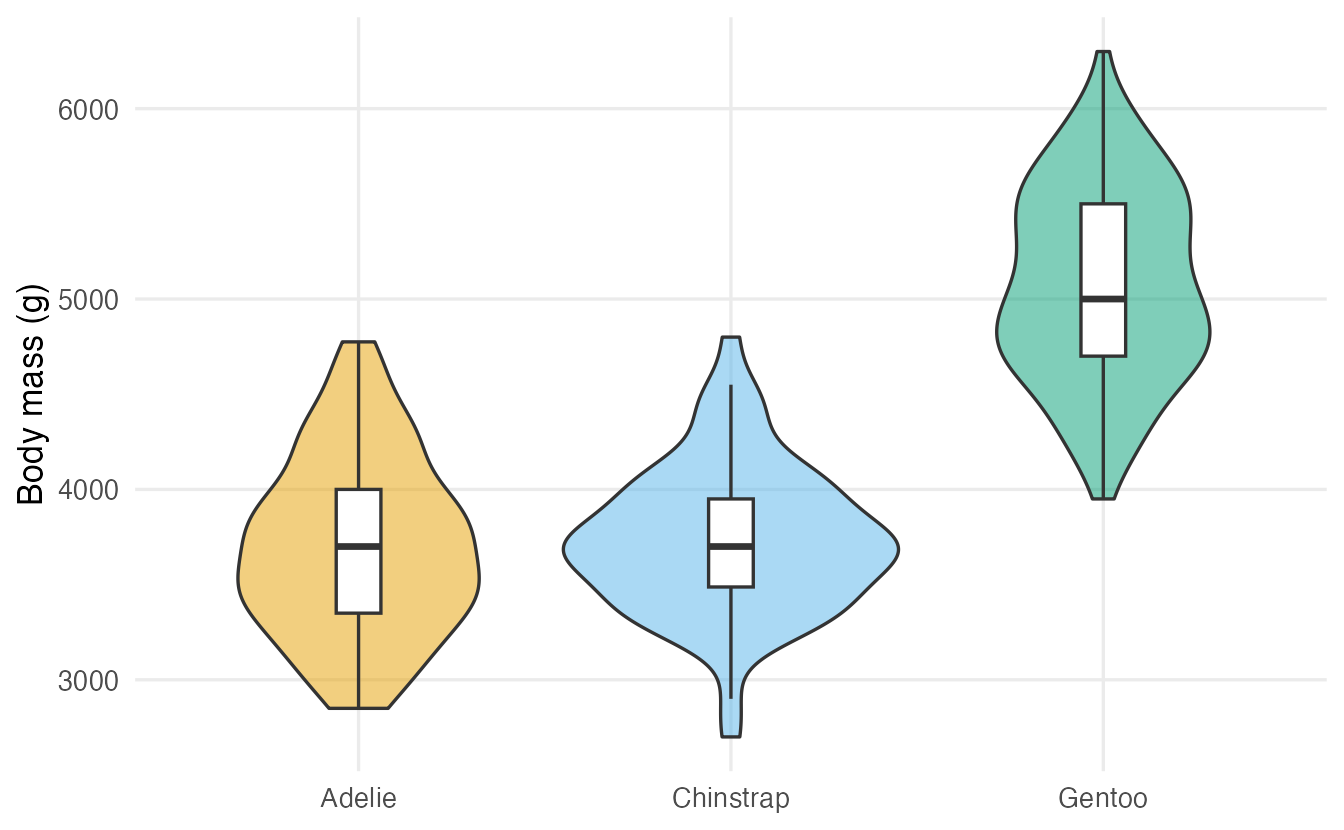
The width of the violin at a given height reflects how many penguins have that mass. Like density plots, violins can mislead with very small groups, so mention (or show) \(n\).
9. Empirical cumulative distribution functions (ECDF)
The ECDF answers, for every value \(x\): what proportion of observations is less than or equal to \(x\)? It is the plot of the cumulative relative frequencies, and it needs no bins and no bandwidth — every observation is used exactly as it is.
ggplot(penguins, aes(body_mass, colour = species)) +
  stat_ecdf(linewidth = 1, na.rm = TRUE) +
  geom_vline(xintercept = 4000, linetype = "dashed") +
  labs(x = "Body mass (g)", y = "Proportion of birds ≤ x", colour = "Species")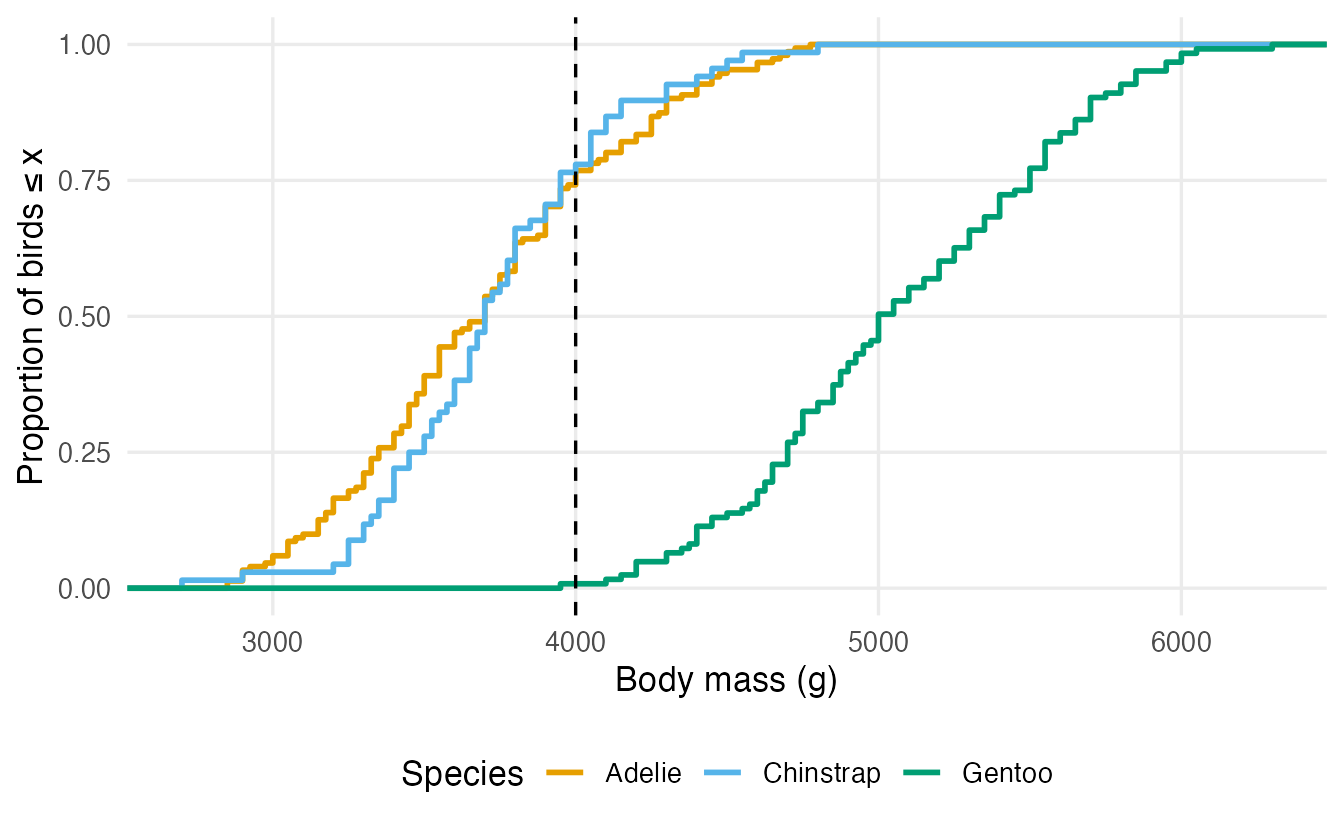
TipHow to read this output
- At 4000 g (dashed line) the Adelie and Chinstrap curves are near 0.78: about 77% of Adelie penguins weigh at most 4 kg; the Gentoo curve is still near 0 (1%).
- Reading horizontally gives quantiles: where a curve crosses 0.5 is the median of that group.
- A curve further to the right means larger values. Steep parts are where many observations are concentrated; flat parts are gaps.
- Base R:
ecdf(x)returns a function, e.g.ecdf(penguins$body_mass)(4000).
ECDFs are less intuitive than histograms at first, but they are the most honest way to compare whole distributions, and they reappear in tests (Kolmogorov–Smirnov) and simulations.
10. Choosing a plot for a numeric variable
| Goal | Good choice | Watch out for |
|---|---|---|
| Shape of one variable | Histogram (try several bin widths), density | Bin width / bandwidth |
| Compare 2–4 groups in detail | Overlaid densities, violins + points, ECDFs | Small groups look smooth |
| Compare many groups quickly | Boxplots (+ jitter if few points) | Boxplots hide multimodality |
| Few observations (< ~30 per group) | Points (jitter or dot plot), possibly with a boxplot | Densities and violins over-smooth |
| Proportions below/above a value | ECDF | Less familiar to readers |
For many groups, a ridgeline plot (stacked density curves, from the ggridges package: ggridges::geom_density_ridges()) is another compact option.
WarningCommon pitfalls
- Trusting the default 30 bins. The number of bins can create or hide features. Try several, and pick round bin widths.
- Calling whisker ends “minimum and maximum”. They are the most extreme points within 1.5 × IQR of the box; points beyond are drawn separately.
- Deleting “outliers” because a boxplot flagged them. The 1.5 × IQR rule is a screening tool, not a verdict; skewed data have many legitimate flagged values.
- Reading overlapping notches as “the medians are equal”. Absence of evidence is not evidence of absence.
- Jittering vertically (
heightnot set to 0) in a plot where the y axis is the measurement — you change the data. - Drawing outliers twice when combining
geom_boxplot()withgeom_jitter()(useoutlier.shape = NA).
11. Check your understanding
12. Exercises
Interactive (run in your browser)
★ Exercise 1 — choose a bin width. Draw a histogram of the waiting time between eruptions (faithful$waiting, in minutes). Try binwidth = 20, then 5, then 1. Which shows the shape best? What is the shape?
Replace the blank with a number and run the code several times.
ggplot(faithful, aes(waiting)) +
  geom_histogram(binwidth = 5, boundary = 40, colour = "white") +
  labs(x = "Waiting time (minutes)", y = "Count")
binwidth = 5 shows clearly that the waiting times are bimodal (peaks around 50–55 and 75–85 minutes). With 20 minutes the shape is crude; with 1 minute it is noisy.
★★ Exercise 2 — boxplot plus points. Using ToothGrowth, draw boxplots of tooth length (len) for each dose, with jittered points on top and without duplicated outliers. Remember that dose is numeric.
Use factor(dose) on the x axis, outlier.shape = NA and height = 0.
ggplot(ToothGrowth, aes(x = factor(dose), y = len)) +
  geom_boxplot(outlier.shape = NA) +
  geom_jitter(width = 0.15, height = 0, alpha = 0.6) +
  labs(x = "Dose (mg/day)", y = "Tooth length")
Tooth length increases with the dose. Without factor(), ggplot2 would treat dose as continuous and draw a single box.
★★ Exercise 3 — compute the whiskers. Compute by hand where the whiskers of a boxplot of mtcars$hp end and which cars are flagged as outliers. Then check with a plot.
iqr <- q[[2]] - q[[1]], and the fence is 1.5 IQR above Q3.
iqr <- q[[2]] - q[[1]]
upper_fence <- q[[2]] + 1.5 * iqr
max(x[x <= upper_fence])
rownames(mtcars)[x > upper_fence]

library(ggplot2)
ggplot(mtcars, aes(x = hp, y = "")) + geom_boxplot()
The upper fence is about 305.25 hp; the whisker ends at the largest car below it (264 hp) and only the Maserati Bora (335 hp) is flagged.
★★★ Exercise 4 — compare distributions with an ECDF. Draw the ECDFs of flipper length for the three penguin species. Use the plot to estimate the median flipper length of each species, then check with summarise().
Map colour = species and use stat_ecdf(). The median is where each curve crosses the dashed line.
ggplot(penguins, aes(flipper_len, colour = species)) +
  stat_ecdf(na.rm = TRUE) +
  geom_hline(yintercept = 0.5, linetype = "dashed") +
  labs(x = "Flipper length (mm)", y = "Proportion ≤ x")
The curves cross 0.5 at about 190 mm (Adelie), 196 mm (Chinstrap) and 216 mm (Gentoo), matching the medians from summarise(). The Gentoo curve lies entirely to the right: nearly every Gentoo has longer flippers than nearly every Adelie.
Practice on your own computer
★★ Exercise 5 — four views of one variable. For bill_len in penguins by species, draw (a) overlaid densities, (b) violins with boxplots, (c) boxplots with jittered points, (d) ECDFs. Write two sentences on what each plot shows best.
TipSolution
p <- ggplot(penguins, aes(colour = species, fill = species))

p + geom_density(aes(bill_len), alpha = 0.3, na.rm = TRUE)

ggplot(penguins, aes(species, bill_len)) +
  geom_violin(na.rm = TRUE) +
  geom_boxplot(width = 0.1, outlier.shape = NA, na.rm = TRUE)

ggplot(penguins, aes(species, bill_len)) +
  geom_boxplot(outlier.shape = NA, na.rm = TRUE) +
  geom_jitter(width = 0.15, height = 0, alpha = 0.4, na.rm = TRUE)

p + stat_ecdf(aes(bill_len), na.rm = TRUE)
Adelie penguins have clearly shorter bills; Chinstrap and Gentoo overlap a lot (Chinstrap slightly longer on average). Densities and violins show the shapes, jittered points show the actual data and group sizes, and the ECDF makes it easy to read proportions and medians.
Summary
| Plot | ggplot2 | Shows best |
|---|---|---|
| Histogram | geom_histogram(binwidth = , boundary = ) |
Shape, modes, gaps |
| Density | geom_density(adjust = ) |
Smooth shape; overlaid groups |
| Boxplot | geom_boxplot(); notch = TRUE |
Median, IQR, outliers; many groups |
| Jittered points | geom_jitter(width = , height = 0) |
Every observation, group size |
| Dot plot | geom_dotplot(binaxis = "y", stackdir = "center") |
Every observation, stacked |
| Violin | geom_violin() |
Shape per group |
| ECDF | stat_ecdf() |
Proportions ≤ x, quantiles, whole-distribution comparison |
| Group summary | stat_summary(fun = mean, geom = "point") |
Adding a mean to a plot |
- Look at the distribution, not just a summary: means can sit where no data are.
- Bin width and bandwidth are choices; try several.
- Boxplot whiskers reach the most extreme point within 1.5 × IQR; points beyond are potential outliers.
- Non-overlapping notches suggest different medians; overlap proves nothing.
- With few observations, show the points.