The grammar of graphics
Build any plot layer by layer with ggplot2 — starting from the scatter plot
Learn the components of a ggplot2 plot (data, aesthetics, geoms, scales, facets, coordinates, themes), build scatter plots step by step, add fitted lines, use log scales, label, facet, theme and save your figures, following principles of good graphics.
NoteLearning objectives
By the end of this lesson you will be able to:
- name the components of the grammar of graphics and identify them in any ggplot;
- build a plot layer by layer, distinguishing mapping an aesthetic from setting it;
- add fitted lines, log scales, labels, facets and coordinate limits correctly;
- change the overall look with themes and save a figure with
ggsave(); - apply a few principles of good, accessible graphics.
library(ggplot2)
library(dplyr)
1. Why a “grammar” of graphics?
Graphs are a key part of every stage of data analysis: we use them to explore data (and find errors), to check models, and to communicate results. A good graph can make a pattern obvious in seconds that would take a table of numbers a page to describe.
Many plotting tools give you a menu of chart types (“scatter”, “bar”, “pie”). ggplot2 works differently. It is based on Leland Wilkinson’s Grammar of Graphics (2005): just as sentences are built from nouns, verbs and adjectives, every plot is built from a small set of independent components. Once you know the components, you can build almost any plot — including ones nobody has named.
| Component | Question it answers | ggplot2 function |
|---|---|---|
| Data | Which data frame? | ggplot(data = ...) |
| Aesthetics | Which variables go to which visual property (x, y, colour, size, shape…)? | aes() |
| Geoms | Which geometric object represents each observation (points, lines, bars…)? | geom_*() |
| Stats | Is the data transformed before plotting (counts, smoothers, densities)? | stat_*(), or inside geoms |
| Scales | How are data values translated into positions, colours, sizes? | scale_*() |
| Facets | Should the data be split into small multiples? | facet_wrap(), facet_grid() |
| Coordinates | In which coordinate system are positions drawn? | coord_*() |
| Theme | What do the non-data elements (fonts, background, grid) look like? | theme_*(), theme() |
The general pattern is:
ggplot(data, aes(x = var1, y = var2)) +
  geom_something() +
  other_components()
Components are added with + (not with the pipe |>).
2. Building a plot layer by layer
Do heavier penguins have longer flippers? We build the answer one layer at a time.
Data and aesthetics only — the canvas and axes are ready, but nothing tells ggplot2 how to draw the observations:
p <- ggplot(penguins, aes(x = flipper_len, y = body_mass))
p
Add a geom — each penguin becomes a point:
p + geom_point(na.rm = TRUE)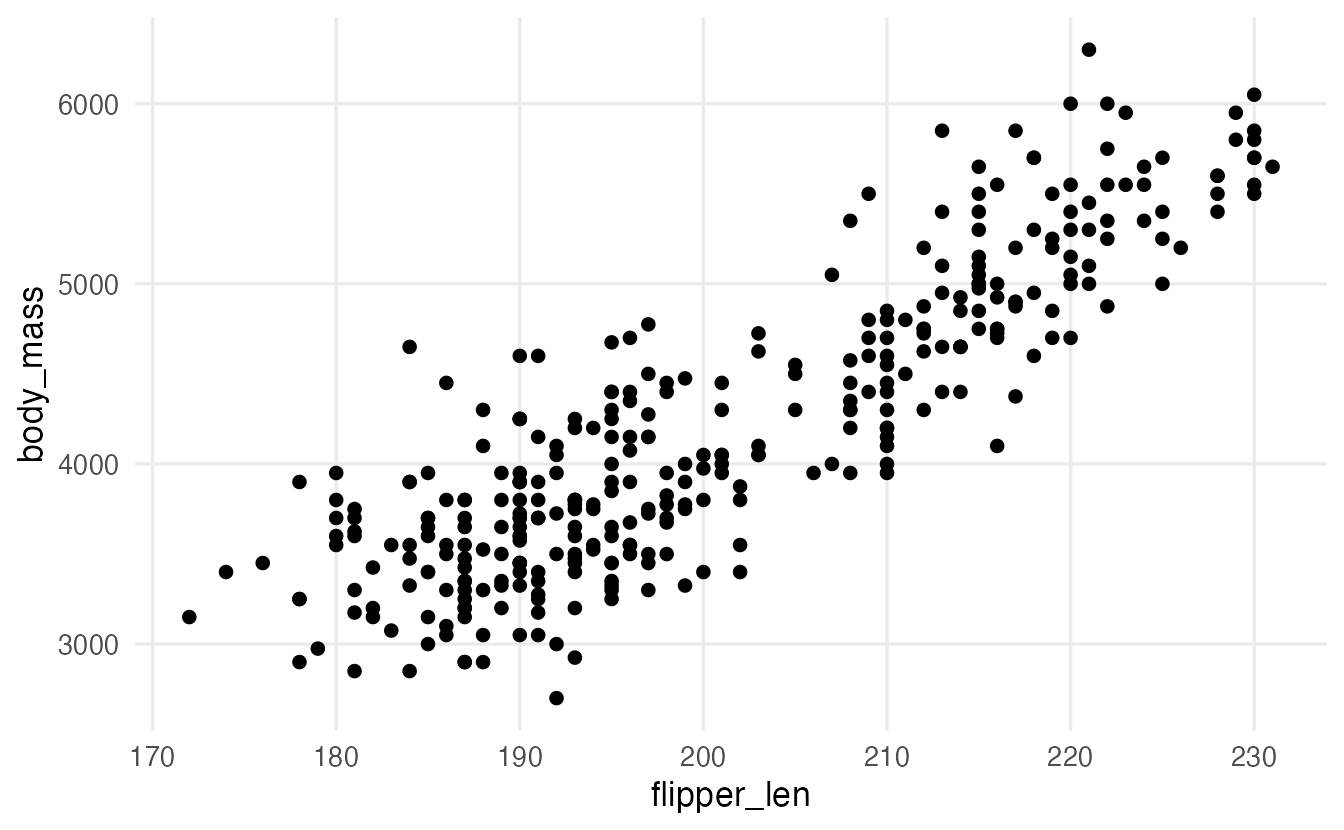
A scatter plot shows the relationship between two numeric variables. Here the cloud goes up from left to right: longer flippers go with heavier bodies. (na.rm = TRUE simply silences the warning about the 2 birds with missing measurements.)
Map a third variable to colour:
p + geom_point(aes(colour = species), na.rm = TRUE)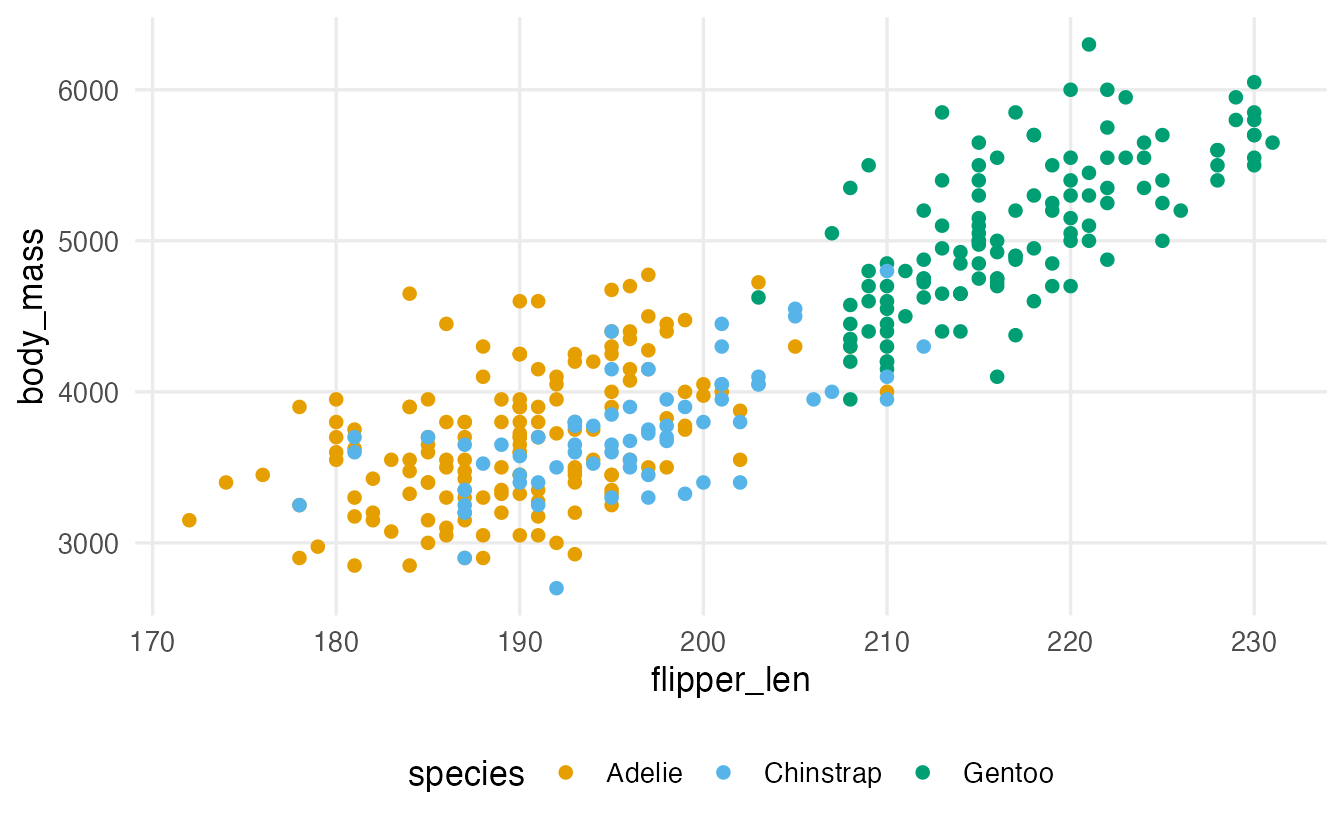
The colours reveal structure that was hidden: the large cluster on the right is the Gentoo species. ggplot2 created a legend automatically, because a mapping always needs a key. The colours are the colour-blind-safe Okabe–Ito palette, set for the whole course in the setup file.
3. Mapping vs setting an aesthetic
This is the most important distinction in ggplot2:
- Mapping (inside
aes()): a visual property depends on a variable.aes(colour = species)means “colour each point according to its species”. - Setting (outside
aes()): a visual property is fixed for all points.colour = "steelblue"means “make every point steel blue”.
ggplot(penguins, aes(flipper_len, body_mass)) +
  geom_point(colour = "steelblue", alpha = 0.6, size = 2, na.rm = TRUE) +
  labs(title = "Setting: colour = \"steelblue\"")

ggplot(penguins, aes(flipper_len, body_mass)) +
  geom_point(aes(colour = "steelblue"), na.rm = TRUE) +
  labs(title = "Mistake: aes(colour = \"steelblue\")")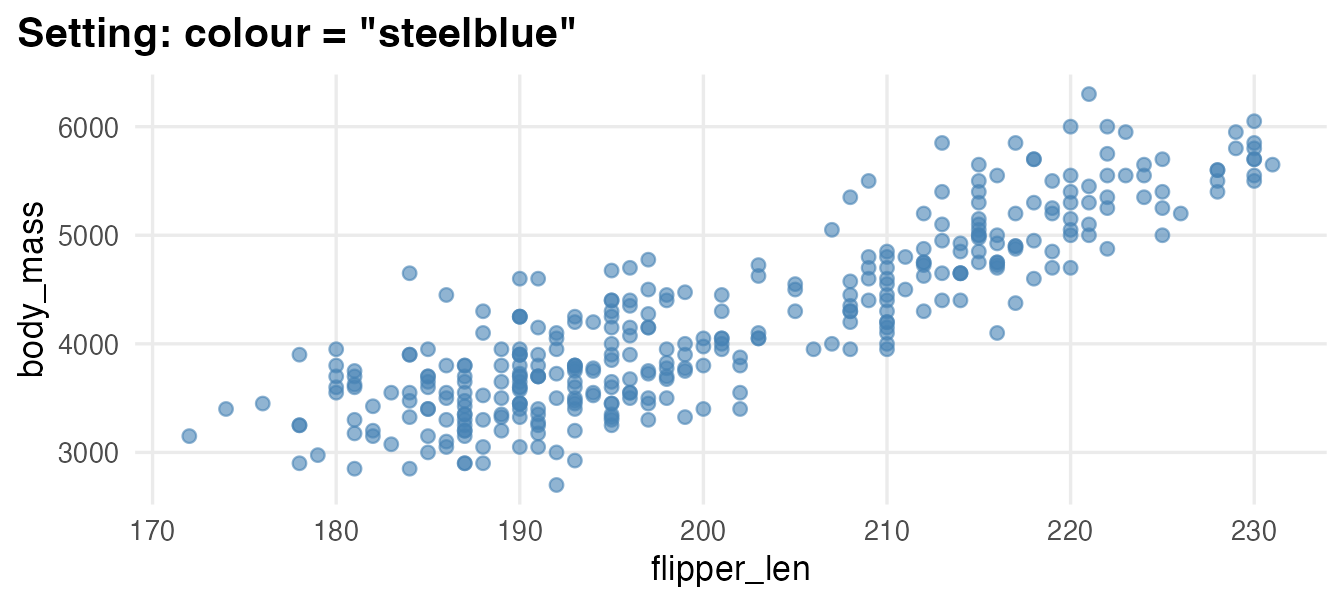
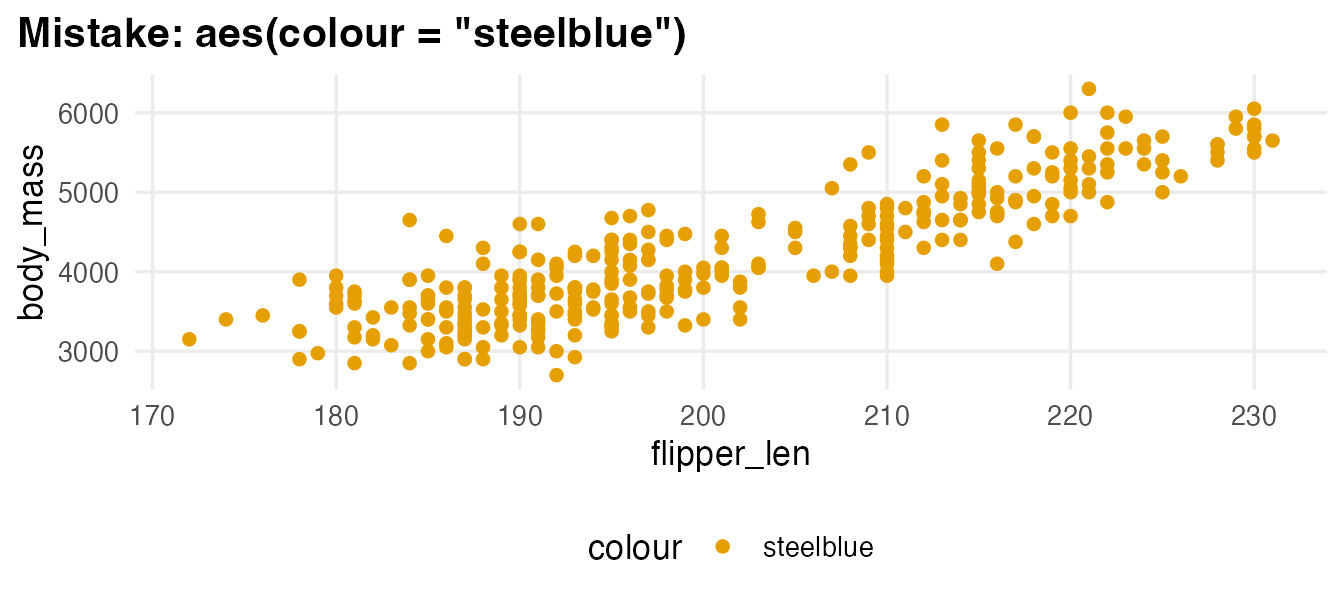
In the second plot, ggplot2 treats "steelblue" as a data value (a constant variable with one category called “steelblue”), gives it the first colour of the palette and adds a pointless legend. If your colour or legend looks strange, check what is inside aes().
More aesthetics: shape, size and transparency
ggplot(penguins, aes(flipper_len, body_mass)) +
  geom_point(aes(colour = species, shape = species, size = bill_len),
             alpha = 0.6, na.rm = TRUE)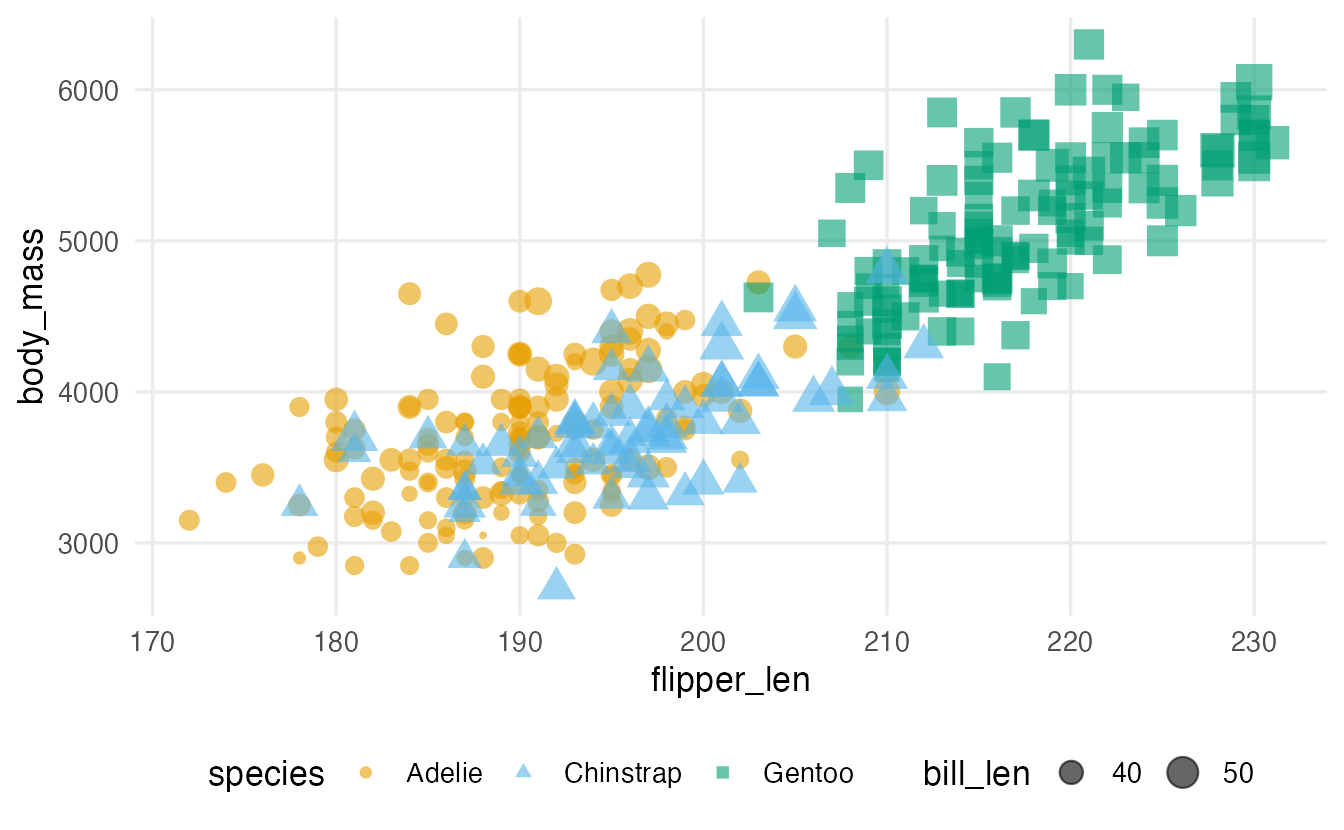
shapeworks for categorical variables (up to about six categories are readable).sizeworks for numeric variables, but our eyes compare sizes poorly: use it sparingly.alpha(transparency, from 0 to 1) is usually set, to reveal overlapping points.
Mapping the same variable to colour and shape is called redundant encoding: the plot stays readable in black and white and for colour-blind readers.
Where to put aes()
Aesthetics given in ggplot() are inherited by all layers; aesthetics given inside a geom_*() apply only to that layer. This matters as soon as you add a second layer.
4. Adding a fitted line: geom_smooth()
A smoother summarises the trend in a scatter plot. With method = "lm" it draws the least-squares straight line (the subject of Simple regression).
ggplot(penguins, aes(flipper_len, body_mass, colour = species)) +
  geom_point(alpha = 0.5, na.rm = TRUE) +
  geom_smooth(method = "lm", formula = y ~ x, se = FALSE, na.rm = TRUE)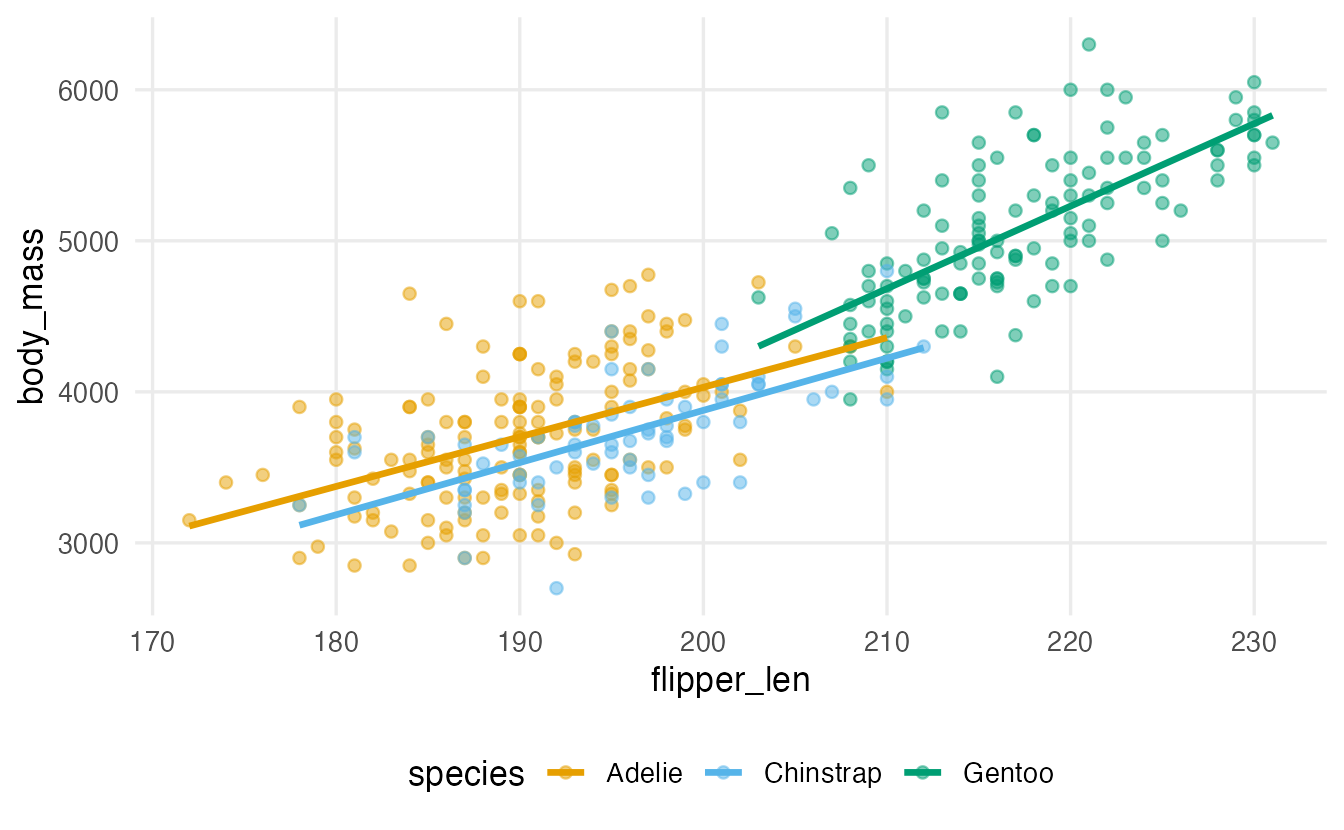
ggplot(penguins, aes(flipper_len, body_mass)) +
  geom_point(aes(colour = species), alpha = 0.5, na.rm = TRUE) +
  geom_smooth(method = "lm", formula = y ~ x, colour = "black",
              linewidth = 1, na.rm = TRUE)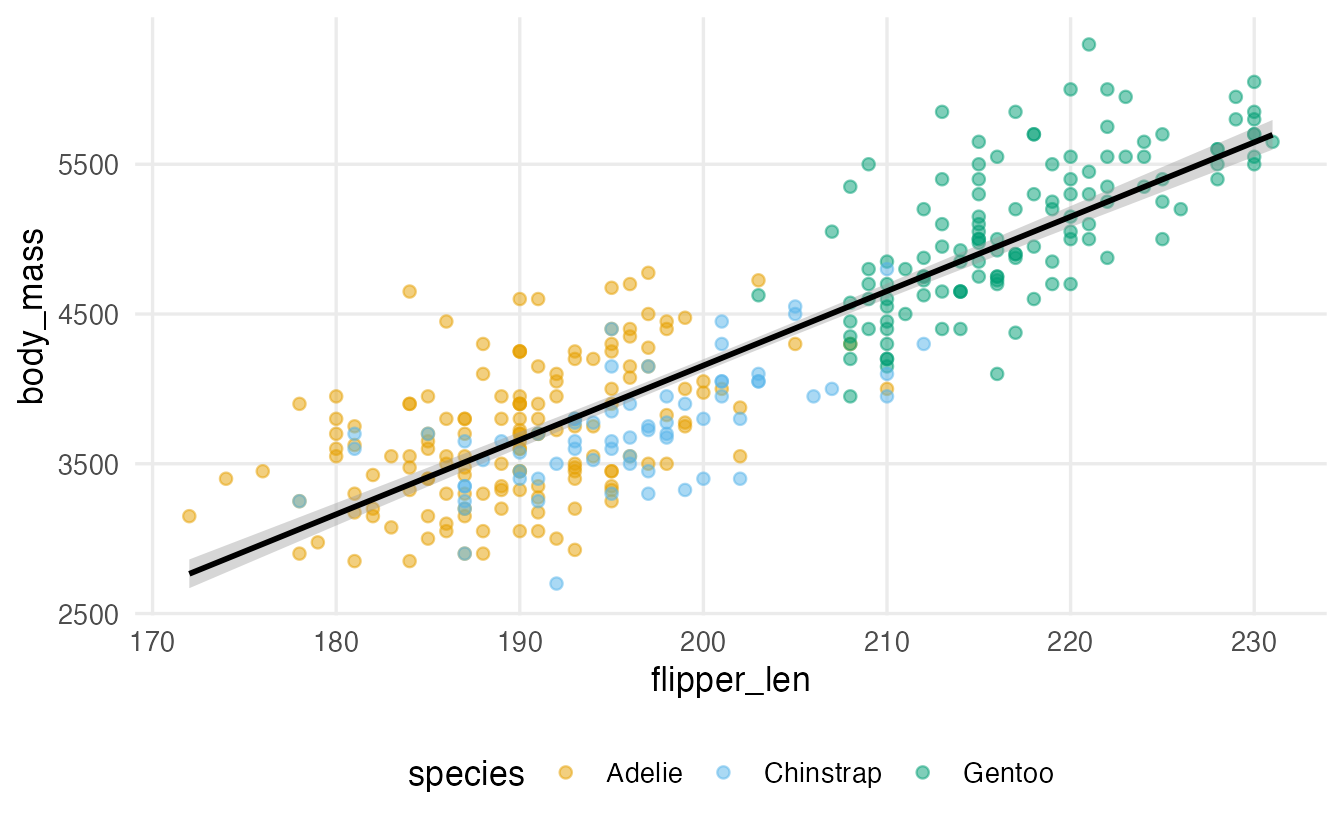
TipHow to read these plots
- In the first plot
colour = speciesis inherited bygeom_smooth(), which therefore fits one line per species. In the second, only the points are coloured and one overall line is fitted. - The grey band (
se = TRUE, the default) is a confidence band for the fitted line, not a range where most points fall; you will learn to interpret it in Confidence intervals. linewidthcontrols the thickness of lines (sizeis for points and text).- Without
method,geom_smooth()uses a flexible curve (LOESS for small data), which is useful for spotting non-linear trends.
5. Scales: from data to visual properties
Every aesthetic has a scale that controls how data values become positions, colours or sizes — and how the axis or legend is labelled. Scale functions are named scale_<aesthetic>_<type>().
Axis breaks
The mtcars data describe 32 cars from 1974. Here we plot fuel economy against the rear axle ratio (drat), with the number of gears as a category:
cars_plot <- ggplot(mtcars, aes(drat, mpg, colour = factor(gear))) +
  geom_point(size = 2) +
  labs(x = "Rear axle ratio", y = "Miles per gallon", colour = "Gears")

cars_plot +
  scale_x_continuous(breaks = seq(2.75, 5, by = 0.25))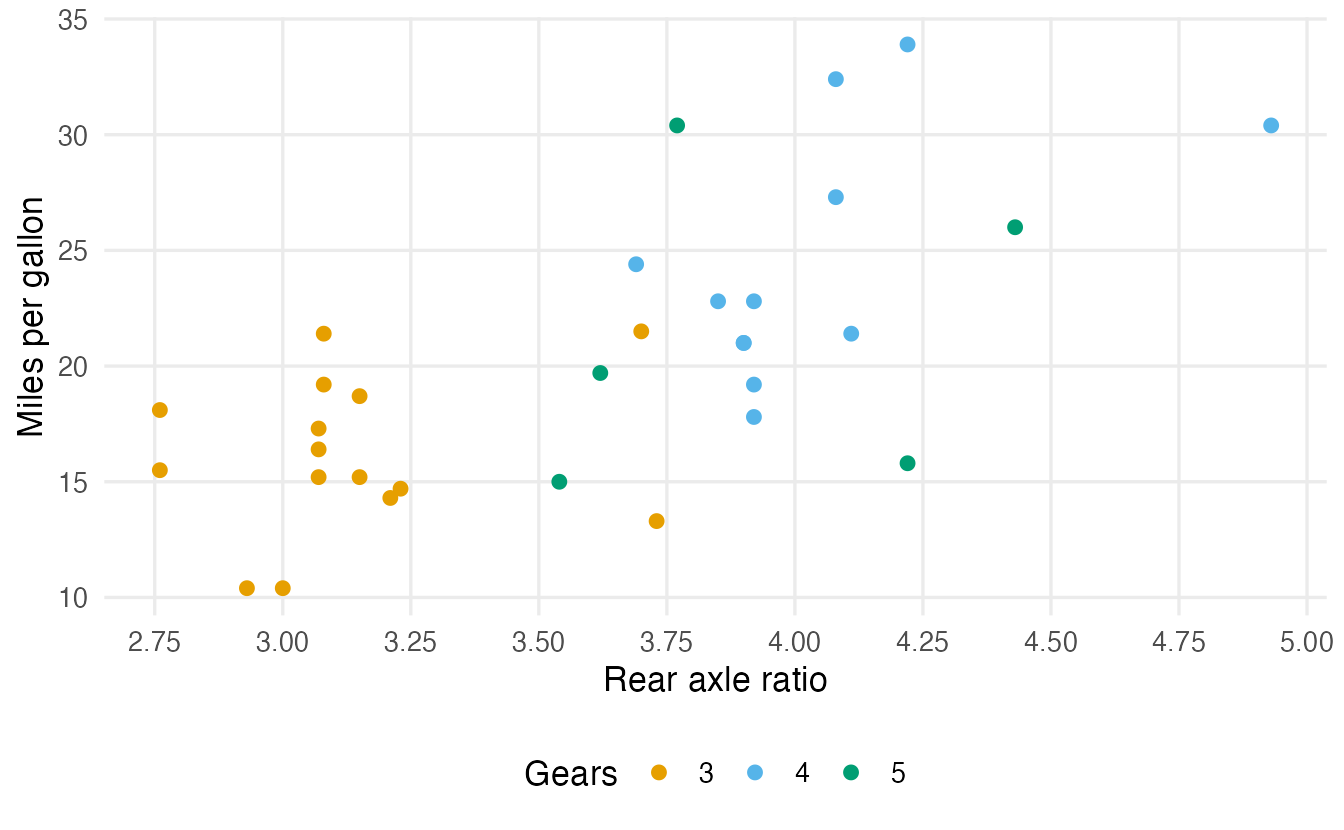
factor(gear) turns the number of gears into a category, so that ggplot2 uses distinct colours instead of a continuous colour gradient.
Log scales
Some variables span several orders of magnitude. The msleep data (shipped with ggplot2) give the body weight and brain weight of 83 mammals, from a few grams to several tonnes:
ggplot(msleep, aes(bodywt, brainwt)) +
  geom_point(na.rm = TRUE) +
  labs(x = "Body weight (kg)", y = "Brain weight (kg)")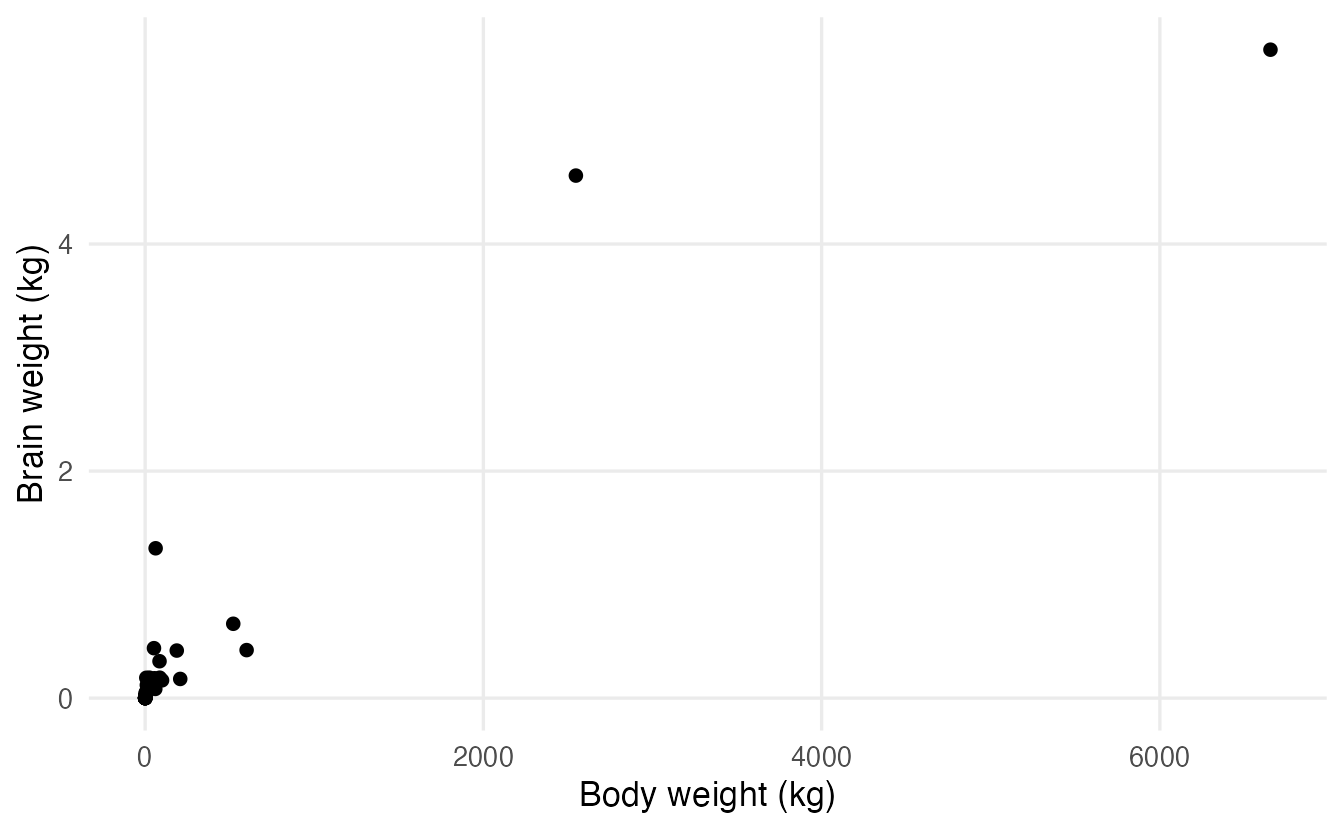
ggplot(msleep, aes(bodywt, brainwt)) +
  geom_point(na.rm = TRUE) +
  scale_x_log10() +
  scale_y_log10() +
  labs(x = "Body weight (kg, log scale)", y = "Brain weight (kg, log scale)")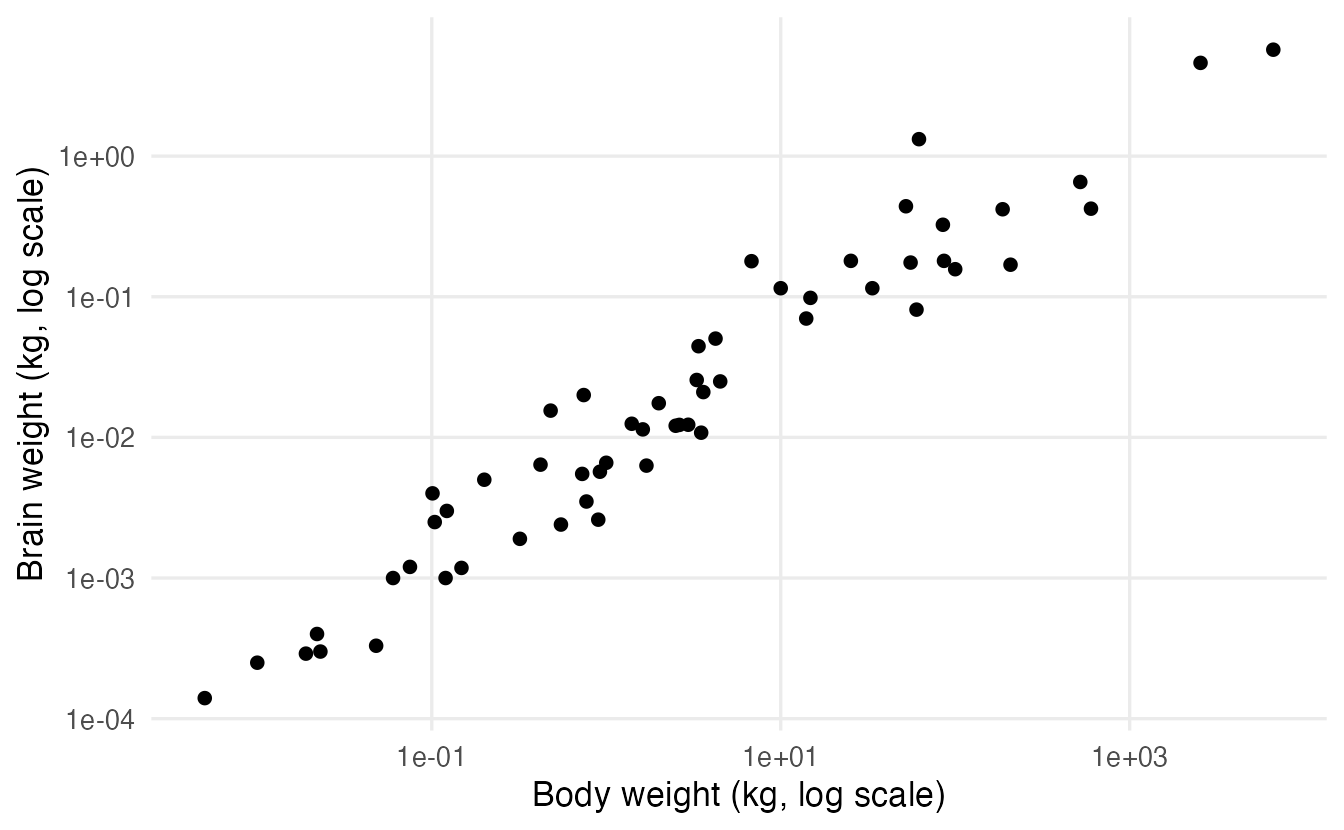
On a log scale, equal distances mean equal ratios: from 1 to 10 kg is the same distance as from 100 to 1000 kg. Two good reasons to use one:
- the data are positive and right-skewed, spanning several orders of magnitude (incomes, populations, concentrations, body sizes);
- relative (multiplicative) differences matter more than absolute ones.
Prefer scale_x_log10() to writing aes(x = log(bodywt)): the points are in exactly the same place, but with the scale the axis labels stay in the original units (0.01, 1, 100 kg), which readers understand. Log scales cannot show zero or negative values.
6. Labels: make the plot self-explanatory
A reader should understand a figure without reading the code. labs() sets the title, subtitle, caption, axis titles and legend titles in one place. Labels can also be computed:
mean_mpg <- mean(mtcars$mpg)

cars_plot +
  geom_smooth(aes(group = 1), method = "lm", formula = y ~ x,
              se = FALSE, colour = "grey30", linewidth = 0.8) +
  labs(
    title = "Cars with a higher axle ratio tend to be more economical",
    subtitle = paste("Mean fuel economy:", round(mean_mpg, 1), "mpg"),
    caption = "Source: mtcars (Motor Trend, 1974)",
    x = "Rear axle ratio (drat)",
    y = "Miles per gallon",
    colour = "Forward gears"
  )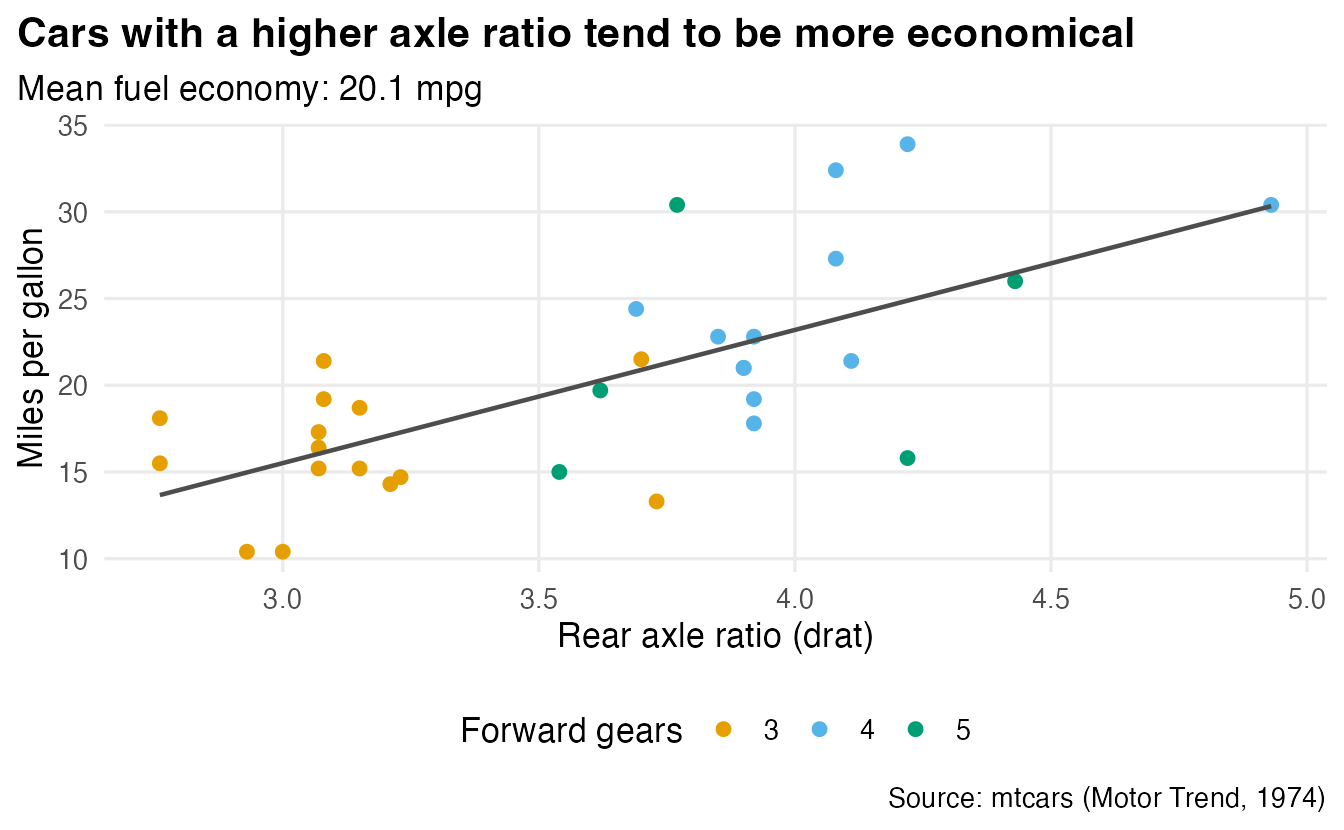
aes(group = 1) tells geom_smooth() to ignore the colour groups and fit a single line. A good title states the message of the plot, not just the variables (“A vs B”).
7. Facets: small multiples
Facets split the data into subsets and draw the same plot for each, with shared axes. This is often clearer than putting many colours on one plot.
ggplot(penguins, aes(flipper_len, body_mass, colour = species)) +
  geom_point(alpha = 0.6, na.rm = TRUE) +
  facet_wrap(~ island) +
  labs(x = "Flipper length (mm)", y = "Body mass (g)", colour = "Species")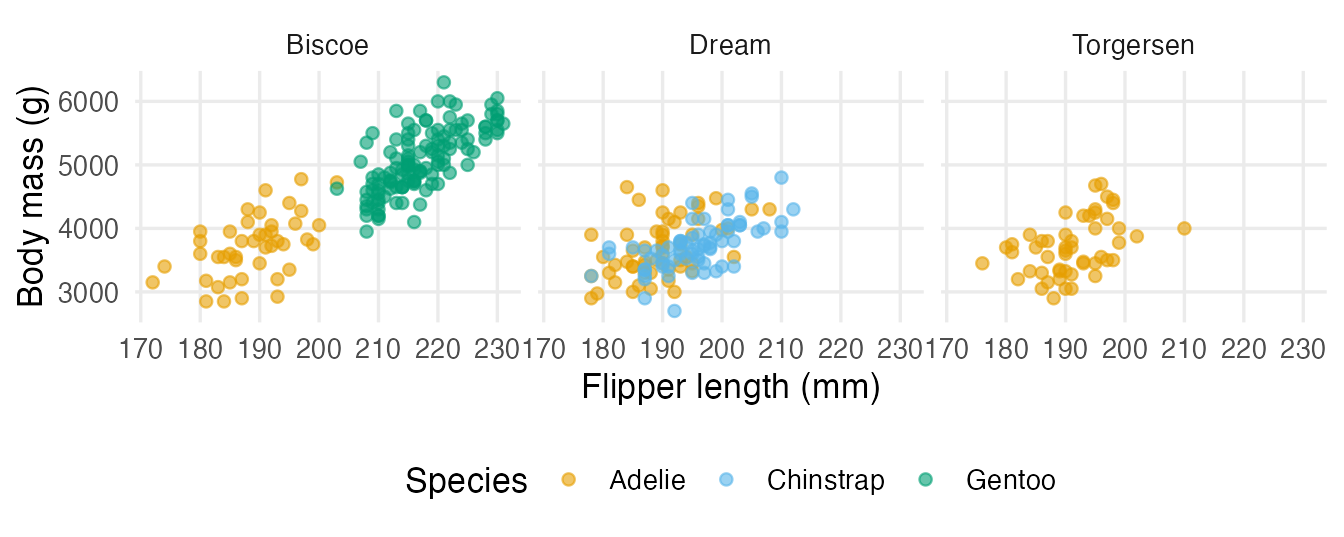
facet_grid(rows ~ cols) crosses two variables:
penguins |>
  filter(!is.na(sex)) |>
  ggplot(aes(bill_len, bill_dep)) +
  geom_point(alpha = 0.6) +
  facet_grid(sex ~ species) +
  labs(x = "Bill length (mm)", y = "Bill depth (mm)")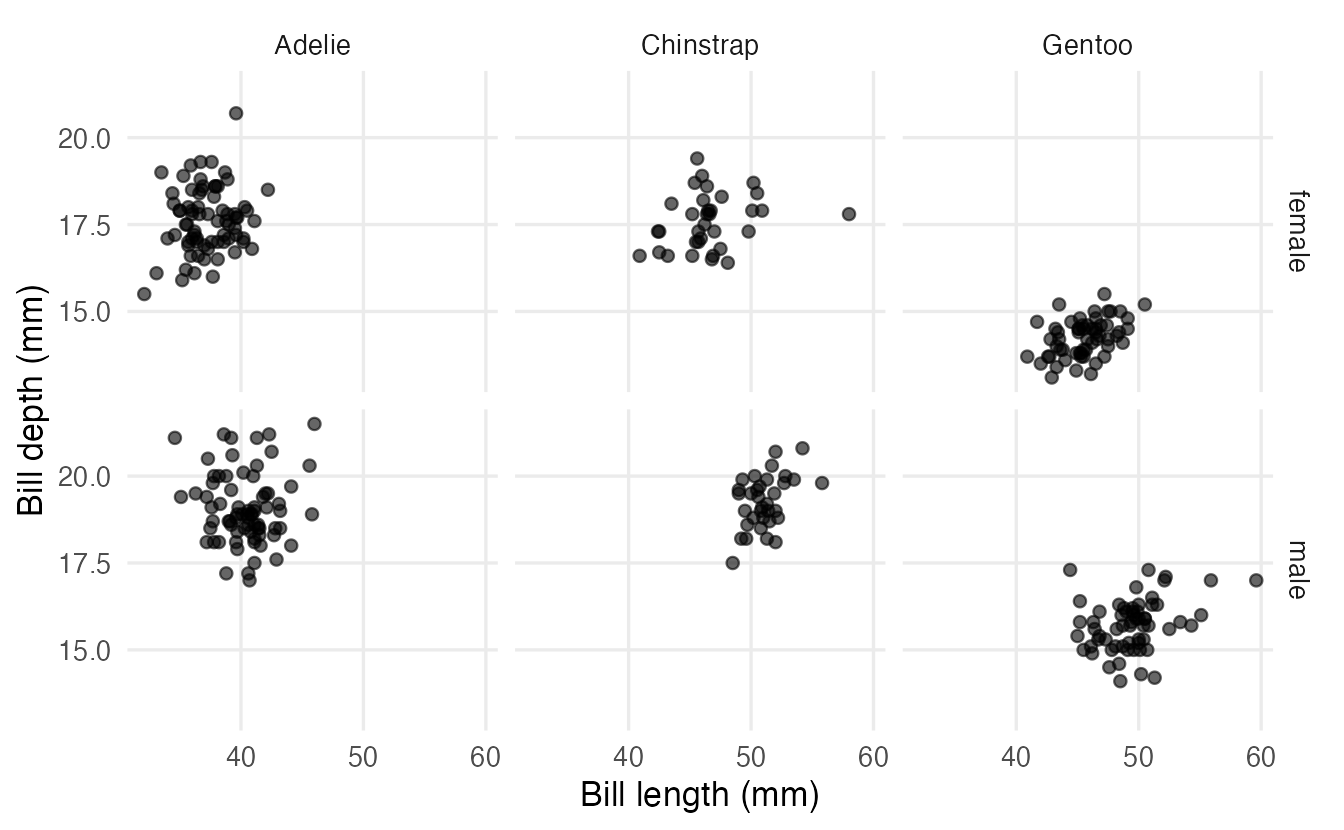
Shared axes make comparisons across panels honest. You can free them with scales = "free", but then readers must check the axis of every panel.
8. Coordinates: zooming without losing data
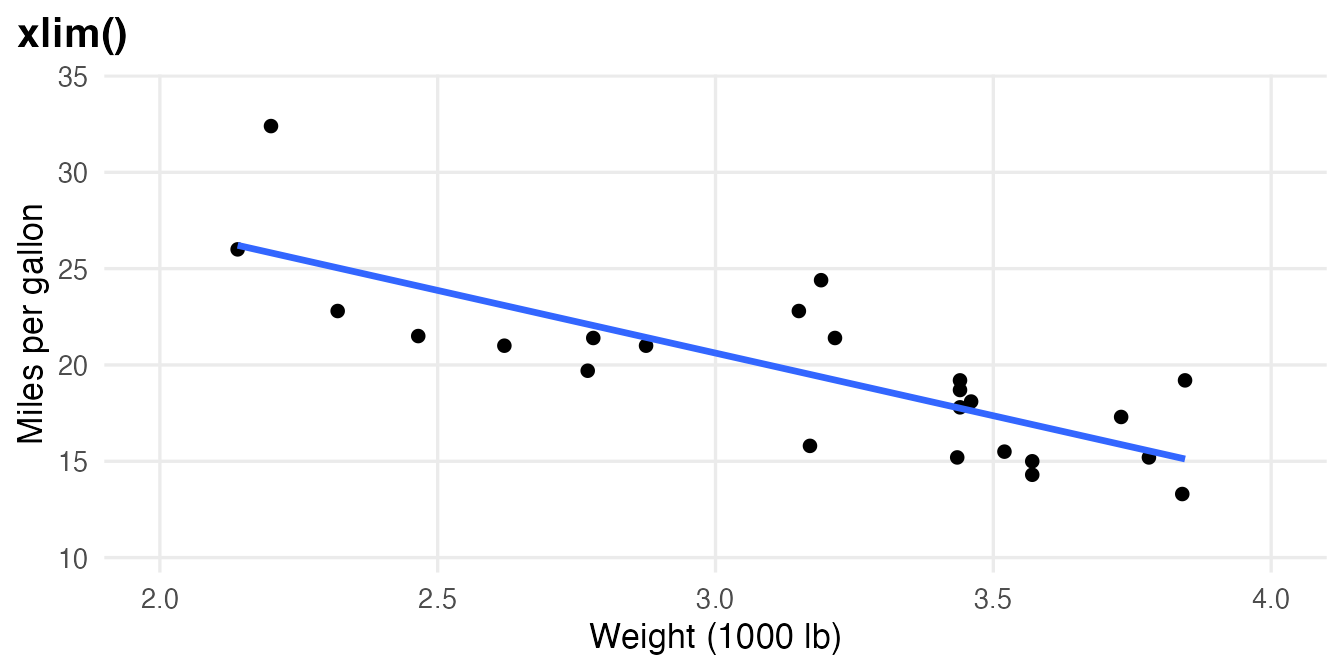
To focus on part of a plot there are two very different tools:
coord_cartesian(xlim = ...)zooms, like a magnifying glass: all data are still used.- Scale limits (
xlim(),scale_x_continuous(limits = ...)) remove the data outside the limits before anything is computed.
base <- ggplot(mtcars, aes(wt, mpg)) +
  geom_point() +
  geom_smooth(method = "lm", formula = y ~ x, se = FALSE) +
  labs(x = "Weight (1000 lb)", y = "Miles per gallon")

base + coord_cartesian(xlim = c(2, 4)) + labs(title = "coord_cartesian()")
base + xlim(2, 4) + labs(title = "xlim()")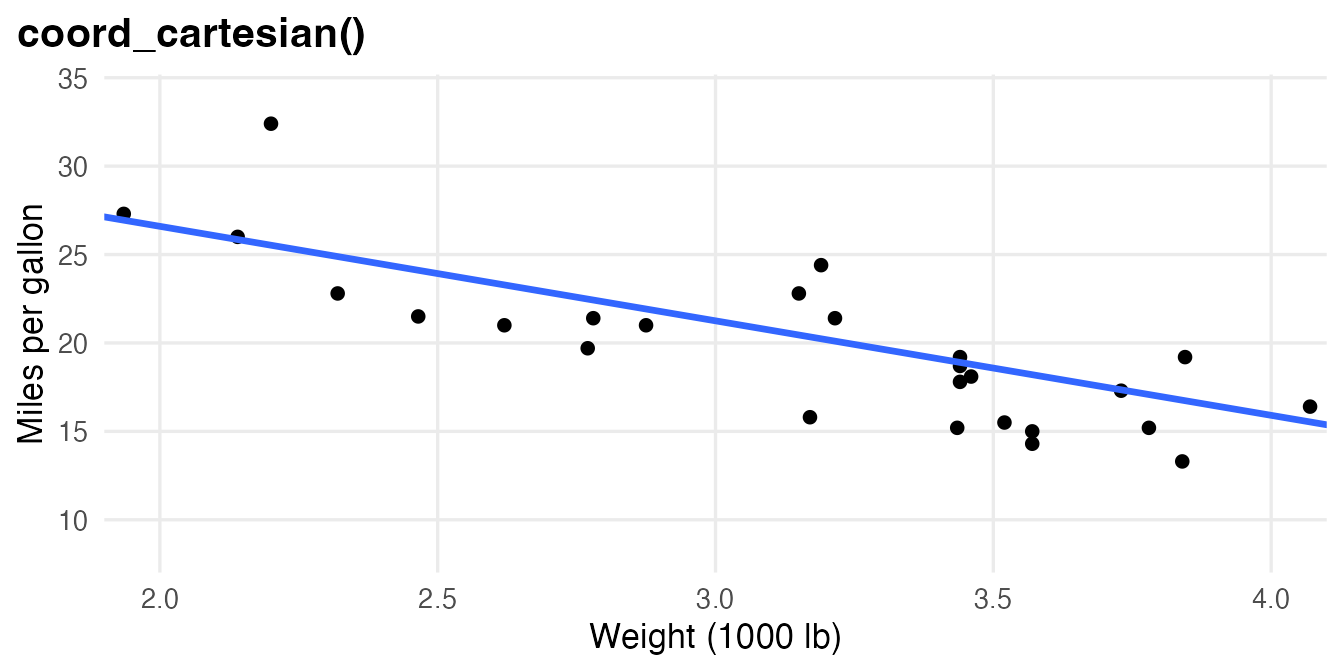
Other coordinate systems: coord_flip() swaps x and y, coord_fixed() forces one unit on x to be as long as one unit on y, and coord_polar() produces circular charts (see Categorical plots).
9. Themes
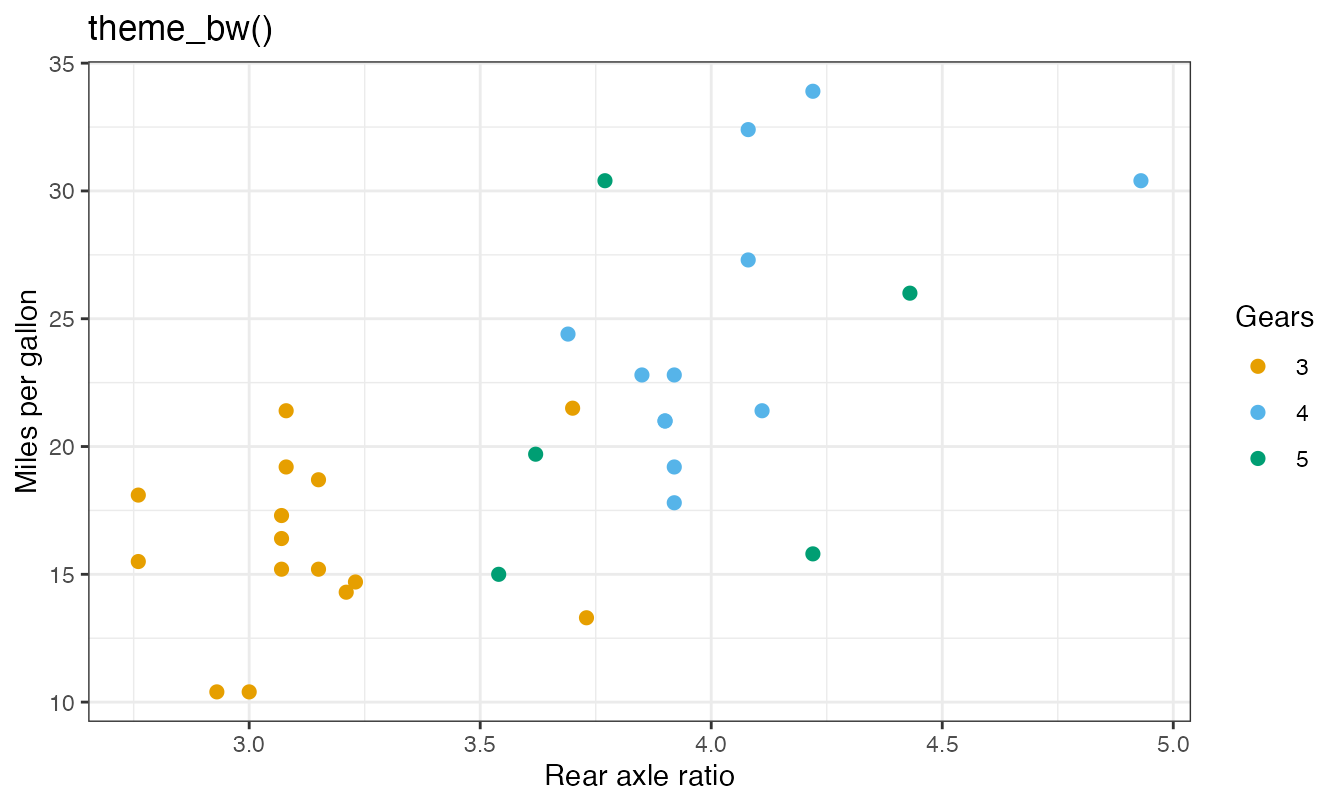
The theme controls everything that is not data: background, grid lines, fonts, legend position. This course sets a global theme (theme_minimal() with a few tweaks) in its setup file, so you rarely need to touch it. Complete themes replace all theme settings at once:
cars_plot + theme_classic() + labs(title = "theme_classic()")
cars_plot + theme_bw() + labs(title = "theme_bw()")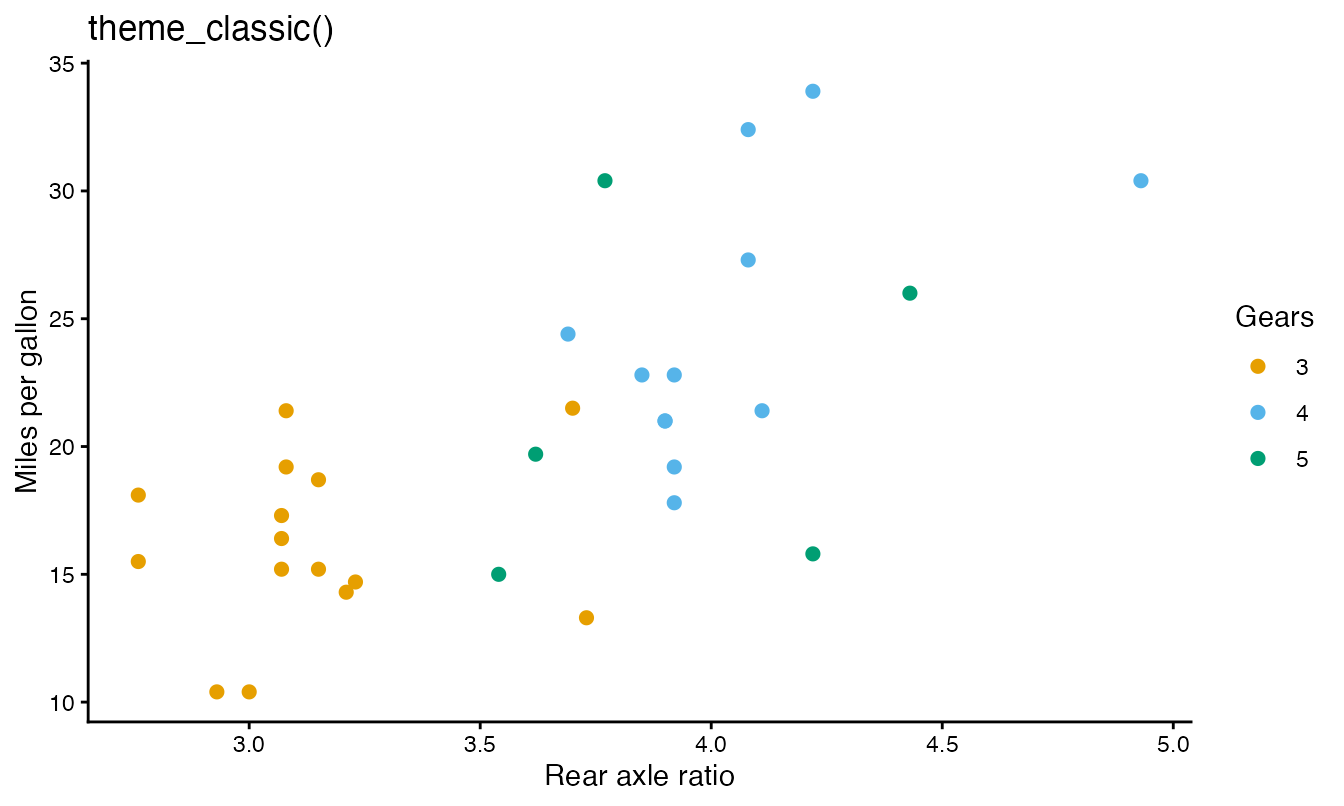
Use theme() to change individual elements, after any complete theme:
cars_plot +
  theme_classic(base_size = 14) +
  theme(legend.position = "top",
        axis.title.y = element_text(angle = 0, vjust = 0.5))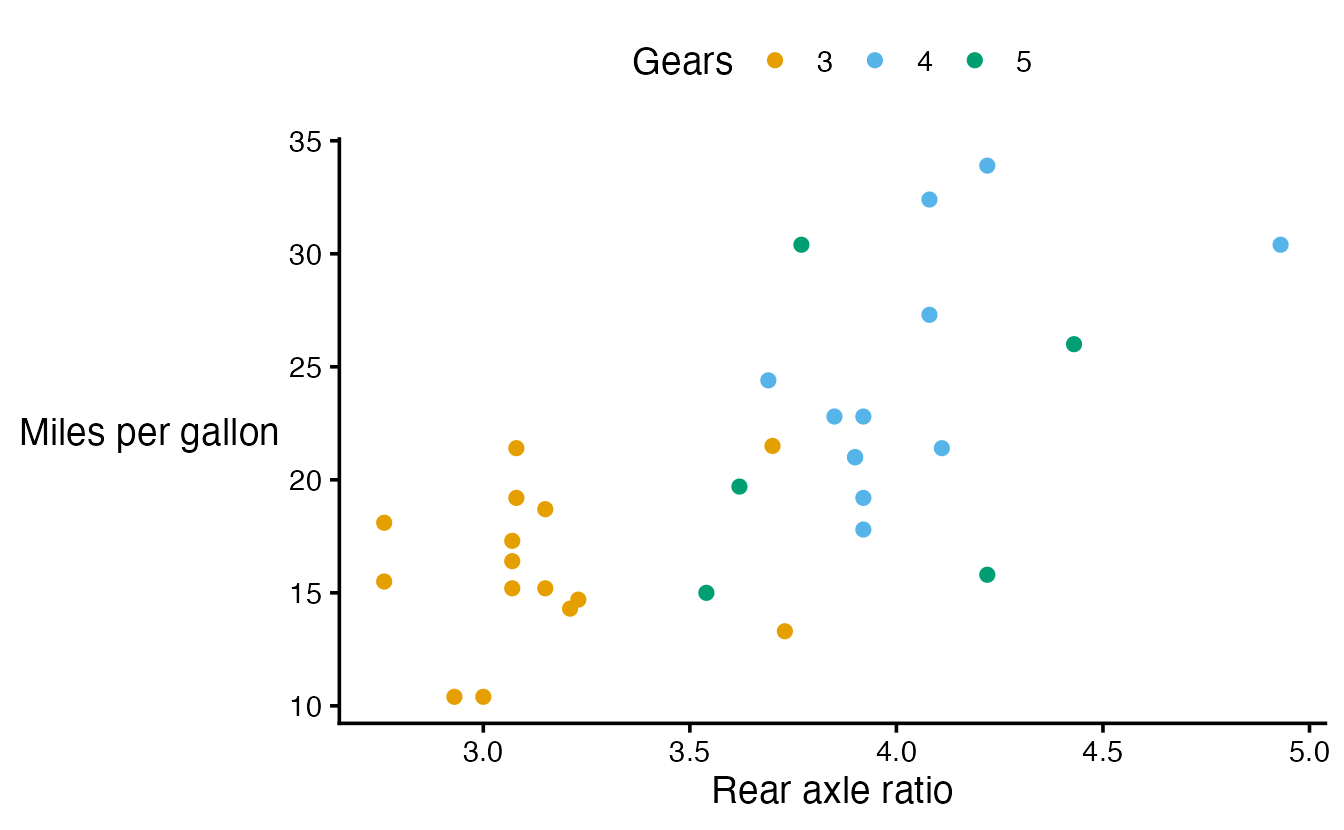
Other built-in themes include theme_gray() (the ggplot2 default), theme_light(), theme_dark() and theme_void().
10. Saving a plot
Store the plot in an object and pass it explicitly to ggsave() (by default ggsave() saves the last plot displayed, which is easy to get wrong):
final_plot <- cars_plot + labs(title = "Fuel economy and axle ratio")

ggsave(
  filename = "figures/fuel-economy.png",  # the extension sets the format
  plot = final_plot,
  width = 7, height = 4.5, units = "in",
  dpi = 300
)
(The chunk is not run here because it writes a file.) The path is relative to your project folder, never an absolute path. Use .png for slides and web pages, and a vector format (.pdf, .svg) for printed documents and papers: vector graphics stay sharp at any zoom. Fix width and height so that text has the same size every time you save.
11. Principles of good graphics
- Show the data. Prefer plots that show individual observations or full distributions when possible, rather than only a summary.
- Maximise the data-ink ratio (Tufte): every drop of ink should carry information. Remove heavy backgrounds, 3-D effects, redundant legends and decorations.
- Use position for the most important comparison. We judge positions on a common axis far more accurately than colours, areas or angles.
- Use colour purposefully and accessibly. About 1 in 12 men has some form of colour-vision deficiency. Use colour-blind-safe palettes (Okabe–Ito, set by default in this course;
scale_colour_viridis_d()for many categories), avoid red–green contrasts, and add redundant encodings (shape, labels). - Label everything with units, and state the message in the title.
- Do not distort. Bars must start at zero; use the same axes across panels you want readers to compare; say when an axis is logarithmic.
WarningCommon pitfalls
- Constant inside
aes():aes(colour = "red")maps a fake variable — the points are not red and a useless legend appears. Set constants outsideaes(). - Using
|>instead of+between ggplot2 layers. The pipe passes data intoggplot(); layers are added with+. - Forgetting
factor()for a numeric code (gears, cylinders) used as a category: you get a continuous colour gradient instead of distinct colours. - Zooming with
xlim()when you meant to zoom: points outside are removed and fitted lines change. Usecoord_cartesian(). sizefor line thickness. In current ggplot2 uselinewidthfor lines and borders.- Calling
ggsave()withoutplot =: it saves whichever plot was displayed last.
12. Check your understanding
13. Exercises
Interactive (run in your browser)
★ Exercise 1 — your first scatter plot. Using mtcars, plot mpg (y) against car weight wt (x), colouring points by the number of cylinders treated as a category. Add axis labels.
x = wt, y = mpg, and colour = factor(cyl) so that cylinders are treated as categories.
ggplot(mtcars, aes(x = wt, y = mpg, colour = factor(cyl))) +
  geom_point(size = 2) +
  labs(x = "Weight (1000 lb)", y = "Miles per gallon", colour = "Cylinders")
Heavier cars travel fewer miles per gallon, and the 8-cylinder cars are the heaviest and least economical.
★★ Exercise 2 — debug. The author wanted orange, semi-transparent points and no legend. Fix the code.
There are two bugs: one in how layers are combined, one in where the constant aesthetics are written.
ggplot(penguins, aes(bill_len, bill_dep)) +
  geom_point(colour = "orange", alpha = 0.5, na.rm = TRUE)
Layers are added with +, not |>; and constant aesthetics are set outside aes(). Inside aes() “orange” and 0.5 would be treated as data values, producing default colours and legends.
★★ Exercise 3 — facets and fitted lines. Plot bill_dep against bill_len for the penguins, with one panel per species and a straight fitted line in each panel. Does the relationship within species go up or down?
method = "lm" and facet_wrap(~ species).
ggplot(penguins, aes(bill_len, bill_dep)) +
  geom_point(alpha = 0.5, na.rm = TRUE) +
  geom_smooth(method = "lm", formula = y ~ x, na.rm = TRUE) +
  facet_wrap(~ species) +
  labs(x = "Bill length (mm)", y = "Bill depth (mm)")
Within every species, longer bills are also deeper (the lines go up). Try removing the facets and the colour: with all species pooled, the overall line goes down! Species is a confounder — the same Simpson’s paradox of Describing two variables. More on this in Correlation.
★★ Exercise 4 — log scale. In msleep, plot total sleep (sleep_total, hours) against body weight (bodywt). Put the x axis on a log scale. Describe the relationship.
Use scale_x_log10().
ggplot(msleep, aes(bodywt, sleep_total)) +
  geom_point() +
  scale_x_log10() +
  labs(x = "Body weight (kg, log scale)", y = "Total sleep (hours per day)")
On the log scale a downward trend becomes visible: larger mammals tend to sleep fewer hours, with a lot of scatter. On a linear scale almost all animals would be squeezed against the y axis.
Practice on your own computer
★★★ Exercise 5 — a publication-ready figure. Create a scatter plot of body_mass against flipper_len with colour and shape mapped to species, one fitted line per species without confidence band, a message-style title, a caption with the data source, axis labels with units, the legend on top and theme_classic(). Save it as penguins.png (7 × 4.5 inches, 300 dpi) and as penguins.pdf.
TipSolution
fig <- ggplot(penguins, aes(flipper_len, body_mass,
                            colour = species, shape = species)) +
  geom_point(alpha = 0.7, na.rm = TRUE) +
  geom_smooth(method = "lm", formula = y ~ x, se = FALSE, na.rm = TRUE) +
  labs(title = "Penguins with longer flippers are heavier, in every species",
       caption = "Source: penguins (Gorman et al., 2014; R datasets)",
       x = "Flipper length (mm)", y = "Body mass (g)",
       colour = "Species", shape = "Species") +
  theme_classic() +
  theme(legend.position = "top")

ggsave("penguins.png", plot = fig, width = 7, height = 4.5, dpi = 300)
ggsave("penguins.pdf", plot = fig, width = 7, height = 4.5)
Mapping colour and shape to the same variable with the same title merges them into a single legend.
Summary
| Component | Typical code |
|---|---|
| Data + aesthetics | ggplot(df, aes(x, y, colour = g)) |
| Scatter plot | + geom_point() |
| Mapping vs setting | geom_point(aes(colour = g)) vs geom_point(colour = "blue") |
| Fitted line | + geom_smooth(method = "lm", formula = y ~ x, se = FALSE) |
| Log axis | + scale_x_log10() |
| Axis breaks | + scale_x_continuous(breaks = ...) |
| Labels | + labs(title, subtitle, caption, x, y, colour) |
| Facets | + facet_wrap(~ g), + facet_grid(r ~ c) |
| Zoom | + coord_cartesian(xlim = ...) |
| Theme | + theme_classic(), + theme(legend.position = "top") |
| Save | ggsave("file.png", plot = p, width, height, dpi) |
- Every ggplot is data + aesthetic mappings + layers, refined by scales, facets, coordinates and a theme.
- Map variables inside
aes(); set constants outside it. - Use log scales for positive, skewed data spanning orders of magnitude; keep labels in original units.
- Zoom with
coord_cartesian(); scale limits remove data. - Good graphics show the data, label everything and are readable by everyone.