library(ggplot2)Deep learning: ideas and set-up
What a neural network is, when it is worth it, and how to install keras3
Connect neural networks to the statistical models of the course (a neuron is a logistic regression), decide when deep learning helps, install keras3 with a TensorFlow or JAX backend, and understand how this site freezes deep-learning results.
NoteLearning objectives
By the end of this lesson you will be able to:
- explain a neural network as stacked logistic-regression-like units with non-linear activations;
- show, with a few lines of base R, that gradient descent finds the same coefficients as
glm(); - decide whether a problem is a good candidate for deep learning or whether a classical model is the better choice;
- install keras3 with a TensorFlow or JAX backend and check that it works;
- describe how this website freezes deep-learning results so that they are computed only once.
ImportantThis track is optional
The deep-learning lessons (61–66) are an optional track. They need extra software (Python and a deep-learning library) that is not required anywhere else in the course. Everything up to lesson 60 and the capstone project works without it. The lessons can still be read without installing anything: all results on this site were computed once and stored (Section 9).
1. Why deep learning?
Some data are hard to describe with a handful of columns. A photograph is a grid of tens of thousands of pixel values; a movie review is a sequence of words of variable length; an electricity meter produces a long, wiggly series. For data like these, nobody can write down in advance which features matter (“is there a vertical edge here?”, “does the word not come before good?”).
Deep learning is a family of models that learn the features themselves from raw inputs. The models are called neural networks. The name sounds mysterious, but the building block is something you already know: the logistic regression of lesson 41.
2. A neuron is a logistic regression
A logistic regression takes predictors \(x_1, \dots, x_p\), forms a weighted sum, and squeezes it into a probability with the sigmoid function \(\sigma(z) = 1/(1+e^{-z})\):
\[ \hat p = \sigma(b + w_1 x_1 + \dots + w_p x_p). \]
In deep-learning language this is one neuron: the coefficients are called weights (\(w\)), the intercept is the bias (\(b\)), and \(\sigma\) is the activation function. A logistic regression is a neural network with one layer and one neuron.
There is one practical difference. glm() finds the coefficients with an exact, specialised algorithm. Neural networks are fitted with gradient descent: start from arbitrary weights, compute how the loss changes when each weight changes (the gradient), take a small step downhill, repeat. Let us check, in base R, that gradient descent reaches the same answer as glm() when we predict the sex of a penguin from body mass and bill depth.
peng <- na.omit(penguins[, c("sex", "body_mass", "bill_dep")])
y <- as.numeric(peng$sex == "male")
X <- cbind(1, scale(peng$body_mass), scale(peng$bill_dep))  # 1 = bias

sigmoid <- function(z) 1 / (1 + exp(-z))

w <- c(0, 0, 0)          # start from zero weights
eta <- 0.5               # learning rate (step size)
for (iter in 1:2000) {
  p <- sigmoid(X %*% w)                 # forward pass: predictions
  grad <- t(X) %*% (p - y) / nrow(X)    # gradient of the mean log-loss
  w <- w - eta * grad                   # one step downhill
}
fit_glm <- glm(y ~ X[, 2] + X[, 3], family = binomial)
cbind(gradient_descent = drop(w), glm = coef(fit_glm))#> gradient_descent glm
#> (Intercept) 0.1878 0.1879
#> X[, 2] 4.2469 4.2484
#> X[, 3] 3.9876 3.9890
TipHow to read this output
- Each row is one parameter: the bias (intercept) and the weights for standardised body mass and bill depth.
- The two columns agree to about three decimals (for example 4.247 versus 4.248). Gradient descent has climbed down to the same minimum of the log-loss that
glm()finds directly. - Gradient descent is slower and approximate, but it has one huge advantage: it works for any model whose loss we can differentiate — including networks with millions of weights, where no exact formula exists.
NoteGoing deeper: where the gradient comes from
The mean log-loss (binary cross-entropy) of a logistic model is
\[ \mathcal L(w) = -\frac1n \sum_{i=1}^n \big[y_i \log \hat p_i + (1-y_i)\log(1-\hat p_i)\big], \qquad \hat p_i = \sigma(x_i^\top w). \]
Because \(\sigma'(z) = \sigma(z)\{1-\sigma(z)\}\), the gradient simplifies to
\[ \nabla \mathcal L(w) = \frac1n X^\top(\hat p - y), \]
which is exactly the line t(X) %*% (p - y) / nrow(X). Gradient descent updates \(w \leftarrow w - \eta \nabla\mathcal L(w)\). Minimising the log-loss is the same as maximising the Bernoulli likelihood, so the minimum is the maximum-likelihood estimate that glm() reports.
3. Stacking neurons: a neural network
A single neuron draws a straight boundary between classes. To bend the boundary, we put several neurons side by side (a layer), feed their outputs into another layer, and so on. A network with layers \(1, \dots, L\) computes
\[ h^{(1)} = g\big(W^{(1)}x + b^{(1)}\big), \quad h^{(2)} = g\big(W^{(2)}h^{(1)} + b^{(2)}\big), \quad \dots, \quad \hat y = \text{output}\big(W^{(L)}h^{(L-1)} + b^{(L)}\big). \]
Each layer is like a set of GLMs whose “predictors” are the outputs of the previous layer. The intermediate layers are called hidden layers; “deep” simply means “more than one hidden layer”. The function \(g\) is the activation. The three you will meet most often are plotted below.
z <- seq(-4, 4, length.out = 200)
act <- rbind(
  data.frame(z = z, value = 1 / (1 + exp(-z)), activation = "sigmoid"),
  data.frame(z = z, value = tanh(z),           activation = "tanh"),
  data.frame(z = z, value = pmax(z, 0),        activation = "ReLU")
)
ggplot(act, aes(z, value, colour = activation)) +
  geom_line(linewidth = 1) +
  labs(x = "input z", y = "g(z)", colour = NULL)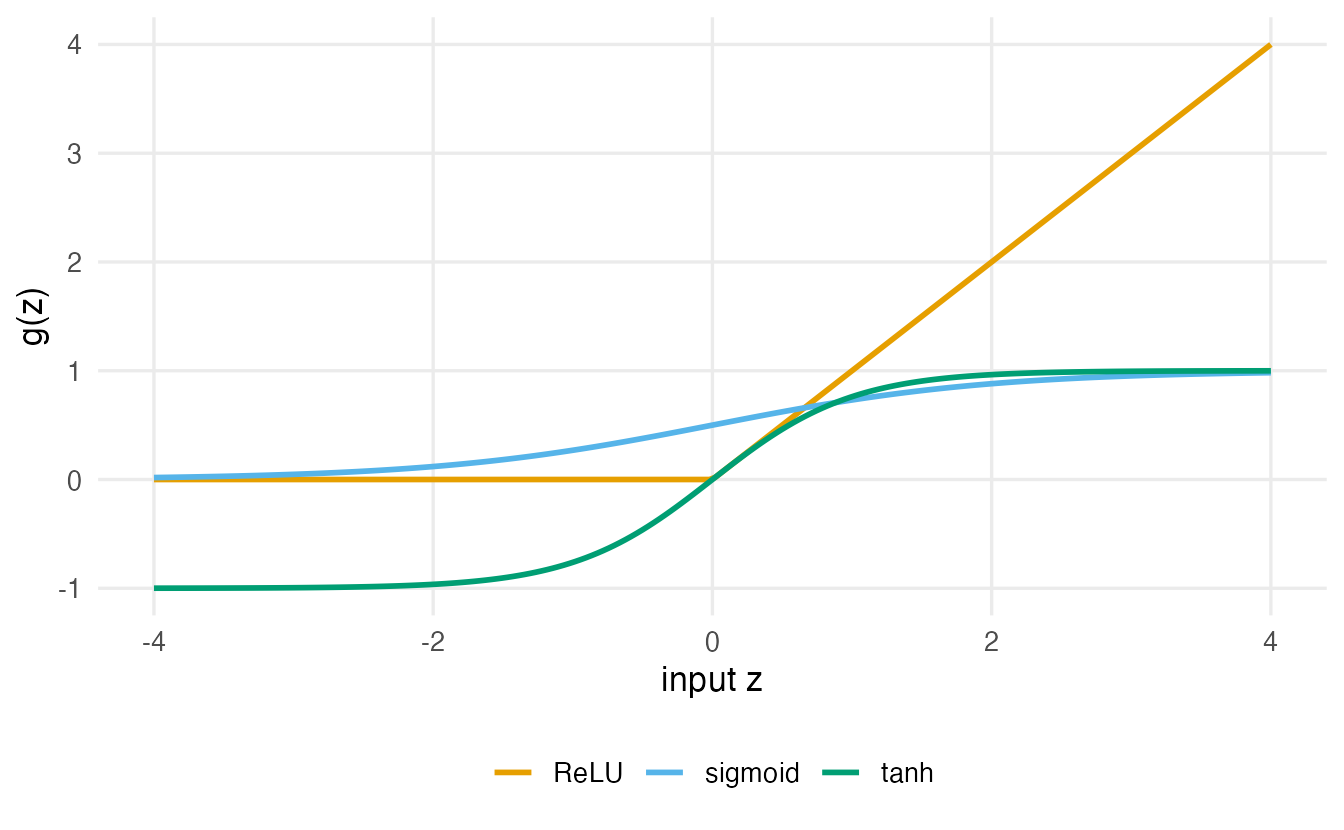
Why is the activation essential? Without it, every layer is a linear map, and a chain of linear maps is still a single linear map: a 10-layer “network” would be just a linear regression with extra steps. The non-linear activation is what lets the network approximate curved relationships and interactions that we never specified.
NoteGoing deeper: why depth without activations collapses
With identity activations, \(h^{(2)} = W^{(2)}(W^{(1)}x + b^{(1)}) + b^{(2)} = (W^{(2)}W^{(1)})x + (W^{(2)}b^{(1)} + b^{(2)}) = \tilde W x + \tilde b\). Any number of layers reduces to one affine map. With a non-linear \(g\), a network with one wide enough hidden layer can approximate any continuous function on a bounded region arbitrarily well (the universal approximation theorem). The theorem says nothing about how much data you need to find such weights — which is the practical question.
| Statistical model you know | Neural-network view |
|---|---|
| Linear regression | 1 neuron, identity activation, squared-error loss |
| Logistic regression | 1 neuron, sigmoid activation, binary cross-entropy loss |
| Multinomial logistic regression | 1 layer of \(K\) neurons, softmax activation, categorical cross-entropy |
| Ridge penalty (lesson 43) | “Weight decay” (\(L_2\) penalty on the weights) |
| PCA (lesson 50) | A linear autoencoder (lesson 63) |
4. When does deep learning help — and when not?
Deep learning is not a better version of statistics; it is a tool with a particular sweet spot.
| Deep learning usually helps | A classical model is usually as good or better |
|---|---|
| Images, audio, video (local spatial patterns) | Small tabular data (hundreds or a few thousand rows, tens of columns) |
| Text and other sequences of symbols | Problems where you need interpretable coefficients, odds ratios, CIs |
| Long time series with complex, repeated patterns | Inference questions (“is the effect different from zero?”) |
| Very large datasets (hundreds of thousands of rows or more) | Situations with little computing power or strict reproducibility needs |
On ordinary spreadsheets, gradient boosting (lesson 47) and penalised regression are hard to beat, train in seconds and need far less tuning. A sensible habit, which we follow in every lesson of this track, is to always fit a classical baseline first and ask whether the network is worth its extra cost.
5. The software: keras3, Python and a backend
R does not run neural networks by itself. The keras3 package is an R interface to Keras 3, a Python library. Keras describes the model (layers, loss, optimiser); a backend does the heavy numerical work. The two common backends are TensorFlow (Google) and JAX (Google). The reticulate package connects R and Python behind the scenes.
your R code ──► keras3 (R) ──► reticulate ──► Keras 3 (Python) ──► TensorFlow or JAXYou write only R. But because Python is involved, installation has a few more steps than a normal R package.
6. Installing keras3, step by step
Do this once, on your own computer, in a fresh R session.
Step 1 — install the R package.
install.packages("keras3")Step 2 — install Python, Keras and a backend. The simplest route is the helper function provided by keras3. It creates a dedicated Python environment (by default called r-keras), installing Python itself if needed, and puts Keras and the backend inside it:
keras3::install_keras()                     # TensorFlow backend (default)
# keras3::install_keras(backend = "jax")    # or: JAX backend
This downloads several hundred megabytes and can take 5–15 minutes. When it finishes, restart R (in RStudio: Session → Restart R).
TipRecent versions can set Python up automatically
With recent versions of keras3 and reticulate, loading keras3 can provision a suitable Python environment by itself the first time you use it. If library(keras3) followed by the check in Step 3 works, you are done; if not, run install_keras() as above. Either way, never install Python packages “by hand” into your system Python for this course.
Step 3 — check the installation.
library(keras3)
keras_ready()           # course helper: should be TRUE
#> [1] TRUEconfig_backend() # "tensorflow" or "jax"#> [1] "tensorflow"Step 4 — build a tiny model. If this prints a table of layers, everything works.
tiny <- keras_model_sequential(input_shape = 3) |>
  layer_dense(units = 4, activation = "relu") |>
  layer_dense(units = 1, activation = "sigmoid")
tiny
#> Model: "sequential"
#> ┏━━━━━━━━━━━━━━━━━━━━━━━━━━━━━━━━━━━┳━━━━━━━━━━━━━━━━━━━━━━━━━━┳━━━━━━━━━━━━━━━┓
#> ┃ Layer (type) ┃ Output Shape ┃ Param # ┃
#> ┡━━━━━━━━━━━━━━━━━━━━━━━━━━━━━━━━━━━╇━━━━━━━━━━━━━━━━━━━━━━━━━━╇━━━━━━━━━━━━━━━┩
#> │ dense (Dense) │ (None, 4) │ 16 │
#> ├───────────────────────────────────┼──────────────────────────┼───────────────┤
#> │ dense_1 (Dense) │ (None, 1) │ 5 │
#> └───────────────────────────────────┴──────────────────────────┴───────────────┘
#> Total params: 21 (84.00 B)
#> Trainable params: 21 (84.00 B)
#> Non-trainable params: 0 (0.00 B)
TipHow to read this output
Each row is a layer. Output Shape (None, 4) means “any number of rows (None is the batch size, decided later), 4 columns”. Param # counts the weights: the first dense layer has \(3 \times 4\) weights plus 4 biases \(= 16\); the second has \(4 \times 1 + 1 = 5\). Counting parameters by hand is a good way to check that you understand an architecture.
To use JAX instead of TensorFlow in a session, call keras3::use_backend("jax") before keras is first used in that session (that is, right after starting R).
7. CPU or GPU?
A GPU (graphics card) performs thousands of multiplications in parallel and can train large networks 10–100 times faster than a CPU. But:
- every lesson in this track has been sized to train on an ordinary laptop CPU in a few minutes;
- GPU support depends on your operating system and hardware (NVIDIA drivers and CUDA on Linux/Windows; Apple-silicon Macs use different routes) and is the most common source of installation trouble;
- you do not need a GPU for this course.
If you have a suitable GPU and the backend sees it, it is used automatically. With the TensorFlow backend you can list the visible GPUs with:
reticulate::import("tensorflow")$config$list_physical_devices("GPU")An empty list means “CPU only” — perfectly fine here.
8. Reproducibility: why two runs can differ
Training a network involves randomness: initial weights, the shuffling of rows into mini-batches, dropout. Unlike set.seed() for R’s own random numbers, these random draws happen in Python. keras3 provides one function that seeds R, Python, NumPy and the backend together:
keras3::set_random_seed(123)Even with a seed, results can differ slightly between computers, library versions, CPU and GPU, because some parallel operations add numbers in a different order (floating-point addition is not exactly associative). So:
- set the seed at the start of every chunk that builds and trains a model;
- expect small differences (a metric changing in the third decimal), not large ones;
- when a difference between two models is smaller than the run-to-run variation, do not over-interpret it.
9. How this site freezes deep-learning results
The course website is built automatically by GitHub Actions (a free computer in the cloud that runs quarto render every time the repository changes). Installing Python, TensorFlow and downloading image datasets on that machine at every change would be slow and fragile. The old version of the course worked around this by publishing these lessons as huge static HTML files with no source code. The new solution uses a Quarto feature called freeze.
The idea. When Quarto executes a document, it stores the results (printed output and figures) in a folder called _freeze/. If that folder is committed to git, any later project render can reuse the stored results instead of running the code. Each deep-learning lesson has, in its front matter,
execute:
  freeze: true
which means “during a project render, never re-execute this file; always use what is in _freeze/”. (The rest of the site uses freeze: auto, which re-executes a file whenever its source changes. That would be dangerous here: fixing a typo in the text would make GitHub Actions try to run keras and fail.)
As a second safety net, each deep-learning lesson starts with a hidden chunk
has_keras <- keras_ready() # defined in _common.Rand every chunk that needs keras carries #| eval: !expr has_keras. On a computer without keras the lesson still renders: the code is shown but not run, and numbers in the text read “not computed”.
For the instructor: updating a lesson
Install keras3 and a backend (Section 6) and check them (Steps 3–4).
Edit the lesson, e.g.
lessons/13-deep-learning/62-dnn-tabular.qmd.Render that single file from the project folder:
quarto render lessons/13-deep-learning/62-dnn-tabular.qmdRendering an individual file always executes it, whatever the freeze setting, and overwrites its stored results in
_freeze/lessons/13-deep-learning/62-dnn-tabular/. (If you want to be certain that no stale output survives — for instance after renaming chunks — delete that folder first.)Look at the result (
quarto preview) and check thathas_keraswasTRUE: the callout boxes must show real numbers, not “not computed”.Commit both the
.qmdand the_freeze/folder, then push:git add lessons/13-deep-learning/62-dnn-tabular.qmd _freeze/lessons/13-deep-learning/ git commit -m "Update DNN lesson" git pushGitHub Actions runs a project render, finds the frozen results, and publishes the page without running keras.
Note that the frozen version stores the whole executed document, prose included. Any change to a deep-learning lesson — even a typo in the text — becomes visible on the site only after step 3 has been repeated on a machine with keras.
WarningDo not render a deep-learning file on a machine without keras
If you run quarto render <file> on a computer where has_keras is FALSE, the frozen results are overwritten with the “code shown, not run” version. Before committing, always look at git diff --stat _freeze/. If you overwrote results by mistake, restore them with git checkout -- _freeze/lessons/13-deep-learning/.
For students who clone the repository
quarto previeworquarto render(whole project) uses the frozen results: you can browse the lessons locally without Python.- To run the code yourself, install keras3 (Section 6), open the
.qmdfile in RStudio or Positron and run the chunks one by one. Your own numbers will be close to, but not identical with, those on the site (Section 8). - Rendering a single deep-learning file re-executes it and updates your local
_freeze/. That is fine on your computer; just do not commit it to a pull request unless you mean to.
WarningCommon pitfalls
- Reaching for deep learning first. On small tabular data a network is often slower, harder to tune and no more accurate than boosting or a penalised GLM. Fit the baseline first.
- Forgetting the activation. A stack of dense layers without non-linear activations is just a linear model.
- Installing Python packages by hand into the system Python. Use
install_keras()(or the automatic set-up) so that keras3 finds a consistent environment. - Using
set.seed()and expecting reproducible training. It does not seed the Python side; usekeras3::set_random_seed(). - Choosing the backend too late.
use_backend()must be called before keras is first used in the session; otherwise restart R. - Committing a
_freeze/folder produced without keras (Section 9).
10. Check your understanding
11. Exercises
★ Exercise 1 — count the parameters. A network has 10 inputs, a hidden layer of 32 ReLU units, a hidden layer of 16 ReLU units and one sigmoid output. How many weights and biases does it have in total? Check your answer by building it with keras_model_sequential(input_shape = 10) and printing it.
TipSolution
Layer 1: \(10 \times 32 + 32 = 352\). Layer 2: \(32 \times 16 + 16 = 528\). Output: \(16 \times 1 + 1 = 17\). Total \(= 897\).
library(keras3)
keras_model_sequential(input_shape = 10) |>
  layer_dense(32, activation = "relu") |>
  layer_dense(16, activation = "relu") |>
  layer_dense(1, activation = "sigmoid")
★ Exercise 2 — the learning rate. Re-run the gradient-descent chunk of Section 2 with eta <- 0.01, eta <- 5 and eta <- 20, keeping 2000 iterations. Compare the final weights with glm(). What happens in each case, and why?
TipSolution
With eta = 0.01 the steps are tiny: after 2000 iterations the weights are still far from the glm() values (about 1.8 and 1.7 instead of about 4.2 and 4.0) — too slow. With eta = 5 the algorithm converges even faster than with 0.5. With eta = 20 the steps overshoot the minimum and the weights do not settle on the glm() values (the bill-depth weight ends near 4.9). In neural networks, too large a learning rate often makes the loss explode. The learning rate is the single most important tuning knob of gradient descent.
★★ Exercise 3 — track the loss. Modify the loop in Section 2 so that it stores the log-loss at each iteration in a vector loss, and plot loss against the iteration number. Where does most of the improvement happen?
TipSolution
w <- c(0, 0, 0); eta <- 0.5; loss <- numeric(2000)
for (iter in 1:2000) {
  p <- sigmoid(X %*% w)
  loss[iter] <- -mean(y * log(p) + (1 - y) * log(1 - p))
  w <- w - eta * t(X) %*% (p - y) / nrow(X)
}
plot(loss, type = "l", xlab = "iteration", ylab = "log-loss")
The loss drops steeply in the first few dozen iterations and then flattens: later iterations make only tiny refinements. This “learning curve” is exactly what keras plots for every model in the next lessons.
★★ Exercise 4 — deep learning or not? For each problem, say whether you would start with deep learning or with a classical model, in one sentence each: (a) predicting house prices from 12 columns for 3,000 houses; (b) detecting defective parts from 200,000 photos; (c) testing whether a new teaching method improves exam marks; (d) classifying 1 million customer e-mails by topic.
TipSolution
- Classical (boosting, penalised regression): small tabular data. (b) Deep learning (a CNN, lesson 66): many images. (c) Classical inference (a t-test or regression with a CI): the question is about an effect, not a prediction. (d) Deep learning is a reasonable candidate (text, very large data), but a bag-of-words penalised logistic regression is a quick, strong baseline to beat (lesson 65).
★★★ Exercise 5 — freeze in practice. You fixed a typo in the text of lesson 64 on a laptop without keras, committed the .qmd and pushed. The site rebuilds without errors, but the typo is still there. Why? What is the correct procedure?
TipSolution
The frozen results in _freeze/ contain the whole executed document (text included), not only the outputs of the code. With freeze: true a project render reuses that stored version, so the new text does not appear until the file is executed again. The correct procedure is to render the file on a machine with keras and commit both the source and the refreshed _freeze/ folder:
quarto render lessons/13-deep-learning/64-lstm.qmd
git add lessons/13-deep-learning/64-lstm.qmd _freeze/lessons/13-deep-learning/
git commit -m "Fix typo in LSTM lesson"
git push
Rendering it on the laptop without keras would also update the text, but would replace the model results with “not computed”.
Summary
| Idea / function | What it means |
|---|---|
| Neuron | Weighted sum + bias + activation: a GLM |
Activation (sigmoid, tanh, relu) |
The non-linearity that makes depth useful |
| Gradient descent, learning rate | Iteratively step downhill on the loss |
install.packages("keras3"), keras3::install_keras() |
Install the R package, then Python + Keras + backend |
keras_ready() (course helper), config_backend() |
Check the installation |
use_backend("jax") |
Choose the backend (before first use) |
set_random_seed() |
Seed R, Python and the backend together |
execute: freeze: true + _freeze/ |
Compute once locally, publish without re-running |
- A neural network is a stack of GLM-like units joined by non-linear activations, fitted by gradient descent.
- Deep learning shines on images, text, long sequences and very large data; on small tables, classical models usually win.
- keras3 is an R front end to Python’s Keras 3; a backend (TensorFlow or JAX) does the computation.
- Training is random: seed with
set_random_seed()and expect small run-to-run differences. - This site renders deep-learning lessons once, on the instructor’s computer, and publishes the frozen results.