Describing two variables
Contingency tables, conditional summaries — and a famous paradox
Describe the relationship between two variables: joint, marginal and conditional distributions of two categorical variables, group summaries of a numeric variable, a first look at covariance, and Simpson’s paradox with the UC Berkeley admissions data.
NoteLearning objectives
By the end of this lesson you will be able to:
- build a contingency table and compute joint, marginal and conditional distributions;
- choose between row and column percentages according to the question;
- compare a numeric variable across groups with conditional means and medians;
- explain what the covariance of two numeric variables measures, and why it depends on units;
- recognise Simpson’s paradox and explain it in terms of a third variable.
library(dplyr)
library(ggplot2)
1. Why look at two variables together?
Most interesting questions are about relationships: Do male and female penguins differ in mass? Do certain species live on certain islands? Were women less likely than men to be admitted to a university? A single-variable summary cannot answer these. We need to describe how one variable changes across the values of another.
What tool to use depends on the types of the two variables:
| Variable 1 | Variable 2 | Description | Plot (Module 6) |
|---|---|---|---|
| categorical | categorical | contingency table, conditional percentages | stacked / proportional bars |
| categorical | numeric | summaries (mean, median, SD) by group | boxplots, violins by group |
| numeric | numeric | covariance, correlation | scatter plot |
Often one variable is thought of as the explanatory variable (the one that might explain or come first, e.g., species, gender) and the other as the response (the outcome, e.g., island, admission). This distinction will guide almost every choice in this lesson.
2. Two categorical variables: the contingency table
A contingency table (or cross-tabulation) counts the observations for every combination of two categorical variables.
tab <- table(island = penguins$island, species = penguins$species)
tab
#> species
#> island Adelie Chinstrap Gentoo
#> Biscoe 44 0 124
#> Dream 56 68 0
#> Torgersen 52 0 0Each cell is a joint frequency: for example 68 penguins are Chinstraps living on Dream. The zeros are informative: Gentoo penguins were only found on Biscoe, Chinstraps only on Dream, and Torgersen only had Adelie penguins.
Margins
The row and column totals are the marginal frequencies — the distribution of each variable on its own (they are written “in the margins” of the table):
addmargins(tab)#> species
#> island Adelie Chinstrap Gentoo Sum
#> Biscoe 44 0 124 168
#> Dream 56 68 0 124
#> Torgersen 52 0 0 52
#> Sum 152 68 124 344margin.table(tab, 1) # island totals (rows)#> island
#> Biscoe Dream Torgersen
#> 168 124 52margin.table(tab, 2) # species totals (columns)#> species
#> Adelie Chinstrap Gentoo
#> 152 68 124The marginal distribution of species is exactly the one-way table of Frequency tables. Margins tell you nothing about the relationship; for that we need conditional distributions.
3. Joint, marginal and conditional distributions
There are three ways to turn the counts into proportions. They answer different questions:
round(prop.table(tab), 3) # joint: divide by the grand total#> species
#> island Adelie Chinstrap Gentoo
#> Biscoe 0.128 0.000 0.360
#> Dream 0.163 0.198 0.000
#> Torgersen 0.151 0.000 0.000Joint proportions: what fraction of all penguins are in each cell? (All cells sum to 1.)
round(prop.table(tab, margin = 1), 3) # row proportions: each row sums to 1#> species
#> island Adelie Chinstrap Gentoo
#> Biscoe 0.262 0.000 0.738
#> Dream 0.452 0.548 0.000
#> Torgersen 1.000 0.000 0.000Row proportions = the distribution of species conditional on (given) the island. Question: “Of the penguins on Dream, what fraction are Chinstrap?” — 55%.
round(prop.table(tab, margin = 2), 3) # column proportions: each column sums to 1#> species
#> island Adelie Chinstrap Gentoo
#> Biscoe 0.289 0.000 1.000
#> Dream 0.368 1.000 0.000
#> Torgersen 0.342 0.000 0.000Column proportions = the distribution of island conditional on the species. Question: “Of the Adelie penguins, what fraction live on Dream?” — 37%.
TipHow to read this output — and how to choose
margin = 1means “condition on the rows” (rows sum to 1);margin = 2“condition on the columns”.- A useful rule: compute percentages within the categories of the explanatory variable, and compare them across those categories. If you think of species as explaining where birds live, use column proportions here (each species sums to 100%) and compare the islands across species.
- The two conditional tables are not interchangeable. “37% of Adelie penguins live on Dream” and “45% of the penguins on Dream are Adelie” are both true and say different things. Mixing them up is one of the most common errors in reading reports (and the newspapers).
Association and independence
If species and island were unrelated (statistically independent), the distribution of species would be the same on every island: every row of the row-proportion table would look like the overall species distribution (44% / 20% / 36%). Here the rows are completely different — a very strong association.
NoteGoing deeper: expected counts under independence
Write \(n_{ij}\) for the count in row \(i\) and column \(j\), \(n_{i\cdot}\) and \(n_{\cdot j}\) for the row and column totals, and \(n\) for the grand total. Under independence the joint proportion is the product of the marginal proportions, so the expected count is
\[ E_{ij} = n \cdot \frac{n_{i\cdot}}{n} \cdot \frac{n_{\cdot j}}{n} = \frac{n_{i\cdot}\, n_{\cdot j}}{n}. \]
expected <- outer(margin.table(tab, 1), margin.table(tab, 2)) / sum(tab)
round(expected, 1)
#> species
#> island Adelie Chinstrap Gentoo
#> Biscoe 74.2 33.2 60.6
#> Dream 54.8 24.5 44.7
#> Torgersen 23.0 10.3 18.7The bigger the differences between observed counts \(n_{ij}\) and expected counts \(E_{ij}\), the stronger the evidence of association. The chi-square test turns this comparison into a formal test — see Proportions and chi-square tests.
The tidy way
With dplyr, count() two variables and compute proportions within the groups of the conditioning variable with .by:
penguins |>
  count(species, island) |>
  mutate(prop = n / sum(n), .by = species)
#> species island n prop
#> 1 Adelie Biscoe 44 0.2895
#> 2 Adelie Dream 56 0.3684
#> 3 Adelie Torgersen 52 0.3421
#> 4 Chinstrap Dream 68 1.0000
#> 5 Gentoo Biscoe 124 1.0000Here .by = species means “divide by the total of each species”: the proportions add up to 1 within each species, exactly like prop.table(tab, margin = 2). Combinations with zero birds simply do not appear as rows.
4. A categorical and a numeric variable: conditional summaries
To relate a numeric variable to a categorical one, compute the summaries of Summary statistics separately for each group — the conditional means, medians and SDs.
penguins |>
  filter(!is.na(body_mass), !is.na(sex)) |>
  summarise(n = n(),
            mean = mean(body_mass),
            median = median(body_mass),
            sd = sd(body_mass),
            .by = c(species, sex)) |>
  arrange(species, sex)
#> species sex n mean median sd
#> 1 Adelie female 73 3369 3400 269.4
#> 2 Adelie male 73 4043 4000 346.8
#> 3 Chinstrap female 34 3527 3550 285.3
#> 4 Chinstrap male 34 3939 3950 362.1
#> 5 Gentoo female 58 4680 4700 281.6
#> 6 Gentoo male 61 5485 5500 313.2In base R, tapply() with a list of two factors gives the same means as a compact two-way table:
means_tab <- tapply(penguins$body_mass,
                    list(penguins$species, penguins$sex),
                    mean, na.rm = TRUE)
round(means_tab)
#> female male
#> Adelie 3369 4043
#> Chinstrap 3527 3939
#> Gentoo 4680 5485
TipHow to read this output
- Within every species males are heavier than females, by about 412 to 805 g on average.
- Is that a big difference? Compare it with the spread within groups (the SDs, a few hundred grams): the difference is between roughly one and two and a half SDs, so the two sexes overlap but are clearly shifted.
- Means and medians are close in each group: no strong skewness, so the mean is a fair summary here.
Always look at the distributions too, not only at their centres:
penguins |>
  filter(!is.na(sex)) |>
  ggplot(aes(x = species, y = body_mass, fill = sex)) +
  geom_boxplot() +
  labs(x = NULL, y = "Body mass (g)", fill = "Sex")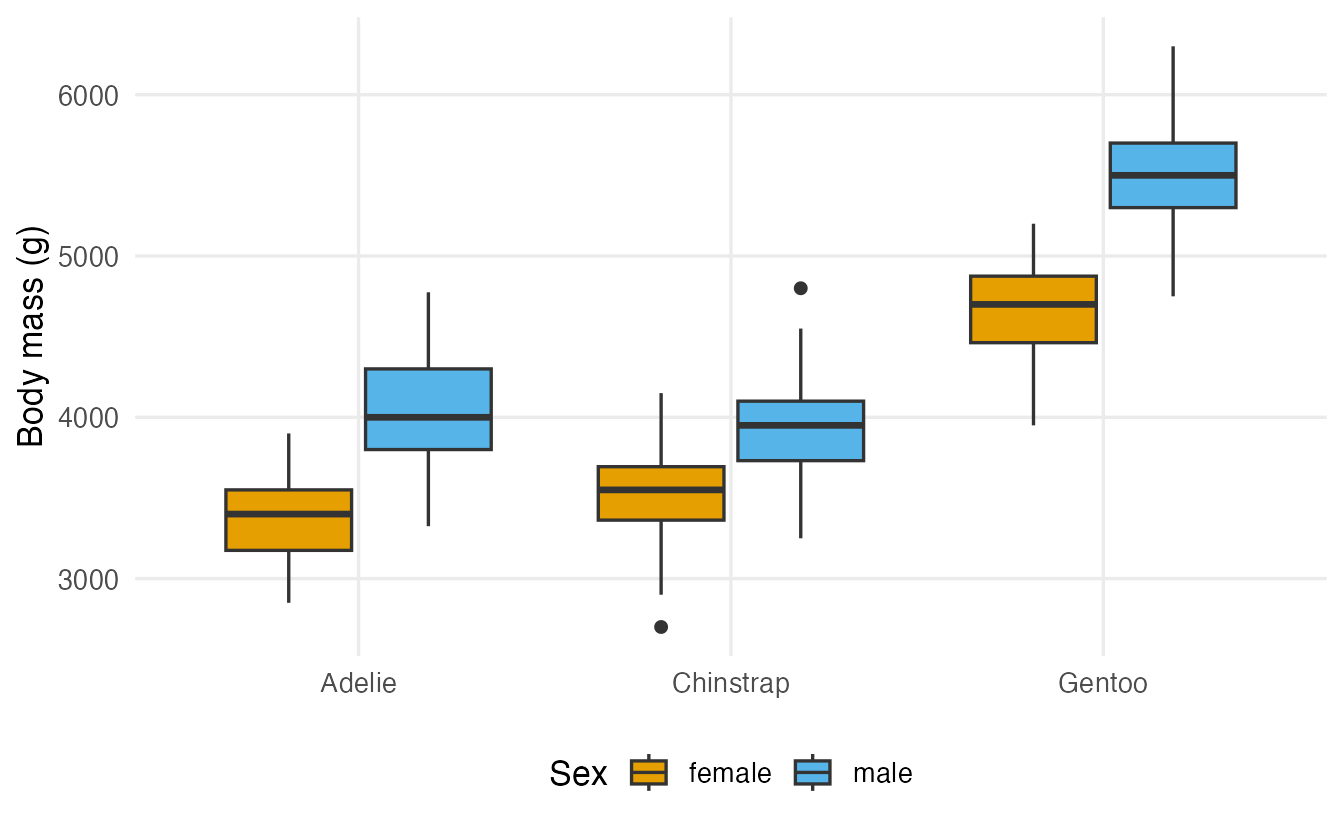
Whether a difference between sample means is larger than chance would produce is a question for t-tests and ANOVA.
5. Two numeric variables: a first look
For two numeric variables, start with a scatter plot: each point is one penguin.
pen <- penguins |> filter(!is.na(flipper_len), !is.na(body_mass))

pen |>
  mutate(product = (flipper_len - mean(flipper_len)) *
           (body_mass - mean(body_mass)),
         sign = if_else(product > 0, "positive", "negative")) |>
  ggplot(aes(flipper_len, body_mass, colour = sign)) +
  geom_point(alpha = 0.7) +
  geom_vline(xintercept = mean(pen$flipper_len), linetype = "dashed") +
  geom_hline(yintercept = mean(pen$body_mass), linetype = "dashed") +
  labs(x = "Flipper length (mm)", y = "Body mass (g)",
       colour = "Product of deviations")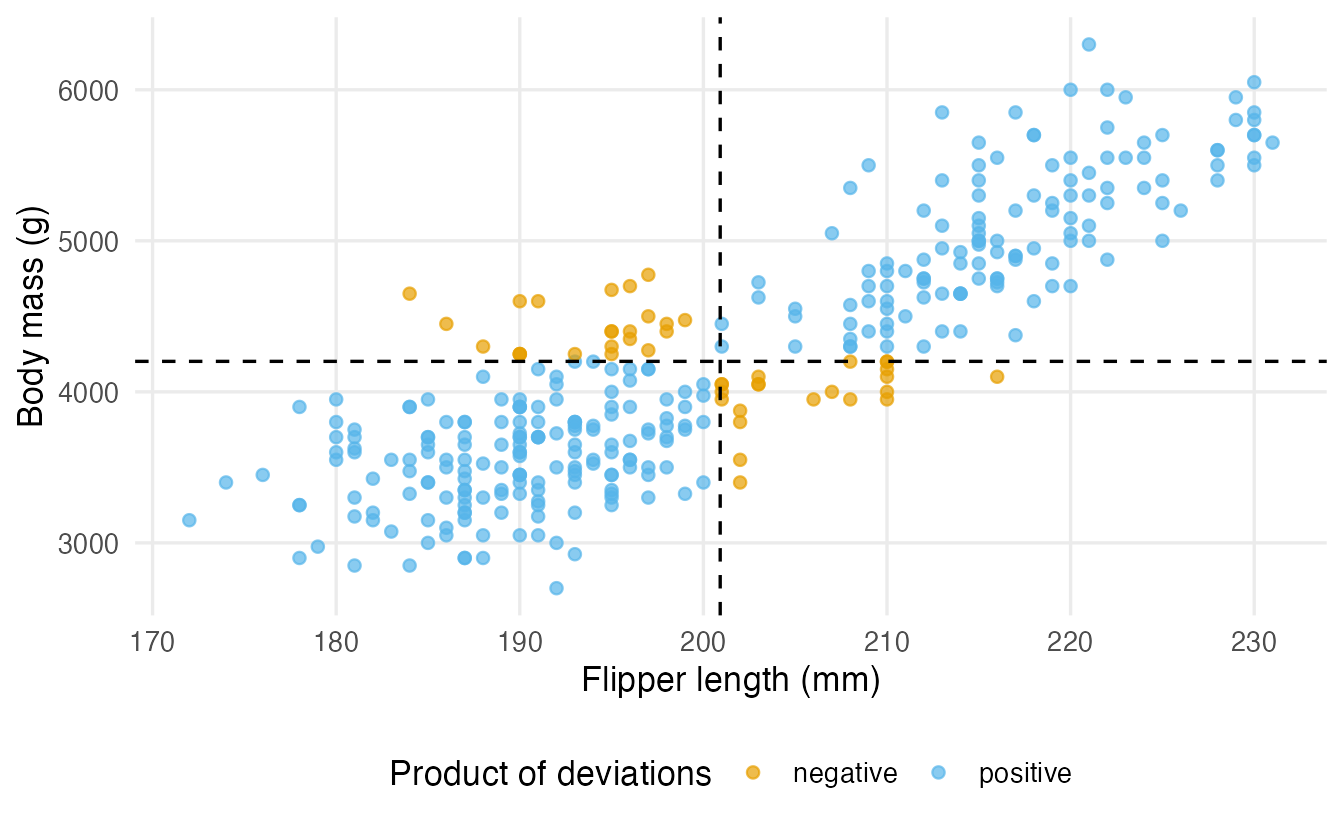
Penguins with longer than average flippers tend to be heavier than average (top-right quadrant), and those with shorter flippers lighter (bottom-left). For a point in one of these two quadrants, the two deviations from the mean have the same sign, so their product is positive. Points in the other two quadrants give negative products.
The covariance is (almost) the average of these products:
\[ \operatorname{cov}(x, y) = \frac{1}{n-1}\sum_{i=1}^n (x_i - \bar x)(y_i - \bar y). \]
cov(pen$flipper_len, pen$body_mass)#> [1] 9824mean((pen$flipper_len - mean(pen$flipper_len)) *
(pen$body_mass - mean(pen$body_mass)) > 0) # share of positive products#> [1] 0.8684A positive covariance means the variables tend to move together; a negative one that when one is above average the other tends to be below; a value near zero that there is no linear tendency. But the size of the covariance is hard to read, because it depends on the units:
cov(pen$flipper_len / 10, pen$body_mass / 1000) # cm and kg instead of mm and g#> [1] 0.9824Same penguins, same relationship, a covariance 10,000 times smaller. Dividing by the two standard deviations removes the units and gives the correlation coefficient, the subject of Correlation.
6. Simpson’s paradox: when the overall table lies
In 1973 the University of California, Berkeley, was worried about possible gender bias in graduate admissions. The built-in UCBAdmissions data contain the applications to its six largest departments: a three-way table of Admit × Gender × Dept.
The aggregate picture
ucb_overall <- margin.table(UCBAdmissions, c(1, 2))  # sum over departments
ucb_overall
#> Gender
#> Admit Male Female
#> Admitted 1198 557
#> Rejected 1493 1278round(prop.table(ucb_overall, margin = 2), 3) # within each gender#> Gender
#> Admit Male Female
#> Admitted 0.445 0.304
#> Rejected 0.555 0.696Gender is the explanatory variable, so we compute percentages within each gender (columns). Overall, 45% of men but only 30% of women were admitted. It looks like clear evidence of bias against women.
Department by department
rate_by_dept <- prop.table(UCBAdmissions, margin = c(2, 3))["Admitted", , ]
round(rate_by_dept, 3)
#> Dept
#> Gender A B C D E F
#> Male 0.621 0.630 0.369 0.331 0.277 0.059
#> Female 0.824 0.680 0.341 0.349 0.239 0.070margin = c(2, 3) computes proportions within each gender–department combination. Now look across the columns: in 4 of the 6 departments women had a higher admission rate than men, and where men did better the difference is small. The direction of the association reversed when we split by department. This is Simpson’s paradox.
Why does it happen?
Two facts explain it:
# where did each gender apply? (rows sum to 1)
round(prop.table(margin.table(UCBAdmissions, c(2, 3)), margin = 1), 3)
#> Dept
#> Gender A B C D E F
#> Male 0.307 0.208 0.121 0.155 0.071 0.139
#> Female 0.059 0.014 0.323 0.204 0.214 0.186# how hard was each department? (admission rate, both genders)
round(prop.table(margin.table(UCBAdmissions, c(1, 3)), margin = 2)["Admitted", ], 3)#> A B C D E F
#> 0.644 0.632 0.351 0.340 0.252 0.064- Departments A and B admitted most of their applicants; departments C–F admitted far fewer.
- More than half of the men applied to A or B; more than 90% of the women applied to the competitive departments C–F.
So the aggregate admission rate of women is low mainly because women applied to departments that were harder to get into for everybody. The department is a third variable related to both gender (where people apply) and admission (how selective it is). Such a variable is called a confounder or lurking variable.
ucb_df <- as.data.frame(UCBAdmissions) |>
  summarise(applicants = sum(Freq),
            admitted = sum(Freq[Admit == "Admitted"]),
            .by = c(Dept, Gender)) |>
  mutate(rate = admitted / applicants)

ggplot(ucb_df, aes(Dept, rate, colour = Gender, size = applicants)) +
  geom_point(alpha = 0.8) +
  labs(x = "Department", y = "Admission rate",
       colour = "Gender", size = "Applicants")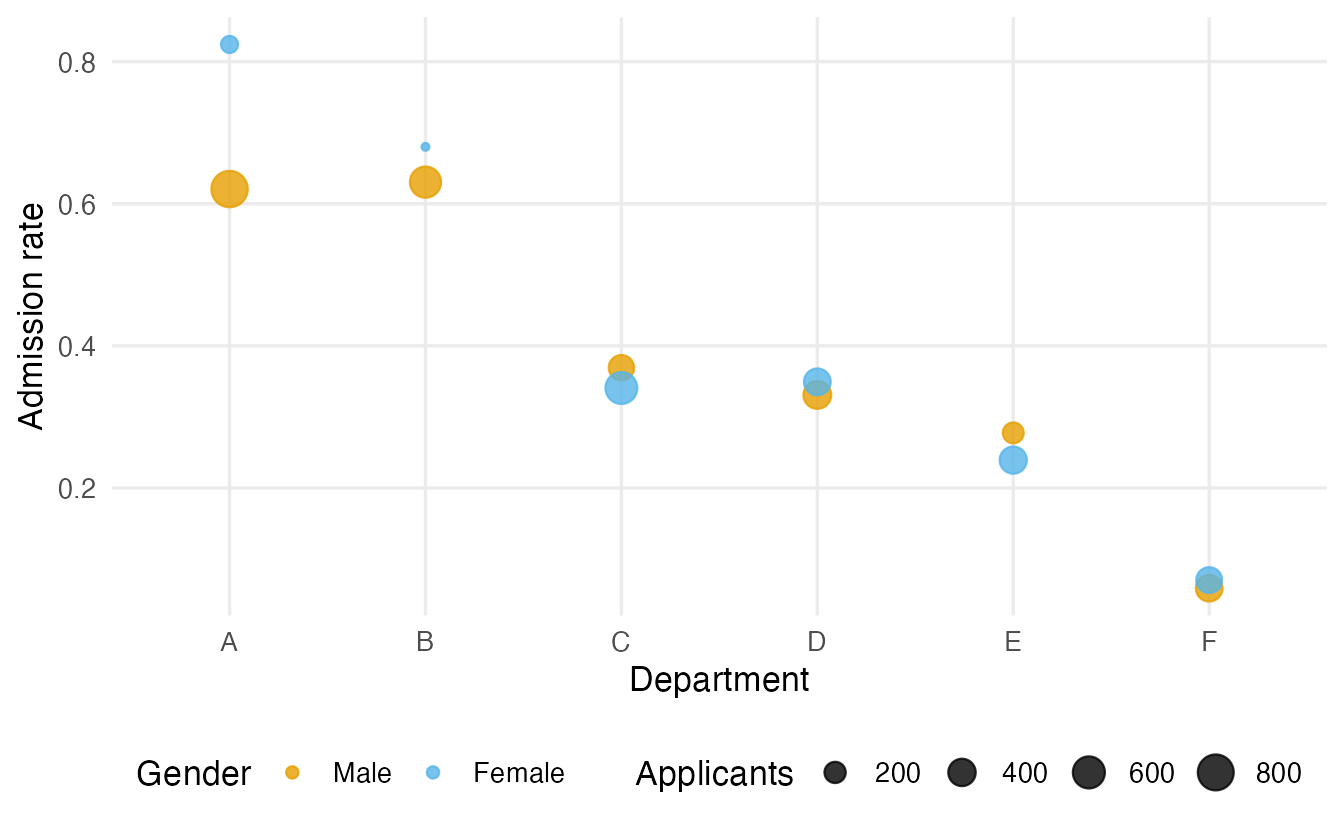
NoteGoing deeper: the aggregate rate is a weighted average
For each gender, the overall admission rate is a weighted average of the department rates, with weights equal to the share of that gender’s applications going to each department:
\[ \text{rate}_{\text{women}} = \sum_{d} w_{d,\text{women}} \cdot \text{rate}_{d,\text{women}}, \qquad w_{d,\text{women}} = \frac{\text{female applicants to } d}{\text{all female applicants}} . \]
w_female <- prop.table(margin.table(UCBAdmissions, c(2, 3)), 1)["Female", ]
sum(w_female * rate_by_dept["Female", ])
#> [1] 0.3035This reproduces the 30% above. Men and women have different weights — women put large weights on low-rate departments — so their averages can be ordered in the opposite way to every (or almost every) department-level comparison.
The lesson is general: an association in aggregated data can disappear or reverse when you condition on a third variable. Before drawing conclusions from a two-way table, ask which other variables could be related to both. You will meet the same phenomenon with correlations in Correlation and with regression coefficients in Multiple regression.
WarningCommon pitfalls
- Confusing row and column percentages. “Most smokers are men” is not the same as “most men are smokers”. State the denominator in words.
- Comparing raw counts across groups of different size. Compare conditional proportions, not counts.
- Using
prop.table()withoutmargin. You get joint proportions over the whole table, which rarely answer the question you have. - Ignoring third variables. An aggregate table can show the opposite of what is happening within every subgroup (Simpson’s paradox).
- Reading covariance size as strength. Covariance depends on units; use correlation to measure strength.
- Concluding causation from a description. An association, however strong, says nothing on its own about why the variables are related.
7. Check your understanding
8. Exercises
Interactive (run in your browser)
★ Exercise 1 — hair and eye colour. HairEyeColor is a 3-way table (hair × eye × sex). Sum over sex, then compute the distribution of eye colour within each hair colour. What percentage of blond people have blue eyes?
Hair colour is on the rows, and we want each hair colour to sum to 100%.
round(100 * prop.table(hair_eye, margin = 1), 1)About 74% of blond people have blue eyes, against about 19% of black-haired people. Eye colour is strongly associated with hair colour. (Note that “74% of blonds have blue eyes” is different from “44% of blue-eyed people are blond”, which is a column percentage.)
★★ Exercise 2 — conditional summaries. Compare fuel consumption (mpg) of automatic (am == 0) and manual (am == 1) cars in mtcars: number of cars, mean, median and SD per group.
Use mean(mpg), median(mpg), sd(mpg) and .by = am.
mtcars |>
  summarise(n = n(), mean = mean(mpg), median = median(mpg),
            sd = sd(mpg), .by = am)
Manual cars go about 7 more miles per gallon on average (≈ 24.4 vs 17.1). Careful: manual cars in these data are also lighter, so weight could be a confounder — a description is not a causal explanation.
★★ Exercise 3 — verify Simpson’s paradox. Compute the admission rate for each gender in department A only, and compare it with the overall rates.
In each 2-D slice Admit is on the rows and Gender on the columns; condition on gender (margin = 2). The overall table sums over departments, keeping dimensions 1 and 2.
round(prop.table(dept_A, margin = 2), 3)
overall <- margin.table(UCBAdmissions, c(1, 2))
round(prop.table(overall, margin = 2), 3)
In department A about 82% of women and 62% of men were admitted, while overall the rates are about 30% for women and 45% for men: the comparison reverses.
★★ Exercise 4 — predict the covariance. Predict the sign of the covariance between car weight (wt) and mpg, then compute it. Then compute it with weight in kilograms (wt is in 1000 lb; 1000 lb ≈ 453.6 kg). What changes, what does not?
Weight in kg is mtcars$wt * 453.6.
cov(mtcars$wt, mtcars$mpg)          # about -5.1
cov(mtcars$wt * 453.6, mtcars$mpg)  # about -2300
Heavier cars travel fewer miles per gallon, so the covariance is negative. Changing the unit multiplies it by 453.6 — the sign stays, the size is meaningless on its own.
Practice on your own computer
★★★ Exercise 5 — Titanic. The built-in Titanic table has dimensions Class × Sex × Age × Survived. (a) Compute the survival rate by class. (b) Compute the survival rate by class and sex. (c) Was the high survival rate of 1st-class passengers only due to the share of women among them? Write three sentences.
TipSolution
cls <- margin.table(Titanic, c(1, 4))            # Class x Survived
round(prop.table(cls, margin = 1), 3)

cls_sex <- margin.table(Titanic, c(1, 2, 4))     # Class x Sex x Survived
round(prop.table(cls_sex, margin = c(1, 2))[, , "Yes"], 3)

round(prop.table(margin.table(Titanic, c(1, 2)), margin = 1), 3)  # share of women
About 62% of 1st-class passengers survived, versus about 25% in 3rd class. Within each sex the class gradient remains: among women about 97% survived in 1st class versus 46% in 3rd; among men about 34% versus 17%. So the higher survival in 1st class is not only due to having more women — class matters within both sexes, although sex is an even stronger factor.
Summary
| Goal | Base R | dplyr |
|---|---|---|
| Contingency table | table(a, b) |
count(df, a, b) |
| Margins / totals | margin.table(t, 1), addmargins(t) |
count(df, a) |
| Joint proportions | prop.table(t) |
mutate(p = n / sum(n)) |
| Row (column) conditional proportions | prop.table(t, margin = 1) (= 2) |
mutate(p = n / sum(n), .by = a) |
| Expected counts under independence | outer(rowSums(t), colSums(t)) / sum(t) |
— |
| Conditional summaries | tapply(y, list(g1, g2), mean) |
summarise(..., .by = c(g1, g2)) |
| Covariance | cov(x, y) |
— |
- Joint, marginal and conditional distributions answer different questions; conditional proportions describe association.
- Compute percentages within the categories of the explanatory variable.
- For a numeric response, compare conditional centres relative to the spread within groups.
- Covariance gives the direction of a linear relationship but its size depends on units.
- Simpson’s paradox: aggregating over a confounder can reverse an association. Always ask which third variables might matter.