library(dplyr)
library(tidyr)
library(readr)
library(ggplot2)
library(dbscan)    # dbscan(), kNNdist(), kNNdistplot(), hdbscan()
library(cluster)   # silhouette()
library(mclust) # adjustedRandIndex()DBSCAN: density-based clustering
Clusters as dense regions, outliers as noise — and how to choose eps without guessing
Core, border and noise points; the parameters eps and minPts; choosing eps from the k-nearest-neighbour distance plot; DBSCAN on non-convex data where k-means fails; an honest analysis of the wholesale data; and a brief look at HDBSCAN.
NoteLearning objectives
By the end of this lesson you will be able to:
- explain the idea of density-based clustering and classify points as core, border or noise;
- choose
minPtswith a rule of thumb andepsfrom the k-nearest-neighbour distance plot, justifying the choice; - run
dbscan::dbscan()and read its output, including the noise label 0; - show on non-convex data why DBSCAN can succeed where k-means fails;
- interpret DBSCAN honestly on real data, including when it finds no useful cluster structure, and know when to try HDBSCAN.
1. Why density?
Look at a map of a country at night, photographed from space. Cities are bright dense patches of light; between them there is darkness with a few scattered lights. Nobody would say that a city must be round, or that every isolated farmhouse must belong to some city. We recognise cities because they are regions where lights are packed together, separated by regions where they are not.
That is the idea behind density-based clustering:
- a cluster is a region where points are densely packed;
- clusters are separated by regions of low density;
- points in low-density regions belong to no cluster — they are labelled noise.
This view has two consequences that k-means and Ward linkage do not share. Clusters can have any shape (a ring, a banana, a snake), and the method can say “this observation does not belong anywhere”, which is often exactly what we want for outliers.
The most popular density-based method is DBSCAN (Density-Based Spatial Clustering of Applications with Noise; Ester, Kriegel, Sander & Xu, 1996).
2. Core, border and noise points
DBSCAN needs two numbers:
eps(\(\varepsilon\)) — a radius. The \(\varepsilon\)-neighbourhood of a point is the set of points within distance \(\varepsilon\) of it.minPts— how many points (the point itself included) its neighbourhood must contain to be considered “dense”.
Each observation is then one of three types:
| Type | Definition | Intuition |
|---|---|---|
| Core | at least minPts points (itself included) within distance eps |
in the middle of a crowd |
| Border | not core, but within eps of a core point |
at the edge of a crowd |
| Noise | neither core nor border | alone in the dark |
Clusters are built by chaining core points: two core points closer than eps belong to the same cluster, and so do all core points reachable through such chains. Each border point joins the cluster of a core point near it. Noise points get the label 0.
Let us classify six points by hand, with eps = 1 and minPts = 3.
pts <- data.frame(
  x = c(1, 1.5, 2, 1.3, 2.9, 5),
  y = c(1, 1, 1.2, 1.6, 1.4, 4),
  row.names = c("A", "B", "C", "D", "E", "F")
)
eps_toy    <- 1
minpts_toy <- 3

D <- as.matrix(dist(pts))
round(D, 2)
#> A B C D E F
#> A 0.00 0.50 1.02 0.67 1.94 5.00
#> B 0.50 0.00 0.54 0.63 1.46 4.61
#> C 1.02 0.54 0.00 0.81 0.92 4.10
#> D 0.67 0.63 0.81 0.00 1.61 4.41
#> E 1.94 1.46 0.92 1.61 0.00 3.34
#> F 5.00 4.61 4.10 4.41 3.34 0.00n_neigh <- rowSums(D <= eps_toy) # includes the point itself
core <- n_neigh >= minpts_toy
near_core <- apply(D[, core, drop = FALSE] <= eps_toy, 1, any)
type <- ifelse(core, "core", ifelse(near_core, "border", "noise"))
data.frame(n_neigh, type)#> n_neigh type
#> A 3 core
#> B 4 core
#> C 4 core
#> D 4 core
#> E 2 border
#> F 1 noise
TipHow to read this output
n_neighcounts the points within distance 1, including the point itself (its distance to itself is 0).- A, B, C and D have at least 3 such points: they are core points, and they are all within 1 of each other through chains, so they form one cluster.
- E has only 2 points in its neighbourhood (itself and C), so it is not core; but C is a core point within distance 1, so E is a border point of the same cluster.
- F is far from everybody: noise.
dbscan(pts, eps = eps_toy, minPts = minpts_toy)$cluster#> [1] 1 1 1 1 1 0dbscan() agrees: A–E are in cluster 1 and F gets the noise label 0.
NoteGoing deeper: the formal definitions
Let \(N_\varepsilon(x) = \{y : d(x, y) \le \varepsilon\}\) (it contains \(x\) itself).
- \(x\) is a core point if \(|N_\varepsilon(x)| \ge \text{minPts}\).
- \(y\) is directly density-reachable from \(x\) if \(x\) is a core point and \(y \in N_\varepsilon(x)\).
- \(y\) is density-reachable from \(x\) if there is a chain \(x = p_1, p_2, \dots, p_m = y\) in which each \(p_{j+1}\) is directly density-reachable from \(p_j\).
- \(x\) and \(y\) are density-connected if both are density-reachable from some point \(o\).
A cluster is a maximal set of density-connected points. Core points always end up in a unique cluster. A border point can be within eps of core points of two different clusters; DBSCAN then assigns it to the cluster that reaches it first, so border points (only) may depend on the order of the data. Noise points are not density-reachable from any core point.
The number of clusters is not an input: it is a consequence of eps and minPts.
3. A shape k-means cannot handle: two moons
We simulate the classic “two moons” data: two interleaved half-circles, plus 20 points of background noise scattered at random.
make_moons <- function(n = 400, noise = 0.06) {
  t1 <- runif(n / 2, 0, pi)
  t2 <- runif(n / 2, 0, pi)
  tibble(
    x = c(cos(t1), 1 - cos(t2)) + rnorm(n, 0, noise),
    y = c(sin(t1), 0.5 - sin(t2)) + rnorm(n, 0, noise),
    truth = rep(c("moon 1", "moon 2"), each = n / 2)
  )
}

set.seed(1)
moons <- bind_rows(
  make_moons(),
  tibble(x = runif(20, -1.5, 2.5), y = runif(20, -1, 1.5),
         truth = "background")
)
X_moons <- as.matrix(moons[, c("x", "y")])
in_moon <- moons$truth != "background"
Both coordinates are on the same scale, so we do not standardise here. (With real data you almost always must — see the introduction.)
First, k-means with \(k = 2\):
set.seed(1)
km_moons <- kmeans(X_moons, centers = 2, nstart = 25)
adjustedRandIndex(km_moons$cluster[in_moon], moons$truth[in_moon])
#> [1] 0.2791An ARI of 0.28 on the moon points: k-means cuts the picture with a straight line, because each of its clusters is “the points closest to a centre” — a convex region. Two interleaved moons cannot be separated that way.
4. Choosing minPts and eps
minPts: a rule of thumb
minPts controls how much “crowd” we demand. Small values make DBSCAN sensitive to random little clumps; large values smooth more and declare more points noise. Common rules of thumb:
minPtsat least \(p + 1\), where \(p\) is the number of variables;minPts\(= 2p\) as a default for low-noise data (Sander et al., 1998), larger for noisy or very large data sets.
For the moons, \(p = 2\), so we take minPts = 4.
eps: the k-nearest-neighbour distance plot
For every point, compute the distance to its \(k\)-th nearest neighbour, with \(k = \text{minPts} - 1\) (the point itself is the first member of its neighbourhood). A point is a core point exactly when this distance is at most eps. Sorting these distances and plotting them gives the kNN distance plot:
- points inside clusters have small kNN distances — the long flat part of the curve;
- noise points have large kNN distances — the steep part at the right end.
A good eps lies at the knee where the curve bends upwards: below it, most points are core points; above it, we start to absorb the noise.
minpts_moons <- 4
knn_moons <- kNNdist(X_moons, k = minpts_moons - 1)

# knee: the point of the sorted curve farthest below the straight line
# joining its first and last points (both axes rescaled to [0, 1])
knee_point <- function(d) {
  d <- sort(d)
  u <- (seq_along(d) - 1) / (length(d) - 1)
  v <- (d - d[1]) / (d[length(d)] - d[1])
  d[which.max(u - v)]
}
eps_moons <- round(knee_point(knn_moons), 2)

kNNdistplot(X_moons, k = minpts_moons - 1)
abline(h = eps_moons, lty = 2, col = "#D55E00")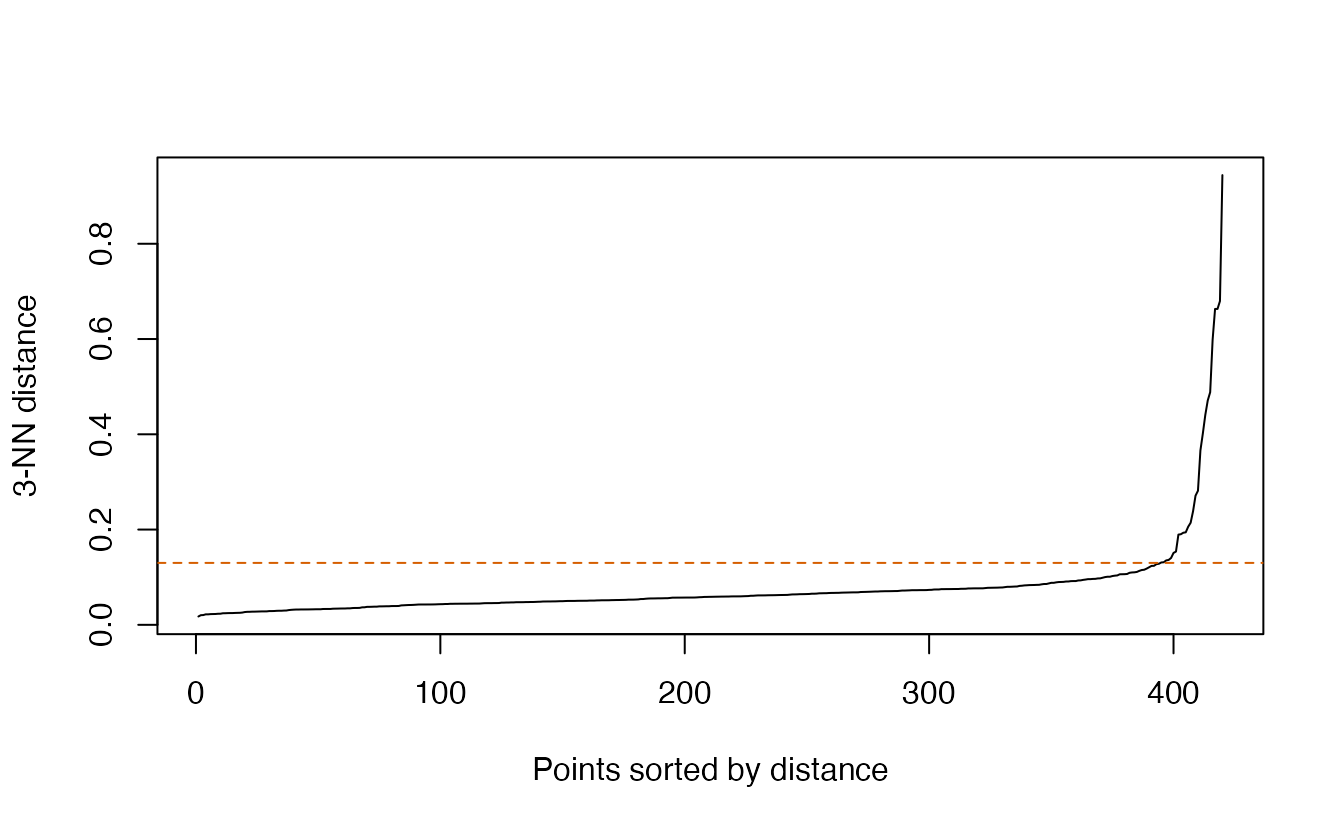
The knee rule gives eps = 0.13. It is not magic — it is a reproducible way of writing down “where the curve bends”. Reading the plot by eye would give a similar value, and (as we will see) DBSCAN is not very sensitive to the exact choice when the clusters are well separated.
ImportantWhy not just try many eps and keep the one that “looks best”?
Because with real data you do not know the right answer. The kNN plot ties eps to a property of the data (the typical distance between neighbours inside dense regions) and makes the choice transparent and repeatable. After choosing, do check how sensitive the result is (section 6).
5. Running DBSCAN
db_moons <- dbscan(X_moons, eps = eps_moons, minPts = minpts_moons)
db_moons
#> DBSCAN clustering for 420 objects.
#> Parameters: eps = 0.13, minPts = 4
#> Using euclidean distances and borderpoints = TRUE
#> The clustering contains 2 cluster(s) and 17 noise points.
#>
#> 0 1 2
#> 17 200 203
#>
#> Available fields: cluster, eps, minPts, metric, borderPointstable(cluster = db_moons$cluster, truth = moons$truth)#> truth
#> cluster background moon 1 moon 2
#> 0 16 1 0
#> 1 1 199 0
#> 2 3 0 200
TipHow to read this output
- The printed summary gives the parameters, the number of clusters found and the number of noise points; then the cluster sizes, with noise listed under 0.
- The cross-table compares with the truth, which DBSCAN never saw. Each moon is (almost entirely) one cluster, and most of the background points are labelled noise. A few background points that happened to fall close to a moon are absorbed as border points — that is correct behaviour: they are in a dense region.
db_moons$clusterholds the labels;0is not a cluster but “no cluster”.
c(kmeans = adjustedRandIndex(km_moons$cluster[in_moon],
                             moons$truth[in_moon]),
  dbscan = adjustedRandIndex(db_moons$cluster[in_moon],
                             moons$truth[in_moon]))
#> kmeans dbscan
#> 0.2791 0.9950We can also recover the three point types. A point is core when its kNN distance is at most eps:
moons <- moons |>
  mutate(
    cluster_km = factor(km_moons$cluster),
    cluster_db = if_else(db_moons$cluster == 0, "noise",
                         paste("cluster", db_moons$cluster)),
    type = case_when(
      knn_moons <= eps_moons  ~ "core",
      db_moons$cluster > 0    ~ "border",
      .default = "noise"
    )
  )
dplyr::count(moons, type)   # mclust also has a count() function
#> # A tibble: 3 × 2
#> type n
#> <chr> <int>
#> 1 border 9
#> 2 core 394
#> 3 noise 17bind_rows(
moons |> transmute(x, y, method = "k-means (k = 2)",
group = paste("cluster", cluster_km), type = "core"),
moons |> transmute(x, y, method = "DBSCAN", group = cluster_db, type)
) |>
ggplot(aes(x, y, colour = group, size = type)) +
geom_point(alpha = 0.7) +
scale_colour_manual(values = c("cluster 1" = "#E69F00",
"cluster 2" = "#0072B2",
"noise" = "grey60")) +
scale_size_manual(values = c(core = 1.6, border = 0.8, noise = 1.6)) +
facet_wrap(~ method) +
coord_equal() +
labs(colour = NULL, size = "Point type")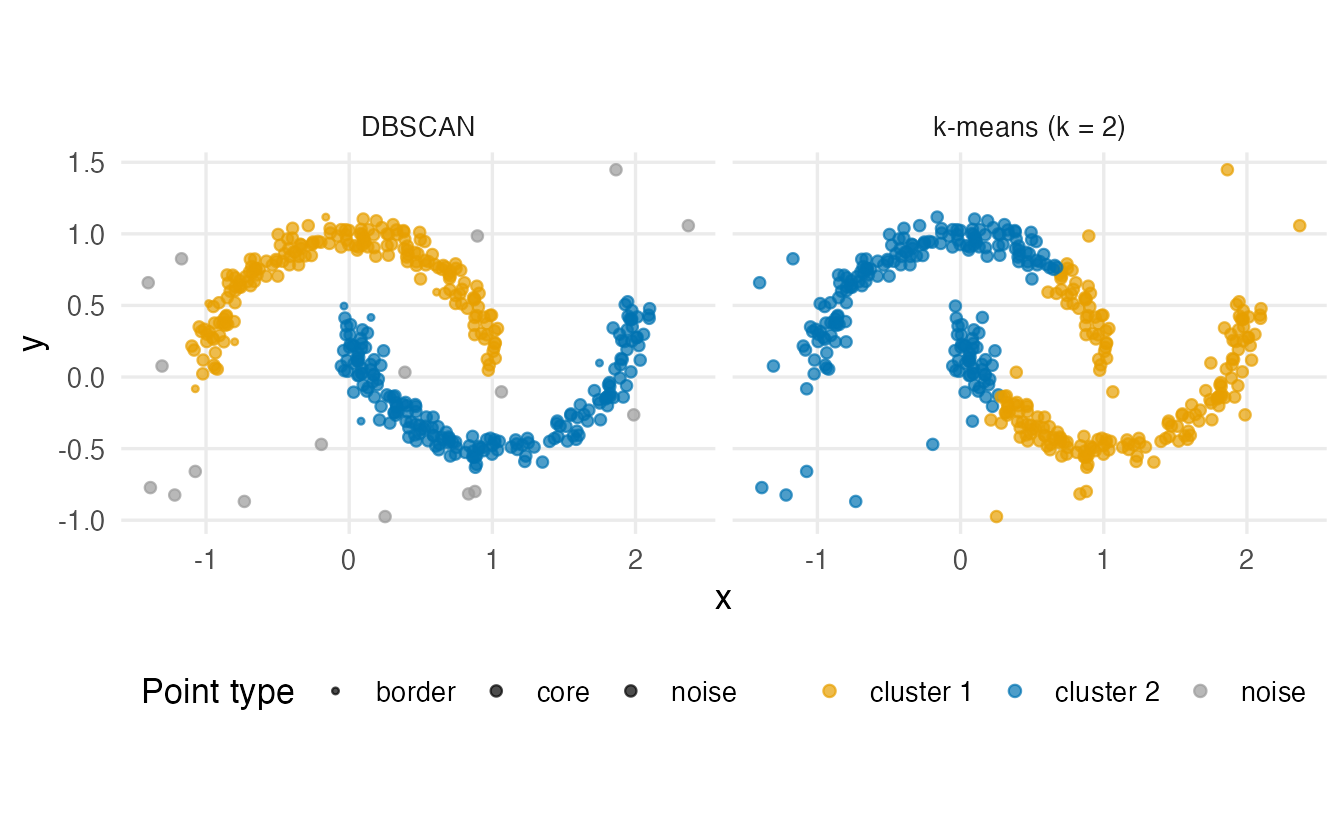
6. How sensitive is the result to eps?
eps_grid <- c(0.05, 0.08, 0.10, eps_moons, 0.20, 0.30, 0.50)
tibble(eps = eps_grid) |>
  mutate(
    fit        = lapply(eps, \(e) dbscan(X_moons, eps = e,
                                         minPts = minpts_moons)$cluster),
    n_clusters = sapply(fit, max),
    pct_noise  = sapply(fit, \(cl) round(100 * mean(cl == 0), 1)),
    ari_moons  = sapply(fit, \(cl) round(adjustedRandIndex(
      cl[in_moon], moons$truth[in_moon]), 2))
  ) |>
  select(-fit)
#> # A tibble: 7 × 4
#> eps n_clusters pct_noise ari_moons
#> <dbl> <int> <dbl> <dbl>
#> 1 0.05 31 43.8 0.03
#> 2 0.08 9 11 0.44
#> 3 0.1 4 6 0.63
#> 4 0.13 2 4 1
#> 5 0.2 2 2.9 1
#> 6 0.3 2 2.4 1
#> 7 0.5 2 0.7 0
TipHow to read this output
- eps too small: few points are core points; the moons break into many small clusters and a large share of points is called noise.
- eps around the knee: two clusters and a small amount of noise.
- eps too large: the neighbourhoods bridge the gap between the moons, both moons merge into one big cluster (ARI 0) and noise almost disappears; any extra “cluster” is just a little clump of background points.
A good choice sits on a plateau — a range of eps values that all give essentially the same answer. If there is no plateau, the data have no clear density structure at that scale.
7. Real data: the wholesale customers
We use the same preprocessing as in the previous lessons: log1p() of the six spending categories, then standardisation.
wholesale <- read_csv(data_path("wholesale_customers.csv"),
                      show_col_types = FALSE)
spend_vars <- c("Fresh", "Milk", "Grocery", "Frozen",
                "Detergents_Paper", "Delicassen")

X <- wholesale |>
  select(all_of(spend_vars)) |>
  mutate(across(everything(), log1p)) |>
  scale()
With \(p = 6\) variables the rule \(2p\) gives minPts = 12.
minpts <- 2 * ncol(X)
knn_w  <- kNNdist(X, k = minpts - 1)
eps_w  <- round(knee_point(knn_w), 2)

kNNdistplot(X, k = minpts - 1)
abline(h = eps_w, lty = 2, col = "#D55E00")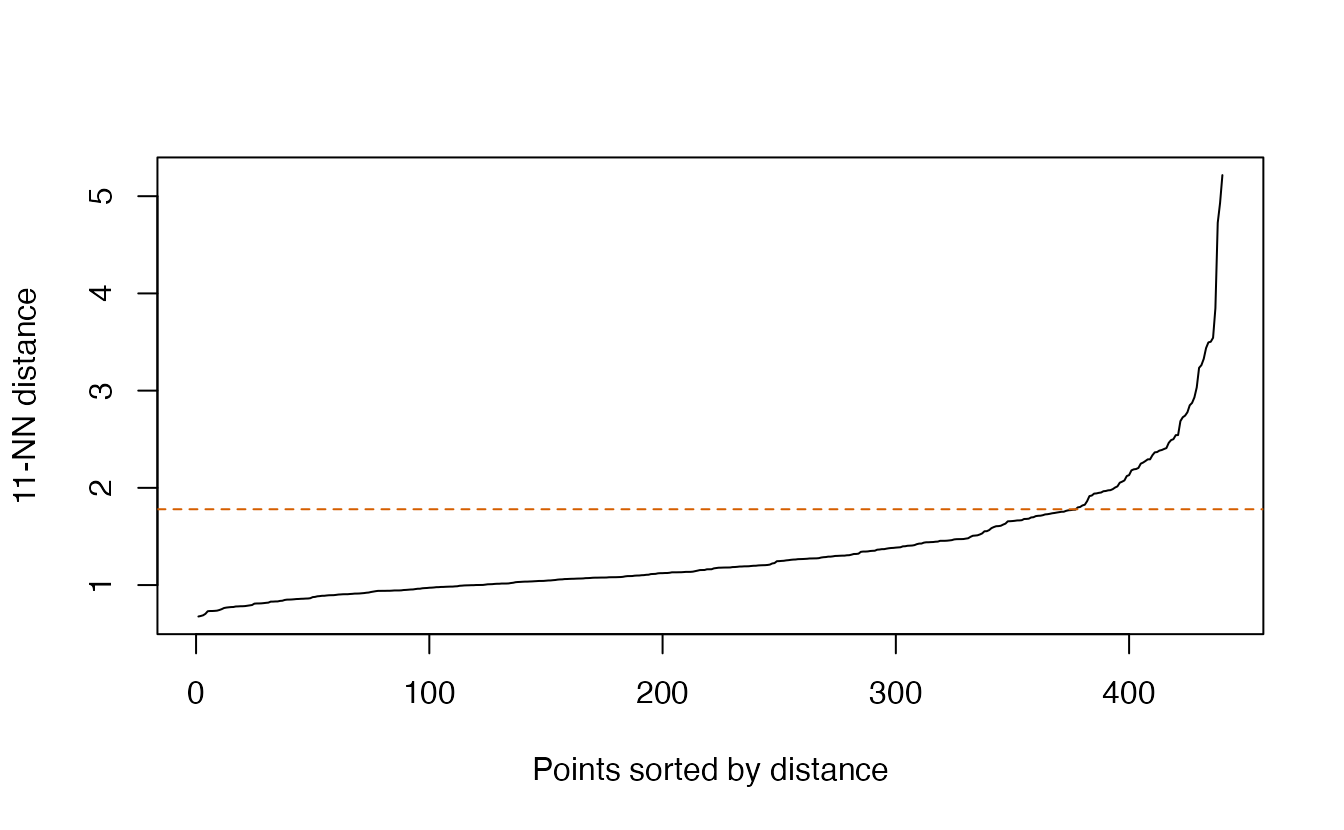
db_w <- dbscan(X, eps = eps_w, minPts = minpts)
db_w
#> DBSCAN clustering for 440 objects.
#> Parameters: eps = 1.78, minPts = 12
#> Using euclidean distances and borderpoints = TRUE
#> The clustering contains 1 cluster(s) and 27 noise points.
#>
#> 0 1
#> 27 413
#>
#> Available fields: cluster, eps, minPts, metric, borderPointsWith eps = 1.78, DBSCAN finds 1 cluster(s) and labels 27 clients (6%) as noise. In other words: most clients live in one connected dense region, and the method’s main contribution is to point out a small set of atypical clients. That is a legitimate and useful result — but it is not a segmentation.
Who are the “noise” clients? Compare them with the rest in the original units:
wholesale |>
  mutate(group = if_else(db_w$cluster == 0, "noise", "dense region")) |>
  summarise(n = n(), across(all_of(spend_vars), median), .by = group)
#> # A tibble: 2 × 8
#> group n Fresh Milk Grocery Frozen Detergents_Paper Delicassen
#> <chr> <int> <dbl> <dbl> <dbl> <dbl> <dbl> <dbl>
#> 1 dense region 413 8656 3677 4754 1647 828 995
#> 2 noise 27 964 1698 5091 774 334 110Typically these are clients with an unusually small amount in one or more categories. On the log scale, spending 3 instead of 1,000 is a huge distance, so such clients are isolated. Before reporting them as “special customers”, check whether those tiny values are real or data-entry artefacts.
Is there density structure at a smaller scale?
Let us scan eps and record the number of clusters and the share of noise.
scan_w <- tibble(eps = seq(0.6, 2.4, by = 0.1)) |>
  mutate(
    cl         = lapply(eps, \(e) dbscan(X, eps = e, minPts = minpts)$cluster),
    n_clusters = sapply(cl, max),
    pct_noise  = sapply(cl, \(x) round(100 * mean(x == 0)))
  )
scan_w |> select(-cl) |> print(n = Inf)
#> # A tibble: 19 × 3
#> eps n_clusters pct_noise
#> <dbl> <int> <dbl>
#> 1 0.6 0 100
#> 2 0.7 1 96
#> 3 0.8 2 79
#> 4 0.9 2 62
#> 5 1 1 41
#> 6 1.1 1 32
#> 7 1.2 1 24
#> 8 1.3 1 18
#> 9 1.4 1 15
#> 10 1.5 1 12
#> 11 1.6 1 10
#> 12 1.7 1 8
#> 13 1.8 1 6
#> 14 1.9 1 4
#> 15 2 1 4
#> 16 2.1 1 3
#> 17 2.2 1 2
#> 18 2.3 1 2
#> 19 2.4 1 2More than one cluster appears only for small eps, where the majority of clients are declared noise. Let us look at the largest such eps:
eps_two <- max(scan_w$eps[scan_w$n_clusters >= 2])
db_two  <- dbscan(X, eps = eps_two, minPts = minpts)
table(cluster = db_two$cluster, channel = wholesale$Channel)
#> channel
#> cluster 1 2
#> 0 191 80
#> 1 19 61
#> 2 88 1At eps = 0.9 there are 2 small dense cores, and 62% of clients are noise. The cross-table with Channel (1 = Horeca, 2 = Retail; not used for clustering) shows that the cores are related to the sales channel: there is a dense “typical restaurant” profile and a dense “typical shop” profile, connected by a continuum of clients in between.
Silhouette and k-means on the non-noise subset
The silhouette is not defined for noise points, so we compute it on the clustered clients only, and compare with k-means on the same subset.
idx    <- which(db_two$cluster > 0)
cl_sub <- db_two$cluster[idx]
d_sub  <- dist(X[idx, ])

summary(silhouette(cl_sub, d_sub))$avg.width
#> [1] 0.4835set.seed(123)
km_sub <- kmeans(X[idx, ], centers = max(cl_sub), nstart = 50)
adjustedRandIndex(cl_sub, km_sub$cluster)#> [1] 0.9298On the dense cores alone, the clusters are well separated (average silhouette 0.48) and k-means finds a similar partition (ARI 0.93). Of course: once the in-between clients are removed, any method separates two distant blobs. This silhouette must not be compared with silhouettes computed on all 440 clients.
pc <- prcomp(X)$x
lab <- \(cl) if_else(cl == 0, "noise", paste("cluster", cl))
bind_rows(
  tibble(PC1 = pc[, 1], PC2 = pc[, 2], group = lab(db_w$cluster),
         fit = paste("eps =", eps_w)),
  tibble(PC1 = pc[, 1], PC2 = pc[, 2], group = lab(db_two$cluster),
         fit = paste("eps =", eps_two))
) |>
  ggplot(aes(PC1, PC2, colour = group)) +
  geom_point(alpha = 0.7) +
  scale_colour_manual(values = c("cluster 1" = "#E69F00",
                                 "cluster 2" = "#0072B2",
                                 "cluster 3" = "#009E73",
                                 "noise" = "grey60")) +
  facet_wrap(~ fit) +
  labs(colour = NULL)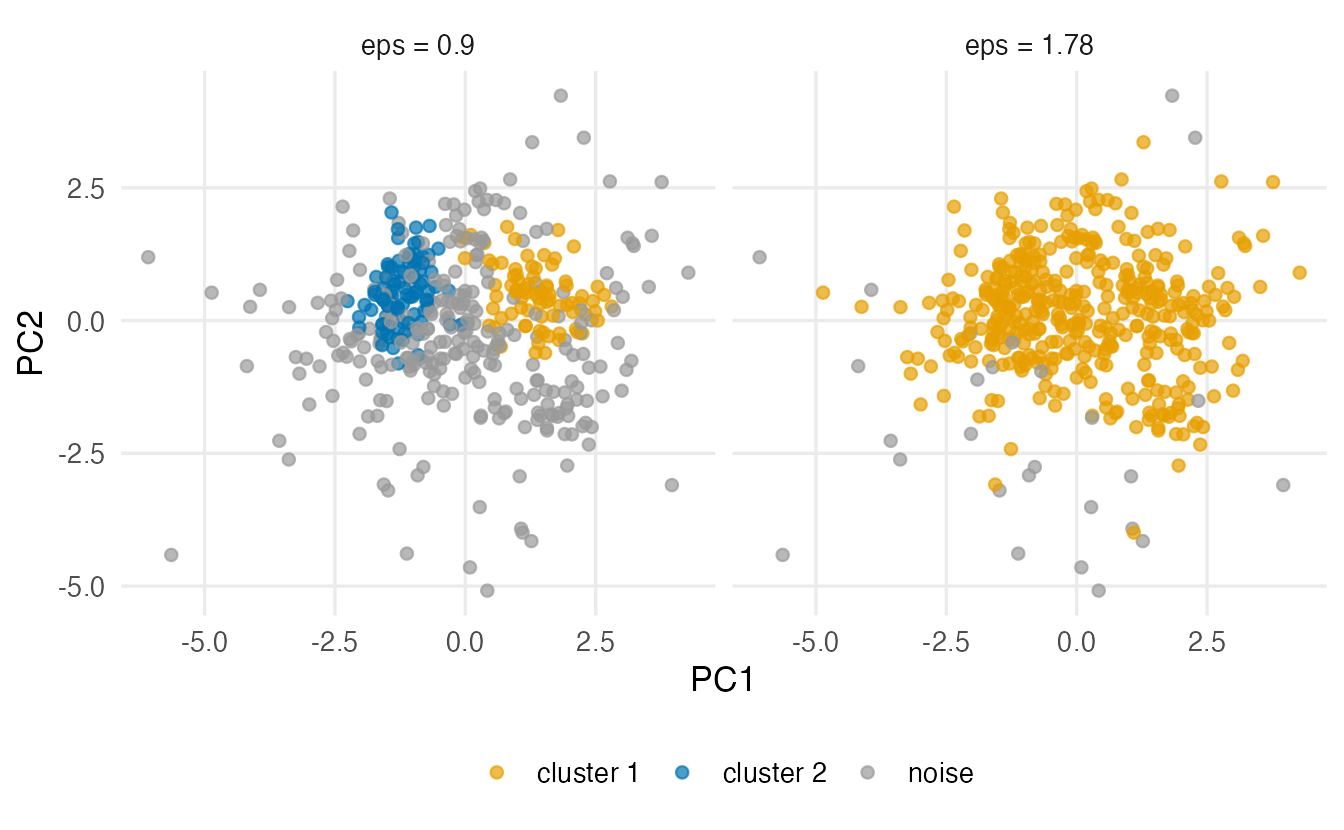
ImportantAn honest conclusion for the wholesale data
DBSCAN tells us that the clients do not form well-separated dense groups: at the scale suggested by the data, there is one dense region plus a few atypical clients. Two denser cores (roughly Horeca and Retail) exist, but only if we leave most clients unassigned. For a segmentation of all clients, a partitioning method (k-means, Ward, a Gaussian mixture) is more appropriate; DBSCAN’s most useful output here is the list of outlying clients.
8. HDBSCAN: when one eps is not enough
A single eps means a single density threshold. If one cluster is much denser than another, no eps fits both: a value that separates the dense cluster turns the sparse one into noise. HDBSCAN (Campello, Moulavi & Sander, 2013) runs DBSCAN for all values of eps at once, builds a hierarchy of clusters, and keeps those that persist over a wide range of densities. It needs only minPts (the minimum cluster size).
hdb_moons <- hdbscan(X_moons, minPts = 10)
hdb_moons
#> HDBSCAN clustering for 420 objects.
#> Parameters: minPts = 10
#> The clustering contains 2 cluster(s) and 11 noise points.
#>
#> 0 1 2
#> 11 207 202
#>
#> Available fields: cluster, minPts, coredist, cluster_scores,
#> membership_prob, outlier_scores, hcadjustedRandIndex(hdb_moons$cluster[in_moon], moons$truth[in_moon])#> [1] 1hdb_w <- hdbscan(X, minPts = minpts)
table(hdb_w$cluster)#>
#> 0 1 2
#> 362 38 40
TipHow to read this output
hdb$clusteruses the same convention as DBSCAN: 0 is noise.hdb$membership_probgives, for each point, how strongly it belongs to its cluster (0 for noise), andhdb$outlier_scoresa score of how outlying it is.- On the moons, HDBSCAN finds 2 cluster(s) (ARI on the moon points 1) without being told any
eps. On the wholesale data it finds 2 cluster(s) and labels 82% of clients as noise — compare with what DBSCAN told us.
HDBSCAN is often a better default than DBSCAN when densities vary, but its results still depend on minPts, and it still has nothing to say when the data form a continuum.
WarningCommon pitfalls
- Forgetting to scale.
epsis a distance; if one variable is in thousands and another in units, the neighbourhoods are determined by the first one only. - Using
k = minPtsin the kNN plot. In thedbscanpackageminPtscounts the point itself, so the matching neighbour is the(minPts − 1)-th: usekNNdist(x, k = minPts - 1). - Treating 0 as a cluster. Label 0 means “noise”. Drop it (or report it separately) before computing cluster profiles or silhouettes.
- Tuning eps until the picture looks nice. Choose it from the kNN plot, then report how sensitive the result is.
- Comparing a silhouette on the non-noise subset with one on all data. Removing the hardest points always makes the remaining clusters look better separated.
- Using DBSCAN in many dimensions without thinking. In high dimensions all distances become similar and “density” loses meaning; reduce dimension first (e.g. with PCA) or use a different method.
9. Check your understanding
10. Exercises
★ Exercise 1 — classify by hand. Points on a line: 0, 0.4, 0.9, 1.3, 3, 3.3, 7. With eps = 0.6 and minPts = 3, classify each point as core, border or noise and give the clusters. Check with dbscan().
TipSolution
Neighbourhoods (distance ≤ 0.6, point included): 0 → {0, 0.4}; 0.4 → {0, 0.4, 0.9}; 0.9 → {0.4, 0.9, 1.3}; 1.3 → {0.9, 1.3}; 3 → {3, 3.3}; 3.3 → {3, 3.3}; 7 → {7}.
- Core (at least 3 points): 0.4 and 0.9.
- Border: 0 (near the core point 0.4) and 1.3 (near 0.9).
- Noise: 3 and 3.3 — they are close to each other, but a pair is not dense enough with
minPts = 3, and neither is near a core point — and 7.
So there is one cluster, {0, 0.4, 0.9, 1.3}.
x <- matrix(c(0, 0.4, 0.9, 1.3, 3, 3.3, 7))
dbscan(x, eps = 0.6, minPts = 3)$cluster   # 1 1 1 1 0 0 0
★★ Exercise 2 — predict, then check. For the moons, predict what happens with minPts = 4 and eps = 0.6. Then run it and look at the cross-table with moons$truth.
TipSolution
eps = 0.6 is several times larger than the knee: neighbourhoods bridge the gap between the moons, so we expect one cluster containing both moons and almost no noise.
db_big <- dbscan(X_moons, eps = 0.6, minPts = 4)
table(db_big$cluster, moons$truth)
Indeed everything (except at most a couple of far-away background points) ends up in cluster 1.
★★ Exercise 3 — debug. A student runs DBSCAN on the raw wholesale spending and finds that every client is labelled noise, for every eps they try between 1 and 5. What is wrong?
db_raw <- dbscan(wholesale[, spend_vars], eps = 2, minPts = 12)
TipSolution
The raw spending is in monetary units: typical distances between clients are in the thousands. An eps between 1 and 5 is tiny on that scale, so no client has 11 other clients that close, there are no core points, and everything is noise. Moreover, unscaled, the categories with the largest spending (Fresh, Grocery) would dominate the distances. Transform and scale first, then look at the kNN plot to put eps on the right scale:
X <- wholesale |>
  select(all_of(spend_vars)) |>
  mutate(across(everything(), log1p)) |>
  scale()
kNNdistplot(X, k = 11)
The general lesson: eps only means something relative to the distances in the data, and the kNN plot shows you that scale.
★★ Exercise 4 — interpret. On some customer data DBSCAN reports: “3 clusters, sizes 210, 35, 12; 143 noise points”. Write three sentences for a manager.
TipSolution
About a third of the customers (143 out of 400) do not belong to any dense group: their behaviour is spread out or atypical, and they should not be forced into a segment. Among the rest, one large group (210) dominates, with two much smaller but well-defined niches (35 and 12). Before acting on the niches, we should check that they are stable when eps changes slightly and describe them in original units (e.g. median spending).
★★★ Exercise 5 — mini-analysis: penguins. Standardise the four numeric penguins measurements (complete cases). Choose minPts and eps as in this lesson, run DBSCAN, and compare with the species using a cross-table and the ARI. Then run hdbscan() with the same minPts. Which method recovers the species better, and why?
TipSolution
peng <- penguins |>
  select(species, bill_len, bill_dep, flipper_len, body_mass) |>
  na.omit()
Xp <- scale(select(peng, -species))
mp <- 2 * ncol(Xp)                                  # 8
eps_p <- round(knee_point(kNNdist(Xp, k = mp - 1)), 2)
db_p <- dbscan(Xp, eps = eps_p, minPts = mp)
table(db_p$cluster, peng$species)
adjustedRandIndex(db_p$cluster, peng$species)

hdb_p <- hdbscan(Xp, minPts = mp)
table(hdb_p$cluster, peng$species)
adjustedRandIndex(hdb_p$cluster, peng$species)
Expect DBSCAN to separate Gentoo from the rest but to merge Adelie and Chinstrap: those two species overlap and are connected by a continuous band of birds, so there is no low-density gap between them. HDBSCAN may or may not split them, depending on minPts. Density-based methods find groups separated by gaps; when groups touch, centroid- or model-based methods (see Model-based clustering) are usually better.
Summary
| Idea | R | Remember |
|---|---|---|
| Core / border / noise | rowSums(as.matrix(dist(x)) <= eps) |
neighbourhood includes the point itself |
| kNN distances | kNNdist(x, k = minPts - 1) |
core point ⇔ kNN distance ≤ eps |
| kNN plot | kNNdistplot(x, k = minPts - 1); abline(h = eps) |
choose eps at the knee |
| minPts | \(\ge p + 1\); \(2p\) as default | larger for noisy data |
| Fit | dbscan(x, eps, minPts) |
$cluster, 0 = noise |
| Sensitivity | refit over a grid of eps | look for a plateau |
| Varying densities | hdbscan(x, minPts) |
no eps; $membership_prob, $outlier_scores |
- DBSCAN defines clusters as dense regions separated by sparse ones; points in sparse regions are noise.
- It finds clusters of arbitrary shape, which k-means cannot.
- Choose
minPtsby a rule of thumb,epsfrom the kNN distance plot, and report the sensitivity. - On data that form a continuum, DBSCAN honestly returns one big cluster plus outliers; that is a finding, not a failure.