library(dplyr)
library(ggplot2)
library(tidymodels)   # rsample, recipes, parsnip, workflows, yardstick

# tidymodels attaches modeldata, whose own `penguins` (with different column
# names) would mask the base-R one: make sure we use R's built-in version.
penguins <- datasets::penguinsPrincipal component analysis
Summarise many correlated variables with a few new ones — and know how many to keep
Understand PCA as finding the directions of maximum variance, run it with prcomp(), choose the number of components with sound rules, read loadings, scores and biplots, and use PCA in a predictive pipeline without leakage.
NoteLearning objectives
By the end of this lesson you will be able to:
- explain a principal component as the direction of maximum variance in a cloud of points;
- decide when to standardise variables, and run PCA with
prcomp(scale. = TRUE); - choose the number of components with the scree plot, cumulative variance, Kaiser rule and parallel analysis;
- interpret loadings, scores and biplots, remembering that signs are arbitrary;
- use PCA inside a predictive pipeline estimated on the training data only.
1. Why reduce dimensions?
Imagine you measure four things on every flower: sepal length, sepal width, petal length and petal width. Many of these numbers move together — long petals tend to be wide petals. So the four columns contain less than four columns’ worth of information.
Principal component analysis (PCA) builds a small number of new variables, called principal components (PCs), that
- are combinations of the original variables (weighted sums),
- are uncorrelated with each other, and
- capture as much of the variability of the data as possible, in decreasing order.
Why is this useful? You can plot data with many variables in two dimensions, compress redundant measurements, and feed a few stable components to a model instead of many correlated predictors.
2. The idea in two dimensions
Let’s start with only two variables: flipper length and body mass of penguins. They are strongly correlated. To put them on the same footing we first standardise them (subtract the mean, divide by the standard deviation) — section 3 explains why.
two <- penguins |>
  select(flipper_len, body_mass) |>
  na.omit() |>
  scale()

cor(two)[1, 2]
#> [1] 0.8712Now imagine drawing a line through the centre of the cloud and projecting every point onto it (dropping a perpendicular). The projected values form a new one-dimensional variable. Different lines give different spreads of projections. Let’s try every direction from 0° to 180° and compute the variance of the projections:
angles <- seq(0, 180, by = 1)
proj_var <- sapply(angles, \(a) {
  u <- c(cos(a * pi / 180), sin(a * pi / 180))   # unit vector
  var(two %*% u)
})

ggplot(data.frame(angle = angles, variance = proj_var),
       aes(angle, variance)) +
  geom_line(linewidth = 1) +
  geom_vline(xintercept = angles[which.max(proj_var)], linetype = "dashed") +
  labs(x = "Direction of the line (degrees)",
       y = "Variance of the projections")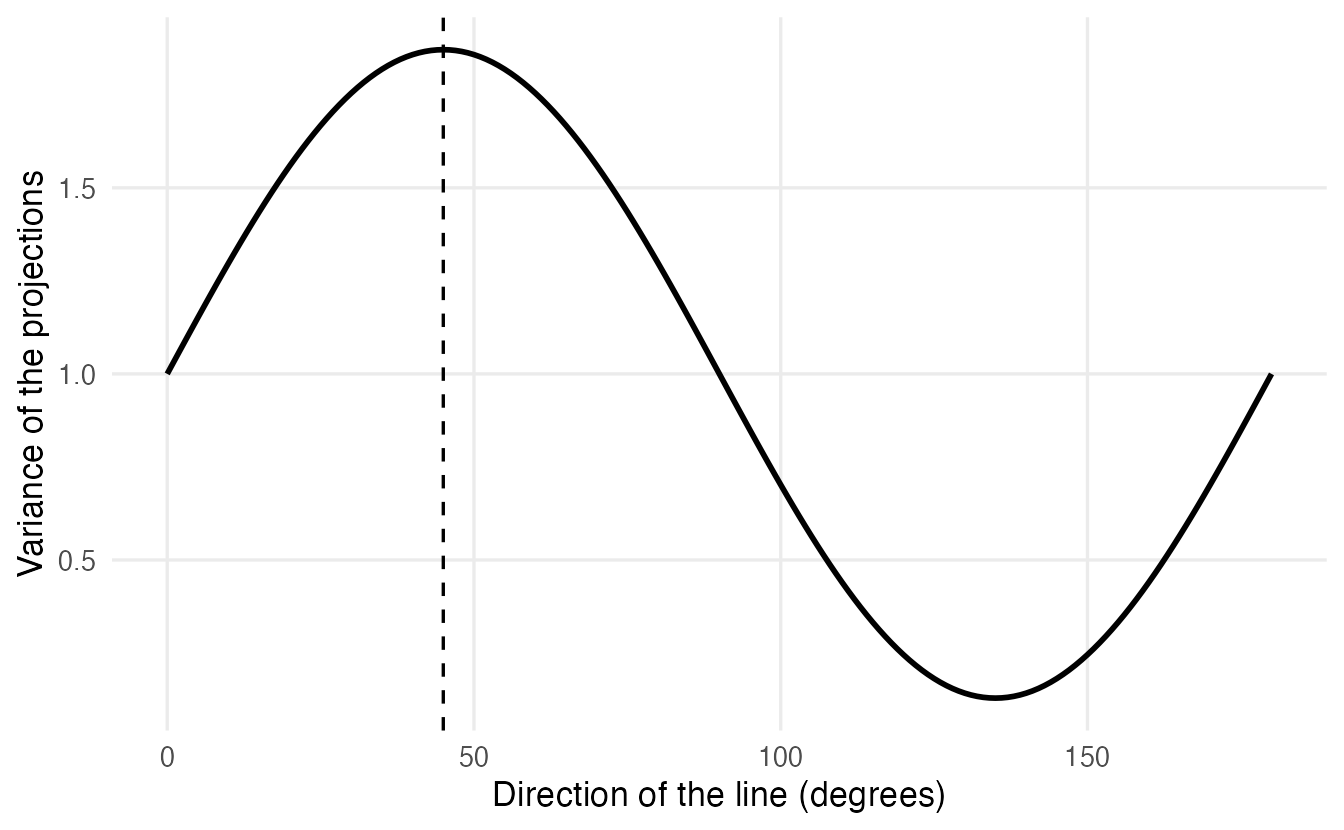
The best direction is at 45°, where the projections have variance 1.87. That direction is the first principal component (PC1). The second component (PC2) is simply the perpendicular direction: it collects what is left.
prcomp() finds the same answer without trying angles:
pca_two <- prcomp(two)
pca_two$rotation        # the directions (one column per PC)
#> PC1 PC2
#> flipper_len 0.7071 0.7071
#> body_mass 0.7071 -0.7071pca_two$sdev^2 # variance along each direction#> [1] 1.8712 0.1288v1 <- pca_two$rotation[, 1]
proj <- (two %*% v1) %*% t(v1) # projected points on PC1
cloud <- data.frame(two, px = proj[, 1], py = proj[, 2])
ggplot(cloud, aes(flipper_len, body_mass)) +
geom_segment(aes(xend = px, yend = py), colour = "grey70") +
geom_point(alpha = 0.6) +
geom_abline(slope = v1[2] / v1[1], intercept = 0,
colour = "#D55E00", linewidth = 1) +
coord_equal() +
labs(x = "Flipper length (standardised)",
y = "Body mass (standardised)")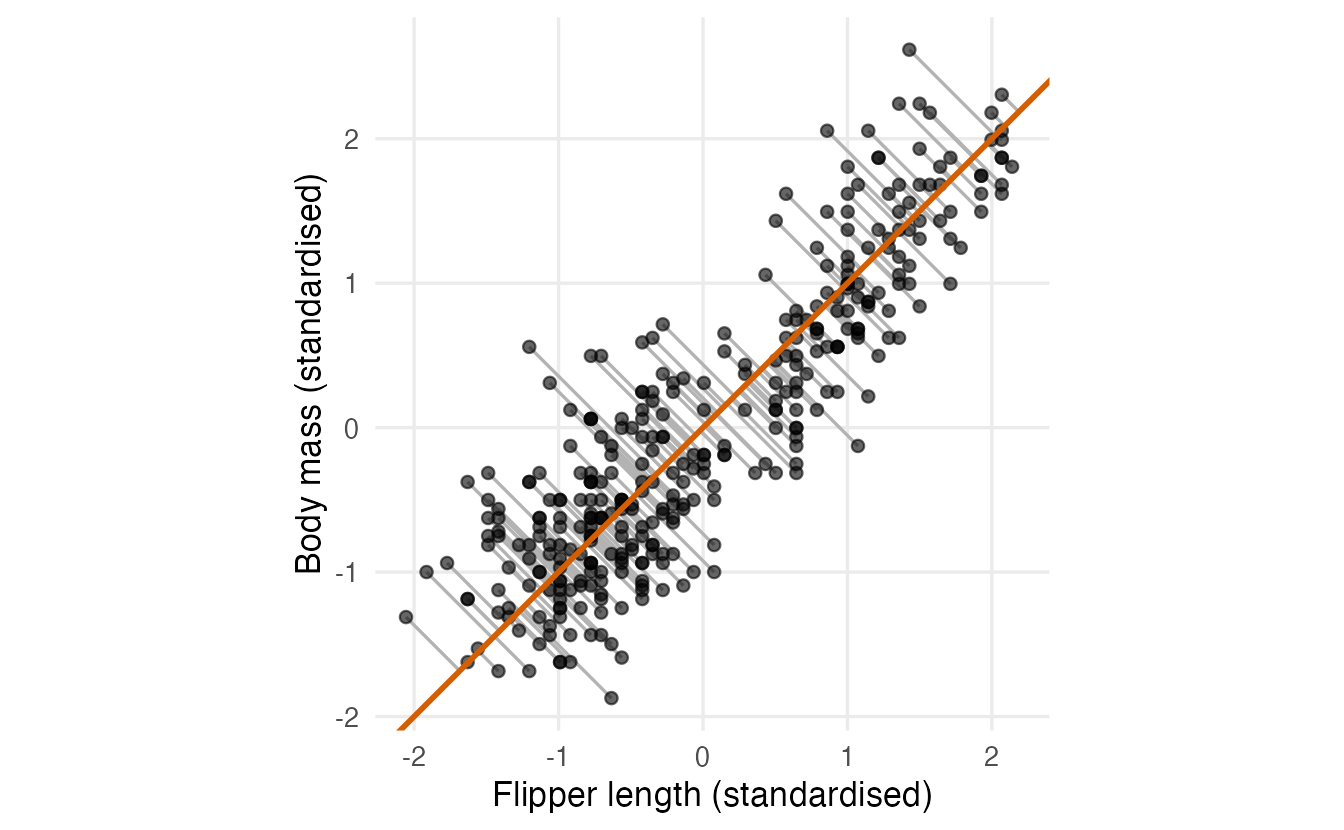
Two equivalent ways to describe PC1:
- the direction along which the data vary the most;
- the line that is closest to all points (smallest sum of squared perpendicular distances — note: perpendicular, not vertical as in regression).
PC1 alone keeps 94% of the total variance of the two variables. Replacing two numbers per penguin with one loses very little.
NoteGoing deeper: two standardised variables
For two standardised variables with correlation \(r > 0\), the covariance matrix is \(\begin{pmatrix}1 & r\\ r & 1\end{pmatrix}\). Its eigenvectors are always \((1, 1)/\sqrt 2\) and \((1, -1)/\sqrt 2\) — the 45° and 135° lines — with eigenvalues \(1 + r\) and \(1 - r\). Here \(r =\) 0.871, so the variances are 1.871 and 0.129, exactly what prcomp() returned. The stronger the correlation, the more variance PC1 collects.
3. Why standardise? Units matter
PCA looks for variance. Variance depends on units: body mass in grams has a variance of hundreds of thousands, bill depth in millimetres a variance of about 4. Watch what happens without standardising:
peng_num <- penguins |>
  select(bill_len, bill_dep, flipper_len, body_mass) |>
  na.omit()

round(apply(peng_num, 2, var), 1)
#> bill_len bill_dep flipper_len body_mass
#> 29.8 3.9 197.7 643131.1pca_raw <- prcomp(peng_num) # no scaling
round(pca_raw$rotation[, 1], 3)#> bill_len bill_dep flipper_len body_mass
#> 0.004 -0.001 0.015 1.000PC1 is essentially body mass alone (weight 1), simply because grams produce big numbers. Had we recorded mass in kilograms, the answer would change completely. That is not a property of penguins, it is a property of our units.
Rule of thumb: when variables are measured in different units (or on very different scales), use scale. = TRUE. This is equivalent to running PCA on the correlation matrix instead of the covariance matrix. Leave scaling off only when all variables share the same unit and their different variances are meaningful (e.g. pixel intensities, the same test score measured at different times).
4. PCA on iris
iris_num <- iris |> select(where(is.numeric))

pca_iris <- prcomp(iris_num, center = TRUE, scale. = TRUE)
summary(pca_iris)
#> Importance of components:
#> PC1 PC2 PC3 PC4
#> Standard deviation 1.71 0.956 0.3831 0.14393
#> Proportion of Variance 0.73 0.229 0.0367 0.00518
#> Cumulative Proportion 0.73 0.958 0.9948 1.00000prcomp() returns a list. The pieces you will use most:
| Element | What it is |
|---|---|
sdev |
standard deviation of each PC; sdev^2 are the eigenvalues (variances) |
rotation |
the loadings: weights that define each PC (one column per PC) |
x |
the scores: the value of each PC for each observation |
center, scale |
the means and SDs used to standardise — needed to project new data |
TipHow to read this output
- Standard deviation —
sdevof each component. Squared, these are the eigenvalues: 2.92, 0.91, 0.15, 0.02. With standardised data they add up to the number of variables (4). - Proportion of Variance — each eigenvalue divided by their sum. PC1 explains 73% of the total variance, PC2 22.9%.
- Cumulative Proportion — the running total: the first two PCs together keep 95.8% of the variance of the four variables.
5. How many components should we keep?
There is no single correct answer. Several rules exist; it is good practice to look at more than one.
Scree plot and cumulative variance
eig_iris <- data.frame(
  pc     = factor(paste0("PC", 1:4), levels = paste0("PC", 1:4)),
  eigen  = pca_iris$sdev^2,
  cum_pc = 100 * cumsum(pca_iris$sdev^2) / sum(pca_iris$sdev^2)
)

ggplot(eig_iris, aes(pc, eigen)) +
  geom_col(fill = "#56B4E9") +
  geom_line(aes(group = 1), linewidth = 0.8) +
  geom_point(size = 2) +
  geom_text(aes(label = paste0(round(cum_pc), "%")), vjust = -0.8) +
  geom_hline(yintercept = 1, linetype = "dashed") +
  labs(x = NULL, y = "Eigenvalue (variance of the PC)")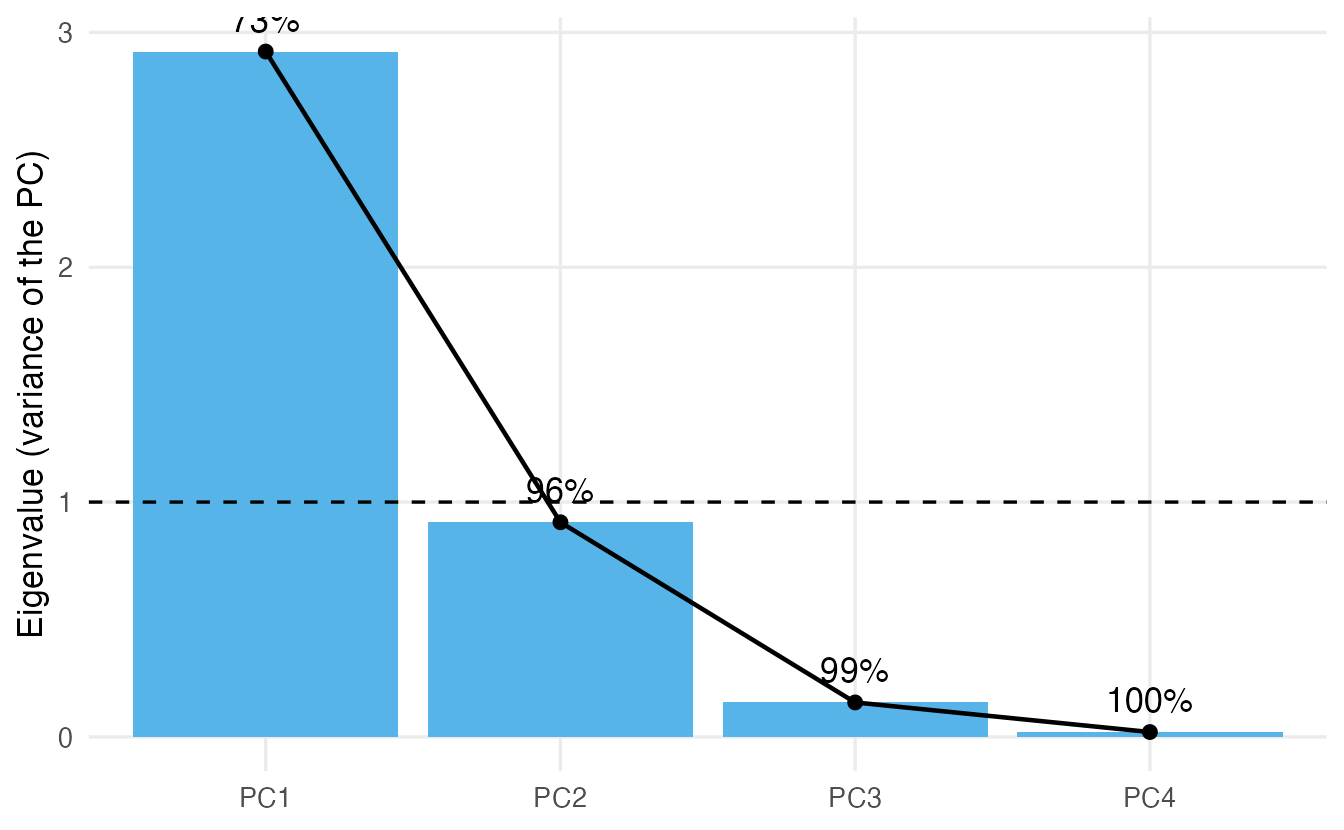
- Elbow rule — keep the components before the curve flattens. Here the big drop is between PC1 and PC2 and the curve is nearly flat after PC2, so one or two components.
- Percentage of variance — keep enough PCs to reach a target such as 80% or 90%. PC1 alone reaches 73%, PC1 + PC2 reach 96%.
Kaiser rule (eigenvalue > 1)
On standardised data each original variable has variance 1. The Kaiser rule keeps components that explain more than one variable’s worth of variance:
round(pca_iris$sdev^2, 3)#> [1] 2.918 0.914 0.147 0.021sum(pca_iris$sdev^2 > 1)#> [1] 1Only PC1 passes (2.92); PC2 is just below (0.91). The rule is simple but crude: it is only meaningful on standardised data, and a component with eigenvalue 0.99 is not really different from one with 1.01.
Parallel analysis
Even pure noise produces eigenvalues above 1 for the first components, just by chance. Parallel analysis asks: is each eigenvalue larger than what random, uncorrelated data of the same size would give? We can simulate this in a few lines:
set.seed(2026)
n <- nrow(iris_num)
p <- ncol(iris_num)

random_eig <- replicate(500, {
  noise <- matrix(rnorm(n * p), nrow = n)
  eigen(cor(noise), only.values = TRUE)$values
})

parallel <- data.frame(
  pc        = 1:p,
  observed  = pca_iris$sdev^2,
  random_95 = apply(random_eig, 1, quantile, probs = 0.95)
)
parallel
#> pc observed random_95
#> 1 1 2.91850 1.2937
#> 2 2 0.91403 1.1180
#> 3 3 0.14676 1.0007
#> 4 4 0.02071 0.9016Keep the components whose observed eigenvalue is above the 95th percentile of the random ones: here 1 component(s). Parallel analysis is generally considered more reliable than the Kaiser rule. (The psych package automates it with psych::fa.parallel(); see Factor analysis.)
TipPutting the rules together for iris
Kaiser and parallel analysis say one component; the elbow and the 90% target point to two. A sensible choice for visualisation is two components (PC2 still carries 23% of the variance and, as we will see, an interpretable contrast). The choice depends on the purpose — in a predictive model you could even tune the number of components by cross-validation (section 9).
6. Loadings: what does each component mean?
round(pca_iris$rotation[, 1:2], 3)#> PC1 PC2
#> Sepal.Length 0.521 -0.377
#> Sepal.Width -0.269 -0.923
#> Petal.Length 0.580 -0.024
#> Petal.Width 0.565 -0.067Each column holds the weights of the original (standardised) variables in that component. To interpret a component, look for the variables with large absolute weights and note which have the same sign and which have opposite signs.
A second view that is often easier to read is the correlation between each original variable and each component (for standardised data it equals loading × sdev):
round(cor(iris_num, pca_iris$x[, 1:2]), 2)#> PC1 PC2
#> Sepal.Length 0.89 -0.36
#> Sepal.Width -0.46 -0.88
#> Petal.Length 0.99 -0.02
#> Petal.Width 0.96 -0.06
TipHow to read the loadings
- PC1 has large weights of the same sign on
Petal.Length,Petal.WidthandSepal.Length, and a smaller weight of opposite sign onSepal.Width. It is a size component, driven by the petals and sepal length: flowers with high scores at one end of PC1 have long, wide petals and long sepals. - PC2 is dominated by
Sepal.Width(weight -0.92; correlation -0.88), with a smaller contribution ofSepal.Lengthin the same direction. The petal variables have almost no weight. PC2 essentially measures how wide the sepals are, independently of overall size.
Signs are arbitrary
If \(v\) is a principal direction, so is \(-v\): flipping a component’s sign changes nothing about the variance it explains. Different software, versions or even computers may return the opposite sign. So never interpret the sign alone — interpret the pattern (which variables go together and which go in opposite directions).
flipped_rot    <- pca_iris$rotation %*% diag(c(-1, 1, 1, 1))
flipped_scores <- pca_iris$x       %*% diag(c(-1, 1, 1, 1))

# both versions reconstruct the standardised data exactly
all.equal(unname(pca_iris$x %*% t(pca_iris$rotation)),
          unname(flipped_scores %*% t(flipped_rot)))
#> [1] TRUE7. Scores and biplots
The scores (pca_iris$x) are the coordinates of each flower on the new axes. Plotting PC1 against PC2 gives the best two-dimensional view of the four-dimensional data:
pve <- round(100 * summary(pca_iris)$importance[2, ], 1)

scores <- data.frame(pca_iris$x, species = iris$Species)

ggplot(scores, aes(PC1, PC2, colour = species)) +
  geom_point(size = 2, alpha = 0.8) +
  labs(x = paste0("PC1 (", pve[1], "%)"),
       y = paste0("PC2 (", pve[2], "%)"),
       colour = "Species")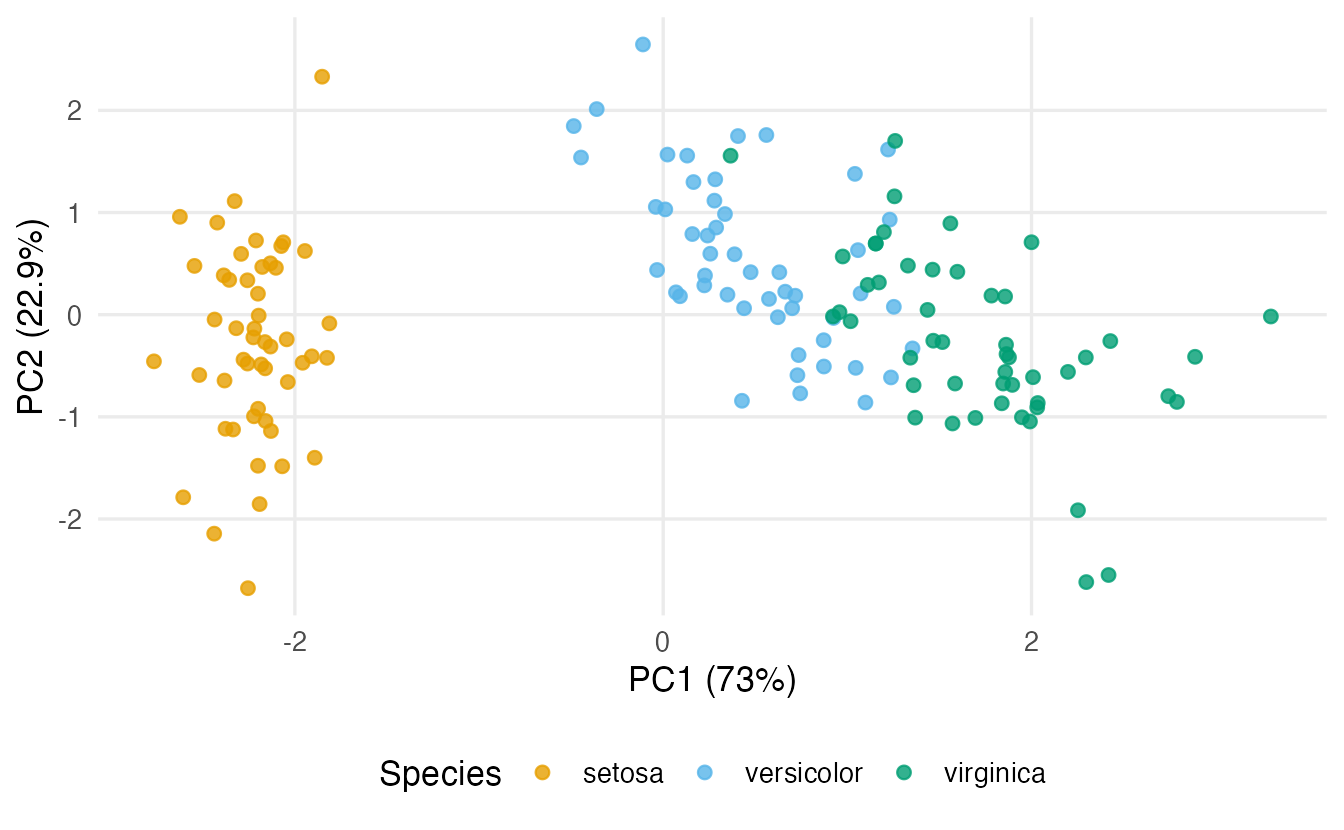
Setosa is clearly separated along PC1 (small petals); versicolor and virginica overlap partially. Remember: PCA did not know the species. That the species separate is a finding, not something PCA was asked to do — PCA maximises variance, not class separation.
A biplot shows scores (points) and variables (arrows) together:
biplot(pca_iris, cex = 0.6, col = c("grey50", "#D55E00"))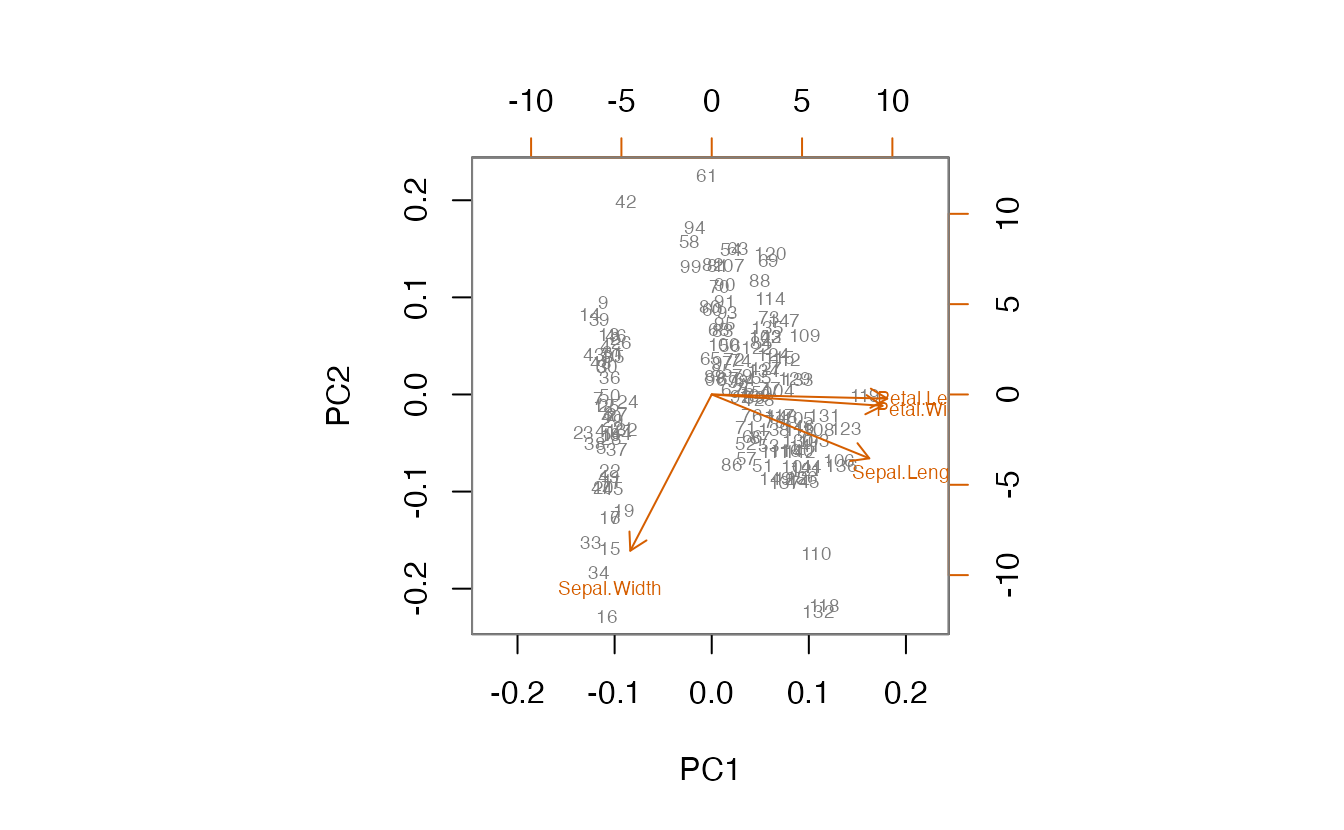
The default biplot() (scale = 1) draws a “correlation-style” biplot: the angle between two arrows approximates the correlation between those variables (small angle → strong positive correlation; 90° → uncorrelated; opposite → negative), and arrow length reflects how well the variable is represented in this plane. Points lying in the direction of an arrow have high values of that variable.
A ggplot version gives more control. We draw the correlations from section 6 as arrows on top of the standardised scores:
arrows <- data.frame(
  variable = colnames(iris_num),
  cor(iris_num, pca_iris$x[, 1:2])
)
scores_std <- scores |>
  mutate(PC1 = PC1 / pca_iris$sdev[1], PC2 = PC2 / pca_iris$sdev[2])

ggplot(scores_std, aes(PC1, PC2)) +
  geom_point(aes(colour = species), alpha = 0.5) +
  geom_segment(data = arrows, aes(x = 0, y = 0, xend = 2 * PC1,
               yend = 2 * PC2), arrow = arrow(length = unit(0.2, "cm"))) +
  geom_text(data = arrows, aes(2.3 * PC1, 2.3 * PC2, label = variable)) +
  labs(x = "PC1 (standardised scores)", y = "PC2 (standardised scores)",
       colour = "Species")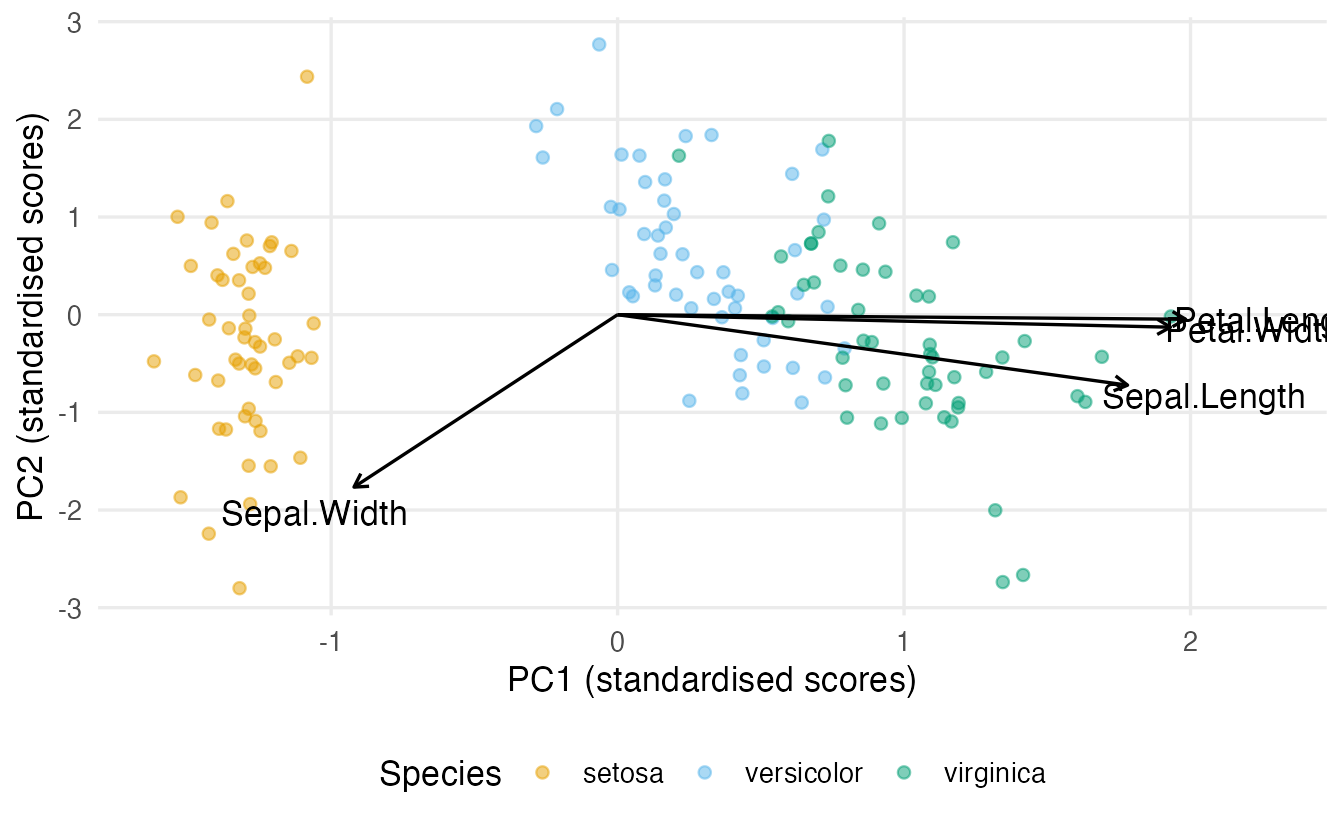
(The arrows are stretched by a factor of 2 only to make them visible; their directions and relative lengths are what matter.)
8. A second example: penguins
peng <- penguins |>
  select(species, bill_len, bill_dep, flipper_len, body_mass) |>
  na.omit()

pca_peng <- prcomp(peng |> select(-species), scale. = TRUE)
summary(pca_peng)
#> Importance of components:
#> PC1 PC2 PC3 PC4
#> Standard deviation 1.659 0.879 0.6043 0.3294
#> Proportion of Variance 0.688 0.193 0.0913 0.0271
#> Cumulative Proportion 0.688 0.882 0.9729 1.0000round(pca_peng$rotation[, 1:2], 2)#> PC1 PC2
#> bill_len 0.46 -0.60
#> bill_dep -0.40 -0.80
#> flipper_len 0.58 0.00
#> body_mass 0.55 -0.08data.frame(pca_peng$x, species = peng$species) |>
ggplot(aes(PC1, PC2, colour = species)) +
geom_point(alpha = 0.7) +
labs(colour = "Species")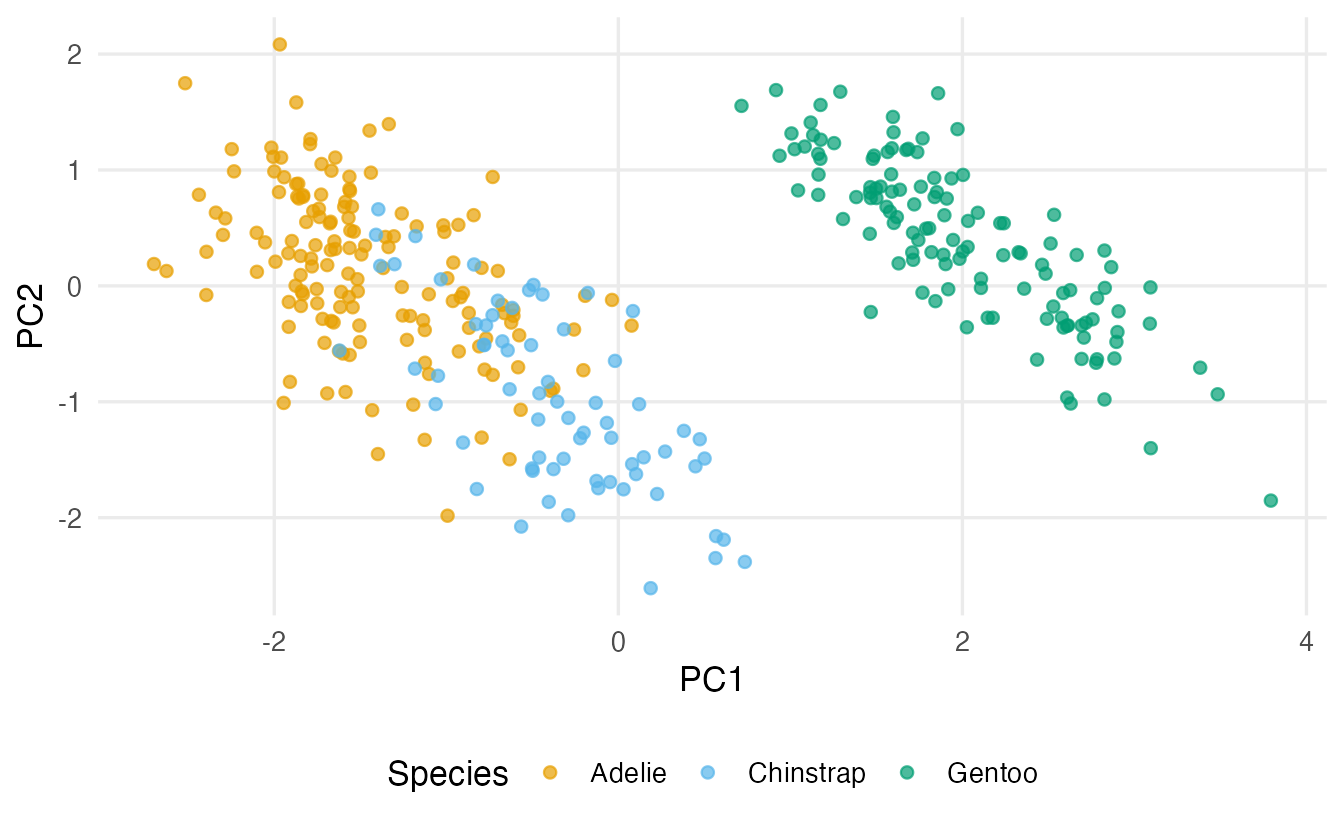
TipHow to read this example
- PC1 explains 69% of the variance. Flipper length, body mass and bill length load with the same sign, bill depth with the opposite sign: a “big body, long but shallow bill” axis. Gentoo penguins sit at one end, Adelie at the other.
- PC2 (19%) is dominated by the two bill measurements, with the same sign (weights -0.6 and -0.8): it separates birds with large bills for their body size. This is the axis that pulls Chinstrap away from Adelie.
- Kaiser keeps 1 component; the first two components keep 88% of the variance.
9. PCA in a predictive pipeline: no leakage
When PCA is a preprocessing step for a model, its means, SDs and loadings are estimated from data. If you estimate them on the full data set and then split into training and test, information from the test set has leaked into the model — the test error will be optimistic. (See The ML workflow.)
The rule: estimate the PCA on the training set, then apply the same transformation to the test set. In base R, predict() on a prcomp object does exactly this — it uses the training centre, scale and loadings:
set.seed(123)
idx       <- sample(nrow(peng), size = round(0.75 * nrow(peng)))
pca_train <- prcomp(peng[idx, -1], scale. = TRUE)
test_pcs  <- predict(pca_train, newdata = peng[-idx, -1])
head(round(test_pcs[, 1:2], 2), 3)
#> PC1 PC2
#> 2 1.33 -0.43
#> 3 1.39 -0.19
#> 13 1.82 -0.25With tidymodels, step_pca() inside a recipe takes care of it automatically: the recipe is estimated (prep()) on the training data only, every time — also within each cross-validation fold.
set.seed(123)
peng_split <- initial_split(peng, prop = 0.75, strata = species)
peng_train <- training(peng_split)
peng_test  <- testing(peng_split)

pca_rec <- recipe(species ~ ., data = peng_train) |>
  step_normalize(all_numeric_predictors()) |>
  step_pca(all_numeric_predictors(), num_comp = 2)

knn_spec <- nearest_neighbor(neighbors = 5) |>
  set_engine("kknn") |>              # requires the kknn package
  set_mode("classification")

pca_wf  <- workflow(pca_rec, knn_spec)
pca_fit <- fit(pca_wf, data = peng_train)

augment(pca_fit, new_data = peng_test) |>
  accuracy(truth = species, estimate = .pred_class)
#> # A tibble: 1 × 3
#> .metric .estimator .estimate
#> <chr> <chr> <dbl>
#> 1 accuracy multiclass 0.8721You can inspect the loadings learned on the training data with tidy():
prep(pca_rec) |>
  tidy(number = 2) |>                # the 2nd step = step_pca
  filter(component %in% c("PC1", "PC2"))
#> # A tibble: 8 × 4
#> terms value component id
#> <chr> <dbl> <chr> <chr>
#> 1 bill_len 0.4513 PC1 pca_GbWbm
#> 2 bill_dep -0.4054 PC1 pca_GbWbm
#> 3 flipper_len 0.5768 PC1 pca_GbWbm
#> 4 body_mass 0.5470 PC1 pca_GbWbm
#> 5 bill_len 0.6189 PC2 pca_GbWbm
#> 6 bill_dep 0.7821 PC2 pca_GbWbm
#> 7 flipper_len -0.003812 PC2 pca_GbWbm
#> 8 body_mass 0.07297 PC2 pca_GbWbmTo choose the number of components for prediction, set num_comp = tune() and tune it with cross-validation like any other hyperparameter.
NoteGoing deeper: PCA via the singular value decomposition
Let \(Z\) be the \(n \times p\) matrix of standardised data. Its singular value decomposition is
\[ Z = U D V^\top , \]
where \(U\) (\(n \times p\)) and \(V\) (\(p \times p\)) have orthonormal columns and \(D\) is diagonal with singular values \(d_1 \ge d_2 \ge \dots \ge 0\). Then
- the loadings are the columns of \(V\) (
rotation), - the scores are \(UD = ZV\) (
x), - the eigenvalues of the correlation matrix are \(\lambda_k = d_k^2/(n-1)\) (
sdev^2).
The correlation matrix itself is \(R = Z^\top Z/(n-1) = V \,\mathrm{diag}(\lambda_k)\, V^\top\) — the eigen-decomposition. prcomp() uses the SVD because it is numerically more stable than computing \(R\) first.
z <- scale(iris_num)
s <- svd(z)
s$d^2 / (nrow(z) - 1)                   # same as pca_iris$sdev^2
#> [1] 2.91850 0.91403 0.14676 0.02071all.equal(abs(s$u %*% diag(s$d)), abs(unname(pca_iris$x))) # scores#> [1] TRUE(We compare absolute values because of the sign indeterminacy.) Keeping only the first \(k\) components gives the best rank-\(k\) approximation of \(Z\) in the least-squares sense: \(Z \approx U_k D_k V_k^\top\) (Eckart–Young theorem).
WarningCommon pitfalls
- Forgetting to standardise variables measured in different units: the variable with the largest numbers wins PC1.
- Applying the Kaiser rule to unstandardised data, or treating “eigenvalue > 1” as a law. Compare several rules; parallel analysis is more trustworthy.
- Interpreting the sign of a component (“PC1 is negative, so flowers are small”). Signs are arbitrary; interpret the pattern.
- Running PCA on all data before splitting for a predictive model (leakage). Put
step_pca()in a recipe, or usepredict()on a PCA fitted to the training set. - Passing non-numeric columns or
NAs toprcomp(). Select numeric columns and handle missing values first (prcomp()stops with “infinite or missing values in ‘x’”). - Expecting PCA to find groups. PCA maximises variance; groups may or may not line up with the first components. It is also linear: curved structure needs other tools (t-SNE and UMAP).
10. Check your understanding
11. Exercises
★ Exercise 1 — scaling matters. The built-in USArrests data contain three crime rates (per 100,000 people) and the percentage of urban population for the 50 US states. (a) Run prcomp() without and with scale. = TRUE. (b) Which variable dominates PC1 without scaling, and why?
TipSolution
round(apply(USArrests, 2, var))
prcomp(USArrests)$rotation[, 1]
prcomp(USArrests, scale. = TRUE)$rotation[, 1]
Without scaling, PC1 is almost entirely Assault (loading about 0.995 in absolute value) because assaults are far more frequent than murders or rapes, so their variance (about 6,900) dwarfs the others. After scaling, PC1 gives similar weights to Murder, Assault and Rape (about 0.54–0.58) and a smaller one to UrbanPop: an overall “crime level” component.
★ Exercise 2 — predict the output. You convert Sepal.Length in iris from centimetres to micrometres (multiply by 10,000). Without running any code: does the output of prcomp(iris_num, scale. = TRUE) change? And that of prcomp(iris_num)? Then check.
TipSolution
With scale. = TRUE nothing changes: each variable is divided by its own SD, so units disappear. Without scaling, Sepal.Length now has an enormous variance and PC1 becomes essentially Sepal.Length alone (loading ≈ 1).
iris_um <- iris_num
iris_um$Sepal.Length <- iris_um$Sepal.Length * 10000
all.equal(prcomp(iris_num, scale. = TRUE)$sdev,
          prcomp(iris_um,  scale. = TRUE)$sdev)   # TRUE
round(prcomp(iris_um)$rotation[, 1], 3)
★★ Exercise 3 — debug. This code stops with an error. Find the two problems and fix them.
pca <- prcomp(penguins[, 3:6], scale = TRUE)
TipSolution
The error is infinite or missing values in 'x': two penguins have missing measurements. (Note also that the argument is called scale. with a dot; scale = TRUE happens to work through partial matching, but writing the full name is clearer and safer.)
pca <- penguins |>
  select(bill_len, bill_dep, flipper_len, body_mass) |>
  na.omit() |>
  prcomp(scale. = TRUE)
Selecting columns by name is also safer than by position (3:6), which silently breaks if the column order changes.
★★ Exercise 4 — interpret. For the standardised USArrests PCA the eigenvalues are approximately 2.48, 0.99, 0.36 and 0.17. (a) How many components would the Kaiser rule keep? (b) What percentage of variance do the first two components explain? (c) Why is the Kaiser decision here fragile?
TipSolution
- One (only 2.48 > 1). (b) (2.48 + 0.99) / 4 ≈ 87%. (c) PC2 has eigenvalue 0.99 — practically 1. A tiny change in the data could push it above the threshold. The cut-off is arbitrary; look at the scree plot, parallel analysis and, above all, at whether PC2 is interpretable (here it is dominated by
UrbanPop).
pca_us <- prcomp(USArrests, scale. = TRUE)
pca_us$sdev^2
summary(pca_us)
round(pca_us$rotation[, 1:2], 2)
★★★ Exercise 5 — mini-analysis. Perform a full PCA of the 11 variables of mtcars: (a) standardise and fit; (b) decide how many components to keep with the Kaiser rule and a parallel analysis (500 simulations); (c) describe PC1 and PC2 in words using the loadings; (d) draw the scores of the cars on PC1–PC2 with their names.
TipSolution
pca_mt <- prcomp(mtcars, scale. = TRUE)
round(pca_mt$sdev^2, 2)          # about 6.61, 2.65, 0.63, ...

set.seed(1)
rand <- replicate(500, eigen(cor(matrix(rnorm(32 * 11), 32)),
                             only.values = TRUE)$values)
data.frame(observed = pca_mt$sdev^2,
           random_95 = apply(rand, 1, quantile, 0.95))

round(pca_mt$rotation[, 1:2], 2)

data.frame(pca_mt$x, car = rownames(mtcars)) |>
  ggplot(aes(PC1, PC2, label = car)) +
  geom_text(size = 3) +
  labs(title = "mtcars on the first two PCs")
Both Kaiser and parallel analysis keep two components (PC1 + PC2 ≈ 84% of the variance). PC1 opposes cyl, disp, wt, hp to mpg, drat, vs: a “big, powerful, thirsty vs light, economical” axis. PC2 is driven by gear, am, carb versus qsec: fast cars with manual gearboxes and many carburettors versus slow-accelerating ones. (Your signs may be reversed.)
Summary
| Idea / function | What it does |
|---|---|
prcomp(x, scale. = TRUE) |
PCA on standardised data (= correlation matrix) |
summary(pca) |
SD, proportion and cumulative proportion of variance |
pca$sdev^2 |
eigenvalues (variance of each PC) |
pca$rotation |
loadings (weights defining the PCs) |
pca$x |
scores (coordinates of the observations) |
biplot(pca) |
scores and variables in one plot |
predict(pca, newdata) |
project new data with the training transformation |
step_pca() |
PCA inside a tidymodels recipe (no leakage) |
- A principal component is the direction of maximum variance; the next one is perpendicular and collects what is left.
- Standardise when variables have different units.
- Choose the number of components with several rules — scree, cumulative %, Kaiser, parallel analysis — and with the purpose in mind.
- Interpret patterns of loadings, never the sign alone.
- In prediction, PCA is part of the model: fit it on the training data only.