library(tidymodels)   # includes workflowsets
library(rpart)        # engine: decision tree
library(ranger)       # engine: random forest
library(xgboost)      # engine: boosted trees
library(kernlab) # engine: SVMComparing and choosing models
Five models, the same resamples, one honest final test
Compare logistic regression, a decision tree, a random forest, boosted trees and an SVM on identical cross-validation folds with workflowsets; choose a model by performance, simplicity, interpretability and calibration; evaluate the winner once on the test set; explain it with permutation importance; and think about responsible use.
NoteLearning objectives
By the end of this lesson you will be able to:
- compare several models fairly, on the same resamples and with the same metrics, using
workflow_set()andworkflow_map(); - read
autoplot()andrank_results()output and judge whether differences are larger than their uncertainty; - choose a model using performance, simplicity, interpretability and calibration, and draw a calibration plot;
- finalise the chosen workflow and evaluate it exactly once on the test set with
last_fit(); - compute permutation importance for any model, and list the main questions of responsible use.
1. Why compare models systematically?
In the last five lessons we fitted five kinds of model to the Titanic data. Which one should we use? It is tempting to look back at the numbers printed in each lesson and pick the largest. That would be a mistake for three reasons:
- Different conditions. If two models were evaluated with different folds, different metrics or different preprocessing, their numbers are not comparable.
- Noise. Cross-validated estimates have a standard error. A difference of 0.005 in AUC may be pure chance.
- The test set. Each lesson called
last_fit()once — fine for teaching, but if we now choose the model with the best test score, the test set has become part of the selection, and its score is optimistic.
There is also no universally best method (this is sometimes called the no free lunch principle): which model works best depends on the data. The honest procedure is:
- evaluate all candidates on the same resamples of the training set, with the same metrics;
- choose one, using performance and other criteria;
- only then, evaluate the chosen one once on the test set.
2. Data, split, folds and metrics
Exactly as in the ML workflow lesson:
titanic <- readr::read_csv(data_path("titanic_data.csv"),
                           na = c("", "NA", "?"), show_col_types = FALSE) |>
  select(survived, pclass, sex, age, sibsp, parch, fare, embarked) |>
  mutate(
    survived = factor(survived, levels = c(1, 0), labels = c("yes", "no")),
    pclass   = factor(pclass, levels = 1:3, labels = c("1st", "2nd", "3rd")),
    sex      = factor(sex),
    embarked = factor(embarked)
  )

set.seed(2026)
titanic_split <- initial_split(titanic, prop = 0.75, strata = survived)
titanic_train <- training(titanic_split)
titanic_test  <- testing(titanic_split)
set.seed(2026)
titanic_folds <- vfold_cv(titanic_train, v = 5, strata = survived)
titanic_metrics <- metric_set(roc_auc, accuracy, sensitivity, specificity,
                              brier_class, mn_log_loss)
Two recipes
Models differ in what preprocessing they need. Logistic regression, SVMs and XGBoost need numeric predictors (dummy variables); SVMs also need normalisation. Trees and forests work directly with factors.
dummy_rec <- recipe(survived ~ ., data = titanic_train) |>
  step_impute_median(all_numeric_predictors()) |>
  step_impute_mode(all_nominal_predictors()) |>
  step_log(fare, offset = 1) |>
  step_dummy(all_nominal_predictors()) |>
  step_normalize(all_numeric_predictors())

basic_rec <- recipe(survived ~ ., data = titanic_train) |>
  step_impute_median(all_numeric_predictors()) |>
  step_impute_mode(all_nominal_predictors())
dummy_rec is the recipe of lesson 44; basic_rec the one used for trees and forests in lessons 45 and 46. Normalising is harmless for boosted trees, so they can share dummy_rec.
Five model specifications
lr_spec <- logistic_reg() |>
  set_engine("glm")

tree_spec <- decision_tree(cost_complexity = tune(), tree_depth = tune(),
                           min_n = 10) |>
  set_engine("rpart")

rf_spec <- rand_forest(mtry = tune(), min_n = tune(), trees = 500) |>
  set_engine("ranger")

xgb_spec <- boost_tree(trees = tune(), tree_depth = tune(),
                       learn_rate = tune()) |>
  set_engine("xgboost")

svm_spec <- svm_rbf(cost = tune(), rbf_sigma = tune()) |>
  set_engine("kernlab")

all_specs <- list(lr_spec, tree_spec, rf_spec, xgb_spec, svm_spec)
all_specs <- lapply(all_specs, \(s) set_mode(s, "classification"))
names(all_specs) <- c("logistic", "tree", "forest", "boost", "svm")
The specifications are those of the previous lessons, slightly simplified (500 trees for the forest; for boosting we tune the number of trees directly instead of using early stopping).
3. A workflow set
A workflow set holds many workflows — combinations of a preprocessor and a model — in one table. workflow_set(preproc, models) crosses every preprocessor with every model; since our two recipes go with different models, we build two sets and stack them:
dummy_set <- workflow_set(
  preproc = list(dummy = dummy_rec),
  models = all_specs[c("logistic", "boost", "svm")]
)
basic_set <- workflow_set(
  preproc = list(basic = basic_rec),
  models = all_specs[c("tree", "forest")]
)
all_wf <- bind_rows(dummy_set, basic_set)
all_wf
#> # A workflow set/tibble: 5 × 4
#> wflow_id info option result
#> <chr> <list> <list> <list>
#> 1 dummy_logistic <tibble [1 × 4]> <opts[0]> <list [0]>
#> 2 dummy_boost <tibble [1 × 4]> <opts[0]> <list [0]>
#> 3 dummy_svm <tibble [1 × 4]> <opts[0]> <list [0]>
#> 4 basic_tree <tibble [1 × 4]> <opts[0]> <list [0]>
#> 5 basic_forest <tibble [1 × 4]> <opts[0]> <list [0]>Each row has an identifier wflow_id made of the preprocessor and model names (dummy_logistic, basic_forest, …). The result column is still empty.
Tune everything on the same folds
workflow_map() applies one tuning function to every workflow in the set:
all_res <- all_wf |>
  workflow_map(
    "tune_grid",
    resamples = titanic_folds,
    grid = 10,
    metrics = titanic_metrics,
    seed = 123,
    control = control_grid(save_pred = TRUE, save_workflow = TRUE),
    verbose = TRUE
  )
#> maximum number of iterations reached 1.024e-05 -1.024e-05maximum number of iterations reached 0.004206 -0.004205maximum number of iterations reached 2.073e-05 -2.073e-05maximum number of iterations reached 0.007791 -0.007776maximum number of iterations reached 1.122e-05 -1.122e-05maximum number of iterations reached 0.004632 -0.00463maximum number of iterations reached 2.621e-05 -2.621e-05maximum number of iterations reached 0.008484 -0.008465maximum number of iterations reached 1.004e-05 -1.004e-05maximum number of iterations reached 0.00411 -0.004109maximum number of iterations reached 2.592e-05 -2.592e-05maximum number of iterations reached 0.007653 -0.007639maximum number of iterations reached 1.026e-05 -1.026e-05maximum number of iterations reached 0.004192 -0.00419maximum number of iterations reached 2.594e-05 -2.594e-05maximum number of iterations reached 0.007828 -0.007813maximum number of iterations reached 1.003e-05 -1.003e-05maximum number of iterations reached 0.004104 -0.004103maximum number of iterations reached 2.002e-05 -2.002e-05maximum number of iterations reached 0.007621 -0.007607all_res#> # A workflow set/tibble: 5 × 4
#> wflow_id info option result
#> <chr> <list> <list> <list>
#> 1 dummy_logistic <tibble [1 × 4]> <opts[4]> <rsmp[+]>
#> 2 dummy_boost <tibble [1 × 4]> <opts[4]> <tune[+]>
#> 3 dummy_svm <tibble [1 × 4]> <opts[4]> <tune[+]>
#> 4 basic_tree <tibble [1 × 4]> <opts[4]> <tune[+]>
#> 5 basic_forest <tibble [1 × 4]> <opts[4]> <tune[+]>grid = 10askstune_grid()to build a space-filling grid of 10 candidate combinations for each model.mtry, whose range depends on the number of predictors, is finalised automatically from the data.- The logistic regression has no tuning parameters;
workflow_map()then simply runsfit_resamples()for it. seed = 123sets the same random seed before each workflow, so the results are reproducible.save_pred = TRUEkeeps the out-of-fold predictions (needed for the calibration plot);save_workflow = TRUEkeeps the workflow inside the results.
In total about 4 × 10 × 5 + 5 = 205 models are fitted; on a laptop this takes a few minutes, mostly for the forests and the SVMs.
4. Reading the comparison
autoplot(all_res, rank_metric = "roc_auc", metric = "roc_auc",
         select_best = TRUE) +
  geom_text(aes(y = mean - 0.02, label = wflow_id), angle = 90, hjust = 1) +
  expand_limits(y = 0.65) +
  theme(legend.position = "none")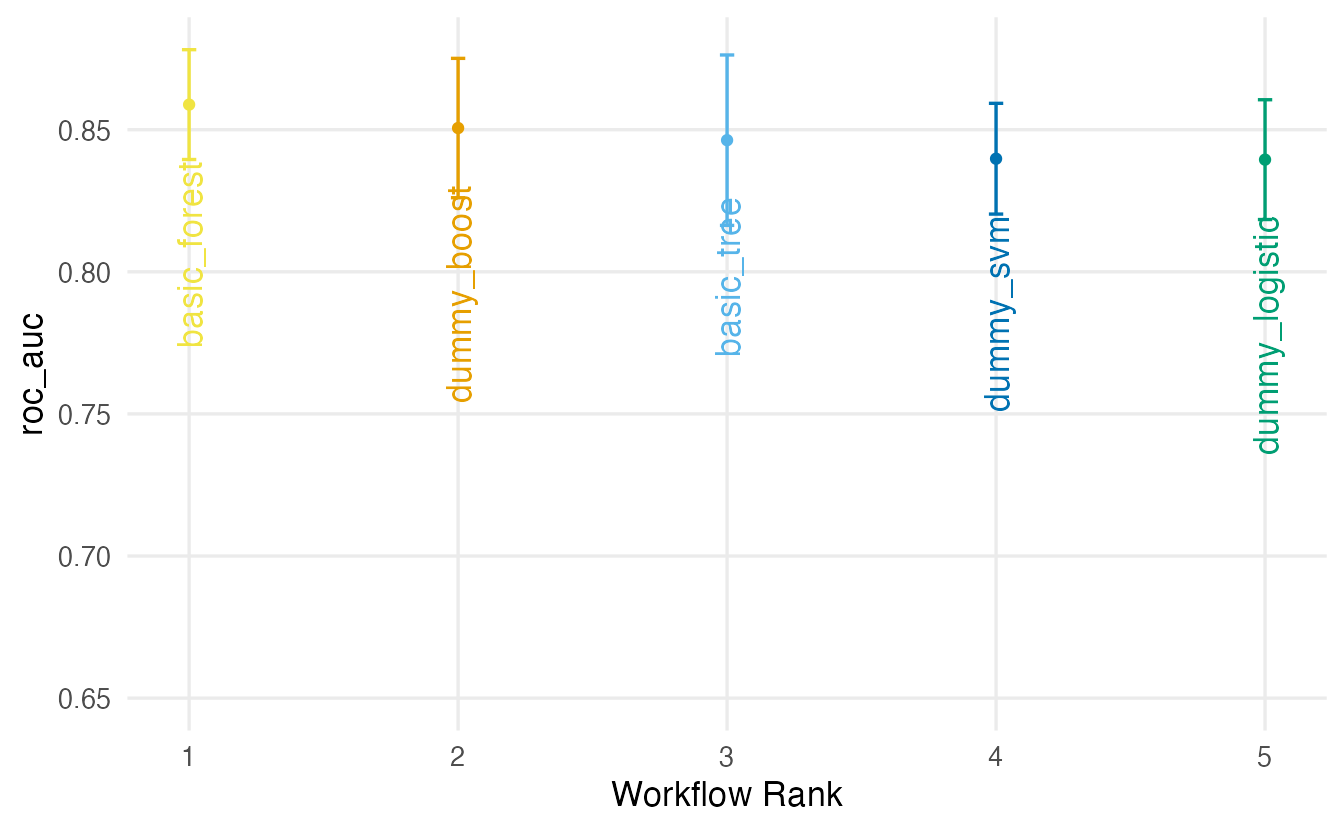
ranked <- rank_results(all_res, rank_metric = "roc_auc",
                       select_best = TRUE) |>
  filter(.metric %in% c("roc_auc", "brier_class")) |>
  select(wflow_id, .metric, mean, std_err, rank) |>
  tidyr::pivot_wider(names_from = .metric,
                     values_from = c(mean, std_err)) |>
  arrange(rank)
ranked
#> # A tibble: 5 × 6
#> wflow_id rank mean_brier_class mean_roc_auc std_err_brier_class
#> <chr> <int> <dbl> <dbl> <dbl>
#> 1 basic_forest 1 0.1417 0.8588 0.005727
#> 2 dummy_boost 2 0.1433 0.8506 0.007059
#> 3 basic_tree 3 0.1448 0.8463 0.009423
#> 4 dummy_svm 4 0.1716 0.8398 0.01126
#> 5 dummy_logistic 5 0.1526 0.8395 0.006791
#> # ℹ 1 more variable: std_err_roc_auc <dbl>
TipHow to read this output
select_best = TRUEkeeps, for each workflow, only its best tuning configuration;rankorders the workflows by mean ROC AUC.- The error bars in the plot (and
std_errin the table) show the uncertainty of each estimate. Typically on these data the flexible models and the logistic regression are within one or two standard errors of each other; the single tree is often a little behind. - Look at the Brier score as well: a model can rank passengers well (high AUC) but give less accurate probabilities (higher Brier).
- The best workflow here is basic_forest with a mean AUC of 0.859 (standard error 0.012).
Are the differences real?
Because all models used the same folds, we can compare them fold by fold: if one model beats another on every fold, that is more convincing than a difference of averages.
fold_auc <- function(wflow) {
  res <- extract_workflow_set_result(all_res, wflow)
  best <- select_best(res, metric = "roc_auc")
  collect_metrics(res, summarize = FALSE) |>
    filter(.metric == "roc_auc", .config == best$.config) |>
    transmute(fold = id, wflow_id = wflow, auc = .estimate)
}
per_fold <- purrr::map(all_res$wflow_id, fold_auc) |>
  purrr::list_rbind() |>
  tidyr::pivot_wider(names_from = wflow_id, values_from = auc)
per_fold
#> # A tibble: 5 × 6
#> fold dummy_logistic dummy_boost dummy_svm basic_tree basic_forest
#> <chr> <dbl> <dbl> <dbl> <dbl> <dbl>
#> 1 Fold1 0.8099 0.8243 0.8262 0.8161 0.8533
#> 2 Fold2 0.8142 0.8237 0.8034 0.8277 0.8233
#> 3 Fold3 0.8804 0.9056 0.8708 0.9176 0.8969
#> 4 Fold4 0.8463 0.8486 0.8581 0.8403 0.8628
#> 5 Fold5 0.8465 0.8508 0.8404 0.8300 0.8579Each row is a fold, each column a model. If the columns go up and down together, the folds differ in difficulty and the models track each other; the differences between columns within a row are what matter. (A formal analysis of such paired results is possible, e.g. with the tidyposterior package; here we keep to the visual comparison.)
5. Choosing a model
Performance is only one criterion. Others matter just as much in practice:
| Criterion | Question | On the Titanic |
|---|---|---|
| Performance | Is it clearly better than the alternatives, beyond the noise? | Often differences of about one standard error |
| Simplicity | Fewer moving parts, easier to maintain and to reproduce? | Logistic < tree < forest < SVM ≈ boosting |
| Interpretability | Can we explain predictions to the people affected? | Logistic regression and a small tree can be read directly |
| Calibration | Do predicted probabilities match observed frequencies? | Check with a calibration plot (below) |
| Cost | Training and prediction time, memory, software dependencies | The SVM and the forest are the slowest here |
A sensible rule, analogous to the 1-SE rule of the decision-tree lesson: among the models whose AUC is within one standard error of the best, choose the simplest.
simplicity <- c(dummy_logistic = 1, basic_tree = 2, basic_forest = 3,
                dummy_svm = 4, dummy_boost = 5)
best <- ranked |> slice_min(rank, n = 1)

candidates <- ranked |>
  filter(mean_roc_auc >= best$mean_roc_auc - best$std_err_roc_auc) |>
  mutate(simplicity = unname(simplicity[wflow_id])) |>
  arrange(simplicity)
candidates
#> # A tibble: 2 × 7
#> wflow_id rank mean_brier_class mean_roc_auc std_err_brier_class
#> <chr> <int> <dbl> <dbl> <dbl>
#> 1 basic_forest 1 0.1417 0.8588 0.005727
#> 2 dummy_boost 2 0.1433 0.8506 0.007059
#> # ℹ 2 more variables: std_err_roc_auc <dbl>, simplicity <dbl>chosen_id <- candidates$wflow_id[1]
chosen_id#> [1] "basic_forest"With this rule the chosen workflow is basic_forest. The ranking of “simplicity” is a judgement call, and you may disagree with ours; the important thing is to decide the rule before looking at the test set.
Calibration
A model is well calibrated if, among the passengers to whom it gives a survival probability of about 0.7, about 70% actually survived. We check this with the out-of-fold predictions saved during tuning: group the predictions into bins, and compare the average predicted probability with the observed proportion of survivors in each bin.
cv_preds <- collect_predictions(all_res, select_best = TRUE,
                                metric = "roc_auc")

calib <- cv_preds |>
  mutate(bin = cut(.pred_yes, breaks = seq(0, 1, by = 0.1),
                   include.lowest = TRUE)) |>
  summarise(predicted = mean(.pred_yes),
            observed = mean(survived == "yes"),
            n = n(),
.by = c(wflow_id, bin))ggplot(calib, aes(predicted, observed)) +
geom_abline(linetype = "dashed", colour = "grey50") +
geom_line(colour = "#0072B2") +
geom_point(aes(size = n), colour = "#0072B2") +
facet_wrap(~ wflow_id) +
coord_equal(xlim = c(0, 1), ylim = c(0, 1)) +
labs(x = "Mean predicted P(survival) in the bin",
y = "Observed proportion of survivors", size = "Passengers")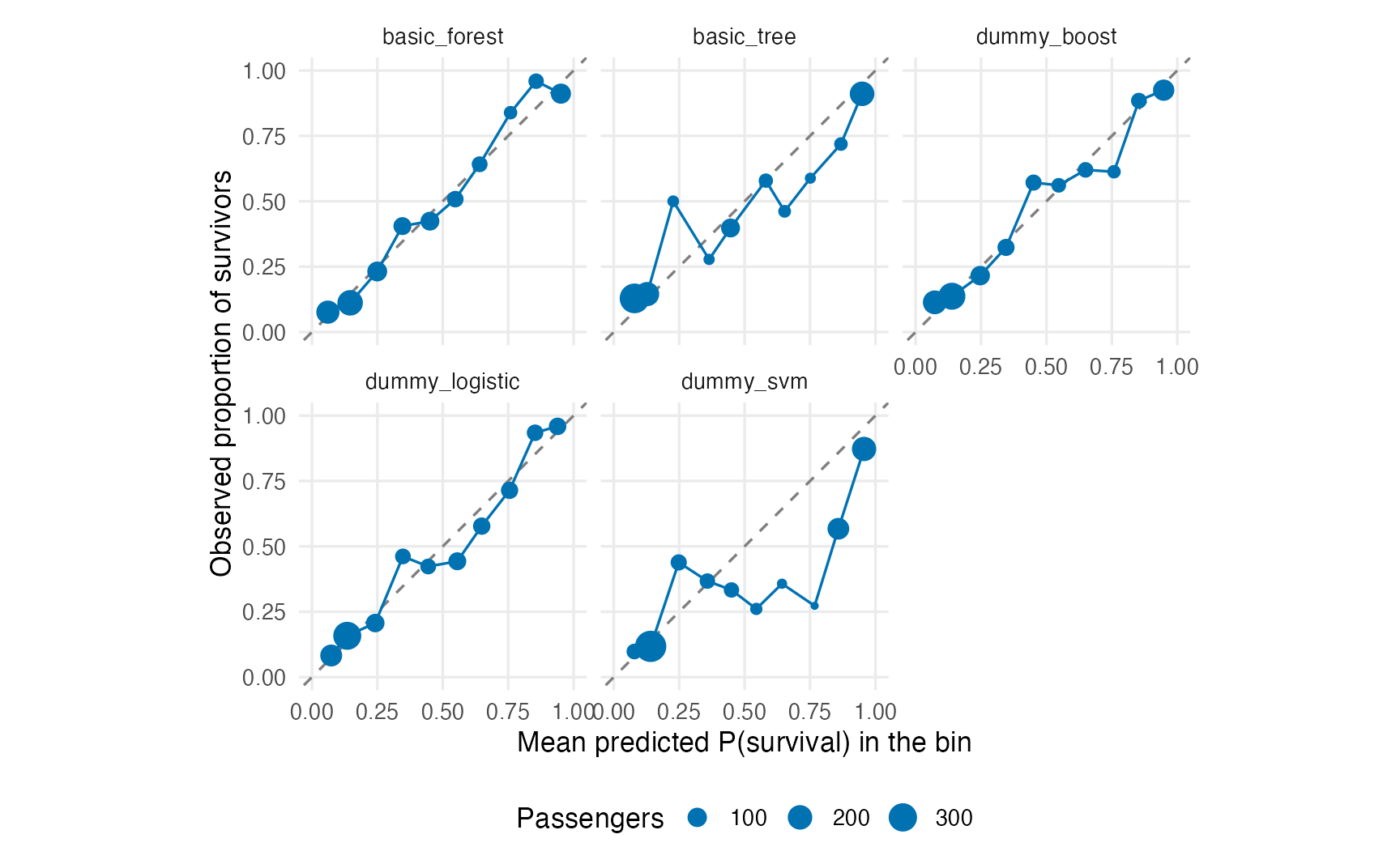
cv_preds |>
  group_by(wflow_id) |>
  brier_class(truth = survived, .pred_yes) |>
  arrange(.estimate)
#> # A tibble: 5 × 4
#> wflow_id .metric .estimator .estimate
#> <chr> <chr> <chr> <dbl>
#> 1 basic_forest brier_class binary 0.1417
#> 2 dummy_boost brier_class binary 0.1433
#> 3 basic_tree brier_class binary 0.1448
#> 4 dummy_logistic brier_class binary 0.1526
#> 5 dummy_svm brier_class binary 0.1716
TipHow to read this output
- Points below the diagonal mean the model is over-confident in survival (it predicts, say, 0.8 where only 65% survived); points above it mean it is too pessimistic.
- Bins with few passengers (small points) are noisy; do not over-interpret them.
- Logistic regression, which estimates probabilities by maximum likelihood, tends to be reasonably calibrated. SVM probabilities come from Platt scaling (lesson 48) and tree probabilities take only a few distinct values (one per leaf), which shows as a few large points.
- The Brier score summarises calibration and discrimination together; lower is better.
If a model ranks well but is poorly calibrated, its probabilities can be recalibrated (the probably package provides tools for this), but the recalibration must itself be estimated on training data only.
6. The final test — exactly once
We now finalise the chosen workflow with its best tuning parameters, fit it on the whole training set and evaluate it on the test set:
chosen_params <- all_res |>
  extract_workflow_set_result(chosen_id) |>
  select_best(metric = "roc_auc")

final_wf <- all_res |>
  extract_workflow(chosen_id) |>
  finalize_workflow(chosen_params)

final_fit <- last_fit(final_wf, split = titanic_split,
                      metrics = titanic_metrics)
collect_metrics(final_fit)
#> # A tibble: 6 × 4
#> .metric .estimator .estimate .config
#> <chr> <chr> <dbl> <chr>
#> 1 accuracy binary 0.8415 pre0_mod0_post0
#> 2 sensitivity binary 0.712 pre0_mod0_post0
#> 3 specificity binary 0.9212 pre0_mod0_post0
#> 4 roc_auc binary 0.8729 pre0_mod0_post0
#> 5 brier_class binary 0.1289 pre0_mod0_post0
#> 6 mn_log_loss binary 0.4159 pre0_mod0_post0cv_auc <- ranked$mean_roc_auc[ranked$wflow_id == chosen_id]
test_auc <- collect_metrics(final_fit) |>
filter(.metric == "roc_auc") |>
pull(.estimate)
c(cv = cv_auc, test = test_auc)#> cv test
#> 0.8588 0.8729The cross-validated AUC of the chosen model was 0.859; on the test set it is 0.873. The two should be close (the test set has only 328 passengers, so a difference of a few hundredths is within the noise). This test value is what we report. If it were much worse, we would have learned something important — but we must not now go back, pick another model and test again: the test set would no longer be independent of our choices.
collect_predictions(final_fit) |>
  roc_curve(truth = survived, .pred_yes) |>
  autoplot()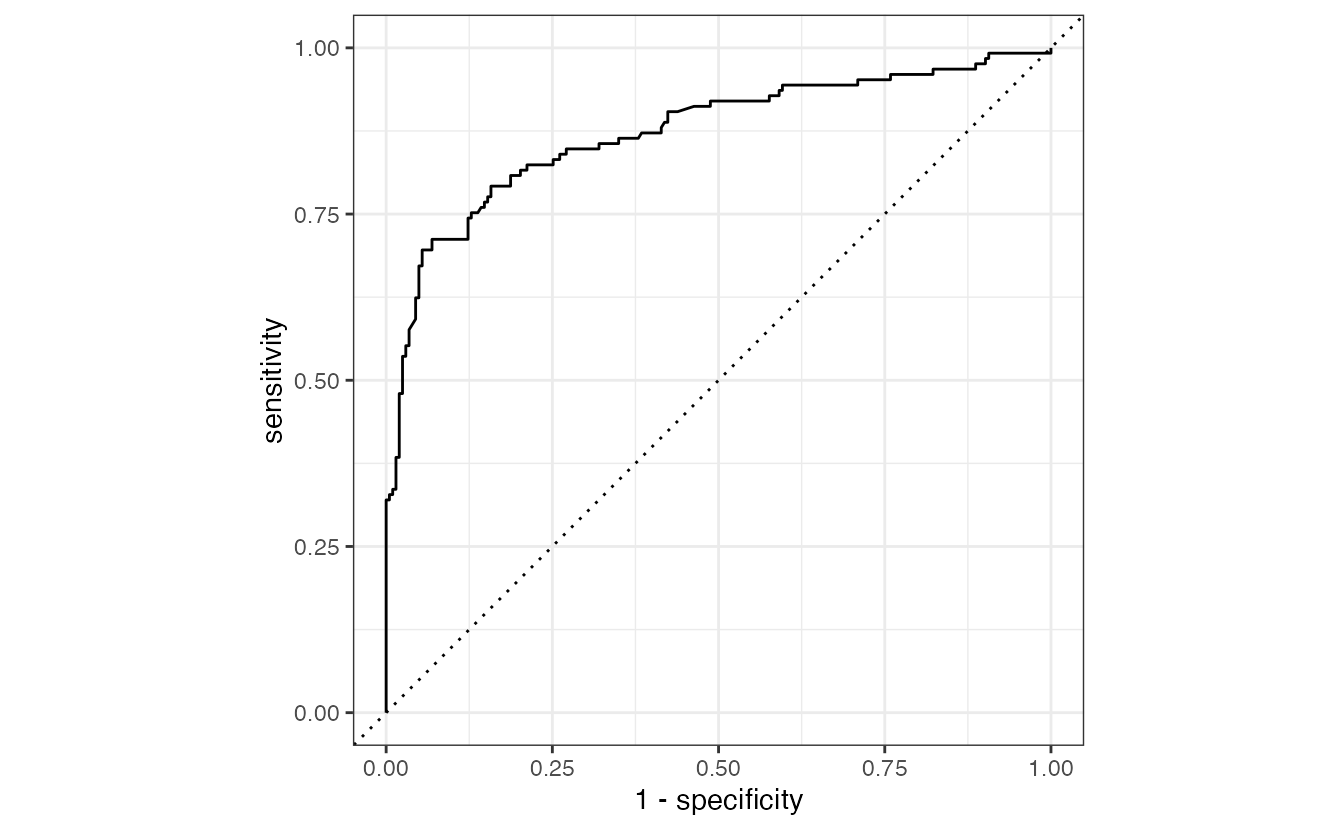
7. Explaining the chosen model: permutation importance
Permutation importance works for any model, because it only needs predictions: shuffle one predictor in a data set, predict again, and measure how much the performance drops. We compute it on the test set, for the original seven variables (not the dummy columns), using the fitted workflow so that the recipe is applied automatically.
final_model <- extract_workflow(final_fit)

set.seed(2026)
perm_imp <- permutation_importance(
  final_model, data = titanic_test, outcome = "survived",
  prob_col = ".pred_yes", event_level = "first", nsim = 20
)

ggplot(perm_imp, aes(x = importance,
                     y = reorder(variable, importance, FUN = median))) +
  geom_vline(xintercept = 0, colour = "grey60") +
  geom_boxplot() +
  labs(x = "Decrease in ROC AUC when the variable is shuffled", y = NULL)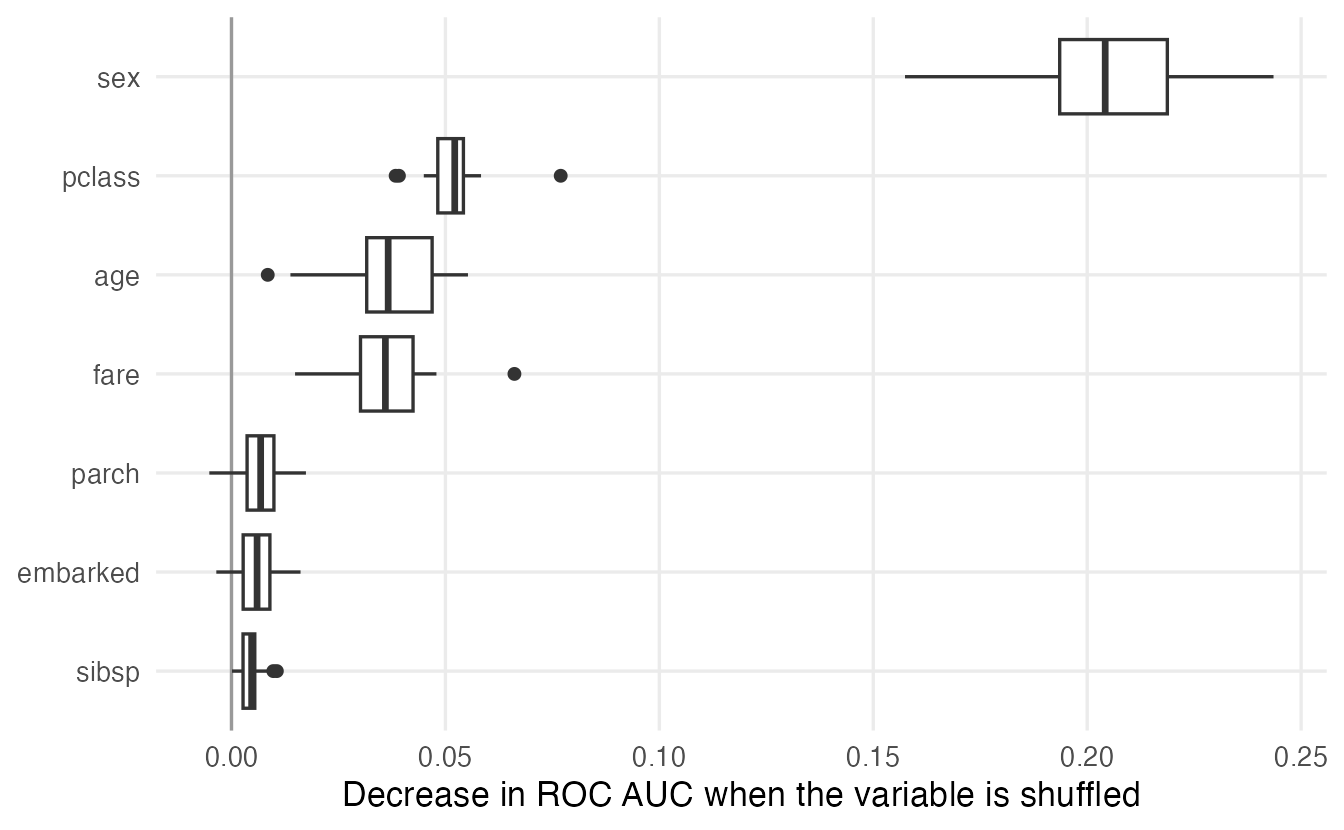
permutation_importance() is a short helper defined in the course file _common.R (open it: it is 20 lines of plain R). For each variable it shuffles the column, predicts again with the whole workflow and records how much the AUC drops.
prob_col = ".pred_yes"is the predicted probability of survival, andevent_level = "first"matches it:"yes"is the first level ofsurvived, so the AUC is computed with survival as the event. A mismatch would give importance values with the wrong sign.nsim = 20repeats each shuffle 20 times; the boxes show how much the importance varies from one random permutation to another.- The package
vip, often used for this, was archived from CRAN in December 2025; the logic above is exactly what it computes.
Typically sex dominates, followed by pclass and age. As in lesson 46, remember that permutation importance describes what the model uses, not causal effects, and that correlated predictors (here pclass and fare) can share or mask each other’s importance.
8. A note on responsible machine learning
A model that predicts well is not automatically a model that should be used. Before deploying a classifier, ask:
- What is it for, and who is affected? Predicting survival on the Titanic is a historical exercise. The same workflow applied to loans, hiring or medical triage makes decisions about people.
- Which variables does it use? Our model relies heavily on
sex. That reflects a historical rule (“women and children first”), but in a modern application using a protected characteristic, or a proxy for it, may be unfair or illegal. - Does it work equally well for different groups? Compute the metrics separately for relevant groups (e.g.
group_by(sex)beforeroc_auc()); a good overall AUC can hide poor performance for a minority. - Will the future look like the training data? Models degrade when the population changes (data drift). Monitor performance after deployment.
- Are the probabilities trustworthy, and is the uncertainty communicated? Report calibration and confidence in the estimates, not just a single accuracy figure.
- Can it be reproduced and audited? Keep the code, the seeds, the package versions and a short written description of data, intended use and limitations (sometimes called a model card).
WarningCommon pitfalls
- Comparing models evaluated on different resamples or metrics. Use one set of folds and one
metric_set()for all candidates. - Choosing the model with the best test score. The test set is for the final report only; choose on CV results.
- Treating the top of
rank_results()as a clear winner. Check the standard errors; differences of about one standard error are not convincing. - Ignoring calibration. A high AUC says nothing about whether probabilities are accurate; use the Brier score and a calibration plot.
- Wrong event level in permutation importance or metrics. The
pred_wrapperprobability andevent_levelmust refer to the same class. - Reading importance as causation, or deploying a model without asking who is affected and how.
9. Check your understanding
10. Exercises
★ Exercise 1 — a different metric. Re-rank the workflows using the Brier score instead of ROC AUC (rank_results(all_res, rank_metric = "brier_class", select_best = TRUE)). Does the ranking change? Why can it?
TipSolution
rank_results(all_res, rank_metric = "brier_class", select_best = TRUE) |>
  filter(.metric == "brier_class") |>
  select(wflow_id, mean, std_err, rank)
For the Brier score smaller is better, and rank_results() takes this into account. The ranking can change because AUC measures only how well the model ranks passengers, while the Brier score also rewards accurate probabilities: a well-ranking but poorly calibrated model (e.g. the SVM, or a tree with few distinct probabilities) can move down.
★★ Exercise 2 — add a sixth model. Add a penalised logistic regression, logistic_reg(penalty = tune(), mixture = 1) |> set_engine("glmnet"), to the set with dummy_rec (see lesson 43), and rerun the comparison. Does the lasso improve on ordinary logistic regression?
TipSolution
lasso_spec <- logistic_reg(penalty = tune(), mixture = 1) |>
  set_engine("glmnet")
lasso_set <- workflow_set(preproc = list(dummy = dummy_rec),
                          models = list(lasso = lasso_spec))
lasso_res <- lasso_set |>
  workflow_map("tune_grid", resamples = titanic_folds, grid = 10,
               metrics = titanic_metrics, seed = 123)
bind_rows(all_res, lasso_res) |>
  rank_results(rank_metric = "roc_auc", select_best = TRUE) |>
  filter(.metric == "roc_auc") |>
  select(wflow_id, mean, std_err, rank)
With only about ten dummy-coded predictors and around a thousand training passengers, there is little to gain from shrinkage: the lasso is usually within a small fraction of a standard error of ordinary logistic regression. Penalisation helps most when there are many predictors relative to the number of observations. (glmnet must be installed.)
★★ Exercise 3 — interpret a calibration table. For one model, the calibration bins give: predicted 0.15 / observed 0.10; predicted 0.45 / observed 0.47; predicted 0.85 / observed 0.70 (60 passengers in the last bin). Describe the model’s calibration in two sentences. What would you check before drawing conclusions?
TipSolution
The model is well calibrated in the middle range, slightly overestimates survival at low probabilities (it predicts 15% where 10% survived), and over-confident at the top: passengers given about 85% survival survived only 70% of the time. Before concluding, check the number of passengers in each bin and the uncertainty: with 60 passengers the observed proportion 0.70 has a standard error of about \(\sqrt{0.7 \cdot 0.3 / 60} \approx 0.06\), so the gap of 0.15 is about 2.5 standard errors — suggestive, not conclusive.
★★ Exercise 4 — debug the procedure. A colleague tunes the five models with CV, then runs last_fit() on all five, and reports the model with the highest test AUC, together with that AUC, as “the expected performance on new passengers”. What is wrong, and what should they do instead?
TipSolution
The test set has been used to select the model, so the reported AUC is the maximum of five noisy estimates and is optimistic (a winner’s-curse effect). They should choose the model on the cross-validated results of the training set (performance plus the other criteria), then run last_fit() only for the chosen model and report that single test score.
★★★ Exercise 5 — performance by group. Using collect_predictions(final_fit), compute the ROC AUC, sensitivity and specificity of the final model separately for men and women (hint: the predictions do not contain sex; join them with the test set by row using .row, or use augment(final_fit)). What do you find, and why does it matter?
TipSolution
test_pred <- augment(final_fit)          # test set + predictions
group_metrics <- metric_set(roc_auc, sensitivity, specificity)
test_pred |>
  group_by(sex) |>
  group_metrics(truth = survived, estimate = .pred_class, .pred_yes)
Within each sex the AUC is lower than overall, because much of the overall discrimination comes from separating women from men; within a group the model must rely on class and age. Sensitivity and specificity typically differ a lot between groups: the model predicts survival for most women and death for most men, so sensitivity is high for women and very low for men. In a real application such differences in error rates between groups would need to be reported and discussed.
Summary
| Idea / function | What it does |
|---|---|
workflow_set(preproc, models) |
All combinations of preprocessors and models; stack sets with bind_rows() |
workflow_map("tune_grid", resamples, grid, metrics, seed) |
Tune every workflow on the same resamples |
autoplot(res, rank_metric, metric, select_best = TRUE) |
Compare the best configuration of each model |
rank_results(res, rank_metric, select_best = TRUE) |
Ranked table with means and standard errors |
collect_predictions(res, select_best = TRUE, metric) |
Out-of-fold predictions, e.g. for calibration |
extract_workflow_set_result(), extract_workflow() |
Retrieve one workflow’s results / workflow |
select_best(), finalize_workflow(), last_fit() |
Fix parameters, refit on training, test once |
permutation_importance(wf, data, outcome, prob_col) (course helper) |
Model-agnostic permutation importance |
- Compare models on the same resamples with the same metrics; look at standard errors before declaring a winner.
- Choose by performance, simplicity, interpretability, calibration and cost — and fix the rule before looking at the test set.
- Use the test set once, for the chosen model only.
- Explain the model (permutation importance) and ask who is affected before using it.