library(tidymodels)
library(kernlab)   # engine for support vector machines

# tidymodels attaches modeldata, whose own `penguins` (with different column
# names) would mask the base-R one: make sure we use R's built-in version.
penguins <- datasets::penguinsSupport vector machines
Separate the classes with the widest possible street — and bend the street with kernels
The maximum-margin idea, soft margins and the cost parameter, the hinge loss, linear, polynomial and RBF kernels shown on simulated 2-D data, why predictors must be normalised, tuning an RBF SVM with tidymodels and kernlab, a correct validation split, and the caveats of SVM probabilities (Platt scaling).
NoteLearning objectives
By the end of this lesson you will be able to:
- explain the maximum-margin idea and identify the support vectors in a picture;
- describe the soft margin and the role of the cost parameter \(C\), and write down the hinge loss;
- explain what a kernel does and how
costandrbf_sigmachange the decision boundary of an RBF SVM; - explain why predictors must be normalised, and build a correct train / validation / test split;
- tune an RBF SVM with
svm_rbf()andkernlabin tidymodels, and interpret its probability estimates with care.
1. Why support vector machines?
Imagine two groups of points on a map — say, houses belonging to two villages — and you must draw a single straight road between them. Many roads would separate the villages. Which one is best? A natural answer: the road that stays as far as possible from the nearest house on either side. A wide road leaves room for error: a new house built a little off the usual pattern will still be on the correct side.
A support vector machine (SVM) turns this idea into a classifier. It looks for the boundary with the widest margin (the widest “street”) between the classes. Then it extends the idea in two directions:
- a soft margin allows some points to be inside the street or on the wrong side, because real classes overlap;
- kernels allow the street to be curved, by implicitly working in a richer space of features.
SVMs were among the most popular classifiers of the late 1990s and 2000s. Today boosted trees are more often the first choice for tabular data, but SVMs remain useful, especially with many numeric features and moderate sample sizes, and the margin and kernel ideas reappear throughout machine learning.
2. The maximum-margin classifier
We simulate two well-separated classes in two dimensions. For SVMs it is convenient to code the classes as \(y = -1\) and \(y = +1\).
set.seed(48)
n <- 40
toy <- data.frame(
  x1 = c(rnorm(n / 2, -1.2, 0.6), rnorm(n / 2, 1.2, 0.6)),
  x2 = c(rnorm(n / 2, -1.2, 0.6), rnorm(n / 2, 1.2, 0.6)),
  y  = rep(c(-1, 1), each = n / 2)
)
X <- as.matrix(toy[, c("x1", "x2")])
A linear classifier uses the decision value \(f(x) = w_1 x_1 + w_2 x_2 + b\) and predicts \(+1\) if \(f(x) > 0\), \(-1\) otherwise. The boundary is the line \(f(x) = 0\). A point is correctly classified when \(y\,f(x) > 0\); the larger \(y\,f(x)\), the more comfortably it is on the right side.
The SVM chooses \(w\) and \(b\) by minimising
\[ \underbrace{\tfrac12 \lVert w \rVert^2}_{\text{small } w \;=\; \text{wide margin}} \;+\; C \sum_{i=1}^n \underbrace{\max\big(0,\; 1 - y_i f(x_i)\big)}_{\text{hinge loss}} . \]
We will unpack this formula in section 3. For now, we can minimise it directly with base R’s general-purpose optimiser optim():
svm_objective <- function(par, X, y, C) {
  w <- par[1:2]
  b <- par[3]
  f <- drop(X %*% w) + b                           # decision values
  0.5 * sum(w^2) + C * sum(pmax(0, 1 - y * f))     # margin + hinge loss
}
fit_linear_svm <- function(X, y, C) {
  start <- c(coef(lm(y ~ X))[-1], 0)
  opt <- optim(start, svm_objective, X = X, y = y, C = C,
               control = list(maxit = 20000, reltol = 1e-12))
  opt <- optim(opt$par, svm_objective, X = X, y = y, C = C,   # restart
               control = list(maxit = 20000, reltol = 1e-12))
  list(w = unname(opt$par[1:2]), b = unname(opt$par[3]))
}(optim() is not how real SVM software works — it solves an equivalent quadratic problem very efficiently — but for 40 points and 3 parameters it is accurate enough, and it lets us see the objective in plain R.)
With a very large \(C\), violations of the margin are so expensive that none is allowed: this is the hard-margin classifier.
svm_hard <- fit_linear_svm(X, toy$y, C = 1000)
f_hard <- drop(X %*% svm_hard$w) + svm_hard$b
toy$margin_value <- toy$y * f_hard
round(sort(toy$margin_value)[1:5], 3)
#> [1] 1.000 1.000 1.000 1.041 1.221half_width <- 1 / sqrt(sum(svm_hard$w^2))
half_width#> [1] 0.7212Every point has \(y_i f(x_i) \ge 1\), and exactly 3 points sit on the edge of the street (\(y_i f(x_i) = 1\)). These are the support vectors: the boundary is determined by them alone. Moving any other point (without crossing the street) would not change the solution. The distance from the boundary to the edge of the street is \(1/\lVert w \rVert\) = 0.72.
other_lines <- data.frame(intercept = c(0, 0), slope = c(-5, -0.2))
w <- svm_hard$w
b <- svm_hard$b
ggplot(toy, aes(x1, x2)) +
  geom_abline(data = other_lines, aes(intercept = intercept, slope = slope),
              colour = "grey70", linewidth = 0.8) +
  geom_abline(intercept = -b / w[2], slope = -w[1] / w[2], linewidth = 1) +
  geom_abline(intercept = (c(-1, 1) - b) / w[2], slope = -w[1] / w[2],
              linetype = "dashed") +
  geom_point(aes(colour = factor(y)), size = 2) +
  geom_point(data = subset(toy, margin_value < 1 + 1e-3),
             shape = 21, size = 5, stroke = 1) +
  coord_equal() +
  labs(x = expression(x[1]), y = expression(x[2]), colour = "Class")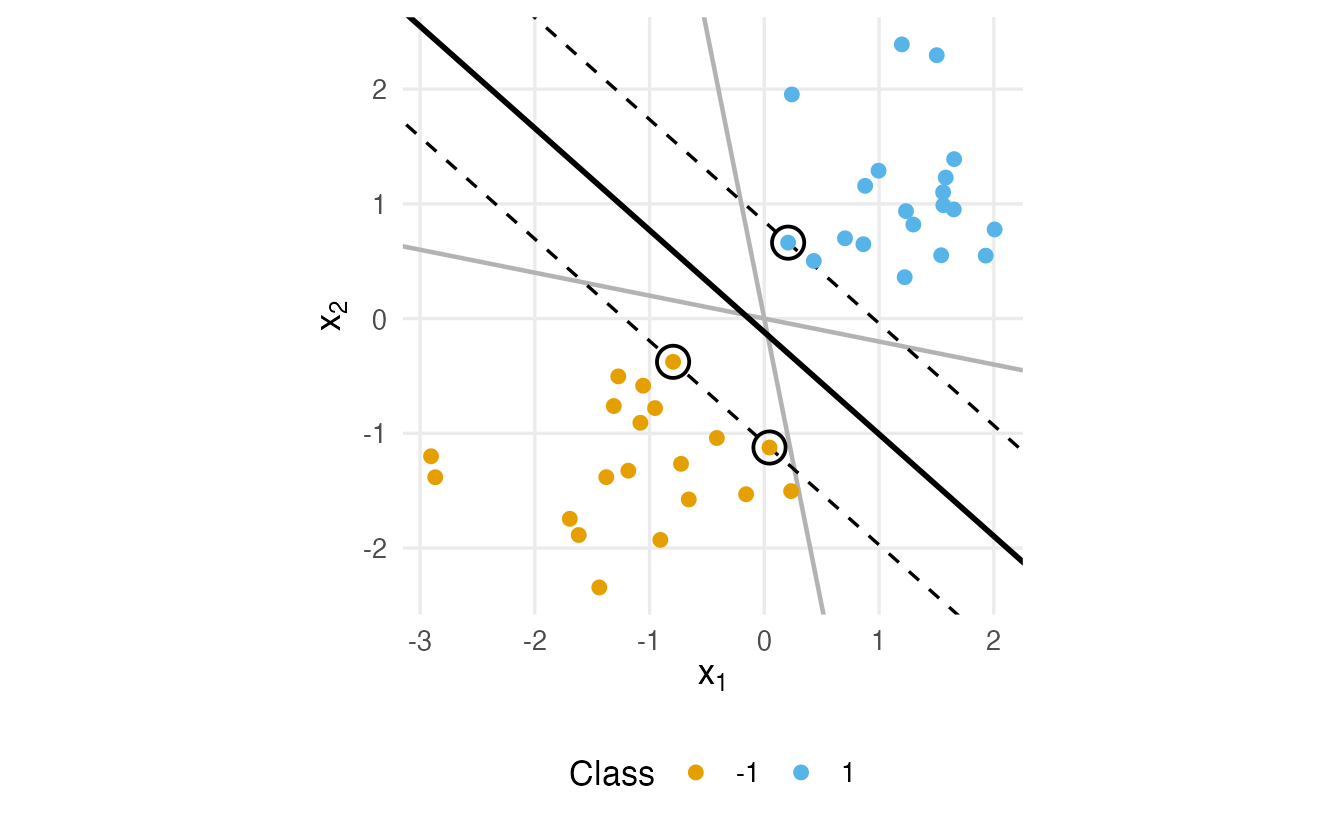
The two grey lines also separate the training data perfectly, but each of them passes closer to the nearest points than the maximum-margin line does. The maximum-margin line is the most “cautious” one: it keeps the largest possible distance from both classes.
3. Soft margins, the cost \(C\) and the hinge loss
Real classes overlap, and no straight line separates them. The soft-margin SVM allows violations, but makes each one pay a price. Look again at the objective:
- \(\tfrac12 \lVert w \rVert^2\) is small when \(w\) is small, i.e. when the street (width \(2/\lVert w \rVert\)) is wide;
- the hinge loss \(\max(0, 1 - y_i f(x_i))\) is zero for a point on the correct side and outside the street (\(y_i f(x_i) \ge 1\)), and grows linearly for points inside the street or on the wrong side;
- the cost \(C\) sets the exchange rate between the two.
losses <- data.frame(m = seq(-2, 3, length.out = 501))
losses <- rbind(
  data.frame(m = losses$m, loss = as.numeric(losses$m < 0), type = "0-1"),
  data.frame(m = losses$m, loss = pmax(0, 1 - losses$m), type = "hinge"),
  data.frame(m = losses$m, loss = log2(1 + exp(-losses$m)),
             type = "logistic")
)
ggplot(losses, aes(m, loss, colour = type)) +
  geom_line(linewidth = 1) +
  geom_vline(xintercept = c(0, 1), linetype = "dotted") +
  labs(x = "Margin value  y · f(x)", y = "Loss", colour = NULL)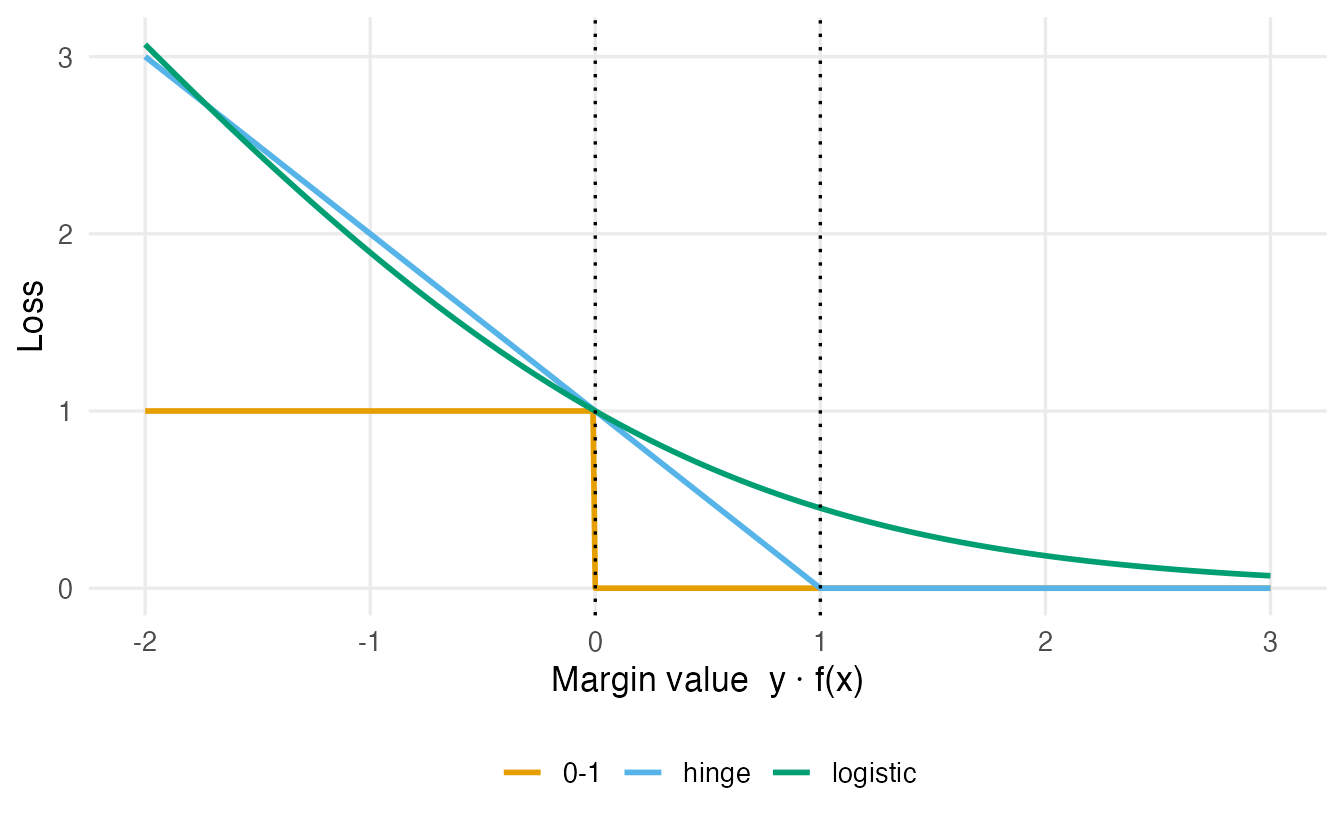
The hinge loss is zero for every point beyond the margin: those points have no influence on the solution. Only points on or inside the margin (the support vectors) matter. The logistic loss, in contrast, gives every point some influence. Otherwise the two are remarkably similar, which is why linear SVMs and logistic regression often give similar boundaries.
Now let us see what \(C\) does on overlapping data:
set.seed(480)
toy2 <- data.frame(
  x1 = c(rnorm(n / 2, -0.7, 0.8), rnorm(n / 2, 0.7, 0.8)),
  x2 = c(rnorm(n / 2, -0.7, 0.8), rnorm(n / 2, 0.7, 0.8)),
  y  = rep(c(-1, 1), each = n / 2)
)
X2 <- as.matrix(toy2[, c("x1", "x2")])
c_values <- c(0.01, 0.1, 1, 100)
soft <- do.call(rbind, lapply(c_values, \(C) {
  fit <- fit_linear_svm(X2, toy2$y, C)
  m <- toy2$y * (drop(X2 %*% fit$w) + fit$b)
  data.frame(C = C, half_width = 1 / sqrt(sum(fit$w^2)),
             support_vectors = sum(m < 1 + 1e-3),
             training_errors = sum(m < 0),
             w1 = fit$w[1], w2 = fit$w[2], b = fit$b)
}))
soft[, 1:4]
#> C half_width support_vectors training_errors
#> 1 1e-02 2.53931 38 5
#> 2 1e-01 0.99437 20 2
#> 3 1e+00 0.54995 10 2
#> 4 1e+02 0.09701 3 0ggplot(toy2, aes(x1, x2)) +
geom_point(aes(colour = factor(y)), size = 1.8) +
geom_abline(data = soft, aes(intercept = -b / w2, slope = -w1 / w2),
linewidth = 1) +
geom_abline(data = soft, aes(intercept = (1 - b) / w2, slope = -w1 / w2),
linetype = "dashed") +
geom_abline(data = soft, aes(intercept = (-1 - b) / w2, slope = -w1 / w2),
linetype = "dashed") +
facet_wrap(~ C, labeller = label_both) +
coord_equal(xlim = c(-3, 3), ylim = c(-3, 3)) +
labs(x = expression(x[1]), y = expression(x[2]), colour = "Class")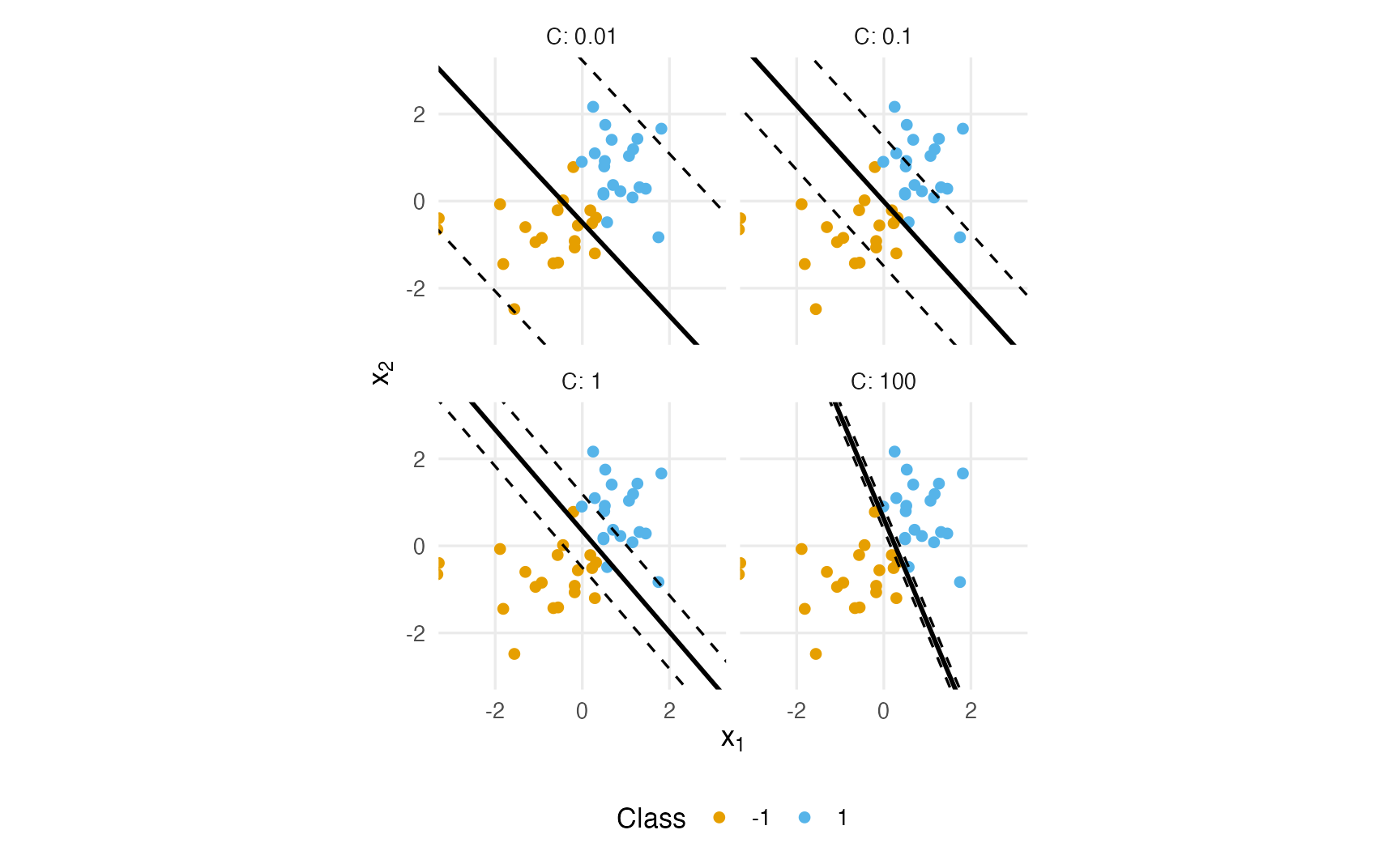
TipHow to read this output
- With small \(C\) (0.01), violations are cheap: the street is wide (half-width 2.54) and 38 of the 40 points are support vectors. The boundary is determined by many points: low variance, possibly higher bias.
- With large \(C\) (100), violations are expensive: the street becomes narrow (half-width 0.1) and the boundary bends to classify the training points correctly (0 training errors against 5 for small \(C\)). Few points decide everything: low bias, high variance — risk of overfitting.
- \(C\) is therefore a regularisation parameter, like \(\lambda\) in penalised regression, but in the opposite direction: a large \(C\) means weak regularisation.
NoteGoing deeper: primal, dual and support vectors
The soft-margin SVM solves \[ \min_{w, b, \xi}\; \tfrac12\lVert w\rVert^2 + C\sum_i \xi_i \quad \text{s.t.} \quad y_i(w^\top x_i + b) \ge 1 - \xi_i,\;\; \xi_i \ge 0, \] where the slack \(\xi_i = \max(0, 1 - y_i f(x_i))\) is exactly the hinge loss. Dividing by \(Cn\) shows that this is regularised empirical risk minimisation: average hinge loss plus a ridge-type penalty \(\lambda \lVert w \rVert^2\) with \(\lambda = 1/(2Cn)\).
Its Lagrange dual is \[ \max_{\alpha}\; \sum_i \alpha_i - \tfrac12 \sum_{i,j} \alpha_i\alpha_j y_i y_j\, x_i^\top x_j \quad \text{s.t.} \quad 0 \le \alpha_i \le C,\;\; \sum_i \alpha_i y_i = 0, \] with \(w = \sum_i \alpha_i y_i x_i\). The solution has \(\alpha_i = 0\) for points beyond the margin; the points with \(\alpha_i > 0\) are the support vectors. Crucially, the data enter the dual only through inner products \(x_i^\top x_j\) — the door through which kernels enter.
4. Kernels: curved boundaries
Some problems are not linear at all. Here one class sits inside a ring formed by the other:
set.seed(4848)
ring <- data.frame(x1 = runif(200, -2, 2), x2 = runif(200, -2, 2))
ring$class <- factor(ifelse(ring$x1^2 + ring$x2^2 + rnorm(200, sd = 0.4) < 2,
                            "inner", "outer"))
table(ring$class)
#>
#> inner outer
#> 72 128No straight line separates the classes. But if we added the feature \(z = x_1^2 + x_2^2\), a simple threshold on \(z\) would. A kernel achieves this kind of enlargement of the feature space implicitly: an SVM only needs inner products between observations (see Going deeper above), and a kernel function \(K(x, x')\) replaces the inner product \(x^\top x'\) with a similarity computed in a richer space — without ever building that space.
| Kernel | \(K(x, x')\) | parsnip | Tuning parameters |
|---|---|---|---|
| Linear | \(x^\top x'\) | svm_linear() |
cost |
| Polynomial | \((\text{scale}\cdot x^\top x' + \text{offset})^{d}\) | svm_poly() |
cost, degree, scale_factor |
| Radial basis function (RBF, Gaussian) | \(\exp(-\sigma \lVert x - x'\rVert^2)\) | svm_rbf() |
cost, rbf_sigma |
The RBF kernel measures how close two points are: 1 for identical points, decaying towards 0 with distance. \(\sigma\) controls how fast it decays:
rbf <- function(d, sigma) exp(-sigma * d^2)
distances <- c(0, 0.5, 1, 2, 3)
round(outer(distances, c(sigma_0.1 = 0.1, sigma_1 = 1, sigma_10 = 10), rbf),
      3)
#> sigma_0.1 sigma_1 sigma_10
#> [1,] 1.000 1.000 1.000
#> [2,] 0.975 0.779 0.082
#> [3,] 0.905 0.368 0.000
#> [4,] 0.670 0.018 0.000
#> [5,] 0.407 0.000 0.000With \(\sigma = 10\) two points at distance 1 are already almost “unrelated” (similarity 4.5^{-5}): each training point influences only its immediate neighbourhood, and the boundary can be very wiggly. With \(\sigma = 0.1\) even distant points are similar, and the boundary is smooth, almost linear. (Some software, e.g. e1071, calls this parameter gamma; kernlab and parsnip call it sigma / rbf_sigma.)
To see a decision boundary, we predict the class on a fine grid of points covering the plane and colour the grid:
grid_2d <- tidyr::expand_grid(x1 = seq(-2, 2, length.out = 120),
                              x2 = seq(-2, 2, length.out = 120))
boundary <- function(spec, label) {
  fitted <- fit(spec, class ~ x1 + x2, data = ring)
  grid_2d |>
    mutate(.pred_class = predict(fitted, new_data = grid_2d)$.pred_class,
           model = label)
}
kernel_fits <- bind_rows(
boundary(svm_linear(cost = 1) |> set_engine("kernlab") |>
set_mode("classification"), "linear"),
boundary(svm_poly(cost = 1, degree = 2) |> set_engine("kernlab") |>
set_mode("classification"), "polynomial (degree 2)"),
boundary(svm_rbf(cost = 1, rbf_sigma = 1) |> set_engine("kernlab") |>
set_mode("classification"), "RBF (sigma = 1)")
)#> maximum number of iterations reached 0.0003072 -0.0003072ggplot(kernel_fits, aes(x1, x2)) +
geom_raster(aes(fill = .pred_class), alpha = 0.35) +
geom_point(data = ring, aes(colour = class), size = 1) +
facet_wrap(~ model) +
coord_equal() +
labs(x = expression(x[1]), y = expression(x[2]), fill = "Predicted",
colour = "Observed")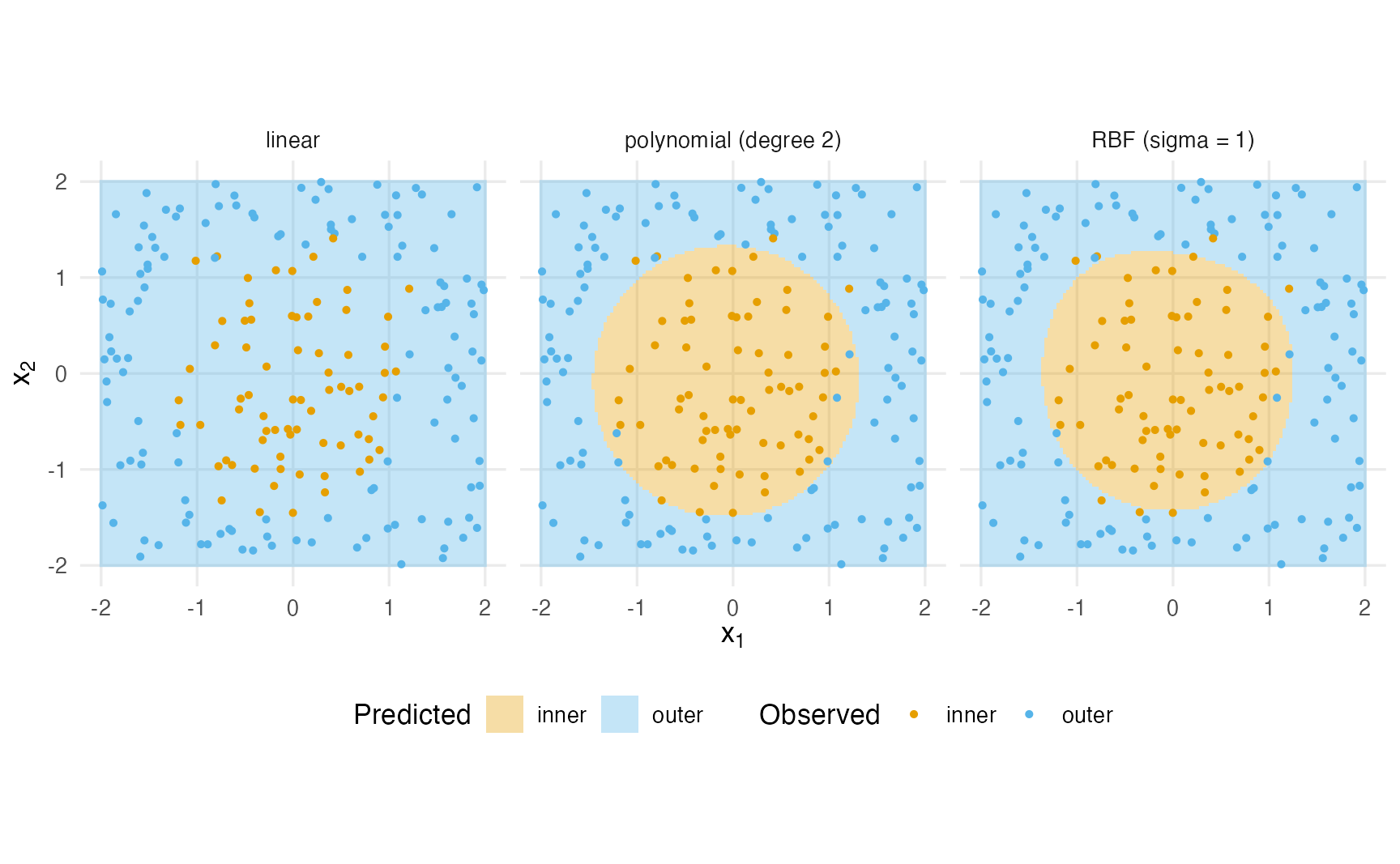
The linear SVM can only draw a straight boundary, which cannot enclose the inner class: whatever line it chooses, many points end up on the wrong side. A degree-2 polynomial can represent ellipses, which suits this problem; the RBF kernel can represent almost any shape.
What cost and rbf_sigma do
settings <- tidyr::expand_grid(cost = c(0.1, 10, 1000),
                               rbf_sigma = c(0.1, 1, 20))
rbf_fits <- purrr::pmap(settings, \(cost, rbf_sigma) {
  spec <- svm_rbf(cost = cost, rbf_sigma = rbf_sigma) |>
    set_engine("kernlab") |>
    set_mode("classification")
  boundary(spec, "rbf") |> mutate(cost = cost, rbf_sigma = rbf_sigma)
}) |>
  bind_rows()

ggplot(rbf_fits, aes(x1, x2)) +
  geom_raster(aes(fill = .pred_class), alpha = 0.35) +
  geom_point(data = ring, aes(colour = class), size = 0.7) +
  facet_grid(rbf_sigma ~ cost, labeller = label_both) +
  coord_equal() +
  labs(x = expression(x[1]), y = expression(x[2]), fill = "Predicted",
       colour = "Observed")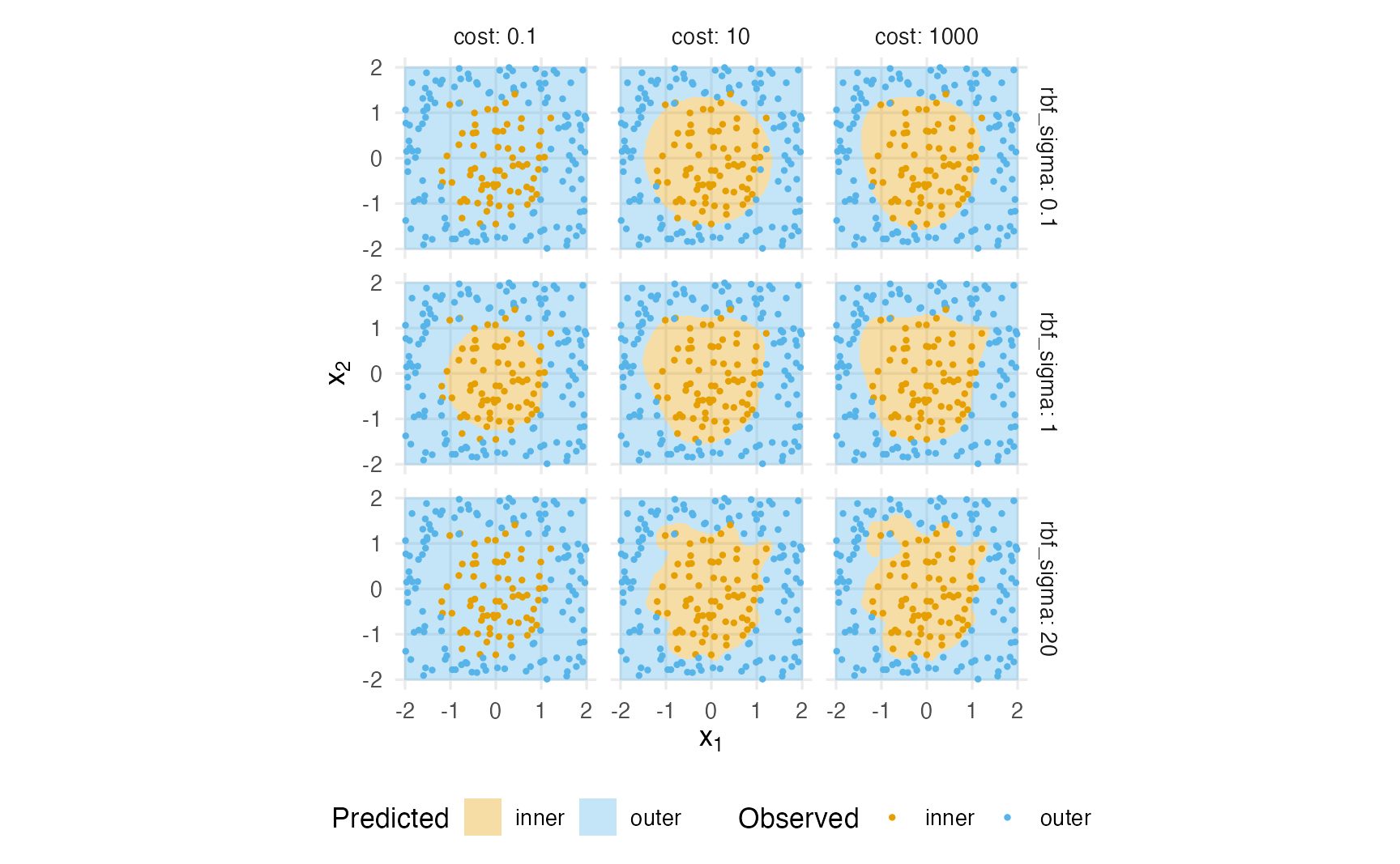
TipHow to read this output
rbf_sigma(rows) sets the reach of each training point. Small \(\sigma\) (top row): every point influences a large region, the boundary is smooth — with \(\sigma = 0.1\) and small cost it may be too smooth to capture the ring. Large \(\sigma\) (bottom row): every point has a tiny region of influence, and the boundary forms islands around individual points — classic overfitting.cost(columns) sets how hard the SVM tries to classify every training point correctly. Large cost with large \(\sigma\) (bottom right) is the most flexible and the most overfitted combination.- The two parameters interact, which is why they are tuned together on a grid.
5. Normalise the predictors
The RBF kernel depends on the Euclidean distance between observations, and so does the margin of a linear SVM. If one predictor is measured on a much larger scale than the others, it dominates the distances. Take three penguins, with bill length in mm and body mass in grams:
peng <- penguins[complete.cases(penguins[, c("bill_len", "body_mass")]),
                 c("species", "bill_len", "body_mass")]
peng[1:3, ]
#> species bill_len body_mass
#> 1 Adelie 39.1 3750
#> 2 Adelie 39.5 3800
#> 3 Adelie 40.3 3250dist(peng[1:3, c("bill_len", "body_mass")])#> 1 2
#> 2 50
#> 3 500 550dist(scale(peng[, c("bill_len", "body_mass")])[1:3, ])#> 1 2
#> 2 0.0962
#> 3 0.6611 0.7013On the raw scale, the distances are essentially differences in body mass: a difference of 50 g counts as much as a difference of 50 mm in bill length, which would be enormous. After standardising each variable (mean 0, SD 1), both variables contribute on comparable terms. For SVMs (and k-NN, penalised regression, neural networks) normalisation is part of the model, and — as always — it must be learned on the training data inside the recipe, with step_normalize(). (kernlab also standardises internally by default, but other engines do not; keep the step in the recipe so the workflow does not depend on an engine default.)
6. A correct validation split
The old version of this lesson created a train / validation / test split by hand like this:
set.seed(123)
n_rows <- 100
idx_train <- sample(n_rows, 80)
n_rows[-idx_train]                       # NOT the remaining row numbers!
#> [1] 100idx_valid_bug <- sample(n_rows[-idx_train], 10)
sum(idx_valid_bug %in% idx_train) # validation rows also in training#> [1] 10n_rows is a single number, a vector of length 1. Negative indexing removes positions, so n_rows[-idx_train] is just n_rows again (positions 2–100 do not exist), and sample(100, 10) draws from all 100 rows. (If position 1 happens to be among the training indices, the result is instead an empty vector and sample() fails with an error — the code “works” only by luck.) Here 10 of the 10 “validation” rows were also training rows: the validation score would be optimistic. The fix is to sample from the rows not yet used:
idx_valid <- sample(setdiff(seq_len(n_rows), idx_train), 10)
sum(idx_valid %in% idx_train)
#> [1] 0In tidymodels, initial_validation_split() does the three-way split for us, stratified, with no possibility of overlap. We use the same Titanic preparation as in the ML workflow lesson:
titanic <- readr::read_csv(data_path("titanic_data.csv"),
                           na = c("", "NA", "?"), show_col_types = FALSE) |>
  select(survived, pclass, sex, age, sibsp, parch, fare, embarked) |>
  mutate(
    survived = factor(survived, levels = c(1, 0), labels = c("yes", "no")),
    pclass   = factor(pclass, levels = 1:3, labels = c("1st", "2nd", "3rd")),
    sex      = factor(sex),
    embarked = factor(embarked)
)set.seed(2026)
titanic_val_split <- initial_validation_split(titanic, prop = c(0.6, 0.2),
strata = survived)
c(train = nrow(training(titanic_val_split)),
validation = nrow(validation(titanic_val_split)),
test = nrow(testing(titanic_val_split)),
total = nrow(titanic))#> train validation test total
#> 785 262 262 1309titanic_val <- validation_set(titanic_val_split)validation_set() turns the split into a resampling object with a single “fold” (fit on the training part, evaluate on the validation part) that can be passed to tune_grid() exactly like CV folds. A single validation set is fast and simple, but noisy with a few hundred rows. For the main analysis we keep, as in the previous lessons, the 75/25 train–test split with 5-fold CV on the training set, so that the results can be compared with the other models; Exercise 5 uses the validation set.
set.seed(2026)
titanic_split <- initial_split(titanic, prop = 0.75, strata = survived)
titanic_train <- training(titanic_split)
titanic_test  <- testing(titanic_split)
set.seed(2026)
titanic_folds <- vfold_cv(titanic_train, v = 5, strata = survived)
titanic_metrics <- metric_set(roc_auc, accuracy, sensitivity, specificity,
                              brier_class, mn_log_loss)
7. Tuning an RBF SVM on the Titanic
The recipe of lesson 44 already does what an SVM needs: impute, log-transform fare, create dummy variables and normalise.
titanic_rec <- recipe(survived ~ ., data = titanic_train) |>
  step_impute_median(all_numeric_predictors()) |>
  step_impute_mode(all_nominal_predictors()) |>
  step_log(fare, offset = 1) |>
  step_dummy(all_nominal_predictors()) |>
  step_normalize(all_numeric_predictors())
svm_spec <- svm_rbf(cost = tune(), rbf_sigma = tune()) |>
set_engine("kernlab") |>
set_mode("classification")
svm_wf <- workflow() |>
add_recipe(titanic_rec) |>
add_model(svm_spec)
svm_grid <- grid_regular(cost(range = c(-2, 8)),
rbf_sigma(range = c(-3, 0)),
levels = 4)
svm_grid#> # A tibble: 16 × 2
#> cost rbf_sigma
#> <dbl> <dbl>
#> 1 0.25 0.001
#> 2 2.520 0.001
#> 3 25.40 0.001
#> 4 256 0.001
#> 5 0.25 0.01
#> 6 2.520 0.01
#> 7 25.40 0.01
#> 8 256 0.01
#> 9 0.25 0.1
#> 10 2.520 0.1
#> 11 25.40 0.1
#> 12 256 0.1
#> 13 0.25 1
#> 14 2.520 1
#> 15 25.40 1
#> 16 256 1The cost() range is given on the log2 scale (\(2^{-2}\) to \(2^{8}\)) and rbf_sigma() on the log10 scale (\(10^{-3}\) to \(1\)): grid_regular() spaces the values evenly on those scales, which is what we want for parameters that act multiplicatively.
set.seed(2026)
svm_res <- tune_grid(svm_wf, resamples = titanic_folds, grid = svm_grid,
metrics = titanic_metrics)autoplot(svm_res, metric = "roc_auc")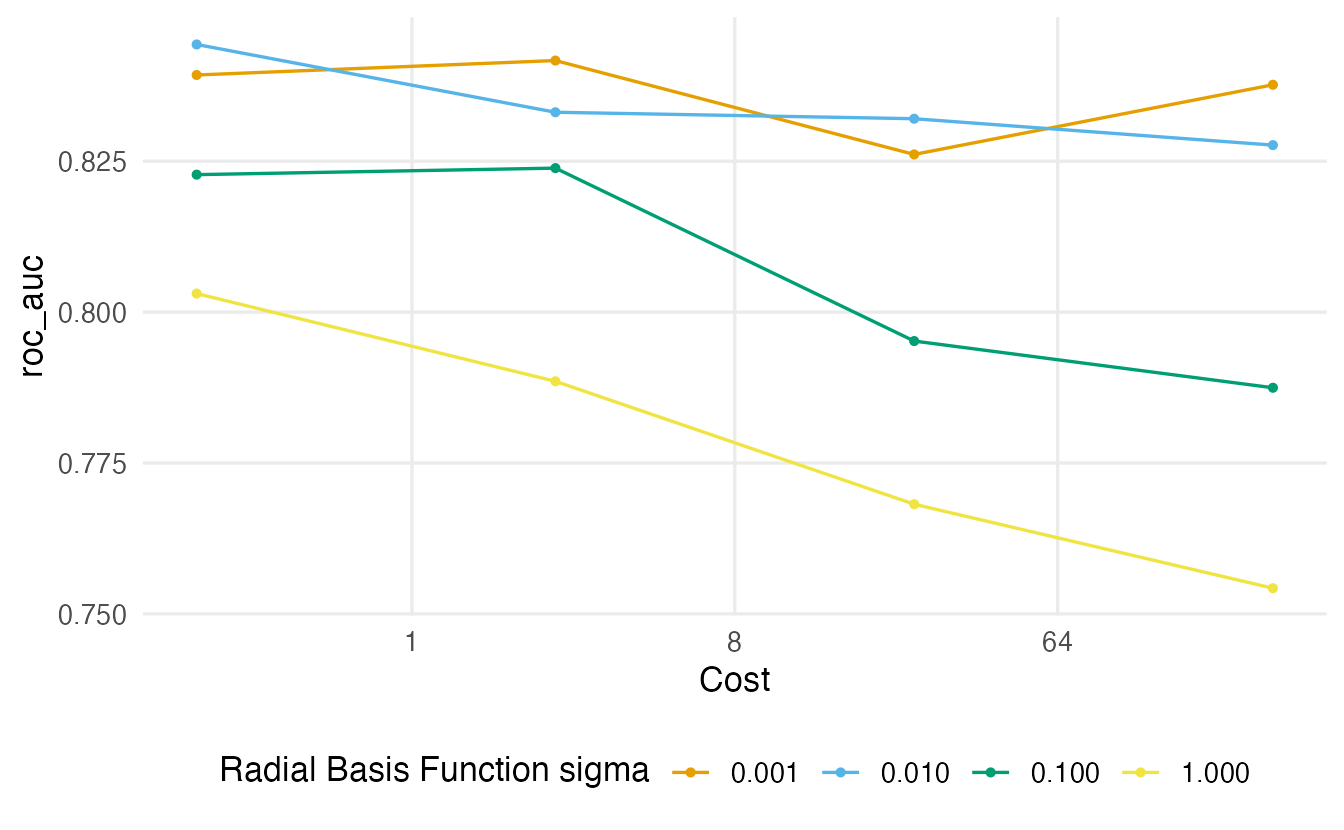
show_best(svm_res, metric = "roc_auc", n = 5)#> # A tibble: 5 × 8
#> cost rbf_sigma .metric .estimator mean n std_err .config
#> <dbl> <dbl> <chr> <chr> <dbl> <int> <dbl> <chr>
#> 1 0.25 0.01 roc_auc binary 0.8443 5 0.01226 pre0_mod02_post0
#> 2 2.520 0.001 roc_auc binary 0.8417 5 0.01277 pre0_mod05_post0
#> 3 0.25 0.001 roc_auc binary 0.8393 5 0.01198 pre0_mod01_post0
#> 4 256 0.001 roc_auc binary 0.8377 5 0.01382 pre0_mod13_post0
#> 5 2.520 0.01 roc_auc binary 0.8331 5 0.008914 pre0_mod06_post0best_svm <- select_best(svm_res, metric = "roc_auc")
best_svm#> # A tibble: 1 × 3
#> cost rbf_sigma .config
#> <dbl> <dbl> <chr>
#> 1 0.25 0.01 pre0_mod02_post0
TipHow to read this output
- Each line is one value of
rbf_sigma; the x-axis iscost(log scale). Very large \(\sigma\) combined with large cost typically gives the worst AUC: the boundary wraps around individual passengers (section 4). - The selected combination is cost = 0.25 and rbf_sigma = 0.01. As usual, check in
show_best()whether other combinations are within one standard error.
svm_final <- svm_wf |>
  finalize_workflow(best_svm) |>
  last_fit(titanic_split, metrics = titanic_metrics)
collect_metrics(svm_final)
#> # A tibble: 6 × 4
#> .metric .estimator .estimate .config
#> <chr> <chr> <dbl> <chr>
#> 1 accuracy binary 0.7866 pre0_mod0_post0
#> 2 sensitivity binary 0.696 pre0_mod0_post0
#> 3 specificity binary 0.8424 pre0_mod0_post0
#> 4 roc_auc binary 0.8454 pre0_mod0_post0
#> 5 brier_class binary 0.1594 pre0_mod0_post0
#> 6 mn_log_loss binary 0.4924 pre0_mod0_post08. Probabilities from an SVM: Platt scaling
An SVM produces a decision value \(f(x)\), not a probability. To report a probability (and compute ROC AUC, the Brier score or the log-loss), kernlab — called by parsnip with prob.model = TRUE in classification mode — uses Platt scaling: it fits a logistic regression of the class on the decision values, \[
\hat P(y = 1 \mid x) = \frac{1}{1 + \exp(A\, f(x) + B)},
\] with \(A\) and \(B\) estimated on decision values obtained by an internal cross-validation of the training data.
This has practical consequences:
- Extra cost and randomness. The internal cross-validation fits the SVM several more times and uses random numbers which, as the parsnip documentation for the kernlab engine warns, are not controlled by R’s
set.seed(): probabilities may differ slightly from run to run. - Class and probability may disagree. The predicted class comes from the sign of \(f(x)\), the probability from the sigmoid; for points near the boundary,
.pred_classcan be “yes” while.pred_yesis below 0.5. Let us count such cases on the test set:
collect_predictions(svm_final) |>
  mutate(agree = (.pred_yes > 0.5) == (.pred_class == "yes")) |>
  count(agree)
#> # A tibble: 1 × 2
#> agree n
#> <lgl> <int>
#> 1 TRUE 328- Calibration is only as good as the sigmoid. With small data sets, or when a sigmoid does not describe the relation between \(f(x)\) and the true probabilities, the probabilities can be poorly calibrated. If you need well-calibrated probabilities, check a calibration plot (lesson 49) or prefer a model that estimates probabilities directly.
NoteGoing deeper: Platt scaling by hand
On the overlapping toy data of section 3, the idea is just a logistic regression on the decision values (Platt’s method additionally uses held-out decision values and slightly smoothed 0/1 targets):
fit_c1 <- fit_linear_svm(X2, toy2$y, C = 1)
decision <- drop(X2 %*% fit_c1$w) + fit_c1$b
platt <- glm(I(toy2$y == 1) ~ decision, family = binomial)
coef(platt)
#> (Intercept) decision
#> -0.03554 4.65213Because the decision values here are in-sample (the SVM was fitted on the same points), the sigmoid tends to be too steep and the probabilities too extreme — this is why held-out decision values are used in practice.
WarningCommon pitfalls
- Forgetting to normalise. Distances, and therefore SVMs, are dominated by the predictors with the largest scale. Put
step_normalize()in the recipe. - Building a validation set by hand with index errors.
n[-idx]on a scalarndoes not give the remaining rows. Useinitial_validation_split()(orsetdiff(seq_len(n), idx)). - Tuning
costandrbf_sigmaon linear scales. Both act multiplicatively; use grids on a log scale (ascost()andrbf_sigma()do by default). - Reading SVM probabilities as calibrated. They come from Platt scaling; check calibration, and remember that class and probability may disagree.
- Expecting SVMs to scale to very large n. Kernel SVMs need the \(n \times n\) kernel matrix in some form; training time grows roughly between \(n^2\) and \(n^3\). For hundreds of thousands of rows, use linear SVMs (e.g. engine
"LiblineaR") or other models. - Calling a printed CV score a “learning curve”. A learning curve plots error against training-set size (or training iterations); a single CV AUC is not one.
9. Check your understanding
10. Exercises
★ Exercise 1 — hinge loss by hand. Five points have margin values \(y_i f(x_i) = -1, 0, 0.5, 1, 2\). Compute their hinge losses. Which points are support vectors? Which are misclassified? Check with pmax().
TipSolution
m <- c(-1, 0, 0.5, 1, 2)
pmax(0, 1 - m)   # 2 1 0.5 0 0
The first four points (\(y f \le 1\)) are support vectors; the last one, beyond the margin, has zero loss and no influence. The point with \(y f = -1\) is misclassified; the one with \(y f = 0\) lies exactly on the boundary; the one with \(0.5\) is correctly classified but inside the street; the one with \(1\) sits on its edge.
★★ Exercise 2 — predict, then check. In section 3, before looking at the table, predict how the number of support vectors changes as \(C\) goes from 0.01 to 100. Then add \(C = 1000\) to c_values and rerun. Does the half-width keep shrinking?
TipSolution
The number of support vectors decreases as \(C\) grows (from 38 of 40 points at \(C = 0.01\) to 3 at \(C = 100\)): with cheap violations, many points are inside the wide street.
c_values <- c(0.01, 0.1, 1, 100, 1000)
# ... rerun the `soft` code above
At \(C = 100\) these data are already separated without errors, so the solution is (essentially) the hard-margin one, and increasing \(C\) further changes almost nothing: the half-width stops shrinking at the maximum-margin value. (On data that are not separable it would keep shrinking.)
★★ Exercise 3 — debug. A student writes this split for a data set with n rows:
idx_train <- sample(n, floor(0.8 * n))
idx_valid <- sample(n[-idx_train], floor(0.1 * n))
idx_test  <- setdiff(seq_len(n), c(idx_train, idx_valid))
What goes wrong, and how large will the test set be? Fix it in two ways.
TipSolution
n is a single number, so n[-idx_train] is either n itself (if 1 is not among the training indices) or an empty vector (if it is — then sample() stops with an error, which happens about 80% of the time). In the first case idx_valid is drawn from all rows and about 80% of it overlaps with idx_train, so the validation score is optimistic; the test set (everything not in either set) ends up with about \(n - 0.8n - 0.02n \approx 18\%\) of the rows instead of 10%. Fixes:
idx_valid <- sample(setdiff(seq_len(n), idx_train), floor(0.1 * n))or, with rsample (stratified, and no indices to get wrong):
split3 <- initial_validation_split(df, prop = c(0.8, 0.1), strata = outcome)★★ Exercise 4 — scaling and distances. Using penguins, compute the distance matrix between the first three complete rows using bill_len, bill_dep, flipper_len and body_mass, first on the raw scale and then after scale(). Which variable dominates the raw distances, and why does this matter for an RBF SVM?
TipSolution
vars <- c("bill_len", "bill_dep", "flipper_len", "body_mass")
pp <- penguins[complete.cases(penguins[, vars]), vars]
dist(pp[1:3, ])
dist(scale(pp)[1:3, ])
sapply(pp, sd)
body_mass (SD about 800 g, against single or low double digits for the others) dominates the raw distances. An RBF kernel on raw data would effectively measure similarity by body mass alone, ignoring the bill and flipper measurements. Standardising gives each variable a comparable say.
★★★ Exercise 5 — linear vs RBF, and the validation set. (a) Using fit_resamples() with titanic_folds, compare a linear SVM (svm_linear(cost = 1), engine kernlab) with the tuned RBF SVM (finalize_workflow(svm_wf, best_svm)). Is the non-linear kernel worth it? (b) Tune the RBF SVM on the single validation set titanic_val instead of the folds. Do you get the same best parameters?
TipSolution
lin_spec <- svm_linear(cost = 1) |>
  set_engine("kernlab") |>
  set_mode("classification")
set.seed(2026)
lin_res <- fit_resamples(workflow(titanic_rec, lin_spec),
                         resamples = titanic_folds,
                         metrics = metric_set(roc_auc, brier_class))
set.seed(2026)
rbf_res <- fit_resamples(finalize_workflow(svm_wf, best_svm),
                         resamples = titanic_folds,
                         metrics = metric_set(roc_auc, brier_class))
bind_rows(linear = collect_metrics(lin_res),
          rbf = collect_metrics(rbf_res), .id = "kernel")

set.seed(2026)
svm_val_res <- tune_grid(svm_wf, resamples = titanic_val, grid = svm_grid,
                         metrics = metric_set(roc_auc))
select_best(svm_val_res, metric = "roc_auc")- Compare the difference in mean AUC with the standard errors: if the RBF gain is about one standard error or less, the simpler linear SVM is a reasonable choice. (b) The best parameters often differ: one validation set of about 260 passengers gives a noisy AUC for every candidate, and the “winner” can change with the split. With small data, CV gives more stable choices. (Note that
titanic_val_splitis a different random split fromtitanic_split, so its test set must not be mixed with this analysis.)
Summary
| Idea / function | What it does |
|---|---|
| Margin, support vectors | Widest street between classes; only points on/inside it matter |
| Hinge loss \(\max(0, 1 - y f(x))\) | Zero beyond the margin, linear inside |
cost (\(C\)) |
Price of margin violations; large = less regularisation |
| Kernel \(K(x, x')\) | Similarity replacing \(x^\top x'\); curved boundaries |
rbf_sigma (\(\sigma\)) |
Reach of each point in the RBF kernel; large = wiggly |
svm_linear(), svm_poly(), svm_rbf() + set_engine("kernlab") |
tidymodels SVM specifications |
step_normalize() |
Essential preprocessing for SVMs |
initial_validation_split(), validation_set() |
Correct three-way split |
| Platt scaling | Sigmoid that turns decision values into probabilities |
- An SVM maximises the margin, trading width against violations through
cost. - Kernels give flexible boundaries;
costandrbf_sigmamust be tuned together, on log scales. - Normalise predictors, and build validation sets with tools that cannot overlap.
- SVM probabilities are a post-processing step (Platt scaling): check their calibration.