library(dplyr)
library(tidyr)
library(readr)
library(ggplot2)
library(cluster)   # silhouette()
library(mclust) # adjustedRandIndex()Hierarchical clustering
Build a tree of nested groups, read the dendrogram, and cut it where it makes sense
Agglomerative clustering by hand and in R: linkage rules and their behaviour, reading dendrograms, cutting with cutree(), cophenetic correlation, silhouette, comparison with k-means and cluster profiles.
NoteLearning objectives
By the end of this lesson you will be able to:
- carry out agglomerative clustering by hand on a few points;
- explain how single, complete, average and Ward linkage differ, and recognise chaining;
- read a dendrogram (what the height means, what does not matter) and cut it with
cutree(); - assess a tree with the cophenetic correlation and a partition with the silhouette;
- compare a hierarchical partition with k-means and profile the clusters.
1. Why a hierarchy?
k-means asks you for \(k\) before it starts. Often we would rather see the structure at all levels of detail: which observations are almost identical, which small groups join into larger ones, and where the big divisions are. Biologists have done this for centuries with family trees of species; marketers do it with customers (premium customers → premium restaurants vs premium shops → …).
Hierarchical clustering produces exactly such a tree, called a dendrogram. You choose the number of clusters afterwards, by cutting the tree.
We focus on the most common version, agglomerative (bottom-up) clustering:
- start with every observation in its own cluster;
- merge the two closest clusters;
- repeat until everything is in one cluster.
The only question is what “closest” means for groups of points — that is the linkage.
2. The algorithm by hand on five points
pts <- data.frame(
  x = c(1, 2, 6, 7, 4),
  y = c(1, 1.5, 5, 5.5, 3),
  row.names = c("A", "B", "C", "D", "E")
)
d5 <- dist(pts)
round(d5, 2)
#> A B C D
#> B 1.12
#> C 6.40 5.32
#> D 7.50 6.40 1.12
#> E 3.61 2.50 2.83 3.91ggplot(pts, aes(x, y, label = rownames(pts))) +
geom_point(size = 3) +
geom_text(nudge_x = 0.3, nudge_y = 0.3) +
coord_equal() +
labs(x = "x", y = "y")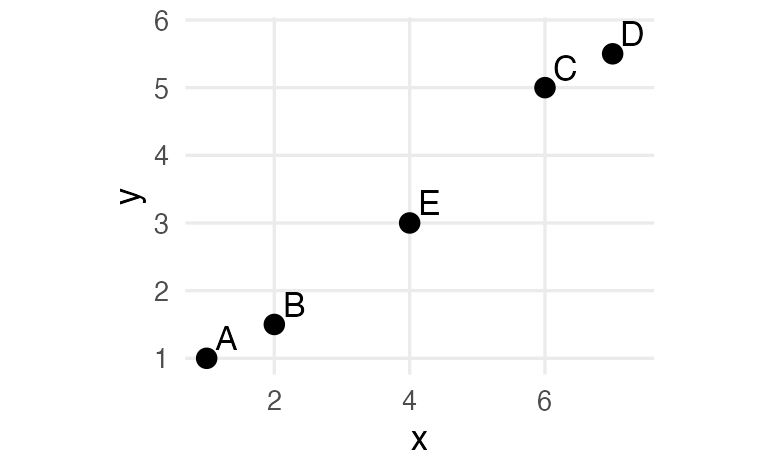
We use complete linkage: the distance between two clusters is the distance between their farthest members.
Step 1. The smallest distance in the matrix is 1.12 — a tie between A–B and C–D. Merge A and B.
Step 2. Merge C and D, also at height 1.12.
Step 3. Now we have three clusters: {A, B}, {C, D} and {E}. Their complete-linkage distances are:
D <- as.matrix(d5)
c(
  E_AB  = max(D["E", c("A", "B")]),
  E_CD  = max(D["E", c("C", "D")]),
  AB_CD = max(D[c("A", "B"), c("C", "D")])
)
#> E_AB E_CD AB_CD
#> 3.606 3.905 7.500The smallest is E–{A, B}, so E joins A and B at height 3.61.
Step 4. The last merge joins {A, B, E} and {C, D} at height 7.5.
hclust() records exactly these steps:
hc_toy <- hclust(d5, method = "complete")
hc_toy$merge
#> [,1] [,2]
#> [1,] -1 -2
#> [2,] -3 -4
#> [3,] -5 1
#> [4,] 2 3round(hc_toy$height, 2)#> [1] 1.12 1.12 3.61 7.50
TipHow to read this output
- Each row of
mergeis one step. Negative numbers are single observations (−1 = A, −2 = B, …); positive numbers refer to the cluster created in that earlier row. Row 3,-5 1, means “observation E joins the cluster made in step 1”. heightis the linkage distance at which each merge happened — the numbers we computed by hand.
plot(hc_toy, hang = -1, main = "Complete linkage", xlab = "", sub = "",
     ylab = "Merge height")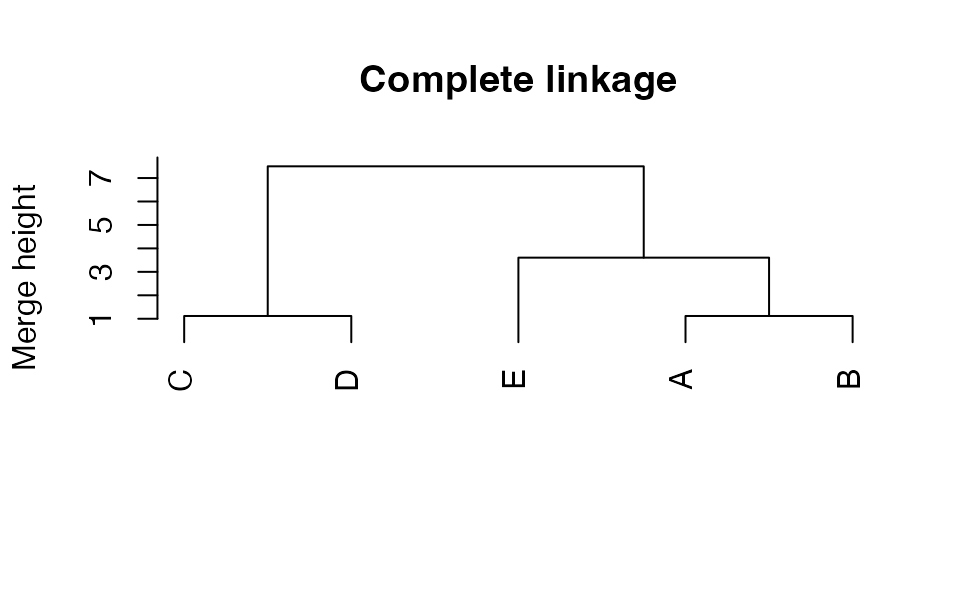
Reading a dendrogram
- Height = merge distance. Two observations that join low down are similar; groups that join only near the top are very different.
- The left-to-right order of the leaves carries little information. Each merge can be flipped like a mobile without changing the tree: A is not “closer” to C just because they are drawn side by side.
- Long vertical branches before a merge mean a well-separated group.
3. Cutting the tree
cutree() turns the tree into a partition, either with a number of clusters k or at a height h:
cutree(hc_toy, k = 2)#> A B C D E
#> 1 1 2 2 1cutree(hc_toy, h = 3)#> A B C D E
#> 1 1 2 2 3Cutting at height 3 crosses three vertical branches, so we get three clusters: {A, B}, {C, D} and {E}. With k = 2, E goes with A and B.
4. Linkage rules and their personality
| Linkage | Distance between clusters \(G\) and \(H\) | Typical behaviour |
|---|---|---|
| Single | closest pair: \(\min_{i \in G, j \in H} d_{ij}\) | finds long, snake-like groups; prone to chaining (clusters grow by adding one nearby point at a time); isolates outliers as tiny clusters |
| Complete | farthest pair: \(\max_{i \in G, j \in H} d_{ij}\) | compact clusters of similar diameter; sensitive to outliers |
| Average (UPGMA) | mean of all pairwise distances | a compromise between single and complete |
Ward ("ward.D2") |
merge the pair that increases the total within-cluster sum of squares the least | compact, balanced clusters, similar in spirit to k-means |
On our five points all four linkages merge in the same order, but at different heights:
linkages <- c("single", "complete", "average", "ward.D2")
sapply(linkages, \(m) round(hclust(d5, method = m)$height, 2))
#> single complete average ward.D2
#> [1,] 1.12 1.12 1.12 1.12
#> [2,] 1.12 1.12 1.12 1.12
#> [3,] 2.50 3.61 3.05 3.52
#> [4,] 2.83 7.50 5.39 8.35Single linkage gives the lowest heights (it uses the closest pair), complete the highest among the three “distance” linkages. Ward heights are on a different scale (see “Going deeper”).
NoteGoing deeper: Ward’s criterion and the two Ward methods in R
Merging clusters \(G\) and \(H\), with sizes \(n_G, n_H\) and centroids \(\bar x_G, \bar x_H\), increases the within-cluster sum of squares by
\[ \Delta(G, H) = \frac{n_G\, n_H}{n_G + n_H}\, \lVert \bar x_G - \bar x_H \rVert^2 . \]
Ward’s method merges the pair with the smallest \(\Delta\). In R, method = "ward.D2" implements this criterion when you give it ordinary (unsquared) Euclidean distances, and reports the merge height \(\sqrt{2\Delta}\). The older method = "ward.D" only implements Ward’s criterion if you pass squared distances; with ordinary dist() output it is a different method. Use "ward.D2".
Because the heights are \(\sqrt{2\Delta}\), the squared heights add up to twice the total sum of squares:
hw_toy <- hclust(d5, method = "ward.D2")
sum(hw_toy$height^2) / 2
#> [1] 42.3sum(scale(pts, scale = FALSE)^2) # total sum of squares#> [1] 42.35. A real data set: wholesale customers
The wholesale data (UCI repository) record the annual spending, in monetary units, of 440 clients of a Portuguese distributor on six product categories. As in the introduction, spending is right-skewed, so we apply log1p() and then standardise.
wholesale <- read_csv(data_path("wholesale_customers.csv"),
                      show_col_types = FALSE)
spend_vars <- c("Fresh", "Milk", "Grocery", "Frozen",
                "Detergents_Paper", "Delicassen")

X <- wholesale |>
  select(all_of(spend_vars)) |>
  mutate(across(everything(), log1p)) |>
  scale()

d <- dist(X)
hcs <- lapply(linkages, \(m) hclust(d, method = m))
names(hcs) <- linkagespar(mfrow = c(2, 2), mar = c(1, 4, 3, 1))
for (m in linkages) {
plot(hcs[[m]], labels = FALSE, hang = -1, main = m, xlab = "", sub = "",
ylab = "Height")
}
par(mfrow = c(1, 1))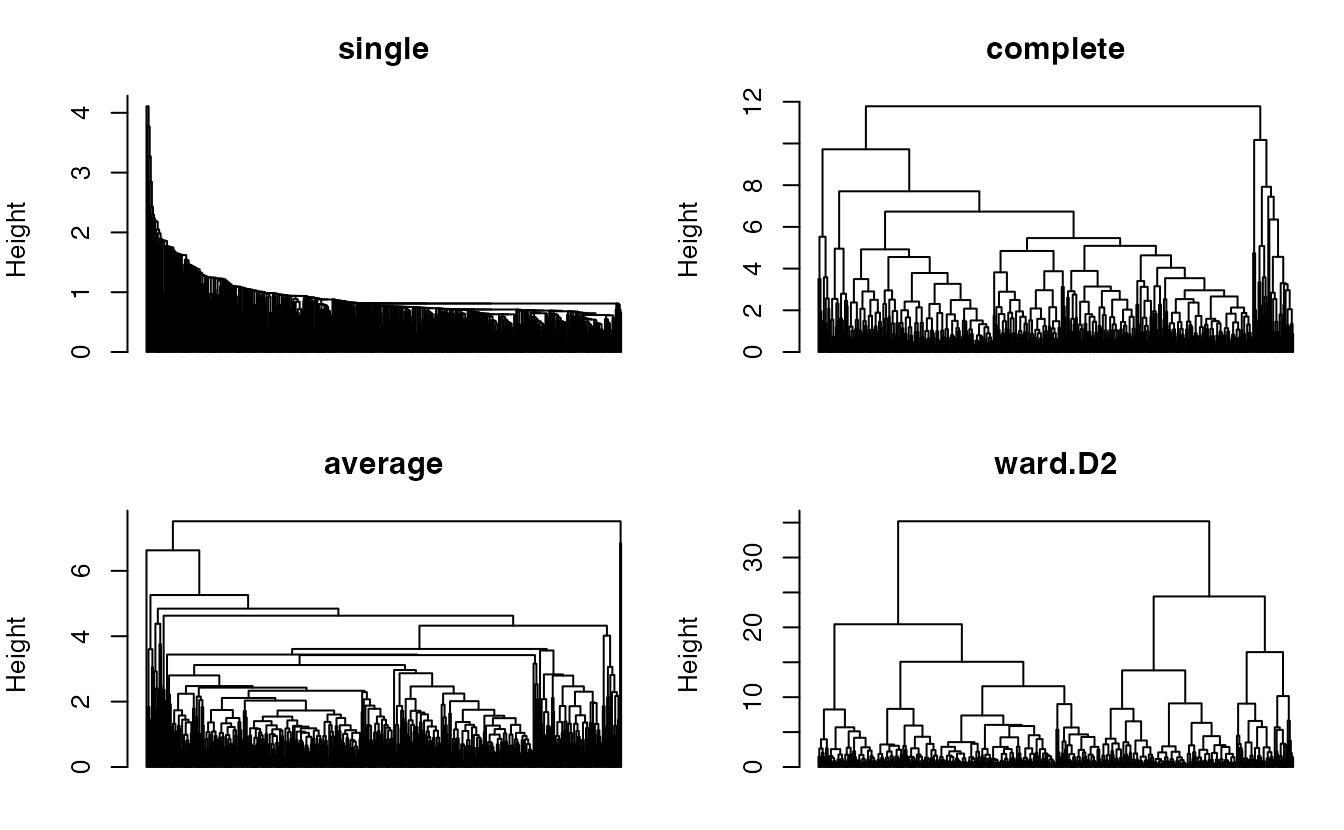
Cutting each tree into 2 to 5 clusters shows their personalities in numbers:
sapply(hcs, \(h) {
  sapply(2:5, \(k) paste(sort(table(cutree(h, k)), decreasing = TRUE),
                         collapse = "/"))
}) |>
  `rownames<-`(paste("k =", 2:5))
#> single complete average ward.D2
#> k = 2 "439/1" "402/38" "438/2" "262/178"
#> k = 3 "438/1/1" "402/33/5" "438/1/1" "262/125/53"
#> k = 4 "437/1/1/1" "391/33/11/5" "437/1/1/1" "208/125/54/53"
#> k = 5 "436/1/1/1/1" "391/24/11/9/5" "431/6/1/1/1" "208/125/54/35/18"
TipHow to read this output
- Each cell lists the cluster sizes, largest first.
- Single linkage peels off one client at a time: almost everyone stays in one giant cluster. This is chaining — the giant cluster grew by adding nearest neighbours one by one, and the last clients to join are the outliers.
- Average linkage behaves similarly on these data; complete linkage creates one large and a few smaller groups.
- Ward produces balanced groups of comparable size.
6. How faithful is the tree? The cophenetic correlation
The cophenetic distance between two observations is the height at which they first end up in the same cluster. If the tree represents the data well, cophenetic distances should be close to the original distances. Their correlation is the cophenetic correlation:
coph <- sapply(hcs, \(h) cor(cophenetic(h), d))
round(coph, 3)
#> single complete average ward.D2
#> 0.649 0.654 0.745 0.484Average linkage has the highest cophenetic correlation (0.75): its tree preserves the original distances best. Ward has the lowest (0.48). This is a typical — and instructive — result. A tree can summarise distances faithfully and still give useless partitions (average linkage cut at \(k = 2\) gives a group of 2 clients). The cophenetic correlation answers “is the tree a good map of the distances?”, not “are the clusters useful?”.
7. Choosing where to cut: silhouette by k
k_grid <- 2:8
sil_tab <- sapply(hcs, \(h) {
  sapply(k_grid, \(k) mean(silhouette(cutree(h, k), d)[, "sil_width"]))
})
rownames(sil_tab) <- k_grid
round(sil_tab, 3)
#> single complete average ward.D2
#> 2 0.570 0.322 0.569 0.258
#> 3 0.506 0.298 0.542 0.255
#> 4 0.498 0.260 0.498 0.202
#> 5 0.397 0.228 0.383 0.203
#> 6 0.357 0.155 0.331 0.171
#> 7 0.322 0.142 0.233 0.163
#> 8 0.319 0.214 0.202 0.148as_tibble(sil_tab) |>
mutate(k = k_grid) |>
pivot_longer(-k, names_to = "linkage", values_to = "silhouette") |>
ggplot(aes(k, silhouette, colour = linkage)) +
geom_line(linewidth = 1) +
geom_point(size = 2) +
labs(x = "Number of clusters (k)", y = "Average silhouette",
colour = "Linkage")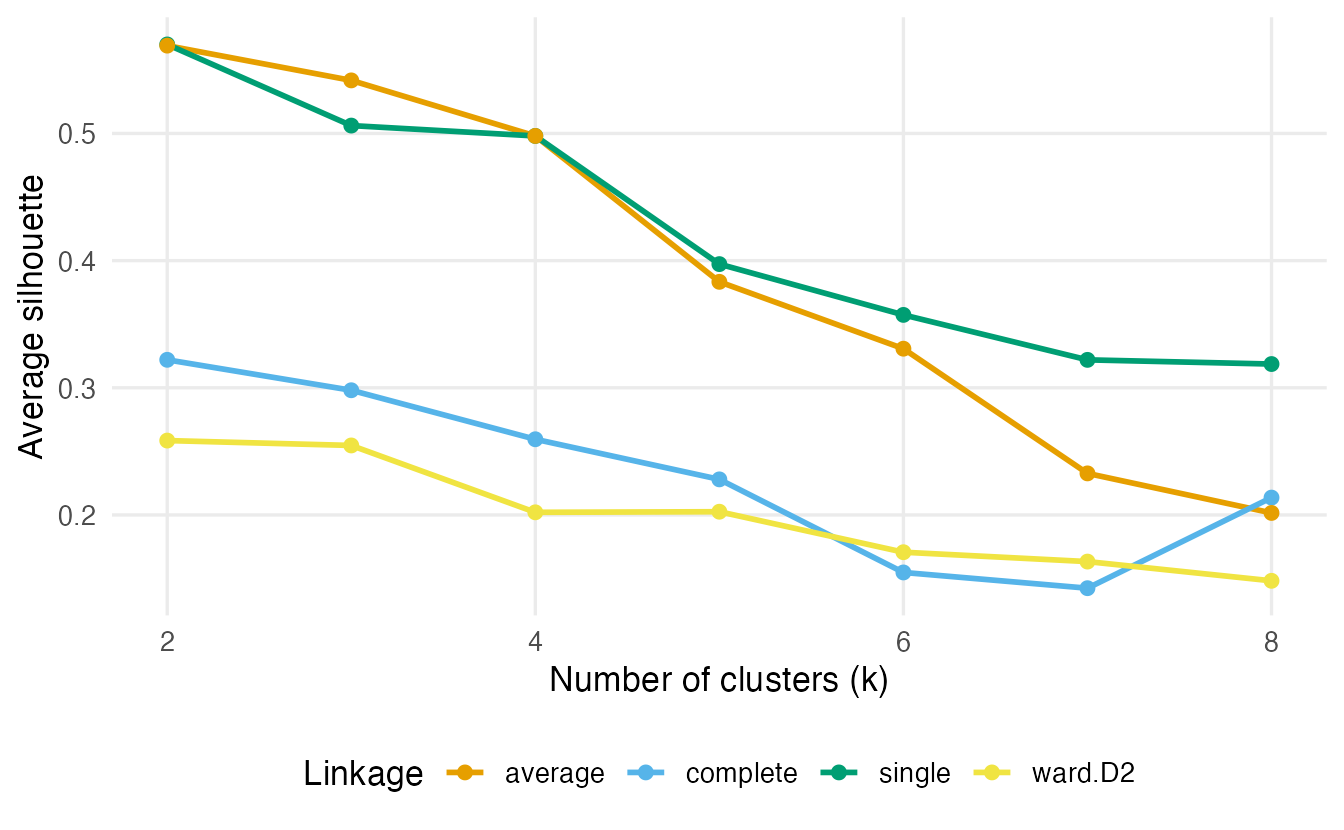
At first sight single and average linkage “win”: their average silhouette is the highest. But look back at the cluster sizes: they win by putting almost all clients in one cluster (with single linkage and \(k = 2\), 439 of 440) and one or two outliers in the others. Those outliers are far from everybody, so their silhouettes — and the giant cluster’s — look fine. A high silhouette does not guarantee a useful partition. Always look at cluster sizes too.
We therefore keep Ward linkage and choose \(k\) where its silhouette is highest:
k_final <- k_grid[which.max(sil_tab[, "ward.D2"])]
cl_hc <- cutree(hcs$ward.D2, k = k_final)
table(cl_hc)
#> cl_hc
#> 1 2
#> 178 262Ward’s silhouette is highest at \(k =\) 2 (0.26), but the values for \(k = 2\) and \(k = 3\) are very close (0.258 and 0.255). Both are defensible; the dendrogram shows one big split followed by a smaller one. We continue with \(k =\) 2.
plot(hcs$ward.D2, labels = FALSE, hang = -1, main = "Ward linkage",
     xlab = "", sub = "", ylab = "Height")
rect.hclust(hcs$ward.D2, k = k_final, border = c("#E69F00", "#0072B2"))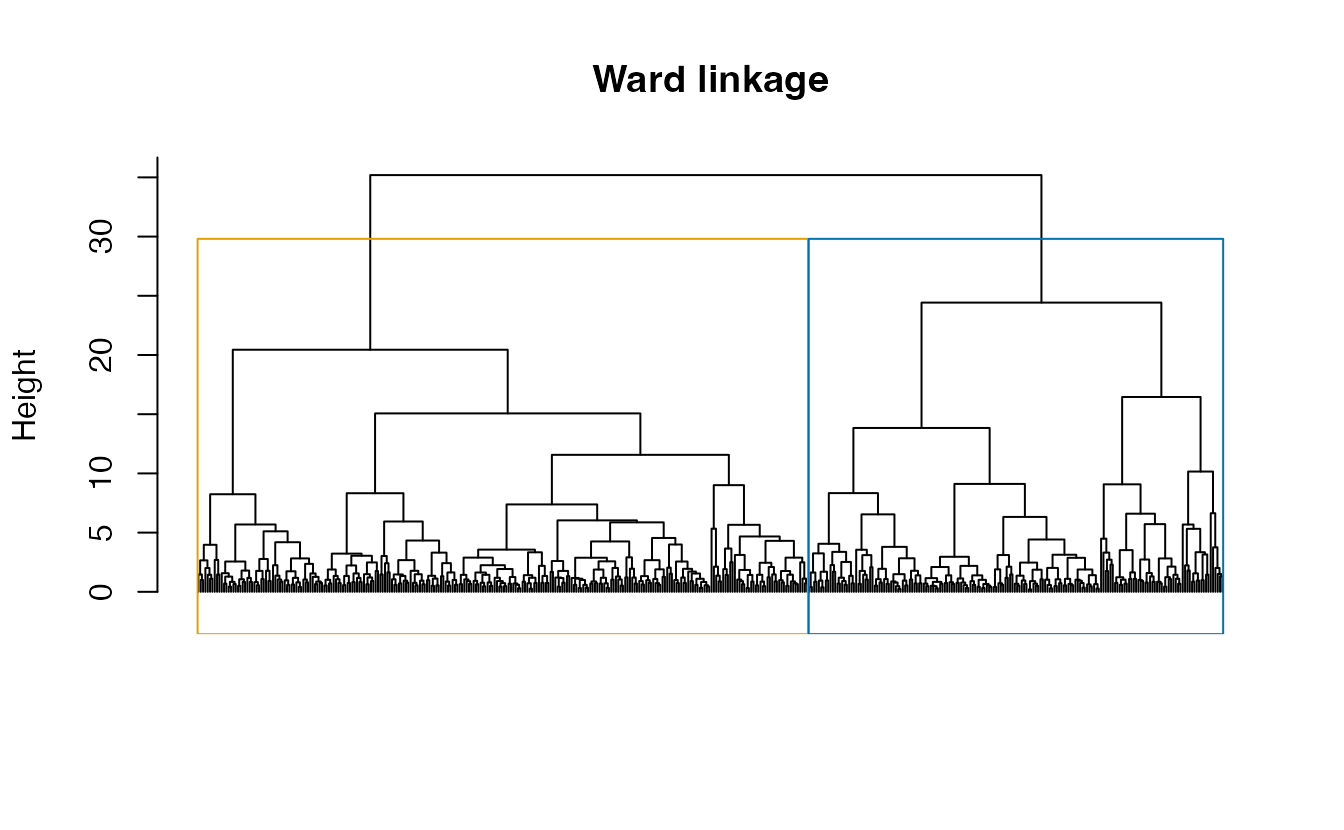
8. Comparison with k-means
set.seed(123)
km <- kmeans(X, centers = k_final, nstart = 50)
table(hierarchical = cl_hc, kmeans = km$cluster)
#> kmeans
#> hierarchical 1 2
#> 1 17 161
#> 2 235 27ari_hc_km <- adjustedRandIndex(cl_hc, km$cluster)
ari_hc_km#> [1] 0.6389The ARI is 0.64: the two methods find broadly the same split, and disagree on about 44 clients (the off-diagonal cells). That is expected: Ward and k-means optimise the same kind of criterion (within-cluster sum of squares), but Ward does it greedily — once merged, two points can never be separated — while k-means can move points back and forth.
The data also contain a variable we did not use: Channel (1 = Horeca — hotels, restaurants, cafés; 2 = Retail). It is a natural external check:
table(cluster = cl_hc, channel = wholesale$Channel)#> channel
#> cluster 1 2
#> 1 47 131
#> 2 251 11adjustedRandIndex(cl_hc, wholesale$Channel)#> [1] 0.5392The clusters are clearly related to the channel (ARI 0.54), but not identical to it: spending patterns and business type overlap.
9. Profiles
wholesale |>
  mutate(cluster = factor(cl_hc)) |>
  summarise(n = n(), across(all_of(spend_vars), median), .by = cluster) |>
  arrange(cluster)
#> # A tibble: 2 × 8
#> cluster n Fresh Milk Grocery Frozen Detergents_Paper Delicassen
#> <fct> <int> <dbl> <dbl> <dbl> <dbl> <dbl> <dbl>
#> 1 1 178 4500. 7339 11099 957 4584 1189
#> 2 2 262 11113 2028 2584. 2382 358.5 864as_tibble(X) |>
mutate(cluster = factor(cl_hc)) |>
summarise(across(everything(), mean), .by = cluster) |>
pivot_longer(-cluster, names_to = "category", values_to = "z") |>
ggplot(aes(category, cluster, fill = z)) +
geom_tile(colour = "white") +
geom_text(aes(label = round(z, 1))) +
scale_fill_gradient2(low = "#0072B2", mid = "white", high = "#D55E00") +
labs(x = NULL, y = "Cluster", fill = "Mean z") +
theme(axis.text.x = element_text(angle = 30, hjust = 1))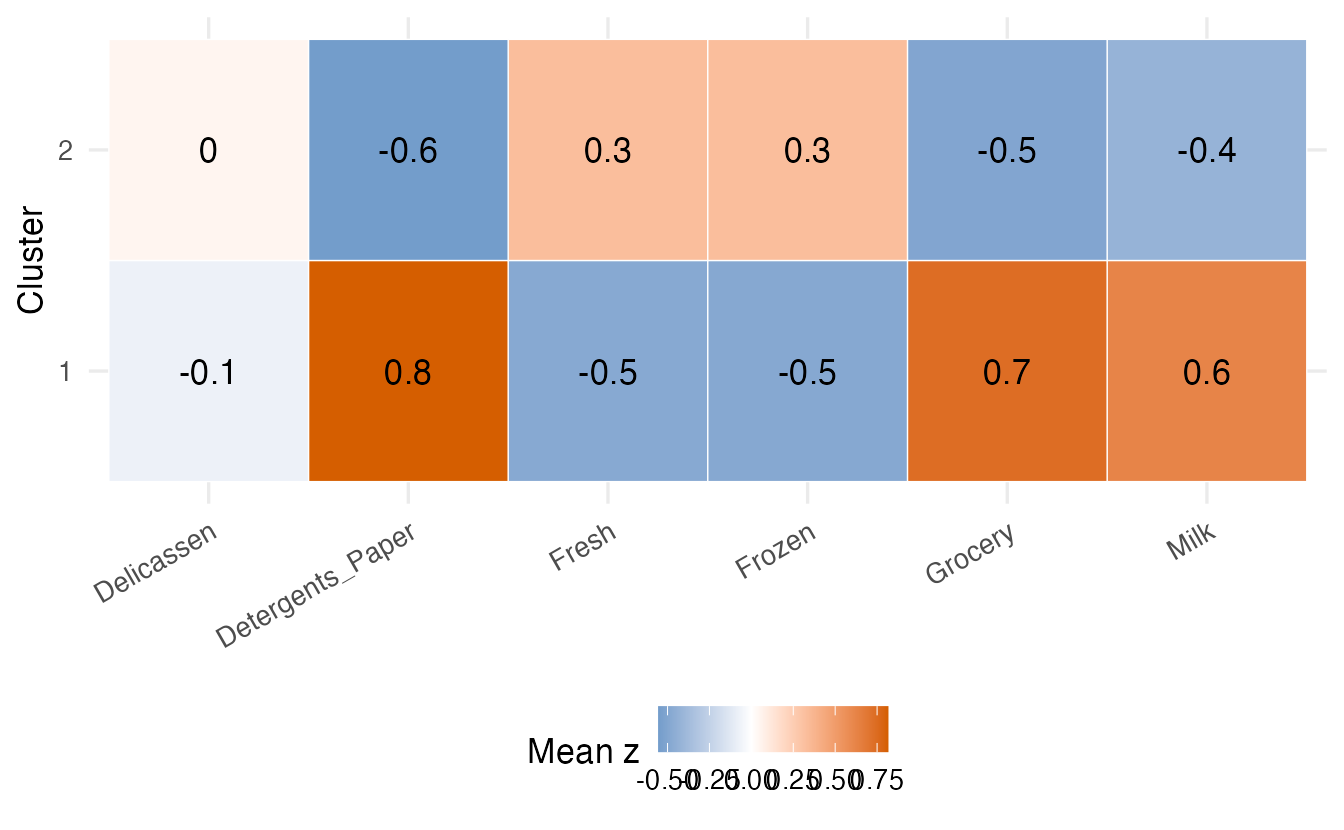
TipHow to read these profiles
The table gives medians in the original monetary units — what a typical client in each cluster spends per year. The heat map gives the same comparison on the standardised log scale, where “+1” means about one standard deviation above the average client. Read them together: one cluster spends much more on Milk, Grocery and Detergents_Paper (typical of shops), the other relatively more on Fresh and Frozen products (typical of restaurants and hotels), which is consistent with the cross-table with Channel.
WarningCommon pitfalls
- Passing the data instead of the distances.
hclust()needs adistobject:hclust(dist(X)), nothclust(X). - Using
"ward.D"with ordinary distances. It is not Ward’s criterion; use"ward.D2". - Reading the horizontal order of leaves. Only the merge heights matter; branches can be flipped.
- Trusting the silhouette (or cophenetic correlation) without looking at cluster sizes. Single and average linkage can score well by isolating a couple of outliers.
- Forgetting the cost. Hierarchical clustering stores all \(n(n-1)/2\) distances; for tens of thousands of observations use k-means or a subsample.
- Assuming merges can be undone. The algorithm is greedy: an early bad merge stays in the tree forever.
10. Check your understanding
11. Exercises
★ Exercise 1 — single linkage by hand. For the five points A–E, repeat the steps of section 2 with single linkage. At which heights do the last two merges happen? Check with hclust(d5, method = "single")$height.
TipSolution
Steps 1–2 are the same (A–B and C–D at 1.12). Then single linkage uses the closest pair: \(d(E, \{A,B\}) = \min(3.61, 2.50) = 2.50\), \(d(E, \{C,D\}) = \min(2.83, 3.91) = 2.83\), \(d(\{A,B\},\{C,D\}) = 5.32\). E joins {A, B} at 2.50. Finally \(d(\{A,B,E\}, \{C,D\}) = \min(5.32, 2.83, \dots) = 2.83\).
round(hclust(d5, method = "single")$height, 2) # 1.12 1.12 2.50 2.83★ Exercise 2 — predict the output. With hc_toy (complete linkage, heights 1.12, 1.12, 3.61, 7.50), what do cutree(hc_toy, h = 1), cutree(hc_toy, h = 5) and cutree(hc_toy, h = 8) return?
TipSolution
h = 1: below every merge, so five singleton clusters:1 2 3 4 5.h = 5: above 3.61 but below 7.50, so two clusters: {A, B, E} and {C, D}.h = 8: above the last merge, so one cluster: all1.
★★ Exercise 3 — debug. This code stops with the cryptic error “missing value where TRUE/FALSE needed”. Why, and how do you fix it?
hc <- hclust(X, method = "ward.D2")
TipSolution
hclust() expects a dissimilarity object (class dist), which carries a "Size" attribute; a plain matrix has none, and the internal check fails. Compute the distances first:
hc <- hclust(dist(X), method = "ward.D2")★★ Exercise 4 — interpret. A colleague reports: “Average linkage is best: it has the highest cophenetic correlation, and at k = 2 its silhouette is more than twice Ward’s.” Using the wholesale results of this lesson, write two or three sentences in reply.
TipSolution
Both statements are numerically true, but the two-cluster average-linkage solution puts 438 clients in one cluster and 2 in the other: it separates outliers, not customer segments. The cophenetic correlation measures how well the tree reproduces distances, and the silhouette rewards isolating far-away points; neither checks that the partition is useful. Ward’s solution has lower scores but gives two sizeable groups that relate clearly to the sales channel.
★★★ Exercise 5 — mini-analysis on penguins. Standardise the four numeric penguins measurements (complete cases). Build Ward and average-linkage trees, cut each at \(k = 3\), and compare with species and with k-means (\(k = 3\), nstart = 25) using the ARI. Which method recovers the species best?
TipSolution
peng <- penguins |>
  select(species, bill_len, bill_dep, flipper_len, body_mass) |>
  na.omit()
Xp <- scale(select(peng, -species))
dp <- dist(Xp)
cl_ward <- cutree(hclust(dp, method = "ward.D2"), k = 3)
cl_avg  <- cutree(hclust(dp, method = "average"), k = 3)
set.seed(1)
cl_km <- kmeans(Xp, centers = 3, nstart = 25)$cluster

table(cl_ward, peng$species)
table(cl_avg,  peng$species)
sapply(list(ward = cl_ward, average = cl_avg, kmeans = cl_km),
       \(cl) adjustedRandIndex(cl, peng$species))
Ward recovers the species best (ARI about 0.92, only a few Chinstraps grouped with Adelies), better than k-means (about 0.79). Average linkage merges Adelie and Chinstrap and splits off a handful of Gentoos — another example of a linkage isolating a small group.
Summary
| Task | Code | Remember |
|---|---|---|
| Distances | d <- dist(X) |
scale (and transform) first |
| Build the tree | hclust(d, method = "ward.D2") |
also "single", "complete", "average" |
| Plot | plot(hc, labels = FALSE, hang = -1); rect.hclust(hc, k) |
height = merge distance |
| Cut | cutree(hc, k = 3) or cutree(hc, h = 2) |
one tree, many partitions |
| Tree fidelity | cor(cophenetic(hc), d) |
good map ≠ good clusters |
| Partition quality | cluster::silhouette(cutree(hc, k), d) |
check cluster sizes too |
| Compare partitions | mclust::adjustedRandIndex(a, b) |
ignores label names |
- Agglomerative clustering repeatedly merges the two closest clusters; the linkage defines “closest”.
- Single linkage chains and isolates outliers; complete and Ward give compact groups; average is in between.
- Read dendrograms by height, never by left-right order; cut with
cutree(). - Choose the linkage and \(k\) with indices and cluster sizes and interpretability; compare with k-means for robustness.