library(dplyr)
library(tidyr)
library(readr)
library(ggplot2)
library(cluster)   # silhouette(), clusGap(), maxSE()
library(mclust) # adjustedRandIndex()k-means clustering
Lloyd’s algorithm, choosing k honestly, and reading clusters in the original units
See k-means work iteration by iteration, avoid local optima with nstart, choose the number of clusters with elbow, silhouette, gap statistic and bootstrap stability, profile the clusters, and learn where k-means fails.
NoteLearning objectives
By the end of this lesson you will be able to:
- describe Lloyd’s algorithm step by step and explain why it can stop at a local optimum;
- run
kmeans()with a sensiblenstartand read every element of its output; - choose the number of clusters by combining the elbow, average silhouette, gap statistic and bootstrap stability;
- profile clusters both in the original units and in z-scores;
- recognise data for which k-means is the wrong tool.
1. Why k-means?
A retailer sells thousands of computer models and wants to describe the catalogue with a handful of typical configurations — “budget machines”, “fast machines with big disks”, and so on. k-means does exactly this: it splits the observations into \(k\) groups and summarises each group by its centre (the average of its members).
It is the most widely used clustering method because it is simple, fast even on large data, and its output — a few centres — is easy to communicate. It is also easy to misuse. This lesson shows both sides.
2. Lloyd’s algorithm, step by step
k-means looks for \(k\) centres such that every point is close to its own centre. The standard algorithm (Lloyd’s) alternates two simple steps:
- Assign: put every point in the cluster of its nearest centre.
- Update: move every centre to the mean of the points assigned to it.
Repeat until nothing changes. Let us watch it on a small two-dimensional data set with three groups.
set.seed(10)
toy <- tibble(
  x = c(rnorm(20, 0, 0.6), rnorm(20, 4, 0.6), rnorm(20, 2, 0.6)),
  y = c(rnorm(20, 0, 0.6), rnorm(20, 0.5, 0.6), rnorm(20, 3.5, 0.6))
)
We write Lloyd’s algorithm ourselves (only a few lines) and store every iteration. To make the steps visible we start from a bad initial position: the first three points, which all belong to the same group.
lloyd_steps <- function(data, centers, max_iter = 10) {
  X <- as.matrix(data)
  steps <- list()
  for (it in seq_len(max_iter)) {
    # squared distance from every point (rows) to every centre (columns)
    d2 <- sapply(seq_len(nrow(centers)),
                 \(j) colSums((t(X) - centers[j, ])^2))
    cl <- max.col(-d2, ties.method = "first")          # 1. assign
    wcss <- sum(d2[cbind(seq_len(nrow(X)), cl)])
    steps[[it]] <- list(cluster = cl, centers = centers, wcss = wcss)
    new_centers <- rowsum(X, cl) / as.vector(table(cl))  # 2. update
    if (max(abs(new_centers - centers)) < 1e-10) break
    centers <- new_centers
  }
  steps
}

steps <- lloyd_steps(toy, centers = as.matrix(toy[1:3, ]))
sapply(steps, \(s) s$wcss)
#> [1] 713.02 149.98 39.77 32.97labels <- sprintf("Iteration %d — WCSS = %.1f", seq_along(steps),
sapply(steps, \(s) s$wcss))
pts <- bind_rows(lapply(seq_along(steps), \(it) {
toy |> mutate(step = labels[it], cluster = factor(steps[[it]]$cluster))
}))
ctr <- bind_rows(lapply(seq_along(steps), \(it) {
tibble(step = labels[it], x = steps[[it]]$centers[, 1],
y = steps[[it]]$centers[, 2], cluster = factor(1:3))
}))
ggplot(pts, aes(x, y, colour = cluster)) +
geom_point(alpha = 0.7) +
geom_point(data = ctr, shape = 4, size = 5, stroke = 2) +
facet_wrap(~ step) +
labs(x = "x", y = "y", colour = "Cluster")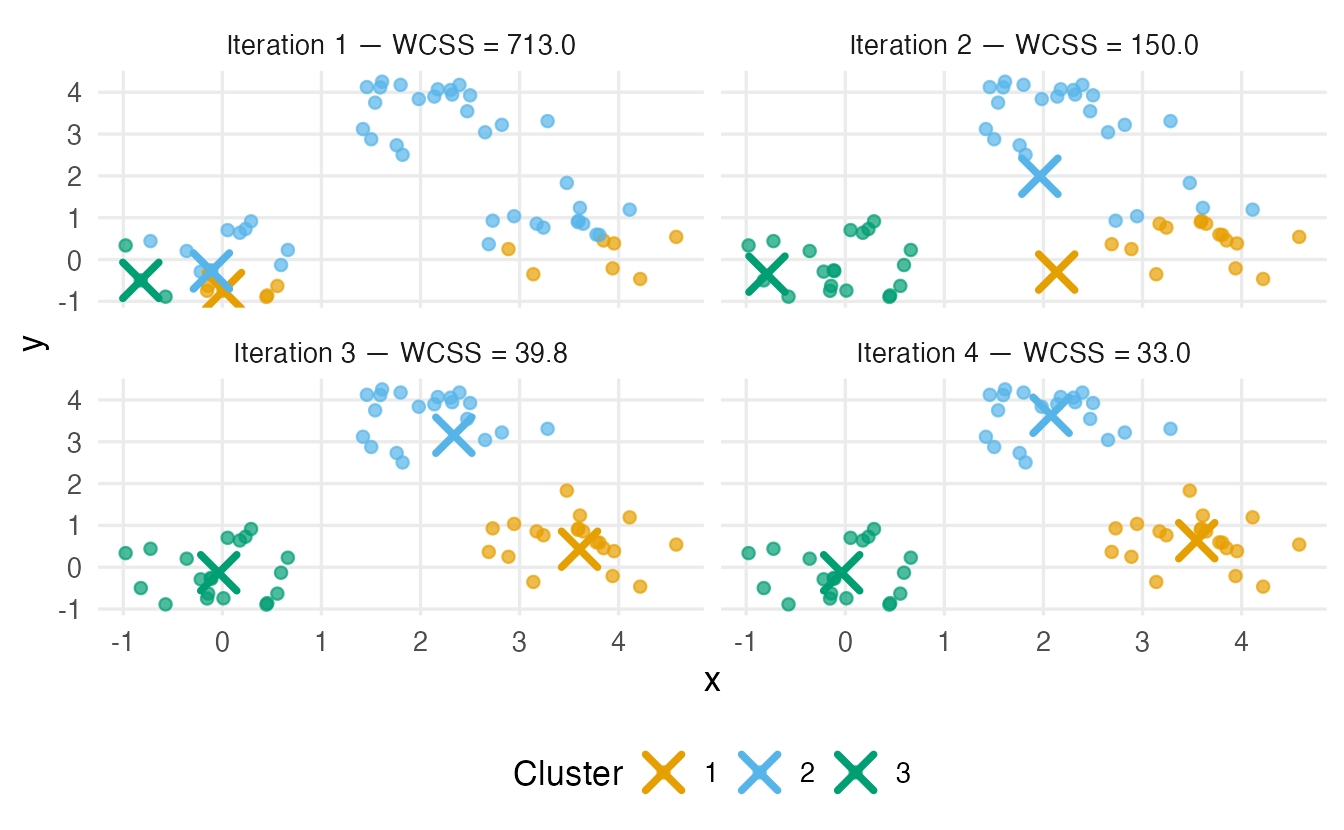
TipHow to read this figure
- Iteration 1: the three centres sit inside the same group, so the assignment is poor and WCSS is large.
- In each following panel the centres have moved to the means of their previous clusters and the points have been re-assigned.
- After 4 iterations nothing changes any more: the algorithm has converged. The final WCSS is 32.97.
NoteGoing deeper: the objective and why the algorithm converges
k-means minimises the within-cluster sum of squares
\[ \text{WCSS}(C_1, \dots, C_k) = \sum_{r=1}^k \sum_{i \in C_r} \lVert x_i - \bar x_r \rVert^2 , \qquad \bar x_r = \frac{1}{|C_r|}\sum_{i \in C_r} x_i . \]
- The assign step cannot increase WCSS: each point moves to the centre that is closest to it.
- The update step cannot increase WCSS: for a fixed set of points, the mean is the point that minimises the sum of squared distances.
So WCSS decreases (or stays equal) at every step, and since there is a finite number of partitions the algorithm must stop. But it stops at a local minimum: a partition that no single step can improve, not necessarily the best one. Finding the global minimum is computationally hard (NP-hard) in general.
3. kmeans() in R
In practice we use the built-in kmeans(). By default it uses the Hartigan–Wong algorithm, a refinement of Lloyd’s that usually reaches a lower WCSS; the idea is the same.
set.seed(1)
km_toy <- kmeans(toy, centers = 3, nstart = 25)
km_toy$size
#> [1] 20 20 20km_toy$centers#> x y
#> 1 2.07742 3.6343
#> 2 -0.03632 -0.1321
#> 3 3.54711 0.6342c(within = km_toy$tot.withinss, between = km_toy$betweenss,
total = km_toy$totss)#> within between total
#> 32.97 288.28 321.25
TipHow to read this output
centers = 3is the number of clusters \(k\);nstart = 25asks for 25 random initial positions, keeping the best result (lowest WCSS).size— number of points per cluster.centers— the coordinates of each centre (here in the units ofxandy).cluster(not printed) — the cluster of each observation.tot.withinssis the WCSS;betweenssthe sum of squares between centres; they add up tototss. The ratiobetweenss / totss= 0.9 is the share of variability “explained” by the clusters.
4. Local optima: why nstart matters
With a single random start, k-means can get stuck. Here are six well-separated groups; we run k-means 100 times with nstart = 1, each time with a different seed, and record the final WCSS.
set.seed(3)
grid_centres <- expand.grid(a = c(0, 5, 10), b = c(0, 5))
blobs <- do.call(rbind, lapply(1:6, \(j) {
  cbind(rnorm(30, grid_centres$a[j], 0.8), rnorm(30, grid_centres$b[j], 0.8))
}))

wcss_single <- sapply(1:100, \(s) {
  set.seed(s)
  kmeans(blobs, centers = 6, nstart = 1)$tot.withinss
})
best <- min(wcss_single)
mean(wcss_single > best + 1e-6)     # share of runs stuck in a worse solution
#> [1] 0.4In 40% of the single-start runs, k-means stopped at a worse solution — typically two true groups merged into one cluster and another group split in two. With nstart = 25 the chance that all 25 starts fail becomes negligible:
set.seed(1)
kmeans(blobs, centers = 6, nstart = 25)$tot.withinss
#> [1] 224.7best#> [1] 224.7Rule: always set nstart to at least 25 (more for large \(k\)), and always set.seed() for reproducibility.
5. A real data set: computer prices
The file computers.csv describes personal computers sold in the United States in 1993–1995, with price and specifications. Its first column has no name: it is just a row number that was written out together with the data. We must drop it — otherwise “row number” would become a clustering variable.
computers_raw <- read_csv(data_path("computers.csv"),
                          show_col_types = FALSE,
                          name_repair = "unique_quiet")
names(computers_raw)[1:3]
#> [1] "...1" "price" "speed"# check that the first column really is just 1, 2, 3, ... before dropping it
stopifnot(all(computers_raw[[1]] == seq_len(nrow(computers_raw))))
computers <- computers_raw |> select(-1)
glimpse(computers)#> Rows: 6,259
#> Columns: 10
#> $ price <dbl> 1499, 1795, 1595, 1849, 3295, 3695, 1720, 1995, 2225, 2575, 21…
#> $ speed <dbl> 25, 33, 25, 25, 33, 66, 25, 50, 50, 50, 33, 66, 50, 25, 50, 50…
#> $ hd <dbl> 80, 85, 170, 170, 340, 340, 170, 85, 210, 210, 170, 210, 130, …
#> $ ram <dbl> 4, 2, 4, 8, 16, 16, 4, 2, 8, 4, 8, 8, 4, 8, 8, 4, 2, 4, 4, 8, …
#> $ screen <dbl> 14, 14, 15, 14, 14, 14, 14, 14, 14, 15, 15, 14, 14, 14, 14, 14…
#> $ cd <chr> "no", "no", "no", "no", "no", "no", "yes", "no", "no", "no", "…
#> $ multi <chr> "no", "no", "no", "no", "no", "no", "no", "no", "no", "no", "n…
#> $ premium <chr> "yes", "yes", "yes", "no", "yes", "yes", "yes", "yes", "yes", …
#> $ ads <dbl> 94, 94, 94, 94, 94, 94, 94, 94, 94, 94, 94, 94, 94, 94, 94, 94…
#> $ trend <dbl> 1, 1, 1, 1, 1, 1, 1, 1, 1, 1, 1, 1, 1, 1, 1, 1, 1, 1, 1, 1, 1,…There are 6259 computers.
We cluster on the five product specifications: price (US dollars), speed (MHz), hd (hard-disk size, MB), ram (MB) and screen (inches). We leave out ads and trend, which describe the market at the time of sale (number of adverts, month index), and the three yes/no variables, which do not fit Euclidean distance well. Because the variables have completely different units, we standardise them.
spec_vars <- c("price", "speed", "hd", "ram", "screen")
comp_z <- computers |>
  select(all_of(spec_vars)) |>
  scale()
round(apply(comp_z, 2, sd), 2)
#> price speed hd ram screen
#> 1 1 1 1 16. Choosing k
There is no single correct \(k\). We look at several criteria and combine them with common sense.
6.1 The elbow
k_grid <- 1:10
wss <- sapply(k_grid, \(k) {
  set.seed(123)
  kmeans(comp_z, centers = k, nstart = 25, iter.max = 50)$tot.withinss
})ggplot(tibble(k = k_grid, wss = wss), aes(k, wss)) +
geom_line(linewidth = 1, colour = "#0072B2") +
geom_point(size = 2.5, colour = "#0072B2") +
scale_x_continuous(breaks = k_grid) +
labs(x = "Number of clusters (k)", y = "Total within-cluster SS")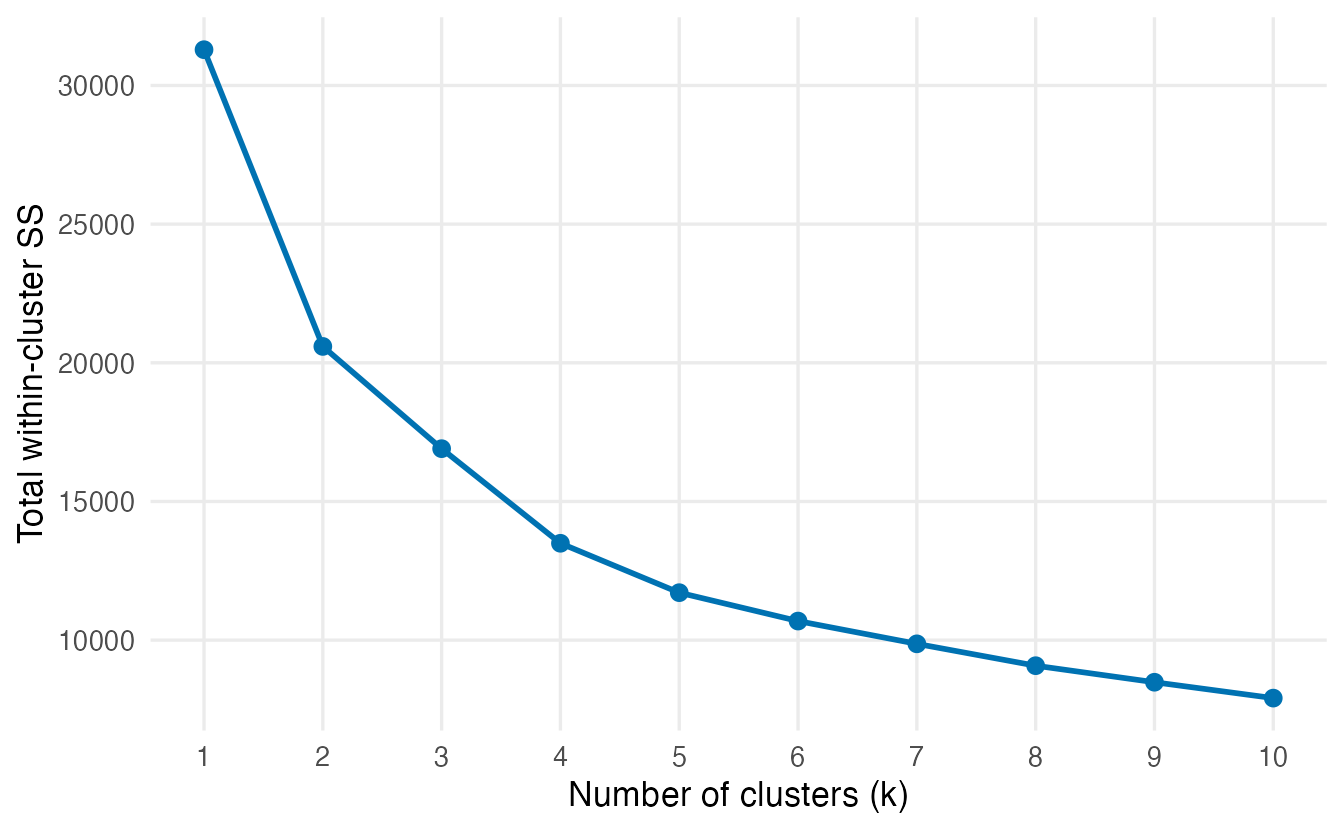
WCSS always decreases. We look for the point after which adding clusters brings little improvement. Here going from one to two clusters removes 1.07^{4} units of WCSS, the next three steps remove 3687, 3411, 1781, and after \(k = 5\) the gains shrink slowly (from 1024 to 572). The elbow is not sharp — a common situation with real data, and the reason why we never rely on the elbow alone.
6.2 Average silhouette
The silhouette (see the previous lesson) needs all pairwise distances. For 6259 computers that is about 20 million distances, so we evaluate it on a random subsample of 1,500 computers (the clusters are still fitted on all data).
set.seed(2024)
sub <- sample(nrow(comp_z), 1500)
d_sub <- dist(comp_z[sub, ])

sil_k <- sapply(2:8, \(k) {
  set.seed(123)
  cl <- kmeans(comp_z, centers = k, nstart = 25, iter.max = 50)$cluster
  mean(silhouette(cl[sub], d_sub)[, "sil_width"])
})
names(sil_k) <- 2:8
round(sil_k, 3)
#> 2 3 4 5 6 7 8
#> 0.357 0.306 0.314 0.321 0.299 0.283 0.293The highest average silhouette is at \(k =\) 2 (0.36), but all values lie between 0.28 and 0.36: by the usual guide this is weak structure for every \(k\). The computers do not fall into sharply separated groups.
6.3 The gap statistic
The gap statistic (Tibshirani, Walther & Hastie, 2001) compares \(\log(\text{WCSS}_k)\) on our data with what we would get on reference data without clusters (uniform over the range of the data). A large gap means “much more compact than random”. cluster::clusGap() simulates B reference data sets; to keep the computation short we use a subsample of 1,000 computers.
set.seed(2024)
sub_gap <- sample(nrow(comp_z), 1000)
gap <- clusGap(comp_z[sub_gap, ], FUNcluster = kmeans, K.max = 8,
               B = 50, d.power = 2, nstart = 10, iter.max = 50,
               verbose = FALSE)
gap_tab <- as_tibble(gap$Tab) |> mutate(k = 1:8)
gap_tab |> select(k, gap, SE.sim)
#> # A tibble: 8 × 3
#> k gap SE.sim
#> <int> <dbl> <dbl>
#> 1 1 1.263 0.01766
#> 2 2 1.207 0.01127
#> 3 3 1.289 0.01210
#> 4 4 1.413 0.01137
#> 5 5 1.487 0.01157
#> 6 6 1.510 0.01220
#> 7 7 1.533 0.01141
#> 8 8 1.553 0.01225k_gap_tibs <- maxSE(gap_tab$gap, gap_tab$SE.sim, method = "Tibs2001SEmax")
k_gap_global <- maxSE(gap_tab$gap, gap_tab$SE.sim, method = "globalmax")
c(Tibs2001SEmax = k_gap_tibs, globalmax = k_gap_global)#> Tibs2001SEmax globalmax
#> 1 8
TipHow to read this output
gapis the gap for each \(k\);SE.simits simulation standard error.- The rule proposed by the authors (
"Tibs2001SEmax") picks the smallest \(k\) whose gap is within one standard error of the gap at \(k+1\). Here it picks \(k =\) 1. A choice of one cluster means: compared with structureless data, splitting does not make the data much more compact than expected — the gap statistic finds no convincing cluster structure. - The global maximum of the gap is at \(k =\) 8. Since that is the largest k we tried, the gap simply keeps growing: no natural stopping point.
- We used
d.power = 2, which corresponds to the squared Euclidean distances of the original paper (the function’s default is 1).
6.4 Stability across bootstrap samples
Different random starts on the same data say little about reliability. A more honest check, introduced in the previous lesson, is to resample the data: fit k-means on a bootstrap sample, assign all computers to the nearest bootstrap centre and compare with the reference partition using the ARI.
assign_nearest <- function(x, centers) {
  d2 <- sapply(seq_len(nrow(centers)),
               \(j) colSums((t(x) - centers[j, ])^2))
  max.col(-d2, ties.method = "first")
}

boot_ari <- function(x, k, B = 20) {
  set.seed(1)
  ref <- kmeans(x, centers = k, nstart = 25, iter.max = 50)$cluster
  set.seed(2)
  vapply(seq_len(B), \(b) {
    rows <- sample(nrow(x), replace = TRUE)
    fit  <- kmeans(x[rows, ], centers = k, nstart = 10, iter.max = 50)
    adjustedRandIndex(ref, assign_nearest(x, fit$centers))
  }, numeric(1))
}
stab <- sapply(2:6, \(k) boot_ari(comp_z, k))
colnames(stab) <- 2:6
round(apply(stab, 2, \(a) c(mean = mean(a), min = min(a))), 3)#> 2 3 4 5 6
#> mean 0.971 0.785 0.992 0.960 0.924
#> min 0.938 0.549 0.984 0.877 0.648The most stable solution is \(k =\) 4 (mean ARI 0.992, minimum 0.984), while \(k =\) 3 is the least stable (mean 0.79): with that many clusters, the boundaries move a lot from one sample to the next.
6.5 Decision
| Criterion | Suggests |
|---|---|
| Elbow | no sharp elbow |
| Average silhouette | \(k =\) 2, but weak structure at every \(k\) |
| Gap statistic (Tibs2001SEmax) | \(k =\) 1 |
| Bootstrap stability | \(k =\) 4 |
The criteria do not agree, and the silhouette and gap values tell us that the computers do not form strongly separated natural groups. That is a finding in itself. Clustering can still be useful as a segmentation — a convenient summary of the catalogue — provided the segments are reproducible and interpretable. We therefore choose the most stable solution:
k_final <- as.integer(colnames(stab)[which.max(colMeans(stab))])
set.seed(123)
km <- kmeans(comp_z, centers = k_final, nstart = 50, iter.max = 50)
km$size
#> [1] 1974 2405 1312 5687. Profiling the clusters
A cluster is only useful if we can describe it. Centres in z-scores tell us how unusual each cluster is on each variable; summaries in original units tell a manager what the cluster actually contains. Report both.
In original units
profile_orig <- computers |>
  mutate(cluster = factor(km$cluster)) |>
  summarise(n = n(), across(all_of(spec_vars), median), .by = cluster) |>
  arrange(cluster)
profile_orig
#> # A tibble: 4 × 7
#> cluster n price speed hd ram screen
#> <fct> <int> <dbl> <dbl> <dbl> <dbl> <dbl>
#> 1 1 1974 2145 66 420 8 14
#> 2 2 2405 1799 33 214 4 14
#> 3 3 1312 2799 66 720 16 15
#> 4 4 568 2465 66 424 8 17In z-scores
as_tibble(km$centers) |>
  mutate(cluster = factor(seq_len(k_final))) |>
  pivot_longer(-cluster, names_to = "variable", values_to = "z") |>
  ggplot(aes(variable, cluster, fill = z)) +
  geom_tile(colour = "white") +
  geom_text(aes(label = round(z, 1))) +
  scale_fill_gradient2(low = "#0072B2", mid = "white", high = "#D55E00") +
  labs(x = NULL, y = "Cluster", fill = "z-score")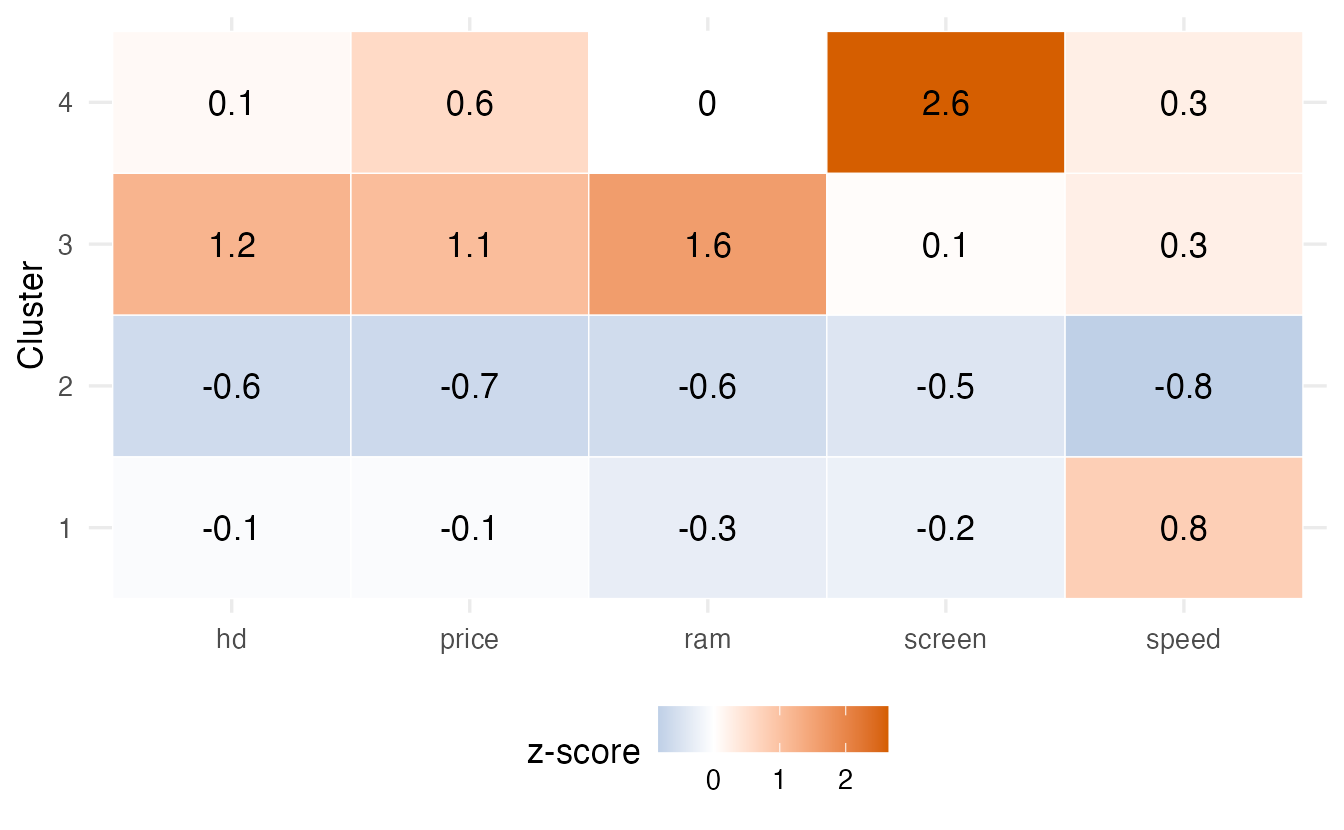
TipHow to read these profiles
- Read each row of the heat map: which variables are clearly above (red) or below (blue) average for that cluster?
- Then go to the table in original units to put numbers on it. For example, the cluster with the highest median price, cluster 3, has a median price of 2,799 dollars, 16 MB of RAM and a 720 MB disk.
- Give each cluster a short descriptive name (e.g. “entry level”, “large screen”) based on its profile — and check that the name still fits when you look at a few individual computers in the cluster.
A picture in two dimensions
To see the clusters, we project the standardised data on the first two principal components (see PCA).
pca <- prcomp(comp_z)
pve <- summary(pca)$importance["Proportion of Variance", 1:2]

tibble(PC1 = pca$x[, 1], PC2 = pca$x[, 2], cluster = factor(km$cluster)) |>
  ggplot(aes(PC1, PC2, colour = cluster)) +
  geom_point(alpha = 0.3, size = 0.8) +
  labs(x = sprintf("PC1 (%.0f%%)", 100 * pve[1]),
       y = sprintf("PC2 (%.0f%%)", 100 * pve[2]), colour = "Cluster")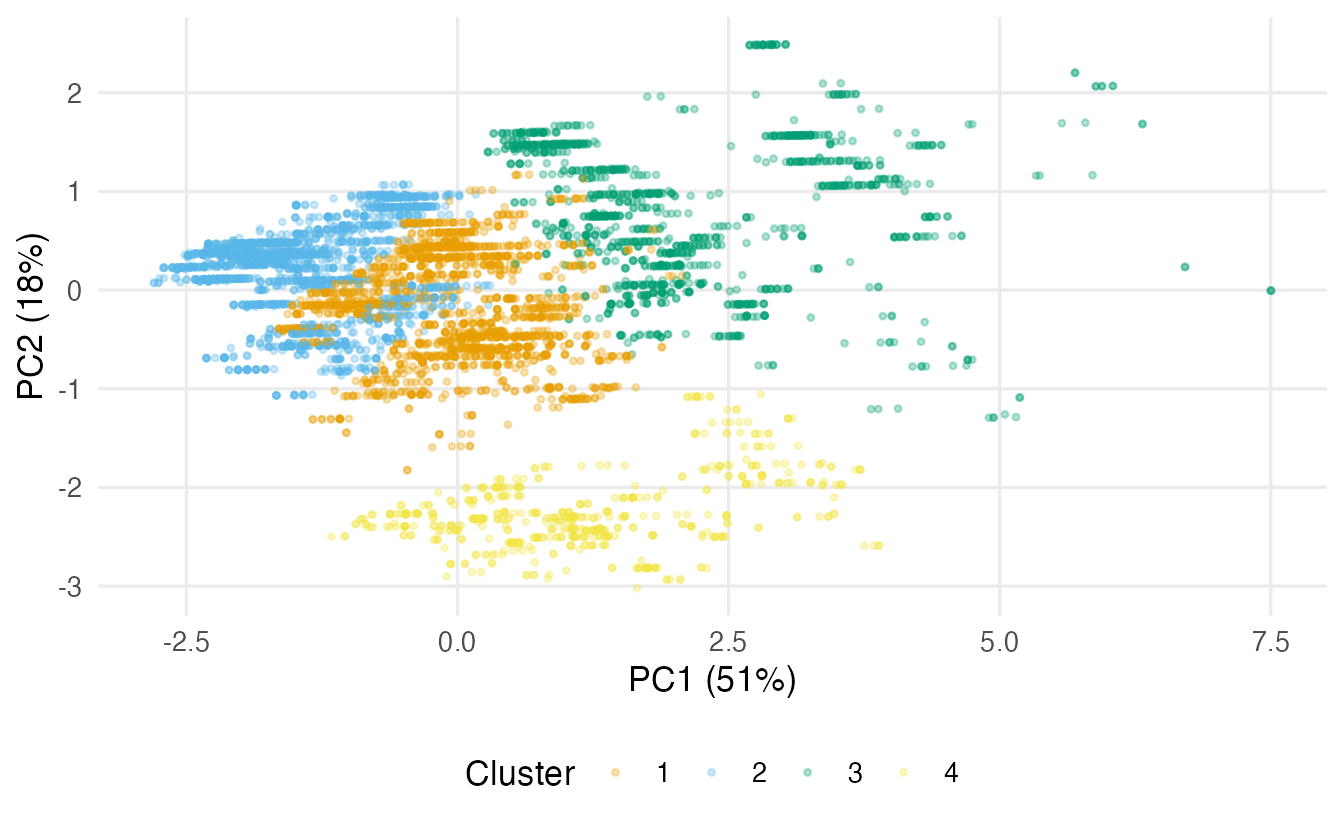
The first two components show 69% of the variance, so the picture is a useful but incomplete view: clusters that overlap here may be separated along other components.
Silhouette of the final solution
sil_final <- silhouette(km$cluster[sub], d_sub)
plot(sil_final, border = NA, col = seq_len(k_final),
     main = paste("Silhouette plot, k =", k_final))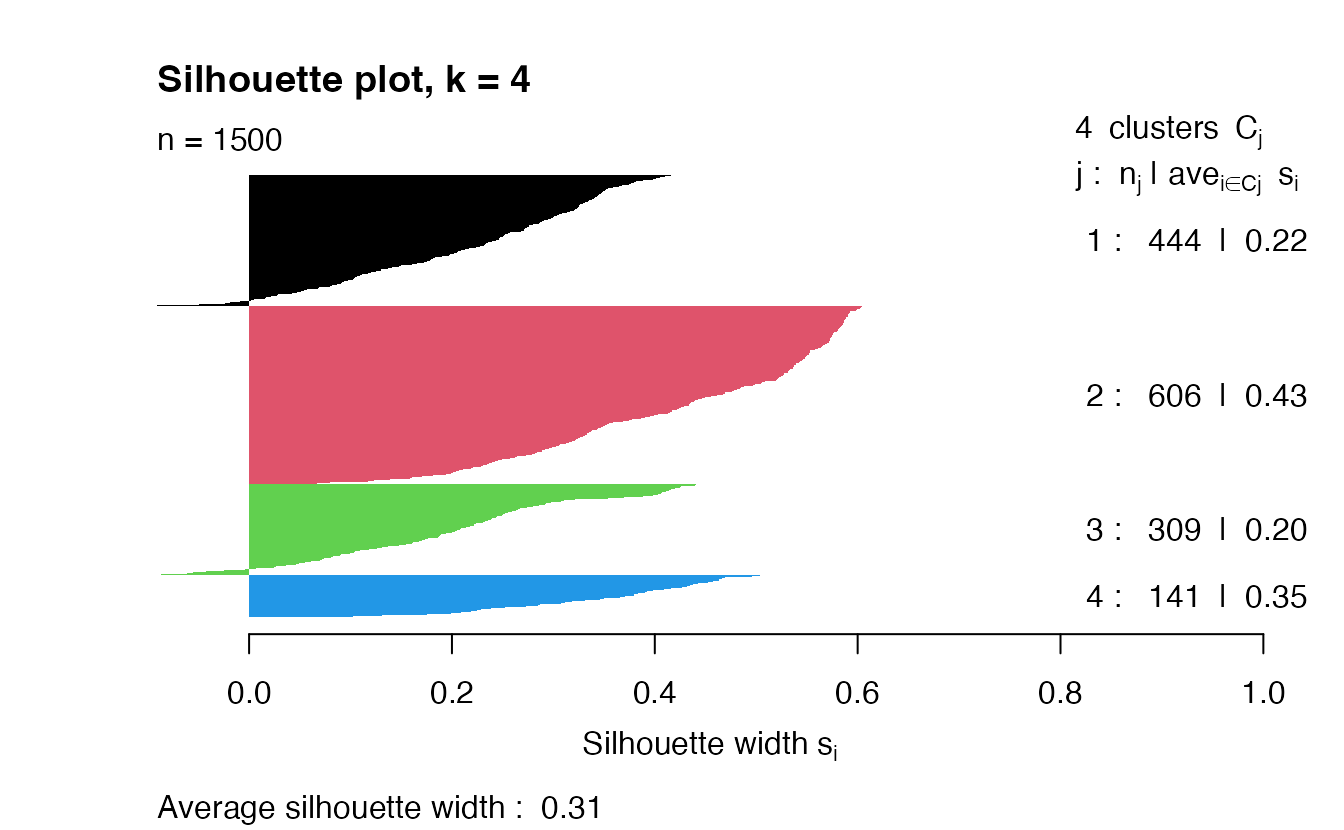
The average silhouette is 0.31. Clusters with many negative bars have fuzzy boundaries; report them as such.
8. Where k-means fails
k-means implicitly assumes clusters that are compact and roughly spherical (equally spread in all directions), of similar size and spread, and without extreme outliers (a mean is pulled by them). Two counter-examples with known groups:
set.seed(6)
elongated <- tibble(
  x = c(rnorm(150, 0, 3), rnorm(150, 0, 3)),
  y = c(rnorm(150, 0, 0.3), rnorm(150, 2, 0.3)),
  truth = rep(1:2, each = 150)
)
set.seed(5)
r     <- c(rnorm(150, 1, 0.1), rnorm(150, 3, 0.1))
theta <- runif(300, 0, 2 * pi)
rings <- tibble(x = r * cos(theta), y = r * sin(theta),
                truth = rep(1:2, each = 150))

set.seed(1)
km_el <- kmeans(elongated[, c("x", "y")], centers = 2, nstart = 25)
set.seed(1)
km_ri <- kmeans(rings[, c("x", "y")], centers = 2, nstart = 25)
c(elongated = adjustedRandIndex(km_el$cluster, elongated$truth),
  rings     = adjustedRandIndex(km_ri$cluster, rings$truth))
#> elongated rings
#> -0.003255 0.004188bind_rows(
elongated |> mutate(cluster = factor(km_el$cluster), data = "Elongated bands"),
rings |> mutate(cluster = factor(km_ri$cluster), data = "Concentric rings")
) |>
ggplot(aes(x, y, colour = cluster, shape = factor(truth))) +
geom_point(alpha = 0.7) +
facet_wrap(~ data, scales = "free") +
theme(aspect.ratio = 1) + # square panels (coord_equal() can't be used with free scales)
labs(colour = "k-means cluster", shape = "True group")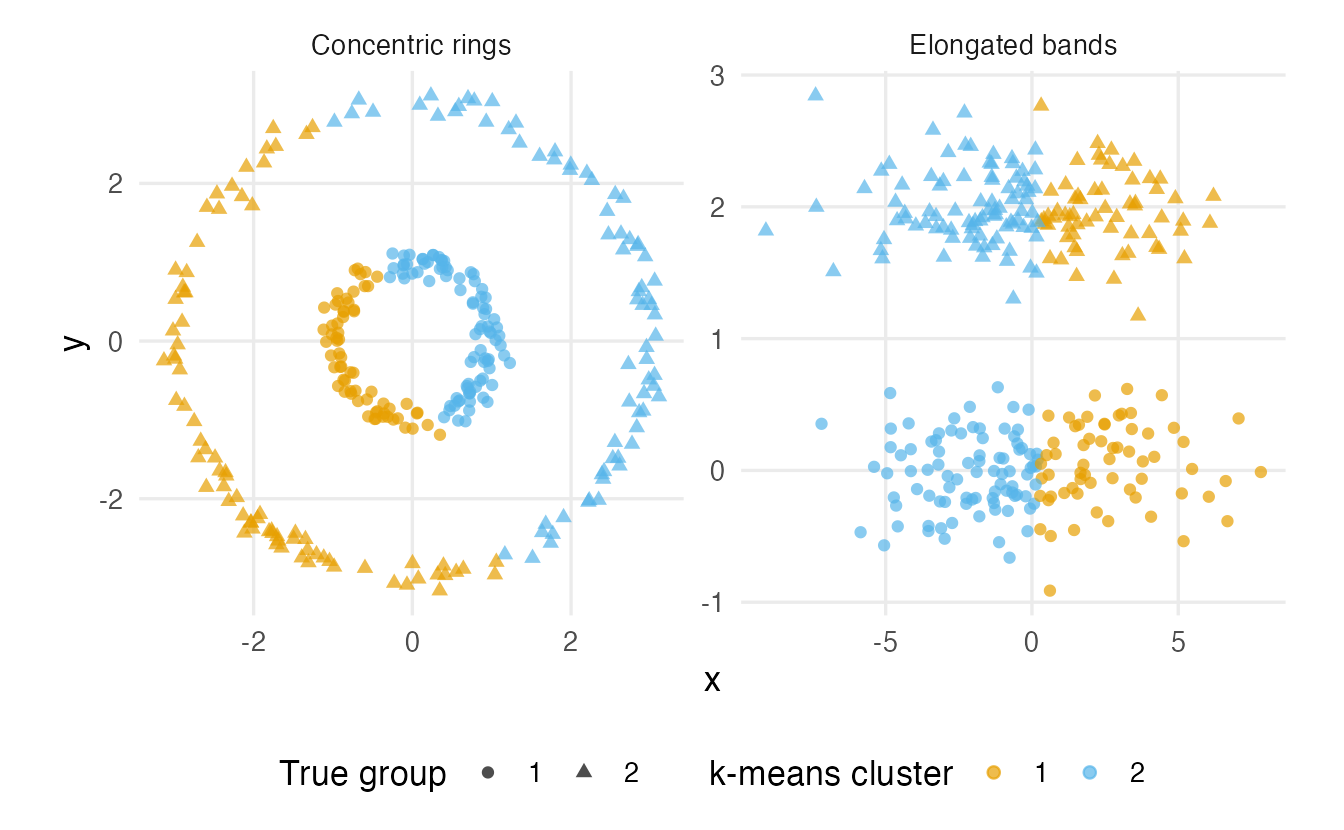
Both ARIs are close to 0: k-means minimises squared distances to a centre, and here the true groups are not the most compact way to split the data. Better tools: a Gaussian mixture with elongated components (Model-based clustering) for the bands; DBSCAN or spectral clustering for the rings.
WarningCommon pitfalls
- Forgetting to scale variables measured in different units (see the previous lesson).
- Leaving an ID or row-number column in the data. It becomes a “variable” and can dominate the clusters. Check
names()and drop such columns explicitly. - Using the default
nstart = 1. Results can be a poor local optimum and change from run to run. - Choosing k from one criterion — or deciding \(k\) before looking. Combine elbow, silhouette, gap and stability, and say when they disagree.
- Checking stability only across random starts. That tests the optimiser, not the data. Resample the observations (bootstrap).
- Describing clusters only in z-scores. “Cluster 2 is +1.3 on price” means little to a non-specialist; give medians or means in the original units too.
9. Check your understanding
10. Exercises
★ Exercise 1 — reproduce on penguins. Standardise the four numeric measurements of penguins (drop rows with missing values), run k-means with \(k = 3\) and nstart = 25, and cross-tabulate the clusters with species. Compute the ARI.
TipSolution
peng <- penguins |>
  select(species, bill_len, bill_dep, flipper_len, body_mass) |>
  na.omit()
peng_z <- scale(select(peng, -species))
set.seed(1)
km_p <- kmeans(peng_z, centers = 3, nstart = 25)
table(km_p$cluster, peng$species)
adjustedRandIndex(km_p$cluster, peng$species)   # about 0.79
Gentoo penguins form an almost perfect cluster; Adelie and Chinstrap are partly mixed.
★ Exercise 2 — predict the output. Without running it, what are kmeans(x, centers = 1)$tot.withinss and kmeans(x, centers = 1)$betweenss, in terms of totss? What would WCSS be if \(k\) equalled the number of (distinct) observations?
TipSolution
With one cluster the centre is the overall mean, so tot.withinss equals totss and betweenss is 0. With one cluster per distinct observation every point is its own centre and WCSS is 0. This is why WCSS alone cannot choose \(k\).
★★ Exercise 3 — debug. A student clusters the computers with the code below and finds that the clusters largely separate computers sold early in the period from those sold late. What went wrong?
comp_bad <- read_csv(data_path("computers.csv"), show_col_types = FALSE) |>
  select(where(is.numeric)) |>
  scale()
set.seed(123)
km_bad <- kmeans(comp_bad, centers = 4, nstart = 25)
TipSolution
where(is.numeric) keeps the unnamed first column (the row number, renamed ...1 by readr) and also ads and trend. The file is ordered by time, so the row number is almost perfectly correlated with trend (check cor(comp_bad[, 1], comp_bad[, "trend"])). Two of the seven clustering variables therefore encode “when the computer was sold”. Drop the index column and choose the variables on purpose:
comp_ok <- read_csv(data_path("computers.csv"), show_col_types = FALSE,
                    name_repair = "unique_quiet") |>
  select(-1) |>
  select(price, speed, hd, ram, screen) |>
  scale()
★★ Exercise 4 — interpret a profile. A k-means solution on standardised supermarket data gives these centres (z-scores):
| cluster | visits | basket size | share organic |
|---|---|---|---|
| 1 | 1.2 | −0.6 | 0.1 |
| 2 | −0.8 | 1.4 | −0.2 |
| 3 | −0.3 | −0.4 | 1.9 |
Name the three clusters and say what extra table you would want before presenting them.
TipSolution
Cluster 1: frequent visitors with small baskets (“daily top-up shoppers”). Cluster 2: rare visits with large baskets (“weekly stock-up shoppers”). Cluster 3: average visits and baskets, but a much larger share of organic products (“organic-oriented”). Before presenting, I would want the cluster sizes and the medians in original units (visits per month, euros per basket, % organic), plus a stability check.
★★★ Exercise 5 — mini-analysis: does a transformation change the segments? hd and ram are right-skewed (each step in RAM roughly doubles it). Replace them with log2(hd) and log2(ram), standardise, refit k-means with k_final clusters, and compare with the partition km using the ARI and the profiles in original units. Is the segmentation robust to this choice?
TipSolution
comp_log_z <- computers |>
  transmute(price, speed, hd = log2(hd), ram = log2(ram), screen) |>
  scale()
set.seed(123)
km_log <- kmeans(comp_log_z, centers = k_final, nstart = 50, iter.max = 50)
adjustedRandIndex(km$cluster, km_log$cluster)

computers |>
  mutate(cluster = factor(km_log$cluster)) |>
  summarise(n = n(), across(all_of(spec_vars), median), .by = cluster)
The ARI is clearly below 1: the transformation moves a substantial share of computers between segments, even if some profiles look similar. Because there is no strong natural structure, the segments depend on preprocessing choices — a reason to report the choice explicitly and, ideally, show that the main conclusions survive it.
Summary
| Task | Code | Remember |
|---|---|---|
| Fit k-means | kmeans(x, centers = k, nstart = 25) |
scale first; set.seed() |
| Output | $cluster, $centers, $size, $tot.withinss, $betweenss |
betweenss / totss = share explained |
| Elbow | WCSS for k = 1:10 |
WCSS always decreases |
| Silhouette | cluster::silhouette(cl, dist(x)) |
subsample large data |
| Gap statistic | cluster::clusGap(x, kmeans, K.max, B, d.power = 2) + maxSE() |
compares with structureless data |
| Bootstrap stability | refit on resamples, ARI with mclust::adjustedRandIndex() |
unstable clusters are not interpreted |
| Profiles | medians in original units + centres in z-scores | name clusters from profiles |
- k-means alternates assign and update steps and decreases WCSS until it reaches a local optimum — use many starts.
- Choosing \(k\) is a judgement: combine several criteria, and accept that real data often have weak cluster structure.
- Always check stability on resampled data and describe clusters in original units.
- k-means looks for compact, round, similar-size groups; for elongated, nested or non-convex shapes, use another family.