library(ggplot2)Loops: for, while and repeat
Repeat a task safely — and know when you do not need a loop at all
Write for loops with seq_along() and pre-allocated results, loop over lists and matrices, use while and repeat with clear stopping rules, skip and stop with next and break, and compare loops with vectorised code.
NoteLearning objectives
By the end of this lesson you will be able to:
- write
forloops over vectors, lists and matrices usingseq_along()andseq_len(); - pre-allocate the object that stores the results, and explain why it is faster;
- write
whileandrepeatloops with a clear, guaranteed stopping rule; - use
nextandbreakto skip iterations or leave a loop early; - decide when a loop is the right tool and when vectorised code is simpler and faster.
1. Why loops?
Many tasks consist of doing the same thing many times: read 20 files, fit a model for each of 3 species, simulate 1,000 random experiments, update a bank balance month after month. Writing the same line 1,000 times is not an option. A loop repeats a block of code, changing one thing (the loop variable) at each repetition, called an iteration.
R has three kinds of loop:
| Loop | Repeats… | Typical use |
|---|---|---|
for |
once for each element of a sequence | known number of iterations |
while |
as long as a condition is TRUE |
unknown number of iterations |
repeat |
forever, until you call break |
stopping rule checked in the middle |
2. The for loop
for (element in sequence) {
  # code that uses `element`
}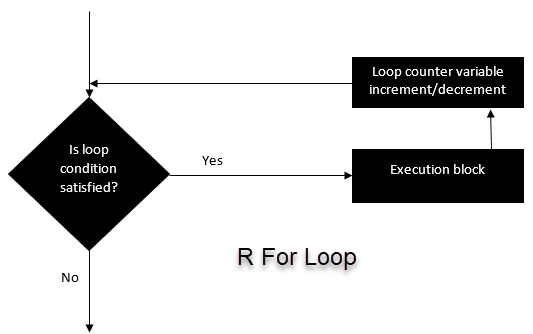
The loop variable takes each value of the sequence in turn:
fruit <- c("Apple", "Orange", "Passion fruit", "Banana")

for (f in fruit) {
  cat("I like", f, "\n")
}
#> I like Apple
#> I like Orange
#> I like Passion fruit
#> I like Bananacat() prints its arguments separated by spaces; "\n" starts a new line. Inside a loop, values are not printed automatically: use cat() or print() if you want to see them.
Loop over positions with seq_along()
Often you need the position i rather than the value, for example to store results. Use seq_along(x), which gives 1, 2, …, length(x):
for (i in seq_along(fruit)) {
  cat(i, ":", fruit[i], "\n")
}
#> 1 : Apple
#> 2 : Orange
#> 3 : Passion fruit
#> 4 : BananaWhy not 1:length(x)? Because it fails when x is empty:
empty <- character(0)
1:length(empty)        # c(1, 0): the loop would run twice on nothing!
#> [1] 1 0seq_along(empty) # integer(0): the loop correctly runs zero times#> integer(0)Similarly, seq_len(n) gives 1, …, n and correctly returns nothing when n is 0.
3. Storing results: pre-allocate
Most loops compute something at each iteration that you want to keep. The good pattern has three steps:
- create an empty container of the right length before the loop;
- fill position
iinside the loop; - use the container after the loop.
n <- 10
squares <- numeric(n)          # 1. ten zeros
for (i in seq_len(n)) {
  squares[i] <- i^2            # 2. fill position i
}
squares                        # 3. use it
#> [1] 1 4 9 16 25 36 49 64 81 100For results that are not single numbers (vectors of different lengths, data frames, models) create a list with vector("list", n) and fill it with [[i]]:
out <- vector("list", length = 3)
for (i in seq_along(out)) {
  out[[i]] <- seq_len(i)
}
str(out)
#> List of 3
#> $ : int 1
#> $ : int [1:2] 1 2
#> $ : int [1:3] 1 2 3
TipDo not call your list
list
A variable called list (or c, mean, data) hides the built-in function with the same name and makes code confusing. Use names like out, results, fits.
Why pre-allocate? A timing experiment
The tempting alternative is to start from an empty vector and grow it with c() at each step. Let us time three approaches for 20,000 squares with system.time(), which reports how long a piece of code takes (the elapsed column is the wall-clock time in seconds):
n <- 20000

t_grow <- system.time({
  x <- c()
  for (i in seq_len(n)) x <- c(x, i^2)      # grow at every step
})
t_pre <- system.time({
  y <- numeric(n)
  for (i in seq_len(n)) y[i] <- i^2         # pre-allocated
})
t_vec <- system.time(z <- seq_len(n)^2)     # vectorised, no loop

c(grow = t_grow[["elapsed"]], prealloc = t_pre[["elapsed"]],
  vectorised = t_vec[["elapsed"]])
#> grow prealloc vectorised
#> 0.252 0.001 0.000
TipHow to read this output
The three numbers are seconds (they change a little from run to run and from computer to computer). Growing the vector is by far the slowest: at every iteration c(x, i^2) copies the whole vector into a new one, so the total work grows with the square of n. Filling a pre-allocated vector does a constant amount of work per step. The vectorised version, seq_len(n)^2, does the loop internally in compiled C code and is the fastest of all.
4. Looping over lists, matrices and data frames
Lists
The loop variable receives each element of the list:
basket <- list(
  fruit    = c("Apple", "Orange", "Banana"),
  prices   = c(1.2, 0.8, 0.5),
  paid     = FALSE
)

for (item in basket) {
  print(item)
}
#> [1] "Apple" "Orange" "Banana"
#> [1] 1.2 0.8 0.5
#> [1] FALSEWhen you also need the names, loop over names() and extract with [[:
for (nm in names(basket)) {
  cat(nm, "has", length(basket[[nm]]), "element(s)\n")
}
#> fruit has 3 element(s)
#> prices has 3 element(s)
#> paid has 1 element(s)Matrices: rows and columns
A matrix has two dimensions, so a nested loop (a loop inside a loop) visits every cell:
mat <- matrix(10:15, nrow = 3, ncol = 2)

for (r in seq_len(nrow(mat))) {
  for (c in seq_len(ncol(mat))) {
    cat("Row", r, "column", c, "has value", mat[r, c], "\n")
  }
}
#> Row 1 column 1 has value 10
#> Row 1 column 2 has value 13
#> Row 2 column 1 has value 11
#> Row 2 column 2 has value 14
#> Row 3 column 1 has value 12
#> Row 3 column 2 has value 15To compute something per row (or per column), a single loop over rows is enough:
row_max <- numeric(nrow(mat))
for (r in seq_len(nrow(mat))) {
  row_max[r] <- max(mat[r, ])
}
row_max
#> [1] 13 14 15Data frame columns
A data frame is a list of columns, so looping over it visits its columns:
num_cols <- penguins[, c("bill_len", "bill_dep", "flipper_len", "body_mass")]
col_means <- numeric(ncol(num_cols))
names(col_means) <- names(num_cols)

for (j in seq_along(num_cols)) {
  col_means[j] <- mean(num_cols[[j]], na.rm = TRUE)
}
round(col_means, 1)
#> bill_len bill_dep flipper_len body_mass
#> 43.9 17.2 200.9 4201.8This is so common that R has shorter tools for it (colMeans(), sapply(), purrr::map(), across()): see Iteration.
5. The while loop
A while loop repeats its block as long as a condition is TRUE. It is the right choice when you do not know in advance how many iterations are needed.
while (condition) {
  # code that must eventually make `condition` FALSE
}
i <- 1
while (i <= 5) {
cat("This is loop number", i, "\n")
i <- i + 1 # without this line the loop never ends
}#> This is loop number 1
#> This is loop number 2
#> This is loop number 3
#> This is loop number 4
#> This is loop number 5The condition is checked before each iteration. If something inside the loop does not eventually make it FALSE, the loop runs forever (press Esc or the stop button to interrupt it).
Example: simulating a stock price
A stock starts at 50. Every day its price changes by a random whole amount between −10 and +10. We sell as soon as the price falls to 45 or below (a stop loss) or rises to 70 or above (take profit). How many days do we hold the stock?
We cannot know the number of days in advance, so while is natural. As a safety net, we also stop after at most 1,000 days.
set.seed(123)

price    <- 50
day      <- 0
max_days <- 1000
path     <- price                       # keep the whole history for a plot

while (price > 45 && price < 70 && day < max_days) {
  day   <- day + 1
  price <- price + sample(-10:10, size = 1)
  path  <- c(path, price)
}

c(days = day, final_price = price)
#> days final_price
#> 12 71The loop stopped after 12 days with a price of 71. (Here growing path with c() is fine: the loop is short, and we do not know its final length in advance.)
ggplot(data.frame(day = seq_along(path) - 1, price = path),
       aes(day, price)) +
  geom_hline(yintercept = c(45, 70), linetype = "dashed", colour = "grey50") +
  geom_line(linewidth = 0.8) +
  geom_point() +
  labs(x = "Day", y = "Price",
       title = "A random walk stopped by a stop loss or a take profit")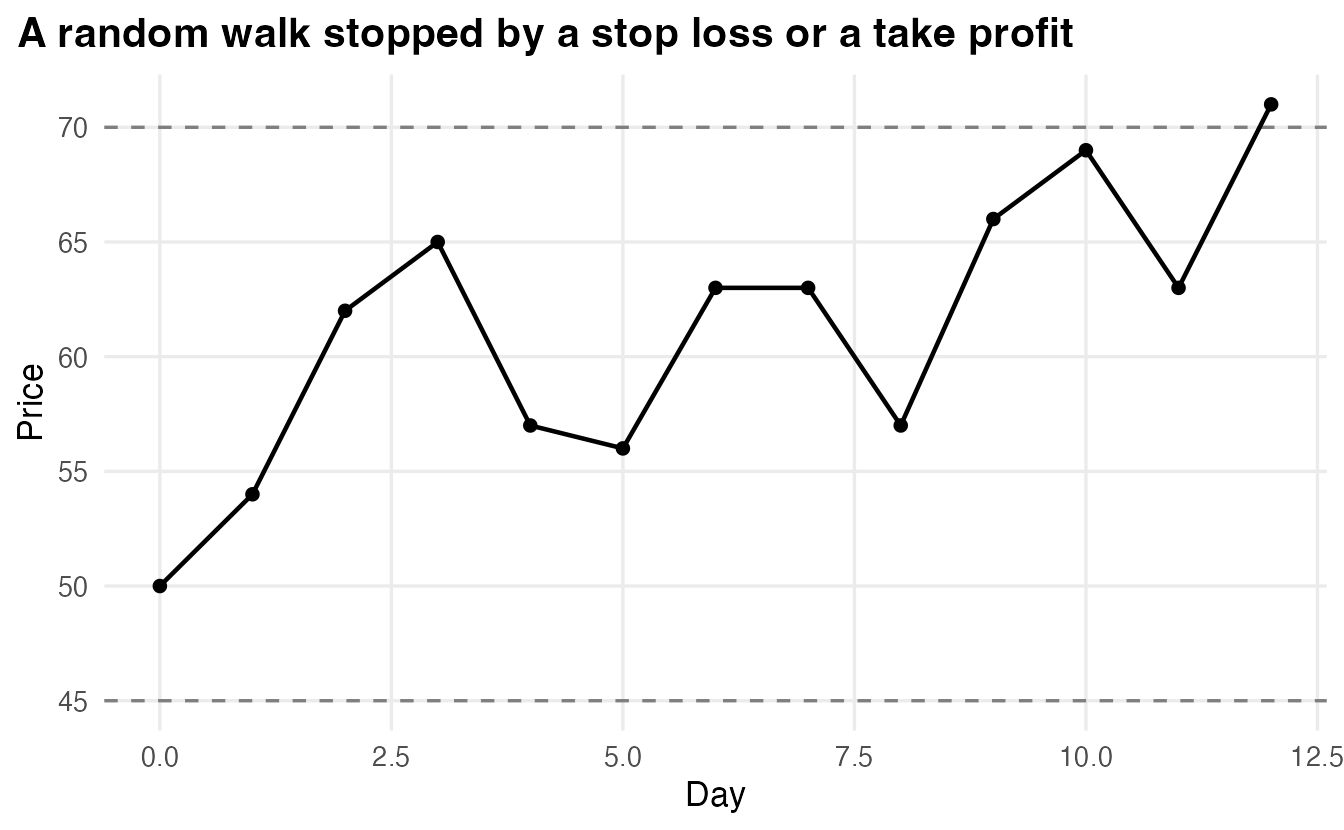
Each time you change the seed you get a different path and a different number of days. Repeating the simulation many times (with a for loop around the while loop!) tells you the distribution of the holding time: this is the idea of simulation.
NoteGoing deeper: why a maximum number of iterations?
This price walk starts in the middle of the interval (45, 70) and moves by up to 10 per day, so in practice it always leaves the interval quickly. But a loop’s stopping rule should not depend on luck or on parameters that someone may change later (for example a step of 0 or bounds that cannot be reached). A cap such as day < max_days, plus a check after the loop (if (day == max_days) warning(...)), guarantees that the code finishes and tells you when it stopped for the “wrong” reason. Iterative algorithms in statistics (e.g. the ones fitting logistic regression) use exactly this pattern: iterate until convergence or until a maximum number of iterations.
6. repeat, break and next
repeat + break
repeat runs forever until it meets break. It is useful when the stopping test comes naturally in the middle or at the end of the block, e.g. “roll a die until you get a six”:
set.seed(2)
rolls <- 0
repeat {
  roll  <- sample(1:6, size = 1)
  rolls <- rolls + 1
  if (roll == 6) break           # leave the loop
}
rolls
#> [1] 2break also works inside for and while: it leaves the innermost loop immediately.
next: skip to the next iteration
next abandons the current iteration and moves on to the next one. It is handy to skip unusable inputs:
values <- c(4, NA, 9, -1, 16)
roots  <- rep(NA_real_, length(values))

for (i in seq_along(values)) {
  if (is.na(values[i]) || values[i] < 0) next   # skip missing / negative
  roots[i] <- sqrt(values[i])
}
roots
#> [1] 2 NA 3 NA 47. Loops or vectorisation?
Many operations in R are vectorised: they work on a whole vector at once (x^2, x + y, sum(x), cumsum(x), ifelse()…). When a vectorised version exists, it is usually shorter, easier to read and faster:
x <- c(3, 8, 1, 9)

# loop version
total <- 0
for (v in x) total <- total + v^2
total
#> [1] 155# vectorised version
sum(x^2)#> [1] 155Loops are perfectly fine (and often the clearest choice) when
- each step depends on the previous one (the stock price, a bank balance with interest, an iterative algorithm);
- each iteration does a big task (read a file, fit a model, make a plot), so the loop overhead is negligible;
- the number of iterations is unknown (
while,repeat).
Prefer vectorised code when the same simple operation is applied to every element independently. In between there are the iteration functions lapply(), sapply() and purrr::map(), which hide the bookkeeping of a for loop: see Iteration.
WarningCommon pitfalls
1:length(x)on an emptyxgivesc(1, 0)and runs the loop twice. Useseq_along(x)/seq_len(n).- Growing a result with
c()orrbind()in a long loop is very slow. Pre-allocate withnumeric(n)orvector("list", n); for data frames, store pieces in a list and combine once at the end (do.call(rbind, pieces)orpurrr::list_rbind()). - Overwriting instead of storing.
for (i in 1:10) res <- i^2keeps only the last value. Writeres[i] <- i^2. - A
whileloop that never ends, because the loop variable is never updated or the condition can never becomeFALSE. Always add a maximum number of iterations. - Expecting values to print inside a loop. Auto-printing does not happen inside loops (or functions): use
print()orcat(). - Using
[instead of[[on a list inside a loop:out[i] <- list(...)vsout[[i]] <- value. With[[you store the object itself.
8. Check your understanding
9. Exercises
Interactive (run in your browser)
★ Exercise 1 — fill a pre-allocated vector. For each column of mtcars, store the number of distinct values (length(unique(x))) in a pre-allocated vector n_distinct, then print it.
The container needs ncol(mtcars) positions; loop over seq_along(mtcars) and extract column j with mtcars[[j]].
n_distinct <- integer(ncol(mtcars))
names(n_distinct) <- names(mtcars)
for (j in seq_along(mtcars)) {
  n_distinct[j] <- length(unique(mtcars[[j]]))
}
n_distinct
Columns such as vs and am have only 2 distinct values (they are binary codes), cyl has 3 — a hint that they should be treated as categorical variables, not as numbers.
★★ Exercise 2 — debug. This loop should store the cumulative mean of x (the mean of the first i values, for each i), but the printed result has only one number. Fix it.
running is overwritten at every iteration. Create it before the loop with numeric(length(x)) and store into running[i].
x <- c(2, 4, 6, 8, 10)
running <- numeric(length(x))
for (i in seq_along(x)) {
  running[i] <- mean(x[1:i])
}
running            # 2 3 4 5 6

cumsum(x) / seq_along(x)   # the vectorised equivalent
★★ Exercise 3 — while with a stopping rule. You put 1,000 euros in a savings account at 3% annual interest. Use a while loop to find after how many years the balance first reaches 2,000 euros.
Each year the balance is multiplied by 1.03, and years increases by 1.
balance <- 1000
years <- 0
while (balance < 2000) {
  balance <- balance * 1.03
  years <- years + 1
}
years      # 24
balance    # about 2033
Each step depends on the previous balance, a natural use of a loop. (Check: log(2) / log(1.03) is about 23.4, so the doubling happens during the 24th year.)
★★★ Exercise 4 — simulate many stopping times. Wrap the “roll a die until six” experiment in a for loop that repeats it 5,000 times and stores the number of rolls each time. What is the average number of rolls? (Theory says 6.)
Leave the repeat loop with break, then store the count in position s.
set.seed(1)
n_sim <- 5000
n_rolls <- integer(n_sim)
for (s in seq_len(n_sim)) {
  rolls <- 0
  repeat {
    rolls <- rolls + 1
    if (sample(1:6, size = 1) == 6) break
  }
  n_rolls[s] <- rolls
}
mean(n_rolls)   # close to 6
break leaves only the inner repeat, so the outer for continues with the next simulation. The number of rolls follows a geometric distribution with mean \(1/p = 6\); try hist(n_rolls) to see its long right tail.
Practice on your own computer
★★ Exercise 5 — many stock simulations. Turn the stock simulation of Section 5 into a function hold_time(start = 50, low = 45, high = 70, max_days = 1000) that returns the number of days. Run it 2,000 times (after one set.seed()), and report the mean holding time and the proportion of runs that ended with take profit. (Hint: make the function return a list with days and outcome.)
TipSolution
hold_time <- function(start = 50, low = 45, high = 70, max_days = 1000) {
  price <- start
  day <- 0
  while (price > low && price < high && day < max_days) {
    day <- day + 1
    price <- price + sample(-10:10, size = 1)
  }
  outcome <- if (price >= high) "profit" else if (price <= low) "loss" else "cap"
  list(days = day, outcome = outcome)
}

set.seed(10)
n_sim <- 2000
days <- integer(n_sim)
outcome <- character(n_sim)
for (s in seq_len(n_sim)) {
  res <- hold_time()
  days[s] <- res$days
  outcome[s] <- res$outcome
}
mean(days)
prop.table(table(outcome))
Because the start (50) is much closer to the stop loss (45) than to the take profit (70), most runs end with a loss — even though the daily changes have mean zero.
Summary
| Tool | Use |
|---|---|
for (x in v) |
one iteration per element of v |
seq_along(v), seq_len(n) |
safe sequences of positions |
numeric(n), character(n), vector("list", n) |
pre-allocate results |
while (cond) |
repeat while cond is TRUE; add a maximum number of iterations |
repeat { ... if (...) break } |
stopping test in the middle of the block |
next, break |
skip this iteration / leave the loop |
system.time() |
time a piece of code |
- Loop over positions with
seq_along()and fill a pre-allocated container. - Every
while/repeatloop needs a stopping rule that is guaranteed to be met. - Loops are the right tool when steps depend on each other or are big tasks.
- For simple element-wise operations, vectorised code is shorter and faster.