library(dplyr)
library(ggplot2)
library(Rtsne)   # t-SNE
library(uwot) # UMAPt-SNE and UMAP
Non-linear maps of high-dimensional data, and how not to over-read them
Understand why linear methods fail on curved structure, how t-SNE and UMAP build maps that keep neighbours together, how perplexity, n_neighbors, min_dist and the seed change the picture, what such maps can and cannot tell you, and how to use UMAP as features without leakage.
NoteLearning objectives
By the end of this lesson you will be able to:
- explain why a linear projection such as PCA cannot unroll curved structure;
- describe in plain words how t-SNE and UMAP build a map that keeps neighbours together;
- run
Rtsne::Rtsne()anduwot::umap(), and judge how perplexity,n_neighbors,min_distand the seed change the result; - say what you can and cannot read from a t-SNE or UMAP plot, and measure how many neighbours a map preserves;
- use UMAP coordinates as model features without leakage (
ret_model = TRUE+umap_transform()).
1. Why non-linear embeddings?
PCA and classical MDS draw a map by projecting the data onto a flat plane: they look at the cloud of points from the best possible angle. That works when the interesting structure is roughly flat. It fails when the data lie on a curved surface folded inside the higher-dimensional space.
The classic example is the swiss roll: a flat sheet of paper rolled up like a cake. Two points on neighbouring layers of the roll can be close in a straight line, but far apart if you walk along the paper. A good 2-D map should unroll the sheet. Let’s build one in base R. Each point has a position t along the roll and a height h; the roll lives in three dimensions.
set.seed(1)
n_roll <- 800
t <- runif(n_roll, 1.5 * pi, 4.5 * pi)   # position along the roll
h <- runif(n_roll, 0, 20)                # height of the sheet
roll <- cbind(x = t * cos(t), y = h, z = t * sin(t)) +
  matrix(rnorm(3 * n_roll, sd = 0.2), ncol = 3)   # a little noise

# the "true" flat sheet: distance walked along the paper, and height
arc <- 0.5 * (t * sqrt(1 + t^2) + asinh(t))
sheet <- cbind(arc, h)
arc is the length of the spiral from its centre to each point, so sheet is what we would get by unrolling the paper perfectly. Now PCA:
pca_roll <- prcomp(roll)

bind_rows(
  data.frame(pca_roll$x[, 1:2], position = arc, map = "PCA (PC1, PC2)"),
  data.frame(PC1 = arc, PC2 = h, position = arc, map = "True unrolled sheet")
) |>
  ggplot(aes(PC1, PC2, colour = position)) +
  geom_point(size = 0.8) +
  scale_colour_viridis_c() +
  facet_wrap(~ map, scales = "free") +
  labs(x = "Dimension 1", y = "Dimension 2", colour = "Position on roll")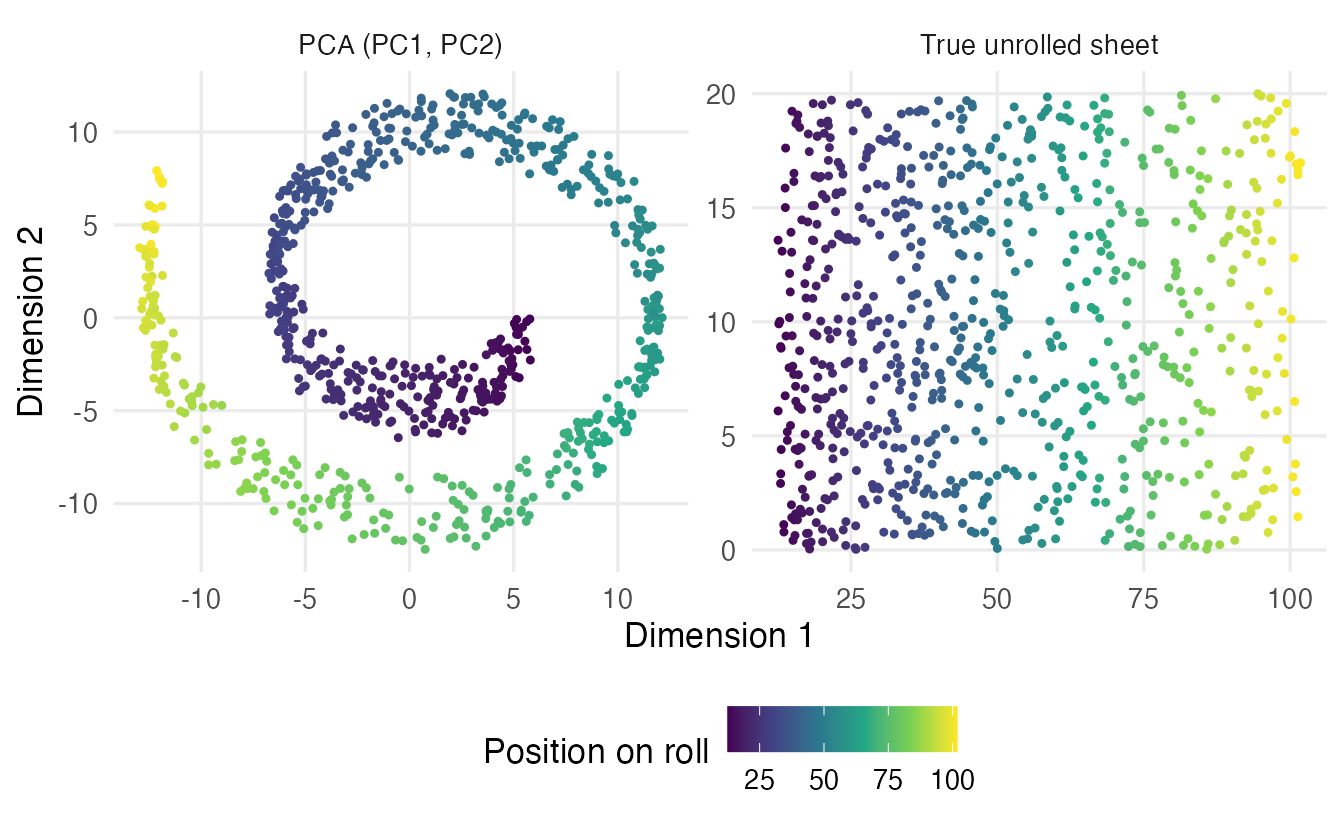
PCA keeps the two directions with the most variance — here the two axes across the spiral — and drops the height. We see the roll from one end: the colours wind around in a spiral instead of running in one direction, points on neighbouring layers are only a few units apart although they are far apart along the paper, and points at all heights are squashed on top of each other. No rotation of a flat projection can unroll the sheet, because the problem is curvature, not orientation.
Non-linear embedding methods take a different approach: instead of preserving all distances, they try to preserve who is whose neighbour. If two points are close on the paper they should be close on the map; how far apart distant points end up matters much less.
2. Measuring “neighbours kept”
Before trying new methods, let’s write a yardstick. For every point we find its \(k\) nearest neighbours in the original space and its \(k\) nearest neighbours on the map, and count how many are shared. The average fraction is the neighbourhood preservation (also called k-NN recall). It is 1 if the map keeps every neighbourhood, and close to \(k/(n-1)\) — almost 0 — for a random map.
knn_preserved <- function(high, low, k = 10) {
  d_high <- as.matrix(dist(high))
  d_low  <- as.matrix(dist(low))
  diag(d_high) <- Inf                      # a point is not its own neighbour
  diag(d_low)  <- Inf
  shared <- vapply(seq_len(nrow(d_high)), \(i) {
    nn_high <- order(d_high[i, ])[1:k]
    nn_low  <- order(d_low[i, ])[1:k]
    length(intersect(nn_high, nn_low))
  }, numeric(1))
  mean(shared) / k
}

knn_preserved(roll, pca_roll$x[, 1:2])   # PCA map
#> [1] 0.4219knn_preserved(roll, sheet) # perfectly unrolled sheet#> [1] 0.9085
TipHow to read this output
- On the PCA map, on average only 42% of each point’s 10 nearest neighbours are still among its 10 nearest neighbours.
- The unrolled sheet keeps 91% (not 100% only because of the noise we added).
- A random 2-D map would keep about 1.3%.
dist() on \(n\) points builds an \(n \times n\) table, so this function is fine for a few thousand points; for larger data, compute it on a random subsample.
NoteGoing deeper: trustworthiness and continuity
Our measure counts shared neighbours. Two classical, rank-based refinements are due to Venna and Kaski. Let \(r(i, j)\) be the rank of \(j\) among the neighbours of \(i\) in the original space, and \(U_k(i)\) the points that are among the \(k\) nearest neighbours of \(i\) on the map but not in the original space (“intruders”). Then
\[ T(k) = 1 - \frac{2}{nk(2n - 3k - 1)} \sum_{i=1}^n \sum_{j \in U_k(i)} \big(r(i, j) - k\big). \]
Trustworthiness \(T(k)\) penalises false neighbours on the map, more heavily the farther away they really are. Continuity is the mirror image: it penalises true neighbours that the map pushed away. Both equal 1 for a perfect map. Our simpler knn_preserved() treats the two kinds of error together and ignores how bad each mistake is.
3. The idea behind t-SNE
t-SNE (t-distributed Stochastic Neighbour Embedding) works in three steps.
- Neighbour probabilities in the original space. For each point \(i\), imagine it picks a neighbour at random, preferring close points. Close points get a high probability, far points almost zero. How quickly the probability fades with distance is tuned separately for every point.
- Neighbour probabilities on the map. On a 2-D map, the same kind of probabilities are computed from the map distances, but with a heavy-tailed curve (the Student t distribution with one degree of freedom).
- Move the points. Starting from a random layout, t-SNE moves the points step by step to make the two sets of probabilities as similar as possible. The mismatch is measured by the Kullback–Leibler (KL) divergence.
Perplexity: the effective number of neighbours
The main setting is the perplexity. Roughly, it is the number of neighbours each point pays attention to. For each point, t-SNE chooses the width \(\sigma_i\) of a Gaussian “bump” so that the neighbour probabilities have the requested perplexity. Let’s do this ourselves for one penguin.
num_vars <- c("bill_len", "bill_dep", "flipper_len", "body_mass")

peng <- penguins |>
  select(species, all_of(num_vars)) |>
  na.omit()

peng_x <- scale(peng[, num_vars])   # standardise, as for PCA
dim(peng_x)
#> [1] 342 4neighbour_probs <- function(d, sigma) {
w <- exp(-d^2 / (2 * sigma^2))
w / sum(w)
}
perplexity_of <- function(p) {
p <- p[p > 0]
2^(-sum(p * log2(p))) # 2 to the power of the entropy
}
perplexity_of(rep(1 / 30, 30)) # equal weight on 30 points#> [1] 30d1 <- as.matrix(dist(peng_x))[1, -1] # distances from penguin 1
sapply(c(0.1, 0.3, 0.5, 1), \(s) perplexity_of(neighbour_probs(d1, s)))#> [1] 3.28 24.35 77.79 169.44If a point spreads its attention equally over 30 neighbours, the perplexity is exactly 30: that is why it is read as an “effective number of neighbours”. For penguin 1, a narrow bump (\(\sigma = 0.1\)) gives a perplexity of about 3.3, a wide one (\(\sigma = 1\)) about 169. t-SNE finds the right \(\sigma_i\) by a simple search:
find_sigma <- function(d, target, lower = 1e-3, upper = 10) {
  for (iter in 1:50) {                     # bisection
    mid <- (lower + upper) / 2
    too_wide <- perplexity_of(neighbour_probs(d, mid)) > target
    if (too_wide) upper <- mid else lower <- mid
  }
  mid
}

sigma_30 <- find_sigma(d1, target = 30)
sigma_30
#> [1] 0.3254perplexity_of(neighbour_probs(d1, sigma_30))#> [1] 30Points in dense regions get a small \(\sigma_i\), points in sparse regions a large one, so that every point has about the same number of effective neighbours. This is one reason why t-SNE tends to make all clusters look similarly spread out, whatever their real density.
Typical perplexities are between 5 and 50. Rtsne() requires the perplexity to be at most \((n - 1)/3\), so with small data sets the perplexity must be small too. There is no universal “x% of \(n\)” rule: try a few values and keep what is stable.
Why a heavy-tailed curve on the map?
data.frame(distance = seq(0, 5, by = 0.05)) |>
  mutate(Gaussian = exp(-distance^2 / 2),
         `Student t (1 df)` = 1 / (1 + distance^2)) |>
  tidyr::pivot_longer(-distance, names_to = "curve",
                      values_to = "similarity") |>
  ggplot(aes(distance, similarity, colour = curve)) +
  geom_line(linewidth = 1) +
  labs(x = "Distance", y = "Similarity (unnormalised)", colour = NULL)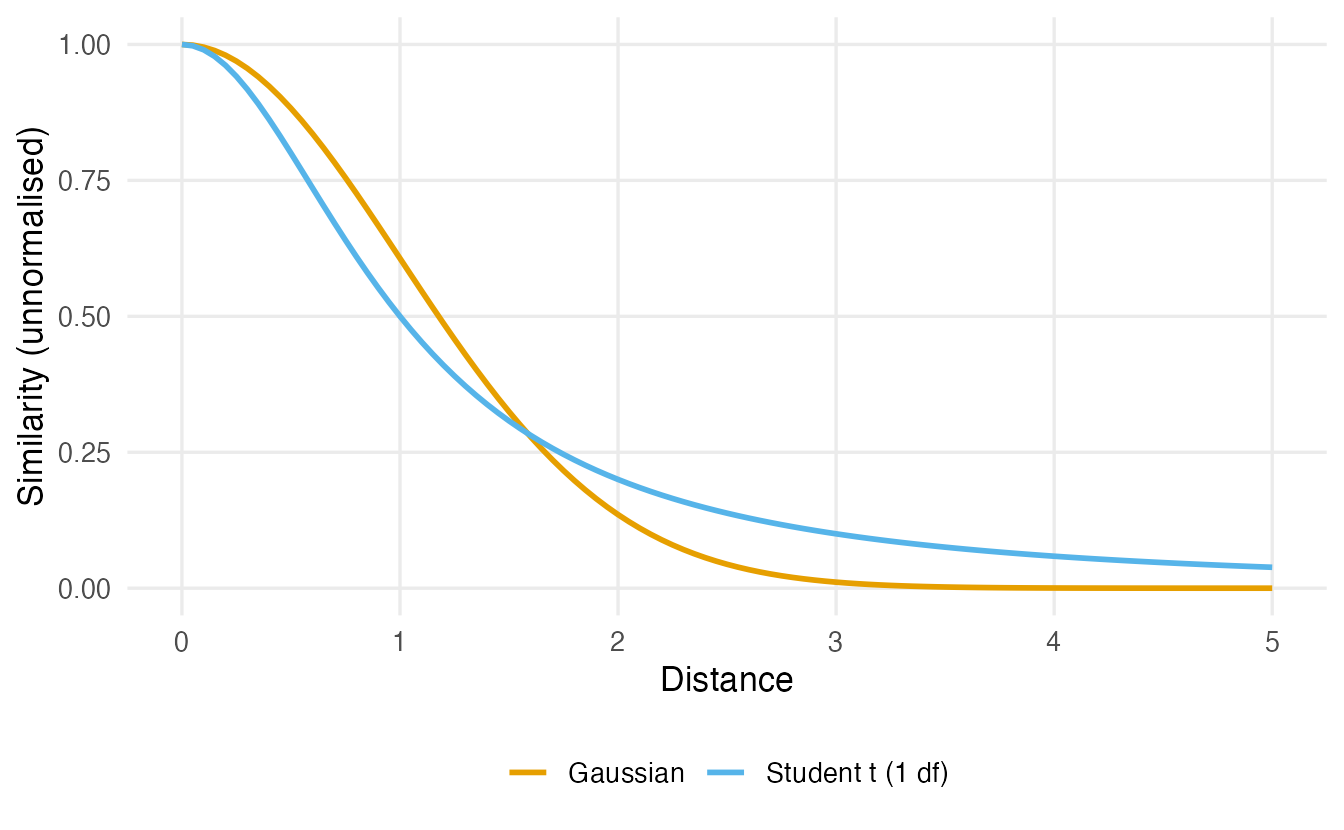
In many dimensions there is a lot of room; on a plane there is not. If the map used the same Gaussian curve, moderately distant points would be crowded on top of each other (the crowding problem). The t curve decays much more slowly, so moderately distant points can be placed farther apart on the map at little cost. The result: tight, well-separated groups.
NoteGoing deeper: the t-SNE objective
In the original space, for point \(i\),
\[ p_{j \mid i} = \frac{\exp\!\big(-\lVert x_i - x_j \rVert^2 / 2\sigma_i^2\big)}{\sum_{k \ne i} \exp\!\big(-\lVert x_i - x_k \rVert^2 / 2\sigma_i^2\big)}, \qquad \text{Perp}(P_i) = 2^{H(P_i)},\quad H(P_i) = -\sum_j p_{j \mid i} \log_2 p_{j \mid i}, \]
with \(\sigma_i\) chosen so that \(\text{Perp}(P_i)\) equals the requested perplexity. The probabilities are symmetrised: \(p_{ij} = (p_{j \mid i} + p_{i \mid j}) / 2n\). On the map, with coordinates \(y_i\),
\[ q_{ij} = \frac{\big(1 + \lVert y_i - y_j \rVert^2\big)^{-1}}{\sum_{k \ne l} \big(1 + \lVert y_k - y_l \rVert^2\big)^{-1}} . \]
The map is found by gradient descent on
\[ \text{KL}(P \,\Vert\, Q) = \sum_{i \ne j} p_{ij} \log \frac{p_{ij}}{q_{ij}} . \]
The KL divergence is asymmetric. Placing true neighbours (large \(p_{ij}\)) far apart (small \(q_{ij}\)) is very costly; placing distant points (tiny \(p_{ij}\)) at any distance costs almost nothing. That is the mathematical reason why t-SNE keeps neighbourhoods but does not care about large distances. Rtsne() uses the Barnes–Hut approximation (theta = 0.5) to speed up the gradient; theta = 0 computes it exactly.
4. t-SNE in R with Rtsne
Duplicates
Rtsne() stops with an error if the data contain duplicate rows (identical points have distance 0 and nothing to separate them). Check first:
anyDuplicated(peng_x) # 0 means: no duplicated rows#> [1] 0The penguins have none. If your data do (the iris measurements, for example, contain one repeated flower), you have two options:
- remove them before the analysis, e.g.
df[!duplicated(df[, num_vars]), ]ordistinct()on the measurement columns with.keep_all = TRUE(see Exercise 3), so that the labels stay attached to the rows you keep; this is usually the cleanest choice; - if you have already removed them, or you want identical points to stay in the data, set
check_duplicates = FALSE. The check is also slow on large data, so the package documentation suggests removing duplicates yourself and switching it off.
A first map
set.seed(42)
tsne_peng <- Rtsne(peng_x, dims = 2, perplexity = 30)
names(tsne_peng)
#> [1] "N" "Y" "costs"
#> [4] "itercosts" "origD" "perplexity"
#> [7] "theta" "max_iter" "stop_lying_iter"
#> [10] "mom_switch_iter" "momentum" "final_momentum"
#> [13] "eta" "exaggeration_factor"head(tsne_peng$Y, 3)#> [,1] [,2]
#> [1,] -1.282 -12.24
#> [2,] -4.601 -12.84
#> [3,] -6.537 -14.48Y holds the 2-D coordinates (one row per penguin, in the same order as peng_x). itercosts records the KL divergence during the optimisation. By default Rtsne() first runs a PCA (pca = TRUE, keeping up to initial_dims = 50 components); with four variables this only rotates the data and changes no distances. dims = 3 would give a 3-D map.
data.frame(tsne_peng$Y, species = peng$species) |>
  ggplot(aes(X1, X2, colour = species)) +
  geom_point(alpha = 0.7) +
  labs(x = "t-SNE 1", y = "t-SNE 2", colour = "Species")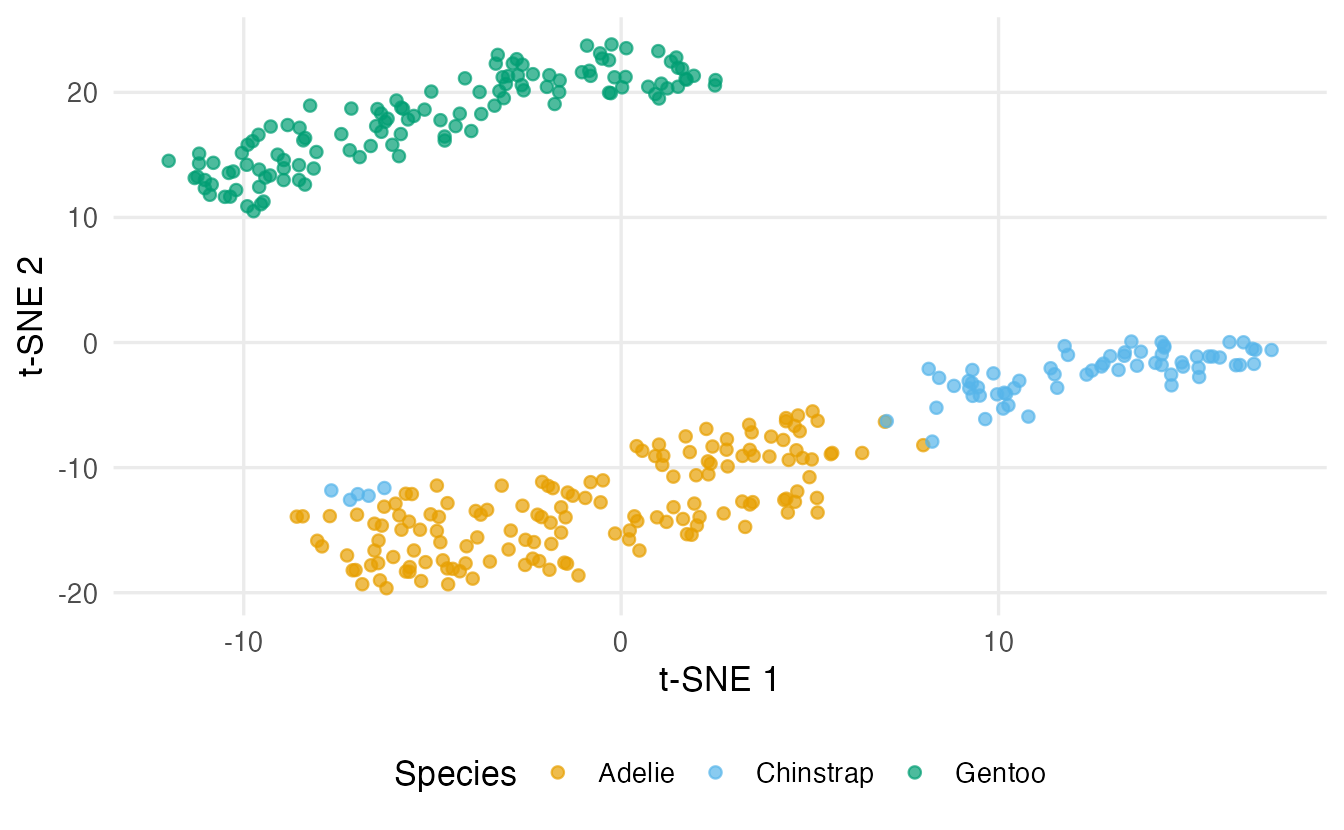
The species were not used to build the map; colouring by them afterwards shows that penguins of the same species tend to be each other’s neighbours in the four measurements.
Sensitivity to perplexity and seed
t-SNE is stochastic: it starts from a random layout and the result depends on the seed. It also depends on the perplexity.
run_tsne <- function(perp, seed) {
  set.seed(seed)
  Y <- Rtsne(peng_x, perplexity = perp)$Y
  data.frame(Y, species = peng$species,
             setting = paste0("perplexity ", perp, ", seed ", seed))
}

bind_rows(run_tsne(5, 42), run_tsne(30, 42), run_tsne(100, 42),
          run_tsne(30, 1), run_tsne(30, 2)) |>
  ggplot(aes(X1, X2, colour = species)) +
  geom_point(size = 0.8, alpha = 0.7) +
  facet_wrap(~ setting, scales = "free", ncol = 3) +
  labs(x = "t-SNE 1", y = "t-SNE 2", colour = "Species")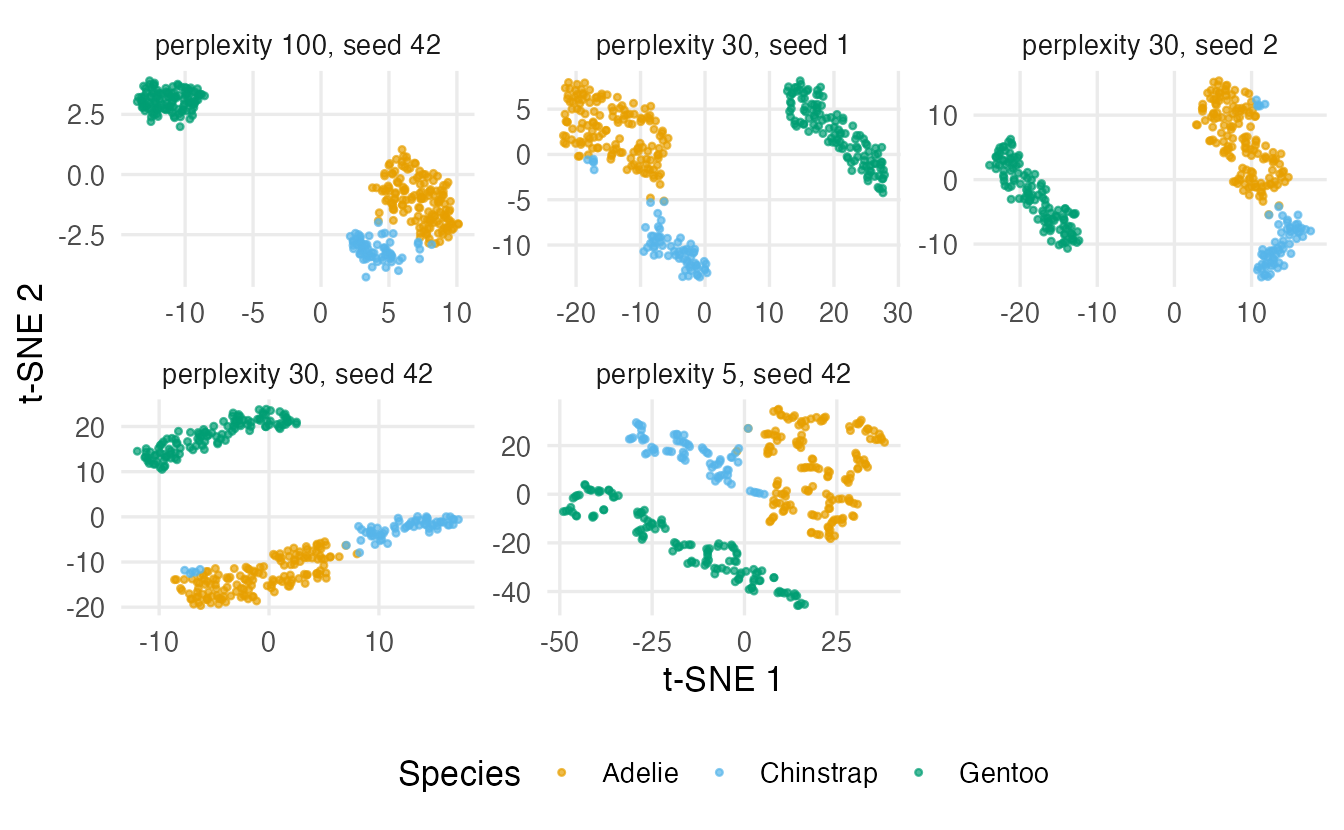
Look at what changes and what does not. With a small perplexity each point only looks at a handful of neighbours, and the map tends to break into many small fragments. With a large perplexity the map looks smoother and more “global”. Changing the seed rotates, mirrors and rearranges the groups. Features that survive all these changes — here, broadly, which penguins end up together — are the ones worth interpreting.
What you can and cannot read from a t-SNE plot
ImportantReading t-SNE (and UMAP) maps
You can read: which points are neighbours; whether there are groups of points that stay together across perplexities and seeds.
You cannot read:
- cluster sizes — t-SNE adapts \(\sigma_i\) to local density, so a tight group and a diffuse group may look equally spread;
- distances between clusters — two groups far apart on the map are not necessarily more different than two groups close together;
- the axes — “t-SNE 1” has no meaning, no units and no sign; there are no loadings;
- a few points in a corner as outliers, or apparent clusters in small samples — t-SNE can create clumps even from random noise, especially with low perplexity.
Also note that Rtsne() has no way to place new points on an existing map: running it again on more data gives a different map. t-SNE is a tool for looking, not for building features.
5. UMAP
UMAP (Uniform Manifold Approximation and Projection) has the same goal — keep neighbours together — with a different recipe:
- Build a k-nearest-neighbour graph. Each point is connected to its
n_neighborsnearest points, with weights that fade with distance (adapted to the local density, as in t-SNE). - Lay out the graph in 2-D. Starting from an initial layout, points are moved so that connected points attract and unconnected points repel. The setting
min_distsays how tightly points may be packed together on the map.
The two settings play roles similar to perplexity:
n_neighbors(default 15): small values focus on very local structure (more, smaller groups); large values give a more global, smoother picture;min_dist(default 0.01 inuwot): small values pack groups tightly; large values spread points out more evenly.
set.seed(42)
umap_peng <- umap(peng_x, n_neighbors = 15, min_dist = 0.1,
                  n_sgd_threads = 1)
dim(umap_peng)
#> [1] 342 2umap() returns a matrix with one row per penguin and two columns.
WarningUMAP is stochastic too
UMAP is not deterministic: the layout is optimised with random sampling, so different seeds give different maps (an older version of this course said otherwise). For exactly reproducible results with uwot you need both set.seed() and n_sgd_threads = 1: with several threads the optimisation runs in an unpredictable order and results differ slightly between runs even with the same seed.
run_umap <- function(nn, md) {
  set.seed(42)
  Y <- umap(peng_x, n_neighbors = nn, min_dist = md, n_sgd_threads = 1)
  data.frame(Y, species = peng$species,
             n_neighbors = paste("n_neighbors =", nn),
             min_dist = paste("min_dist =", md))
}

bind_rows(run_umap(5, 0.01), run_umap(5, 0.5),
          run_umap(50, 0.01), run_umap(50, 0.5)) |>
  ggplot(aes(X1, X2, colour = species)) +
  geom_point(size = 0.8, alpha = 0.7) +
  facet_grid(n_neighbors ~ min_dist, scales = "free") +
  labs(x = "UMAP 1", y = "UMAP 2", colour = "Species")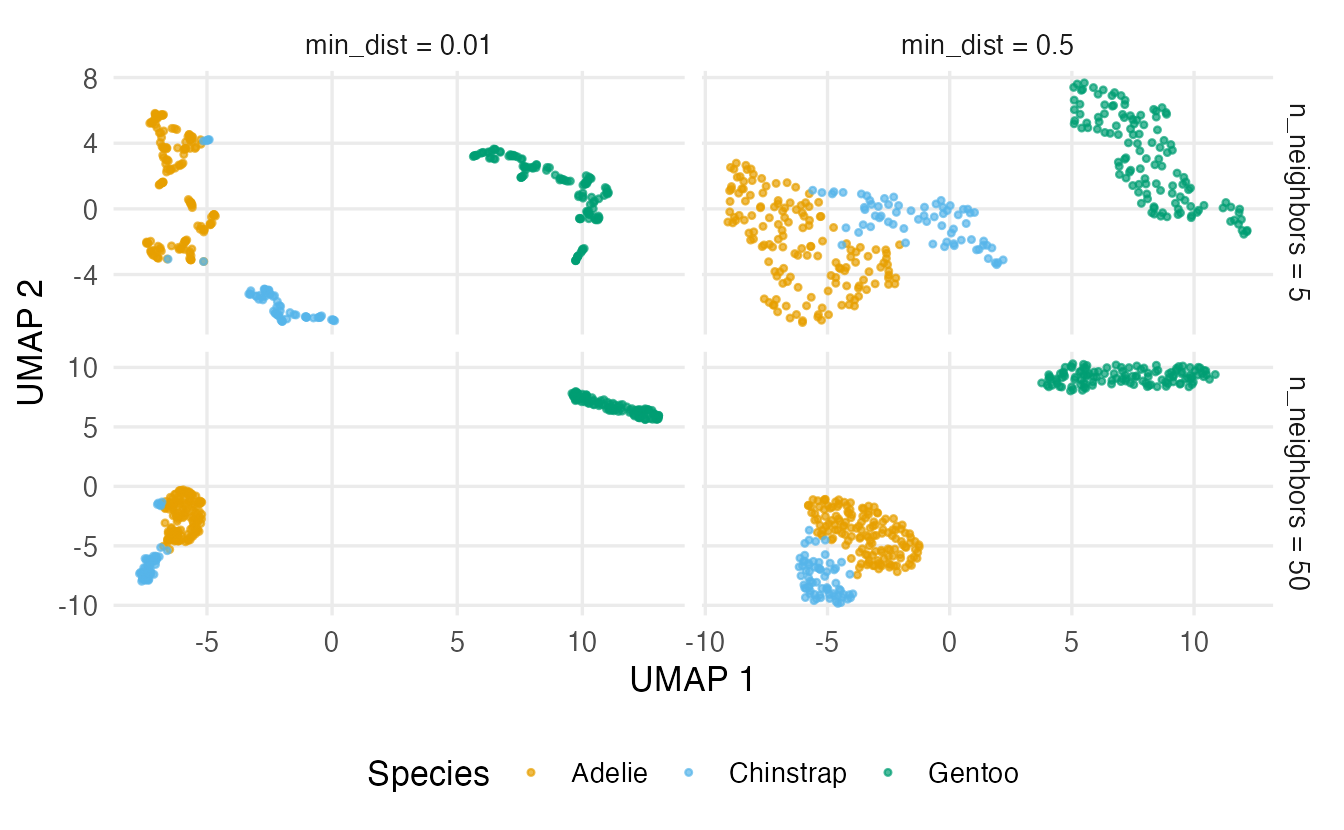
Everything said about reading t-SNE plots also applies to UMAP. UMAP layouts often keep the arrangement of groups somewhat better than t-SNE, but neither method reliably preserves global distances: the distance between two groups on a UMAP map, or the size of a group, should not be interpreted (an older version of this course claimed the opposite). Other useful options are n_components = 3 for a 3-D map and metric = "cosine" for data such as word counts, where the direction of a vector matters more than its length.
NoteGoing deeper: the UMAP objective
For each point \(i\) with nearest neighbours \(j\), let \(\rho_i\) be the distance to its closest neighbour. UMAP sets
\[ w_{j \mid i} = \exp\!\left(-\frac{\max(0, d_{ij} - \rho_i)}{\sigma_i}\right), \qquad \sum_{j} w_{j \mid i} = \log_2(\texttt{n\_neighbors}), \]
so every point is connected at least to its nearest neighbour with weight 1, and \(\sigma_i\) plays the role of the per-point width in t-SNE. The graph is symmetrised with \(v_{ij} = w_{j \mid i} + w_{i \mid j} - w_{j \mid i} w_{i \mid j}\). On the map, similarities are \(u_{ij} = \big(1 + a \lVert y_i - y_j \rVert^{2b}\big)^{-1}\), where \(a\) and \(b\) are derived from min_dist. The layout minimises the cross-entropy
\[ \sum_{i \ne j} \left[ v_{ij} \log\frac{v_{ij}}{u_{ij}} + (1 - v_{ij}) \log\frac{1 - v_{ij}}{1 - u_{ij}} \right] \]
by stochastic gradient descent with negative sampling (random pairs are pushed apart) — the source of UMAP’s randomness. The second term makes UMAP care a little about non-neighbours, unlike t-SNE, but only through random pairs, so large distances are still not reproduced faithfully.
6. PCA vs t-SNE vs UMAP
Let’s compare the three maps on both data sets with two numbers: the neighbourhood preservation (local structure) and the rank correlation between all pairwise distances before and after (global structure; 1 = the map keeps the order of all distances).
dist_cor <- function(high, low) {
  cor(as.vector(dist(high)), as.vector(dist(low)), method = "spearman")
}

embed_scores <- function(high, maps, k = 10) {
  data.frame(
    method      = names(maps),
    knn_kept    = sapply(maps, \(m) knn_preserved(high, m, k = k)),
    dist_rank_r = sapply(maps, \(m) dist_cor(high, m))
  )
}
pca_peng <- prcomp(peng_x)$x[, 1:2]
scores_peng <- embed_scores(peng_x, list(PCA = pca_peng,
`t-SNE` = tsne_peng$Y,
UMAP = umap_peng))
scores_peng#> method knn_kept dist_rank_r
#> PCA PCA 0.4550 0.9731
#> t-SNE t-SNE 0.6746 0.8439
#> UMAP UMAP 0.6114 0.8440set.seed(42)
tsne_roll <- Rtsne(roll, perplexity = 30)$Y
set.seed(42)
umap_roll <- umap(roll, n_neighbors = 15, min_dist = 0.1, n_sgd_threads = 1)
scores_roll <- embed_scores(roll, list(PCA = pca_roll$x[, 1:2],
`t-SNE` = tsne_roll,
UMAP = umap_roll))
scores_roll#> method knn_kept dist_rank_r
#> PCA PCA 0.4219 0.8584
#> t-SNE t-SNE 0.8586 0.5461
#> UMAP UMAP 0.7871 0.3237bind_rows(
data.frame(X1 = pca_roll$x[, 1], X2 = pca_roll$x[, 2], method = "PCA"),
data.frame(tsne_roll, method = "t-SNE"),
data.frame(umap_roll, method = "UMAP")
) |>
mutate(position = rep(arc, 3)) |>
ggplot(aes(X1, X2, colour = position)) +
geom_point(size = 0.6) +
scale_colour_viridis_c() +
facet_wrap(~ method, scales = "free") +
labs(x = "Dimension 1", y = "Dimension 2", colour = "Position on roll")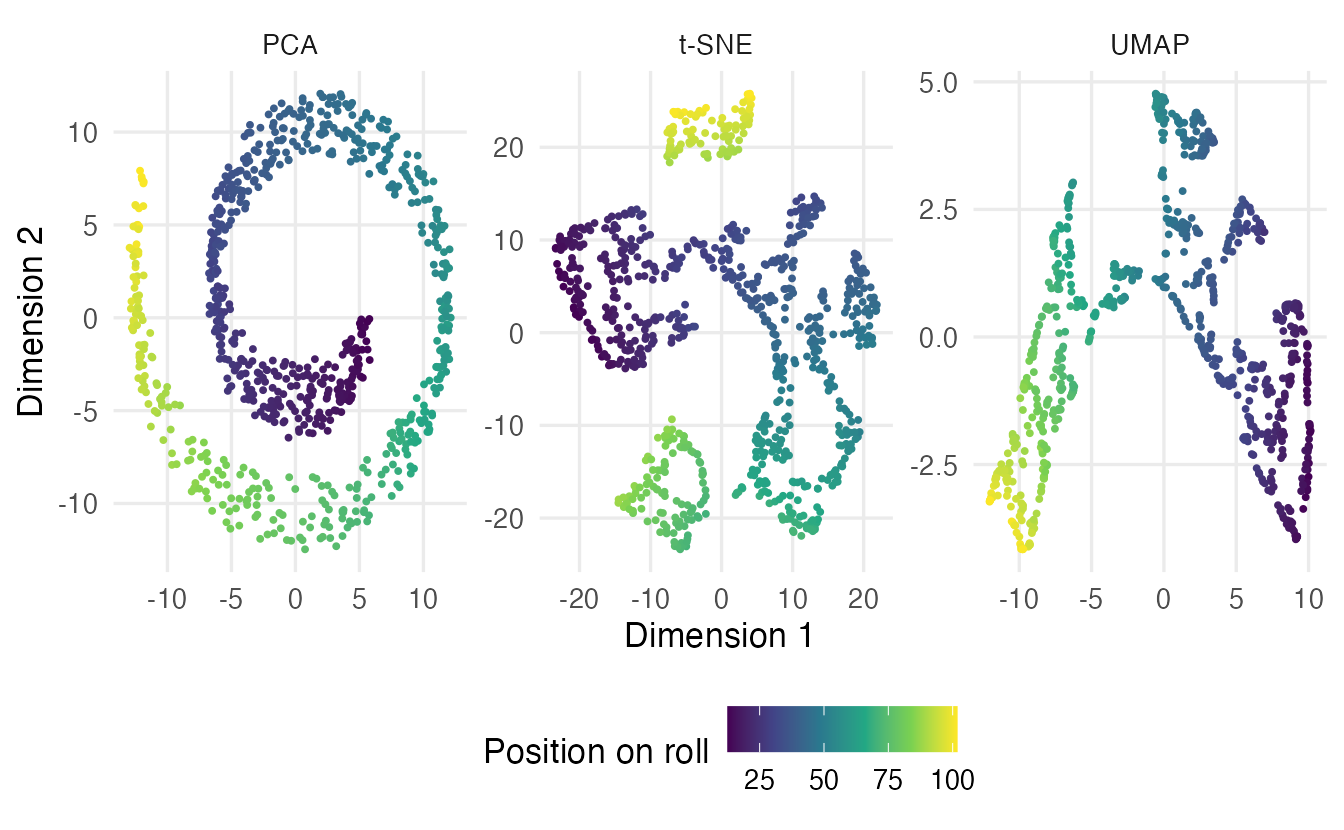
TipHow to read the comparison
- On the swiss roll, PCA keeps 42% of the 10 nearest neighbours, t-SNE 86% and UMAP 79%. In the figure, check whether the colour runs smoothly across each map (sheet unrolled) or jumps (layers mixed). Non-linear methods sometimes tear the sheet into pieces: neighbourhoods are kept, but the pieces may be placed in an arbitrary order.
- On the penguins the structure is much less curved. PCA keeps 45% of the neighbours, t-SNE 67% and UMAP 61%.
- The
dist_rank_rcolumn measures the global picture, using straight-line distances. On the swiss roll even the perfectly unrolled sheet scores only 0.39, because it keeps distances along the paper, not through the air: always ask which distances you want a map to keep. For the penguins, PCA reaches 0.97: with four standardised variables, two components already reproduce the order of most distances. The non-linear maps are optimised for neighbours, not for this.
The practical lesson: start with PCA. It is fast, deterministic, has interpretable loadings and keeps global distances as well as any 2-D projection can. Reach for t-SNE or UMAP when you mainly care about local structure, and judge every map with numbers such as these, not only by eye.
| PCA | t-SNE | UMAP | |
|---|---|---|---|
| Linear? | yes | no | no |
| Random result? | no (only signs arbitrary) | yes | yes |
| Main settings | number of components | perplexity | n_neighbors, min_dist |
| Keeps local neighbours | moderately | well | well |
| Keeps global distances | as well as a projection can | no | not reliably |
| Interpretable axes | yes (loadings) | no | no |
| Can place new points | yes, predict() |
no | yes, umap_transform() |
| Speed on large data | fast | slow | fast |
7. UMAP as features, without leakage
Like PCA in the PCA lesson, UMAP can be a preprocessing step for a model: replace the four measurements by two UMAP coordinates and fit a classifier on them. The same rule applies: everything is estimated on the training data only. Running UMAP on all penguins and then splitting (as an earlier version of this course did) lets the test penguins shape the map that the model is trained on — the test accuracy becomes optimistic.
uwot makes the correct approach easy: ret_model = TRUE keeps what is needed to place new points, and umap_transform() adds the test points to the existing training map without changing it.
set.seed(2024)
peng_split <- rsample::initial_split(peng, prop = 0.75, strata = species)
peng_train <- rsample::training(peng_split)
peng_test  <- rsample::testing(peng_split)

# standardise with the TRAINING means and SDs
train_x <- scale(peng_train[, num_vars])
test_x  <- scale(peng_test[, num_vars],
                 center = attr(train_x, "scaled:center"),
scale = attr(train_x, "scaled:scale"))set.seed(2024)
umap_fit <- umap(train_x, n_neighbors = 15, min_dist = 0.1,
ret_model = TRUE, n_sgd_threads = 1)
emb_train <- umap_fit$embedding # training coordinates
set.seed(2024)
emb_test <- umap_transform(test_x, umap_fit, n_sgd_threads = 1)
dim(emb_test)#> [1] 86 2With ret_model = TRUE, umap() returns a list; the coordinates are in $embedding. Now a 5-nearest-neighbour classifier on the UMAP features, and the same classifier on the four standardised measurements for comparison:
pred_umap <- class::knn(train = emb_train, test = emb_test,
                        cl = peng_train$species, k = 5)
pred_raw  <- class::knn(train = train_x, test = test_x,
                        cl = peng_train$species, k = 5)

c(umap_features = mean(pred_umap == peng_test$species),
  raw_features  = mean(pred_raw  == peng_test$species))
#> umap_features raw_features
#> 0.9884 1.0000On the test set the classifier using UMAP features has an accuracy of 0.988, compared with 1 on the original variables. With only four informative variables there is little to gain from UMAP; it can help more with many noisy variables. Whether it helps must be checked on held-out data, ideally with cross-validation, and the UMAP settings tuned like any other hyperparameter.
In a tidymodels workflow the embed package provides step_umap(), which does the same thing inside a recipe (fitted on the training data of each resample):
umap_rec <- recipes::recipe(species ~ ., data = peng_train) |>
  recipes::step_normalize(recipes::all_numeric_predictors()) |>
  embed::step_umap(recipes::all_numeric_predictors(),
                   num_comp = 2, neighbors = 15, min_dist = 0.1)
(This chunk is not run here because it needs the embed package.) A model with ret_model = TRUE contains an index stored outside R; to save it to disk use uwot::save_uwot() and uwot::load_uwot(), not saveRDS().
WarningCommon pitfalls
- Reading cluster sizes and between-cluster distances from t-SNE or UMAP maps. Only neighbourhoods are (approximately) preserved.
- Trusting a single run. Both methods are stochastic and sensitive to their settings: try several seeds and settings, and interpret only what is stable. For exact reproducibility in
uwot, useset.seed()andn_sgd_threads = 1. - Forgetting to standardise variables with different units — exactly as in PCA, the largest numbers dominate the distances.
- Duplicated rows in
Rtsne(): remove them withdistinct(), or setcheck_duplicates = FALSEif you know what you are doing. And keep the perplexity at most(n - 1) / 3. - Fitting UMAP on all the data before splitting. Fit on the training set with
ret_model = TRUEand project the test set withumap_transform(). Never use t-SNE coordinates as model features. - Treating clusters on the map as proof of clusters in the data. Confirm with clustering methods on the original variables, and with subject knowledge.
8. Check your understanding
9. Exercises
★ Exercise 1 — predict. You run Rtsne() twice on the same data with the same perplexity, once after set.seed(1) and once after set.seed(2). The two maps look like mirror images of each other, and in the second one two groups have swapped places. (a) Is one of the runs wrong? (b) What would make you worried?
TipSolution
- No. The starting layout is random, and t-SNE axes have no meaning: mirror images and rearranged groups are equally good solutions. (b) It would be worrying if the membership of the groups changed a lot — e.g. a group present in one run splitting into pieces or merging with another in the other run. That would mean the grouping is not a stable feature of the data.
★★ Exercise 2 — perplexity by hand. Using neighbour_probs(), perplexity_of() and find_sigma() from section 3, find the width \(\sigma\) that gives perplexity 5, 30 and 50 for penguin 1. How does \(\sigma\) change, and why?
TipSolution
sapply(c(5, 30, 50), \(p) find_sigma(d1, target = p))The widths are about 0.14, 0.33 and 0.40. A larger perplexity means more effective neighbours, so the Gaussian bump must be wider to give non-negligible probability to more points. Repeat for other penguins and you will see that the width needed for the same perplexity differs from point to point, depending on how crowded its region is.
★★ Exercise 3 — debug. This code stops with errors. Find the two problems and fix them.
virginica_x <- scale(iris[101:150, 1:4])
tsne_virginica <- Rtsne(virginica_x, perplexity = 30)
TipSolution
First, flower 143 has exactly the same four measurements as flower 102, so the data contain a duplicated row (anyDuplicated(virginica_x) is not 0) and Rtsne() refuses to run. Second, with 50 rows the perplexity is too large: it must be at most \((50 - 1)/3 \approx 16.3\). Remove the duplicate and lower the perplexity (and set a seed):
virginica <- iris[101:150, ] |>
  distinct(Sepal.Length, Sepal.Width, Petal.Length, Petal.Width,
           .keep_all = TRUE)                       # 49 flowers
virginica_x <- scale(virginica[, 1:4])

set.seed(1)
tsne_virginica <- Rtsne(virginica_x, perplexity = 10)  # 10 <= 48 / 3
Use the columns of virginica (not of iris) for labels or colours, so that labels and rows stay aligned.
★★ Exercise 4 — how local is “local”? Compute knn_preserved() for the penguin PCA, t-SNE and UMAP maps with k = 5, 10 and 50. How does the ranking of the methods change with k? What do you conclude?
TipSolution
ks <- c(5, 10, 50)
kept <- sapply(ks, \(k) c(
  PCA  = knn_preserved(peng_x, pca_peng, k),
  tSNE = knn_preserved(peng_x, tsne_peng$Y, k),
  UMAP = knn_preserved(peng_x, umap_peng, k)
))
colnames(kept) <- paste0("k = ", ks)
round(kept, 2)
For PCA the values are about 0.35, 0.45 and 0.74: the larger the neighbourhood, the easier it is to preserve. t-SNE and UMAP are designed for small neighbourhoods (of the order of the perplexity or n_neighbors), so compare their advantage over PCA at k = 5 with that at k = 50: any advantage is expected to be largest for small k. The answer to “which map is best?” depends on the scale of structure you care about.
★★ Exercise 5 — interpret a silhouette. A report compares the average silhouette width (from cluster::silhouette(), a measure of how well-separated known groups are; see the clustering lessons) of the three species on a PCA map and a t-SNE map of iris, and finds a higher value for t-SNE. It concludes that “t-SNE represents the data better”. Run the comparison yourself and explain why this conclusion does not follow.
TipSolution
iris_u <- iris |>
  distinct(Sepal.Length, Sepal.Width, Petal.Length, Petal.Width,
           .keep_all = TRUE)
iris_x <- scale(iris_u[, 1:4])
set.seed(1)
tsne_iris <- Rtsne(iris_x, perplexity = 30)$Y
pca_iris  <- prcomp(iris_x)$x[, 1:2]

sil <- function(map) {
  mean(cluster::silhouette(as.integer(iris_u$Species), dist(map))[, 3])
}
c(PCA = sil(pca_iris), tSNE = sil(tsne_iris))
t-SNE (and UMAP) are designed to produce tight, well-separated groups: the heavy-tailed curve pushes moderately distant points apart. A higher silhouette on the map partly reflects this exaggeration, not a better representation of the data. Silhouettes computed on the map also depend on the seed and the perplexity. Better questions are “how many neighbours are kept?” (knn_preserved()) and “is the grouping stable across settings?”.
★★★ Exercise 6 — leakage, measured. Using the penguin split of section 7, compare the test accuracy of the 5-NN classifier on UMAP features obtained in two ways: (a) the wrong way — UMAP on all 342 penguins, then split the coordinates; (b) the right way — ret_model = TRUE on the training set and umap_transform() on the test set. Repeat for 20 different splits. Is the difference large? Why is (a) wrong even when the difference is small?
TipSolution
one_split <- function(seed) {
  set.seed(seed)
  idx <- sample(nrow(peng), round(0.75 * nrow(peng)))
  tr  <- scale(peng[idx, num_vars])
  te  <- scale(peng[-idx, num_vars], center = attr(tr, "scaled:center"),
               scale = attr(tr, "scaled:scale"))
  y_tr <- peng$species[idx]
  y_te <- peng$species[-idx]

  all_map <- umap(peng_x, min_dist = 0.1, n_sgd_threads = 1)   # (a) wrong
  pred_a  <- class::knn(all_map[idx, ], all_map[-idx, ], y_tr, k = 5)

  fit    <- umap(tr, min_dist = 0.1, ret_model = TRUE,          # (b) right
                 n_sgd_threads = 1)
  emb_te <- umap_transform(te, fit, n_sgd_threads = 1)
  pred_b <- class::knn(fit$embedding, emb_te, y_tr, k = 5)

  c(wrong = mean(pred_a == y_te), right = mean(pred_b == y_te))
}
res <- sapply(1:20, one_split)
rowMeans(res)
On the penguins, whose species are easy to separate, the two averages are likely to be close. Approach (a) is still wrong: the test penguins helped build the map, so their coordinates already “know” where their neighbours in the training set are. The accuracy estimate is then not an honest estimate of performance on truly new penguins, and with harder problems or more variables the optimism can be large.
Summary
| Idea / function | What it does |
|---|---|
knn_preserved(high, low, k) |
fraction of \(k\) nearest neighbours kept by a map (our own function) |
| perplexity | t-SNE’s effective number of neighbours (\(2^{\text{entropy}}\)) |
Rtsne(x, perplexity = 30) |
t-SNE map in $Y; needs no duplicates and perplexity ≤ (n − 1)/3 |
umap(x, n_neighbors, min_dist) |
UMAP map (matrix) |
set.seed() + n_sgd_threads = 1 |
exact reproducibility in uwot |
umap(..., ret_model = TRUE) + umap_transform() |
fit on training data, place new points without leakage |
embed::step_umap() |
UMAP inside a tidymodels recipe |
- Linear methods cannot unroll curved structure; t-SNE and UMAP aim to keep neighbours together instead of all distances.
- Both methods are stochastic and sensitive to their settings: interpret only what is stable across seeds and settings.
- Neither preserves cluster sizes or distances between clusters reliably; the axes have no meaning.
- Judge a map with numbers (neighbours kept, distance correlation), and start with PCA as a baseline.
- To use UMAP as features, fit on the training data and project new data with
umap_transform(); never use t-SNE coordinates as features.