Plotting categorical data
Bar charts done right: counts, order, proportions, labels — and what to avoid
Visualise categorical variables with ggplot2: geom_bar() vs geom_col(), ordering bars, stacked, dodged and proportional bars for two variables, labels, horizontal bars, why pie charts are usually worse, and why bar charts of means with error bars hide the data.
NoteLearning objectives
By the end of this lesson you will be able to:
- choose between
geom_bar()(R counts for you) andgeom_col()(you supply the heights); - order bars meaningfully with
forcats, and draw readable horizontal bars; - show two categorical variables with stacked, dodged and proportional bars, and pick the right one for the question;
- add labels to bars;
- explain why pie charts and bar charts of means (“dynamite plots”) are usually poor choices, and what to use instead.
library(ggplot2)
library(dplyr)
library(forcats)
1. Why bar charts?
A bar chart is the picture of a frequency table (see Frequency tables): one bar per category, with a length proportional to a number — usually a count or a proportion. It works so well because we compare lengths from a common baseline very accurately.
Two different situations need two different geoms:
| You have… | Use | What ggplot2 does |
|---|---|---|
| One row per observation (e.g., one row per car) | geom_bar() |
counts the rows in each category (stat = "count") |
| One row per category, with the height already computed (a count, a mean, a percentage) | geom_col() |
draws the values as they are (stat = "identity") |
2. Counting with geom_bar()
How many cars in mtcars have 4, 6 or 8 cylinders?
ggplot(mtcars, aes(x = factor(cyl))) +
  geom_bar() +
  labs(x = "Cylinders", y = "Number of cars")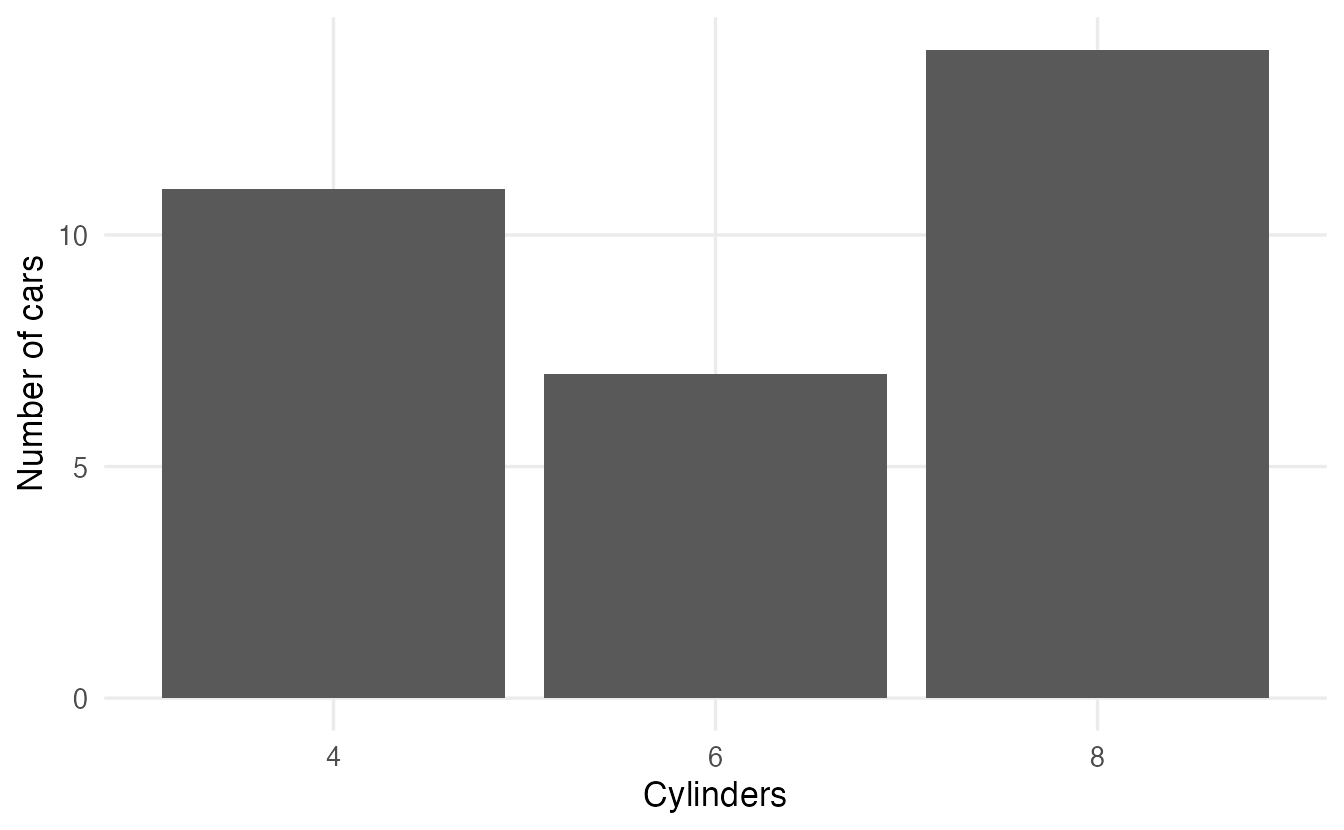
factor(cyl) treats cylinders as categories. We never computed the counts: geom_bar() did it.
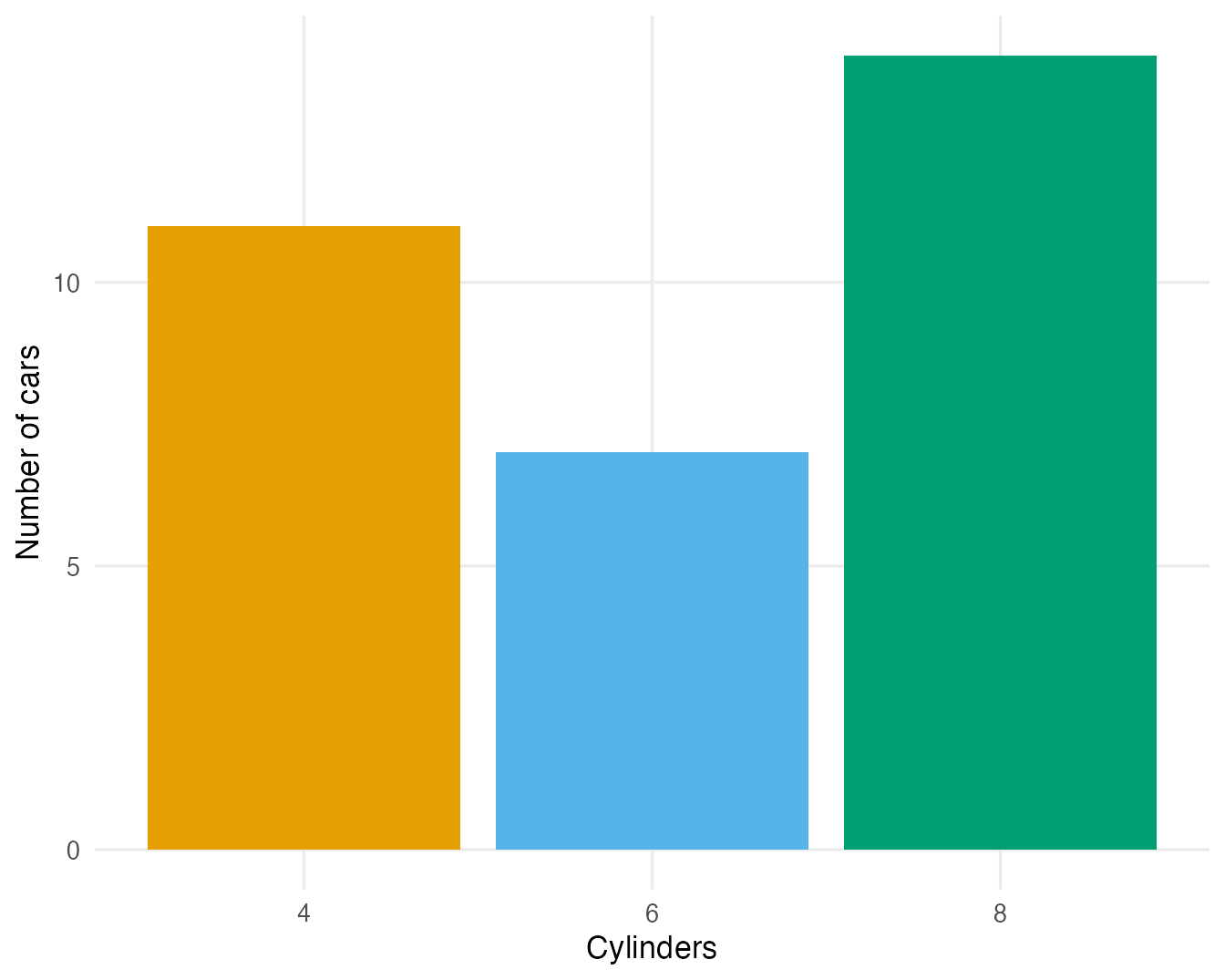
Setting (not mapping) fill and alpha changes the look of all bars; mapping fill to the same variable as x colours each bar differently but adds no information, so we remove the legend:
ggplot(mtcars, aes(factor(cyl))) +
  geom_bar(fill = "#0072B2", alpha = 0.6) +
  labs(x = "Cylinders", y = "Number of cars")

ggplot(mtcars, aes(factor(cyl), fill = factor(cyl))) +
  geom_bar() +
  guides(fill = "none") +
  labs(x = "Cylinders", y = "Number of cars")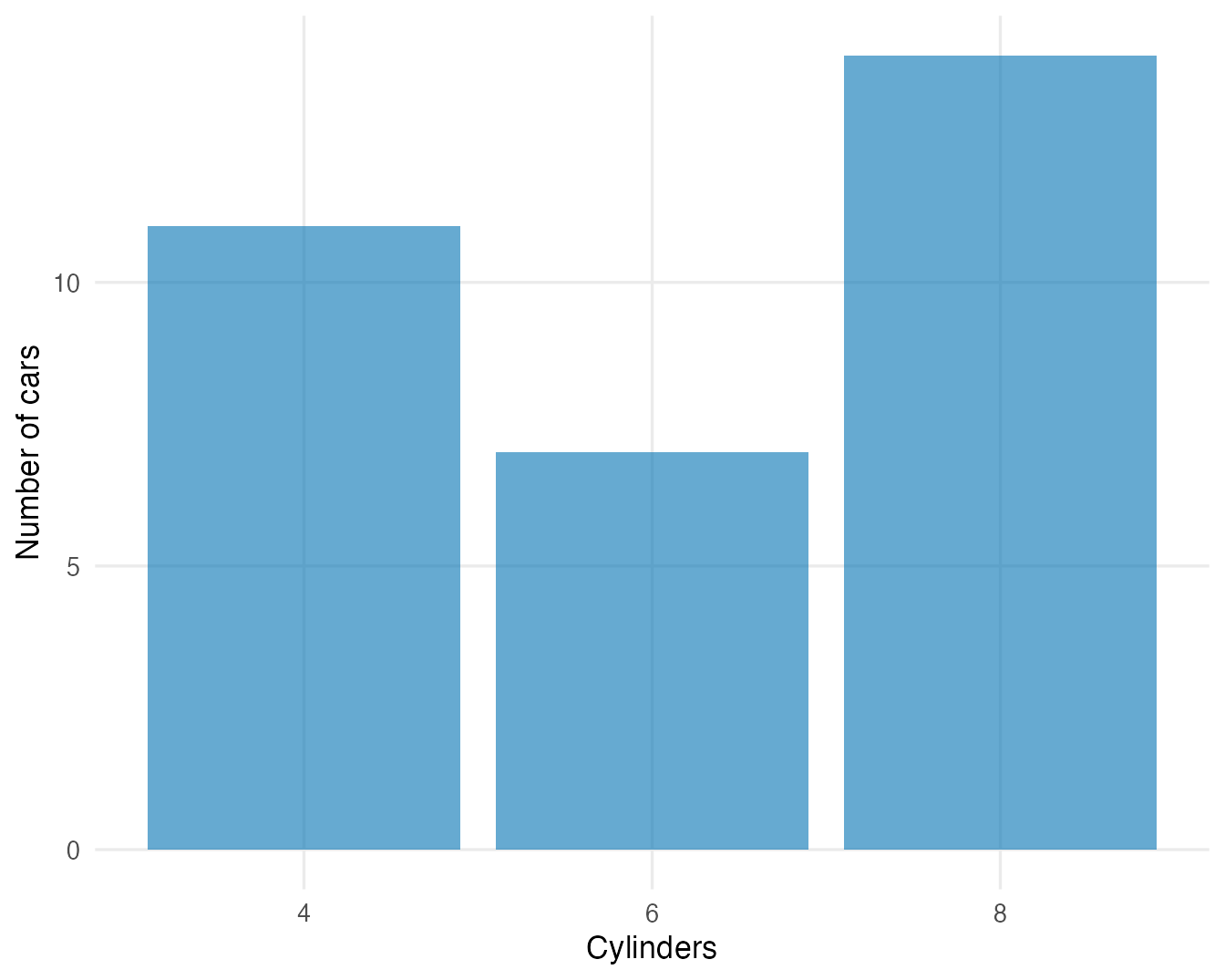
3. Precomputed values with geom_col()
Often you first summarise with dplyr and then plot the result. The same counts as above, computed explicitly:
cyl_counts <- mtcars |>
  count(cyl) |>
  mutate(cyl = factor(cyl))
cyl_counts
#> cyl n
#> 1 4 11
#> 2 6 7
#> 3 8 14ggplot(cyl_counts, aes(x = cyl, y = n)) +
geom_col() +
labs(x = "Cylinders", y = "Number of cars")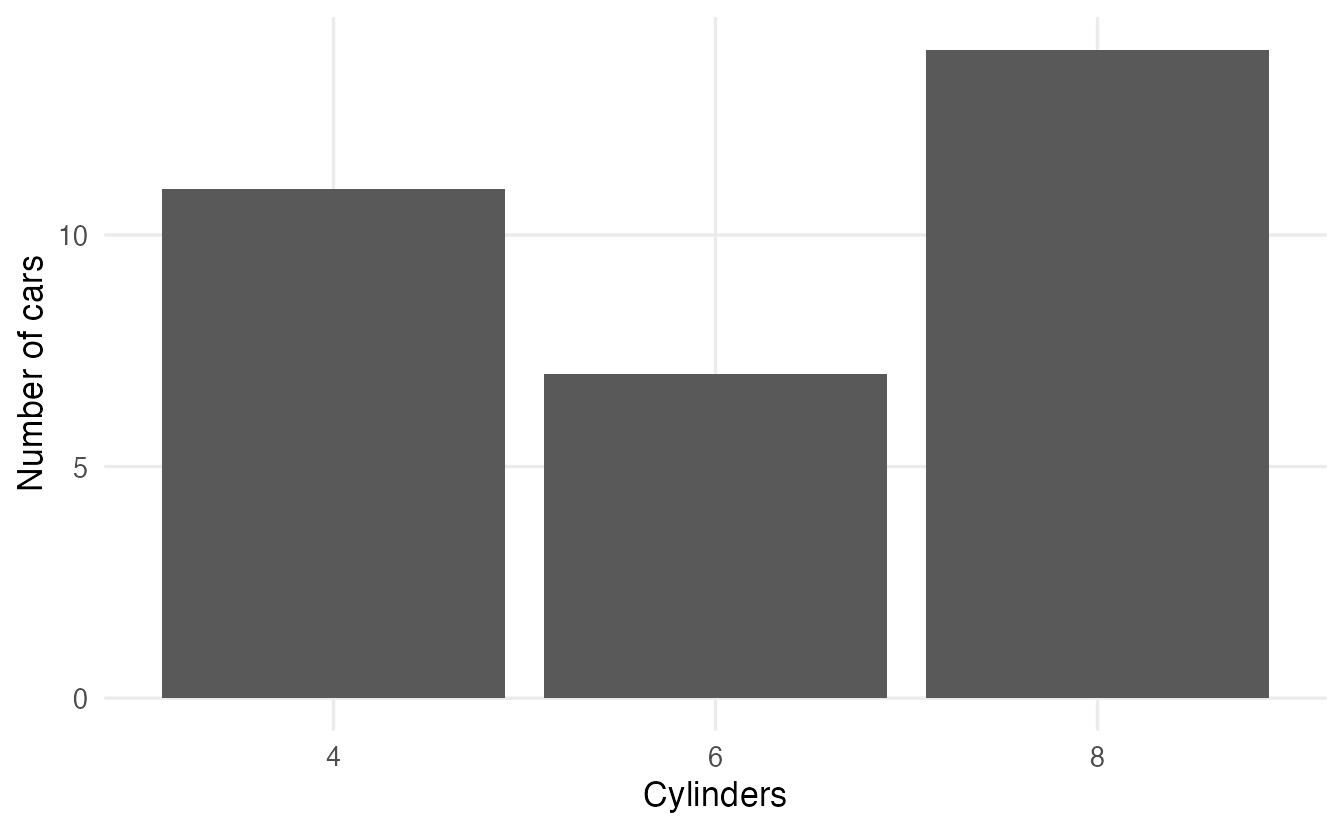
Using geom_bar() on cyl_counts would be a mistake: it would count the rows of the summary table (one per category) and draw three bars of height 1.
4. Order matters
For a nominal variable the alphabetical order of the bars is arbitrary and makes comparisons harder. Sort the bars by frequency with forcats::fct_infreq():
states <- tibble(division = state.division)

ggplot(states, aes(y = fct_rev(fct_infreq(division)))) +
  geom_bar() +
  labs(x = "Number of states", y = NULL)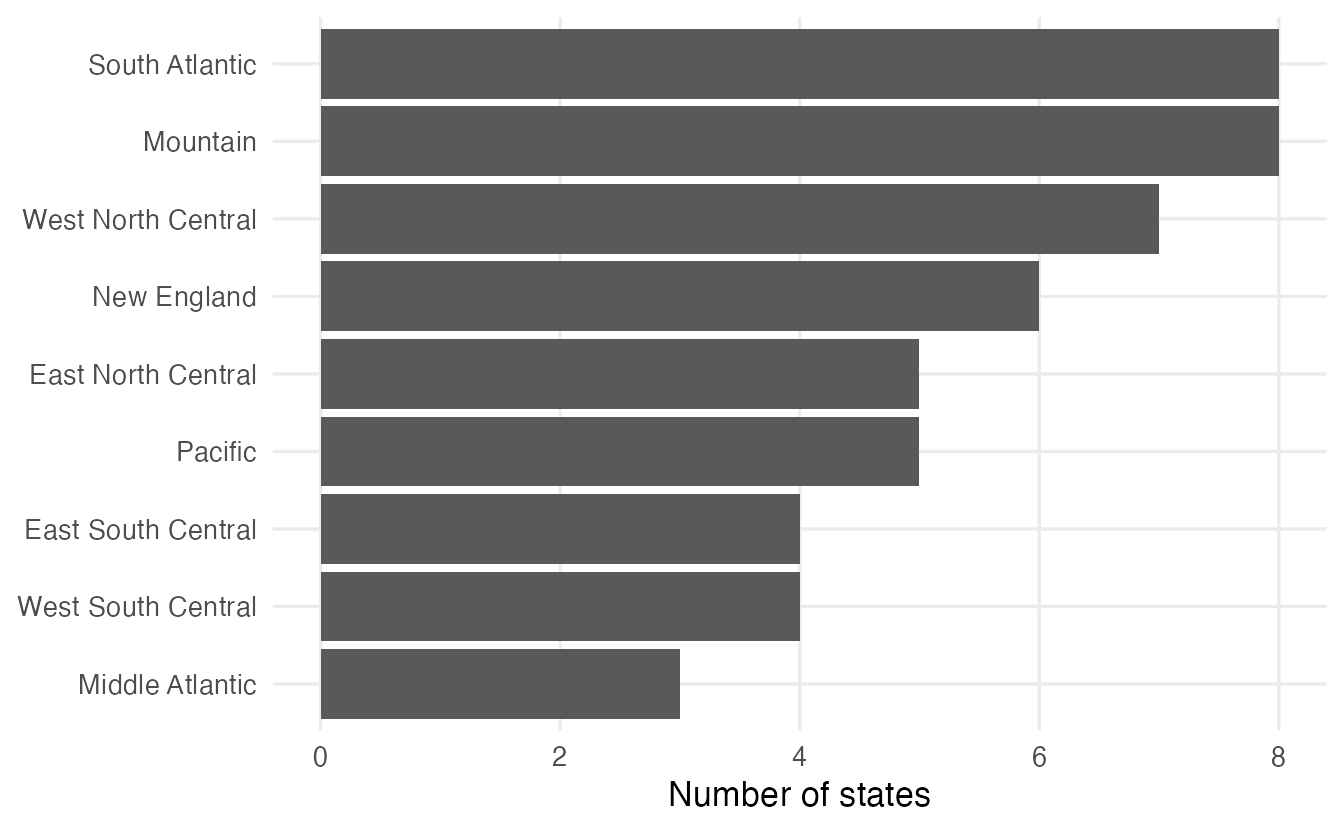
Three things happen here:
fct_infreq()orders the levels from most to least frequent;fct_rev()reverses that order, because ggplot2 draws the first level at the bottom of a vertical axis — so the largest bar ends up on top;- mapping the variable to
ygives horizontal bars, which leave plenty of room for long category names. (The older way is to mapxand addcoord_flip(); both work.)
When the heights are precomputed, use fct_reorder() to order a factor by another variable:
feed_means <- chickwts |>
  summarise(mean_weight = mean(weight), n = n(), .by = feed)

ggplot(feed_means, aes(x = mean_weight, y = fct_reorder(feed, mean_weight))) +
  geom_col() +
  labs(x = "Mean weight after 6 weeks (g)", y = "Feed")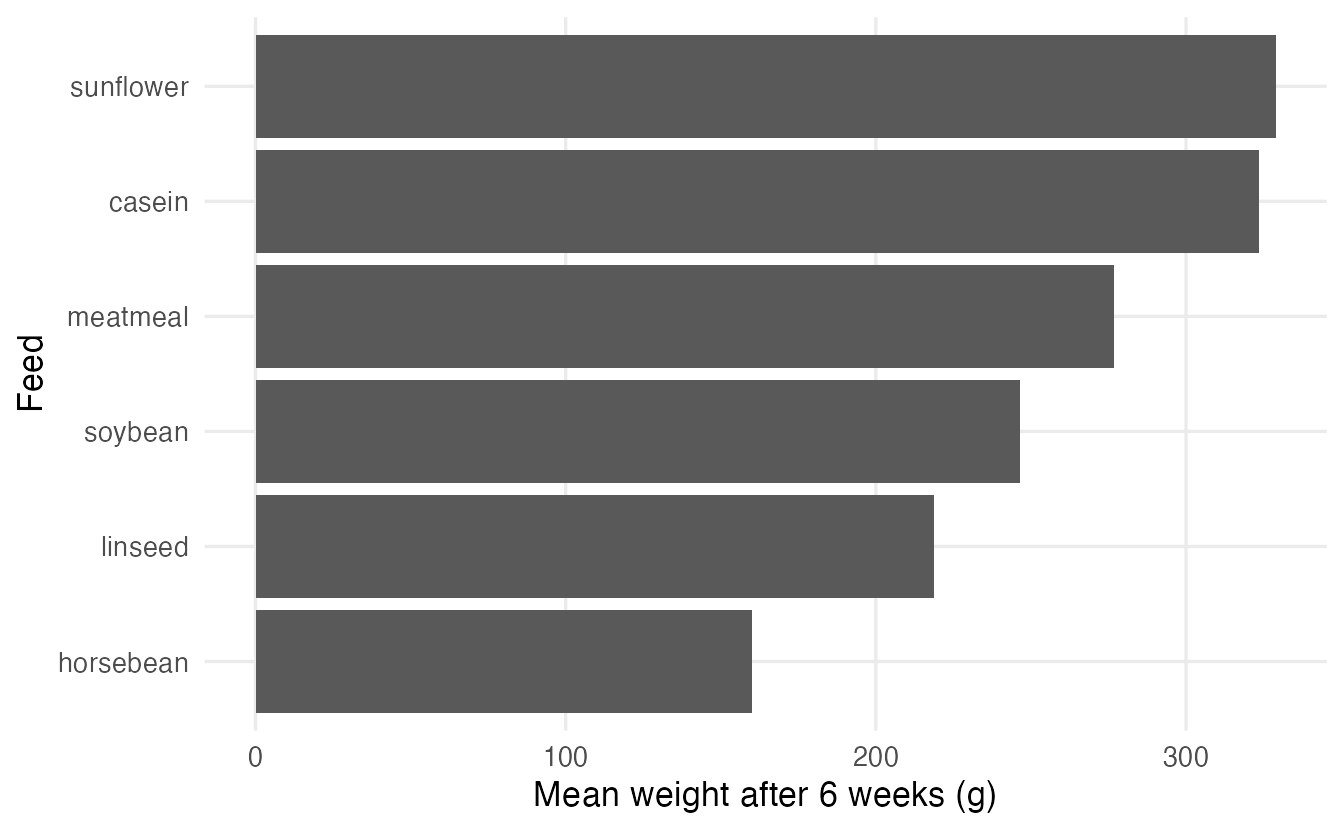
Do not reorder ordinal variables (education level, agreement scales, age classes, months): their natural order carries information. Keep the level order and, if needed, set it with factor(..., levels = ...).
5. Adding labels
Labels with the exact values help when readers need the numbers. On a summary table, map label and nudge the text above the bars:
ggplot(cyl_counts, aes(cyl, n)) +
  geom_col(width = 0.6) +
  geom_text(aes(label = n), vjust = -0.4) +
  expand_limits(y = max(cyl_counts$n) * 1.1) +
  labs(x = "Cylinders", y = "Number of cars")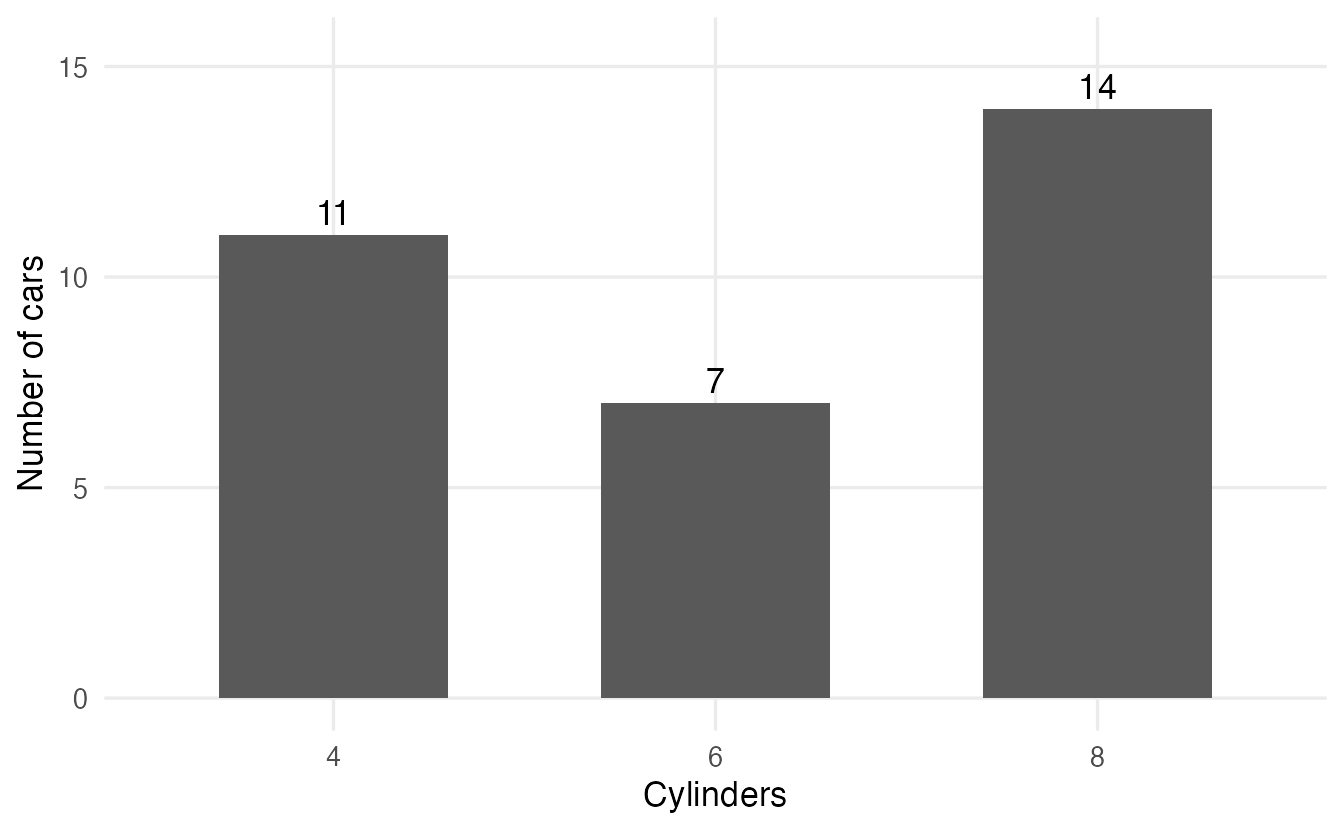
vjust = -0.4 moves the text just above the top of each bar, and expand_limits() leaves room so that the highest label is not cut off. With geom_bar() the counts exist only inside the plot; refer to them with after_stat():
ggplot(penguins, aes(island)) +
  geom_bar(width = 0.6) +
  geom_text(stat = "count", aes(label = after_stat(count)), vjust = -0.4) +
  labs(x = NULL, y = "Number of penguins")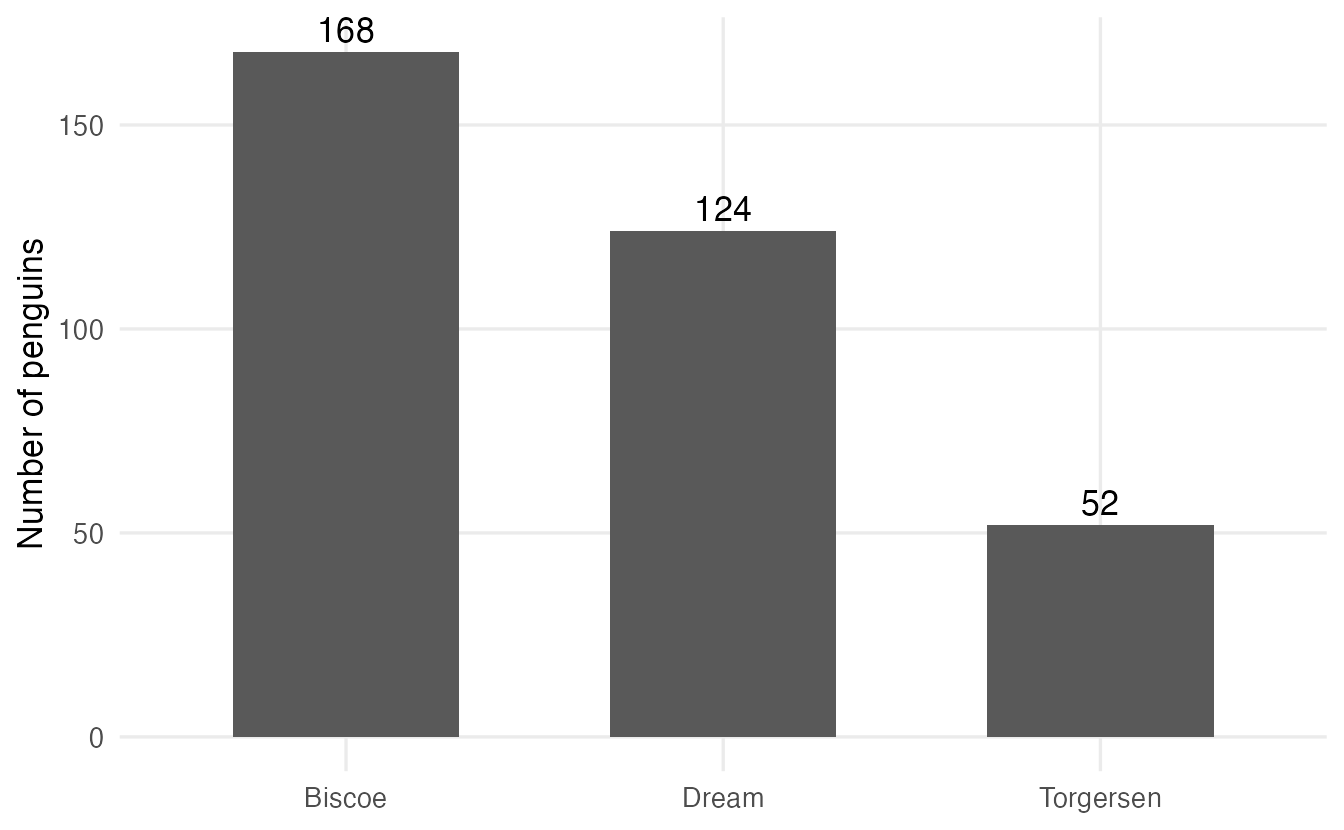
For horizontal bars, use hjust instead of vjust:
mpg_by_cyl <- mtcars |>
  summarise(mean_mpg = mean(mpg), .by = cyl) |>
  mutate(cyl = factor(cyl))

ggplot(mpg_by_cyl, aes(x = mean_mpg, y = cyl)) +
  geom_col(width = 0.6) +
  geom_text(aes(label = round(mean_mpg, 1)), hjust = -0.15) +
  expand_limits(x = max(mpg_by_cyl$mean_mpg) * 1.1) +
  labs(x = "Mean miles per gallon", y = "Cylinders")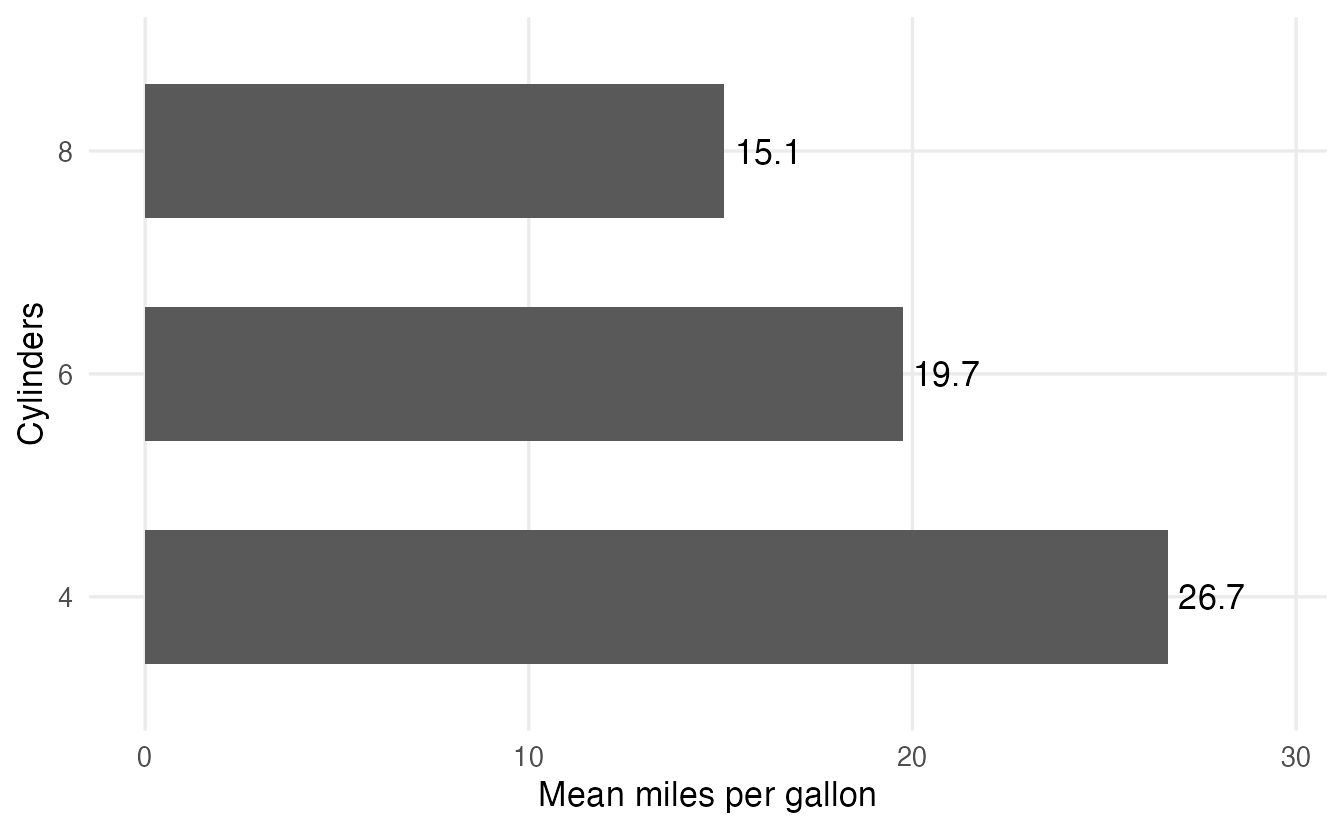
(We will come back to bars of means in Section 8 — they have a serious problem.)
6. Two categorical variables
How is the transmission type (am: automatic or manual) distributed across cylinder classes? First we turn the codes into labelled factors:
cars <- mtcars |>
  mutate(cyl = factor(cyl),
         am = factor(am, levels = c(0, 1), labels = c("automatic", "manual")))
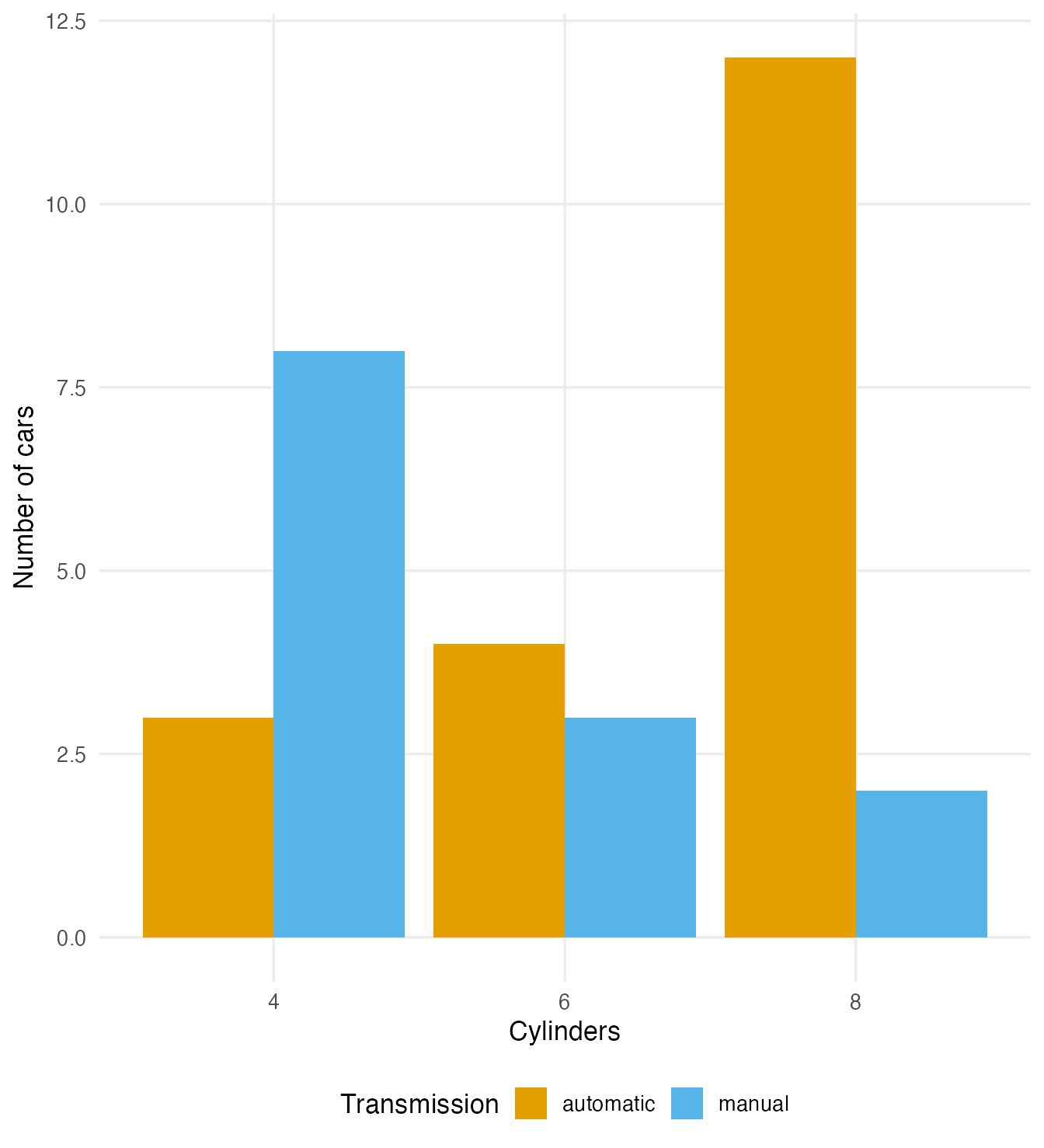
The position argument decides how the bars of the second variable are arranged:
p <- ggplot(cars, aes(x = cyl, fill = am)) +
  labs(x = "Cylinders", fill = "Transmission")

p + geom_bar() + labs(y = "Number of cars")
p + geom_bar(position = position_dodge(preserve = "single")) +
  labs(y = "Number of cars")
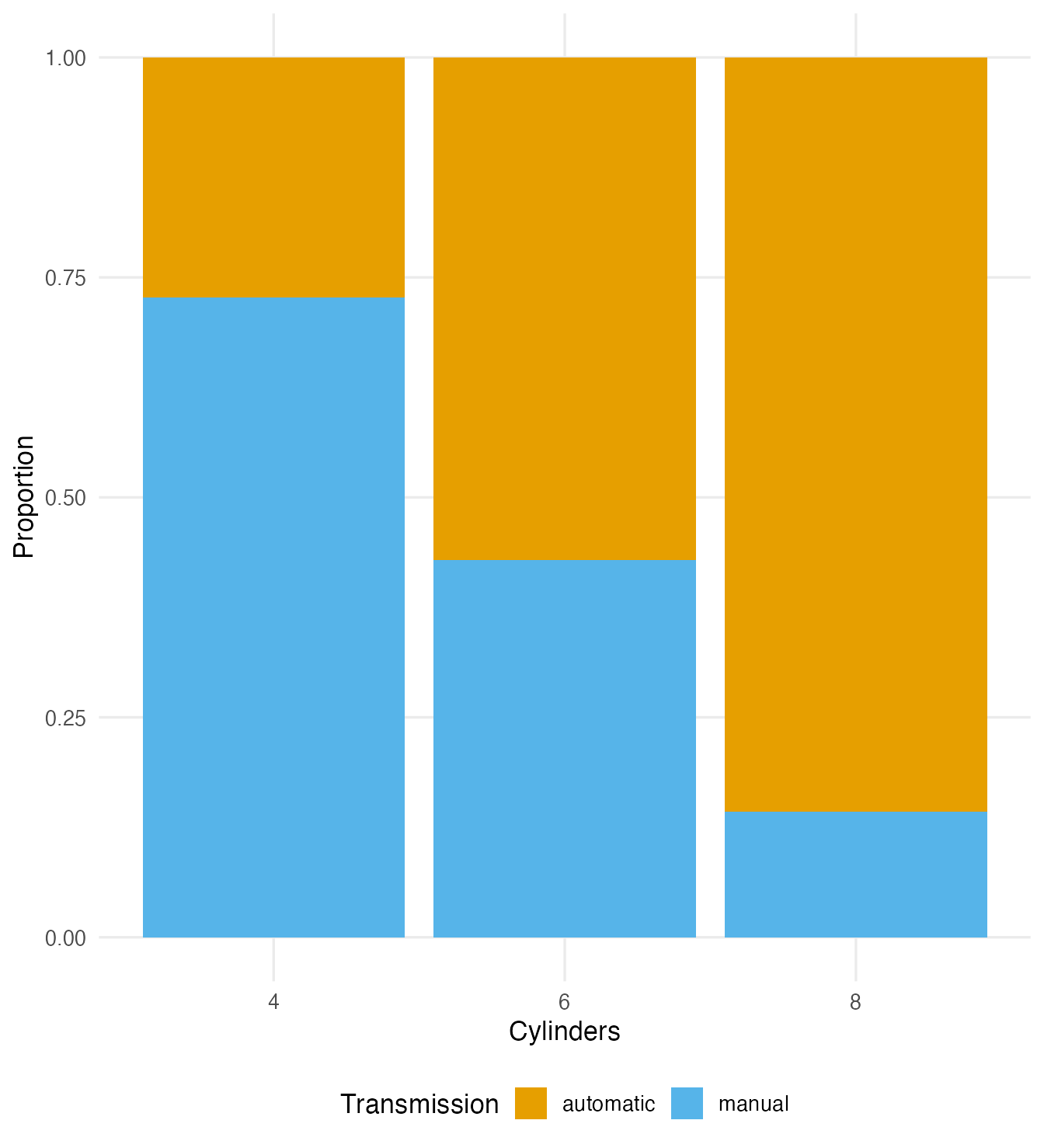
p + geom_bar(position = "fill") + labs(y = "Proportion")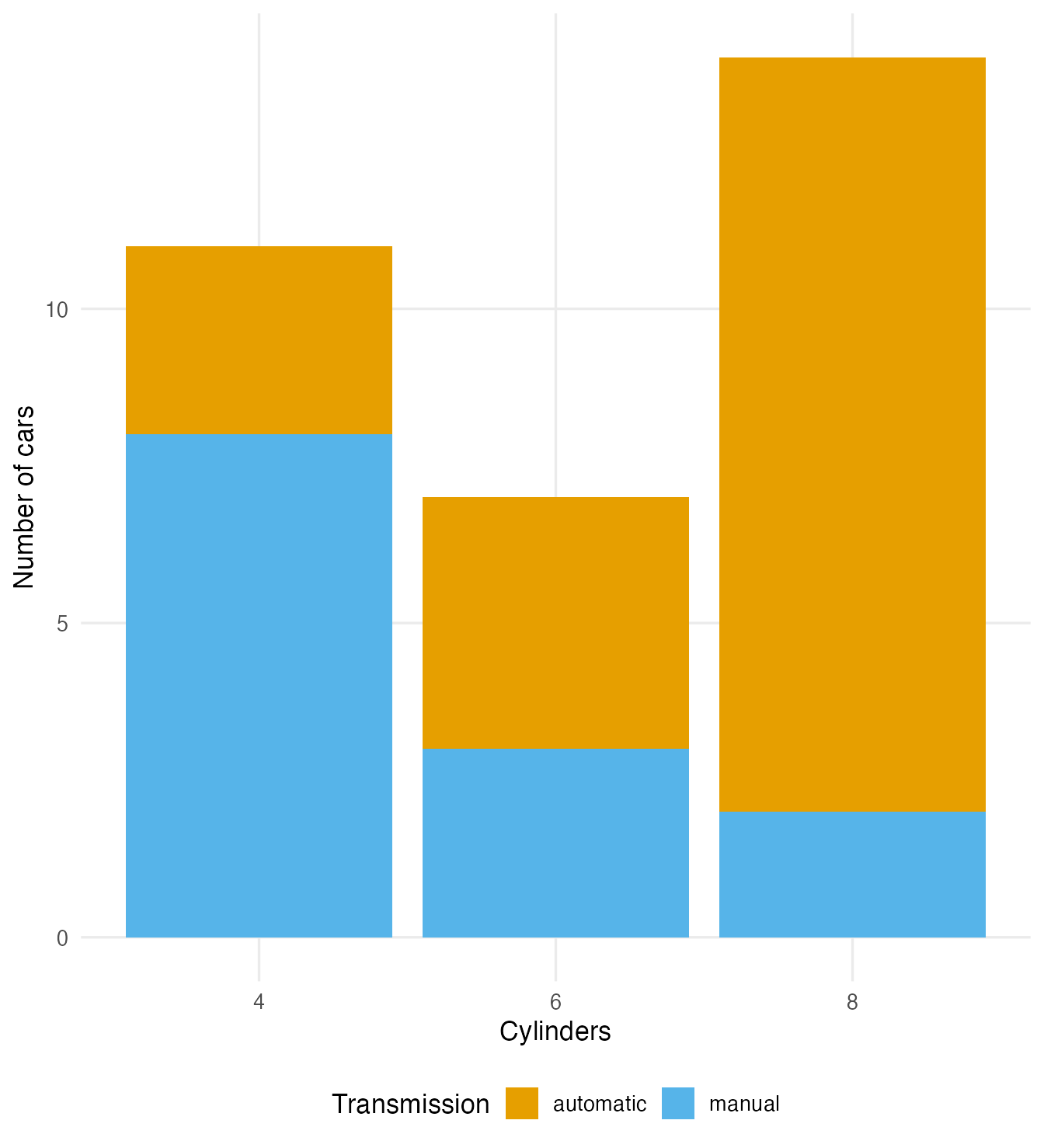
| Arrangement | Answers best | Weakness |
|---|---|---|
| Stacked | Totals per category, plus a rough split | Only the bottom segment shares a baseline; the others are hard to compare |
| Dodged | Compare counts of the subgroups directly | Totals are harder to see |
Filled (position = "fill") |
Compare conditional proportions across categories | Hides how many observations are behind each bar |
The filled chart is the picture of the conditional distribution from Describing two variables: within each cylinder class, the proportion of automatic and manual cars. It shows clearly that 86% of 8-cylinder cars are automatic. Put the explanatory variable on the x axis and the response in the fill — just as you would compute percentages within the categories of the explanatory variable.
position_dodge(preserve = "single") keeps all bars the same width even when a combination is missing — important for data such as island × species in penguins, which has empty cells.
Proportional bars with percentage labels
To label a filled chart, compute the proportions yourself and use position_fill(vjust = 0.5) to centre the labels inside the segments:
island_species <- penguins |>
  count(island, species) |>
  mutate(prop = n / sum(n), .by = island)

island_n <- count(penguins, island)

ggplot(island_species, aes(x = island, y = prop, fill = species)) +
  geom_col(position = "fill") +
  geom_text(aes(label = scales::percent(prop, accuracy = 1)),
            position = position_fill(vjust = 0.5), colour = "white") +
  geom_text(data = island_n, aes(x = island, y = 1.04,
                                 label = paste0("n = ", n)),
            inherit.aes = FALSE) +
  labs(x = NULL, y = "Proportion", fill = "Species")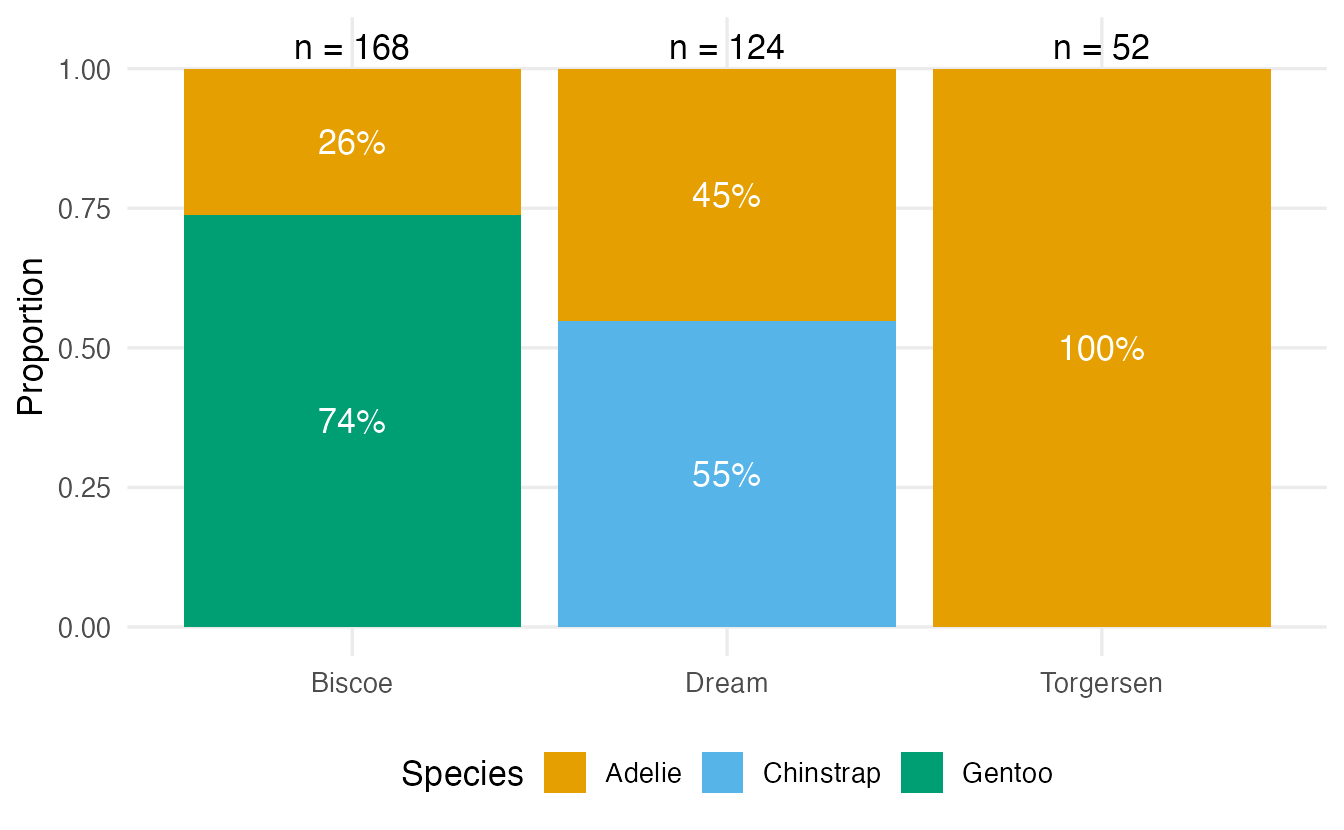
Writing \(n\) above each bar fixes the main weakness of proportional bars: Torgersen’s 100% Adelie is based on 52 birds, Biscoe’s figures on 168.
Mosaic plots
A mosaic plot goes one step further: bar widths are proportional to the size of each group, so the area of each rectangle is proportional to the count in that cell. Base R draws one directly from a table:
mosaicplot(table(penguins$island, penguins$species),
           main = "", xlab = "Island", ylab = "Species",
           color = c("#E69F00", "#56B4E9", "#009E73"))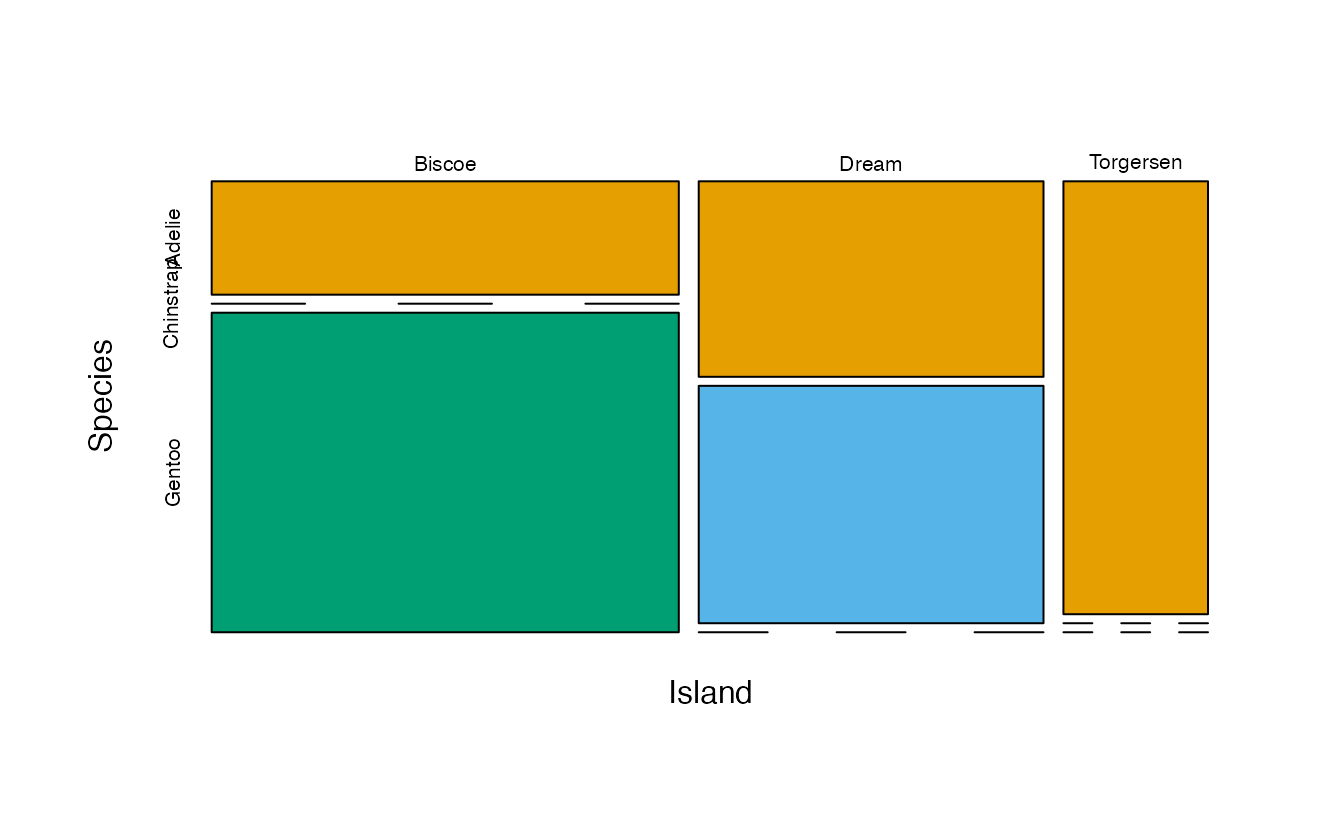
(For a ggplot2 version, see the ggmosaic package.)
7. Why pie charts are usually worse
A pie chart shows proportions as angles and areas of slices. Humans judge angles and areas much less accurately than lengths on a common scale. Compare the same six counts:
ggplot(chickwts, aes(x = "", fill = feed)) +
  geom_bar(width = 1) +
  coord_polar(theta = "y") +
  theme_void() +
  labs(fill = "Feed")

ggplot(chickwts, aes(y = fct_rev(fct_infreq(feed)))) +
  geom_bar() +
  labs(x = "Number of chicks", y = NULL)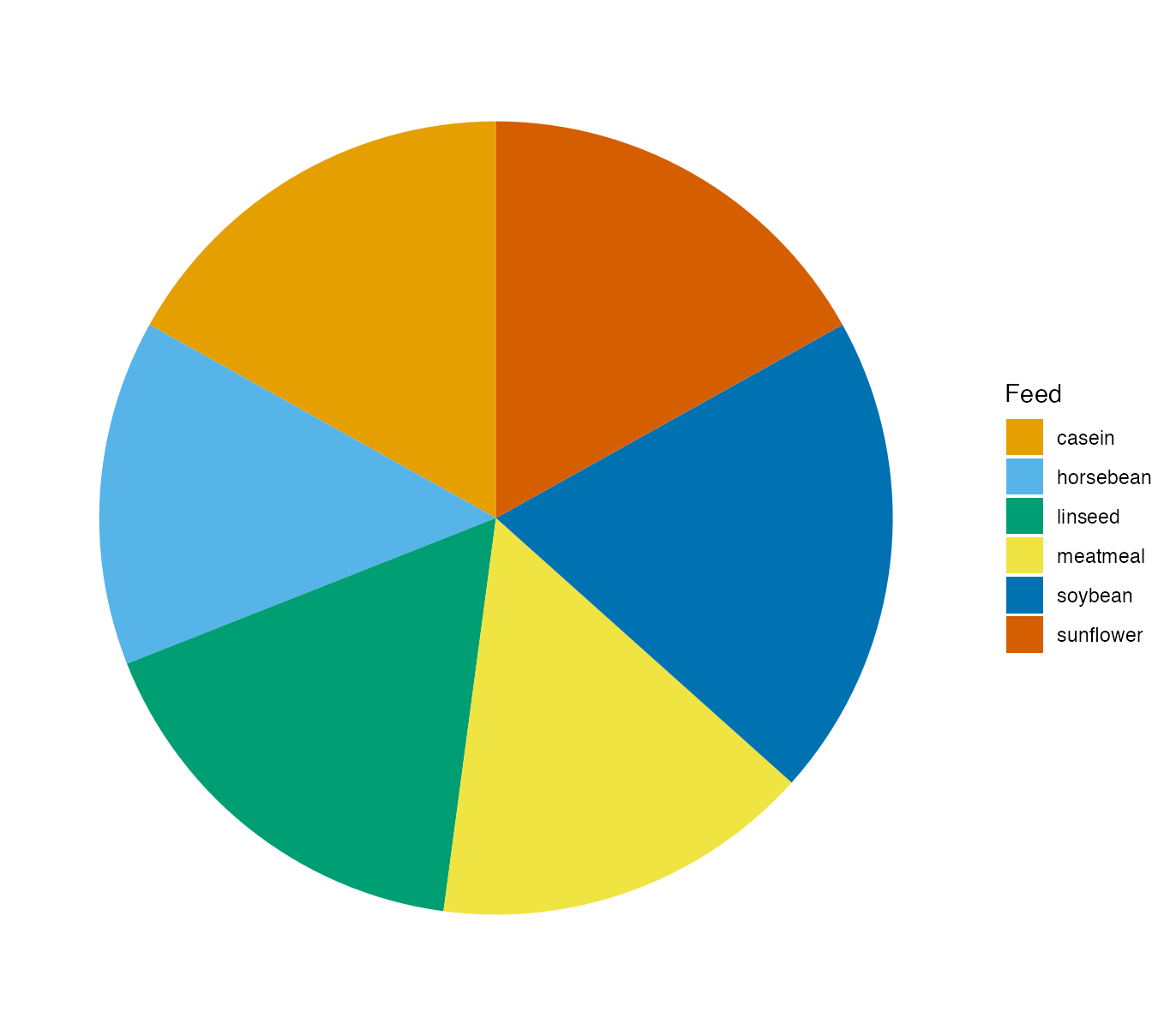
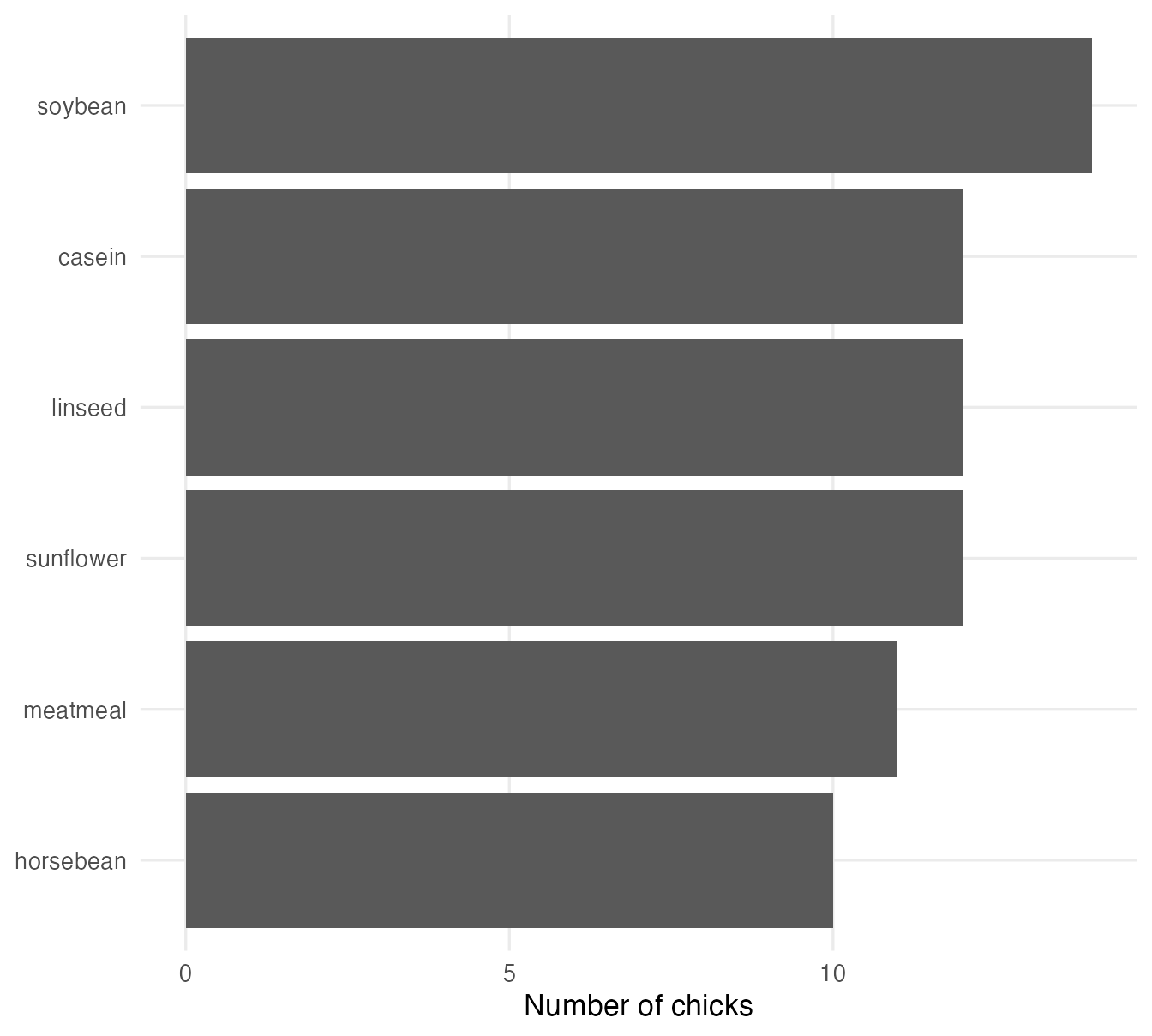
In the pie it is almost impossible to say whether soybean or casein is larger, or which slices are equal; in the bar chart it is immediate (14 soybean chicks, three feeds with 12 each). Pies also need a colour legend, and they fail completely for comparing two groups side by side. A pie can be acceptable for two or three parts of a whole with very different sizes; otherwise use bars. Never use 3-D pies: perspective distorts the slices.
The pie is built with the grammar of graphics too: a single stacked bar (x = "") drawn in polar coordinates (coord_polar(theta = "y")).
8. Bars for means: the “dynamite plot” problem
A very common chart in scientific papers shows the mean of each group as a bar with an error bar on top, usually the mean ± one standard error (SE). The SE measures how precisely a sample mean estimates the population mean: \(\text{SE} = s / \sqrt{n}\) (you will learn exactly why in Sampling distributions).
feed_summary <- chickwts |>
  summarise(n = n(),
            mean = mean(weight),
            se = sd(weight) / sqrt(n),
            .by = feed)
feed_summary
#> feed n mean se
#> 1 horsebean 10 160.2 12.21
#> 2 linseed 12 218.8 15.08
#> 3 soybean 14 246.4 14.47
#> 4 sunflower 12 328.9 14.10
#> 5 meatmeal 11 276.9 19.57
#> 6 casein 12 323.6 18.60ggplot(feed_summary, aes(feed, mean)) +
geom_col(fill = "grey70") +
geom_errorbar(aes(ymin = mean - se, ymax = mean + se), width = 0.3) +
labs(x = NULL, y = "Weight (g)") +
theme(axis.text.x = element_text(angle = 45, hjust = 1))
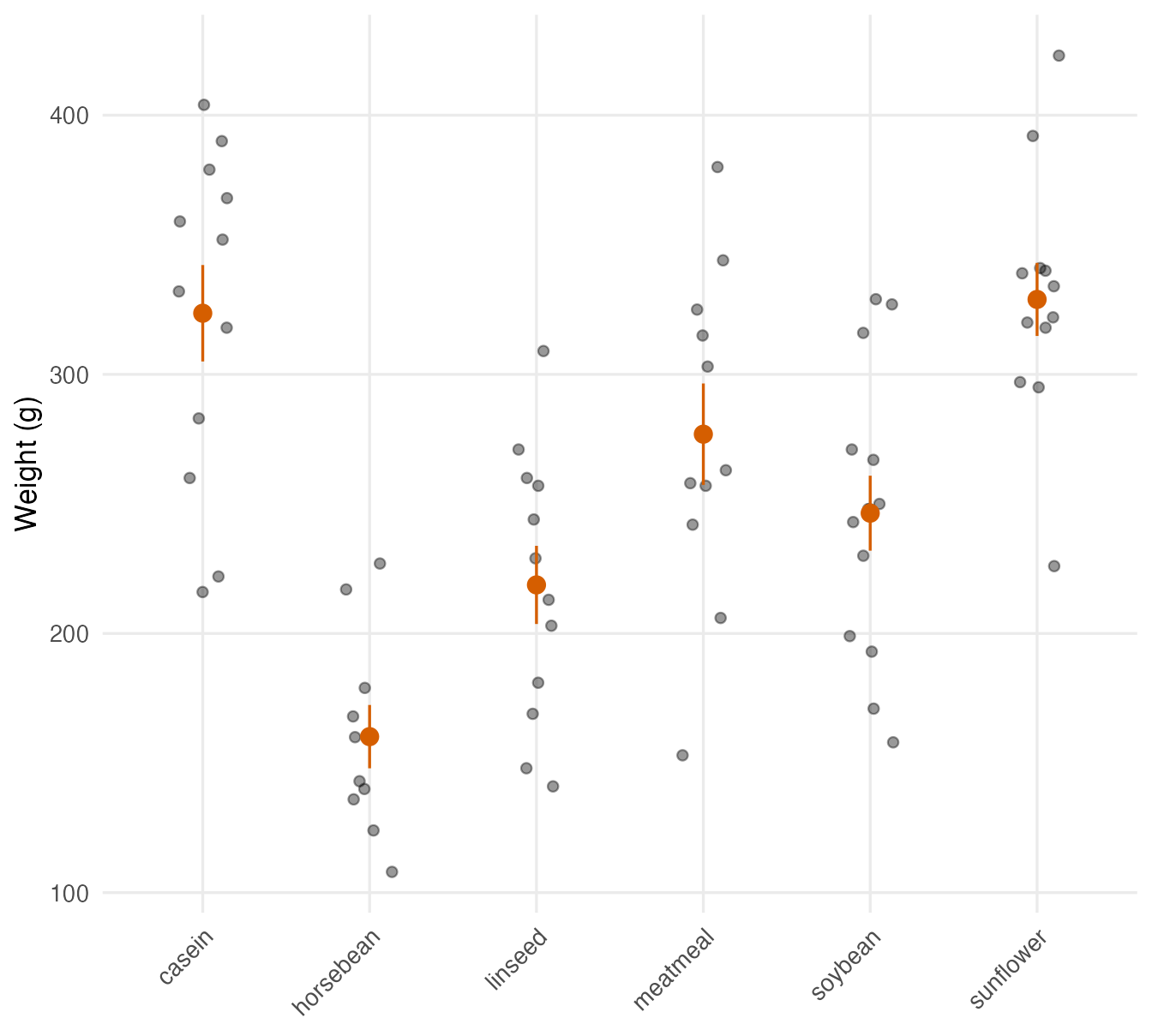
ggplot(chickwts, aes(feed, weight)) +
geom_jitter(width = 0.15, height = 0, alpha = 0.4) +
stat_summary(fun.data = mean_se, geom = "pointrange",
colour = "#D55E00") +
labs(x = NULL, y = "Weight (g)") +
theme(axis.text.x = element_text(angle = 45, hjust = 1))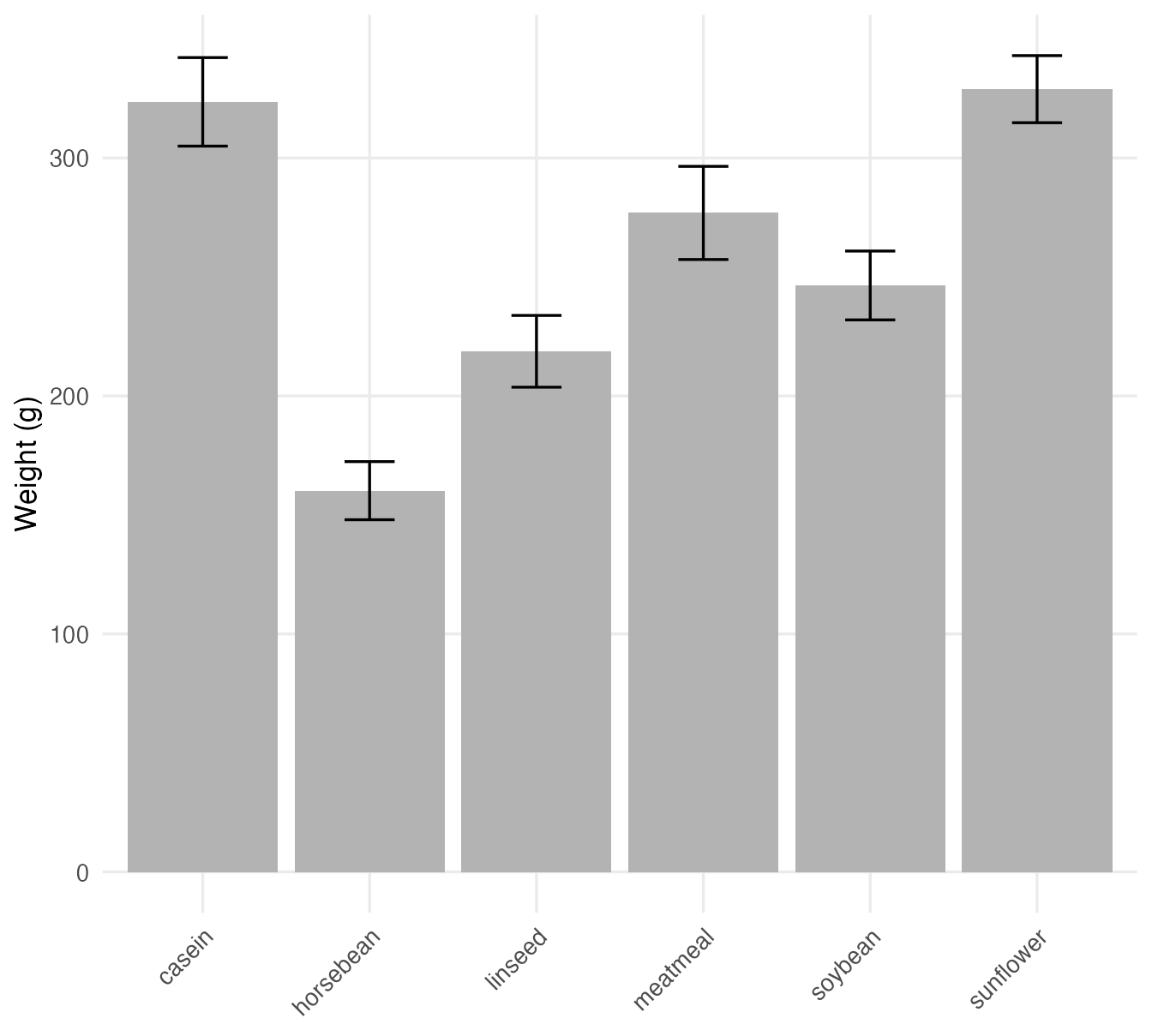
What is wrong with the dynamite plot?
- It hides the data. With 10–14 chicks per group, the full data fit on the plot. The bars say nothing about spread, skewness, outliers or \(n\); very different datasets give identical dynamite plots.
- The bar suggests the data go from 0 to the mean. For counts a bar from zero is natural; for a mean it implies that all values are inside the bar, while in reality about half of them are above it.
- The error bar is ambiguous. Readers rarely know whether it is ± 1 SD, ± 1 SE or a 95% confidence interval — three very different things. Always state it in the caption.
- ± 1 SE is not a range for the data. It describes the uncertainty of the mean, not where individual observations lie (most chicks are far outside the error bars on the right).
Better alternatives: points with jitter plus mean ± SE (right panel), boxplots with points, or violins (see Plotting distributions). mean_se() is a ggplot2 helper that returns the mean and mean ± 1 SE for stat_summary().
NoteGoing deeper: SD, SE and confidence intervals
For a group with \(n\) observations, mean \(\bar x\) and standard deviation \(s\):
- \(\bar x \pm s\) describes the spread of the observations;
- \(\bar x \pm s/\sqrt n\) (± 1 SE) describes the uncertainty of the mean; it shrinks as \(n\) grows;
- \(\bar x \pm t_{0.975,\,n-1} \cdot s/\sqrt n\) is a 95% confidence interval for the population mean (about \(\bar x \pm 2\,\text{SE}\) for moderate \(n\)); see Confidence intervals.
In stat_summary(), fun.data = mean_cl_normal (which needs the Hmisc package) gives t-based 95% intervals, and mean_se(mult = 2) gives mean ± 2 SE.
WarningCommon pitfalls
geom_bar()on a summary table. It counts rows (all bars of height 1). Usegeom_col()when you already have the heights.- Alphabetical order for nominal categories. Order by frequency (
fct_infreq()) or by value (fct_reorder()); keep the natural order for ordinal variables. - Bars that do not start at zero. A bar’s length is the value; cutting the axis exaggerates differences. (If zero is irrelevant, use points instead of bars.)
- Stacked bars for comparing subgroups. Only the bottom segment has a common baseline; use dodged or filled bars.
- Proportional bars without \(n\). 100% of 3 is not the same as 100% of 300.
- Dynamite plots. Bars of means with error bars hide the data; show the points, and say what the error bars are.
9. Check your understanding
10. Exercises
Interactive (run in your browser)
★ Exercise 1 — ordered horizontal bars. Draw a horizontal bar chart of the number of chicks per feed in chickwts, with the most frequent feed on top.
fct_infreq() sorts by frequency; fct_rev() reverses the order so that the largest bar is at the top.
ggplot(chickwts, aes(y = fct_rev(fct_infreq(feed)))) +
  geom_bar() +
  labs(x = "Number of chicks", y = NULL)
Soybean has the most chicks (14); horsebean the fewest (10).
★★ Exercise 2 — debug. This code should draw the mean len per supplement type in ToothGrowth, but all bars have height 1. Fix it.
The heights are already computed in mean_len. Which geom uses precomputed heights, and what must be mapped to y?
ggplot(tg_means, aes(x = supp, y = mean_len)) +
  geom_col() +
  labs(x = "Supplement", y = "Mean tooth length")
geom_bar() counted the rows of tg_means (one per supplement). With geom_col() and y = mean_len the bars show the means (about 20.7 for orange juice, OJ, and 17.0 for ascorbic acid, VC). Even better: show the 30 observations per group with points, as in Section 8.
★★ Exercise 3 — conditional proportions. Using penguins, draw filled bars showing the proportion of females and males within each species (exclude birds with unknown sex). Is the sex ratio balanced?
Filter with !is.na(sex) and use position = "fill".
penguins |>
  filter(!is.na(sex)) |>
  ggplot(aes(x = species, fill = sex)) +
  geom_bar(position = "fill") +
  labs(x = NULL, y = "Proportion", fill = "Sex")
In every species the split is very close to 50/50 — the researchers sampled pairs of birds.
★★★ Exercise 4 — replace a dynamite plot. For PlantGrowth (plant weight by group), draw jittered points with the group mean ± 1 SE on top. Then answer: do the error bars show where most plants are?
The ggplot2 helper that returns the mean and mean ± 1 SE is mean_se.
ggplot(PlantGrowth, aes(group, weight)) +
  geom_jitter(width = 0.1, height = 0, alpha = 0.5) +
  stat_summary(fun.data = mean_se, geom = "pointrange", colour = "#D55E00") +
  labs(x = NULL, y = "Dried weight (g)",
       caption = "Orange: mean ± 1 standard error")
No: many plants lie well outside the error bars. The SE describes the precision of each mean (with 10 plants per group), not the spread of the plants. The caption saying what the error bars are is essential.
Practice on your own computer
★★ Exercise 5 — hair and eye colour. Convert HairEyeColor to a data frame with as.data.frame() (columns Hair, Eye, Sex, Freq). Draw (a) dodged bars of the counts of eye colour for each hair colour, (b) filled bars of the proportions, with percentage labels. Use geom_col() because the counts are in Freq. Which chart shows best that blond people mostly have blue eyes?
TipSolution
hec <- as.data.frame(HairEyeColor) |>
  summarise(n = sum(Freq), .by = c(Hair, Eye)) |>
  mutate(prop = n / sum(n), .by = Hair)

ggplot(hec, aes(Hair, n, fill = Eye)) +
  geom_col(position = "dodge") +
  labs(y = "Number of students")

ggplot(hec, aes(Hair, prop, fill = Eye)) +
  geom_col(position = "fill") +
  geom_text(aes(label = scales::percent(prop, accuracy = 1)),
            position = position_fill(vjust = 0.5), size = 3) +
  labs(y = "Proportion within hair colour")
The filled chart shows the conditional distribution directly: about 74% of blond students have blue eyes. The fill colours here are the course’s Okabe–Ito palette; for eye colours you might prefer scale_fill_manual() with intuitive colours (keeping them distinguishable).
Summary
| Goal | ggplot2 |
|---|---|
| Counts from raw data | geom_bar() |
| Precomputed heights | geom_col() |
| Order by frequency / by value | fct_infreq(x), fct_reorder(x, value); fct_rev() to reverse |
| Horizontal bars | map the category to y (or coord_flip()) |
| Stacked / dodged / filled | position = "stack" / position_dodge(preserve = "single") / "fill" |
| Value labels | geom_text(aes(label = n), vjust = -0.4); with geom_bar(): stat = "count", aes(label = after_stat(count)) |
| Labels in filled bars | geom_text(..., position = position_fill(vjust = 0.5)) |
| Mosaic plot | mosaicplot(table(a, b)) |
| Mean ± SE over data | geom_jitter() + stat_summary(fun.data = mean_se, geom = "pointrange") |
- Bars compare lengths from zero: they must start at zero.
- Order nominal bars by size; keep ordinal categories in their natural order.
- For two variables, filled bars show conditional proportions — add \(n\).
- Prefer bars to pie charts.
- Do not hide data behind bars of means: show the observations and say what error bars represent.