library(dplyr)
library(tidyr)
library(readr)
library(ggplot2)
library(cluster)   # daisy(), silhouette()
library(mclust) # adjustedRandIndex()Clustering: the big picture
Distances, scaling and validation — the choices that decide every clustering result
What clustering can and cannot do, how distances and scaling shape the groups you find, and how to judge a clustering with silhouette, stability and (when available) external labels.
NoteLearning objectives
By the end of this lesson you will be able to:
- explain what clustering is, what it is not, and why there is no single “correct” answer;
- compute Euclidean, Manhattan, correlation-based and Gower distances in R and choose among them;
- show with an example why scaling and transformations can completely change the clusters;
- evaluate a clustering with within-cluster sum of squares, silhouette (by hand and with
cluster::silhouette()), bootstrap stability and, when labels exist, the adjusted Rand index; - pick a reasonable family of clustering methods for a given problem.
1. Why cluster?
A wholesale distributor has 440 clients and knows how much each one spends on fresh food, milk, groceries and so on. Nobody has labelled the clients as “restaurants” or “corner shops”. Still, the marketing team would like to know: are there groups of clients that behave similarly?
A biologist measures bills and flippers of penguins and wonders whether the measurements alone, without being told the species, fall into natural groups.
Both are clustering problems: we look for groups (clusters) of observations that are similar to each other and different from the rest, without a response variable that tells us the right answer. This is called unsupervised learning, in contrast with the supervised methods of module 10, where every training observation comes with a label.
2. What clustering is — and what it is not
Clustering is a tool for exploration and simplification. It summarises many observations by a few “typical profiles”.
It is not:
- a test. A clustering algorithm always returns groups, even when the data are a single shapeless cloud. Finding clusters does not prove that groups exist.
- classification. There is no ground truth to measure accuracy against. Two analysts can obtain different, equally defensible clusterings of the same data.
- automatic. The result depends on a chain of human choices:
| Choice | Example | Lesson section |
|---|---|---|
| Which variables? | spending only, or also region? | 2 |
| Which transformation? | raw euros or log1p(euros)? |
5 |
| Which scaling? | raw units or z-scores? | 4 |
| Which distance? | Euclidean, Manhattan, Gower… | 3 |
| Which algorithm and how many clusters? | k-means with \(k = 3\), DBSCAN… | 8 and next lessons |
The honest attitude is: make each choice deliberately, write it down, and check how much the conclusions change when you change it.
3. Distances: what does “similar” mean?
Almost every clustering method starts from a distance (or dissimilarity): a number that is 0 when two observations are identical and grows as they become more different.
We work with four numeric penguin measurements. We drop the two birds with missing measurements and keep species aside — we will not use it to build clusters, only to check them later.
peng <- penguins |>
  select(species, bill_len, bill_dep, flipper_len, body_mass) |>
  na.omit()

peng_x <- peng |> select(-species)
peng_z <- scale(peng_x)          # z-scores: mean 0, sd 1 for each column
nrow(peng)
#> [1] 342Let us compare three birds: two Adelie penguins (rows 1 and 2) and one Gentoo (row 200).
three <- peng_z[c(1, 2, 200), ]
rownames(three) <- c("Adelie 1", "Adelie 2", "Gentoo")

dist(three, method = "euclidean")
#> Adelie 1 Adelie 2
#> Adelie 2 0.7543
#> Gentoo 4.0766 3.4064dist(three, method = "manhattan")#> Adelie 1 Adelie 2
#> Adelie 2 1.149
#> Gentoo 7.756 6.606as.dist(1 - cor(t(three))) # correlation-based distance#> Adelie 1 Adelie 2
#> Adelie 2 0.006547
#> Gentoo 1.874884 1.816098
TipHow to read this output
dist()returns the lower triangle of a distance matrix: each number is the distance between a row bird and a column bird.- Euclidean distance is the straight-line distance (“as the crow flies”). The two Adelie birds are 0.75 apart; Adelie 1 and the Gentoo are 4.08 apart.
- Manhattan distance adds up the absolute differences variable by variable (“walking along city blocks”). It is always at least as large as the Euclidean one and is less dominated by a single large difference.
- The correlation-based distance \(1 - r\) compares the shape of two profiles, not their level: two birds whose measurements go up and down together get a small distance even if one is larger overall. It is popular for gene-expression or time-series profiles; for body measurements it is rarely what we want.
NoteGoing deeper: formulas
For observations \(x = (x_1, \dots, x_p)\) and \(y = (y_1, \dots, y_p)\):
\[ d_{\text{Euc}}(x, y) = \sqrt{\sum_{j=1}^p (x_j - y_j)^2}, \qquad d_{\text{Man}}(x, y) = \sum_{j=1}^p |x_j - y_j|, \qquad d_{\text{cor}}(x, y) = 1 - r(x, y), \]
where \(r(x, y)\) is the Pearson correlation between the two vectors of \(p\) values. Euclidean and Manhattan distances are special cases of the Minkowski distance \(\big(\sum_j |x_j - y_j|^q\big)^{1/q}\) with \(q = 2\) and \(q = 1\).
Mixed data: the Gower distance
Real data sets mix numbers and categories (island, sex). Euclidean distance makes no sense for a factor. The Gower distance handles both:
- for a numeric variable, the difference is \(|x_j - y_j|\) divided by the range of that variable (so it lies between 0 and 1);
- for a categorical variable, the difference is 0 if the two categories match and 1 otherwise;
- the Gower distance is the average of these per-variable differences (variables missing for either observation are skipped).
cluster::daisy() computes it. Factors are recognised automatically.
peng_mixed <- penguins |>
  select(island, sex, bill_len, flipper_len, body_mass)

gower <- daisy(peng_mixed, metric = "gower")
round(as.matrix(gower)[c(1, 2, 200), c(1, 2, 200)], 3)
#> 1 2 200
#> 1 0.000 0.223 0.524
#> 2 0.223 0.000 0.701
#> 200 0.524 0.701 0.000Let us check the distance between birds 1 and 200 by hand, using the same per-variable rules. The ranges must be computed on the whole data set, as daisy() does.
b1 <- peng_mixed[1, ]
b2 <- peng_mixed[200, ]
num_vars <- c("bill_len", "flipper_len", "body_mass")

num_part <- sapply(num_vars, \(v) {
  abs(b1[[v]] - b2[[v]]) / diff(range(peng_mixed[[v]], na.rm = TRUE))
})
cat_part <- c(island = b1$island != b2$island, sex = b1$sex != b2$sex)

parts <- c(num_part, cat_part)
round(parts, 3)
#> bill_len flipper_len body_mass island sex
#> 0.415 0.746 0.458 1.000 0.000mean(parts)#> [1] 0.5237The by-hand average, 0.524, matches the daisy() entry. Because ranges depend on the whole data set, adding or removing observations changes every Gower distance a little.
4. Why scaling changes everything
Distances add up differences across variables. If one variable is measured in thousands and another in units, the first one decides everything. Let us see this with simulated data where we know the true groups.
We simulate 200 shoppers. Half are occasional (about 2 visits per month), half are frequent (about 6). Their annual income (in euros) has nothing to do with the groups.
set.seed(42)
n <- 200
shoppers <- tibble(
  group  = rep(c("occasional", "frequent"), each = n / 2),
  visits = c(rnorm(n / 2, mean = 2, sd = 0.7),
             rnorm(n / 2, mean = 6, sd = 0.7)),
  income = rnorm(n, mean = 30000, sd = 8000)
)

set.seed(1)
km_raw <- kmeans(shoppers[, c("visits", "income")], centers = 2, nstart = 25)
set.seed(1)
km_std <- kmeans(scale(shoppers[, c("visits", "income")]), centers = 2,
                 nstart = 25)
demo <- bind_rows(
shoppers |> mutate(cluster = factor(km_raw$cluster), version = "Raw units"),
shoppers |> mutate(cluster = factor(km_std$cluster), version = "Standardised")
)
ggplot(demo, aes(visits, income, colour = cluster, shape = group)) +
geom_point(alpha = 0.7) +
facet_wrap(~ version) +
labs(x = "Visits per month", y = "Annual income (EUR)",
colour = "Cluster", shape = "True group")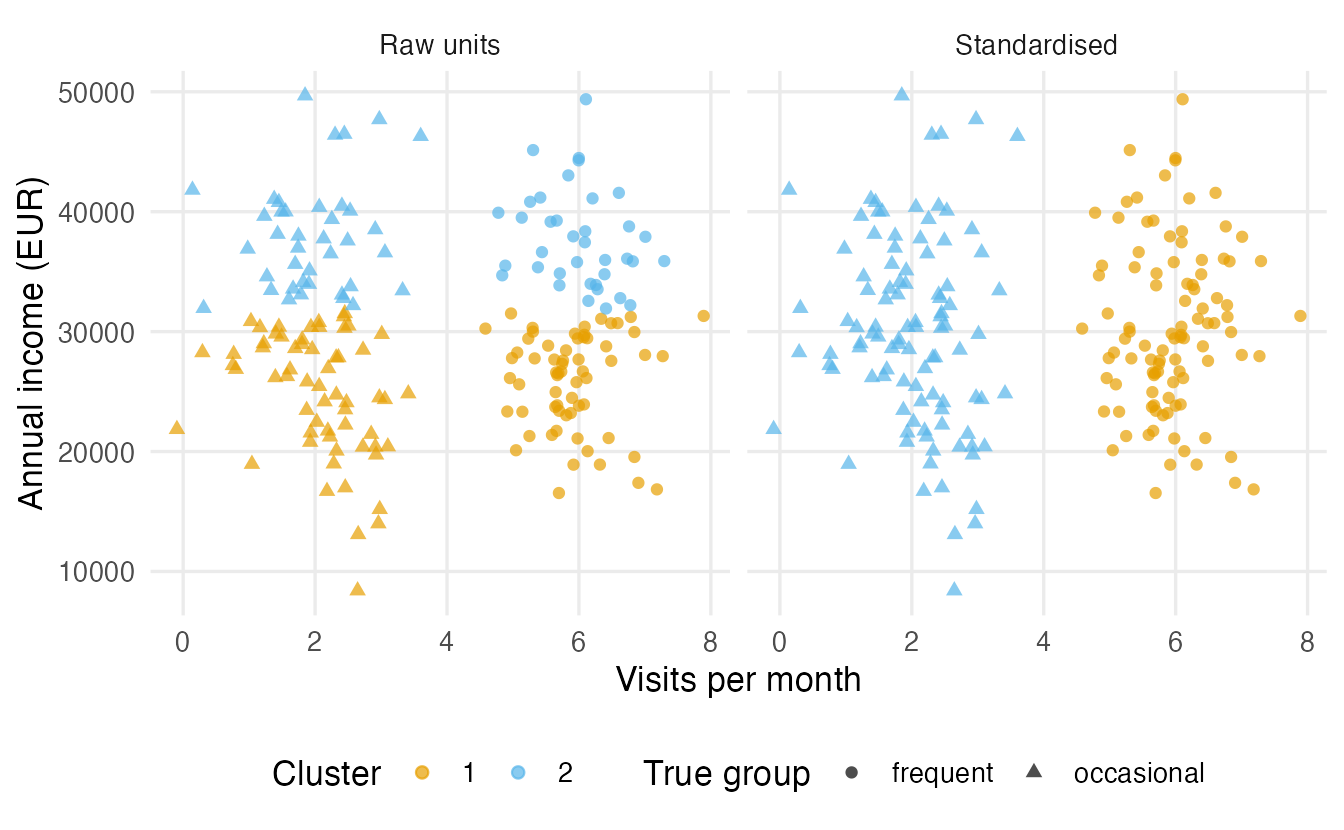
In raw units, a difference of 4 visits counts as much as a difference of 4 euros — nothing, compared with income differences of thousands of euros. So k-means cuts the income axis. The agreement with the true groups, measured by the adjusted Rand index (section 7), is 0 for raw data (no better than chance) and 1 after scaling.
The same happens with real data. In penguins, body mass is in grams and has a much larger standard deviation than the bill measurements in millimetres:
round(sapply(peng_x, sd), 1)#> bill_len bill_dep flipper_len body_mass
#> 5.5 2.0 14.1 802.0set.seed(1)
km_peng_raw <- kmeans(peng_x, centers = 3, nstart = 25)
set.seed(1)
km_peng_z <- kmeans(peng_z, centers = 3, nstart = 25)
table(cluster = km_peng_raw$cluster, species = peng$species)#> species
#> cluster Adelie Chinstrap Gentoo
#> 1 0 0 70
#> 2 112 52 1
#> 3 39 16 52table(cluster = km_peng_z$cluster, species = peng$species)#> species
#> cluster Adelie Chinstrap Gentoo
#> 1 24 63 0
#> 2 0 0 123
#> 3 127 5 0Without scaling, the clusters are essentially “light”, “medium” and “heavy” birds. After scaling, all four measurements contribute and the clusters line up much better with the species (ARI 0.32 versus 0.79).
ImportantScaling is a choice, not a ritual
Standardising gives every variable the same weight. That is usually the right default when variables are in different units. But if variables are already in the same unit and their spread is meaningful (e.g. budget shares that all sum to 1), standardising can inflate noise variables. Decide, and say why.
5. Transformations for skewed data
Spending, income, counts and concentrations are often right-skewed: most values are small and a few are huge. With Euclidean distance those few huge values dominate, and clusters become “the giants” versus “everybody else”.
wholesale <- read_csv(data_path("wholesale_customers.csv"),
                      show_col_types = FALSE)
spend_vars <- c("Fresh", "Milk", "Grocery", "Frozen",
                "Detergents_Paper", "Delicassen")
wholesale |>
transmute(raw = Fresh, log1p = log1p(Fresh)) |>
pivot_longer(everything(), names_to = "scale", values_to = "value") |>
mutate(scale = factor(scale, levels = c("raw", "log1p"))) |>
ggplot(aes(value)) +
geom_histogram(bins = 30, fill = "#56B4E9", colour = "white") +
facet_wrap(~ scale, scales = "free_x") +
labs(x = "Annual spending on fresh products", y = "Number of clients")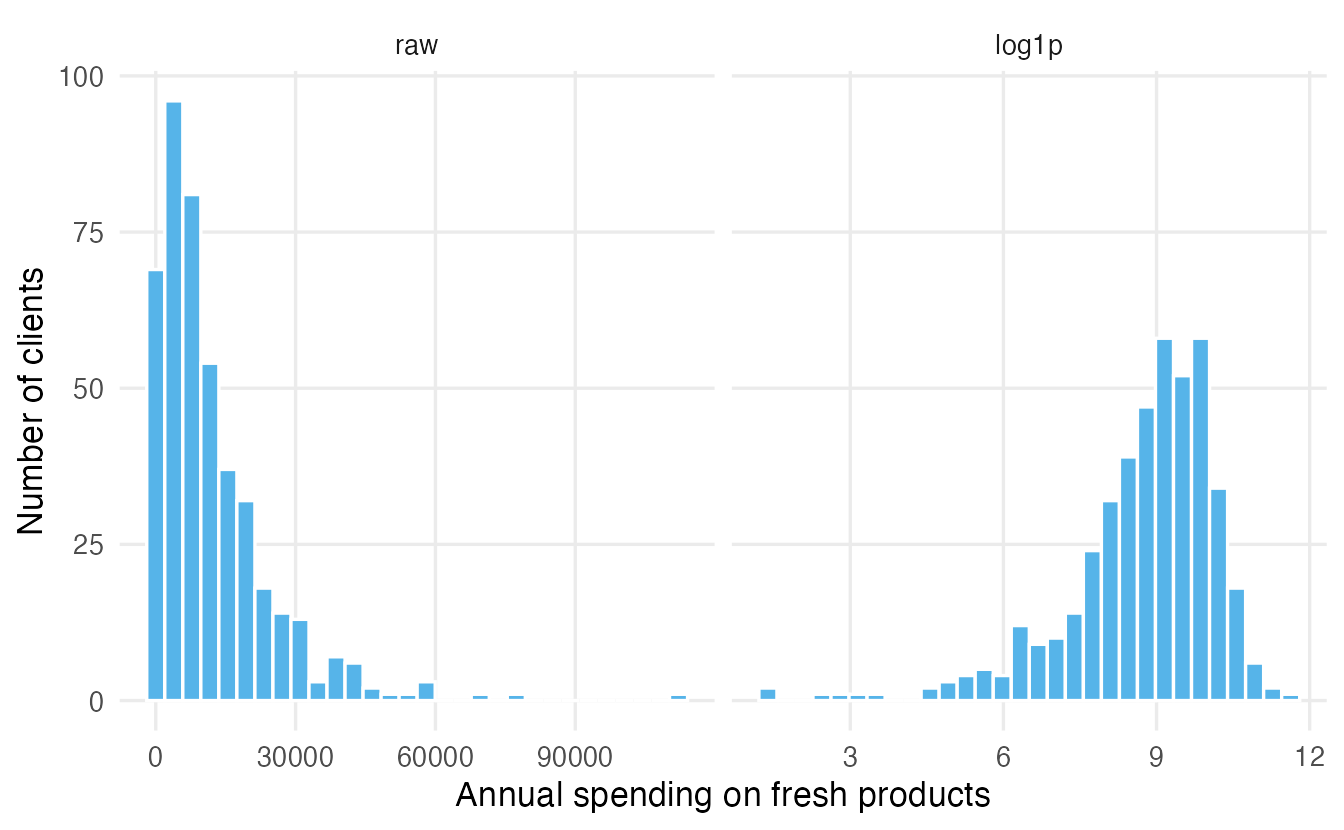
We use log1p(x) \(= \log(1 + x)\) rather than log(x) because it is defined at zero. On the log scale, differences are ratios: a client who spends 2,000 and one who spends 4,000 are as far apart as one who spends 20,000 and one who spends 40,000. That is often closer to what “similar behaviour” means. After the transformation we still standardise, so that all six categories weigh the same:
wholesale_z <- wholesale |>
  select(all_of(spend_vars)) |>
  mutate(across(everything(), log1p)) |>
  scale()
round(colMeans(wholesale_z), 3)
#> Fresh Milk Grocery Frozen
#> 0 0 0 0
#> Detergents_Paper Delicassen
#> 0 0We will reuse exactly this preprocessing in the next lessons.
6. Internal validation: how good is a clustering?
Without labels, we can still ask whether the clusters are compact (points close to their own group) and separated (far from other groups).
Within-cluster sum of squares
k-means reports the within-cluster sum of squares (WCSS): the sum of squared distances from each point to the centre of its cluster. Smaller is more compact.
km_peng_z$tot.withinss # WCSS of the 3-cluster solution#> [1] 378.3km_peng_z$totss # total sum of squares (one big cluster)#> [1] 1364The three clusters remove 72% of the total sum of squares. But beware: WCSS always decreases when we add clusters (with \(n\) clusters it is 0), so it cannot choose the number of clusters on its own.
The silhouette, by hand for one penguin
The silhouette of observation \(i\) compares two numbers:
- \(a(i)\) — the average distance from \(i\) to the other members of its own cluster (cohesion);
- \(b(i)\) — the average distance from \(i\) to the members of the nearest other cluster (separation).
\[ s(i) = \frac{b(i) - a(i)}{\max\{a(i),\, b(i)\}} \quad \in [-1, 1]. \]
Values near 1: \(i\) sits comfortably in its cluster. Near 0: \(i\) is on the border. Negative: \(i\) is closer, on average, to another cluster.
Let us compute it for the first penguin.
d_peng <- dist(peng_z)
d_mat  <- as.matrix(d_peng)
cl     <- km_peng_z$cluster
i      <- 1

# mean distance from penguin i to each cluster (excluding i itself)
mean_to_cluster <- tapply(d_mat[i, -i], cl[-i], mean)
mean_to_cluster
#> 1 2 3
#> 2.157 4.017 1.109a_i <- mean_to_cluster[as.character(cl[i])]
b_i <- min(mean_to_cluster[names(mean_to_cluster) != cl[i]])
s_i <- (b_i - a_i) / max(a_i, b_i)
unname(s_i)#> [1] 0.486Penguin 1 belongs to cluster 3. Its average distance to its own cluster is \(a =\) 1.11; the nearest other cluster is on average \(b =\) 2.16 away; so \(s =\) 0.49. Now let cluster::silhouette() do it for every penguin:
sil <- silhouette(cl, d_peng)
sil[i, ]                      # the same value for penguin 1
#> cluster neighbor sil_width
#> 3.000 1.000 0.486summary(sil)$clus.avg.widths # average silhouette in each cluster#> 1 2 3
#> 0.3009 0.5677 0.4313mean(sil[, "sil_width"]) # overall average silhouette#> [1] 0.4472
TipHow to read this output
- Each row of a
silhouetteobject has the cluster, the neighbor (nearest other cluster) and the silhouette width. - The average silhouette width, here 0.45, summarises the whole clustering. Rough guide (Kaufman & Rousseeuw): above 0.7 strong structure, 0.5–0.7 reasonable, 0.25–0.5 weak, below 0.25 no substantial structure. Treat these as a vocabulary, not as hard thresholds.
- Per-cluster averages show which clusters are well defined and which are fuzzy.
Silhouette has a built-in preference: it rewards compact, round, well-separated groups. A ring-shaped or elongated cluster can be perfectly real and still get a poor silhouette. Keep this in mind in the lessons on DBSCAN and spectral clustering.
7. Stability: would we find the same clusters again?
A useful clustering should not change drastically if we had collected a slightly different sample. We can imitate “a different sample” with the bootstrap: resample the rows with replacement, cluster again, and compare.
To compare two partitions we use the adjusted Rand index (ARI). It looks at every pair of observations and asks whether the two partitions agree on putting them together or apart, corrected so that random labelling gives about 0. ARI = 1 means identical partitions (cluster numbers may be permuted — ARI does not care about the names).
# assign each row of x to the nearest of the given centres
assign_nearest <- function(x, centers) {
  d2 <- sapply(seq_len(nrow(centers)),
               \(j) colSums((t(x) - centers[j, ])^2))
  max.col(-d2, ties.method = "first")
}

boot_stability <- function(x, k, B = 50, seed = 1) {
  set.seed(seed)
  ref <- kmeans(x, centers = k, nstart = 25)$cluster
  vapply(seq_len(B), \(b) {
    rows <- sample(nrow(x), replace = TRUE)
    fit  <- kmeans(x[rows, ], centers = k, nstart = 10)
    adjustedRandIndex(ref, assign_nearest(x, fit$centers))
  }, numeric(1))
}
For each bootstrap sample we fit k-means, then assign all original penguins to the nearest bootstrap centre, and compare with the reference partition.
stab_3 <- boot_stability(peng_z, k = 3)
summary(stab_3)
#> Min. 1st Qu. Median Mean 3rd Qu. Max.
#> 0.851 0.892 0.967 0.946 0.990 1.000The median ARI across 50 bootstrap samples is 0.97: the three-cluster solution is very reproducible. Stability does not prove the clusters are “real” (a stable artefact is still an artefact), but unstable clusters should never be interpreted.
NoteGoing deeper: the adjusted Rand index
For two partitions of \(n\) objects, build the contingency table \(n_{ij}\) (objects in cluster \(i\) of the first and cluster \(j\) of the second), with row sums \(a_i\) and column sums \(b_j\). Then
\[ \text{ARI} = \frac{\sum_{ij}\binom{n_{ij}}{2} - \Big[\sum_i \binom{a_i}{2}\sum_j\binom{b_j}{2}\Big] \Big/ \binom{n}{2}} {\tfrac12\Big[\sum_i \binom{a_i}{2} + \sum_j \binom{b_j}{2}\Big] - \Big[\sum_i \binom{a_i}{2}\sum_j\binom{b_j}{2}\Big] \Big/ \binom{n}{2}} . \]
The numerator is “pairs placed together by both partitions” minus what we would expect by chance; the denominator rescales so that the maximum is 1. ARI can be slightly negative. (Hubert & Arabie, 1985.)
8. External validation: when labels exist
Sometimes we do have labels that were not used for clustering — here, the species. Then we can measure agreement with ARI:
adjustedRandIndex(km_peng_z$cluster, peng$species)#> [1] 0.7928This is useful for teaching and for testing methods (we know what the answer should be). In real applications, however:
- usually there are no labels — otherwise we would use supervised learning;
- when labels exist, they are one possible grouping among many. Penguins could also cluster by sex or island. A clustering that disagrees with the species is not necessarily “wrong”; it may be finding a different structure.
9. A map of clustering families
| Family | Core idea | Finds | Needs \(k\)? | Outliers | Lesson |
|---|---|---|---|---|---|
| Centroid-based (k-means, k-medoids) | each cluster is summarised by a centre; minimise distances to centres | compact, roughly round, similar-size groups | yes | pulled into clusters (k-means is sensitive) | k-means |
| Hierarchical (agglomerative) | merge the closest groups step by step; a tree of nested partitions | depends on linkage; any \(k\) from one tree | no (cut later) | single linkage isolates them; others absorb them | Hierarchical |
| Density-based (DBSCAN, HDBSCAN) | clusters are dense regions separated by sparse ones | arbitrary shapes | no | labelled explicitly as noise | DBSCAN |
| Model-based (Gaussian mixtures) | data are a mixture of probability distributions | elliptical groups, soft memberships | chosen by BIC | can add a noise component | Model-based |
| Graph-based (spectral) | build a similarity graph; cut it into weakly connected pieces | non-convex, connected shapes | yes | sensitive to the similarity scale | Spectral |
A practical rule of thumb: start simple (k-means and Ward hierarchical clustering on well-prepared data), look at the result, and switch family only when you have a reason — elongated or non-convex shapes, many outliers, need for probabilities, mixed data types.
WarningCommon pitfalls
- Clustering unscaled data with mixed units. The variable with the largest numbers silently decides the clusters (section 4).
- Believing clusters exist because the algorithm found them. Every algorithm returns groups. Check silhouette, stability and whether the profiles make sense.
- Using Euclidean distance on categorical codes. Coding islands as 1, 2, 3 and computing Euclidean distance pretends Dream is “between” Biscoe and Torgersen. Use Gower (or another distance designed for categories).
- Choosing the number of clusters by WCSS alone. WCSS always decreases as \(k\) grows.
- Treating cluster numbers as meaningful. “Cluster 1” in one run can be “cluster 3” in the next. Compare partitions with ARI or cross-tables, never by label.
- Over-interpreting agreement with known labels. High ARI with species is reassuring in a teaching example; in practice, the “right” grouping depends on the question.
10. Check your understanding
11. Exercises
★ Exercise 1 — distances by hand. For the points \(P = (1, 2)\) and \(Q = (4, 6)\), compute by hand the Euclidean and Manhattan distances, then check with dist().
TipSolution
Euclidean: \(\sqrt{3^2 + 4^2} = 5\). Manhattan: \(3 + 4 = 7\).
pq <- rbind(P = c(1, 2), Q = c(4, 6))
dist(pq)                        # 5
dist(pq, method = "manhattan")  # 7
★★ Exercise 2 — predict, then check. Using peng_x (raw units), compute the Euclidean distance between penguins 1 and 2 with all four variables, and again using only body_mass. Before running: how different do you expect the two numbers to be? What does this tell you?
TipSolution
dist(peng_x[1:2, ])
dist(peng_x[1:2, "body_mass", drop = FALSE])
The two distances are almost identical (about 50.3 and 50): the 50 g difference in body mass swamps the differences of a few millimetres in the other variables. In raw units, the distance is essentially a body-mass distance.
★★ Exercise 3 — debug. A student wants to cluster mtcars and writes the code below. The clusters are almost entirely determined by one variable. Which one, and how do you fix it?
set.seed(1)
km <- kmeans(mtcars, centers = 3, nstart = 25)
aggregate(mtcars[, c("disp", "hp", "mpg")], list(km$cluster), mean)
TipSolution
disp (engine displacement, values in the hundreds and with the largest standard deviation) and, to a lesser extent, hp, dominate the distances; variables such as am or vs (0/1) play no role. Standardise first:
round(sapply(mtcars, sd), 1)          # see the scale problem
set.seed(1)
km_z <- kmeans(scale(mtcars), centers = 3, nstart = 25)
Compare the two partitions with adjustedRandIndex(km$cluster, km_z$cluster): they differ noticeably.
★★ Exercise 4 — interpret silhouettes. A clustering has per-cluster average silhouettes of 0.62, 0.55 and 0.08. Write two sentences for a colleague.
TipSolution
The first two clusters are reasonably well defined: their members are clearly closer to their own group than to others. The third cluster has an average silhouette close to 0, so most of its members sit on the border with other clusters; it may be an artefact (for example, a “leftover” group) and should be examined — or merged — before being interpreted.
★★★ Exercise 5 — mini-analysis: stability across k. Using boot_stability() from section 7 on peng_z, compute the median bootstrap ARI for \(k = 2, 3, 4, 5\). Which values of \(k\) give reproducible partitions? Does the most stable \(k\) match the number of species?
TipSolution
stab <- sapply(2:5, \(k) median(boot_stability(peng_z, k = k, B = 30)))
names(stab) <- 2:5
round(stab, 2)
You should find that \(k = 2\) is perfectly stable (median ARI 1: Gentoo versus the rest is an easy split), \(k = 3\) is almost as stable (about 0.97), and \(k = 4\) and \(5\) are somewhat less stable (around 0.9). So the most stable \(k\) is not the number of species: stability is one piece of evidence, not a machine that finds “the true” \(k\). Combine it with silhouette and interpretability.
Summary
| Idea | R | Remember |
|---|---|---|
| Euclidean / Manhattan distance | dist(x), dist(x, method = "manhattan") |
numeric data, scale first |
| Correlation distance | as.dist(1 - cor(t(x))) |
compares profile shapes, not levels |
| Gower distance (mixed data) | cluster::daisy(x, metric = "gower") |
ranges depend on the whole data |
| Standardise | scale(x) |
gives every variable equal weight |
| Skewed positive data | log1p(x) |
differences become ratios |
| Compactness | kmeans(...)$tot.withinss |
always decreases with \(k\) |
| Silhouette | cluster::silhouette(cl, d) |
favours compact, round clusters |
| Agreement between partitions | mclust::adjustedRandIndex(a, b) |
1 = identical, about 0 = chance |
- Clustering is exploration: there is no ground truth, and the result depends on variables, transformation, scaling, distance and algorithm.
- Scaling and transformations can change the clusters completely; decide them on purpose.
- Judge a clustering by compactness/separation (silhouette), stability (bootstrap ARI) and interpretability — and by external labels only when they exist and are relevant.
- Choose the family from the shapes you expect and the questions you ask.