library(ggplot2)Probability distributions
Binomial, Poisson, normal and friends — and the four R functions that work for all of them
Learn the d/p/q/r family of R functions, the binomial, Poisson, uniform and normal distributions, meet the t, chi-square and F families, and use QQ-plots to compare data with a distribution.
NoteLearning objectives
By the end of this lesson you will be able to:
- use the four functions
d*(),p*(),q*()andr*()for any distribution in R, and explain what each one returns; - recognise situations described by the Bernoulli, binomial, Poisson, uniform and normal distributions, and compute probabilities with them;
- standardise a value (z-score) and use
pnorm()/qnorm()to find probabilities and cut-offs; - recognise the shapes of the t, chi-square and F distributions used in later tests;
- read a QQ-plot and judge whether a normal model is a reasonable description of a variable.
1. Why do we need distributions?
In the previous lesson we simulated dice and coins by listing every outcome and its probability. Real questions are often more complex:
- A student guesses all 20 answers of a multiple-choice quiz. How likely is a pass?
- An emergency room receives 3 patients per hour on average. How often will 6 or more arrive in one hour?
- How unusual is a Gentoo penguin weighing more than 6 kg?
Each question is about a random variable, and in each case a probability distribution — a mathematical model that says which values are possible and how likely they are — answers it in one line of R. A small set of distributions turns up again and again because they describe common ways in which data are generated: counting successes, counting events, adding up many small effects.
2. The d/p/q/r family
Every distribution in R comes with four functions. Their names are a prefix plus the distribution’s short name (binom, pois, unif, norm, t, chisq, f, …):
| Prefix | Question it answers | Normal example | Returns |
|---|---|---|---|
d |
How likely is this value? (height of the curve) | dnorm(1) |
density (continuous) or probability (discrete) |
p |
How likely is a value ≤ x? | pnorm(1) |
cumulative probability, between 0 and 1 |
q |
Which value has probability p below it? |
qnorm(0.9) |
a quantile (the inverse of p) |
r |
Give me random values | rnorm(1000) |
simulated data |
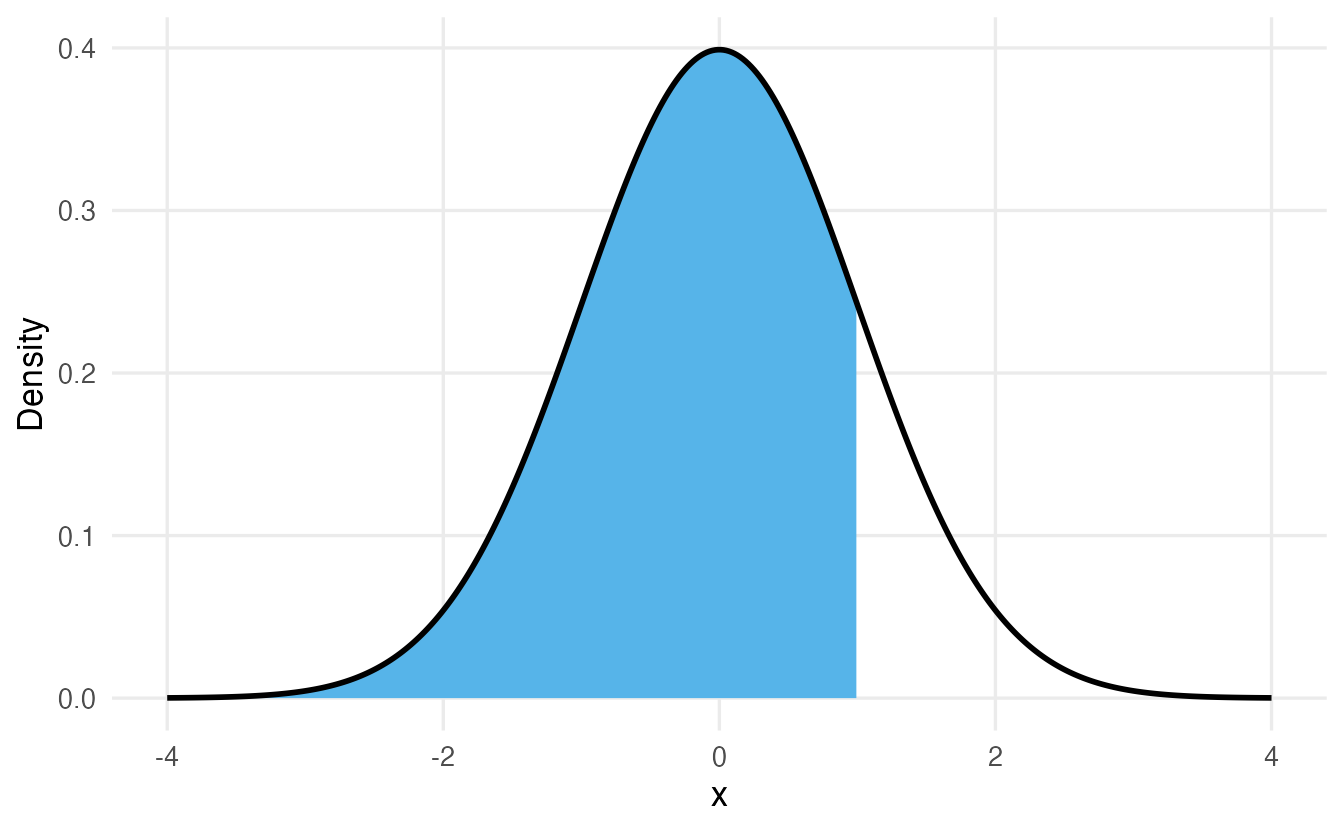
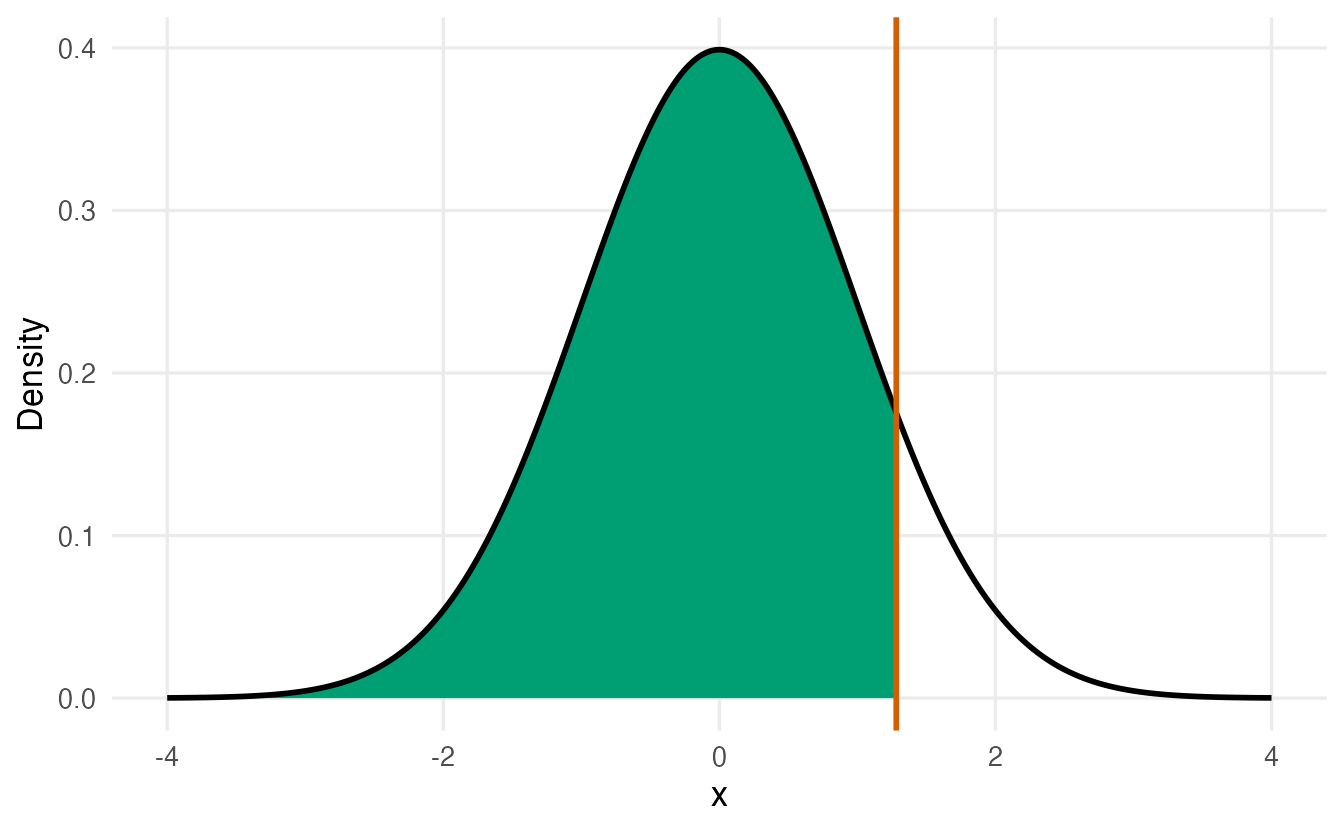
dnorm(1) # height of the standard normal curve at x = 1#> [1] 0.242pnorm(1) # P(X <= 1)#> [1] 0.8413qnorm(0.9) # the value with 90% of the distribution below it#> [1] 1.282set.seed(1)
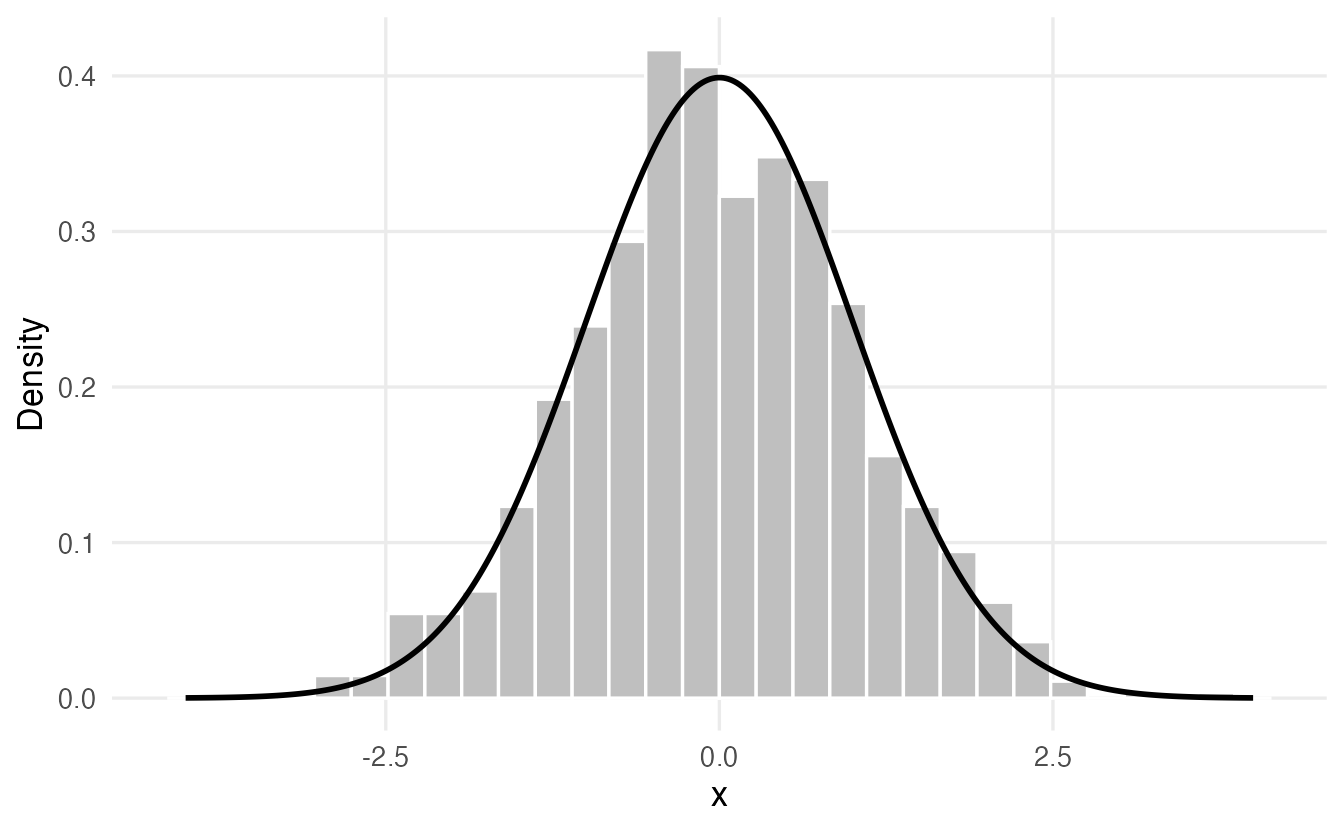
rnorm(5) # five random values#> [1] -0.6265 0.1836 -0.8356 1.5953 0.3295grid <- data.frame(x = seq(-4, 4, length.out = 400))
grid$density <- dnorm(grid$x)
base <- ggplot(grid, aes(x, density)) + labs(x = "x", y = "Density")
base + geom_line(linewidth = 1) +
annotate("segment", x = 1, xend = 1, y = 0, yend = dnorm(1),
colour = "#D55E00", linewidth = 1) +
annotate("point", x = 1, y = dnorm(1), colour = "#D55E00", size = 3)
base + geom_area(data = subset(grid, x <= 1), fill = "#56B4E9") +
geom_line(linewidth = 1)
base + geom_area(data = subset(grid, x <= qnorm(0.9)), fill = "#009E73") +
geom_line(linewidth = 1) +
geom_vline(xintercept = qnorm(0.9), colour = "#D55E00", linewidth = 1)
set.seed(1)
ggplot(data.frame(x = rnorm(1000)), aes(x)) +
geom_histogram(aes(y = after_stat(density)), bins = 30,
fill = "grey75", colour = "white") +
geom_line(data = grid, aes(x, density), linewidth = 1) +
labs(x = "x", y = "Density")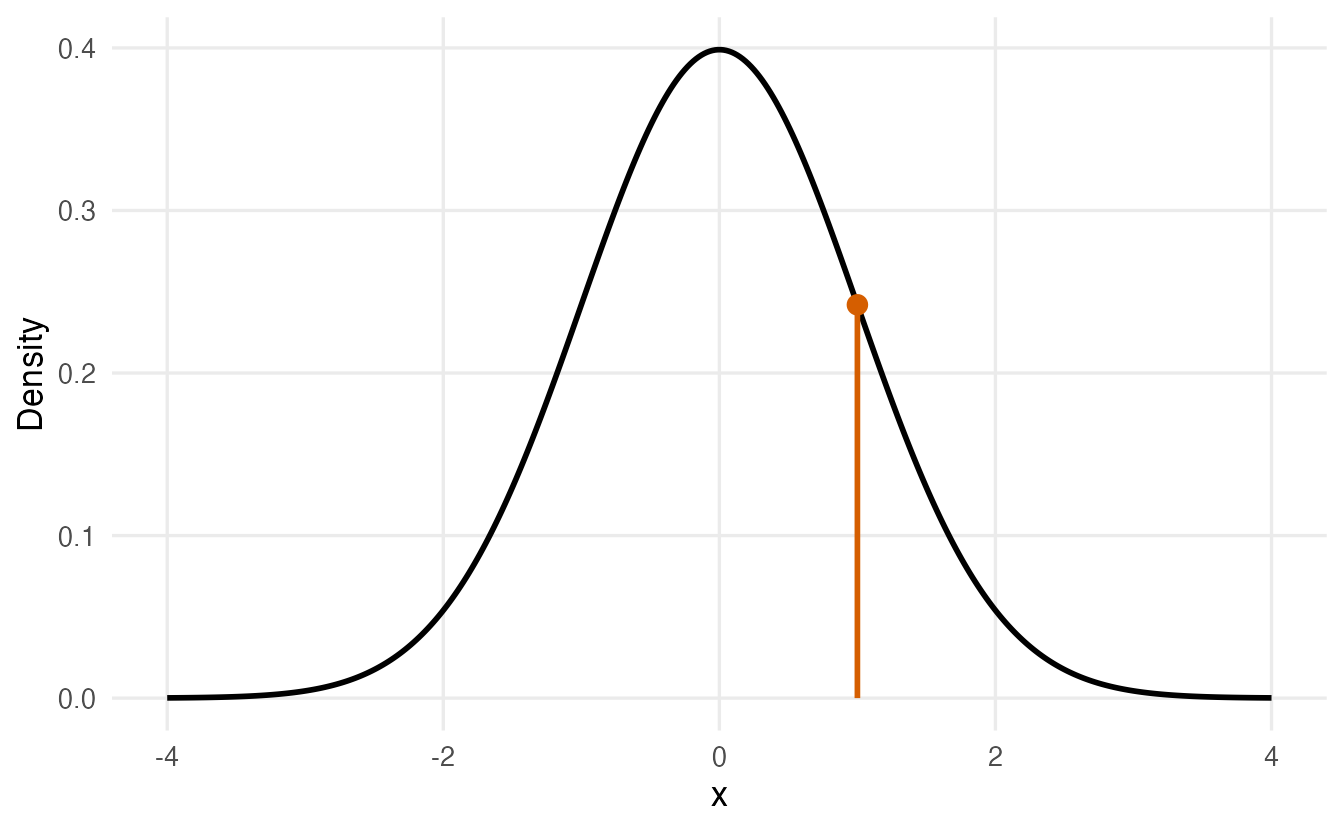
TipHow to read the four panels
- (a)
dnorm(1)= 0.242 is a height, not a probability. For continuous variables only areas are probabilities. - (b)
pnorm(1)= 0.841: the shaded area — about 84% of values are below 1. - (c)
qnorm(0.9)= 1.282 goes the other way: from an area (0.9) to a value.pandqundo each other:pnorm(qnorm(0.9))is 0.9. - (d)
rnorm()produces data whose histogram follows the curve. This is how we simulate.
Two tricks you will use constantly:
- Upper tail. \(P(X > x) = 1 - P(X \le x)\), so use
1 - pnorm(x)or, more accurately for tiny probabilities,pnorm(x, lower.tail = FALSE). - Intervals. \(P(a < X \le b) =\)
pnorm(b) - pnorm(a).
3. Bernoulli and binomial: counting successes
A Bernoulli trial has two outcomes: success (1) with probability \(p\), failure (0) with probability \(1-p\). A coin toss, a patient who recovers or not, a customer who buys or not.
The binomial distribution counts the number of successes in \(n\) independent Bernoulli trials with the same \(p\). We write \(X \sim \text{Binomial}(n, p)\). A Bernoulli variable is simply a binomial with \(n = 1\).
A student guesses all 20 questions of a quiz; each question has 4 options, so \(p = 0.25\). The number of correct answers is \(\text{Binomial}(20, 0.25)\).
dbinom(5, size = 20, prob = 0.25) # P(X = 5)#> [1] 0.2023pbinom(7, size = 20, prob = 0.25) # P(X <= 7)#> [1] 0.8982pbinom(9, size = 20, prob = 0.25, lower.tail = FALSE) # P(X >= 10)#> [1] 0.01386Note the last line: for a discrete variable \(P(X \ge 10) = 1 - P(X \le 9)\), so the cut-off is 9, not 10. Guessing gives a pass mark of 10/20 with probability 0.014: unlikely but not impossible.
quiz <- data.frame(correct = 0:20,
                   prob = dbinom(0:20, size = 20, prob = 0.25))
quiz$pass <- quiz$correct >= 10

ggplot(quiz, aes(correct, prob, fill = pass)) +
  geom_col() +
  scale_fill_manual(values = c(`FALSE` = "#0072B2", `TRUE` = "#E69F00")) +
  labs(x = "Number of correct answers", y = "Probability", fill = "Pass")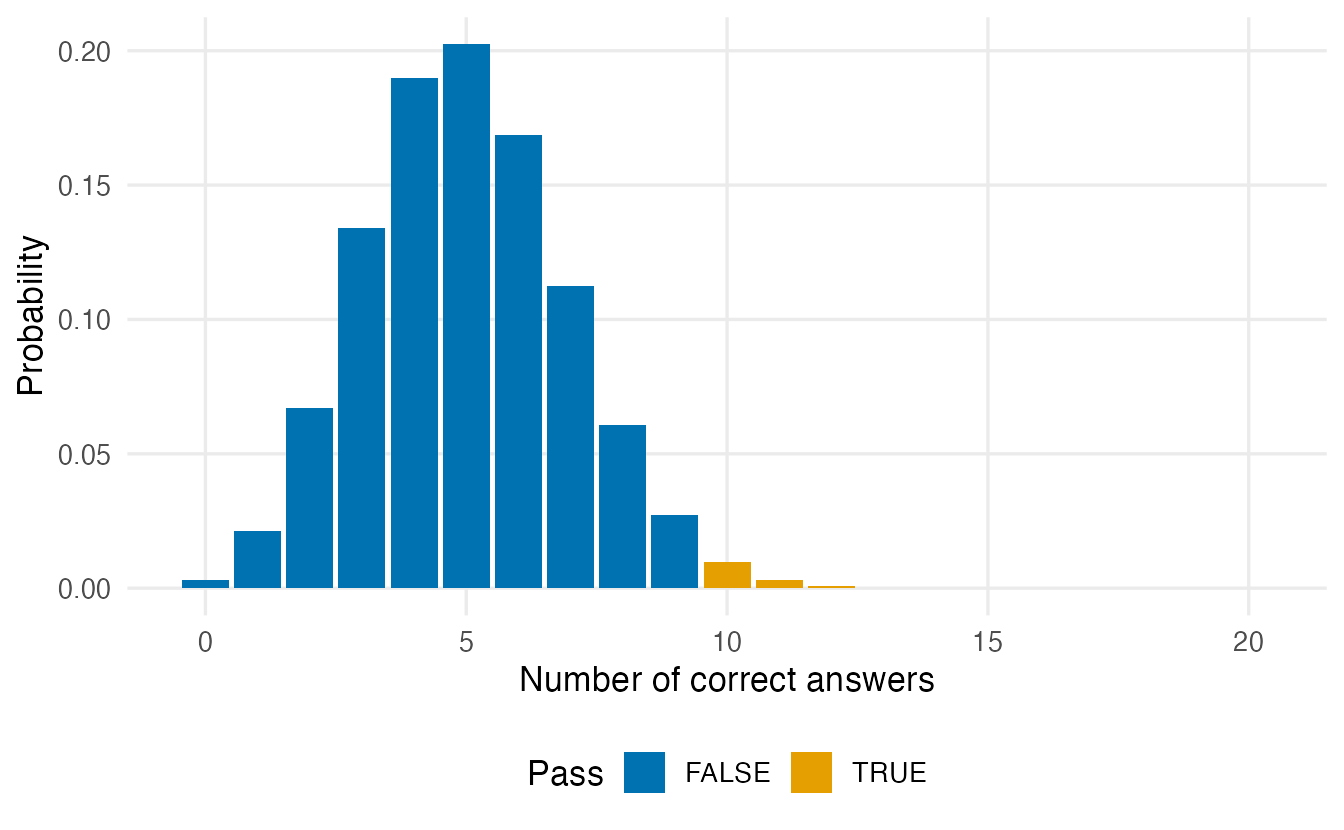
For a discrete distribution the d function gives real probabilities (the bar heights), and they sum to 1. Let us check the model against a simulation:
set.seed(28)
guesses <- rbinom(10000, size = 20, prob = 0.25)  # 10,000 simulated students
mean(guesses >= 10)
#> [1] 0.0119mean(guesses) # compare with n * p = 5#> [1] 4.98
NoteGoing deeper: the binomial formula
\[ P(X = k) = \binom{n}{k} p^k (1-p)^{n-k}, \qquad k = 0, 1, \ldots, n, \]
where \(\binom{n}{k}\) = choose(n, k) counts the ways of placing \(k\) successes among \(n\) trials. Check: choose(20, 5) * 0.25^5 * 0.75^15 equals dbinom(5, 20, 0.25). The mean and variance are \(E(X) = np\) and \(\operatorname{Var}(X) = np(1-p)\). The binomial assumes a fixed number of trials, independent trials and the same \(p\) for every trial.
4. Poisson: counting events
The Poisson distribution describes the number of events in a fixed interval of time or space when events happen independently at a constant average rate \(\lambda\) (“lambda”): calls per hour, typos per page, cases of a rare disease per year. Unlike the binomial there is no upper limit on the count.
An emergency room receives on average 3 patients per hour.
dpois(0, lambda = 3) # P(no patients in an hour)#> [1] 0.04979ppois(5, lambda = 3, lower.tail = FALSE) # P(6 or more)#> [1] 0.08392pois_df <- expand.grid(k = 0:18, lambda = c(1, 3, 8))
pois_df$prob <- dpois(pois_df$k, pois_df$lambda)
ggplot(pois_df, aes(k, prob)) +
geom_col(fill = "#009E73") +
facet_wrap(~ lambda, ncol = 3, labeller = label_both) +
labs(x = "Number of events", y = "Probability")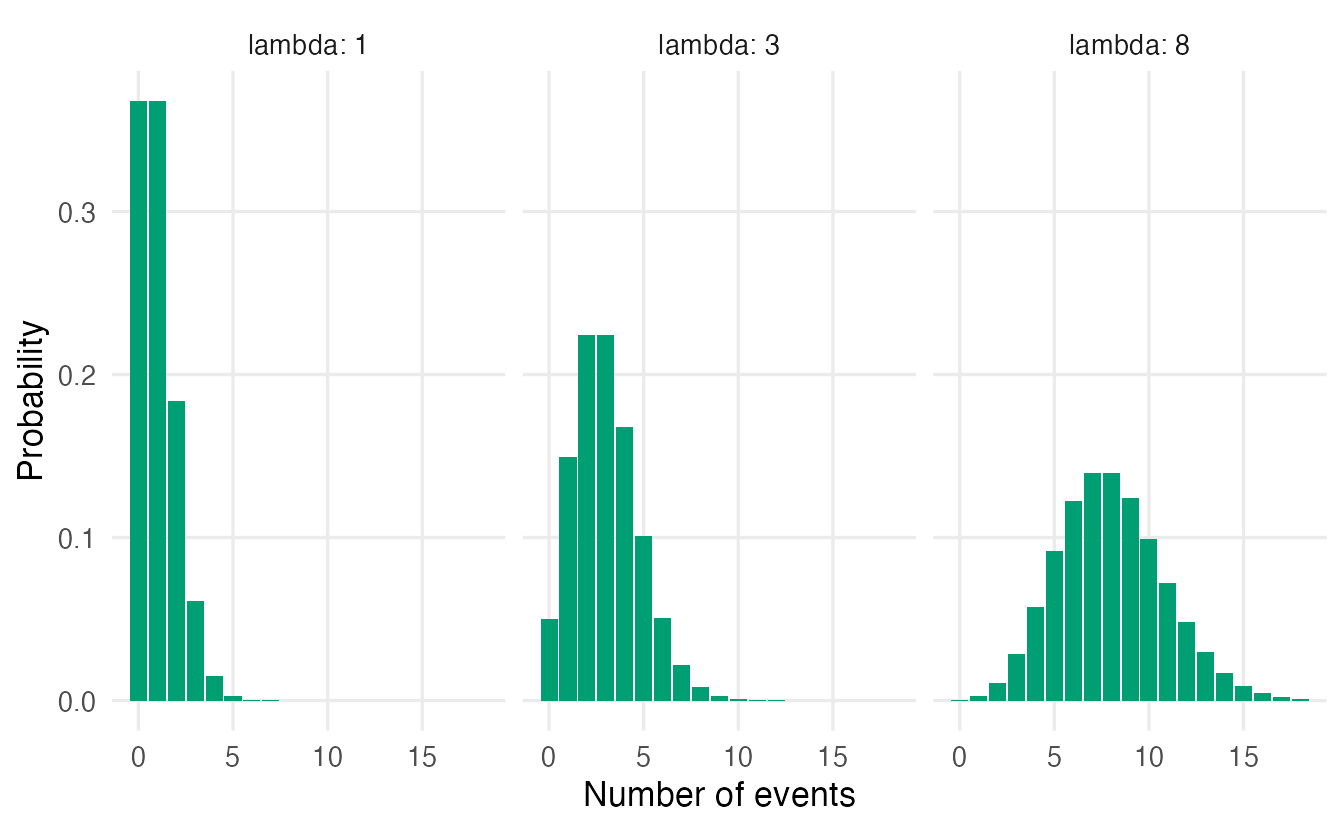
A distinctive property: for a Poisson variable the mean equals the variance, both equal to \(\lambda\).
set.seed(3)
arrivals <- rpois(10000, lambda = 3)
c(mean = mean(arrivals), variance = var(arrivals))
#> mean variance
#> 2.983 3.004Real count data often have a variance larger than the mean (overdispersion), something we will check in Poisson regression.
NoteGoing deeper: Poisson as a limit of the binomial
\(P(X = k) = e^{-\lambda}\lambda^k / k!\). If \(n\) is large and \(p\) small, \(\text{Binomial}(n, p)\) is almost identical to \(\text{Poisson}(\lambda = np)\): many opportunities, each with a tiny chance. Compare dbinom(0:5, 1000, 0.003) with dpois(0:5, 3): they agree to about three decimal places.
5. Uniform: all values equally likely
The continuous uniform distribution on \([a, b]\) gives every value in the interval the same density; its curve is flat. runif() (used in the last lesson) draws from it.
A bus comes every 10 minutes and you arrive at a random time. Your wait is \(\text{Uniform}(0, 10)\).
punif(7, min = 0, max = 10, lower.tail = FALSE) # P(wait > 7 minutes)#> [1] 0.3qunif(0.5, min = 0, max = 10) # median wait#> [1] 5For a uniform the probability of an interval is simply its length divided by \(b - a\): a wait longer than 7 minutes has probability \(3/10\).
6. The normal distribution
The normal (or Gaussian) distribution is the famous symmetric bell curve. It is described by two numbers: the mean \(\mu\) (its centre) and the standard deviation \(\sigma\) (its spread). We write \(X \sim N(\mu, \sigma)\); in R: dnorm(x, mean = mu, sd = sigma).
Why is it everywhere? Variables that result from adding up many small, independent effects (genes, environment, measurement error…) tend to be approximately normal. And, crucially for this course, averages of samples are approximately normal even when the data are not — the Central Limit Theorem of the next lesson.
The 68–95–99.7 rule
Whatever \(\mu\) and \(\sigma\), the same proportions of a normal distribution lie within 1, 2 and 3 standard deviations of the mean:
k <- 1:3
pnorm(k) - pnorm(-k)
#> [1] 0.6827 0.9545 0.9973bands <- data.frame(x = seq(-4, 4, length.out = 800))
bands$density <- dnorm(bands$x)
bands$band <- cut(abs(bands$x), breaks = c(0, 1, 2, 3, Inf),
labels = c("within 1 SD", "1-2 SD", "2-3 SD", "beyond 3 SD"),
include.lowest = TRUE)
ggplot(bands, aes(x, density)) +
geom_ribbon(aes(ymin = 0, ymax = density, fill = band,
group = interaction(band, x > 0))) +
geom_line(linewidth = 1) +
scale_x_continuous(breaks = -3:3,
labels = c("-3 SD", "-2 SD", "-1 SD", "mean",
"+1 SD", "+2 SD", "+3 SD")) +
labs(x = NULL, y = "Density", fill = NULL)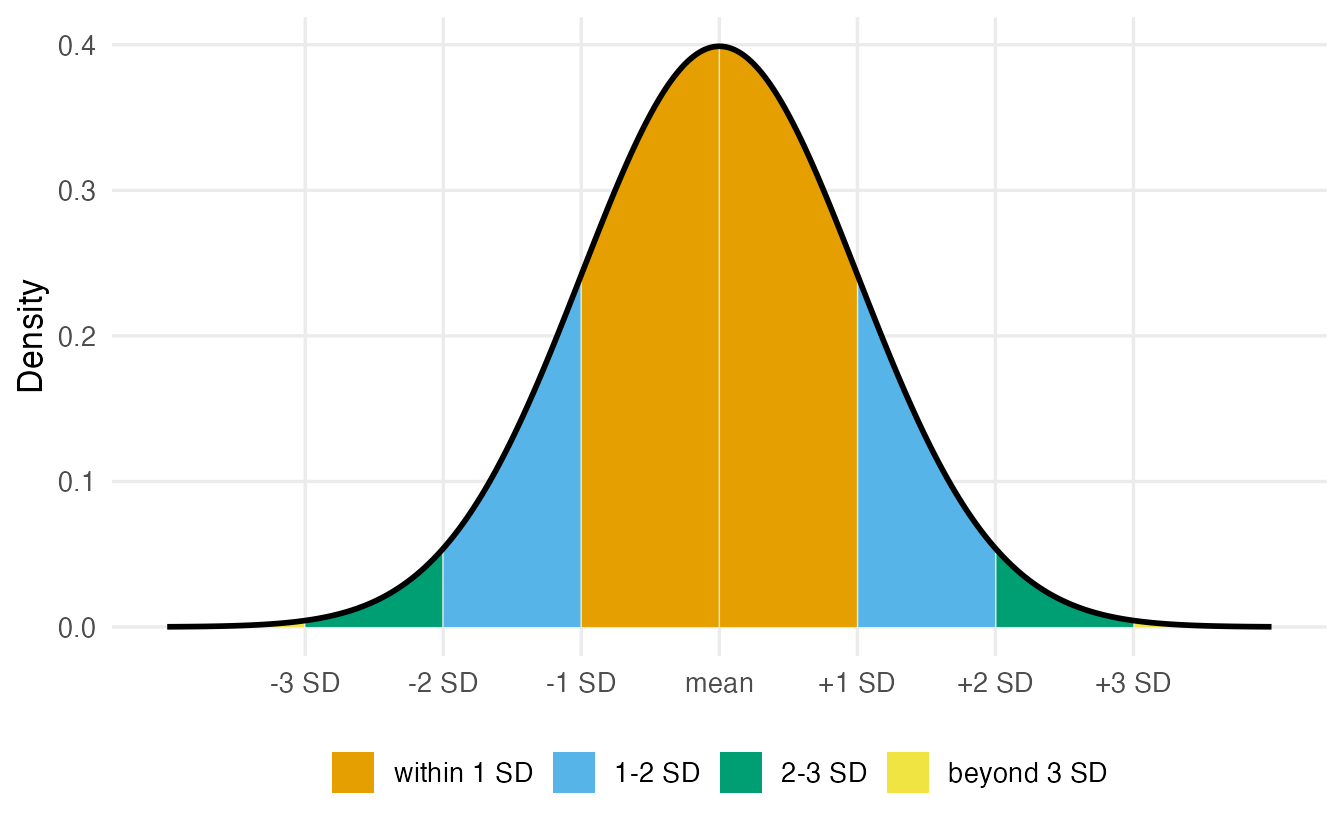
Standardisation and z-scores
To compare a value with a normal distribution we measure how many standard deviations it lies from the mean: the z-score
\[ z = \frac{x - \mu}{\sigma}. \]
If \(X \sim N(\mu, \sigma)\), then \(Z = (X-\mu)/\sigma \sim N(0, 1)\), the standard normal. Any normal probability can therefore be computed on the standard scale — this is exactly what the tables at the back of old statistics books did. In R you can skip the step and pass mean and sd directly.
Example: heavy Gentoo penguins
The body mass of Gentoo penguins is roughly symmetric. Let us model it with a normal distribution whose mean and SD are estimated from the data:
gentoo <- penguins$body_mass[penguins$species == "Gentoo"]
gentoo <- gentoo[!is.na(gentoo)]
mu    <- mean(gentoo)
sigma <- sd(gentoo)
c(mean = mu, sd = sigma)
#> mean sd
#> 5076.0 504.1Finding a probability. How likely is a Gentoo heavier than 5,500 g?
z <- (5500 - mu) / sigma
z
#> [1] 0.841pnorm(z, lower.tail = FALSE) # via the z-score#> [1] 0.2002pnorm(5500, mean = mu, sd = sigma, lower.tail = FALSE) # same, directly#> [1] 0.2002mean(gentoo > 5500) # observed proportion#> [1] 0.2276A 5,500 g penguin is 0.84 standard deviations above the mean. The model says that about 20% of Gentoos are heavier; in our sample the proportion is 23%. A model is a simplification: close agreement is what we hope for, not exact equality.
Finding a cut-off. Above which mass are the heaviest 10% of Gentoos? Now we know the probability and want the value, so we use qnorm():
qnorm(0.90, mean = mu, sd = sigma) # model#> [1] 5722quantile(gentoo, 0.90) # data#> 90%
#> 5700qnorm(c(0.025, 0.975), mean = mu, sd = sigma) # middle 95%#> [1] 4088 6064g_grid <- data.frame(
mass = seq(mu - 4 * sigma, mu + 4 * sigma, length.out = 400)
)
g_grid$density <- dnorm(g_grid$mass, mean = mu, sd = sigma)
ggplot(g_grid, aes(mass, density)) +
geom_area(data = subset(g_grid, mass >= 5500), fill = "#E69F00") +
geom_line(linewidth = 1) +
geom_vline(xintercept = 5500, linetype = "dashed") +
labs(x = "Body mass (g)", y = "Density")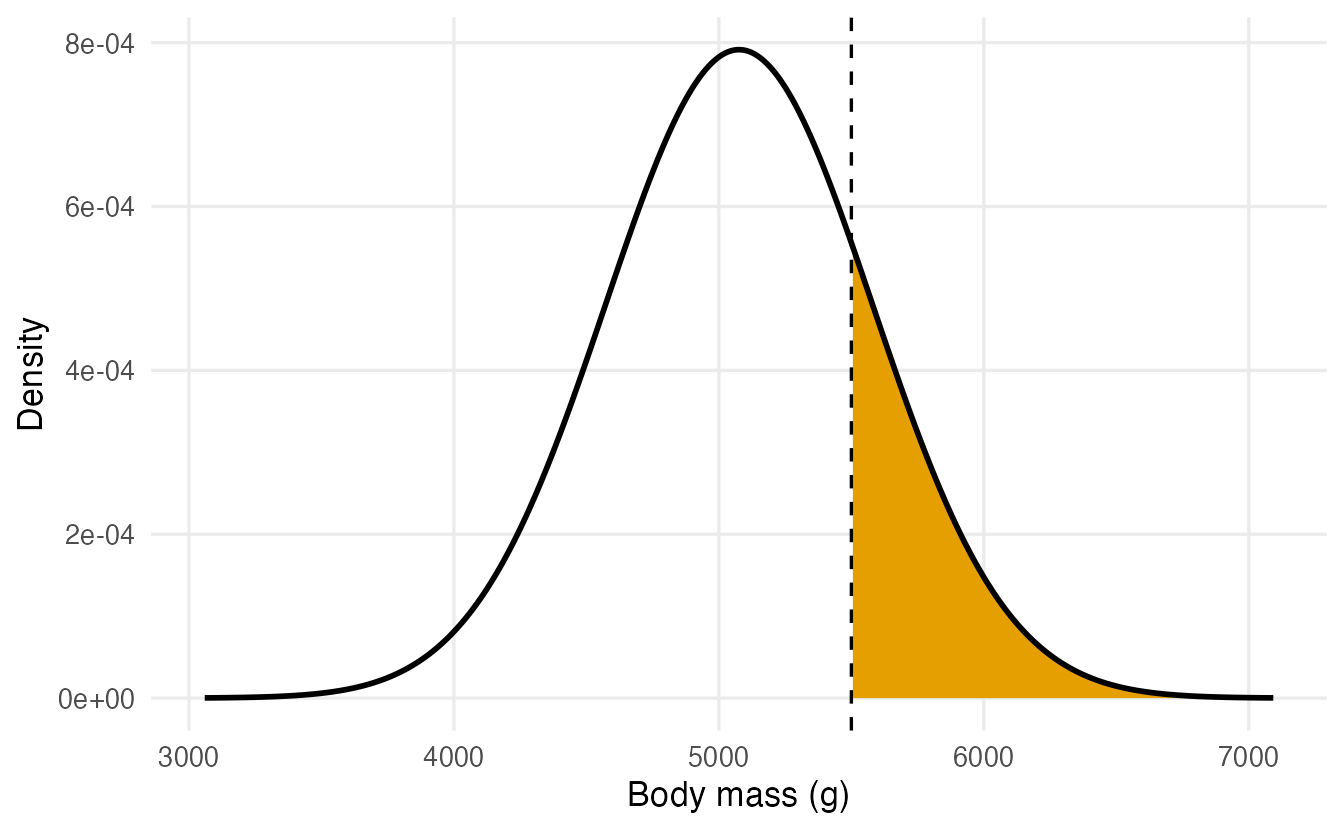
NoteGoing deeper: the normal density
\[ f(x) = \frac{1}{\sigma\sqrt{2\pi}} \exp\!\left(-\frac{(x-\mu)^2}{2\sigma^2}\right). \]
\(P(a < X \le b) = \int_a^b f(x)\,dx\), which has no closed form; pnorm() computes it numerically. The important quantile qnorm(0.975) = 1.96 ≈ 1.96 is where the “± 1.96 standard errors” of 95% confidence intervals comes from (see Confidence intervals).
7. Families we will meet in tests: t, chi-square, F
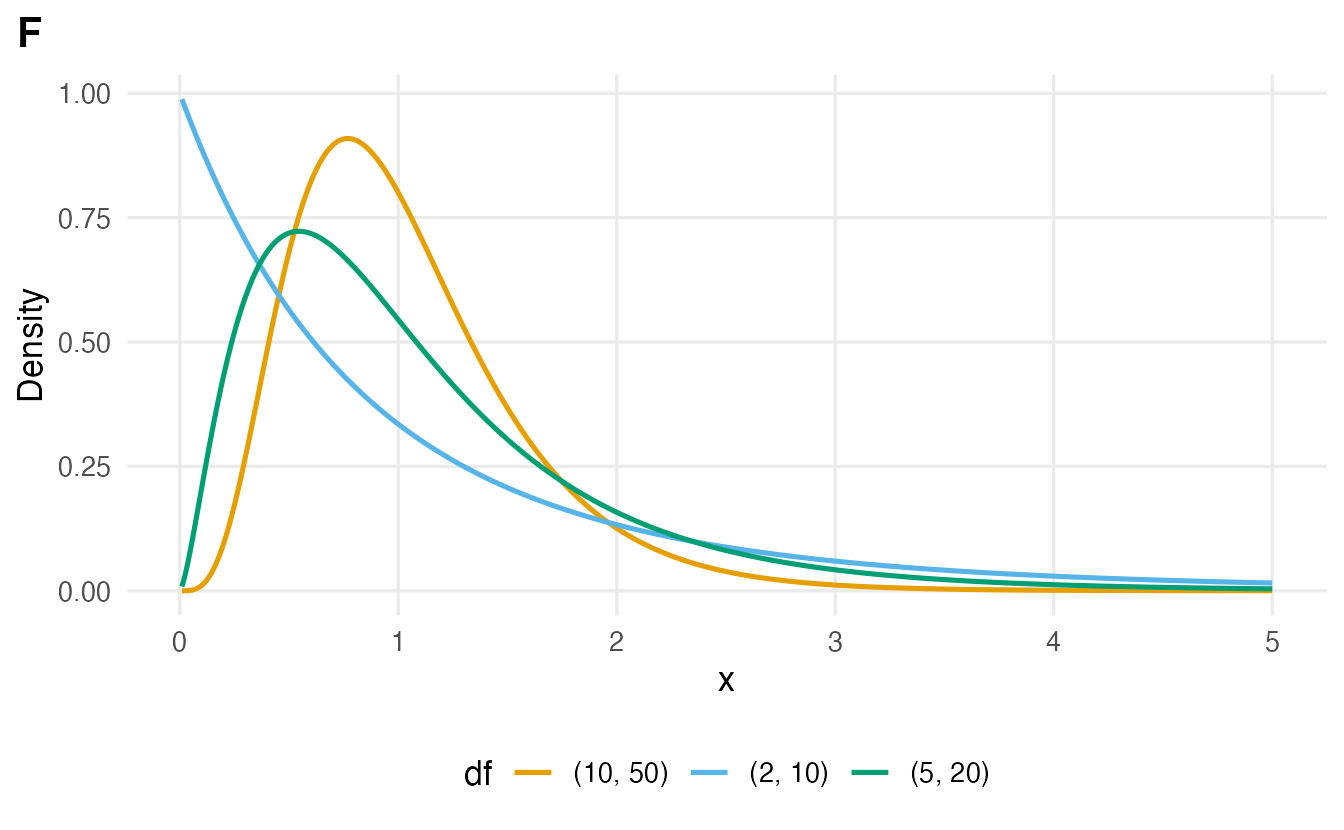
Three more continuous distributions appear as reference distributions for test statistics. You do not need their formulas, only their shapes and where they show up. They all have one or two parameters called degrees of freedom (df), which depend on the sample size.
x_t <- seq(-5, 5, length.out = 400)
t_df <- do.call(rbind, lapply(c(1, 3, 10, 30), \(k) {
  data.frame(x = x_t, density = dt(x_t, df = k), dist = paste0("t, df = ", k))
}))
t_df$dist <- factor(t_df$dist, levels = unique(t_df$dist))

ggplot(t_df, aes(x, density, colour = dist)) +
  geom_line(linewidth = 0.9) +
  geom_line(data = data.frame(x = x_t, density = dnorm(x_t)),
            colour = "black", linewidth = 1, linetype = "dashed") +
  labs(x = "x", y = "Density", colour = NULL)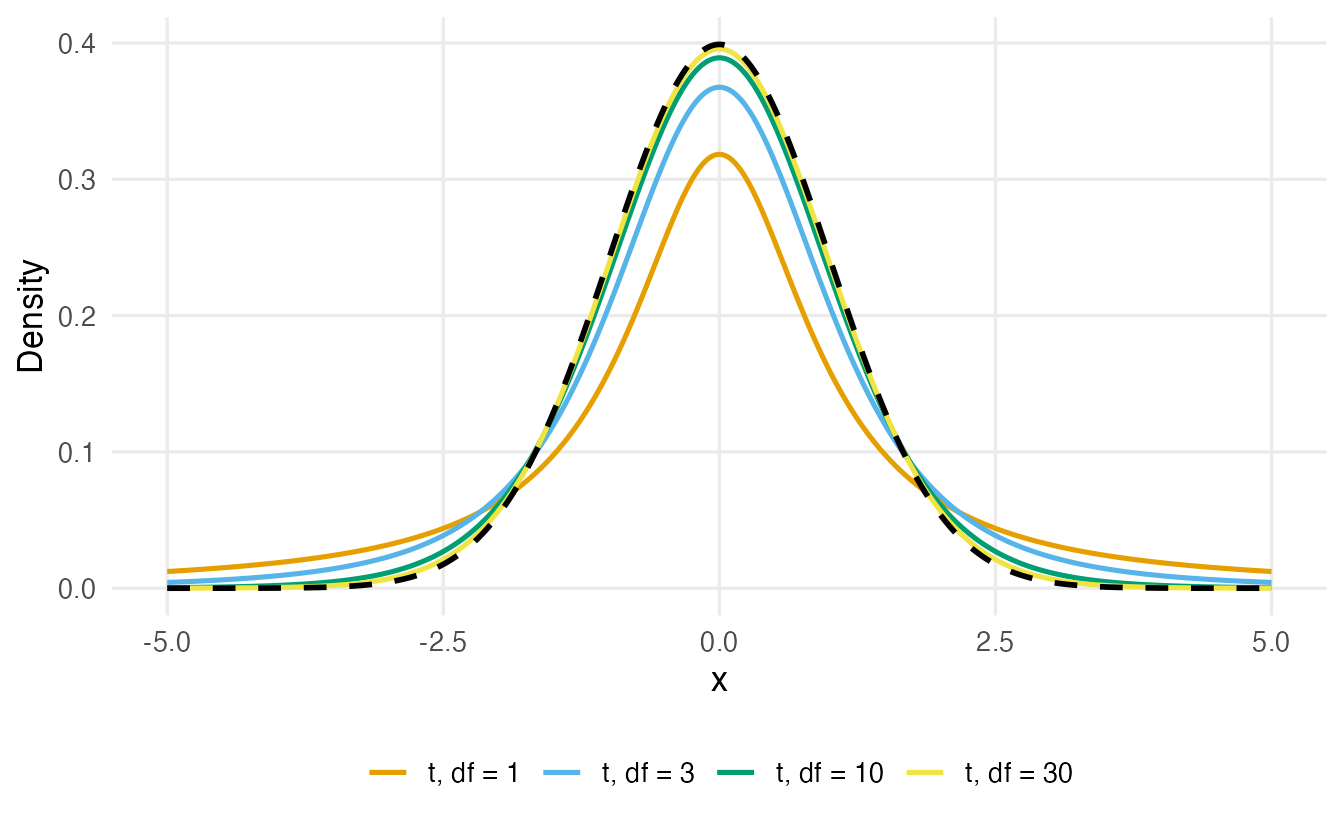
- t — symmetric like the normal but with heavier tails, because it accounts for the extra uncertainty of estimating \(\sigma\) from the data. Used for means: t-tests, confidence intervals for a mean, regression coefficients.
x_c <- seq(0.05, 20, length.out = 400)
c_df <- do.call(rbind, lapply(c(1, 3, 5, 10), \(k) {
  data.frame(x = x_c, density = dchisq(x_c, df = k), df = factor(k))
}))
ggplot(c_df, aes(x, density, colour = df)) +
  geom_line(linewidth = 0.9) +
  coord_cartesian(ylim = c(0, 0.5)) +
  labs(x = "x", y = "Density", colour = "df", title = "Chi-square")

x_f <- seq(0.01, 5, length.out = 400)
f_pars <- list(c(2, 10), c(5, 20), c(10, 50))
f_df <- do.call(rbind, lapply(f_pars, \(d) {
  data.frame(x = x_f, density = df(x_f, d[1], d[2]),
             df = paste0("(", d[1], ", ", d[2], ")"))
}))
ggplot(f_df, aes(x, density, colour = df)) +
  geom_line(linewidth = 0.9) +
  labs(x = "x", y = "Density", colour = "df", title = "F")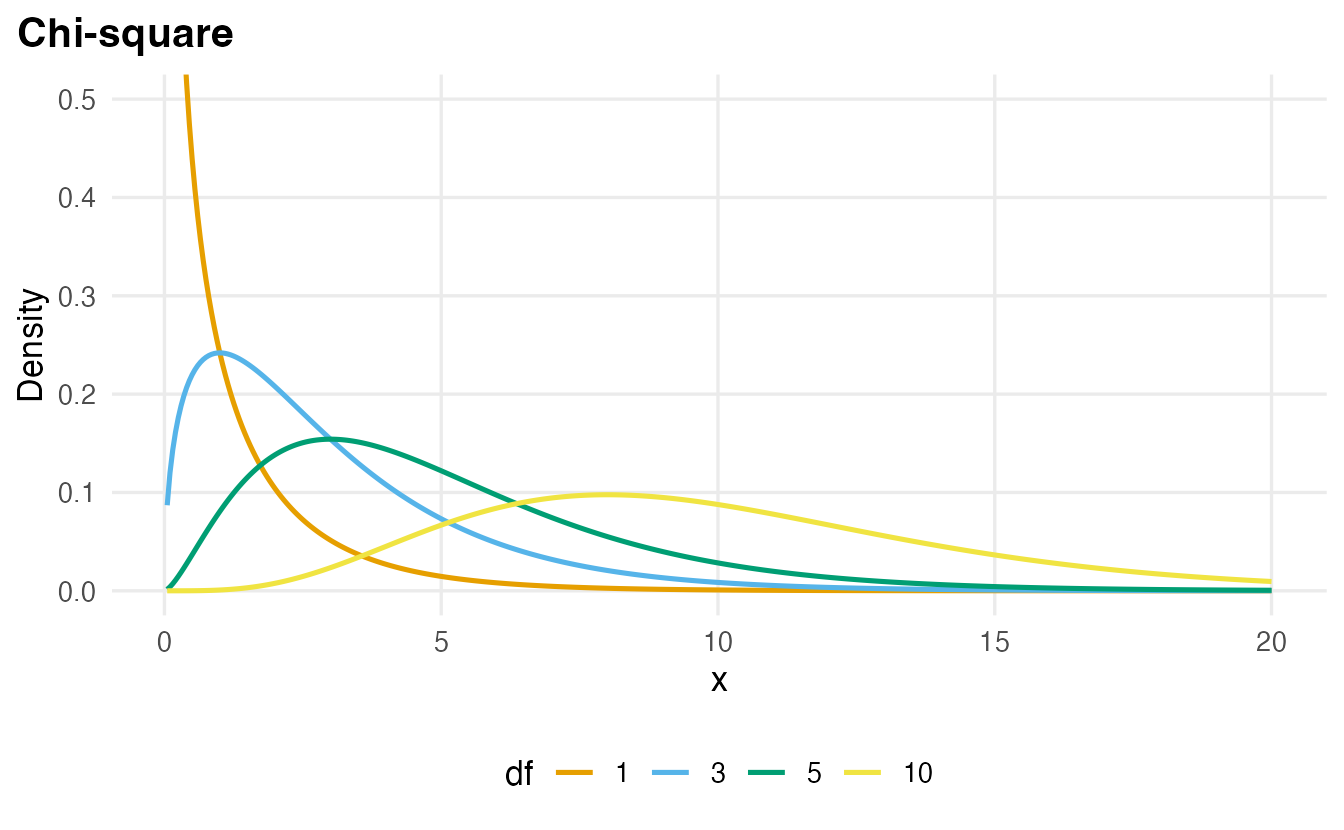
- Chi-square (\(\chi^2\)) — positive and right-skewed; a sum of squared standard normal values. Used for tests on tables of counts.
- F — positive and right-skewed, the ratio of two variances, with two df parameters. Used in ANOVA and to compare regression models.
They have their own d/p/q/r functions: dt(), pt(), qt(), rt(); dchisq(), pchisq(), …; df(), pf(), … For instance qt(0.975, df = 10) = 2.228 replaces 1.96 when a mean is estimated from 11 observations.
8. QQ-plots: does a distribution fit my data?
A histogram with a curve on top is a good first look, but the eye is poor at judging the tails. A quantile–quantile plot (QQ-plot) is sharper. The idea:
- sort the data from smallest to largest;
- compute where those values would be if the data came from a standard normal (the theoretical quantiles,
qnorm(ppoints(n))); - plot one against the other.
If the data are normal, the points lie on a straight line. Building one by hand shows there is nothing magic about it:
set.seed(4)
x <- rnorm(50, mean = 10, sd = 2)
theoretical <- qnorm(ppoints(length(x)))
head(cbind(theoretical, sample = sort(x)))
#> theoretical sample
#> [1,] -2.326 6.405
#> [2,] -1.881 6.624
#> [3,] -1.645 7.036
#> [4,] -1.476 7.438
#> [5,] -1.341 8.144
#> [6,] -1.227 8.276In practice we use qqnorm() + qqline() in base R, or stat_qq() + stat_qq_line() in ggplot2. The pattern of departures from the line tells you how the data differ from a normal:
set.seed(5)
qq_df <- data.frame(
  value = c(rnorm(200), rexp(200), rt(200, df = 3)),
  shape = rep(c("Normal", "Right-skewed (exponential)",
                "Heavy tails (t, 3 df)"), each = 200)
)
qq_df$shape <- factor(qq_df$shape, levels = unique(qq_df$shape))

ggplot(qq_df, aes(sample = value)) +
  stat_qq(alpha = 0.6) +
  stat_qq_line(colour = "#D55E00", linewidth = 1) +
  facet_wrap(~ shape, scales = "free_y") +
  labs(x = "Theoretical normal quantiles", y = "Sample quantiles")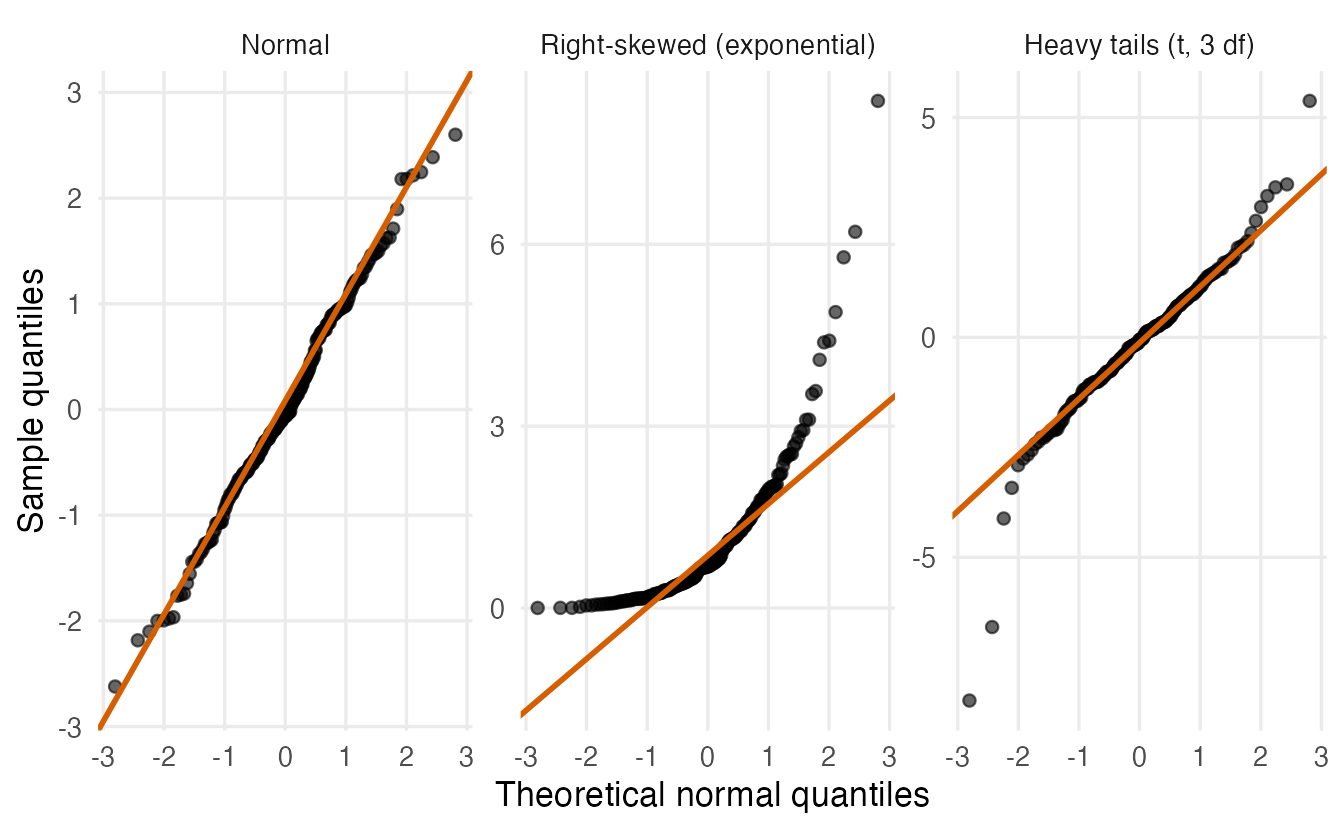
TipHow to read a QQ-plot
- Points on the line: the normal model fits.
- A curve bending up at the right (a “banana”): right skew — the largest values are larger than a normal would produce.
- An S-shape with both ends pulled away from the line: heavy tails — more extreme values than a normal on both sides.
- A few wiggles at the very ends are normal for small samples; focus on systematic patterns.
9. Fitting a normal model to penguin body mass
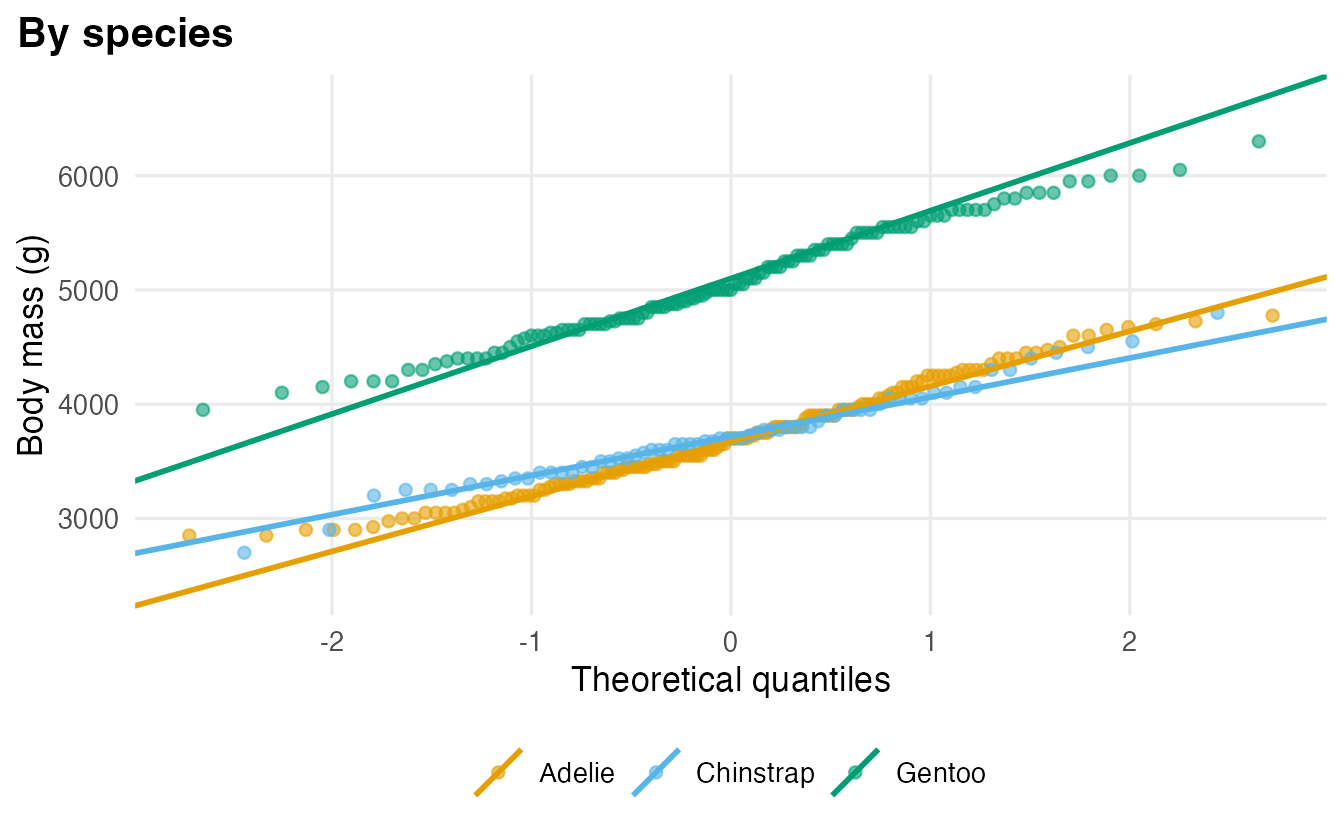
Is penguin body mass normally distributed? Let us first try all penguins together, then each species separately.
peng <- penguins[!is.na(penguins$body_mass), ]

curves <- do.call(rbind, lapply(levels(peng$species), \(sp) {
  m <- peng$body_mass[peng$species == sp]
  mass_grid <- seq(2500, 6500, by = 10)
  data.frame(species = sp, body_mass = mass_grid,
             density = dnorm(mass_grid, mean = mean(m), sd = sd(m)))
}))
curves$species <- factor(curves$species, levels = levels(peng$species))

ggplot(peng, aes(body_mass)) +
  geom_histogram(aes(y = after_stat(density)), bins = 20,
                 fill = "grey75", colour = "white") +
  geom_line(data = curves, aes(y = density), colour = "#D55E00",
            linewidth = 1) +
  facet_wrap(~ species, ncol = 1) +
  labs(x = "Body mass (g)", y = "Density")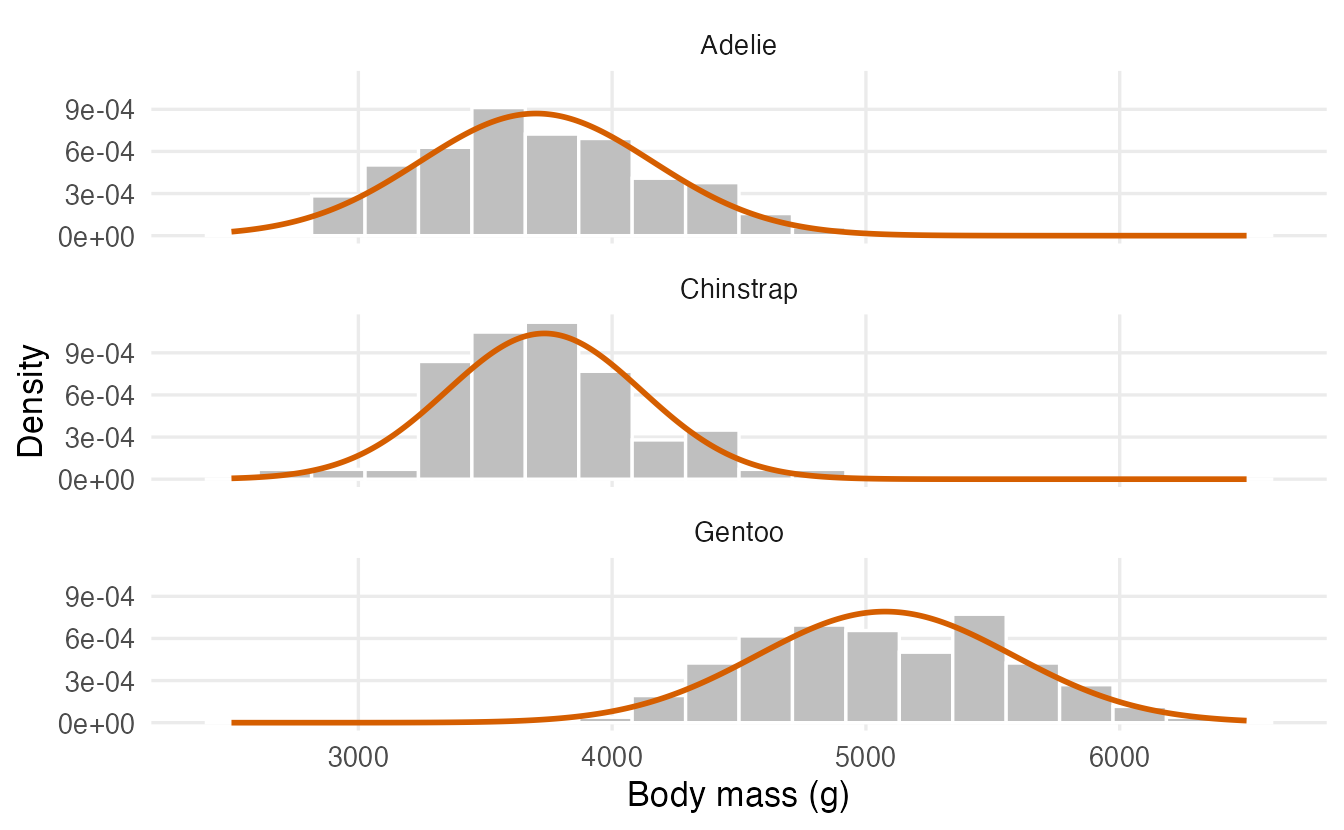
ggplot(peng, aes(sample = body_mass)) +
  stat_qq(alpha = 0.5) +
  stat_qq_line(colour = "#D55E00", linewidth = 1) +
  labs(x = "Theoretical quantiles", y = "Body mass (g)", title = "All species")

ggplot(peng, aes(sample = body_mass, colour = species)) +
  stat_qq(alpha = 0.6) +
  stat_qq_line(linewidth = 1) +
  labs(x = "Theoretical quantiles", y = "Body mass (g)",
       title = "By species", colour = NULL)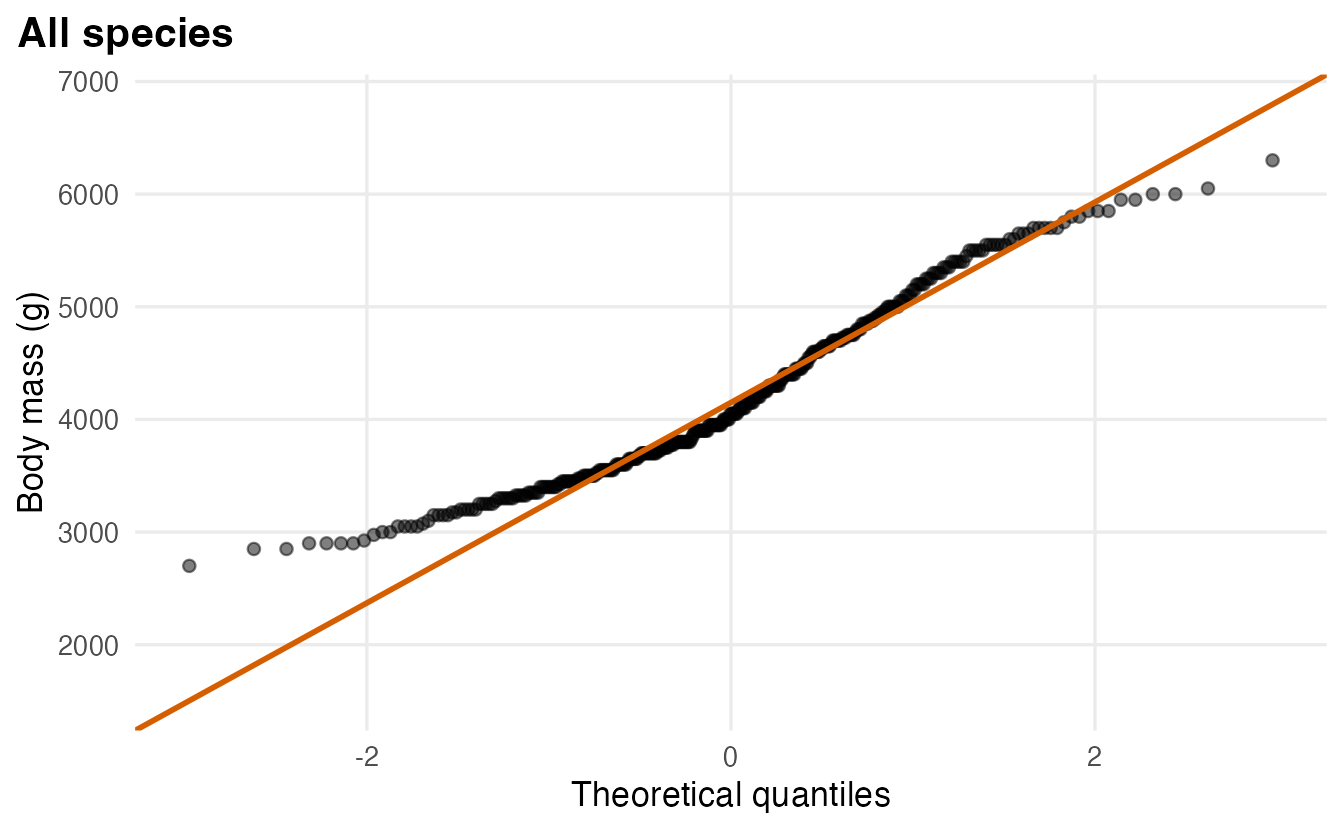
TipHow to read these plots
- Pooled, the points bend away from the line: mixing a heavy species (Gentoo) with two lighter ones produces a right-skewed distribution (mean 4202 g vs median 4050 g) that a single normal describes poorly.
- Within each species the histograms are close to the normal curves and the QQ-points are close to straight lines. A normal model per species is a reasonable simplification.
- The lesson generalises: a variable can be non-normal overall simply because it mixes groups. Look for structure before blaming the distribution.
WarningCommon pitfalls
- Treating
dnorm()as a probability. For a continuous variable it is a density (it can even exceed 1). Probabilities are areas: usepnorm(). - Off-by-one errors with discrete tails. \(P(X \ge 10)\) is
pbinom(9, ...)withlower.tail = FALSE, notpbinom(10, ...). - Passing the variance instead of the SD.
pnorm(x, mean, sd)wants the standard deviation:sd = 2, notsd = 4, for a variance of 4. - Mixing up
pandq.p*()takes a value and returns a probability;q*()takes a probability and returns a value. - Expecting real data to be exactly normal. No real variable is. The question is whether the normal is a useful approximation for the purpose at hand; QQ-plots help, formal normality tests on large samples flag irrelevant deviations.
10. Check your understanding
11. Exercises
Interactive (run in your browser)
★ Exercise 1 — the guessing student. A quiz has 20 questions with 4 options each. A student guesses every answer. Compute (a) the probability of exactly 5 correct answers, (b) the probability of 10 or more, and (c) check (b) with 10,000 simulated students.
For “10 or more” use pbinom(9, ...) with lower.tail = FALSE, because \(P(X \ge 10) = 1 - P(X \le 9)\).
dbinom(5, size = 20, prob = 0.25)                      # about 0.202
pbinom(9, size = 20, prob = 0.25, lower.tail = FALSE)  # about 0.014
set.seed(1)
sim <- rbinom(10000, size = 20, prob = 0.25)
mean(sim >= 10)                                        # close to 0.014
Five correct answers is the single most likely result (it is the mean, \(20 \times 0.25\)). Passing by pure guessing happens to only about 1.4% of students.
★★ Exercise 2 — normal probabilities and cut-offs. Scores on a standardised test are approximately \(N(100, 15)\). Find (a) the proportion of people scoring above 130, (b) the proportion between 85 and 115, (c) the score needed to be in the top 5%.
- is an interval:
pnorm(b) - pnorm(a). (c) goes from a probability to a value, so it needsqnorm().
pnorm(130, mean = 100, sd = 15, lower.tail = FALSE)              # about 0.023
pnorm(115, mean = 100, sd = 15) - pnorm(85, mean = 100, sd = 15) # about 0.683
qnorm(0.95, mean = 100, sd = 15)                                 # about 124.7
130 is 2 SD above the mean, so about 2.3% score higher (half of the 5% outside ±2 SD). 85–115 is ±1 SD: the familiar 68%.
★★ Exercise 3 — a call centre. A call centre receives on average 4 calls every 10 minutes. Using a Poisson model, find the probability of (a) no calls in a 10-minute window and (b) more than 8 calls. (c) Simulate 10,000 windows with rpois() and compare the mean and the variance of the counts.
“More than 8” is \(P(X > 8) = 1 - P(X \le 8)\), so the cut-off is 8. The random generator is rpois().
dpois(0, lambda = 4)                        # about 0.018
ppois(8, lambda = 4, lower.tail = FALSE)    # about 0.021
set.seed(1)
calls <- rpois(10000, lambda = 4)
c(mean = mean(calls), var = var(calls))     # both close to 4
Mean and variance are both close to \(\lambda = 4\), the signature of a Poisson distribution.
★★ Exercise 4 — read the QQ-plot. Draw normal QQ-plots of the built-in rivers (lengths of 141 North American rivers) and faithful$waiting (waiting times between eruptions of the Old Faithful geyser). Before running, predict which one is right-skewed. What else do you notice?
Fill in rivers and faithful$waiting. Then look at the ends of each plot, and make a hist() of each variable if the pattern is unclear.
par(mfrow = c(1, 2))
qqnorm(rivers, main = "rivers"); qqline(rivers)
qqnorm(faithful$waiting, main = "faithful$waiting"); qqline(faithful$waiting)
par(mfrow = c(1, 1))
rivers shows the “banana” of strong right skew: a few very long rivers. faithful$waiting is not skewed but shows a step (two flat stretches joined by a jump): the data are bimodal, with a cluster of short and a cluster of long waits — hist(faithful$waiting) confirms it. Neither variable is well described by one normal distribution.
Practice on your own computer
★★★ Exercise 5 — checking the 68% rule on real data. For each penguin species, compute the proportion of birds whose flipper length (flipper_len) lies within one standard deviation of the species mean. Compare with the normal value pnorm(1) - pnorm(-1) and draw QQ-plots by species. Is the normal model reasonable?
TipSolution
within_1sd <- function(x) {
  x <- x[!is.na(x)]
  mean(abs(x - mean(x)) < sd(x))
}
tapply(penguins$flipper_len, penguins$species, within_1sd)
pnorm(1) - pnorm(-1)

ggplot(penguins, aes(sample = flipper_len)) +
  stat_qq() +
  stat_qq_line(colour = "#D55E00") +
  facet_wrap(~ species) +
  labs(x = "Theoretical quantiles", y = "Flipper length (mm)")
The proportions are roughly 0.71 (Adelie), 0.68 (Chinstrap) and 0.63 (Gentoo), all near 0.68. The QQ-plots are close to straight lines; small “staircase” steps appear because flipper lengths are recorded as whole millimetres. A normal model per species is a reasonable approximation. (ggplot2 drops the rows with missing values with a warning.)
Summary
| Distribution | Describes | d / p / q / r |
Mean |
|---|---|---|---|
| Binomial\((n, p)\) | successes in \(n\) trials | dbinom(), pbinom(), qbinom(), rbinom() |
\(np\) |
| Poisson\((\lambda)\) | events in an interval | dpois(), ppois(), qpois(), rpois() |
\(\lambda\) |
| Uniform\((a, b)\) | equally likely values | dunif(), punif(), qunif(), runif() |
\((a+b)/2\) |
| Normal\((\mu, \sigma)\) | sums of many small effects | dnorm(), pnorm(), qnorm(), rnorm() |
\(\mu\) |
| t, \(\chi^2\), F | reference distributions for tests | dt()/pt()/…, dchisq()/…, df()/… |
— |
| QQ-plot | compare data with the normal | qqnorm() + qqline(), stat_qq() + stat_qq_line() |
— |
d= height/probability of one value,p= probability up to a value,q= value for a probability,r= random draws.- For continuous variables, probabilities are areas; use
lower.tail = FALSEfor upper tails. - In a normal distribution 68%, 95% and 99.7% of values lie within 1, 2 and 3 SD of the mean; z-scores put everything on the standard scale.
- QQ-plots reveal skew, heavy tails and mixtures far better than histograms; non-normality is often a sign of hidden groups.