library(dplyr)Writing functions
Turn copy-pasted code into small, tested, reusable tools
Learn the anatomy of an R function, arguments and defaults, return values, input checks, scoping and anonymous functions, with two worked examples: rescaling to [0, 1] and a reproducible train/test split.
NoteLearning objectives
By the end of this lesson you will be able to:
- write a function with arguments, default values and a clear return value;
- return several results at once in a named list;
- check inputs with
stopifnot()andstop()and write informative error messages; - explain where R looks for a variable (lexical scoping) and why functions do not change your global variables;
- use anonymous functions
\(x)and decide when a piece of code deserves to become a function.
1. Why write functions?
Suppose you want to rescale three measurements of the penguins so that each one runs from 0 (smallest bird) to 1 (largest bird). A first attempt usually looks like this:
peng <- penguins[, c("bill_len", "bill_dep", "flipper_len")]

peng$bill_len_01 <- (peng$bill_len - min(peng$bill_len, na.rm = TRUE)) /
  (max(peng$bill_len, na.rm = TRUE) - min(peng$bill_len, na.rm = TRUE))
peng$bill_dep_01 <- (peng$bill_dep - min(peng$bill_dep, na.rm = TRUE)) /
  (max(peng$bill_dep, na.rm = TRUE) - min(peng$bill_len, na.rm = TRUE))
Look closely at the second line: the last min() uses bill_len instead of bill_dep. This copy-paste mistake gives wrong numbers without any error or warning:
range(peng$bill_dep_01, na.rm = TRUE) # should be 0 and 1!#> [1] -0.7925 0.0000A function is a named, reusable piece of code. Writing the logic once inside a function has three advantages:
- Fewer mistakes — there is only one place where the formula is written.
- Easier changes — fix or improve the function and every use benefits.
- Readable code —
rescale01(x)says what you are doing; the formula only says how.
2. Functions you already use
You have been calling functions since the first lesson: mean(), sum(), c(). A function call has the form name(argument1, argument2, ...). Arguments can be given by position or by name, and many have default values.
| Type | Examples |
|---|---|
| Maths | abs(x), sqrt(x), exp(x), log(x) (natural log), log(x, base = 10), factorial(x) |
| Statistics | mean(x), median(x), var(x), sd(x), quantile(x), summary(x), scale(x) (z-scores) |
| Structure | length(x), nrow(df), ncol(df), dim(m) |
x <- c(-2, 0, 3)
abs(x)
#> [1] 2 0 3log(100, base = 10)#> [1] 2quantile(cars$speed)#> 0% 25% 50% 75% 100%
#> 4 12 15 19 25length() depends on the object
length() counts elements. What counts as an element depends on the type of object, and this regularly surprises people:
m <- matrix(1:12, nrow = 3, ncol = 4)
length(m)       # a matrix is a vector with dimensions: 3 * 4 = 12
#> [1] 12length(cars) # a data frame is a list of columns: number of columns#> [1] 2nrow(cars) # number of rows: use nrow() for data frames#> [1] 50length(cars$speed)#> [1] 50For a matrix, length() returns the total number of cells (\(n \times m\)), not the number of columns. For a data frame, it returns the number of columns, because a data frame is a list of columns (see Lists). To avoid ambiguity, use nrow(), ncol() and dim().
diff(): a function with a useful default
diff() computes differences between consecutive values. Its argument lag has the default 1.
set.seed(123)
walk <- cumsum(rnorm(200))
steps <- diff(walk)          # same as diff(walk, lag = 1)

par(mfrow = c(1, 2))
plot(walk, type = "l", main = "Random walk", xlab = "Time", ylab = "Value")
plot(steps, type = "l", main = "First differences", xlab = "Time",
     ylab = "Difference")
par(mfrow = c(1, 1))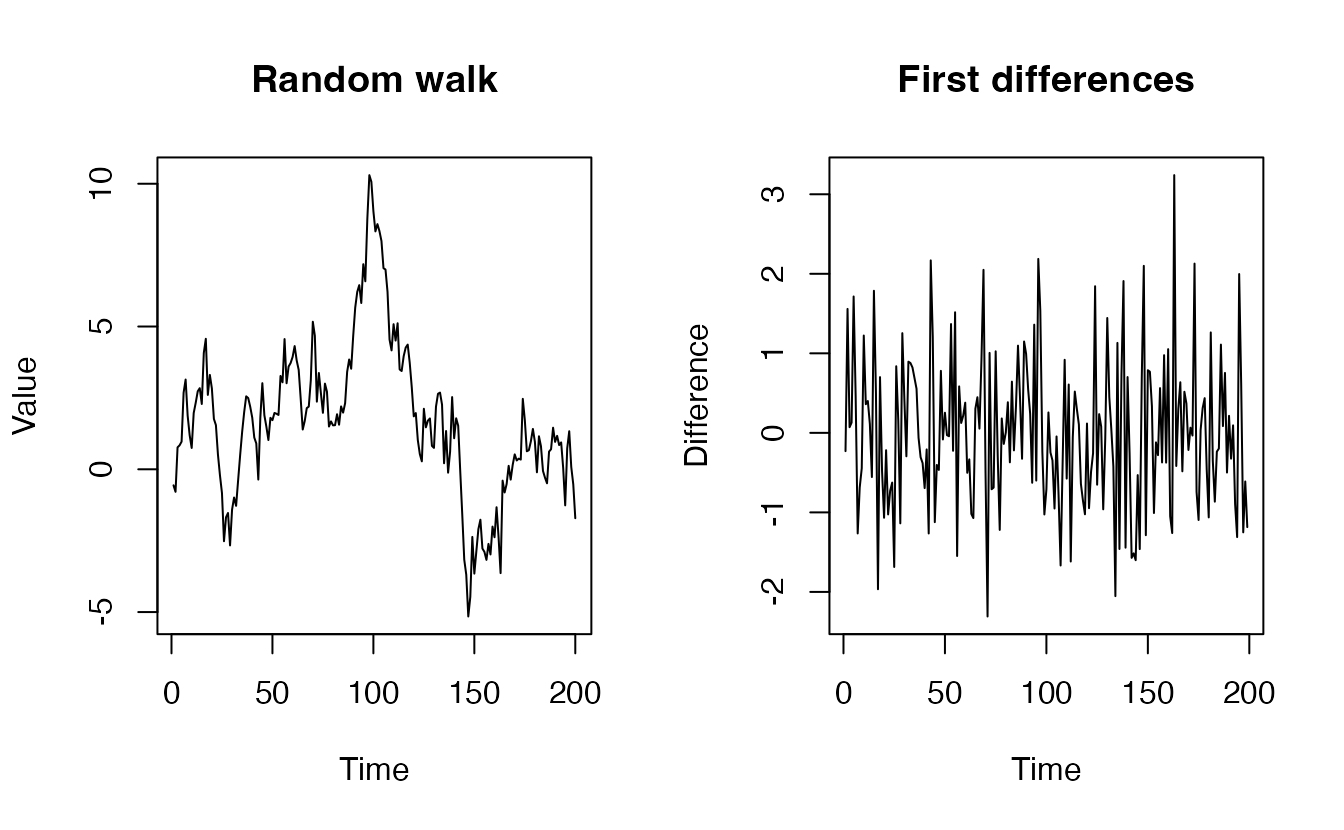
To see the arguments of any function and their defaults, type args(diff) or open the help page with ?diff.
3. Anatomy of a function
You create a function with function() and store it in a name with <-, exactly like any other object.
square <- function(n) {
  n^2
}

square(4)
#> [1] 16square(1:5) # works on whole vectors because ^ is vectorised#> [1] 1 4 9 16 25Every function has three parts:
| Part | In square |
How to see it |
|---|---|---|
| Name | square |
— |
| Arguments (inputs, also called formals) | n |
formals(square) |
| Body (the code that runs) | n^2 |
body(square) |
A function is an ordinary object: you can print it, copy it, and remove it.
rm(square)
exists("square")
#> [1] FALSE
TipNaming functions
Functions do things, so give them verbs in snake_case: rescale01(), split_data(), compute_bmi(). Avoid names that already exist in R, such as mean, c, t or data.
4. Arguments and default values
Matching by position or by name
times <- function(x, y) {
  x * y
}

times(2, 4)            # by position: x = 2, y = 4
#> [1] 8times(y = 4, x = 2) # by name: order does not matter#> [1] 8A common convention: the first one or two arguments (the data) are given by position, all the other ones (the details) by name — like mean(x, na.rm = TRUE).
Default values
A default is used when the caller does not supply that argument.
power <- function(x, exponent = 2) {
  x^exponent
}

power(3)                 # uses the default exponent = 2
#> [1] 9power(3, exponent = 3) # overrides it#> [1] 27Put arguments without defaults first (they are required) and arguments with defaults after them.
Passing extra arguments on with ...
The special argument ... (“dot-dot-dot”) collects any extra arguments and lets you hand them to another function. It is handy for small wrappers:
mean_sd <- function(x, ...) {
  c(mean = mean(x, ...), sd = sd(x, ...))
}

mean_sd(penguins$body_mass, na.rm = TRUE)   # na.rm travels through ...
#> mean sd
#> 4202 802Use ... sparingly: a misspelled argument (e.g. na.mr = TRUE) is silently swallowed by ... instead of producing an error.
5. Return values
The last expression is returned
An R function returns the value of the last expression evaluated in its body. You do not need to write return() at the end.
cv <- function(x) {
  s <- sd(x)
  m <- mean(x)
  s / m          # this value is returned
}

cv(cars$speed)
#> [1] 0.3434return() for an early exit
Use return() when you want to stop early, typically to handle a special case before the main computation.
safe_log <- function(x) {
  if (any(x <= 0, na.rm = TRUE)) {
    warning("Non-positive values found; returning NA for them.")
    x[x <= 0] <- NA
  }
  if (all(is.na(x))) {
    return(x)              # nothing left to compute: leave now
  }
  log(x)
}

safe_log(c(1, 10, 100))
#> [1] 0.000 2.303 4.605Returning several results: use a list
A function returns one object. When you need several results, put them into a named list.
describe <- function(x) {
  x <- x[!is.na(x)]
  list(
    n      = length(x),
    mean   = mean(x),
    sd     = sd(x),
    range  = range(x)
  )
}

res <- describe(penguins$flipper_len)
res$mean
#> [1] 200.9res$range#> [1] 172 231The caller picks the pieces they need with $. This is exactly how t.test() or lm() return their results.
6. Checking inputs
A function is used by other people (including you, six months from now). Checking the inputs at the start turns a confusing error deep in the code into a clear message.
stopifnot() for quick checks
stopifnot() stops with an error if any condition is not TRUE. Naming each condition gives a readable message:
cv <- function(x) {
  stopifnot(
    "`x` must be numeric" = is.numeric(x),
    "`x` needs at least two values" = length(x) >= 2
  )
  sd(x) / mean(x)
}

cv(c("a", "b"))
#> Error in `cv()`:
#> ! `x` must be numericstop() for custom messages
When the check needs more explanation, use if together with stop(). The argument call. = FALSE hides the internal function call so that the user sees only your message.
cv <- function(x, na.rm = FALSE) {
  if (!is.numeric(x)) {
    stop("`x` must be numeric, not ", class(x)[1], ".", call. = FALSE)
  }
  if (!na.rm && anyNA(x)) {
    stop("`x` contains missing values; use `na.rm = TRUE`.", call. = FALSE)
  }
  sd(x, na.rm = na.rm) / mean(x, na.rm = na.rm)
}

cv(penguins$body_mass)
#> Error:
#> ! `x` contains missing values; use `na.rm = TRUE`.cv(penguins$body_mass, na.rm = TRUE)#> [1] 0.1909A good error message says what is wrong and, if possible, how to fix it. Use warning() instead of stop() when the function can still return something sensible (as in safe_log() above). Conditions are covered in detail in Conditionals.
7. Scoping: where does R look for a variable?
When R meets a name inside a function, it looks for it:
- first among the function’s own variables (arguments and objects created in the body: the local environment);
- if not found there, in the environment where the function was defined (for us, usually the global environment, i.e. your workspace).
This rule is called lexical scoping.
y <- 10
add_y <- function(x) {
  x + y          # y is not local, so R uses the global y
}
add_y(5)
#> [1] 15A local variable shadows a global one with the same name, and changes made inside a function stay inside it:
y <- 10
g <- function(x) {
  y <- 100       # a new, local y
  x + y
}
g(5)
#> [1] 105y # the global y is unchanged#> [1] 10Every call starts with a fresh local environment, which is destroyed when the function finishes. A function therefore cannot accidentally overwrite your data: if you want to keep a result, return it and assign it, e.g. peng <- add_columns(peng).
WarningAvoid relying on global variables
add_y() works, but its result depends on whatever y happens to be in your workspace. Pass everything a function needs as an argument. You may meet the “super-assignment” operator <<-, which modifies a variable outside the function: avoid it in everyday analysis code.
NoteGoing deeper: environments
Each function call creates an environment, a set of name–value bindings whose parent is the environment where the function was created. Looking up a name walks up this chain of parents: local → defining environment → … → global environment → loaded packages → base. You can inspect it with environment(add_y) (the defining environment) and, from inside a function, environment() (the current call’s environment). This is also why a function created inside another function remembers the variables of its parent (a closure). See Advanced R (2e), chapters 6–7.
8. Worked example 1: rescale01()
We now turn the copy-pasted code from Section 1 into a function. The formula is
\[ \text{rescale}(x_i) = \frac{x_i - \min(x)}{\max(x) - \min(x)} . \]
A tempting but wrong version
range(x) returns a vector of length 2, c(min, max). A natural idea is to use it directly:
rescale_wrong <- function(x) {
  rng <- range(x, na.rm = TRUE)
  (x - rng) / (rng[2] - rng[1])      # BUG: subtracts a vector of length 2
}

rescale_wrong(c(1, 2, 3, 4, 5))
#> [1] 0.00 -0.75 0.50 -0.25 1.00The result is wrong and R does not complain. x - rng recycles rng: it computes 1 - 1, 2 - 5, 3 - 1, 4 - 5, 5 - 1, alternating the minimum and the maximum. (When the length of x is odd, R gives a warning; when it is even, not even that.)
The correct version
# Rescale a numeric vector to the interval [0, 1].
# x:     numeric vector (may contain NA)
# Returns a numeric vector of the same length; NAs stay NA.
rescale01 <- function(x) {
  stopifnot("`x` must be numeric" = is.numeric(x))
  rng <- range(x, na.rm = TRUE)
  width <- rng[2] - rng[1]
  if (!is.finite(width) || width == 0) {
    return(rep(0, length(x)))         # constant or all-NA input
  }
  (x - rng[1]) / width
}

rescale01(c(1, 2, 3, 4, 5))
#> [1] 0.00 0.25 0.50 0.75 1.00rescale01(c(7, 7, 7))#> [1] 0 0 0Notice the comments above the function: what it does, what it expects, what it returns. That is all the documentation a small analysis function needs. (Package authors use the same idea in a structured form, called roxygen comments, starting with #'.)
Now the three columns can be rescaled with one line, using across() from dplyr:
peng_01 <- penguins |>
  select(bill_len, bill_dep, flipper_len) |>
  mutate(across(everything(), rescale01, .names = "{.col}_01"))

peng_01 |>
  select(ends_with("_01")) |>
  summary()
#> bill_len_01 bill_dep_01 flipper_len_01
#> Min. :0.000 Min. :0.000 Min. :0.000
#> 1st Qu.:0.259 1st Qu.:0.298 1st Qu.:0.305
#> Median :0.449 Median :0.500 Median :0.424
#> Mean :0.430 Mean :0.482 Mean :0.490
#> 3rd Qu.:0.596 3rd Qu.:0.667 3rd Qu.:0.695
#> Max. :1.000 Max. :1.000 Max. :1.000
#> NAs :2 NAs :2 NAs :2
TipHow to read this output
Each rescaled column has Min. equal to 0 and Max. equal to 1, which is the quick check that the function does what it promises. The NA's row shows that missing values were kept as missing, not turned into numbers.
9. Worked example 2: a reproducible train/test split
In machine learning you often split a data set into a training part (to fit a model) and a test part (to evaluate it). We want a function that
- takes a data frame and the proportion of rows for training,
- optionally takes a seed, so that the split can be reproduced,
- returns both pieces.
# Randomly split a data frame into a training and a test set.
# df:   a data frame
# prop: proportion of rows in the training set (strictly between 0 and 1)
# seed: optional integer for a reproducible split
# Returns a list with elements `train` and `test`.
split_data <- function(df, prop = 0.8, seed = NULL) {
  stopifnot(
    "`df` must be a data frame" = is.data.frame(df),
    "`prop` must be a single number in (0, 1)" =
      is.numeric(prop) && length(prop) == 1 && prop > 0 && prop < 1
  )
  if (!is.null(seed)) set.seed(seed)

  n <- nrow(df)
  idx_train <- sample.int(n, size = floor(prop * n))

  list(
    train = df[idx_train, , drop = FALSE],
    test  = df[-idx_train, , drop = FALSE]
  )
}
spl <- split_data(penguins, prop = 0.7, seed = 42)
nrow(spl$train)#> [1] 240nrow(spl$test)#> [1] 104nrow(spl$train) + nrow(spl$test) == nrow(penguins)#> [1] TRUERunning the call again with the same seed gives exactly the same rows:
spl2 <- split_data(penguins, prop = 0.7, seed = 42)
identical(spl$train, spl2$train)
#> [1] TRUEThe function uses everything we have seen: defaults (prop = 0.8, seed = NULL), input checks, an if that runs only when a seed is given, and a list as return value. In the ML workflow lesson you will use rsample::initial_split(), which does the same job with more options (for example, stratification).
NoteGoing deeper:
set.seed() inside a function
Calling set.seed() inside a function changes the random-number state of your whole session, not just of the function. That is acceptable for a teaching example, but in production code it is often better to leave seeding to the caller (call set.seed() once at the top of the script) or to restore the previous state with withr::with_seed().
10. Anonymous functions
Sometimes you need a tiny function only once, typically as an argument to another function. You do not need to give it a name: write it anonymously. Since R 4.1, \(x) is a short form of function(x).
sapply(1:5, \(x) x^2 + 1)#> [1] 2 5 10 17 26# the same, with the long form
sapply(1:5, function(x) x^2 + 1)#> [1] 2 5 10 17 26Anonymous functions are everywhere in modern R: in across(), in the apply family and in purrr::map() (see Iteration).
penguins |>
  summarise(across(
    c(bill_len, body_mass),
    \(v) round(mean(v, na.rm = TRUE), 1)
  ))
#> bill_len body_mass
#> 1 43.9 4202If an anonymous function grows beyond one line, give it a name.
11. When should you write a function?
A useful guideline is the rule of three: once you have copied and pasted the same block of code twice (so it appears three times), turn it into a function.
Other good signs that a function would help:
- you find yourself changing the same number or name in several places;
- a block of code does one clear job that you can name with a verb;
- you want to test a piece of logic on small, hand-made inputs (like
rescale01(c(1, 2, 3))).
Keep functions small and focused: one function, one job. A 200-line function is as hard to read as 200 lines of script.
WarningCommon pitfalls
- Using a vector where a single value is meant.
x - range(x)recycles silently and gives wrong numbers (Section 8). Index explicitly:rng[1],rng[2]. - Forgetting to assign the result.
rescale01(x)prints the result but does not changex. Writex01 <- rescale01(x). - Depending on global variables. If a function uses a variable that is not an argument, its result changes when your workspace changes. Pass it as an argument.
- Putting
print()instead of returning. A function that only prints cannot be used in further computations. Return the value; let the caller print it. - Vague error messages.
stop("error")helps no one. Say what was expected and what was received. - Misspelled argument names swallowed by
....mean_sd(x, na.mr = TRUE)does not removeNAs. Double-check argument names.
12. Check your understanding
13. Exercises
Interactive (run in your browser)
★ Exercise 1 — your first function. Write a function cv() that returns the coefficient of variation (standard deviation divided by the mean) of a numeric vector, with an argument na.rm that defaults to FALSE and is passed on to sd() and mean(). Use it on penguins$body_mass.
The default is FALSE; inside the body, pass the argument na.rm (not the value TRUE) to both functions.
cv <- function(x, na.rm = FALSE) {
  sd(x, na.rm = na.rm) / mean(x, na.rm = na.rm)
}
cv(penguins$body_mass, na.rm = TRUE)   # about 0.19
Body mass varies by about 19% around its mean. Without na.rm = TRUE the result is NA, because two penguins have no recorded mass.
★★ Exercise 2 — debug. This function should rescale a vector to \([0, 1]\), but the output below is clearly wrong (some values are negative and the largest one is not 1). Find and fix the bug.
rng has two elements. Which one should be subtracted from every value of x?
normalize01 <- function(x) {
  rng <- range(x, na.rm = TRUE)
  (x - rng[1]) / (rng[2] - rng[1])
}
normalize01(c(10, 20, 30, 40))   # 0.000 0.333 0.667 1.000
x - rng recycles the vector c(10, 40) along x, subtracting the minimum from odd positions and the maximum from even positions. Because x has even length, R does not even warn.
★★ Exercise 3 — predict the output. Before running the code, write down what the three lines at the bottom print. Then run it and check.
Inside the function, n is the argument (default 1), not the global n. Assignments inside a function are local.
add_n(1) gives 11 (default n = 1, multiplied by 10). add_n(1, n = 2) gives 21. The global n is still 5: the function only changed its local copy.
★★★ Exercise 4 — several results and input checks. Complete bmi_summary(): it takes weight (kg) and height (m), stops with an informative message if the two vectors have different lengths or if any height is not positive, and returns a list with the vector of BMI values (bmi = weight / height^2) and their mean.
Use length(weight) == length(height) and all(height > 0). The list elements are bmi and mean(bmi).
bmi_summary <- function(weight, height) {
  stopifnot(
    "`weight` and `height` must have the same length" =
      length(weight) == length(height),
    "all heights must be positive" = all(height > 0)
  )
  bmi <- weight / height^2
  list(bmi = bmi, mean_bmi = mean(bmi))
}
res <- bmi_summary(c(60, 75, 90), c(1.65, 1.80, 1.75))
res$mean_bmi   # about 24.9
The second call stops with “weight and height must have the same length”. Without the check, R would recycle weight and return a wrong BMI for the third person, with only a warning.
Practice on your own computer
★★ Exercise 5 — extend split_data(). Add an argument strata (a column name, default NULL). When it is given, split within each level of that column, so that, e.g., every penguin species has about 70% of its birds in the training set. Check the result with table(spl$train$species) / table(penguins$species).
TipSolution
split_data <- function(df, prop = 0.8, seed = NULL, strata = NULL) {
  stopifnot(is.data.frame(df), prop > 0, prop < 1)
  if (!is.null(seed)) set.seed(seed)

  if (is.null(strata)) {
    groups <- list(seq_len(nrow(df)))
  } else {
    stopifnot("`strata` must be a column of `df`" = strata %in% names(df))
    groups <- split(seq_len(nrow(df)), df[[strata]])
  }
  idx_train <- unlist(lapply(groups, \(idx) {
    idx[sample.int(length(idx), size = floor(prop * length(idx)))]
  }))

  list(train = df[idx_train, , drop = FALSE],
       test  = df[-idx_train, , drop = FALSE])
}

spl <- split_data(penguins, prop = 0.7, seed = 1, strata = "species")
table(spl$train$species) / table(penguins$species)   # all close to 0.7
We index idx[sample.int(length(idx), ...)] instead of sample(idx, ...) because sample() behaves differently when idx has length 1 (it would sample from 1:idx).
Summary
| Idea | Code |
|---|---|
| Define a function | f <- function(x, y = 1) { ... } |
| Default value | y = 1 in the argument list |
| Return the last value / leave early | last expression / return(value) |
| Several results | list(a = ..., b = ...) |
| Check inputs | stopifnot("message" = condition), stop("...", call. = FALSE) |
| Pass extra arguments on | function(x, ...) mean(x, ...) |
| Anonymous function | \(x) x^2 |
| Structure of objects | length(), nrow(), ncol(), dim() |
- A function has a name, arguments and a body; it returns its last expression.
- Functions see global variables but cannot change them: return results and assign them.
- Check inputs early and write error messages that say how to fix the problem.
- Watch out for silent recycling when a vector is used where a single number is meant.
- Follow the rule of three: copy-pasted twice? Write a function.