Conditionals: if, else and friends
Make your code take decisions — for one value or for a whole column
Use if, else if and else for single decisions, switch() for a list of options, and the vectorised ifelse(), if_else() and case_when() for columns; validate function inputs with informative errors.
NoteLearning objectives
By the end of this lesson you will be able to:
- write
if,else ifandelseblocks and predict which branch runs; - explain why an
ifcondition must be a singleTRUEorFALSE, and use&&,||,any()andall()accordingly; - choose between
if,ifelse(),dplyr::if_else(),dplyr::case_when()andswitch(); - validate the inputs of a function with clear error messages.
library(dplyr)1. Why do programs need to take decisions?
A shop applies a different VAT (value-added tax) rate depending on the product:
| Category | Products | VAT |
|---|---|---|
| A | Books, magazines, newspapers, … | 8% |
| B | Vegetables, meat, beverages, … | 10% |
| C | T-shirts, jeans, trousers, … | 20% |
To compute the final price, the code must choose a rate based on the category: if the product is in category A, multiply by 1.08; otherwise, if it is in B, multiply by 1.10; otherwise multiply by 1.20. This lesson shows the tools R offers for such decisions, and when to use each one.
2. if and else
The basic structure is:
if (condition) {
  # code run when condition is TRUE
} else {
  # code run when condition is FALSE
}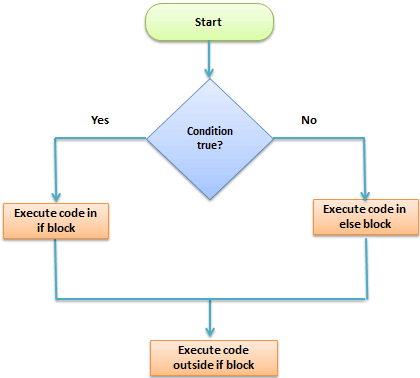
if/else statement: exactly one of the two blocks runs, then the program continues after the whole statement.quantity <- 25
if (quantity > 20) {
message_text <- "You sold a lot!"
} else {
message_text <- "Not enough for today."
}
message_text#> [1] "You sold a lot!"The else part is optional: without it, nothing happens when the condition is FALSE.
TipStyle
Put { on the same line as if, and } else { on one line. Indent the code inside the braces by two spaces. If else starts a new line at the top level of a script, R thinks the if statement has already ended and gives an error.
if is itself an expression that returns a value, so you can also write:
message_text <- if (quantity > 20) "You sold a lot!" else "Not enough for today."
message_text
#> [1] "You sold a lot!"3. Several branches: else if
Use else if to check conditions in order. R runs the first branch whose condition is TRUE and skips all the others.
quantity <- 25

if (quantity < 20) {
  day <- "Not enough for today."
} else if (quantity <= 30) {
  day <- "Average day."
} else {
  day <- "What a great day!"
}
day
#> [1] "Average day."Because the branches are checked in order, the second condition does not need to repeat quantity >= 20: if we reach it, the first condition was already FALSE. Writing conditions this way also avoids gaps. For example, the pair quantity < 20 and quantity > 20 && quantity <= 30 leaves out exactly quantity == 20, which would silently fall into the last branch.
4. A condition must be one TRUE or FALSE
if takes a decision for one situation. Its condition must therefore be a logical vector of length 1 that is not NA. Anything else is an error:
x <- c(5, 30)
if (x > 20) "big"          # length 2: which element decides?
#> Error in `if (x > 20) ...`:
#> ! la condizione ha lunghezza > 1y <- NA
if (y > 20) "big" # NA: R cannot decide#> Error in `if (y > 20) ...`:
#> ! valore mancante dove è richiesto TRUE/FALSE(Since R 4.2 a condition of length > 1 is an error; older versions only warned and used the first element, which hid many bugs.)
&& and || versus & and |
R has two versions of “and” and “or”:
| Operator | Works on | Use it in |
|---|---|---|
&, \| |
whole vectors, element by element | filter(), ifelse(), indexing |
&&, \|\| |
single values only | if () and while () conditions |
&& and || are also short-circuit operators: they stop as soon as the answer is known. In is.numeric(x) && x > 0, the comparison x > 0 is never evaluated when x is not numeric. Since R 4.3, giving && or || a vector of length > 1 is an error:
x <- c(5, 30)
x > 0 & x < 10             # vectorised: one answer per element
#> [1] TRUE FALSEx > 0 && x < 10 # error: && wants single values#> Error in `x > 0 && x < 10`:
#> ! 'length = 2' nella coercizione in 'logical(1)'To turn many TRUE/FALSE values into one, summarise them explicitly:
any(x > 20) # is at least one element > 20?#> [1] TRUEall(x > 0) # are all elements > 0?#> [1] TRUEisTRUE(NA > 1) # TRUE only for a single, non-missing TRUE#> [1] FALSE5. The VAT example as a function
Let us write the VAT calculation once, as a function that works for one product:
# Final price of one product, VAT included.
# price:    a single positive number
# category: "A", "B" or "C"
price_with_vat <- function(price, category) {
  if (category == "A") {
    rate <- 0.08
  } else if (category == "B") {
    rate <- 0.10
  } else if (category == "C") {
    rate <- 0.20
  } else {
    stop("Unknown category '", category, "'. Use \"A\", \"B\" or \"C\".",
         call. = FALSE)
  }
  price * (1 + rate)
}

price_with_vat(10, "A")
#> [1] 10.8price_with_vat(10, "C")#> [1] 12The last else does not silently pick a rate: an unknown category is almost always a typo, so the function stops and tells the user what is allowed.
6. switch(): choosing by name
When the decision is “which of several named options?”, switch() is shorter than a chain of else if. It compares the first argument with the names of the other arguments and returns the matching value. An unnamed last argument is the default.
vat_rate <- function(category) {
  switch(category,
    A = 0.08,
    B = 0.10,
    C = 0.20,
    stop("Unknown category '", category, "'.", call. = FALSE)
  )
}

vat_rate("B")
#> [1] 0.1If several names share the same result, leave the value empty and R “falls through” to the next one:
food_group <- function(item) {
  switch(item,
    apple = ,
    banana = "fruit",
    carrot = ,
    potato = "vegetable",
    "unknown"
  )
}
food_group("banana")
#> [1] "fruit"food_group("pizza")#> [1] "unknown"switch() is for one value, like if. Without a default, an unmatched name returns NULL invisibly, which can cause confusing errors later — always add a default or a stop().
7. Decisions for a whole vector
if decides once. Very often, however, you need one decision per element — per row of a data frame. For that you need vectorised functions.
ifelse() (base R)
sales <- c(10, 25, 40, 18)
ifelse(sales > 20, "good", "poor")
#> [1] "poor" "good" "good" "poor"ifelse(test, yes, no) returns, for each element, the value from yes where test is TRUE and from no where it is FALSE. It has two weaknesses: it drops attributes such as dates and factor levels, and it does not complain when yes and no have different types:
d <- ifelse(TRUE, as.Date("2024-03-01"), NA)
d            # a number, not a date!
#> [1] 19783class(d)#> [1] "numeric"dplyr::if_else(): stricter and safer
if_else() works like ifelse() but keeps the type of true/false, refuses to mix types (e.g. text and numbers), and has a missing argument for NA conditions.
sales <- c(10, 25, NA, 18)
if_else(sales > 20, "good", "poor", missing = "not recorded")
#> [1] "poor" "good" "not recorded" "poor"if_else(TRUE, as.Date("2024-03-01"), as.Date(NA))#> [1] "2024-03-01"dplyr::case_when(): many conditions
For more than two outcomes, case_when() is the vectorised version of if … else if … else. Each argument is condition ~ value; conditions are checked in order and the first TRUE wins. .default gives the value when no condition is TRUE.
penguins |>
  mutate(size = case_when(
    body_mass < 3500 ~ "small",
    body_mass < 4500 ~ "medium",
    body_mass >= 4500 ~ "large",
    .default = "unknown"          # here: the 2 penguins with missing mass
  )) |>
  count(size)
#> size n
#> 1 large 118
#> 2 medium 153
#> 3 small 71
#> 4 unknown 2Now the VAT problem for a whole price list:
basket <- tibble(
  item     = c("novel", "tomatoes", "jeans", "newspaper"),
  category = c("A", "B", "C", "A"),
  price    = c(15, 3.5, 60, 2)
)

basket |>
  mutate(
    rate  = case_when(
      category == "A" ~ 0.08,
      category == "B" ~ 0.10,
      category == "C" ~ 0.20
    ),
    total = price * (1 + rate)
  )
#> # A tibble: 4 × 5
#> item category price rate total
#> <chr> <chr> <dbl> <dbl> <dbl>
#> 1 novel A 15 0.08 16.2
#> 2 tomatoes B 3.5 0.1 3.85
#> 3 jeans C 60 0.2 72
#> 4 newspaper A 2 0.08 2.16
TipHow to read this output
Each row received its own rate. A category not listed in case_when() (and no .default) would get NA for rate and total, which is visible in the result. That is safer than a silent wrong rate.
Which tool when?
| Situation | Use |
|---|---|
| One decision (one value, e.g. a function argument) | if / else if / else |
| One value, many named options | switch() |
| A column, two outcomes | dplyr::if_else() (or ifelse() for plain vectors) |
| A column, three or more outcomes | dplyr::case_when() |
8. Validating inputs
Conditionals are the natural tool for checking that a function received sensible inputs (see also Writing functions). A robust version of price_with_vat():
price_with_vat <- function(price, category = c("A", "B", "C")) {
  category <- match.arg(category)           # only allowed values pass
  if (!is.numeric(price) || length(price) != 1 || price < 0) {
    stop("`price` must be a single non-negative number.", call. = FALSE)
  }
  rate <- switch(category, A = 0.08, B = 0.10, C = 0.20)
  price * (1 + rate)
}

price_with_vat(10, "B")
#> [1] 11price_with_vat(10, "D")#> Error in `match.arg()`:
#> ! 'arg' dovrebbe essere uno di "A", "B", "C"price_with_vat(-5, "A")#> Error:
#> ! `price` must be a single non-negative number.match.arg()compares the argument with the vector of allowed values in the definition and stops with a clear message otherwise. If the user gives no value, it takes the first one ("A"here).- The
||chain is evaluated left to right and stops at the firstTRUE, soprice < 0is never evaluated for a non-numericprice.
NoteGoing deeper: warnings, errors and
tryCatch()
stop() signals an error (the function ends), warning() a warning (the function continues, the user is told at the end), message() an informational note. A caller can intercept them with tryCatch(expr, error = function(e) ..., warning = function(w) ...), for example to skip a file that fails to load inside a loop. Use this sparingly: catching errors you do not understand hides bugs. See Advanced R (2e), chapter “Conditions”.
WarningCommon pitfalls
- Using
ifon a vector.if (df$age > 18)is an error since R 4.2. Useif_else()/case_when()for columns, orany()/all()if you really need one decision. - Forgetting
NA.if (x > 3)fails whenxisNA. Handle missing values first (if (!is.na(x) && x > 3)) or useisTRUE(). =instead of==.if (x = 3)is a syntax error; comparison is==.- Gaps and overlaps between branches. Check the boundary values (here, exactly 20 or 30) and let the order of
else ifdo the work. - Comparing decimals with
==.0.1 + 0.2 == 0.3isFALSEbecause of rounding; useisTRUE(all.equal(a, b))or a tolerance. ifelse()and dates/factors. It returns plain numbers; preferif_else().
9. Check your understanding
10. Exercises
Interactive (run in your browser)
★ Exercise 1 — fill the branches. Complete grade() so that a score below 18 returns "fail", a score from 18 to 26 returns "pass", and a score above 26 returns "merit".
The thresholds are 18 and 26; the last branch returns "merit".
grade <- function(score) {
  if (score < 18) {
    "fail"
  } else if (score <= 26) {
    "pass"
  } else {
    "merit"
  }
}
grade(15); grade(18); grade(26); grade(30)
The four calls give "fail", "pass", "pass", "merit". Check the boundaries 18 and 26 explicitly: they are where most bugs hide.
★★ Exercise 2 — debug. The code below is meant to label each car in mtcars as "efficient" (more than 25 mpg) or "thirsty", but it fails. Fix it with a vectorised function.
cars2$mpg > 25 has 32 values. Use if_else(test, true, false) (or ifelse()).
cars2 <- mtcars
cars2$type <- if_else(cars2$mpg > 25, "efficient", "thirsty")
table(cars2$type)
Six cars have more than 25 mpg. if can only take one decision; if_else() takes one per element.
★★ Exercise 3 — case_when() on penguins. Create a column bill_shape that is "long" when bill_len > 45, "medium" when bill_len > 40, and "short" otherwise, then count penguins by species and bill_shape. Missing bill lengths should end up as NA, not as "short".
If you use .default = "short", the missing values would become "short" too. The last condition can be bill_len <= 40: it is NA for missing values, so no branch matches and the result is NA.
penguins |>
  mutate(bill_shape = case_when(
    bill_len > 45 ~ "long",
    bill_len > 40 ~ "medium",
    bill_len <= 40 ~ "short"
  )) |>
  count(species, bill_shape)
Adelie penguins are mostly "short", Chinstrap and Gentoo mostly "long". The two birds without a bill measurement appear with bill_shape = NA.
★★★ Exercise 4 — switch() with validation. Write summarise_by(x, stat) that returns the mean, median or standard deviation of x (ignoring NAs) depending on stat, which must be one of "mean", "median", "sd". Use match.arg() and switch().
stat <- match.arg(stat); the other branches are median(x, na.rm = TRUE) and sd(x, na.rm = TRUE).
summarise_by <- function(x, stat = c("mean", "median", "sd")) {
  stat <- match.arg(stat)
  switch(stat,
    mean   = mean(x, na.rm = TRUE),
    median = median(x, na.rm = TRUE),
    sd     = sd(x, na.rm = TRUE)
  )
}
summarise_by(penguins$flipper_len)        # about 200.9 (default: mean)
summarise_by(penguins$flipper_len, "sd")  # about 14.1
Without an explicit stat, match.arg() picks the first allowed value, "mean". "mode" is rejected with a message listing the allowed values.
Practice on your own computer
★★ Exercise 5 — a shipping-cost function. Write shipping_cost(weight, express = FALSE): parcels up to 1 kg cost 5, up to 5 kg cost 9, heavier ones cost 9 plus 1.5 per kg above 5. Express delivery doubles the price. The function must stop with a clear message if weight is not a single positive number. Test it on 0.5, 5, 8 and -1 kg.
TipSolution
shipping_cost <- function(weight, express = FALSE) {
  if (!is.numeric(weight) || length(weight) != 1 || is.na(weight) ||
      weight <= 0) {
    stop("`weight` must be a single positive number (in kg).", call. = FALSE)
  }
  cost <- if (weight <= 1) {
    5
  } else if (weight <= 5) {
    9
  } else {
    9 + 1.5 * (weight - 5)
  }
  if (express) cost <- 2 * cost
  cost
}
shipping_cost(0.5)                 # 5
shipping_cost(5)                   # 9
shipping_cost(8, express = TRUE)   # 2 * (9 + 4.5) = 27
shipping_cost(-1) stops with the message. Note that the checks use || so that weight <= 0 is not evaluated when weight is, say, text.
Summary
| Tool | For | Example |
|---|---|---|
if / else if / else |
one decision | if (x > 0) "pos" else "non-pos" |
&&, \|\| |
combining single conditions | if (!is.na(x) && x > 0) |
any(), all(), isTRUE() |
turning many values into one | if (any(x < 0)) stop(...) |
switch() |
one value, named options | switch(cat, A = 0.08, B = 0.10, 0.20) |
ifelse() |
base vectorised choice | ifelse(x > 20, "big", "small") |
dplyr::if_else() |
type-safe vectorised choice | if_else(x > 20, "big", "small") |
dplyr::case_when() |
many conditions on a column | case_when(x < 1 ~ "a", .default = "b") |
match.arg(), stop() |
input validation | type <- match.arg(type) |
ifneeds one non-missingTRUE/FALSE; columns need vectorised tools.- Use
&&/||insideif, and&/|for vectors. - Branches are checked in order; the first
TRUEwins. - Stop with a clear message on invalid input instead of guessing.