Correlation
One number for a scatter plot — what it measures, what it hides, and why you must always look
Understand covariance and Pearson correlation through standardised scatter plots, use Spearman and Kendall rank correlations, learn from Anscombe’s quartet, confounding, restricted range and outliers, build correlation matrices and heatmaps, explore data with GGally::ggpairs and preview inference with cor.test().
NoteLearning objectives
By the end of this lesson you will be able to:
- explain the Pearson correlation as the average product of z-scores, and read its sign and size;
- choose between Pearson, Spearman and Kendall correlations and compute them with
cor(); - recognise when a correlation is misleading: non-linearity (Anscombe’s quartet), confounding, restricted range and outliers;
- build a correlation matrix, handle missing values, and draw it as a heatmap or a pairs plot;
- run and read a first test of correlation with
cor.test().
library(ggplot2)
library(dplyr)
library(readr)
library(GGally)   # ggcorr() and ggpairs(), extensions of ggplot2
1. Why summarise a scatter plot with one number?
In The grammar of graphics we saw that penguins with longer flippers tend to be heavier. A scatter plot shows this at a glance. But often we want to compare relationships: is flipper length more closely related to body mass than bill length is? Is the link between income and food spending stronger in one country than in another? For that we need a number that says how closely two numeric variables move together.
That number is the correlation coefficient. It is one of the most used — and most misused — statistics. This lesson builds it from scratch, then spends just as long on what it cannot tell you. The golden rule, which you will see illustrated several times: never report a correlation without looking at the scatter plot.
2. From covariance to correlation
In Describing two variables we met the covariance: the (almost) average product of the deviations from the means. Its sign is meaningful, but its size depends on the units — measure flipper length in cm instead of mm and the covariance shrinks ten times.
The fix is to measure every value in standard deviations from its mean. This is called a z-score (or standardised value):
\[ z = \frac{\text{value} - \text{mean}}{\text{standard deviation}} . \]
A z-score of 1.5 means “1.5 standard deviations above average”, whatever the original unit. Let us standardise flipper length and body mass:
pen <- penguins |>
  filter(!is.na(flipper_len), !is.na(body_mass)) |>
  mutate(
    z_flipper = (flipper_len - mean(flipper_len)) / sd(flipper_len),
    z_mass = (body_mass - mean(body_mass)) / sd(body_mass),
    product = if_else(z_flipper * z_mass > 0, "positive", "negative")
  )

count(pen, product)
#> product n
#> 1 negative 45
#> 2 positive 297Now plot the z-scores. The two lines at zero split the plane into four quadrants. A point in the top-right (both above average) or bottom-left (both below average) has a positive product \(z_x z_y\); a point in the other two quadrants has a negative product.
ggplot(pen, aes(z_flipper, z_mass, colour = product)) +
  geom_hline(yintercept = 0, colour = "grey50") +
  geom_vline(xintercept = 0, colour = "grey50") +
  geom_point(alpha = 0.7) +
  scale_colour_manual(values = c(negative = "#D55E00",
                                 positive = "#0072B2")) +
  coord_fixed() +
  labs(x = "Flipper length (z-score)", y = "Body mass (z-score)",
       colour = "Sign of z_x · z_y")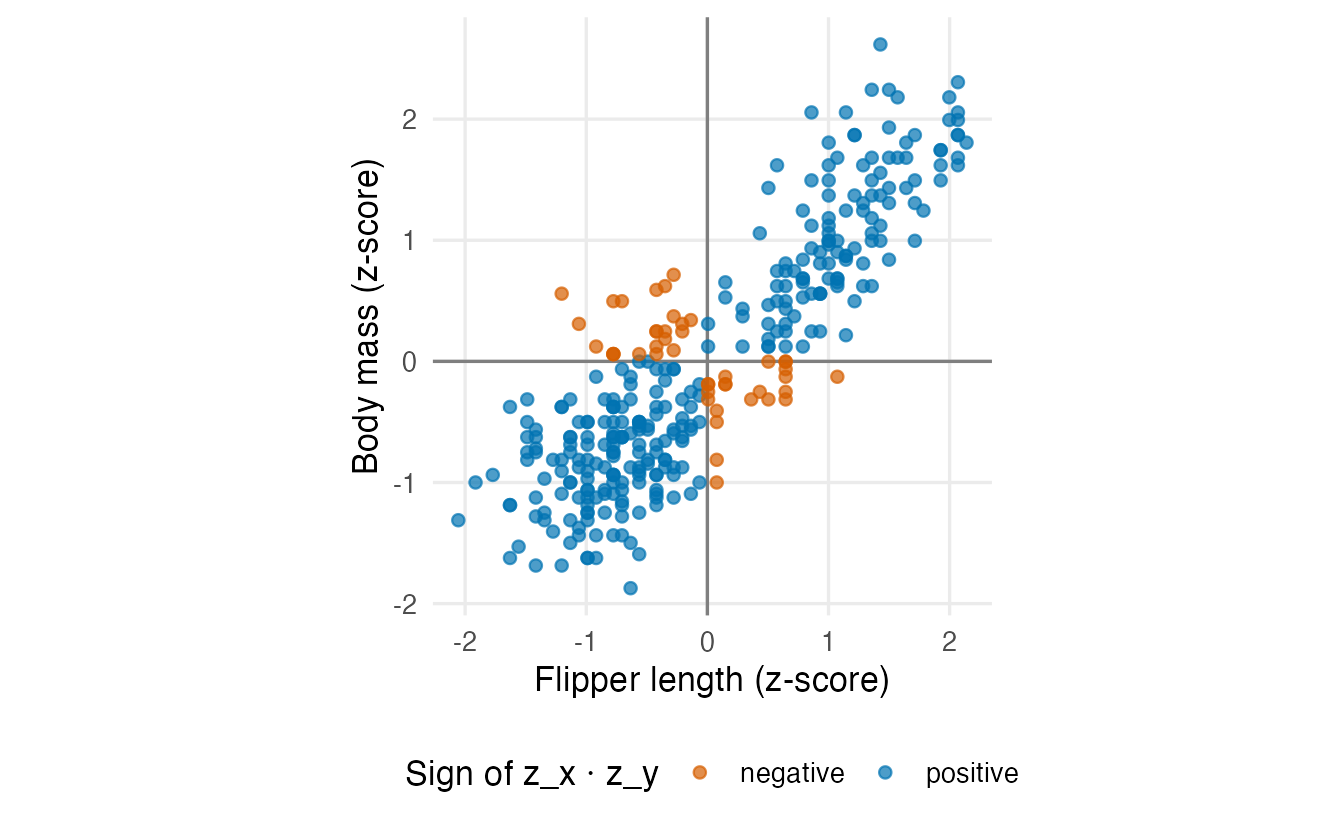
The Pearson correlation \(r\) is the average of these products (dividing by \(n - 1\), as for the variance):
n <- nrow(pen)
r_hand <- sum(pen$z_flipper * pen$z_mass) / (n - 1)
r_hand
#> [1] 0.8712cor(pen$flipper_len, pen$body_mass)#> [1] 0.8712The two numbers are identical. Of the 342 penguins, 297 contribute a positive product and only 45 a negative one, so the average is large and positive: \(r =\) 0.87.
TipHow to read a correlation
- Sign. Positive: when one variable is above its mean, the other tends to be above its mean too. Negative: one above, the other below.
- Size. \(r\) always lies between \(-1\) and \(+1\). \(r = \pm 1\) means all points lie exactly on a straight line; \(r = 0\) means no linear tendency.
- No units. Changing mm to cm or g to kg does not change \(r\). It is also symmetric:
cor(x, y)equalscor(y, x). - Linear only. \(r\) measures how well the points follow a straight line — not just any pattern (Section 4).
What do different values look like? The plots below show simulated data with true correlations from \(-0.9\) to \(0.9\):
set.seed(42)
gallery <- do.call(rbind, lapply(c(-0.9, -0.5, 0, 0.5, 0.9), \(rho) {
  x <- rnorm(150)
  data.frame(rho = rho, x = x, y = rho * x + sqrt(1 - rho^2) * rnorm(150))
}))

gallery |>
  mutate(panel = paste("r =", round(cor(x, y), 2)), .by = rho) |>
  mutate(panel = factor(panel, levels = unique(panel))) |>
  ggplot(aes(x, y)) +
  geom_point(alpha = 0.5, size = 1) +
  facet_wrap(~ panel, nrow = 1) +
  labs(x = "x", y = "y")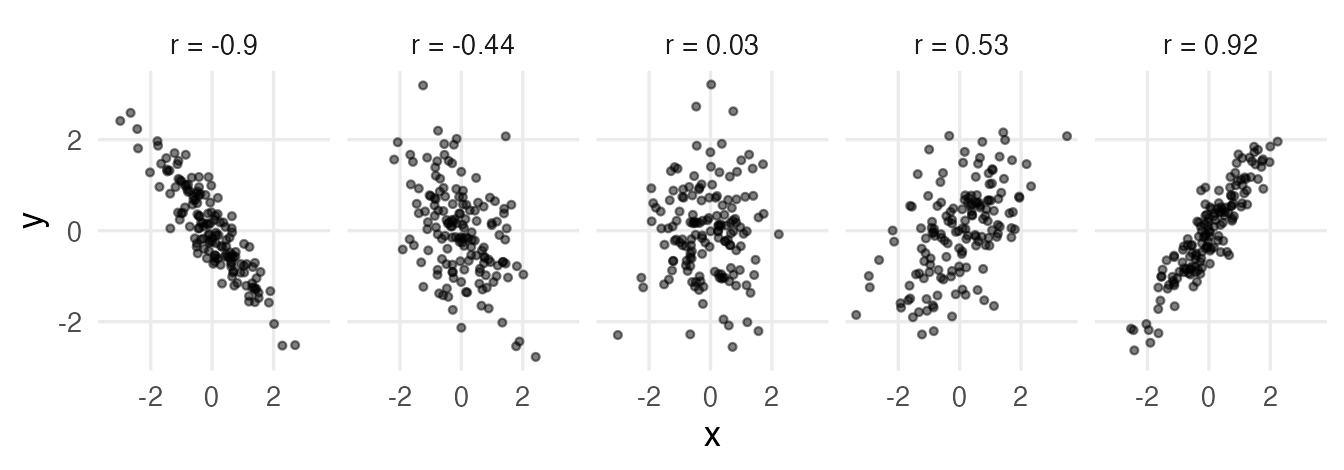
Notice that \(r = 0.5\) is already a rather diffuse cloud: correlations of moderate size describe tendencies, not tight laws.
NoteGoing deeper: the formulas
With sample means \(\bar x, \bar y\) and standard deviations \(s_x, s_y\):
\[ \operatorname{cov}(x, y) = \frac{1}{n-1}\sum_{i=1}^n (x_i - \bar x)(y_i - \bar y), \qquad r = \frac{\operatorname{cov}(x, y)}{s_x\, s_y} = \frac{1}{n-1}\sum_{i=1}^n z_{x,i}\, z_{y,i}. \]
By the Cauchy–Schwarz inequality \(|r| \le 1\), with equality only if \(y_i = a + b x_i\) exactly. \(r^2\) is the proportion of the variance of \(y\) explained by the least-squares line (see Simple regression). The population quantity estimated by \(r\) is usually written \(\rho\) (“rho”).
The simulation above uses the fact that if \(x\) and \(e\) are independent standard normals, \(y = \rho x + \sqrt{1 - \rho^2}\, e\) is also standard normal and \(\operatorname{cor}(x, y) = \rho\).
3. Pearson, Spearman and Kendall
cor() computes three different correlations through its method argument.
- Pearson (
"pearson", the default): linear association between the values. - Spearman (
"spearman"): the Pearson correlation of the ranks. Replace each value by its position in the sorted data (1 = smallest) and correlate the positions. It measures monotonic association: does \(y\) tend to go up (or down) whenever \(x\) goes up, whether or not along a straight line? - Kendall (
"kendall", Kendall’s \(\tau\)): look at every pair of observations. A pair is concordant if the one with larger \(x\) also has larger \(y\), discordant otherwise. \(\tau\) is (roughly) the proportion of concordant pairs minus the proportion of discordant pairs.
Horsepower and fuel economy in mtcars have a clearly curved, but steadily decreasing, relationship:
ggplot(mtcars, aes(hp, mpg)) +
  geom_point() +
  labs(x = "Horsepower", y = "Miles per gallon")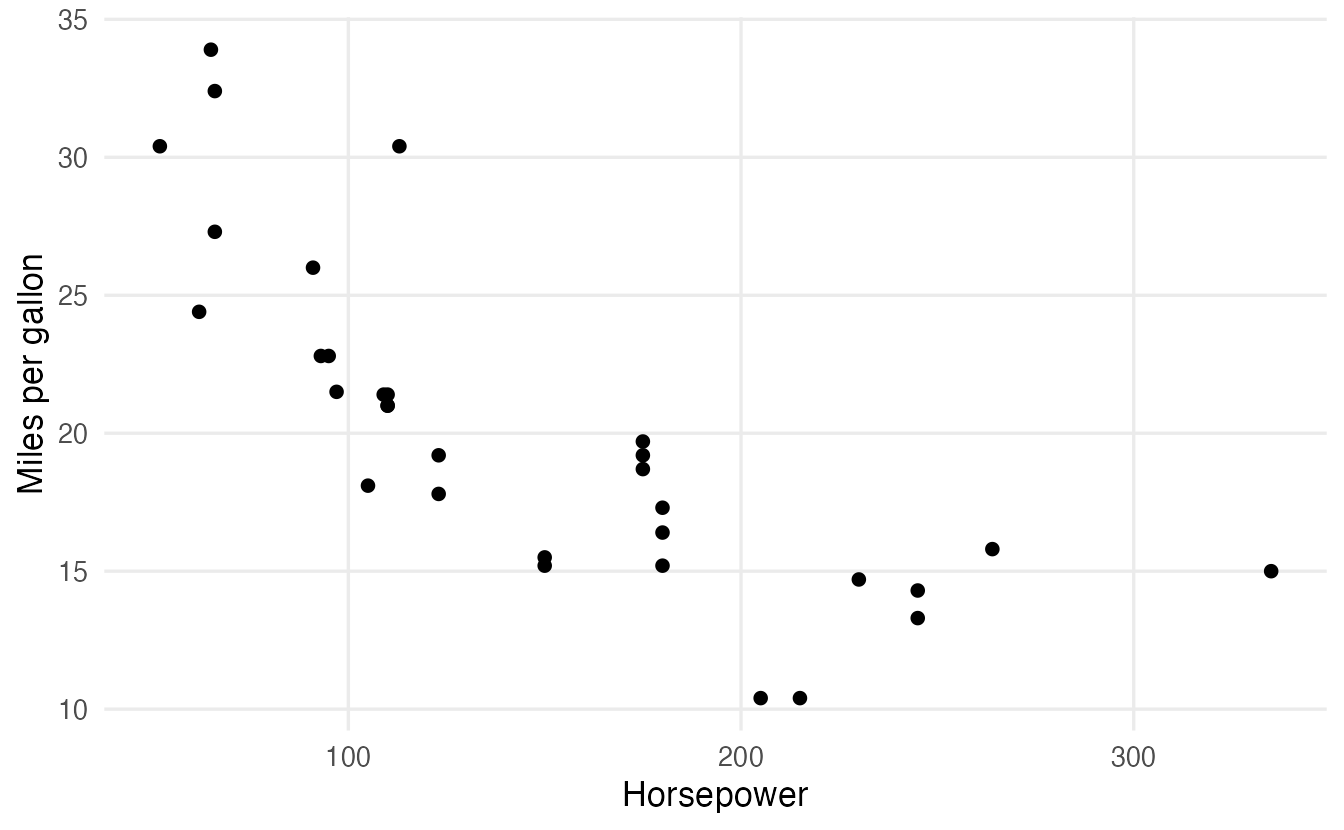
cor(mtcars$hp, mtcars$mpg, method = "pearson")#> [1] -0.7762cor(mtcars$hp, mtcars$mpg, method = "spearman")#> [1] -0.8947cor(mtcars$hp, mtcars$mpg, method = "kendall")#> [1] -0.7428cor(rank(mtcars$hp), rank(mtcars$mpg)) # Spearman = Pearson on ranks#> [1] -0.8947
TipHow to read this output
- All three are negative: more powerful cars travel fewer miles per gallon.
- Spearman (-0.89) is larger in absolute value than Pearson (-0.78): the relationship is more monotonic than it is linear.
- Kendall’s \(\tau\) is on a different scale — it is usually smaller in absolute value than Spearman for the same data — so compare \(\tau\) only with other \(\tau\) values.
- The last line confirms that Spearman is just Pearson applied to the ranks.
| Use… | When |
|---|---|
| Pearson | both variables numeric, relationship roughly linear, no extreme outliers |
| Spearman | relationship monotonic but curved, outliers present, or ordinal data (e.g., ratings 1–5) |
| Kendall | as Spearman; preferred by some for small samples or many ties, and easier to interpret as a probability of concordance |
4. Anscombe’s quartet: always plot
In 1973 the statistician Francis Anscombe built four small datasets to make a point. They ship with R as anscombe, with columns x1–x4 and y1–y4. Let us put them in a long format (one row per point, with a set column):
ansc <- do.call(rbind, lapply(1:4, \(i) {
  data.frame(set = paste("Set", i),
             x = anscombe[[paste0("x", i)]],
             y = anscombe[[paste0("y", i)]])
}))

ansc_stats <- ansc |>
  summarise(mean_x = mean(x), mean_y = mean(y),
            var_x = var(x), var_y = var(y),
            pearson = cor(x, y),
            spearman = cor(x, y, method = "spearman"),
            .by = set)
ansc_stats
#> set mean_x mean_y var_x var_y pearson spearman
#> 1 Set 1 9 7.501 11 4.127 0.8164 0.8182
#> 2 Set 2 9 7.501 11 4.128 0.8162 0.6909
#> 3 Set 3 9 7.500 11 4.123 0.8163 0.9909
#> 4 Set 4 9 7.501 11 4.123 0.8165 0.5000Look at the numbers before the picture. All four sets have mean of \(x\) = 9, mean of \(y\) ≈ 7.5, variance of \(x\) = 11, variance of \(y\) ≈ 4.1 and Pearson correlation ≈ 0.82. They even have the same least-squares line, \(y \approx 3 + 0.5x\). By the summaries, they are the same data. Now look:
ggplot(ansc, aes(x, y)) +
  geom_smooth(method = "lm", formula = y ~ x, se = FALSE,
              colour = "#D55E00", linewidth = 0.8) +
  geom_point(size = 2) +
  facet_wrap(~ set) +
  labs(x = "x", y = "y")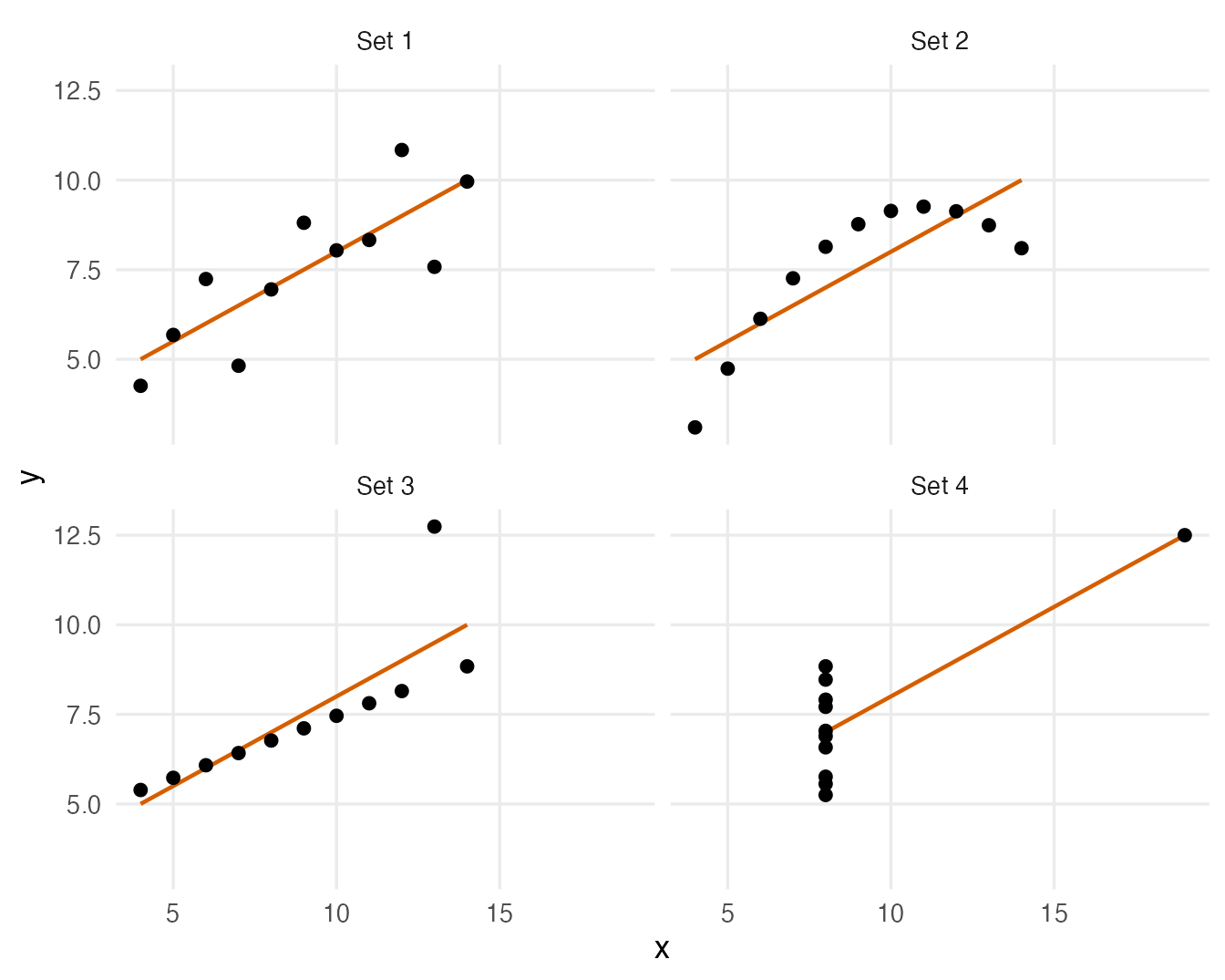
- Set 1 is what \(r \approx 0.8\) “should” look like: a noisy linear trend.
- Set 2 is a perfect curve. A straight line is the wrong summary; \(r\) underrates how tightly \(y\) depends on \(x\).
- Set 3 is a perfect line with one outlier, which pulls \(r\) down from 1. Spearman (0.99) is barely affected.
- Set 4 has no relationship at all among ten points with the same \(x\); a single point far to the right creates the whole correlation.
The Spearman column already hints that something differs between the sets (it ranges from 0.5 to 0.99), but only the plot tells you what. A correlation is a summary of a scatter plot — and like every summary it can hide the most important features.
5. Correlation is not causation
A strong correlation between \(x\) and \(y\) does not show that \(x\) causes \(y\). Three common alternative explanations:
- Confounding: a third variable drives both.
- Reverse causation: \(y\) causes \(x\).
- Chance, especially when many correlations are examined.
A simulated example: ice cream and drownings
On hot days people buy more ice cream, and more people go swimming — so more people drown. We simulate 200 summer days in which ice cream has no effect at all on drownings; both depend only on temperature:
set.seed(2026)
summer <- tibble(
  temperature = runif(200, 10, 35),                        # degrees C
  ice_cream = 20 + 3 * temperature + rnorm(200, sd = 10),  # sales
  drownings = 1 + 0.2 * temperature + rnorm(200, sd = 1.2) # per day
)

cor(summer$ice_cream, summer$drownings)
#> [1] 0.668ggplot(summer, aes(ice_cream, drownings, colour = temperature)) +
geom_point() +
scale_colour_viridis_c() +
labs(x = "Ice cream sales", y = "Drownings",
colour = "Temperature (°C)")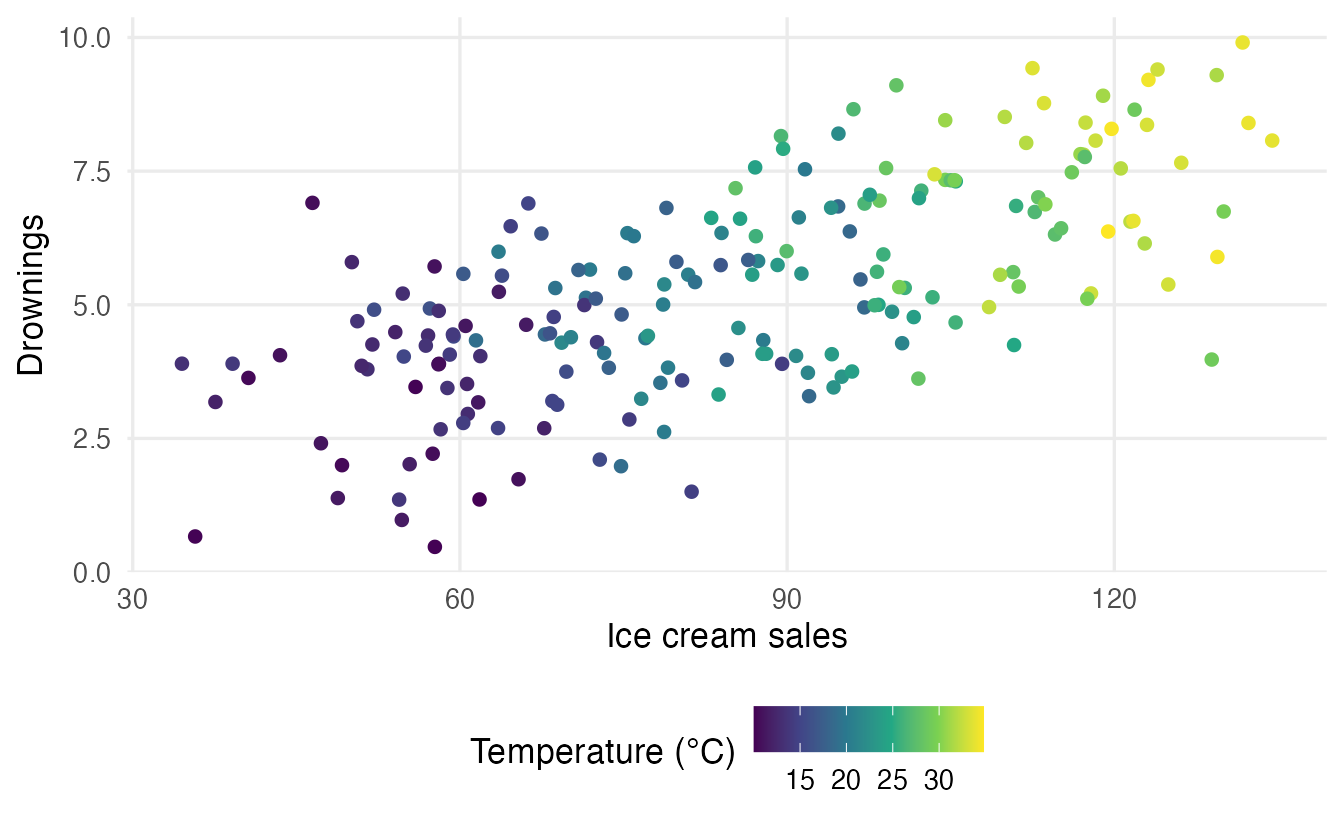
The correlation is 0.67, yet banning ice cream would save no one. Temperature is a confounder: it is related to both variables. If we remove the part of each variable explained by temperature (the residuals of a straight-line fit, see Simple regression) and correlate what is left, the association vanishes:
res_ice <- resid(lm(ice_cream ~ temperature, data = summer))
res_drown <- resid(lm(drownings ~ temperature, data = summer))
cor(res_ice, res_drown)
#> [1] 0.006231This is called a partial correlation: the correlation of ice cream and drownings holding temperature fixed. It is essentially zero (0.006).
A real example: penguin bills
Confounding can even reverse the sign of a correlation — the numeric version of Simpson’s paradox from Describing two variables. Across all penguins, longer bills go with shallower bills:
cor(penguins$bill_len, penguins$bill_dep, use = "complete.obs")#> [1] -0.2351penguins |>
summarise(r = cor(bill_len, bill_dep, use = "complete.obs"),
.by = species)#> species r
#> 1 Adelie 0.3915
#> 2 Gentoo 0.6434
#> 3 Chinstrap 0.6535ggplot(penguins, aes(bill_len, bill_dep)) +
geom_point(aes(colour = species), alpha = 0.6, na.rm = TRUE) +
geom_smooth(method = "lm", formula = y ~ x, se = FALSE,
colour = "black", na.rm = TRUE) +
geom_smooth(aes(colour = species), method = "lm", formula = y ~ x,
se = FALSE, na.rm = TRUE) +
labs(x = "Bill length (mm)", y = "Bill depth (mm)", colour = "Species")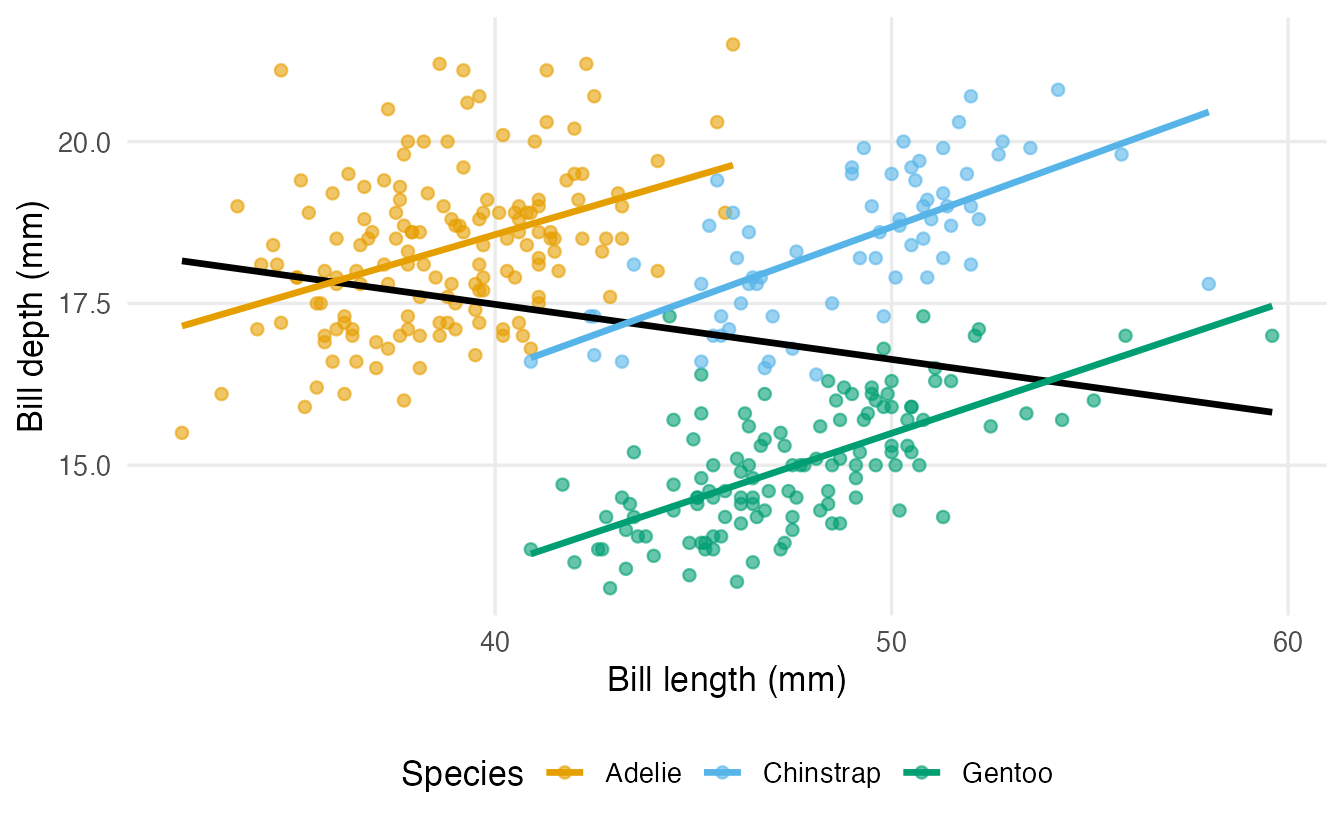
Within every species the correlation is positive, but Gentoo penguins have long and shallow bills, which tilts the pooled cloud downward. Species is the confounder. The general tool for “holding other variables fixed” is Multiple regression; establishing causation needs a good study design, ideally a randomised experiment.
6. Restricted range and outliers
Two more ways in which \(r\) can mislead, best seen by simulation.
Restricted range
Suppose an admission test score and later university performance have a true correlation of 0.7 in the whole population. But a university only admits the top 20% of applicants, so it only ever sees their data:
set.seed(1)
applicants <- tibble(
  test = rnorm(1000),
  performance = 0.7 * test + sqrt(1 - 0.7^2) * rnorm(1000)
) |>
  mutate(admitted = test > quantile(test, 0.8))

cor(applicants$test, applicants$performance)
#> [1] 0.7006applicants |>
filter(admitted) |>
summarise(r_admitted = cor(test, performance))#> # A tibble: 1 × 1
#> r_admitted
#> <dbl>
#> 1 0.4864ggplot(applicants, aes(test, performance, colour = admitted)) +
geom_point(alpha = 0.5) +
scale_colour_manual(values = c(`FALSE` = "grey70", `TRUE` = "#0072B2")) +
labs(x = "Test score (z)", y = "Later performance (z)",
colour = "Admitted")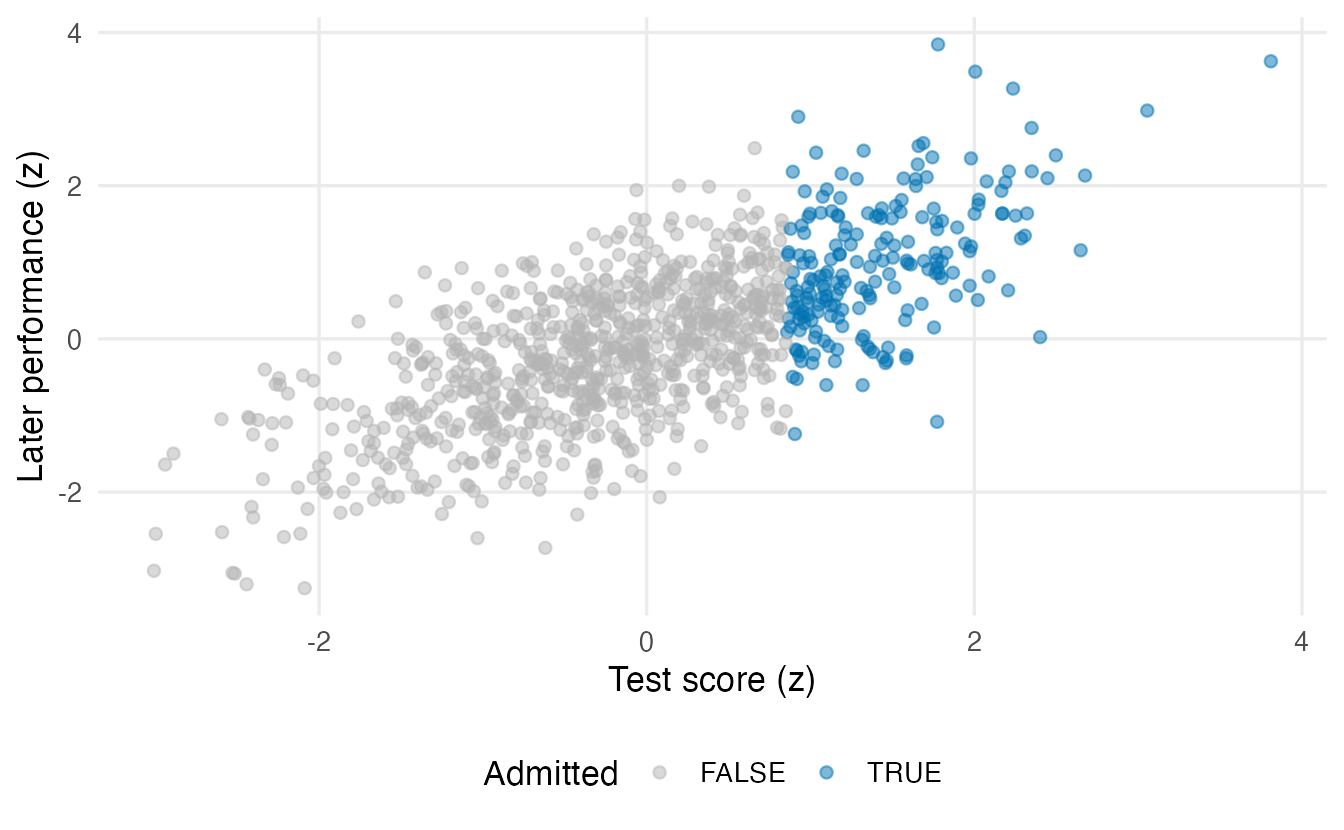
The relationship is the same everywhere, but among admitted students \(r\) drops from about 0.7 to 0.49. Someone looking only at admitted students might wrongly conclude that the test “barely predicts” performance. The size of \(r\) depends on how spread out the \(x\) values are in the sample, not only on the relationship.
A single outlier
Now 20 points with no relationship, plus one extreme point:
set.seed(3)
x <- rnorm(20)
y <- rnorm(20)
c(pearson = cor(x, y), spearman = cor(x, y, method = "spearman"))
#> pearson spearman
#> -0.1446 -0.1263x_out <- c(x, 8) # add one point at (8, 8)
y_out <- c(y, 8)
c(pearson = cor(x_out, y_out),
spearman = cor(x_out, y_out, method = "spearman"))#> pearson spearman
#> 0.79742 0.02727One point out of 21 moves Pearson’s \(r\) from -0.14 to 0.8. Spearman stays near zero (0.03): in ranks, the outlier is simply “the largest value”, no matter how far away it is. Remember Anscombe’s set 4: same story.
What to do with an outlier? First check whether it is an error (a typo, a wrong unit). If it is a genuine value, report the correlation with and without it, or use a rank-based correlation — but do not silently delete it.
7. Correlation matrices
With several numeric variables, cor() applied to a data frame returns all pairwise correlations at once, as a correlation matrix: a square, symmetric table with 1s on the diagonal.
pen_num <- penguins |>
  select(bill_len, bill_dep, flipper_len, body_mass)

cor(pen_num)
#> bill_len bill_dep flipper_len body_mass
#> bill_len 1 NA NA NA
#> bill_dep NA 1 NA NA
#> flipper_len NA NA 1 NA
#> body_mass NA NA NA 1Only NAs off the diagonal: two penguins have missing measurements, and by default any NA makes the result NA. The use argument decides how to handle missing values:
use = "complete.obs"— first drop every row with any missing value (listwise deletion), then compute all correlations on the same rows;use = "pairwise.complete.obs"— for each pair of variables, use all rows where those two are observed.
cor_mat <- cor(pen_num, use = "pairwise.complete.obs")
round(cor_mat, 2)
#> bill_len bill_dep flipper_len body_mass
#> bill_len 1.00 -0.24 0.66 0.60
#> bill_dep -0.24 1.00 -0.58 -0.47
#> flipper_len 0.66 -0.58 1.00 0.87
#> body_mass 0.60 -0.47 0.87 1.00Here both options give the same result, because the same two penguins are missing every measurement. With airquality (Exercise 2) they differ. Pairwise deletion uses more data, but different entries are then based on different subsets of rows; listwise deletion keeps everything comparable but may throw a lot away.
Since the matrix is symmetric, one triangle is enough:
cor_lower <- round(cor_mat, 2)
cor_lower[upper.tri(cor_lower)] <- NA
cor_lower
#> bill_len bill_dep flipper_len body_mass
#> bill_len 1.00 NA NA NA
#> bill_dep -0.24 1.00 NA NA
#> flipper_len 0.66 -0.58 1.00 NA
#> body_mass 0.60 -0.47 0.87 1A heatmap with ggplot2
Matrices of numbers are hard to scan. A heatmap colours each cell by its value. ggplot2 needs a long table — one row per pair of variables — which as.data.frame(as.table()) creates from a matrix:
cor_long <- as.data.frame(as.table(cor_mat)) |>
  rename(var1 = Var1, var2 = Var2, r = Freq)
head(cor_long)
#> var1 var2 r
#> 1 bill_len bill_len 1.0000
#> 2 bill_dep bill_len -0.2351
#> 3 flipper_len bill_len 0.6562
#> 4 body_mass bill_len 0.5951
#> 5 bill_len bill_dep -0.2351
#> 6 bill_dep bill_dep 1.0000ggplot(cor_long, aes(var1, var2, fill = r)) +
geom_tile(colour = "white") +
geom_text(aes(label = round(r, 2))) +
scale_fill_gradient2(low = "#0072B2", mid = "white", high = "#D55E00",
midpoint = 0, limits = c(-1, 1)) +
coord_fixed() +
labs(x = NULL, y = NULL, fill = "Pearson r")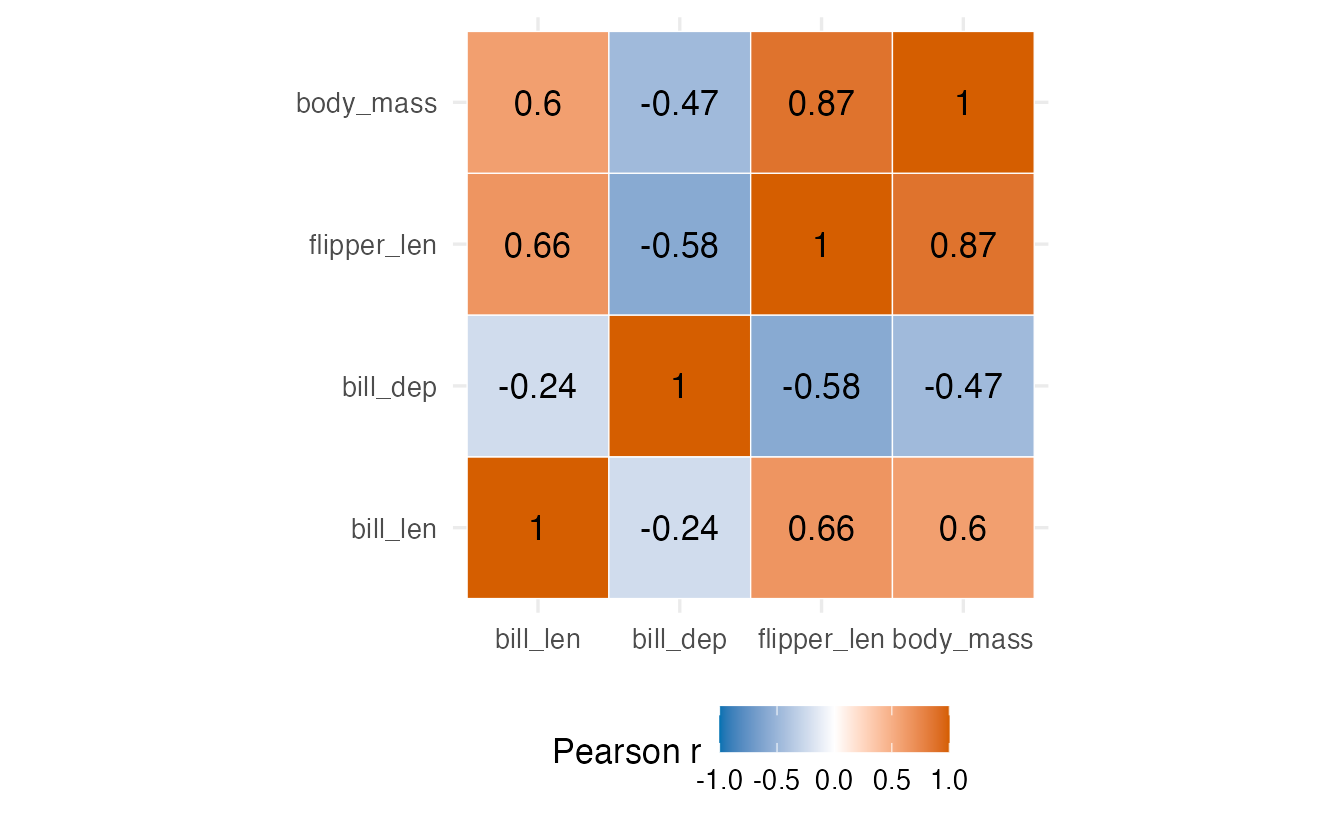
A diverging colour scale (scale_fill_gradient2()) with white at 0 and limits = c(-1, 1) is essential: the colour then means the same thing in every heatmap, and positive and negative correlations are instantly distinguishable.
British household budgets
The file british_household.csv contains the weekly budgets of British households (the BudgetUK data from the Ecdat package): the budget shares spent on food, fuel, clothing, alcohol, transport and other goods (wfood, wfuel, wcloth, walc, wtrans, wother; each a proportion between 0 and 1), total expenditure totexp and net income income (both in pounds per week, rounded to tens), the age of the household head age, and the number of children.
bh_raw <- read_csv(data_path("british_household.csv"), show_col_types = FALSE)
names(bh_raw)
#> [1] "...1" "wfood" "wfuel" "wcloth" "walc" "wtrans"
#> [7] "wother" "totexp" "income" "age" "children"count(bh_raw, children)#> # A tibble: 2 × 2
#> children n
#> <dbl> <int>
#> 1 1 594
#> 2 2 925There are 1519 households. Three cleaning steps:
- The first column is an unnamed row index (read as
...1); it carries no information and must not enter the correlation matrix. - Income and expenditure are right-skewed (a few very high values), so, as usual for money, we analyse their logarithms. This makes the relationships closer to linear and tames the extreme incomes.
childrentakes only the values 1 and 2 — every household in this dataset has children — so we treat it as a factor with two levels. (A “has children: Yes/No” factor would be “Yes” for everybody.)
bh <- bh_raw |>
  select(-1) |>
  mutate(
    log_income = log(income),
    log_totexp = log(totexp),
    children = factor(children, levels = c(1, 2),
                      labels = c("1 child", "2 children"))
  ) |>
  select(-income, -totexp)

glimpse(bh)
#> Rows: 1,519
#> Columns: 10
#> $ wfood <dbl> 0.4272, 0.3739, 0.1941, 0.4438, 0.3331, 0.3752, 0.2568, 0.4…
#> $ wfuel <dbl> 0.1342, 0.1686, 0.4056, 0.1258, 0.0824, 0.0481, 0.0909, 0.2…
#> $ wcloth <dbl> 0.0000, 0.0091, 0.0012, 0.0539, 0.0399, 0.1170, 0.0453, 0.1…
#> $ walc <dbl> 0.0106, 0.0825, 0.0513, 0.0397, 0.1571, 0.0210, 0.0153, 0.0…
#> $ wtrans <dbl> 0.1458, 0.1215, 0.2063, 0.0652, 0.2403, 0.0955, 0.0227, 0.0…
#> $ wother <dbl> 0.2822, 0.2444, 0.1415, 0.2716, 0.1473, 0.3431, 0.5689, 0.2…
#> $ age <dbl> 25, 39, 47, 33, 31, 24, 46, 25, 30, 41, 48, 24, 28, 31, 32,…
#> $ children <fct> 2 children, 2 children, 2 children, 2 children, 1 child, 1 …
#> $ log_income <dbl> 4.868, 5.011, 5.438, 4.605, 4.605, 4.248, 5.247, 4.605, 5.5…
#> $ log_totexp <dbl> 3.912, 4.500, 5.193, 4.382, 4.500, 4.248, 4.942, 3.912, 4.6…Is a richer household spending a smaller share of its budget on food (the classic Engel’s law)?
cor(bh$log_income, bh$wfood)#> [1] -0.2473cor(bh$log_income, bh$wfood, method = "spearman")#> [1] -0.251cor(bh$log_totexp, bh$wfood)#> [1] -0.4951Yes, with a moderate negative correlation (-0.25), and Pearson and Spearman agree. The share of food is even more strongly related to total expenditure (-0.5), a better measure of the household’s living standard than a single week’s income.
GGally::ggcorr() draws a correlation heatmap directly from a data frame of numeric variables:
bh_num <- bh |> select(where(is.numeric))

ggcorr(bh_num, method = c("pairwise", "pearson"),
       label = TRUE, label_size = 3, label_round = 2,
       low = "#0072B2", mid = "white", high = "#D55E00")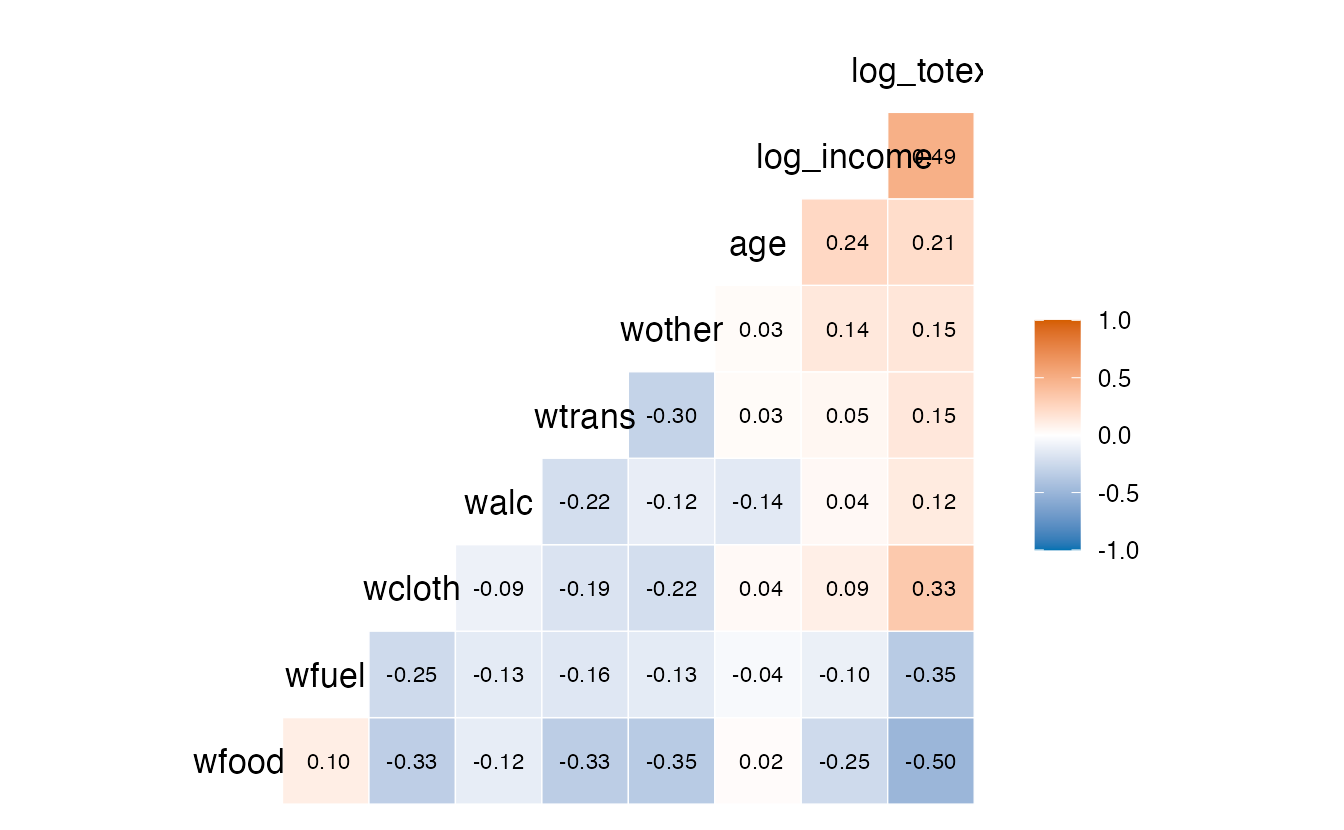
method = c("pairwise", "pearson") sets the use and method arguments of cor(). Note how the budget shares are negatively correlated with each other: they are shares of the same total, so if one goes up, others must go down. Correlations between parts of a whole are partly forced by the arithmetic.
Pairs plots with ggpairs()
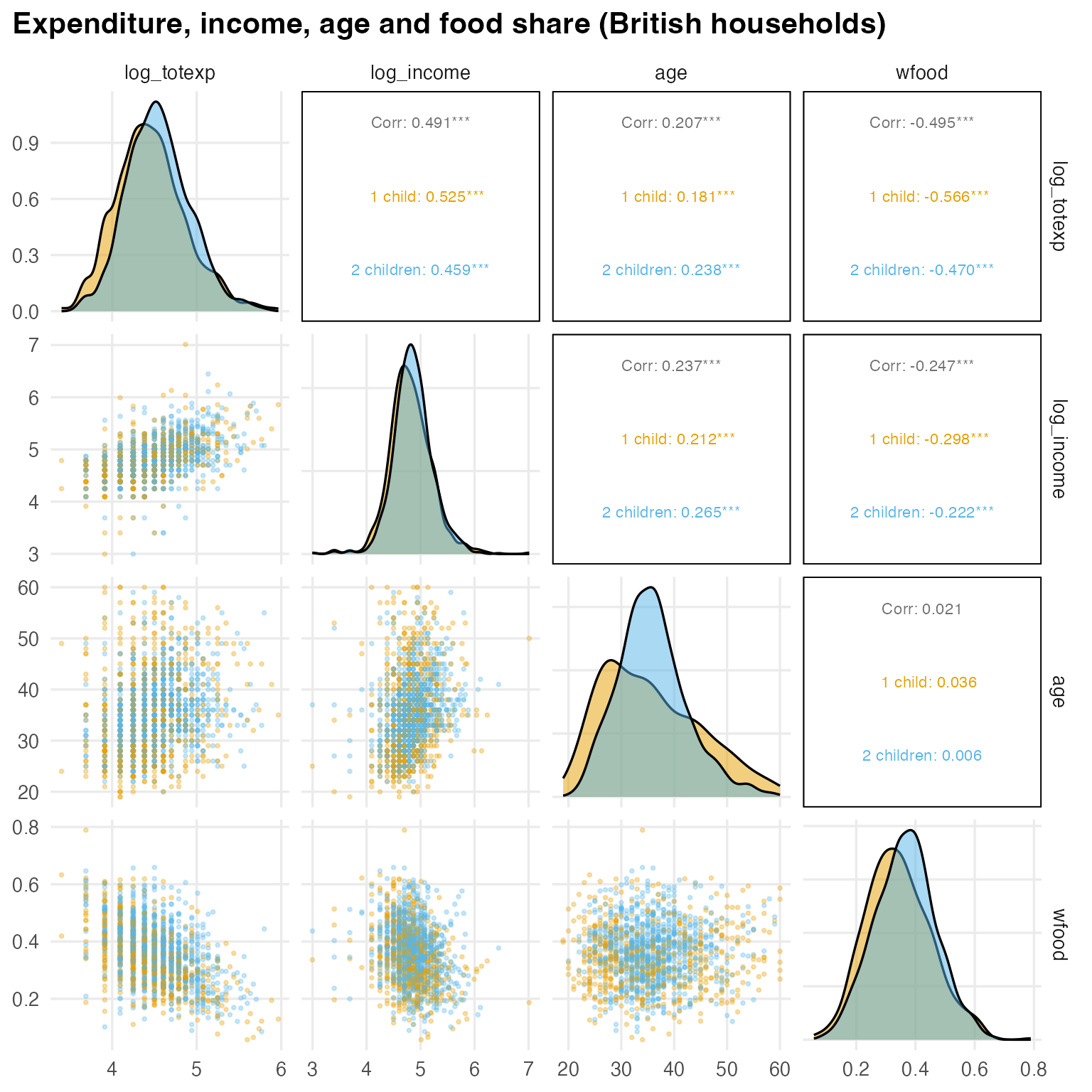
A heatmap shows numbers; a pairs plot (scatter-plot matrix) shows the data behind them — remember Anscombe. GGally::ggpairs() draws distributions on the diagonal, scatter plots below and correlations above:
ggpairs(
  bh,
  columns = c("log_totexp", "log_income", "age", "wfood"),
  mapping = aes(colour = children),
  upper = list(continuous = wrap("cor", size = 3)),
  lower = list(continuous = wrap("points", alpha = 0.3, size = 0.6)),
  diag = list(continuous = wrap("densityDiag", alpha = 0.5)),
  title = "Expenditure, income, age and food share (British households)"
)
TipHow to read this plot
- Diagonal: the distribution of each variable (density curves by group). The log scale makes expenditure and income roughly symmetric.
- Below the diagonal: one scatter plot per pair. Check them for curves, clusters and outliers before trusting the numbers.
- Above the diagonal: the overall correlation (
Corr:) and the correlation within each group. Stars mark small p-values — a topic for Section 8, and not a reason to ignore the size of the correlation. wrap()passes options (point size, transparency, text size) to the panel functions.
8. A preview of inference: cor.test()
Our 342 penguins are a sample. A different sample would give a slightly different \(r\). Is the correlation in the population, \(\rho\), different from zero, and how precisely do we know it? cor.test() answers both questions (the logic of tests is explained in Hypothesis testing):
ct <- cor.test(penguins$flipper_len, penguins$body_mass)
ct
#>
#> Pearson's product-moment correlation
#>
#> data: penguins$flipper_len and penguins$body_mass
#> t = 33, df = 340, p-value <2e-16
#> alternative hypothesis: true correlation is not equal to 0
#> 95 percent confidence interval:
#> 0.8430 0.8946
#> sample estimates:
#> cor
#> 0.8712
TipHow to read this output
t,df,p-valuetest \(H_0: \rho = 0\). The statistic is \(t = r\sqrt{(n-2)/(1-r^2)}\) with \(n - 2 =\) 340 degrees of freedom. The p-value is tiny: a correlation this strong would essentially never appear by chance if there were no linear association.- 95 percent confidence interval: values of \(\rho\) compatible with the data, from 0.84 to 0.89. This is the more informative part — it tells you how strong the association plausibly is.
- sample estimates: the Pearson \(r\) itself.
For Spearman or Kendall, set method. With tied values R cannot compute an exact p-value and warns; exact = FALSE uses an approximation:
cor.test(mtcars$hp, mtcars$mpg, method = "spearman", exact = FALSE)#>
#> Spearman's rank correlation rho
#>
#> data: mtcars$hp and mtcars$mpg
#> S = 10337, p-value = 5e-12
#> alternative hypothesis: true rho is not equal to 0
#> sample estimates:
#> rho
#> -0.8947Two warnings. First, a significant correlation is not necessarily a large one: with 10,000 observations even \(r = 0.03\) gives a small p-value. Second, the test inherits every problem of Sections 4–6: it cannot detect a curve, a confounder or an outlier. In Simple regression you will see that testing \(\rho = 0\) is the same test as testing whether the slope of the regression line is zero.
NoteGoing deeper: confidence intervals and many correlations
The confidence interval for Pearson’s \(\rho\) uses Fisher’s z-transformation \(z = \tfrac12 \ln\frac{1+r}{1-r}\), which is approximately normal with standard error \(1/\sqrt{n-3}\); the interval is computed on the \(z\) scale and transformed back, which is why it is not symmetric around \(r\).
To get p-values for a whole correlation matrix, Hmisc::rcorr(as.matrix(bh_num)) returns the matrix of \(r\) values ($r) and of p-values ($P). Use it with care: a matrix of 9 variables contains 36 different tests, so a few “significant” correlations are expected by chance alone (see multiple testing in Hypothesis testing). Call it as Hmisc::rcorr() rather than attaching Hmisc, which masks dplyr::summarize().
WarningCommon pitfalls
- Reporting \(r\) without a plot. Curves, clusters and single points can produce any value (Anscombe’s quartet). Plot first.
- “\(r = 0\) means no relationship.” It means no linear relationship; \(y = x^2\) on a symmetric range has \(r = 0\).
- Reading correlation as causation. Look for confounders (temperature, species) and consider reverse causation.
- Comparing correlations from samples with different ranges. A restricted range shrinks \(r\); a sample with extreme groups inflates it.
- Forgetting
use =with missing data.cor()returnsNA; choose"pairwise.complete.obs"or"complete.obs"consciously. - Including ID or index columns in a correlation matrix, or correlating codes of a nominal variable (e.g., region 1–10). Select meaningful numeric variables only.
9. Check your understanding
10. Exercises
Interactive (run in your browser)
★ Exercise 1 — three correlations. Compute the Pearson and Spearman correlations between engine displacement (disp) and mpg in mtcars. Which is larger in absolute value, and what does that suggest about the shape of the relationship? Draw the scatter plot to check.
The method names are strings: "pearson" and "spearman".
cor(mtcars$disp, mtcars$mpg, method = "pearson")    # about -0.85
cor(mtcars$disp, mtcars$mpg, method = "spearman")   # about -0.91
Spearman is larger in absolute value: the relationship is strongly monotonic (bigger engines, fewer miles per gallon) but curved — the decrease flattens for large engines.
★★ Exercise 2 — debug. This code should print the correlation matrix of airquality, but almost everything is NA. Fix it using all available pairs, and then compare with use = "complete.obs". Why do some values differ?
Add use = "pairwise.complete.obs" inside cor(). Count the incomplete rows with sum(!complete.cases(airquality)).
round(cor(airquality, use = "pairwise.complete.obs"), 2)
round(cor(airquality, use = "complete.obs"), 2)
sum(!complete.cases(airquality))
Ozone and Solar.R contain missing values. With "complete.obs" all correlations use only the 111 complete days (42 of 153 rows are dropped); with "pairwise.complete.obs" the correlation of, say, Wind and Temp uses all 153 days. That is why entries such as Wind–Temp differ (about −0.46 vs −0.50), while those involving Ozone change little. The strongest correlation with ozone is temperature (about 0.70).
★★★ Exercise 3 — restricted range in real data. In faithful, compute the correlation between eruption duration (eruptions) and waiting time (waiting). Then compute it only for the long eruptions (eruptions > 3). Before running, predict: will it go up or down? Then plot the data to explain the result.
Filter with eruptions > 3, then cor(eruptions, waiting) inside summarise().
faithful |>
  filter(eruptions > 3) |>
  summarise(r = cor(eruptions, waiting))
The overall correlation is about 0.90, but among long eruptions it drops to about 0.37. The plot shows two clusters (short and long eruptions with short and long waits): much of the overall correlation comes from the gap between the clusters. Within a cluster the range of eruptions is narrow and the relationship is much weaker. Both restricted range and grouping change \(r\).
★★ Exercise 4 — your own heatmap. Draw a correlation heatmap of mpg, cyl, disp, hp, wt and qsec from mtcars, with the values written in the cells. Which pair is most strongly correlated? Which variable is least related to the others?
Label each tile with r, and centre the diverging scale at 0.
ggplot(cm_long, aes(var1, var2, fill = r)) +
  geom_tile(colour = "white") +
  geom_text(aes(label = round(r, 2))) +
  scale_fill_gradient2(low = "#0072B2", mid = "white", high = "#D55E00",
                       midpoint = 0, limits = c(-1, 1)) +
  coord_fixed() +
  labs(x = NULL, y = NULL, fill = "r")
The strongest pair is cyl–disp (about 0.90), closely followed by disp–wt (about 0.89); mpg is strongly negatively correlated with cyl, disp and wt (about −0.85 to −0.87). qsec (quarter-mile time) is the least related to the rest, except for a fairly strong negative correlation with hp (about −0.71): powerful cars are faster.
Practice on your own computer
★★ Exercise 5 — household budgets. Using the cleaned bh data from Section 7: (a) compute the Pearson and Spearman correlations between log_totexp and the share spent on clothing, wcloth; (b) draw a ggpairs() plot of log_totexp, wcloth, walc and wfuel coloured by children; (c) in one sentence, describe how the budget shares change as households spend more in total.
TipSolution
cor(bh$log_totexp, bh$wcloth)                       # about 0.33
cor(bh$log_totexp, bh$wcloth, method = "spearman")

ggpairs(
  bh,
  columns = c("log_totexp", "wcloth", "walc", "wfuel"),
  mapping = aes(colour = children),
  upper = list(continuous = wrap("cor", size = 3)),
  lower = list(continuous = wrap("points", alpha = 0.3, size = 0.6))
)
Households that spend more in total devote a larger share to clothing (and slightly to alcohol) and a smaller share to fuel (about −0.35) and food — necessities take a smaller part of a larger budget. Note the many households with wcloth or walc equal to 0 (96 and 241 households respectively), visible as a line of points at the bottom of the scatter plots: a reason to compare Pearson with Spearman.
★★ Exercise 6 — interpret, don’t compute. A report on 10,000 employees states: “Hours of sleep and job satisfaction are significantly correlated (r = 0.03, p = 0.002).” The headline says “Sleep more to love your job”. Write three sentences criticising this conclusion.
TipSolution
With 10,000 observations even a tiny correlation is “significant”: \(r = 0.03\) means sleep accounts for about \(0.03^2 \approx 0.1\%\) of the variation in satisfaction, a practically negligible association. A correlation does not show causation: stressed or unhappy employees may sleep less (reverse causation), and health, workload or family situation may affect both (confounding). Finally, we would want to see the scatter plot and a confidence interval for \(\rho\) before drawing any conclusion.
Summary
| Goal | R code |
|---|---|
| Covariance | cov(x, y) |
| Pearson / Spearman / Kendall | cor(x, y, method = "pearson" / "spearman" / "kendall") |
| z-scores | (x - mean(x)) / sd(x) (or scale(x)) |
Correlation matrix with NAs |
cor(df_num, use = "pairwise.complete.obs") (or "complete.obs") |
| Long table for a heatmap | as.data.frame(as.table(cor_mat)) |
| Heatmap | geom_tile() + scale_fill_gradient2(midpoint = 0, limits = c(-1, 1)), or GGally::ggcorr() |
| Pairs plot | GGally::ggpairs(df, columns = ..., mapping = aes(colour = g)) |
| Test and CI for \(\rho\) | cor.test(x, y); method = "spearman", exact = FALSE |
| Partial correlation (one confounder) | cor(resid(lm(y ~ z)), resid(lm(x ~ z))) |
- Pearson’s \(r\) is the average product of z-scores: unit-free, between −1 and 1, and measures linear association only.
- Spearman (ranks) and Kendall (pairs) measure monotonic association and resist outliers.
- Always plot: Anscombe’s four datasets share the same \(r\) but tell four different stories.
- Correlation is not causation: look for confounders; restricted range and outliers also distort \(r\).
- A small p-value says \(\rho\) is probably not zero, not that the association is strong — report the confidence interval.