library(dplyr)
library(ggplot2)Convolutional neural networks for images
Filters, feature maps and pooling — from a 6 × 6 example in base R to classifying clothes
Compute a convolution and a max-pooling by hand in base R, understand filters, feature maps and weight sharing, train a CNN on Fashion-MNIST with keras3, add data-augmentation layers, compare with a dense network and inspect the misclassified images.
NoteLearning objectives
By the end of this lesson you will be able to:
- compute a convolution, a ReLU and a max-pooling step by hand and explain what a filter and a feature map are;
- explain why weight sharing makes convolutional layers so much smaller than dense layers, and compute output shapes and parameter counts;
- build and train a CNN on Fashion-MNIST with
layer_conv_2d()andlayer_max_pooling_2d(); - add data-augmentation layers and explain why they are active only during training;
- compare a CNN with a dense network and inspect misclassified images.
library(keras3)
ImportantRunning this lesson
The model chunks need keras3 and a backend (see lesson 61); Fashion-MNIST (about 30 MB) is downloaded by keras the first time. The results on this page were computed once and frozen. Without keras, the keras code is shown but not run, and numbers that depend on it read “not computed”. Sections 2–3 (convolution by hand) run in plain R.
1. Why a special network for images?
A greyscale image of 28 × 28 pixels is a matrix of 784 numbers. We could flatten it into a row of 784 columns and feed it to the dense network of lesson 62. That works, but it throws away what we know about images:
- Locality. A pixel is strongly related to its neighbours; an edge or a corner is a small, local pattern.
- Translation. A collar is a collar whether it is two pixels to the left or to the right. A dense network must learn the same pattern separately at every position.
- Hierarchy. Edges combine into shapes (a sleeve, a sole), shapes into objects (a shirt, a boot).
A convolutional neural network (CNN) builds these three ideas into its architecture. Its basic operation, the convolution, is simple enough to compute by hand.
2. Convolution by hand
A filter (or kernel) is a small matrix of weights, say 3 × 3. We slide it over the image; at each position we multiply the filter element-wise with the 3 × 3 patch underneath and add everything up. The numbers we obtain form a new matrix, the feature map: it is large where the patch looks like the filter.
Our image is 6 × 6, dark (0) on the left and bright (1) on the right. The filter has −1 in its left column and +1 in its right column, so it responds to a dark-to-bright vertical edge.
img <- matrix(0, nrow = 6, ncol = 6)
img[, 4:6] <- 1                                # bright right half
k_vert <- matrix(c(-1, 0, 1), nrow = 3, ncol = 3, byrow = TRUE)
img
#> [,1] [,2] [,3] [,4] [,5] [,6]
#> [1,] 0 0 0 1 1 1
#> [2,] 0 0 0 1 1 1
#> [3,] 0 0 0 1 1 1
#> [4,] 0 0 0 1 1 1
#> [5,] 0 0 0 1 1 1
#> [6,] 0 0 0 1 1 1k_vert#> [,1] [,2] [,3]
#> [1,] -1 0 1
#> [2,] -1 0 1
#> [3,] -1 0 1conv2d <- function(x, k) {
out <- matrix(0, nrow(x) - nrow(k) + 1, ncol(x) - ncol(k) + 1)
for (i in seq_len(nrow(out))) {
for (j in seq_len(ncol(out))) {
patch <- x[i:(i + nrow(k) - 1), j:(j + ncol(k) - 1)]
out[i, j] <- sum(patch * k) # element-wise product, then sum
}
}
out
}
fm <- conv2d(img, k_vert)
fm#> [,1] [,2] [,3] [,4]
#> [1,] 0 3 3 0
#> [2,] 0 3 3 0
#> [3,] 0 3 3 0
#> [4,] 0 3 3 0
TipHow to read this output
- The feature map is 4 × 4: a 3 × 3 filter fits in \(6 - 3 + 1 = 4\) positions along each direction.
- Columns 2 and 3 equal 3: there the patch contains the edge (three 0s under the −1s, three 1s under the +1s, \(3 \times 1 = 3\)). Columns 1 and 4 equal 0: the patch is uniform, and the −1s and +1s cancel.
- The feature map is a map of where the pattern is. A different filter finds a different pattern: the transposed filter
t(k_vert)detects horizontal edges and gives all zeros here (Exercise 2).
Strictly speaking, sliding a filter without flipping it is a cross-correlation; deep-learning libraries call it convolution anyway, and since the filter weights are learned, the difference does not matter.
ReLU and max pooling
After the convolution, a CNN applies an activation (usually ReLU, which sets negative values to 0) and then often a pooling step: the map is cut into 2 × 2 blocks and each block is replaced by its maximum. Pooling halves the width and height and keeps the strongest response in each region.
max_pool <- function(x, size = 2) {
  out <- matrix(0, nrow(x) %/% size, ncol(x) %/% size)
  for (i in seq_len(nrow(out))) {
    for (j in seq_len(ncol(out))) {
      rows <- ((i - 1) * size + 1):(i * size)
      cols <- ((j - 1) * size + 1):(j * size)
      out[i, j] <- max(x[rows, cols])
    }
  }
  out
}
relu <- function(z) pmax(z, 0)
max_pool(relu(fm))
#> [,1] [,2]
#> [1,] 3 3
#> [2,] 3 3Now shift the edge one pixel to the left and repeat:
img_shift <- matrix(0, nrow = 6, ncol = 6)
img_shift[, 3:6] <- 1
relu(conv2d(img_shift, k_vert))
#> [,1] [,2] [,3] [,4]
#> [1,] 3 3 0 0
#> [2,] 3 3 0 0
#> [3,] 3 3 0 0
#> [4,] 3 3 0 0max_pool(relu(conv2d(img_shift, k_vert)))#> [,1] [,2]
#> [1,] 3 0
#> [2,] 3 0The feature map moved by one column, exactly like the edge: the same filter finds the pattern wherever it is (this is weight sharing at work). After pooling, the left half still reports a strong edge in both cases; small shifts change the pooled summary only a little. This tolerance to small translations is one reason CNNs work well on images.
3. Filters on a real image
The built-in volcano matrix (heights of Maunga Whau, Auckland, on an 87 × 61 grid) can be viewed as a greyscale image. Applying the vertical- and horizontal-edge filters gives two feature maps that highlight the slopes in the two directions.
k_horiz <- t(k_vert)
mat_df <- function(m, map) {
  data.frame(row = as.vector(row(m)), col = as.vector(col(m)),
             value = as.vector(m) / max(abs(m)), map = map)
}
maps <- rbind(mat_df(volcano - mean(volcano), "image (centred)"),
              mat_df(conv2d(volcano, k_vert), "vertical-edge filter"),
              mat_df(conv2d(volcano, k_horiz), "horizontal-edge filter"))
ggplot(maps, aes(col, row, fill = value)) +
  geom_raster() +
  facet_wrap(~ factor(map, levels = unique(map))) +
  scale_y_reverse() +
  scale_fill_gradient2(low = "#0072B2", mid = "white", high = "#D55E00") +
  coord_equal() +
  labs(x = NULL, y = NULL, fill = NULL)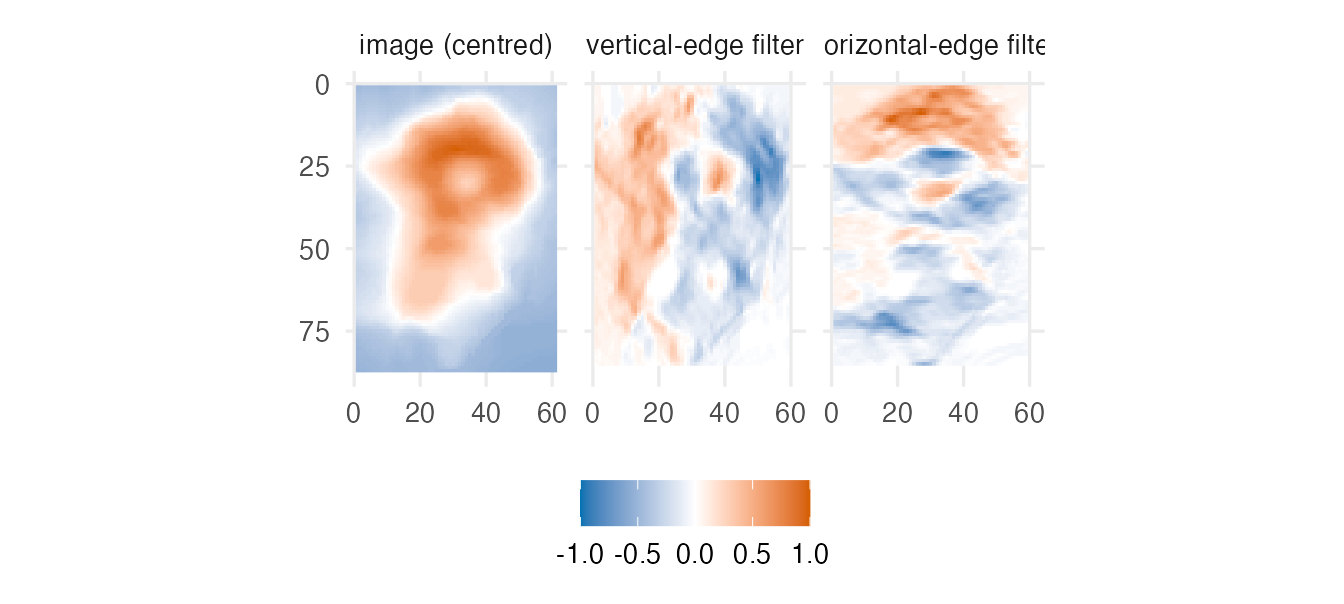
In a CNN nobody designs these filters: a convolutional layer has, say, 32 filters whose 3 × 3 weights are learned by backpropagation. The first layer typically learns edge and texture detectors like these; later layers combine them into larger patterns.
Shapes and parameters
For an input of size \(n \times n\), a \(k \times k\) filter with stride \(s\) (step size) and padding \(p\) (zeros added around the border) gives an output of size \(\lfloor (n + 2p - k)/s \rfloor + 1\). Keras calls \(p = 0\) padding = "valid" (the default) and the choice that keeps the size unchanged padding = "same".
out_size <- function(n, k, p = 0, s = 1) (n + 2 * p - k) %/% s + 1
c(valid = out_size(28, 3), same = out_size(28, 3, p = 1),
  stride_2 = out_size(28, 3, s = 2))
#> valid same stride_2
#> 26 28 13A convolutional layer with \(F\) filters of size \(k \times k\) reading \(C\) input channels has \(k \cdot k \cdot C \cdot F + F\) parameters — independent of the image size, because each filter is reused at every position. A first layer with 32 filters of size 3 × 3 on a greyscale image has \(3 \cdot 3 \cdot 1 \cdot 32 + 32 = 320\) parameters. A dense layer producing an output of the same size (26 × 26 × 32 values) from the 784 pixels would need 16,959,488 weights.
NoteGoing deeper: convolution with several channels
A colour image has \(C = 3\) channels (red, green, blue), and the output of a convolutional layer with \(F\) filters has \(F\) channels. A filter therefore has size \(k \times k \times C\) and the feature map \(f\) produced by filter \(W\) with bias \(b\) is
\[ f_{ij} = g\Big(b + \sum_{a=1}^{k}\sum_{c=1}^{k}\sum_{m=1}^{C} W_{acm}\, x_{i+a-1,\, j+c-1,\, m}\Big), \]
with activation \(g\). Stacking the \(F\) maps gives the layer’s output, of shape (height, width, \(F\)). Each output value depends only on a \(k \times k\) patch of the input: its receptive field. After a pooling step and another 3 × 3 convolution, a value depends on an 8 × 8 patch of the original image, and so on — this is how depth builds the hierarchy from edges to objects. Batch normalisation (layer_batch_normalization()), used in the original version of this lesson, standardises each channel’s values within every mini-batch and then rescales them with two learned parameters per channel; it often makes deeper CNNs train faster and more stably.
4. The data: Fashion-MNIST
Fashion-MNIST (Xiao, Rasul & Vollgraf, 2017) contains 70,000 greyscale images of 28 × 28 pixels, each showing one of 10 kinds of clothing. It was designed as a harder drop-in replacement for the classic handwritten-digit dataset MNIST (dataset_mnist()), which has exactly the same format.
fashion <- dataset_fashion_mnist()
x_train <- fashion$train$x;  y_train <- fashion$train$y   # labels 0, ..., 9
x_test  <- fashion$test$x;   y_test  <- fashion$test$y
dim(x_train)
#> [1] 60000 28 28class_names <- c("T-shirt/top", "Trouser", "Pullover", "Dress", "Coat",
"Sandal", "Shirt", "Sneaker", "Bag", "Ankle boot")
table(class_names[y_train + 1])#>
#> Ankle boot Bag Coat Dress Pullover Sandal
#> 6000 6000 6000 6000 6000 6000
#> Shirt Sneaker T-shirt/top Trouser
#> 6000 6000 6000 6000The 60,000 training images are balanced: 6,000 per class. A small helper turns images into a data frame for ggplot:
image_df <- function(x, ids, labels = ids) {
  labels <- make.unique(as.character(labels), sep = " #")  # facets need unique labels
  do.call(rbind, lapply(seq_along(ids), \(m) {
    pix <- x[ids[m], , ]                         # one image: rows x columns
    data.frame(label = factor(labels[m], levels = labels),  # keep order
               row = as.vector(row(pix)),
               col = as.vector(col(pix)), value = as.vector(pix))
  }))
}
plot_images <- function(df) {
  ggplot(df, aes(col, row, fill = value)) +
    geom_raster() +
    facet_wrap(~ label, nrow = 2) +
    scale_y_reverse() +
    scale_fill_gradient(low = "white", high = "black", guide = "none") +
    coord_equal() +
    labs(x = NULL, y = NULL) +
    theme(axis.text = element_blank(), panel.grid = element_blank())
}
first_of_class <- sapply(0:9, \(k) which(y_train == k)[1])
plot_images(image_df(x_train, first_of_class, class_names))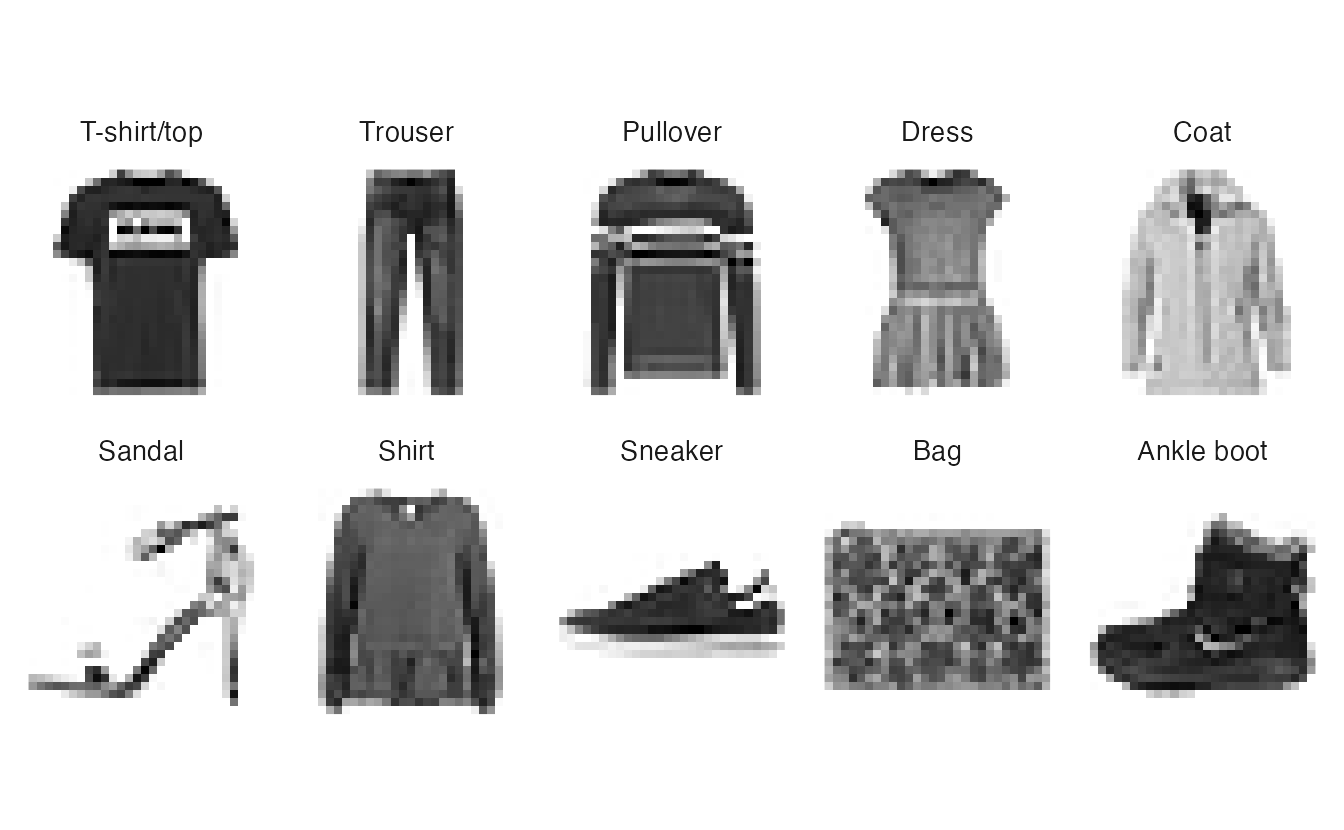
Two preparation steps. Pixel values run from 0 to 255; we divide by 255 to put them in [0, 1]. Convolutional layers expect a 4-D array (images, height, width, channels); greyscale images have one channel, so we add a trailing dimension of size 1 (which does not change the order of the values in memory). Then we keep 10% of the training images aside for validation.
x_train <- x_train / 255;  dim(x_train) <- c(dim(x_train), 1)
x_test  <- x_test / 255;   dim(x_test)  <- c(dim(x_test), 1)

set.seed(123)
va_idx <- sample(nrow(x_train), size = 6000)
X_tr <- x_train[-va_idx, , , , drop = FALSE];  y_tr <- y_train[-va_idx]
X_va <- x_train[va_idx, , , , drop = FALSE];   y_va <- y_train[va_idx]
dim(X_tr)
#> [1] 54000 28 28 1With 10 classes the output layer has 10 softmax units (probabilities that sum to 1, as in multinomial logistic regression). Because the labels are integers 0–9, the loss is "sparse_categorical_crossentropy"; no one-hot coding is needed.
5. The baseline: a dense network
fit_image_model <- function(model, epochs = 30) {
  model |> compile(optimizer = optimizer_adam(learning_rate = 1e-3),
                   loss = "sparse_categorical_crossentropy",
                   metrics = "accuracy")
  model |> fit(
    X_tr, y_tr, validation_data = list(X_va, y_va),
    epochs = epochs, batch_size = 128, verbose = 0,
    callbacks = list(callback_early_stopping(
      monitor = "val_loss", patience = 3, restore_best_weights = TRUE))
  )
}

set_random_seed(123)
dense <- keras_model_sequential(input_shape = c(28, 28, 1)) |>
  layer_flatten() |>                               # 28 x 28 x 1 -> 784
  layer_dense(units = 128, activation = "relu") |>
  layer_dropout(rate = 0.3) |>
  layer_dense(units = 10, activation = "softmax")
history_dense <- fit_image_model(dense)
The dense network has \(784 \cdot 128 + 128 + 128 \cdot 10 + 10 =\) 101,770 parameters and sees each image as an unordered list of 784 numbers.
6. A small CNN
The classic architecture: two convolution + pooling blocks, then a flatten and a softmax layer. We use the functional API (as in lesson 63) and name the first convolutional layer so that we can look inside it later. The function has an augment switch that we will use in Section 8.
build_cnn <- function(augment = FALSE) {
  inputs <- keras_input(shape = c(28, 28, 1))
  x <- inputs
  if (augment) {
    x <- x |>
      layer_random_flip(mode = "horizontal") |>
      layer_random_translation(height_factor = 0.1, width_factor = 0.1,
                               fill_mode = "constant") |>
      layer_random_zoom(height_factor = 0.1, fill_mode = "constant")
  }
  outputs <- x |>
    layer_conv_2d(filters = 32, kernel_size = c(3, 3), activation = "relu",
                  name = "conv1") |>
    layer_max_pooling_2d(pool_size = c(2, 2)) |>
    layer_conv_2d(filters = 64, kernel_size = c(3, 3), activation = "relu") |>
    layer_max_pooling_2d(pool_size = c(2, 2)) |>
    layer_flatten() |>
    layer_dropout(rate = 0.5) |>
    layer_dense(units = 10, activation = "softmax")
  keras_model(inputs, outputs)
}
set_random_seed(123)
cnn <- build_cnn()
cnn
#> Model: "functional_4"
#> ┏━━━━━━━━━━━━━━━━━━━━━━━━━━━━━━━━━━━┳━━━━━━━━━━━━━━━━━━━━━━━━━━┳━━━━━━━━━━━━━━━┓
#> ┃ Layer (type) ┃ Output Shape ┃ Param # ┃
#> ┡━━━━━━━━━━━━━━━━━━━━━━━━━━━━━━━━━━━╇━━━━━━━━━━━━━━━━━━━━━━━━━━╇━━━━━━━━━━━━━━━┩
#> │ input_layer_1 (InputLayer) │ (None, 28, 28, 1) │ 0 │
#> ├───────────────────────────────────┼──────────────────────────┼───────────────┤
#> │ conv1 (Conv2D) │ (None, 26, 26, 32) │ 320 │
#> ├───────────────────────────────────┼──────────────────────────┼───────────────┤
#> │ max_pooling2d (MaxPooling2D) │ (None, 13, 13, 32) │ 0 │
#> ├───────────────────────────────────┼──────────────────────────┼───────────────┤
#> │ conv2d (Conv2D) │ (None, 11, 11, 64) │ 18,496 │
#> ├───────────────────────────────────┼──────────────────────────┼───────────────┤
#> │ max_pooling2d_1 (MaxPooling2D) │ (None, 5, 5, 64) │ 0 │
#> ├───────────────────────────────────┼──────────────────────────┼───────────────┤
#> │ flatten_1 (Flatten) │ (None, 1600) │ 0 │
#> ├───────────────────────────────────┼──────────────────────────┼───────────────┤
#> │ dropout_1 (Dropout) │ (None, 1600) │ 0 │
#> ├───────────────────────────────────┼──────────────────────────┼───────────────┤
#> │ dense_2 (Dense) │ (None, 10) │ 16,010 │
#> └───────────────────────────────────┴──────────────────────────┴───────────────┘
#> Total params: 34,826 (136.04 KB)
#> Trainable params: 34,826 (136.04 KB)
#> Non-trainable params: 0 (0.00 B)
TipHow to read this output
Follow the Output Shape column and check it with the formula of Section 3:
conv1: \(28 - 3 + 1 = 26\), with 32 filters →(None, 26, 26, 32), \(3 \cdot 3 \cdot 1 \cdot 32 + 32 = 320\) parameters.- pooling: \(26/2 = 13\) →
(None, 13, 13, 32), no parameters. - second convolution: \(13 - 3 + 1 = 11\) →
(None, 11, 11, 64), \(3 \cdot 3 \cdot 32 \cdot 64 + 64 = 18{,}496\) parameters (each filter now spans all 32 input channels). - pooling: \(\lfloor 11/2 \rfloor = 5\) →
(None, 5, 5, 64); flatten → 1,600 values; softmax layer \(1600 \cdot 10 + 10 = 16{,}010\).
In total 34,826 parameters, about a third of the dense network’s.
history_cnn <- fit_image_model(cnn)bind_rows(dense = as.data.frame(history_dense),
cnn = as.data.frame(history_cnn), .id = "model") |>
filter(!is.na(value), metric == "accuracy", data == "validation") |>
ggplot(aes(epoch, value, colour = model)) +
geom_line(linewidth = 0.8) +
labs(x = "Epoch", y = "Validation accuracy", colour = NULL)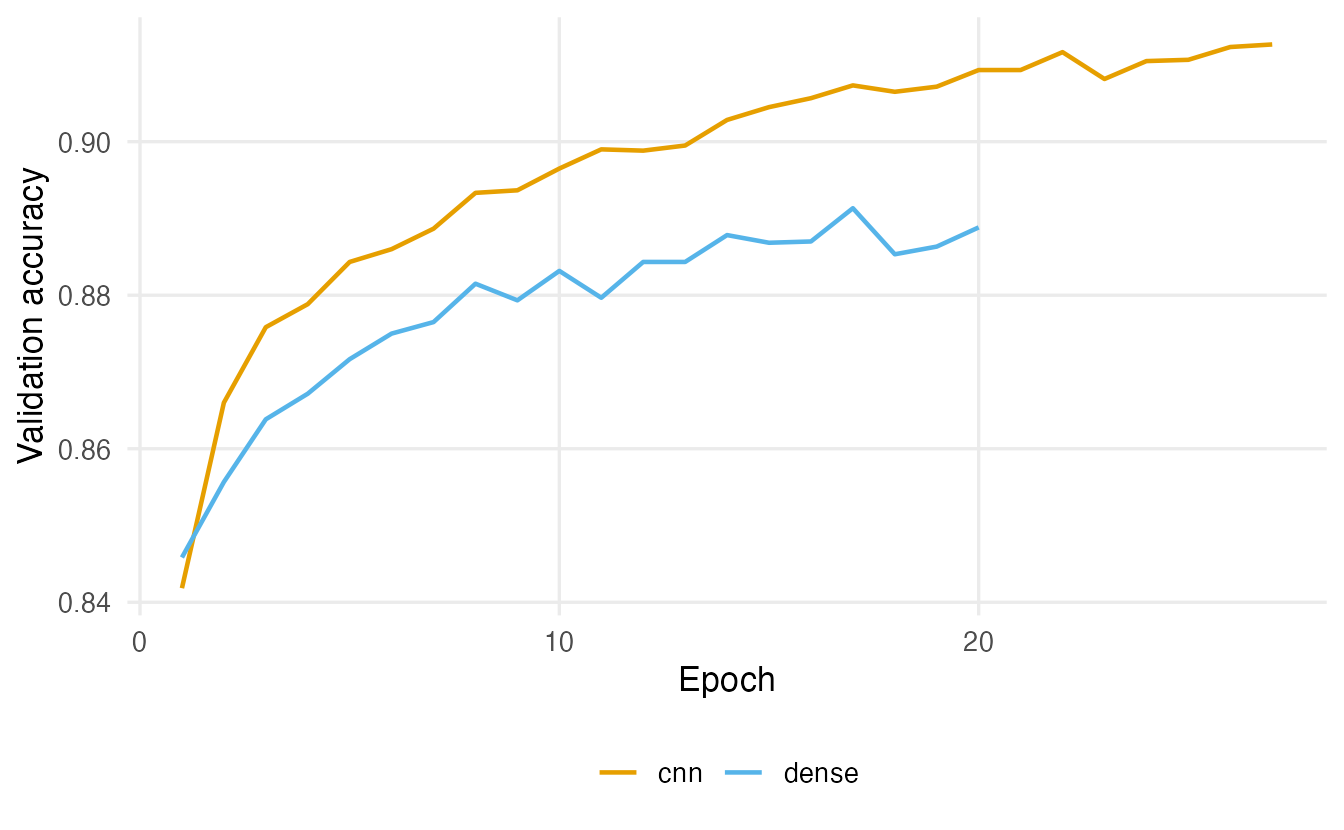
7. Test accuracy and the confusion matrix
We compute predictions once and derive everything from them. (The original lesson printed the output of evaluate() with the wrong labels, so its test accuracy of 0.94 appeared as a “loss”. In keras3, evaluate() returns a named list; computing the accuracy from the predictions, as here, avoids the problem entirely.)
predict_class <- function(model) {
  probs <- predict(model, x_test, verbose = 0)       # 10,000 x 10 probabilities
  list(probs = probs, class = max.col(probs, ties.method = "first") - 1)
}
pred_dense <- predict_class(dense)
pred_cnn   <- predict_class(cnn)
c(dense = mean(pred_dense$class == y_test), cnn = mean(pred_cnn$class == y_test))
#> dense cnn
#> 0.8844 0.9086The CNN classifies 90.9% of the 10,000 test images correctly, against 88.4% for the dense network — with fewer parameters.
cm <- table(truth = factor(class_names[y_test + 1], levels = class_names),
            pred  = factor(class_names[pred_cnn$class + 1], levels = class_names))
round(diag(cm) / rowSums(cm), 3)                 # accuracy per class
#> T-shirt/top Trouser Pullover Dress Coat Sandal
#> 0.853 0.977 0.873 0.926 0.872 0.978
#> Shirt Sneaker Bag Ankle boot
#> 0.686 0.982 0.979 0.960confused <- as.data.frame(cm, responseName = "n") |>
filter(truth != pred) |>
arrange(desc(n))
head(confused, 5)#> truth pred n
#> 1 Shirt T-shirt/top 123
#> 2 T-shirt/top Shirt 90
#> 3 Shirt Coat 77
#> 4 Shirt Pullover 75
#> 5 Pullover Shirt 59
TipHow to read this output
- The first vector is the accuracy (recall) per class. Classes with a distinctive shape (trousers, bags, sandals, ankle boots) are recognised almost perfectly.
- The second table lists the most frequent confusions. The weakest class is usually Shirt, confused with T-shirt/top, Pullover and Coat: at 28 × 28 pixels these garments differ only in details (buttons, collar, sleeve length). Here the most frequent confusion is “Shirt” predicted as “T-shirt/top” (123 images).
Looking at the mistakes
Numbers tell us how often the model is wrong; images tell us why. Here are the 12 test images on which the CNN was wrong with the highest confidence:
wrong <- which(pred_cnn$class != y_test)
conf_wrong <- pred_cnn$probs[cbind(wrong, pred_cnn$class[wrong] + 1)]
top_wrong <- wrong[order(conf_wrong, decreasing = TRUE)][1:12]
labels <- sprintf("%d. true: %s\npred: %s (%.2f)", seq_along(top_wrong),
                  class_names[y_test[top_wrong] + 1],
                  class_names[pred_cnn$class[top_wrong] + 1],
                  sort(conf_wrong, decreasing = TRUE)[1:12])
plot_images(image_df(x_test[, , , 1], top_wrong, labels))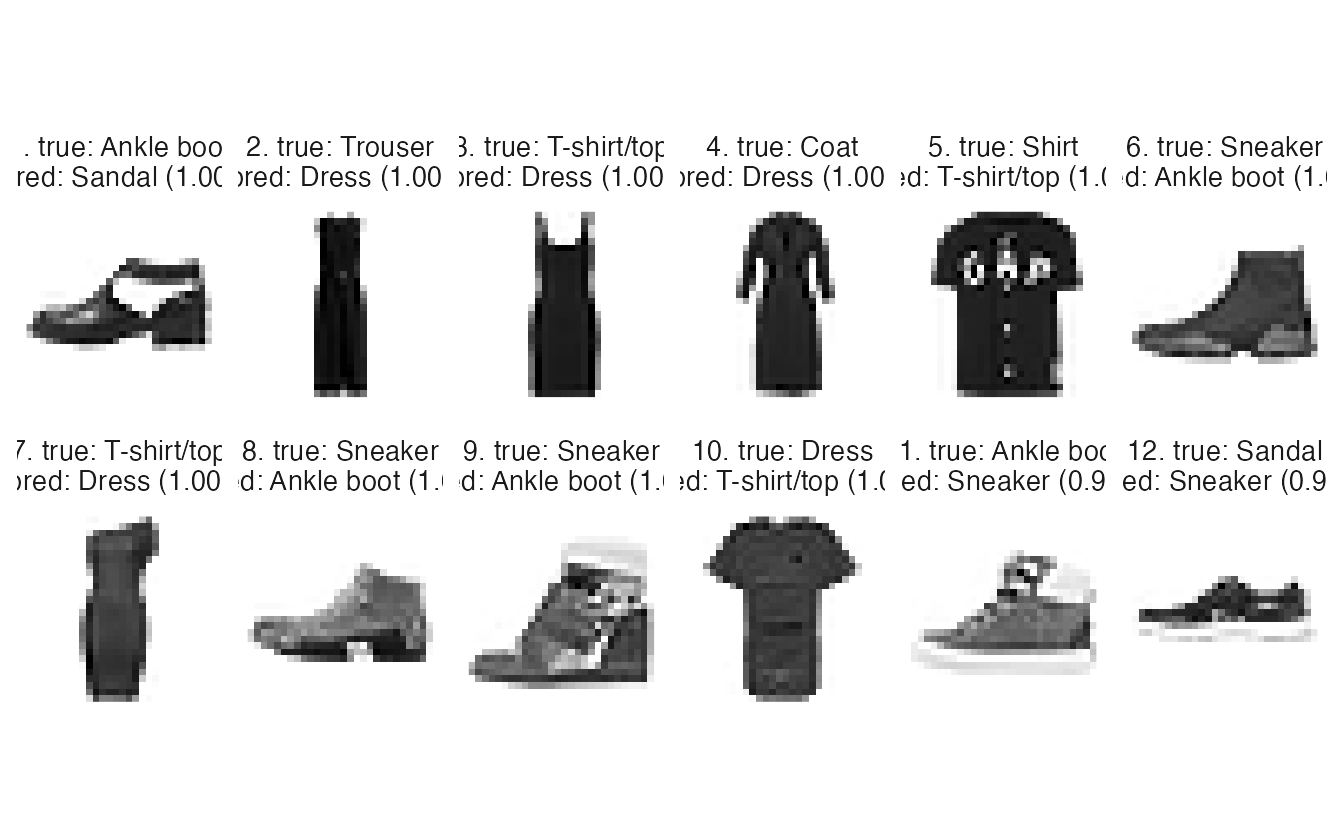
Some mistakes are genuinely ambiguous (a shirt without visible buttons is hard to tell from a top), and some look like labelling errors in the data. Inspecting errors this way is the image counterpart of looking at residuals in regression: it tells you whether more data, a different architecture or better labels would help.
What the first layer sees
The 32 filters of conv1 produce 32 feature maps for every image. A second model that stops at conv1 lets us look at them:
conv1_model <- keras_model(inputs = cnn$inputs,
                           outputs = get_layer(cnn, "conv1")$output)
fmaps <- predict(conv1_model, x_test[1, , , , drop = FALSE], verbose = 0)
dim(fmaps)                                           # 1 x 26 x 26 x 32
#> [1] 1 26 26 32fmap_array <- aperm(fmaps[1, , , 1:8], c(3, 1, 2)) # 8 maps x 26 x 26
plot_images(image_df(fmap_array, 1:8, paste("filter", 1:8)))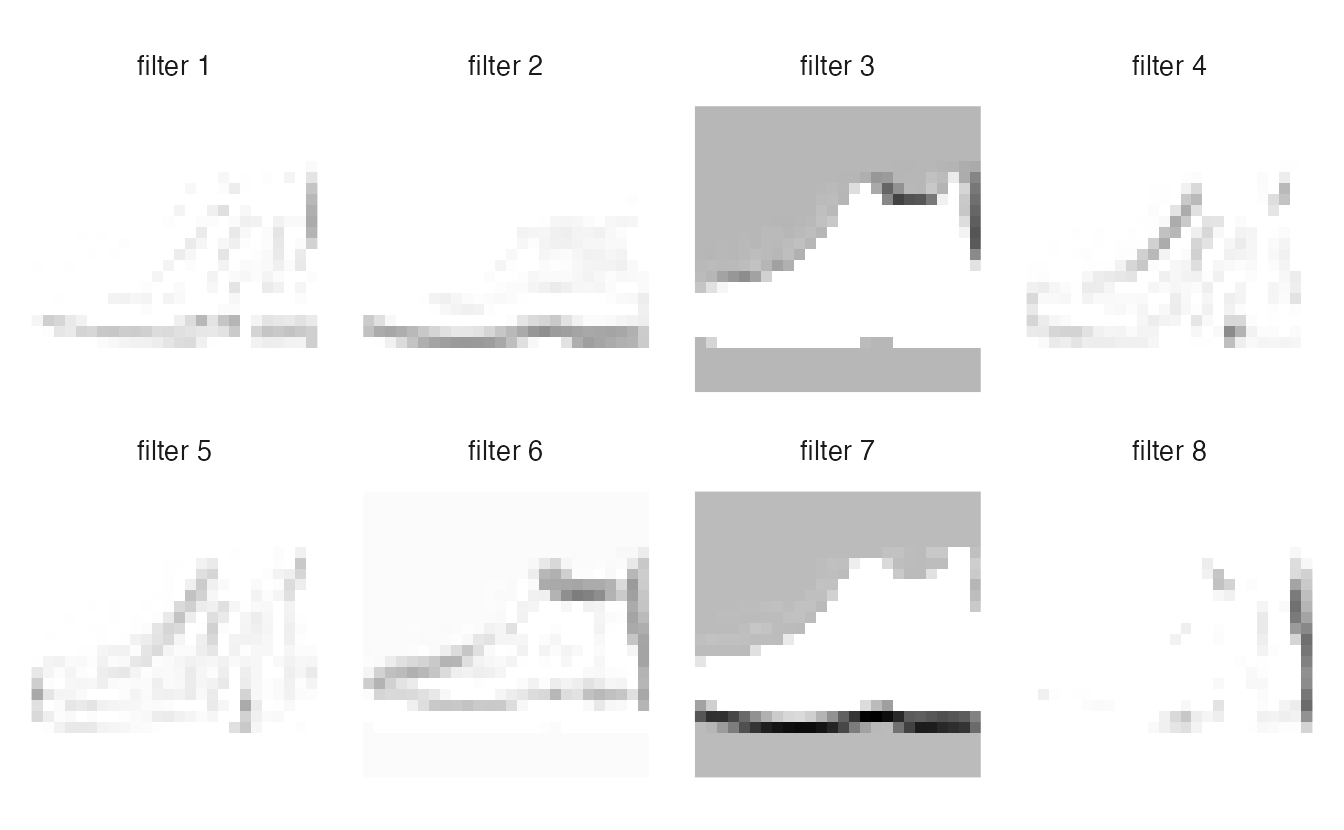
8. Data augmentation
A CNN learns from the training images only. Data augmentation creates plausible variations of them on the fly — small shifts, zooms and mirror images — so that the network sees a slightly different version of each image at every epoch. It is a regulariser, like dropout: it makes memorising individual images harder.
In keras3 augmentation is a set of layers placed right after the input (see build_cnn(augment = TRUE) in Section 6):
| Layer | What it does |
|---|---|
layer_random_flip(mode = "horizontal") |
Mirror the image left–right with probability 0.5 |
layer_random_translation(height_factor = 0.1, width_factor = 0.1) |
Shift by up to 10% of the height and width |
layer_random_zoom(height_factor = 0.1) |
Zoom in or out by up to 10% |
layer_random_rotation(factor = ) |
Rotate by a random angle (a fraction of a full turn) |
These layers are active only during training; at prediction time they pass the image through unchanged, so validation and test images are never altered. The transformations must keep the label valid: a mirrored shirt is still a shirt, but a mirrored digit “7” is not a 7 — for MNIST digits, leave out the flip.
set_random_seed(123)
cnn_aug <- build_cnn(augment = TRUE)
history_aug <- fit_image_model(cnn_aug, epochs = 50)
pred_aug <- predict_class(cnn_aug)
comparison <- tibble::tibble(
model = c("dense", "cnn", "cnn + augmentation"),
params = c(dense$count_params(), cnn$count_params(), cnn_aug$count_params()),
epochs = c(length(history_dense$metrics$loss), length(history_cnn$metrics$loss),
length(history_aug$metrics$loss)),
accuracy = c(mean(pred_dense$class == y_test), mean(pred_cnn$class == y_test),
mean(pred_aug$class == y_test))
)
comparison#> # A tibble: 3 × 4
#> model params epochs accuracy
#> <chr> <int> <int> <dbl>
#> 1 dense 101770 20 0.8844
#> 2 cnn 34826 27 0.9086
#> 3 cnn + augmentation 34826 44 0.8866
TipHow to read this output
- The augmentation layers have no parameters, so the two CNNs have the same size.
- Augmented training usually needs more epochs, because each epoch shows harder, varied images; training stopped after 44 epochs versus 27 without augmentation.
- Test accuracy: 0.887 with augmentation versus 0.909 without. On Fashion-MNIST, where all images are centred and similarly sized, the gain is often small (or even absent for a small network); augmentation matters most when the training set is small or real images vary more than the training images. A difference of a few tenths of a percentage point is within run-to-run variation.
WarningCommon pitfalls
- Forgetting the channel dimension. Convolutional layers need (images, height, width, channels); a greyscale array of shape (n, 28, 28) must become (n, 28, 28, 1).
- Scaling training and test images differently. Divide both by 255 (or apply the same normalisation).
- Augmentations that change the label. Flipping digits, rotating “6” into “9”, or cropping away the object. Check a few augmented images by eye.
- Reading
evaluate()output by position. Use the names (keras3 returns a named list) or compute metrics from the predictions. - Reporting only overall accuracy. Look at per-class accuracy, the confusion matrix and the misclassified images.
- Tuning on the test set. Architecture, epochs and augmentation are chosen on the validation set; the test set is used once.
9. Check your understanding
10. Exercises
★ Exercise 1 — shapes and parameters. A colour image of 32 × 32 × 3 goes through layer_conv_2d(filters = 16, kernel_size = c(5, 5)) (valid padding) and then layer_max_pooling_2d(pool_size = c(2, 2)). Give the output shape after each layer and the number of parameters. Check the size with out_size().
TipSolution
Convolution: \(32 - 5 + 1 = 28\) → (28, 28, 16), with \(5 \cdot 5 \cdot 3 \cdot 16 + 16 = 1216\) parameters. Pooling: (14, 14, 16), no parameters. out_size(32, 5) returns 28.
★ Exercise 2 — predict the output. Without running code, predict conv2d(img, t(k_vert)) for the image of Section 2. Then build an image whose bottom half is bright (img_h <- matrix(0, 6, 6); img_h[4:6, ] <- 1) and predict conv2d(img_h, t(k_vert)). Check both in R.
TipSolution
t(k_vert) has −1 in the top row and +1 in the bottom row: it detects dark-above-bright horizontal edges. On img every column is constant from top to bottom, so the result is a 4 × 4 matrix of zeros. On img_h rows 2 and 3 of the 4 × 4 result equal 3 (the patch straddles the edge) and rows 1 and 4 equal 0.
★★ Exercise 3 — debug. A student trains the CNN of Section 6 on handwritten digits from dataset_mnist(). They prepare the data with x_train <- x_train / 255; dim(x_train) <- c(dim(x_train), 1) and dim(x_test) <- c(dim(x_test), 1), and use build_cnn(augment = TRUE). Validation accuracy is high but test accuracy is poor. Find the two problems.
TipSolution
- The test images were not divided by 255: the network sees values up to 255 instead of [0, 1], and its predictions are nonsense. Apply exactly the same preprocessing to every set. (2) The augmentation includes a horizontal flip, which turns many digits into shapes that are not valid digits (a mirrored 2, 3, 7). It does not explain the poor test accuracy by itself (augmentation is off at prediction time) but it makes training harder for no reason; remove
layer_random_flip()for digits and keep small translations and zooms.
★★ Exercise 4 — the original lesson’s deeper CNN. The original version of this lesson used two blocks of (conv → batch normalisation → ReLU) × 2, each followed by max pooling and dropout, padding = "same", and a dense layer of 128 units. Build it, train it with fit_image_model(), and add it to comparison. How many parameters does it have, and is the gain in test accuracy worth it?
TipSolution
conv_bn <- function(x, filters) {
  x |>
    layer_conv_2d(filters, c(3, 3), padding = "same") |>
    layer_batch_normalization() |>
    layer_activation("relu")
}
inputs <- keras_input(shape = c(28, 28, 1))
outputs <- inputs |>
  conv_bn(32) |> conv_bn(32) |>
  layer_max_pooling_2d(c(2, 2)) |> layer_dropout(0.25) |>
  conv_bn(64) |> conv_bn(64) |>
  layer_max_pooling_2d(c(2, 2)) |> layer_dropout(0.3) |>
  layer_flatten() |>
  layer_dense(128, activation = "relu") |> layer_dropout(0.4) |>
  layer_dense(10, activation = "softmax")
set_random_seed(123)
deep_cnn <- keras_model(inputs, outputs)
history_deep <- fit_image_model(deep_cnn)
mean(predict_class(deep_cnn)$class == y_test)
It has 468,586 parameters (384 of them non-trainable batch-normalisation statistics), more than ten times the small CNN, and each epoch takes several times longer. Its test accuracy is typically one to two percentage points higher. Whether that is worth it depends on the use: for a teaching example, the small CNN already shows the essential ideas.
★★ Exercise 5 — where does the dense network lose? Compute the per-class accuracy of the dense network and of the CNN side by side. For which classes does the CNN help most? Look at a few images of that class to explain why.
TipSolution
per_class <- function(pred) {
  tapply(pred$class == y_test, class_names[y_test + 1], mean)
}
round(cbind(dense = per_class(pred_dense), cnn = per_class(pred_cnn),
            gain = per_class(pred_cnn) - per_class(pred_dense)), 3)
The largest gains are usually for the upper-body garments (Shirt, Pullover, Coat, T-shirt/top), which differ in local details — collars, buttons, zips, sleeve edges — that convolutional filters detect wherever they are. Classes with a distinctive overall silhouette (Trouser, Bag) are already easy for the dense network.
★★★ Exercise 6 — the same code on digits. Replace dataset_fashion_mnist() with dataset_mnist() (handwritten digits 0–9; set class_names <- as.character(0:9)), remove the horizontal flip from the augmentation, and re-run Sections 4–8. Compare the accuracies with Fashion-MNIST and look at the most confident mistakes. Why is Fashion-MNIST considered the harder benchmark?
TipSolution
Only the import line, class_names and the augmentation block change (drop layer_random_flip()). On MNIST both models are much more accurate (the CNN typically above 99% on the test set, the dense network around 98%), so the room for improvement is tiny and differences between models are hard to see. The remaining errors are often digits that a human would also find ambiguous. Fashion-MNIST was built because MNIST had become too easy to separate good models from very good ones.
Summary
| Idea / code | Meaning |
|---|---|
| Filter (kernel), feature map | Small weight matrix slid over the image; map of where its pattern appears |
| Weight sharing | The same filter at every position: few parameters, translation tolerance |
| Output size \(\lfloor (n + 2p - k)/s \rfloor + 1\) | padding = "valid" (\(p = 0\)) or "same"; stride \(s\) |
layer_conv_2d(filters, kernel_size) |
Convolutional layer; \(k \cdot k \cdot C \cdot F + F\) parameters |
layer_max_pooling_2d(pool_size) |
Keep the maximum of each block; halves height and width |
layer_random_flip(), _translation(), _zoom(), _rotation() |
Data augmentation, active only in training |
"sparse_categorical_crossentropy" + softmax |
Multi-class loss with integer labels |
get_layer(model, name)$output |
Build a sub-model to look at feature maps |
- A convolution computes local weighted sums with a small filter; ReLU and pooling follow.
- CNNs exploit locality, translation and hierarchy, so they need far fewer parameters than dense networks and usually classify images better.
- Data augmentation is a regulariser: it must preserve the label.
- Evaluate with per-class accuracy, the confusion matrix and a look at the misclassified images.